Search the Community
Showing results for tags 'solved'.
-
solved Power Control via Terminal
RolazLaguna posted a topic in Fallout 4's Creation Kit and Modders
I am trying to switch on and off the power in a settlement via terminal. The set-up looks as follows: RLZPowerGeneratorConnector is an activator, which contains the workshopobjectscript without edits . In the terminal the switching ON fragment looks like this: RLZPowerGeneratorConnector.SetValue(PowerGenerated, 100) RLZPowerGeneratorConnector.SetValue(PowerRadiation, 5000) The OFF fragment in the terminal just sets these values to 0. This is the default value in the base object as well. Additionally to the AVIFs above mentioned RLZPowerGeneratorConnector has the AVIF WorkshopResourceObject (value = 1.00). The RLZPowerGeneratorConnector has the following KYWDs: AO_Type_WorkshopResouceObject BlockPlayerActivation UnscrappableObject WorshopPowerConnectionDUPLICATE00 WorshopStarPoweredON WorshopSwitchActivatorKeyword It is only partially successful: In building mode, with the activator ON, lights placed are automatically ON. If the activator is set to OFF, when placing new lights these are automatically OFF. However, those placed lights that are ON remain ON despite switching OFF via terminal the activator, and therefore the power. I am familiar with the enablemarker solution and the circuit breaker, but I wanted to go a step forward. What am I missing? Should I loop finding all items with the KYWD "WorkshopCanBePowered" and switching them off? However, not all of them have the same ON/OFF mechanisms. Does anyone know of an example of this kind of terminal total control over the power in a settlement? Of course it would be better if the scripts are public. Those cases I found are not. -
Several hours ago, I uploaded two screenshots for a thread I never posted. Is there some way to delete these two pictures and get that part of my attachment quota back? They're currently just sitting there on the server(s), completely unused -- and I don't see a Delete button anywhere on the forum's My Attachments page.
-
Vortex is not registering my Cyberpunk as updated to 2.31 and is saying it is instead 2.1.3.0. However GOG says it IS updated to 2.31, I have stopped managing CP77, reinstalled it, and re managed it and it STILL says 2.1.3.0. Anyone have some tips?
-
I am using the latest version of AE on Steam, i been trying for a while to figure this out and i pretty much disable most of my mods that i was thinking they could be the cause. I am using LOOT for the Load order, i was thinking maybe i did the load order wrong since i was not using LOOT before, so i got it to see if it would solve it but it didn't happen. 0 0 Skyrim.esm 1 1 Update.esm 2 2 Dawnguard.esm 3 3 HearthFires.esm 4 4 Dragonborn.esm 5 5 ccasvsse001-almsivi.esm 6 6 ccbgssse001-fish.esm 254 FE 0 ccbgssse002-exoticarrows.esl 254 FE 1 ccbgssse003-zombies.esl 254 FE 2 ccbgssse004-ruinsedge.esl 254 FE 3 ccbgssse005-goldbrand.esl 254 FE 4 ccbgssse006-stendarshammer.esl 254 FE 5 ccbgssse007-chrysamere.esl 254 FE 6 ccbgssse010-petdwarvenarmoredmudcrab.esl 254 FE 7 ccbgssse011-hrsarmrelvn.esl 254 FE 8 ccbgssse012-hrsarmrstl.esl 254 FE 9 ccbgssse014-spellpack01.esl 254 FE a ccbgssse019-staffofsheogorath.esl 254 FE b ccbgssse020-graycowl.esl 254 FE c ccbgssse021-lordsmail.esl 254 FE d ccmtysse001-knightsofthenine.esl 254 FE e ccqdrsse001-survivalmode.esl 7 7 cctwbsse001-puzzledungeon.esm 8 8 cceejsse001-hstead.esm 254 FE f ccqdrsse002-firewood.esl 254 FE 10 ccbgssse018-shadowrend.esl 254 FE 11 ccbgssse035-petnhound.esl 254 FE 12 ccfsvsse001-backpacks.esl 254 FE 13 cceejsse002-tower.esl 254 FE 14 ccedhsse001-norjewel.esl 254 FE 15 ccvsvsse002-pets.esl 254 FE 16 ccbgssse037-curios.esl 254 FE 17 ccbgssse034-mntuni.esl 254 FE 18 ccbgssse045-hasedoki.esl 254 FE 19 ccbgssse008-wraithguard.esl 254 FE 1a ccbgssse036-petbwolf.esl 254 FE 1b ccffbsse001-imperialdragon.esl 254 FE 1c ccmtysse002-ve.esl 254 FE 1d ccbgssse043-crosselv.esl 254 FE 1e ccvsvsse001-winter.esl 254 FE 1f cceejsse003-hollow.esl 9 9 ccbgssse016-umbra.esm 10 a ccbgssse031-advcyrus.esm 254 FE 20 ccbgssse038-bowofshadows.esl 254 FE 21 ccbgssse040-advobgobs.esl 254 FE 22 ccbgssse050-ba_daedric.esl 254 FE 23 ccbgssse052-ba_iron.esl 254 FE 24 ccbgssse054-ba_orcish.esl 254 FE 25 ccbgssse058-ba_steel.esl 254 FE 26 ccbgssse059-ba_dragonplate.esl 254 FE 27 ccbgssse061-ba_dwarven.esl 254 FE 28 ccpewsse002-armsofchaos.esl 254 FE 29 ccbgssse041-netchleather.esl 254 FE 2a ccedhsse002-splkntset.esl 254 FE 2b ccbgssse064-ba_elven.esl 254 FE 2c ccbgssse063-ba_ebony.esl 254 FE 2d ccbgssse062-ba_dwarvenmail.esl 254 FE 2e ccbgssse060-ba_dragonscale.esl 254 FE 2f ccbgssse056-ba_silver.esl 254 FE 30 ccbgssse055-ba_orcishscaled.esl 254 FE 31 ccbgssse053-ba_leather.esl 254 FE 32 ccbgssse051-ba_daedricmail.esl 254 FE 33 ccbgssse057-ba_stalhrim.esl 254 FE 34 ccbgssse066-staves.esl 11 b ccbgssse067-daedinv.esm 254 FE 35 ccbgssse068-bloodfall.esl 254 FE 36 ccbgssse069-contest.esl 254 FE 37 ccvsvsse003-necroarts.esl 254 FE 38 ccvsvsse004-beafarmer.esl 12 c ccbgssse025-advdsgs.esm 254 FE 39 ccffbsse002-crossbowpack.esl 254 FE 3a ccbgssse013-dawnfang.esl 254 FE 3b ccrmssse001-necrohouse.esl 254 FE 3c ccedhsse003-redguard.esl 254 FE 3d cceejsse004-hall.esl 13 d cceejsse005-cave.esm 254 FE 3e cckrtsse001_altar.esl 254 FE 3f cccbhsse001-gaunt.esl 14 e ccafdsse001-dwesanctuary.esm 254 FE 40 _ResourcePack.esl 15 f unofficial skyrim special edition patch.esp 254 FE 41 Completionist.esp 16 10 Schlongs of Skyrim - Core.esm 254 FE 42 Sentinel - Master Plugin.esp 17 11 SexLab.esm 18 12 SkyUI_SE.esp 19 13 UnlimitedBookshelves.esp 254 FE 43 BetterThirdPersonSelection.esp 254 FE 44 At Your Own Pace - Dark Brotherhood.esp 254 FE 45 Faithful Faces0.esp 20 14 Book Covers Skyrim.esp 254 FE 46 Faithful Faces.esp 21 15 Northern Roads.esp 22 16 cutting room floor.esp 254 FE 47 At Your Own Pace - Thieves Guild.esp 254 FE 48 Northern Roads - Additional Roads.esp 254 FE 49 Northern Roads - Ultimate Grass Fix.esp 254 FE 4a Northern Roads - Rocks Patch.esp 23 17 Clear Those Locations.esp 254 FE 4b AE Quest Disable - Netch Leather.esp 254 FE 4c Freak's Floral Solstheim.esp 254 FE 4d At Your Own Pace - Companions.esp 24 18 TheChoiceIsYours.esp 254 FE 4e At Your Own Pace - College of Winterhold.esp 254 FE 4f AE Quest Disable - Alternative Armors.esp 254 FE 50 At Your Own Pace - Dawnguard.esp 25 19 SexLab-AmorousAdventures.esp 254 FE 51 Freak's Floral Fields.esp 254 FE 52 AE Quest Disable - Dead Man's Dread.esp 254 FE 53 At Your Own Pace - Main Quest.esp 254 FE 54 At Your Own Pace - Misc.esp 254 FE 55 At Your Own Pace - Thane Overhaul.esp 254 FE 56 Beef Unending - A Civil War Replacer.esp 26 1a SkyHUD.esp 27 1b SOS - VectorPlexus Muscular Addon.esp 28 1c RaceMenu.esp 29 1d XPMSE.esp 30 1e dD - Enhanced Blood Main.esp 31 1f FabulousFollowersAIO.esp 32 20 FNIS.esp 254 FE 57 Northern Roads - Grass Patch.esp 254 FE 58 Freak's Floral Fields- Volcanic Wasteland.esp 254 FE 59 Freak's Floral Fields- Realistic Tundra.esp 254 FE 5a Freak's Floral Fields- Realistic Rift.esp 254 FE 5b Freak's Floral Fields- Mixed Reach.esp 254 FE 5c Freak's Floral Fields- Dead Snow Grass.esp 254 FE 5d Freak's Floral Fields- Realistic Pine.esp 254 FE 5e HonedMetal.esp 33 21 IcePenguinWorldMap.esp 254 FE 5f Northern Roads - USSEP Additions.esp 254 FE 60 Northern Roads - Floating Plants Fix.esp 34 22 RaceMenuPlugin.esp 35 23 Schlongs of Skyrim.esp 254 FE 61 Sentinel.esp 254 FE 62 Sentinel - Sailors and Swashbucklers.esp 254 FE 63 Sentinel - Memories of Morrowind.esp 254 FE 64 Sentinel - City Guards.esp 254 FE 65 Sentinel - Alternative Armors.esp 254 FE 66 Sentinel - Backpacks and Bandoliers.esp 254 FE 67 Sentinel - Priests and Acolytes.esp 36 24 SexLabMatchMaker.esp 254 FE 68 FSMPM - The FSMP MCM.esp 254 FE 69 MCMHelper.esp 37 25 SLALAnimObjBillyy.esp 38 26 SLAnimLoader.esp 39 27 SOS - Smurf Average Addon.esp 254 FE 6a tciy_crf_patch.esp 254 FE 6b TCIY BCS Patch.esp 254 FE 6c cc-vigilenforcer_tciy_patch.esp 254 FE 6d cc-staffofsheogorath_tciy_patch.esp 254 FE 6e cc-saints&seducers_tciy_patch.esp 254 FE 6f cc-hendraheim_tciy_patch.esp 254 FE 70 cc-plagueofthedead_tciy_patch.esp 254 FE 71 cc-headmanscleaver_tciy_patch.esp 254 FE 72 cc-deadmansdread_tciy_patch.esp 254 FE 73 cc-bonewolf_tciy_patch.esp 254 FE 74 cc-bittercup_tciy_patch.esp 254 FE 75 cc-sunder&wraithguard_tciy_patch.esp 254 FE 76 atyourownpace-misc_tciy_patch.esp 254 FE 77 cc-bloodchillmanor_tciy_patch.esp 254 FE 78 cc-lordsmail_tciy_patch.esp 254 FE 79 cc-thecontest_tciy_patch.esp 40 28 TimingIsEverything.esp 41 29 UnreadBooksGlow.esp 254 FE 7a BnP - Skinfix.esp 254 FE 7b CBBE 3BA Creation Club.esp 254 FE 7c CBBE 3BA Vanilla Outfits.esp 254 FE 7d 3BBB.esp 254 FE 7e CBBE.esp 42 2a RaceMenuMorphsCBBE.esp 254 FE 7f SOSPhysicsManager.esp

-
I am trying to create a method to make placed walls in the perimeter of the settlements contribute to the safety rating of workshops. A script placed on a quest contains functions that calculate the perimeter of the settlement which will be used to determine later if in workshop mode a wall was placed near to it. The functions are called from a pipboy holotape. This part already works. As part of the setup, a Xmarker is placed in the centroid of the building area (BA). This Xmarker is in fact an activator. This activator is set the way that can be seen in the attached image. Then, when the activator is placed inside the BA the following lines are relevant: workshopParentScript Property pWorkshopParent Auto Const mandatory keyword property pWorkshopItemKeyword Auto Const mandatory Form Property RLZ_perimetersafetyMarker auto ... Location PSLOC = (Game.Getplayer()).GetCurrentLocation() Objectreference CurrentWSR = (pWorkshopParent.GetWorkshopFromLocation(PSLOC) as ObjectReference) ... objectreference RLZ_PSM = (Game.Getplayer()).placeatme(RLZ_perimetersafetyMarker) RLZ_PSM.SetPosition(centroid.x, centroid.y, RLZ_PSM.z) RLZ_PSM.SetLinkedRef(CurrentWSR, pWorkshopItemKeyword) (pWorkshopParent as WorkshopParentScript).BuildObjectPUBLIC(RLZ_PSM, CurrentWSR as workshopscript) The idea is that each time a wall is placed (or removed) in the perimeter, the AV of the XMarker will be modified to account for their presence. I did not get that far because despite the base SafetyAV = 100 and the above script lines, the safety rating of the workshop does not change. What am I doing wrong? Should I create an actor instead of an activator for this method to work? Or is there anything else not properly done in the former setup?

-
Alright, so I've been digging around through the files and I can't seem to find the texture files for "HUM_F_SharStatue_Headwear.GR2". The closest I've gotten so far is a line in "Shared\Public\SharedDev\Content\Assets\Characters\Humans\[PAK]_Female_SharStatue\_merged.lsx" that reads: <node id="Resource"> <attribute id="DiffusionProfileUUID" type="FixedString" value="" /> <attribute id="ID" type="FixedString" value="4de72362-a0fa-0114-a9e3-89094adcdb4e" /> <attribute id="MaterialType" type="uint8" value="6" /> <attribute id="Name" type="LSString" value="HUM_F_SharStatue_Headwear" /> <attribute id="SourceFile" type="LSString" value="Public/Shared/Assets/Materials/Environment/ENV_Base_TileBlend_Test.lsf" /> <attribute id="_OriginalFileVersion_" type="int64" value="144115207403209030" /> <children> I searched through "Public/Shared/Assets/Materials/Environment/ENV_Base_TileBlend_Test.lsf" and hit a dead end. I know vaguely that I'm looking for environment textures but I have no idea where to look. Any help would be much appreciated EDIT: The tile textures work, but they're not the textures that appear on the statue headwear. These textures appear on Shar in the cinematics. My new question is this: Is there an easy way to transfer the UV map from one model to another that shares the same geometry? To clarify, the DEC_GEN_Statue_Shar_Normal and the DEC_GEN_Statue_Shar_Huge are identical. The only difference is the "normal" sized one has less detail. EDIT 2: Okay, lesson learned. If you have a model with a normal map and mask, but no basecolor map, it's easier to create one from by combining elements of the normal/mask. They hold most of the texture information already. Digging through files for days for a non-existent texture is a huge waste of time (and sanity)
-
Looking for a function that will create an Actor given its refid.
-
Creation Kit: How do you remove deprecated, ie no longer needed, Parent masters from a .esp file?
-
I apologize in advanced if I end up breaking some forum etiquette, this is my first time posting a topic. Hello, I’ve been having a small problem with race menu and how it interacts with cbbe, specifically with the nude body. I’ll try to explain to the best of my ability in as much detail as I can so please bear with me. I recently got Skyrim AE on steam and wanted to see how the game would handle a few bodymorphing mods before I started my modding journey in earnest. It was mostly smooth until I got race menu working. At first it was fine aside from a few clipping issues due to not getting an alt start mod and thus having my hands bound. But when I removed my clothes to see how my characters textures looked, I found that the naked cbbe body wasn’t affected by my race menu sliders. The clothed body was affected just fine but the naked body was only affected by the preset I made in bodyslider. I tried again after checking the build morph option but no dice, the nude body still wasn’t affected by race menu sliders. I tried searching around online to see if anyone already found the problem but nobody else seemed to have ran into this problem, or at least nobody else asked about it. So I figured I’d ask here, does anyone have a potential solution to this problem? Here’s some extra info in case it could help. I think a mod that could be causing this problem is the 3ba mod for cbbe, as I was using the cbbe 3bbb amazing model for the naked body and it’s possible that it isn’t affected by racemenu’s body morph sliders. I’m also using the Flawn’s argonians and Flawn’s argonian overlays mods, and while I doubt those specifically are what’s causing this issue I was trying to make an argonian character when I found this problem so I think those mods should be taken into consideration when figuring out the cause. I’m sorry if this was a bit long winded, and thanks in advance for your time.
-
Sometimes when I make costumes and accessories morphs and weight slider only works when I choose _0 with ck, sometimes it works only when I choose _1, I'm a bit confused. le smmb male cbbe female
-
I'm trying to add a book, built off of the brilliant Real Readable Books mod by Zorkaz. Unfortunately, no matter what I do, I cannot get the pages to work like they do in the original mod. The texture keeps showing up as a flat opaque white poking out around the edges of the book. I've been poking at this on and off for two years now, with no success, and I'm at my wit's end. Does anyone have ANY ideas what I'm doing wrong, or how to fix it? Here's a quick upload of the basic file if anyone wants to take a look and try to save me: https://drive.google.com/file/d/1BQz0EEbijnf1FBidUQd9VxMa8XW24pQI/view?usp=drive_link
-
Wondering if there is a clean solution for finding the baseids for xx in base id or should I just brute force it with 02,03,04?
-
Looking for a 1.6.1170 compatible version of studio's Papyrus Debug Extension. Required latest version of https://www.nexusmods.com/skyrimspecialedition/mods/32444
-
I would like to use JContainers, but I can't figure how to get the keys for a nested map. For example, how to list all the keys for the map at ".dog". { "dog":{"name":bill","age":10} } I am looking for the function that would look like solveStrMapAllKeys(int object, String path).
-
So I wanted to look at different outfit mods so I installed AddItemMenu to make things easier but when I add 1 to like 5 things my game crashes or freezes. I've tried different add item menus mods and outfits but I still get the crash and I tried adding one item at a time but then I sometimes crash when putting on the outfits. I've used Loot to organize my load order.
-
How do you link against forms/factions/etc in optional Mods without the optional mod's esp file getting added to the Master's list? Faction CoolModFaction Auto <-- how to link this in Creation Kit?
-
Bit of a heavy list, I know. I'm not new to modding by any stretch, and many of the conflicting mods here are disabled (MO2 doesn't let you just export the mods you have ACTIVE AFAIK), but I'm having a frustrating glitch where when I enter Riften, I get an infinite black screen. I will hear my character load in (i.e. the door closing and the ambience/music starts) but then the whole game hangs there. Really annoying. Anything jump out at anyone that might be causing this? For the record, it's not save-related. I started a new character and when I try to enter Riften under any circumstances, it does the same thing. Door close, music begins, black screen.
-
OnInit is called only the first time the quest is created. What I am looking for is an event that is called when the game reloads, so I can check if the plugin list or a config file has changed.
-
Update: I was able to solve it. One of the mods overwrited two of the Flower Girls scripts and MO2 didn't show it. Hi,I installed Flower Girls and for the majority of my playthrough it worked completely, but at suddenly it stopped working partially. What still works: Enhanced BeggingBribingPleasure SelfFornicateWhat does not work anymore: Scenes with lovers or Flower GirlsKissing (Option "(Kiss her)")What i have tried to fix it: Re-Installing the mod -> Behaviour stays the sameChange from FNIS to Nemesis -> Behaviour stays the sameInstalled the Flower Girls AE Patch -> Behaviour stays the sameStarted a new game multiple times -> Behaviour stays the sameRe-ordered Mods with LOOT -> Behaviour stays the sameI have Version 1.6.353 and the correct SKSE installed. This are my installed mods: https://pastebin.com/mqcUVjFw and this is the latest load order i have tried (created via LOOT): https://pastebin.com/KPcY9gy0 The installed Flower Girls Patch is this: https://[Blocked URL: Stolen content, sexualised depictions of minors]/file/2149-flower-girls-for-ae-se-and-vr-schaken-mods-patchadd-on/?tab=details
-
Nevermind, figured out it was a problem with Darnified Additions & Quest Log Manager, with either one disabled it goes away. Can't figure out why it happens though. EDIT: Solved
-
So I'm trying to work out what is causing most of my merchants and Alvor/Gerdur's starting gear trade to make my whole game crash. Merchants I know work are Hod and Faendar, which are ironically the only merchants who I have edited with mods (aside from adding a hairstyle). Merchants that definitely don't work are Lucan, Belethor and Arcadia. Arcadia does have a mod that adds a key to her attic, but I don't think this is an issue since it isn't only affecting her and also I'm sure I've used her shop since I installed that (though not 100% sure). I have a lot of mods installed and no idea when the problem started because nothing I installed or edited myself should be editing them and I have been testing what the mods actually do and apparently at no point did I trade with these merchants (it didn't help that Hod was working, who I traded with multiple times while testing the mods). Deactivating the last 20ish mods I installed di not fix the problem, and the 50/50 method won't work since it'll deactivate patches I have made and therefore cause other things to break. SSEEdit shows no mods editing any of the affected NPCs or their containers or level item lists (though I can't find the name of Gerdur/Alvor's starting item container) that I can see. I also couldn't see any quests or anything referencing the merchants or their containers that might be editing them. I tried enabling Papyrus logging but I don't really understand what I'm looking at and the last few entries are different on every log. I am using MO2 and everything is installed on a partitioned Z drive. Any idea what kind of mods I should be looking at or anywhere else to look in SSEEdit that might help me find the problem? Thanks --------------------------------------------------- External mod list (I'm still adding things, this is just where I have gotten to so far, also it doesn't show my ESLs I have made in SSEEdit, but I made them so I know that they haven't edited anything that might have caused this):
-
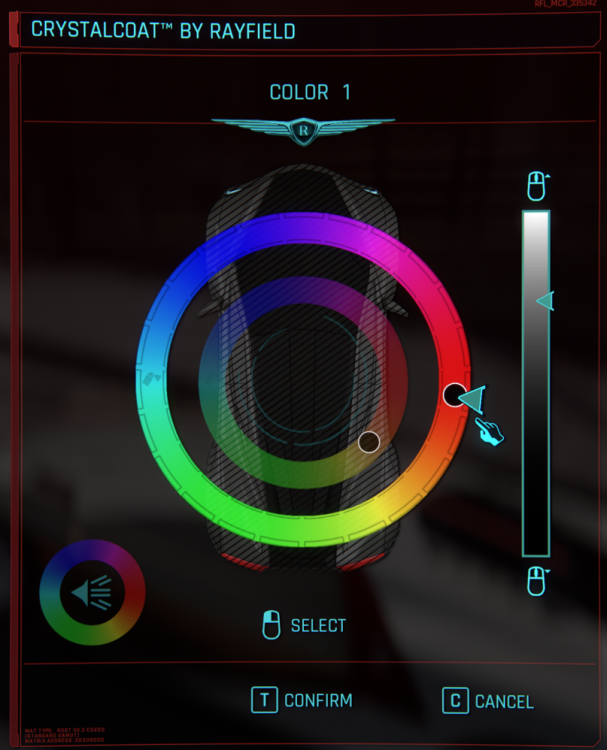
No matter what I do the crystal coat just appears as black and white and when confirming it's just black no matter what, I got no idea how to fix this or what causes this.
-
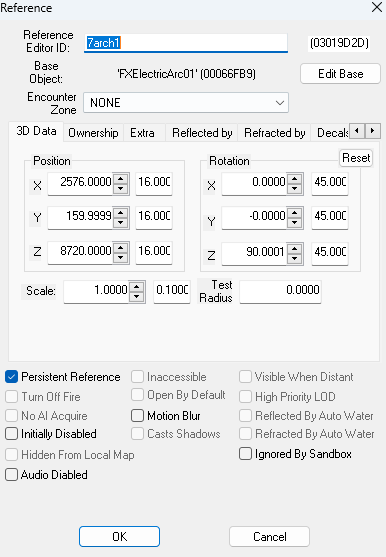
Ive been trying to figure out how to use enable/disable scripts by looking at some examples, but I still can't figure it out Basically I'm trying to disable the FXElectricArc01 called 7arch1, but it says "Script command "7arch1.disable" not found."

-
So I have brought up this matter before but form a different view. I'm editing the empty wasteland area that is not playable past Nellis to the north right outside the fence. I edited some of the fences to be broken so the player can exit from Nellis to that area, I did landscape editing and changed textures on the landscape, added roads and buildings, basically the whole nine yards, everything on that empty place I filled with locations and stuff. I'm told that to make terrain changes appear as well as some other stuff, I need to generate LOD with LODGen, which I have multiple times, yet nothing changes apart from the objects I placed there. I can see buildings and roads half buried there cause the terrain changes I made just won't show up no matter what I do. I use the GECK only with extender and hot reload for scripting and an esm of my mod. The fences I deleted are still here, basically no change apart from any statics I added to the area. What am I missing here? I used FNVEdit to see if anything conflicts and I got some red stuff indicating problems but I don't get how my mod is tied to others when it simply does changes to places that no mod edits or the base game has nothing placed here, it's a dead zone. What am I not doing right? is there a way to tell through FNVEdit what's the problem or a fix or something? I've had this for months and no answer online, no answer on my side, I'm going nuts here with this.
-
I'm a brand new modder. So I edited the player damage values and the enemy damage values through CK. I edited them, save the plugin and I start the game through my PC and tested if my edited values are working, and sure enough they work as intended. But then I upload my mod to Beth.net and tested if the mod is working on my Xbox, and long story short it doesn't work.. So this is how I upload my mod to Xbox: 1. Start the CK 2. Go to Data folder and set my mod as Active Plugin 3. Login to Beth.net through CK 4. Go to Upload Plugin and select Xbox 5. Pack files (But there were no archivable files here tho. CK can't find any, me neither) 6. Push the Create New Mod button 7. Name my mod, describe it, choose category and then upload it to Beth.net So yeah, that's what I did. I watched a ton of tutorial videos on Youtube trying to pinpoint where exactly I went wrong with my upload and none of them provide me with any answers.. So yeah.. I need a little assist here, guys.