
Search the Community
Showing results for tags 'updates'.
-
Hello. I'm in the progress of creating a mod called Thorns of a Whiskey Rose, which is an attempt to integrate the scrapped idea mentioned by Jason Bergman in a developer interview (see here https://archive.is/Morid) where the player would get blackout drunk with Cass and wake up married to her. I saw this and immediately thought it would be an interesting quest, so I decided to try to implement the questline, while adding some additional touches. merge it with the second idea, of the player doing an actual on-screen marriage presided by The King, ending in him performing Love Me Tender. The idea is still mostly unwritten and very WIP, but I'm making this thread to keep anyone following updated on the mod's progress. All I have to show right now is the basic questline idea, in the form of a (probably poorly formatted) flowchart. My aim is to update this thread as often as possible. As I have no prior serious experience of modding on a scripting/GECK level, I may also put out help requests from time to time, which anyone is free to answer. With the flowchart roughed out, my next step is going to be writing dialogue. 5/12/24: I've deleted and through-striked the old flowchart and concept, adapting to the newer concept outlined below. Scripting has begun (currently banging my head against the wall trying to figure out basic trigger boxes LOL)
- 5 replies
-
- 4
-

-
- development
- updates
- (and 1 more)
-
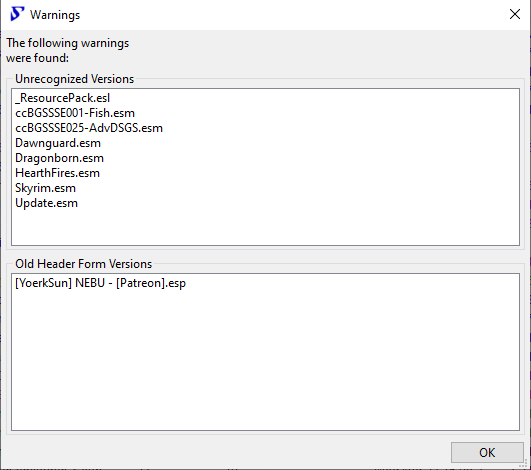
I have been updating the mods that were broken by Skyrim update 1.6.1130 as they come out. Now with all the mods updated (that Vortex mod manager says need to be). I checked WyreBash to make sure all was in order, but this warning (attached image) keeps coming up. Anyone know what is causing this or even how to fix it?
-
I'm sorry if this was asked before but I can't seem to find exactly what I'm looking for. I was wondering how would I update Valheim mods without the config settings getting changed back to default?
-
Another update and once again SS2 is messed up.
rickcarufel posted a topic in Fallout 4's Discussion
The HQ workshop is a mess. The tags are wrong on who is assigned and who isn't, every time a settler is assigned to a department the department head changes, and if I take a 14 str settler from facilities and assign them to engineering their str drops to one. It also seems that settlers are duplicating when transferred between departments. There are also conflicting stats from the settlements. The actual build and the SS2 build are not the same. One settlement has 4 apt buildings fully built out with just 12 people and says there's a housing shortage. Seems that everything concerned with building settlements and HQ is screwed up in some way. Does anyone at nexus check if mods actually work before they are added or is it just a free for all? -
Hi guys, just a quick question here; After any big mod update is available, say EGM, should do I re apply re install any other extra minor texture mod? Thanxs in advance for your reps
-
If I downloaded and installed a mod, say it's version 4 of the mod and then installed an option for the mod the author has included, if the mod is then updated to version 5 should I keep the option or discard it? I seldom see any info on the mod page about the optional files or patches. In addition, if a different mod has patches to get the two to work together, will the update break them?
-
Hi all I know that after installing texture mods the gameplay mods like community patch or any others can't be installed. My Q is, though: In that case, everytime there is a new updated for a mod (esp if its a single mod from the list of all the mods for the 3 games, say, only an update to community patch of me1) I would have to undo all the mod installations by going back to the non-modded backup (or uninstall the game and reinstall for a fresh one) and then reinstalling the mods??... ty
-
Edit: I missed part of the manifest change steps, but updated them below in bold. I have successfully tested this process for the brand new Update 2 that just released. I am still running Patch 0 Hotfix 4 with 8/17 version of binaries and mods, and my game now launches even when Steam is logged out and not running at all. Already in the middle of an established playthrough? Patches and updates keep breaking your mods? Steam installs updates with no option to opt out? You can make it stop. After Patch 0's Hotfix 4 broke my previous playthough, I adjusted my mod loadout and started a new game. I didn't want to have to worry about that happening again, but BG3 has only just come out, and we can likely expect an ongoing number of updates from Larian over the next month or two as post-launch bugs are patched, and live service support kicks into full gear. I tried to armor my own installation against this onslaught by making a backup of the install directory right after P0 HF4 (8/17), but even with a preserved baseline to return my game files to, Steam does not currently have a supported set of options to disable game updates. The best they offer is an option to prevent Steam from installing updates until the next time you launch the game - which doesn't solve the issue, it just delays it slightly. I came across a solution that actually works to disable auto-updates in Steam on a per-game basis. It is surprisingly straightforward, but it makes sense in hindsight. I have successfully tested this method after Patch 1 broke some of my mods. Because I had backed up my install directory, I was able to revert back to Patch 0 Hotfix 4 before locking my installation out of Steam's update system. For anyone who has already been updated to Patch 1 with impacted mods, you'll have to wait for your mod authors to release new versions, and follow instructions about repairing your saves. But you can still lock your Steam installation to Patch 1, and never have to worry about Patch 1 Hotfix 1, or Patch 2, or whatever comes next breaking everything all over again. Here's how: Get the "app ID" of your BG3 installation, and write that down for later steps ➤ From Steam's Library tab ➤ Right-click Baldur's Gate 3 ➤ Properties ➤ Updates tab : Look for "App ID: " down toward the bottom of the tab, and record that number for the next step ➤ Close the Updates tab window Lock your current installation and prevent Steam from updating it until you unlock it ➤ From Steam's Library tab ➤ Right-click Baldur's Gate 3 ➤ Manage ➤ Browse local files : This should open an Explorer window at a location similar to: <DRIVE>:\SteamLibrary\steamapps\common\Baldurs Gate 3 ➤ Go up to parent directory twice, to end up in: <DRIVE>:\SteamLibrary\steamapps ➤ Find the .acf file that starts with "appmanifest_" and ends with the number you recorded from the App ID for BG3. Edit: I missed a few steps here ➤ CLOSE STEAM by going to the lower-right corner clicking the up arrow to show running background processes, then right-clicking the Steam icon there and clicking "Exit" ➤ Make a backup copy of the app manifest file for if you ever want to reverse these changes in the future ➤ Right-click the app manifest file for BG3 and edit it in Notepad ➤ Find the row that starts with "LauncherPath" and change the path from "steam.exe" to something innocuous. In my case, I pointed it at notepad.exe. ➤ Find the rows that start with "AutoUpdateBehavior", "AllowOtherDownloadsWhileRunning", and "ScheduledAutoUpdate" and set each one of those to 0 ➤ Save the file and close your text editor ➤ Right-click that app manifest file ➤ Properties ➤ At the bottom of the Properties pane, find the checkbox for "Read-only" and check that box ➤ Click "Ok" to close the Properties pane Your install is now locked, as Steam uses that app manifest file to manage update installations. Doing this will cause issues when you try to launch the game from Steam directly, since it attempts to check for updates, but you can easily circumvent this. Launching the locked game now that Steam's shortcut no longer works Option 1 - Use BG3 Mod Manager ➤ If you already use Baldur's Gate 3 Mod Manager to launch your game, you are done. You may continue to use the manager to launch the game without any further work. Enjoy! Option 2 - Create a simple desktop shortcut ➤ From Steam's Library tab ➤ Right-click Baldur's Gate 3 ➤ Manage ➤ Add desktop shortcut. Launching BG3 from this shortcut on the desktop should work even when the "Launch" button in Steam no longer does. Option 3 - Create a custom shortcut in Steam ➤ From Steam's Library tab ➤ Click the "+ Add a game" button in the very lower-left corner ➤ Select "Add a Non-Steam Game..." ➤ Click the "Browse" button to manually locate BG3's game binaries ➤ Navigate to the folder where BG3 is installed (we were there in previous steps), and click on the "bin" folder ➤ Select the game exe for your new shortcut to launch (unmanaged by Steam) ➤ Click "Open" ➤ Click "Add Selected Programs" This should now show up in your Library and be launchable from Steam without using the standard BG3 Launch button. When you are ready to unlock your installation and allow Steam to update your game again ➤ Simply follow the steps above as if you wanted to lock your installation, and instead, UNCHECK the "Read-only" box for the game's app manifest file Hopefully this saves someone else some time and trouble!
-
I just installed 4.03 last week and got a BUNCH of mods to finally come together so I could play the game and now they update it again wow.
-
I've been trying to figure out how to mod my game before starting my first playthrough on pc. I have most of it figured out like content mods then textures last and how to use the batch mod installer. If I decide to install texture mods for any of the games do I need to do a vanilla reset every time I update a content mod then redo the textures or do I need to do something else? I have the community patches and expanded galaxy that receive updates as well as a few other smaller mods that may need updates in the future. I basically want to know what to do when I update a mod with texture mods installed. I want to use Garrus and Turians - Face and Eyes Textures (GTFET) for all three games which don't look like very big mods and only effect turians unlike bigger texture mods so before I install them I want to make sure I know how to handle updates. Any help or links are appreciated.
-
What are your thoughts on the latest patch? I've just had to reinstall everything on my rig due to a faulty Windows. I did a backup of my old .ini and exe files - version 1.9.4- so I CAN go back. Still - if the game runs fine with 1.10.2 in regards to mods, stability etc I see no reason. I'm starting all over anyway. Just hope that the SE is up to speed :)
-
I have had a mod thats been on the nexus since 2014 (I think ..hm) it was my first mod EVER made! and it still works :D however there's some issues with it, the characters head mesh isn't the same color as the body and...maybe a pathfinding problem somewhere ... idk.. i wanted to Install the mod first, then delete it from the site so i can later re upload it back when i, at the very least get the head mesh thing fixed. how would i go about doing that? Just fyi (if it even matters but) nobody's even downloaded the mod it's basically been hidden since i uploaded it. i kept it hidden because of those earlier stated issues and at the time i ..was going to fix them but i don't know how to update mods :/ so i was thinking, i would temporarily remove the mod fix it up and re upload it with new pics and a better description. a fresh start if you will. any way i can go about doing that?
-
I truly appreciate the modders that have ported their mods that had required SKSE in Skyrim LE to Skyrim SE without needing SKSE64. I have been using the mods with great enthusiasm and would like to continue to use them after SKSE64 is available to the general public. 1. My computer is barely above that of a potato. I have to run my graphics on medium and low just to keep the game running smoothly. All I know about SKSE64 is that it is a script extender, not sure what that means exactly, just that it allows the mods to do more within the game. Will SKSE64 itself add to the load on the cpu or graphics? 2. For those mods that were ported without SKSE64 and will be updated to utilize that mod, will those same mods still have the version that doesn't depend on SKSE64? Thank you for your time in reading this and answering my questions.
-
Last night, updates to Skyrim, Special Edition, and Fallout 4 ALL outstripped the coverage of their respective script extenders. I have, on advice from steam users, set all three games to only update when launched normally, but I need to rollback the games to the previous version as well. A little help, here?
-
I have to rant and I cannot contact Bathesda! So in Steam settings for Fallout 4 I have it set to only update on game launch and I launch via F4SE. My understanding is I should not get updates. Yesterday I logged into Steam and Fo4 had (update paused) next to it. The last time I exited Steam and went offline that was not there. I decided to go ahead and update. And of course that screwed with some of my mods and I still don't have all that sorted out. After the update completed I went back into Steam offline mode. Today I received a message stating Steam needed an update. Thinking it was actually Steam that needed the update I logged in. It couldn't be Fo4 right? Because I updated that yesterday. Yes it was Fallout 4 that needed another freaking update! It says update paused next to the game. I went into Steam discussion and posted something similar to this and now I am here. I have had it with Bathesda. I will not purchase Fallout 76 and will not purchase the new Skyrim when it finally releases as long as Bathesda does game updates like Fo4. My question is, is there a way to avoid the updates? Is there a legal way to play Fo4 on pc without going through Steam? Thank you to anyone that responds.
-
I'm seeing an increasing number of <!> next to my mods in the mod list on NMM it says theres a mod update available but its the same version when i look into the downloads section of said mod. theres no new update there. i re install the mod, and the ! is still there. why is this happening? how the hell do i get rid of all these !'s ? >_<'
-
Hello, I am new to Skyrim modding on the PC and have run into various issues. 1. Whenever I download a mod onto the nexus, CBBE for example, it says there is a newer version available on the nexus, but I cannot ever find 'newer' files, only the ones I just downloaded. 2. I am also unable to run mods in general, I only downloaded SKSE and Alternative start and XPSE and they had no pop-ups in the nexus mod manager and yet I was still unable to run skyrim, I would show me a Bethesda symbol and crash. I'm sure I'm making a stupid error that can easily be fixed but I have tried and would really appreciate a helping hand from someone more experienced. Thanks.
-
When I ask NM to check for mod updates I see that there are a lot of them. But it isn't downloading and installing them automatically. I looked for some way to make that happen but didn't find a way. Is there a way to have mods update automatically?
-
I'd like to know if there is a best practice when updating an installed mod? If I have mod v1 installed and mod v2 comes out, I normally let the new version overwrite the old and leave both installed. I'm wondering though if I should a) uninstall the original mod and then install the updated version b) install the updated version and then delete the old version c) continue as I have been, overwrite the old and leave it alone. Thanks for your input.
-
http://www.nexusmods.com/witcher3/mods/302/?tab=1&navtag=http%3A%2F%2Fwww.nexusmods.com%2Fwitcher3%2Fajax%2Fmoddescription%2F%3Fid%3D302%26preview%3D&pUp=1 Can someone make this mod compatible with patch 1.12? I don't think this modder updates anymore, but this mod is very useful to effective crossbow gameplay.
-
Can someone make this mod compatible with patch 1.12? I don't think this modder updates anymore, but this mod is very useful to effective crossbow gameplay. UPDATE: Iv'e got permission now, so it should be good to go. If anyone knows how to update mods it'd be a real help! http://forums.nexusmods.com/index.php?app=members&module=messaging§ion=view&do=showConversation&topicID=1662835&st=0#msg6422705
-
Hello pepz of the almighty internet. So we all know the Creation Kit is not perfect... Or good... But I'm having some issues that just dosn't make any sense. The CK crashes all the time and it crashes for the weirdest reasons, though it seems to somehow be consistent, or so I thought... The CK crashes when I tried to go to a Commonwealth cell which I had edited a little to make a few more changes. Meaning of course that I had the ability to go there before and I have gone back and forth to that cell plenty of times before however out of nowhere I started to crash whenever I tried to even load that cell... If I went to a nearby cell and manually navigated my way over to the edited cell the CK would crash upon trying to load it. It also crashes upon closing the CK (Not that that's really that big of an issue... I mean I was closing it anyway), bit the hair the broke the camel's back for me is that first it destroys my chances for even participating in the Fallout 4 contest but now it also crashes when I try to make a mod that contains content from DLC's... So now that you know of my struggle (The struggle T_T) my actual question here is, are there any programs that are required for the CK to work properly? My friend tried to open my mod and he could do everything I couldn't and he also says he have never even experienced the CK crashing. I have updated my driver, checked if I'm using the most up to date version of the CK, updated Java, updated Flash and googled for answers for what is probably turning into hours now... Any help is appreciated, cheers.
-
Hi, I'm using Friendly Hud, Immersive Camera, STLM, and HD Re-worked. Do these mods affect game saves possibly corrupting them in future? Do they still with your saves permanently? Thank you
-
I'm trying to add some content to my Forgotten Island mod, and am running into some difficulties. I am trying to add a quest that starts after all others have been completed. All that works fine but what I'm attempting to do is add some more buildings and NPCs to the existing landscape,so it appears that the island has been repopulated after the threat in the first quest has been eliminated. I have placed some buildings and a few other objects into the landscape that are enabled via a quest script using "X" markers as the Enable Parent. While testing I set the correct stage of the quest through the console and the items that have been placed appear as designed. If I set the stage while in Tamriel then coc to the island all the objects appear also. My issue is that when I enter an interior cell on the island such as a cave, when I exit the cave back to the island, all the LOD for the objects disappears. I have regenerated the LOD with the changes and once the new objects are in place the LOD works fine from anywhere on the island, it is only when I exit an interior cell a distance away from the new "village" that the LOD does not work. I even tried checking some of the farmhouses as "never fades" in the CK and they still disappear. I'm at a loss. I don't understand why the LOD does not load correctly. I have only placed a few things onto the island for testing before going through completely and wasting my time with something that will not work. I have generated LOD for several small worldspaces for myself and also a few other mod authors without issues, so I don't believe the issue is with the LODs themselves. Any suggestion would be appreciated. http://i87.photobucket.com/albums/k143/johng58/1_zpswz2qo5nd.jpg http://i87.photobucket.com/albums/k143/johng58/2_zpsst7qyhfg.jpg http://i87.photobucket.com/albums/k143/johng58/3_zpsnkjvwnwt.jpg
-
Anybody else having problems with the load order? After the new version of FO4 mine just CTD nonstop. I tried evey thing I could think of but finally ended up disabling every single mod just to get the game to start. I am now in the process of starting the mods one by one (five at a time) to see what works and eliminating the ones I no longer find attractive or useful. Any tips as to what definately will crash or what is unnecessary with the new version? Picked up that SSEX and Settlement keywords isn't needed. Any others that you might know about?


