Search the Community
Showing results for tags 'vortexhelp'.
-
I installed some mods using Vortex and my game immediately crashes upon starting the game. I noticed in my load order the following vanilla files were locked to the bottom: AltarGymNavigation.esp TamrielLeveledRegion.esp I cannot figure out how to move these files. I came across a youtube video that showed that these files should be able to be moved around. Having any single mod turned on crashes the game however when the mods are turned off, the game runs fine. Please help.


-
when i put mods,disable mods,enable mods,delete mods on a game it appears a massage that failed to deploy mods and the reason says dest already exists. code: EEXIST and when i click on details it says this: dest already exists. dest already exists. dest already exists. Error: dest already exists. at C:\Program Files\Black Tree Gaming Ltd\Vortex\resources\app.asar\node_modules\fs-extra\lib\move\move.js:41:31 at C:\Program Files\Black Tree Gaming Ltd\Vortex\resources\app.asar\node_modules\universalify\index.js:21:38 at tryCatcher (C:\Program Files\Black Tree Gaming Ltd\Vortex\resources\app.asar\node_modules\bluebird\js\release\util.js:16:23) at Promise._settlePromiseFromHandler (C:\Program Files\Black Tree Gaming Ltd\Vortex\resources\app.asar\node_modules\bluebird\js\release\promise.js:547:31) at Promise._settlePromise (C:\Program Files\Black Tree Gaming Ltd\Vortex\resources\app.asar\node_modules\bluebird\js\release\promise.js:604:18) at Promise._settlePromise0 (C:\Program Files\Black Tree Gaming Ltd\Vortex\resources\app.asar\node_modules\bluebird\js\release\promise.js:649:10) at Promise._settlePromises (C:\Program Files\Black Tree Gaming Ltd\Vortex\resources\app.asar\node_modules\bluebird\js\release\promise.js:729:18) at _drainQueueStep (C:\Program Files\Black Tree Gaming Ltd\Vortex\resources\app.asar\node_modules\bluebird\js\release\async.js:93:12) at _drainQueue (C:\Program Files\Black Tree Gaming Ltd\Vortex\resources\app.asar\node_modules\bluebird\js\release\async.js:86:9) at Async._drainQueues (C:\Program Files\Black Tree Gaming Ltd\Vortex\resources\app.asar\node_modules\bluebird\js\release\async.js:102:5) at Async.drainQueues (C:\Program Files\Black Tree Gaming Ltd\Vortex\resources\app.asar\node_modules\bluebird\js\release\async.js:15:14) Prior Context: at Object.moveAsync (C:\Program Files\Black Tree Gaming Ltd\Vortex\resources\app.asar\renderer.js:9778:27) at C:\Users\chady\AppData\Roaming\Vortex\plugins\Vortex Extension Update - Dying Light Support v0.0.2\index.js:93:20 at tryCatcher (C:\Program Files\Black Tree Gaming Ltd\Vortex\resources\app.asar\node_modules\bluebird\js\release\util.js:16:23) at Promise._settlePromiseFromHandler (C:\Program Files\Black Tree Gaming Ltd\Vortex\resources\app.asar\node_modules\bluebird\js\release\promise.js:547:31) at Promise._settlePromise (C:\Program Files\Black Tree Gaming Ltd\Vortex\resources\app.asar\node_modules\bluebird\js\release\promise.js:604:18) at Promise._settlePromise0 (C:\Program Files\Black Tree Gaming Ltd\Vortex\resources\app.asar\node_modules\bluebird\js\release\promise.js:649:10) at Promise._settlePromises (C:\Program Files\Black Tree Gaming Ltd\Vortex\resources\app.asar\node_modules\bluebird\js\release\promise.js:729:18) at _drainQueueStep (C:\Program Files\Black Tree Gaming Ltd\Vortex\resources\app.asar\node_modules\bluebird\js\release\async.js:93:12) at _drainQueue (C:\Program Files\Black Tree Gaming Ltd\Vortex\resources\app.asar\node_modules\bluebird\js\release\async.js:86:9) at Async._drainQueues (C:\Program Files\Black Tree Gaming Ltd\Vortex\resources\app.asar\node_modules\bluebird\js\release\async.js:102:5) at Async.drainQueues (C:\Program Files\Black Tree Gaming Ltd\Vortex\resources\app.asar\node_modules\bluebird\js\release\async.js:15:14) Prior Context: at Object.moveAsync (C:\Program Files\Black Tree Gaming Ltd\Vortex\resources\app.asar\renderer.js:9778:27) at C:\Users\chady\AppData\Roaming\Vortex\plugins\Vortex Extension Update - Dying Light Support v0.0.2\index.js:93:20 at tryCatcher (C:\Program Files\Black Tree Gaming Ltd\Vortex\resources\app.asar\node_modules\bluebird\js\release\util.js:16:23) at Promise._settlePromiseFromHandler (C:\Program Files\Black Tree Gaming Ltd\Vortex\resources\app.asar\node_modules\bluebird\js\release\promise.js:547:31) at Promise._settlePromise (C:\Program Files\Black Tree Gaming Ltd\Vortex\resources\app.asar\node_modules\bluebird\js\release\promise.js:604:18) at Promise._settlePromise0 (C:\Program Files\Black Tree Gaming Ltd\Vortex\resources\app.asar\node_modules\bluebird\js\release\promise.js:649:10) at Promise._settlePromises (C:\Program Files\Black Tree Gaming Ltd\Vortex\resources\app.asar\node_modules\bluebird\js\release\promise.js:729:18) at _drainQueueStep (C:\Program Files\Black Tree Gaming Ltd\Vortex\resources\app.asar\node_modules\bluebird\js\release\async.js:93:12) at _drainQueue (C:\Program Files\Black Tree Gaming Ltd\Vortex\resources\app.asar\node_modules\bluebird\js\release\async.js:86:9) at Async._drainQueues (C:\Program Files\Black Tree Gaming Ltd\Vortex\resources\app.asar\node_modules\bluebird\js\release\async.js:102:5) at Async.drainQueues (C:\Program Files\Black Tree Gaming Ltd\Vortex\resources\app.asar\node_modules\bluebird\js\release\async.js:15:14) Prior Context: at C:\Program Files\Black Tree Gaming Ltd\Vortex\resources\app.asar\renderer.js:10286:197 at withActivationLock (C:\Program Files\Black Tree Gaming Ltd\Vortex\resources\app.asar\renderer.js:5486:227) at C:\Program Files\Black Tree Gaming Ltd\Vortex\resources\app.asar\renderer.js:5036:38 at tryCatcher (C:\Program Files\Black Tree Gaming Ltd\Vortex\resources\app.asar\node_modules\bluebird\js\release\util.js:16:23) at Promise._settlePromiseFromHandler (C:\Program Files\Black Tree Gaming Ltd\Vortex\resources\app.asar\node_modules\bluebird\js\release\promise.js:547:31) at Promise._settlePromise (C:\Program Files\Black Tree Gaming Ltd\Vortex\resources\app.asar\node_modules\bluebird\js\release\promise.js:604:18) at Promise._settlePromise0 (C:\Program Files\Black Tree Gaming Ltd\Vortex\resources\app.asar\node_modules\bluebird\js\release\promise.js:649:10) at Promise._settlePromises (C:\Program Files\Black Tree Gaming Ltd\Vortex\resources\app.asar\node_modules\bluebird\js\release\promise.js:729:18) at _drainQueueStep (C:\Program Files\Black Tree Gaming Ltd\Vortex\resources\app.asar\node_modules\bluebird\js\release\async.js:93:12) at _drainQueue (C:\Program Files\Black Tree Gaming Ltd\Vortex\resources\app.asar\node_modules\bluebird\js\release\async.js:86:9) at Async._drainQueues (C:\Program Files\Black Tree Gaming Ltd\Vortex\resources\app.asar\node_modules\bluebird\js\release\async.js:102:5) at Async.drainQueues (C:\Program Files\Black Tree Gaming Ltd\Vortex\resources\app.asar\node_modules\bluebird\js\release\async.js:15:14) and i dont know what to do please help


-
I've been having an issue where if I try to launch fallout 4 via the script extender with 130 mods, the game will instantly CTD. It doesn't matter what mods I load, as soon as it hits 130 it will not let it load. Nobody else seems to have an explanation for this, and I am at a loss. This issue has not been present previously, and I don't know what could be causing this. I am not knowledgeable about modding at all, and would appreciate any help. It runs just fine if I use 129 mods, but as soon as I enable 130 it won't work
-
My mods no longer show up in my game. I don't know when this happened It has been a while since I played Morrowind. My last save was July 2025 and the one before Dec 2024. At that time all my mods worked. I have about 20 mods enabled and all are through Vortex. I rarely change the mods, other than un-enabling and re-enabling some. (Based on character type FYI water breathing for an Argonian.) I have not intentionally changed anything to vortex, the game, or the pathways. I use *openMW* but that was never a problem before. I also Loaded up the original software and it also is missing all mods. I used the start up though Vortex which goes to the original software executable. On a less important side-note, I also cannot find how to edit the profile so I can even see the pathway being used or modify it. I only get options to save, delete, clone, and something else. My computer knowledge is basic. (I'm getting old.) I can modify text based files if given instructions on what to paste in and where. FYI I did look for any threads that matched my problem but nothing jumped out so I started my own. This may be because I am using different/older nomenclature. Thank you for your time and effort.
-
basically what i mean is when you mod manager install a mod from vortex, its green, and it shows no content for an install(in this case multiple are listed, armor mods, sex s#*!, and a few patches). im constantly getting crashes from everything, so im thinking my long list of enabled no content ones are causing it to fall apart from the seams.

-
I remember reading before that one of the disadvantages of Vortex compared to MO2 is that, even after a mod gets uninstalled, it could still leave a copy or some data behind in the installation/staging folder. Whereas, in MO2, the mod doesn't directly make a copy in the install folder or something like that. Is this true? If so, how do I delete the leftover data?
-
I considered asking this in the Vortex Support Forum but that place seems to be reserved for actual Vortex program bugs/troubleshooting. Anyway, does it mean the mods load simultaneously or that you're letting Vortex/LOOT make a decision each time you load the game?
-
hello! im very new to modding and i have no idea where i went wrong. to start off, im using vortex, modding skyrim special edition. the screen is very bugged and only displays on the top left of the screen, anywhere else either doesn't display anything or freezes a copy of every frame. i really need some help figuring this out.


-
I'll keep this brief. Whenever I update a mod in Vortex, it shows an intrusive pop-up asking whether I want to update all files/ if I want to replace the previous file. EVERY. SINGLE. TIME. I can't find any setting for a "don't show this again", meaning that it can take upwards of 30 minutes to update a small amount of mods (100 or so). Is there a button to remove these pop-ups and just update the mod? It makes premium feel redundant as I still have to do the same amount of clicking for each download.

-
Help please! Apart from the patches I made on xEdit, I have no idea which ones can be safely flagged as light. Any rules of thumb? Also, do I have to do/check something on xEdit before/after flagging? Thank you!
-
Hi, I used to use VortexMM for a Cyberpunk collection, but out of nowhere it started showing that unremovable error message, and the fun thing is that I'm using GoG not the steam version, also I can't do anything on the app as it starts on the CP2077 page and I can't get out of it to use the app on other mods, Is there any way to fix this without a complete reinstall? Thanks.

-
I'm gonna start this off slow because it's a whole confusing mess. Basically Nexus's is telling me that I can't put the mod folder into my game data directory, HOWEVER I'm also trying to get bodyslide to work, and it says that I need to have the the outfits and textures installed into my game DATA DIRECTORY so I can fix the no image error, however, it wont let me put the mods into the said directory, the files are loading into the appdata folder pathway. But when I try to enable BS/OS, another issue is that for some reason despite me being the admin on my PC it's telling me that that the admin has to give permission for it to open in the folder but when I try to give permission it just sends me back. P.S. I'm using McAfee so I can't just give exception to the folder cause it's being stupid.
-
I'm in the middle of a modded playthrough and wanted to change the settings of a mod or patch it. Unless it has MCM integration, the only I way I can do this is by reinstalling the mod using the FOMOD installer. Is it safe to do this in Vortex? Unless it's explicitly discouraged by the mod author in the description/posts tab, I honestly can't tell.
-
I've decided to redownload CyberPunk for a new playthrough. I have all my mods deploying. Entering the game world Simple Menu loads immediately. My problem though is that I can't open Simple Menu or even add a keybind to open it. On top of this I've discovered that Cyber Engine Tweaks, Simple Menu and other mods like Codeware are not showing in the deploy/load order on Vortex despite showing in downloaded/installed mods. I'm at a lost in getting it to work. Ive always gone through Vortex for CyberPunk and Fallout4 and never had an issue so I'm quite puzzled
- 1 reply
-
- 1
-

-
- vortexhelp
- mod manager
- (and 1 more)
-
Context: Both mods are player home/settlement mods. I am playing on Old Gen.

-
Sorry for possibly a dumb question. I have Skyrim SE from Steam. I recently closed out my game via task manager by ending task. Which was likely a big mistake. Now vortex won't launch my game, and I am a wreck over it. I don't think it has anything to do with the mod I downloaded after as it was the Marry/Follower Aicantar and Nelecar mods and they don't seem like they'd break the launcher. I am extremely stupid when it comes to mods, gaming, all this tech smart stuff and so I can't even understand the fixes people are giving on forums as I simply don't know what they're talking about. If someone could help me fix this problem with that in mind, I'd much appreciate it as I am so upset over this. If I need to provide a list of all my mods, I will. And if it would be easier to help me via discord, that is also fine with me. Please help me, I'm begging.
-
I installed a mod pack for FO3 and on the first install it gave me a pop-up in Vortex for some config options and I enabled some that I don't want on anymore. Now, even after a full reinstall of the mods I can't get back to the config menu, wondering if anyone has a solution to this? I don't believe this is something that only applies to FO3.
-
Hello, i'm currently using vortex 1.10.8, I'm trying to mod Ready or not which i bought from steam. I am trying to use the Takina VO Ron1.0 Mod for the game, when applying the mod for the game there was no errors shown but the mod did not take effect into the game. Could I get further assistance regarding this? Thank you.
-
Hi I just re-installed Windows on another drive because I was experiencing Issues, so I had to reinstall Vortex, but it can't recognize my mods for some reason. My mods and Vortex folder are stored on another drive with the same file systems and so on; they're unchanged. I'd rather not need to reinstall all of my mods when they are where they should be. Is there anyone who could help? I am running the latest version of Vortex as of writing this. (V1.12.6) Note: I also upgraded to windows 11. File for "Mods" path: E:\MODS (ALSO VORTEX)\{GAME} File path for "Downoads": E:\VORTEX{GAME} Thanks in advance.
-
vortex Vortex will not start up anymore and I have NO idea why.
zaFi03 posted a topic in Vortex Support
A few days ago I tried upening up vortex version 1.13.5 and install a mod for skyrim se. Well, it shows the "VORTEX MOD MANAGER" window that only should appear for a few seconds before the actuall program is launched, but for me it just stays on that window. Basically Vortex never launches no matter how long I wait. In task manager it says 0% activity except for 25% memory usage. > tried new install location > tried older Vortex version > tried disabling antivirus > I did not update windows (I use win10 and it always worked just fine) and there are no new updates right now. Basially, no major changes were introduced to my PC that should have caused any issues, it.. just stopped working. I did what I could, but it seems like my journey with Vortex has come to an end. It's like my PC is rejecting this software. Has anyone had a similar experience ? I also get this in CMD when launching the Vortex.exe with --safe-mode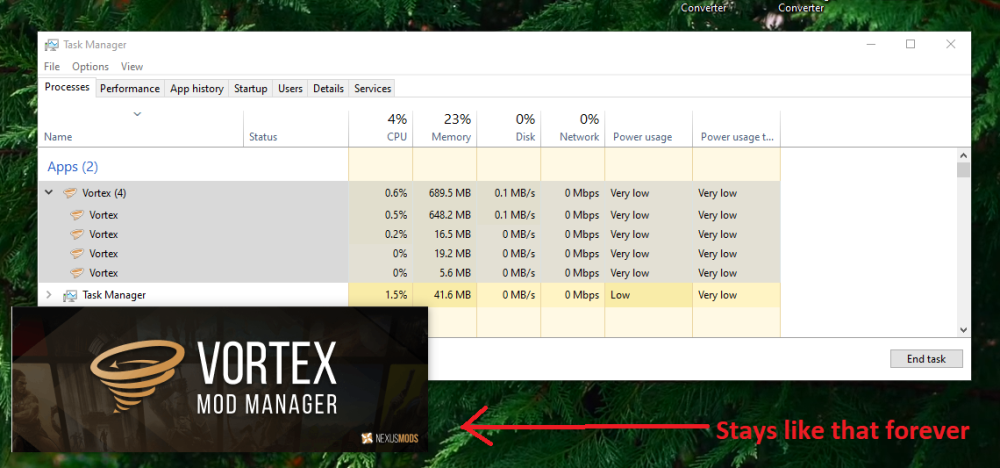

-
Hey all. I'm by no means a skilled modder or good at computer stuff, but I've successfully ran Fallout: New Vegas and Fallout 4 with hundreds of mods, no issues there. But for Fallout 3: GOTY in particular, nothing seems to work. I have ran the game directly through Steam, ran the .exe directly from the files, and mods worked, but weren't perfect; When I try to run the game through Vortex, or even attempt with the FOSE loader, it doesn't recognize my game's version. I'm curious if this is because I ran the Anniversary Patcher. The Patcher says not to load the game with FOSE_loader, which seems to be how Vortex runs the game. Nonetheless, it frustrates me to no end and I really just want to play the game properly. Thanks in advance for any and all help.
-
So, i have this problem when i try to install mods from collections (It doesn't matter which collection I'm trying to download, it happens with any mods/collections) And sometimes i have error with next text: Downloading failed due to an I/O error (either network or disk access). This is very likely a temporary problem, please try resuming at a later time. The author of the mod collection said the following: I found only this: Or i check in a wrong place?
-
I have a mod installed for Skyrim that needed a plugin(Zip File) from another site to work. I have the zip downloaded but when its put into Vortex it puts in the mod category and not the plugins thus not removing the error. When I start Skyrim up it wont active the mod because it still thinks its "Missing". Any advice please?
-
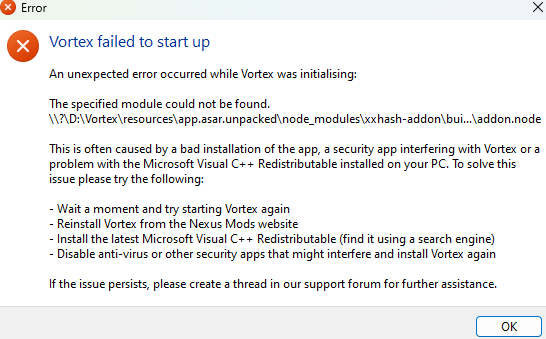
I'm not sure what happened, but recently I noticed that the icon for Vortex was removed from my version, and when I tried to launch it, it displayed this: Even after trying to reinstall it and follow the advice on the error, it still doesn't work. Any help?
-
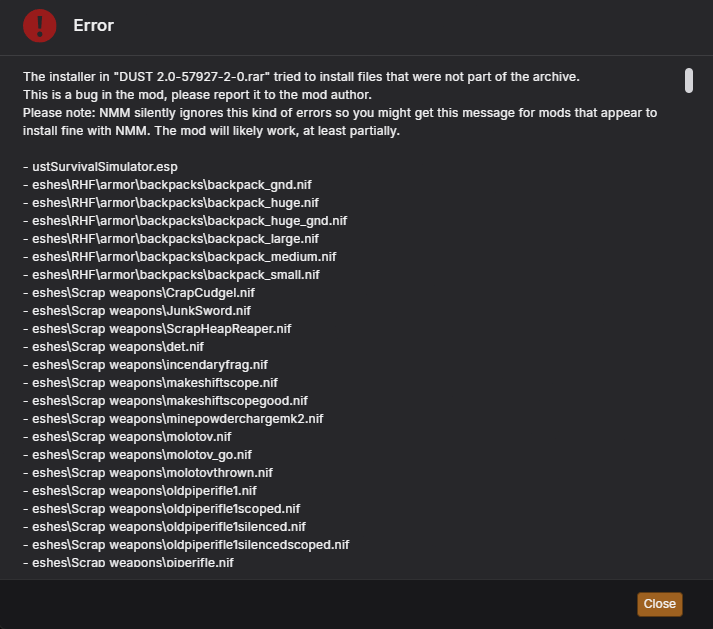
I am using Vortex 1.12.2. Since like 3 days I can't seem to install any mods with vortex, either with mod manager download or manual download and install. It is not game specific since I tried it on both Fallout: New Vegas and Stardew Valley. For example I'm trying to install Dust - Survival Mode for New Vegas and I get this error in the picture with the "Invalid installer" notification on the top right. I have tried installing this mod on multiple other mod managers and it worked every time so I am positive the problem here is Vortex. Again, this is just an example, I am getting this error on EVERY mod I try to install. Any help will be appreciated.