Search the Community
Showing results for tags 'html'.
-
 <div class="row"> <label for="a" id="lbName">Name:</label> <input type="text" name="name" id="name"> </div> The if statement sending variables, lblTag and errorLbl to function "errorMessage", the error message I am getting is "TypeError: Cannot read properties of null (reading 'style'), which also means that the last line in the errorMessage function is also going to getting an error message, but won't show until the first error is cleared. The error message is for variable lblTag if (name ==""){ lblTag = "lbName" errorLbl = "Name" errorMessage(lblTag, errorLbl) } function errorMessage(lblTag, errorLbl){ console.log(errorLbl) // getting undefined in the console here and the other variable as well and getting error message // error message: TypeError: Cannot read properties of null (reading 'style') document.getElementById(`${lblTag}`).style.color = `red` document.getElementById('error-lbl-message').innerHTML = errorLbl + " is empty" }
 -
Hello, photos do not appear in the following cases 1- inserting photo inside <picture> tag (In Server Side Only), Working normally in local 2- Not Working when site domain only www.mysite.com ,, Working when site domain = www.mysite.com/index.php <picture class="hover1 runHover2"> <img src="assets/img/central-business-district-singapore.jpg"> </picture> Note: -The path is right, and when opening inspect to check the photo, I find it - Tried to change the path to /assets/img/central-business-district-singapore.jpg or www.mysite.com/assets/img/central-business-district-singapore.jpg , but not solved
-
Hi, I have a website(HTML) where I sell 1 tour in 3 languages. In the root I have the index.html and tour.html both in English (English is default). Then there are 2 folders, one folder is ES (Spanish) and one folder DE (German), both have index.html and tour.html with the same contents but in their specific language. I am trying for some time now to solve these 2 error-messages in Google Search Console: - Duplicate without user-selected canonical - Duplicate, Google chose different canonical than user My question is where and in which page(s) (index or tour) to put "<link rel="canonical" href="http://www.mywebsite.com/???.html" />" Thanks for your help.
-
Hi. I've been thrown in the deep end with a community shed website when the person who knows HTML bailed out I have very little knowledge of writing forms - none actually. I've done my best at writing (plagarising) an application form with no success. Can someone give me a heads up where I've gone wrong? This is the application HTML: <!DOCTYPE html PUBLIC "-//W3C//DTD HTML 4.01//EN" "http://www.w3.org/TR/html4/strict.dtd"> <html> <head> <meta content="text/html; charset=ISO-8859-1" http-equiv="content-type"> <title>Application</title> <meta content="Alistair" name="author"> <style> body { background-color:rgb(102, 255, 255); } ul { list-style-type: none; display: flex; margin: 70; padding: 60; overflow: hidden; spacing: 120; # background-color:rgb(102, 255, 255); } li { float: left; } li { margin-right: 110px; } li a, .dropbtn { display: inline-block; color: black; text-align: center; padding: 14px 16px; text-decoration: none; } li a:hover, .dropdown:hover .dropbtn { background-color: grey; } li.dropdown { display: inline-block; } .dropdown-content { display: none; position: absolute; background-color: #f9f9f9; min-width: 160px; box-shadow: 0px 8px 16px 0px rgba(0,0,0,0.2); z-index: 1; } .dropdown-content a { color: black; padding: 12px 16px; text-decoration: none; display: block; text-align: left; } .dropdown-content a:hover {background-color: #f1f1f1;} .dropdown:hover .dropdown-content { display: block; } </style> </head> <body style="margin-left: 0px; width: 1303px;"> <table style="width: 1280px; height: 129px;" border="0"> <tbody> <tr> <td style="width: 377.25px; text-align: right;"><img style="width: 302px; height: 115px;" alt="Logo" src="Images/logo.png"></td> <td style="width: 560.883px;"> <div style="text-align: center;"><font size="+3"><span style="font-family: serif;"><span style="font-family: Helvetica,Arial,sans-serif;">Livingston Community Shed <div style="text-align: center;"><small style="font-family: sans-serif;">Application Form</small><br> </div> <font size="+3"><span style="font-family: serif;"><span style="font-family: Helvetica,Arial,sans-serif;"></span></span></font></span></span></font></div> <big> <font size="+3"> <font size="+3"><span style="font-family: serif;"></span></font> </font></big></td> <td style="width: 402.867px; text-align: left;"><span><img src="Images/smsa-logo.png" alt="smsa logo" style="width: 279px; height: 102px;"><br> </span></td> </tr> </tbody> </table> <ul> <li style="font-weight: bold;"><big><a href="index.html">Home</a></big></li> <li style="font-weight: bold;"><big><a href="about.html">About</a></big></li> <li style="font-weight: bold;"><big><a href="findus.html">Find Us</a></big></li> <big> </big> <li style="font-weight: bold;" class="dropdown"><big> <a href="javascript:void(0)" class="dropbtn">News</a></big> <div style="top: 178px; left: 671px;" class="dropdown-content"><a href="updates.html">Updates</a><a href="projects.html">Projects</a><a href="gardens.html">Gardens</a><a href="videos.html">Videos</a></div> </li> <li style="font-weight: bold;"><big><a href="join.html">Join</a></big></li> <big> <big> </big> </big> <li style="font-weight: bold;"><big><a href="contact.html">Contact</a></big></li> </ul> <div style="text-align: center;"><!-- ************ End of Headings ************** --> <br> <big><big><big><span style="font-family: Helvetica,Arial,sans-serif; color: rgb(51, 51, 255); font-weight: bold;">Livingston Community Shed Application Form</span></big></big></big> </div> <div style="text-align: center; width: 1199px;"><br> </div> <table style="text-align: left; width: 900px; margin-left: auto; margin-right: auto;" cellpadding="2" cellspacing="2"> <tbody> <tr> <td style="vertical-align: top; width: 464px;"> <form style="margin-left: 0px; width: 410px;"><!-- ************ Forename ************** --> <div style="margin-left: 0px; width: 391px;"> <div style="text-align: left;"> <label for="fname">First name:</label><br> </div> <div style="text-align: left;"><input id="fname" name="fname" value="" type="text"><br> <br> </div> <!-- ************ Surname ************** --> <div style="text-align: left;"><label for="sname">Surname:</label><br> </div> <div style="text-align: left;"><input id="sname" name="sname" value="" type="text"><br> <br> </div> <!-- ************ Address 1 ************** --> <div style="text-align: left;"> <label for="add1">Address 1:</label><br> </div> <div style="text-align: left;"><input size="30" id="add1" name="add1"><br> <br> </div> <!-- ************ Address 2 ************** --> <div style="text-align: left;"><label for="add2">Address 2:</label><br> </div> <div style="text-align: left;"><input size="30" id="add2" name="add2"><br> <br> </div> <!-- ************ Town ************** --> <div style="text-align: left;"> <label for="town">Town / City:</label><br> </div> <div style="text-align: left;"><input id="town" name="town" value="" type="text"><br> <br> </div> <!-- ************ Postcode ************** --> <div style="text-align: left;"><label for="pcode">Postcode:</label><br> </div> <div style="text-align: left;"><input size="8" name="pcode" id="pcode"><br> <br> </div> <!-- ************ email ************** --> <div style="text-align: left;"><label for="email">Email:<br> <input id="email" name="email" type="email"><br> </label></div> <!-- ************ Phone number ************** --> <div style="text-align: left;"><label for="phone">Phone Number:</label><br> </div> <div style="text-align: left;"><input size="15" name="phone" id="phone" type="tel"><br> <br> </div> <!-- ************ Birthday ************** --> <div style="text-align: left;"><label for="bday">Date of Birth:</label><br> </div> <div style="text-align: left;"><input size="8" id="bday" name="bday" value="" type="date"><br> <br> </div> </div> </form> </td> <td style="vertical-align: top; width: 632px;"> <form style="width: 529px;"> <label for="cname">Contact name:</label><br> <input id="cname" name="cname" value="" type="text"><br> <br> <label for="relat">Relationship:</label><br> <input id="relat" name="relat" value="" type="text"> <br> <br> <label for="cphone">Contact Phone Number:</label><br> <input id="cphone" name="cphone" type="tel"> <span style="font-weight: bold;"><br> <br> </span> <div><label for="allergy">Please list any allergies you may have:<br> </label> <div style="text-align: left; margin-left: 0px; width: 978px;" class="fcf-input-group"> <textarea cols="30" id="allergy" name="allergy" class="fcf-form-control" rows="5" maxlength="1000" required=""></textarea> </div> <br> <label for="skill">Please list any skills/interests which may be useful to the shed:</label><br> <div style="text-align: left; margin-left: 0px; width: 978px;" class="fcf-input-group"> <textarea cols="30" id="skill" name="skill" class="fcf-form-control" rows="5" maxlength="1000" required=""></textarea> </div> <br> </div> </form> </td> </tr> </tbody> </table> <table style="text-align: left; width: 950px; margin-left: auto; height: 31px; margin-right: auto;" cellpadding="2" cellspacing="2"> <tbody> <tr> <td style="vertical-align: top; width: 874px;"><input id="permit" name="permit" value="No" type="checkbox"> <label for="permit">May we include a summary of this and a photo in the member’s section of the website?</label><br> </td> </tr> </tbody> </table> <table style="text-align: left; height: 151px; margin-right: auto; width: 950px; margin-left: auto;" cellpadding="2" cellspacing="2"> <tbody> <tr> <td colspan="1" rowspan="1" style="vertical-align: top; text-align: center; width: 950px;"> <p style="line-height: 100%; margin-bottom: 0cm;" align="left"><font style="font-size: 14pt;" size="4"><b>Constitution acceptance</b></font></p> <span style="font-weight: bold;"></span> <p style="line-height: 100%; margin-bottom: 0cm;" align="left"><font style="font-size: 12pt;" size="3"><input id="perm" name="agree" value="No" type="checkbox"> <label for="agree">I agree to abide by the constitution of the Livingston Community Shed, a copy of which is held in the shed and on this Website.</label><br> </font><br> </p> <p style="line-height: 100%; margin-bottom: 0cm;" align="left"><font style="font-size: 12pt;" size="3"><input id="smsa" name="smsa" value="No" type="checkbox"><label for="smsa">By applying, I also agree to abide by the Scottish Men’s Sheds Association (SMSA) Constitution and Purposes to which we are affiliated with group membership.</label></font></p> <form style="margin-top: 16px; height: 55px;" enctype="text/plain" method="post" action="/application.php"> <input style="height: 50px; width: 70px;" value="Submit" align="middle" type="submit"><br> <!-- **** If you click the "Submit" button, the form-data will be sent to a page called "/application.php **** --> </form> </td> </tr> </tbody> </table> </body> </html> The PHP page that accompanies it is: <!DOCTYPE HTML PUBLIC "-//W3C//DTD HTML 4.01 Transitional//EN"> <html> <head> <meta content="text/html;charset=ISO-8859-1" http-equiv="Content-Type"> <?php if (isset($_POST['Email'])) { // EDIT THE 2 LINES BELOW AS REQUIRED $email_to = "[email protected]"; $email_subject = "New Application Request."; function problem($error) { echo "We are very sorry, but there were error(s) found with the form you submitted. "; echo "These errors appear below.<br><br>"; echo $error . "<br><br>"; echo "Please go back and fix these errors.<br><br>"; die(); } // validation expected data exists if ( !isset($_POST['fname']) || !isset($_POST['sname']) || !isset($_POST['email']) || !isset($_POST['bday']) || !isset($_POST['agree']) || !isset($_POST['smsa']) ) { problem('We are sorry, but there appears to be a problem with the form you submitted.'); } $fname = $_POST['fname']; // required $sname = $_POST['sname']; // required $email = $_POST['email']; // required $fname = $_POST['bday']; // required $sname = $_POST['agree']; // required $email = $_POST['smsa']; // required $error_message = ""; $email_exp = '/^[A-Za-z0-9._%-]+@[A-Za-z0-9.-]+\.[A-Za-z]{2,4}$/'; if (!preg_match($email_exp, $email)) { $error_message .= 'The Email address you entered does not appear to be valid.<br>'; } $string_exp = "/^[A-Za-z .'-]+$/"; if (!preg_match($string_exp, $fname)) { $error_message .= 'The Name you entered does not appear to be valid.<br>'; } $string_exp = "/^[A-Za-z .'-]+$/"; if (!preg_match($string_exp, $sname)) { $error_message .= 'The Name you entered does not appear to be valid.<br>'; } $string_exp = ""; if(!preg_match($string_exp,$bday)) { $error_message .= 'You did not choose a date.<br />'; } if (isset($_POST['agree'])) { // Checkbox is checked } else { $error_message .= 'You did not agree to the constitution.<br>'; } if (isset($_POST['smsa'])) { // Checkbox is checked } else { $error_message .= 'You did not agree to the SMSA rules.<br>'; } $email_message = "Form details below.\n\n"; function clean_string($string) { $bad = array("content-type", "bcc:", "to:", "cc:", "href"); return str_replace($bad, "", $string); } $email_message .= "Foreame: " . clean_string($fname) . "\n"; $email_message .= "Surname: " . clean_string($sname) . "\n"; $email_message .= "Address1: " . clean_string($add1) . "\n"; $email_message .= "Address2: " . clean_string($add2) . "\n"; $email_message .= "Town: " . clean_string($town) . "\n"; $email_message .= "Postcode: " . clean_string($pcode) . "\n"; $email_message .= "Email: " . clean_string($email) . "\n"; $email_message .= "Phone Number: " . clean_string($phone) . "\n"; $email_message .= "Date of Birth: " . clean_string($bday) . "\n"; $email_message .= "Contact Name: " . clean_string($cname) . "\n"; $email_message .= "Relationship: " . clean_string($relat) . "\n"; $email_message .= "Contact Phone: " . clean_string($cphone) . "\n"; $email_message .= "Allergies: " . clean_string($allergy) . "\n"; $email_message .= "Skills: " . clean_string($skill) . "\n"; $email_message .= "Page Permission: " . clean_string($permit) . "\n"; $email_message .= "Abide by LCS Rules: " . clean_string($agree) . "\n"; $email_message .= "Abide by SMSA Rules: " . clean_string($smsa) . "\n"; // create email headers $headers = 'From: ' . $email . "\r\n" . 'Reply-To: ' . $email . "\r\n" . 'X-Mailer: PHP/' . phpversion(); @mail($email_to, $email_subject, $email_message, $headers); ?><!-- include your success message below --> <title>Application.php</title> </head> <body style="color: rgb(0, 0, 0); background-color: rgb(102, 255, 255);" alink="#000099" link="#000099" vlink="#990099"> <br> <div style="text-align: center;"><?php } ?> <br> <br> <big>Thank you for your application. We will be in touch with you very soon. <br> </big> </div> <div style="text-align: center;"><big><a href="index.html"><br> Back to Home page</a></big><br> </div> </body> </html>
-

php Repeat a drop down list on each row of a HTML table
GregRickshaw posted a topic in PHP Coding Help
Hi all I want to display the same drop down list (selection) in every row of my table but I can't seem to work out how to do it, the drop down always seems to come at the end of the table and not on each row. The drop down list is a SQL query (a stored procedure) which is called. I managed to get the dropdown to appear in the correct place when it's just one row in a table. <?php $statement = db()->prepare("EXEC fe_uspAdminUserShowRegisteredAgencies"); $statement->execute(); $agencies= $statement->fetchAll(PDO::FETCH_ASSOC); ?> <p> <!DOCTYPE html> <html lang="en"> <head> <meta charset="UTF-8"> <meta name="viewport" content="width=device-width, initial-scale=1.0"> </head> <body> <table> <thead> <tr bgcolor="#FFF8DC"></b> <th><center><i>inviter</th> <th><center><i>inviter email</th> <th><center><i>inviter contact</th> <th><center><i>inviter region</th> <th><center><i>inviter skill</th> <th>refer to</th> <th></th> </i> </center> </tr> </thead> <p> </p> <?php if($inviterdetails) { foreach ($inviterdetails as $inviterdetail) { echo "<tr bgcolor=#FFF8DC>"; echo "<td><center>" . $inviterdetail['fullname'] . "</td>"; echo "<td><center>" . $inviterdetail['inviteremail'] . "</td>"; echo "<td><center>" . $inviterdetail['invitercontact'] . "</td>"; echo "<td><center>" . $inviterdetail['inviterregion'] . "</td>"; echo "<td><center>" . $inviterdetail['inviterskill'] . "</td>"; echo "<form action=LogReferal.php?email=referto>"; // echo "<td><left><input type=email id=referto name=referto></td>"; echo "<input type=hidden name=referred value=$inviterdetail[inviteremail]>"; echo "<td><left><input type=submit value=refer></td>"; } } ?> <td><select name="referto" id ="referto"> <?php foreach($agencies as $agencylist) { echo "<option><name=referto type=email>" . $agencylist['email'] . "</option>"; } Produces the desired result However when I try to repeat the process in a separate table which has multiple rows, I get the selection drop down all over the place in this case at the end of the row and not applicable to any particular row. I have managed to get it everywhere except on the row it should be and it doesn't repeat and be relevant to the row. <?php //Connection details section.. $email = current_user(); $statement = db()->prepare("EXEC fe_uspConnectionDetails ?;"); $statement->bindParam(1, $email, PDO::PARAM_STR); $statement->execute(); $details = $statement->fetchAll(PDO::FETCH_ASSOC); ?> <p> <p> <table> <thead> <tr> <th><i>name</th> <th><i>email</th> <th><i>skill</th> <th><i>mobile</th> <th><i>region</th> <th><i>days</th> <th><i><center>refer to</center></th> </tr> </thead> <hr color="#c7c34c" size="4" width="50%"> <p><i>my connections (below)</i></p> <?php if($details) { foreach ($details as $detail) { echo "<td><left>" . $detail['fullname'] . "</td>"; echo "<td><left>" . $detail['connectionemail'] . "</td>"; echo "<td><left>" . $detail['skill'] . "</td>"; echo "<td><left>" . $detail['phonenumber'] . "</td>"; echo "<td><left>" . $detail['region'] . "</td>"; echo "<td><left>" . $detail['daysremaining'] . "</td>"; echo "<form action=LogReferal.php?email=referto>"; // echo "<td><left><input type=email id=referto name=referto></td>"; echo "<input type=hidden name=referred value=$detail[connectionemail]>"; echo "<td><left><input type=submit value=refer></td>"; // echo "<form action=LogReferal.php?email=referto>"; // // echo "<td><left><input type=email id=referto name=referto></td>"; // echo "<input type=hidden name=referred value=$inviterdetail[inviteremail]>"; // echo "<td><left><input type=submit value=refer></td></tr></form>"; } } ?> <td><select name="referto" id ="referto"> <?php foreach($agencies as $agencylist) { echo "<option><name=referto type=email>" . $agencylist['email'] . "</option>"; } ?> </td> I kind of realise the repeating code (for each) has to be somewhere in the main table and not outside the table but I have just got stuck... Any help greatly received Cheers Greg

-
 Basically I created a leapyear calculator, but to improve user experience i want it to display a message on the webpage confirming whether or not the year entered is a leapyear without changing the webpage. However I keep getting '1 is not leap year' regardless of the the year I enter. What am I doing wrong? <!DOCTYPE html> <html lang="en"> <head> <meta http-equiv="content-type" content="text/html; charset=utf-8" /> <title>Leap year form</title> </head> <body> <?php $year = isset($_GET["leapyear"]); function is_leapyear($year){ if(is_numeric($year)){ if($year%4 ==0) if($year%100 ==0) if($year%400 ==0){ return true; } return false; } } if (isset($_GET["confirm"])){ if (is_leapyear($year)){ echo'<span style="color:#008631;">'; echo"$year is a leap year</span>"; } else { echo'<span style="color:#FF0000;">'; echo "$year is not a leap year</span>"; } } ?> <h1>Leap Year</h1> <form action = "leapyear_selfcall.php" method = "get" > <label for="leapyear">Enter a year</label> <input type="text" name="leapyear"/> <p><input type="submit" name="confirm" value="Check For Leap Year"/></p> </form> </body> </html>
 -
Hello Everyone, This is Trisha, and I would like to know about the UI and UX of our website, you can visit our website from here: https://themeselection.com If you want to rate our website then you can do it from here: https://www.csswinner.com/details/themeselection/16567 Thanks!
-
 <body> <div class="header"> <?php include('navbar.php'); ?> </div> <div class="container"> <div class="row mt-4"> <div class="col-sm-3"> <p>Patient Name :</p> </div> <div class="col-sm-3"> <p><?php echo $_POST['name']; ?></p> </div> </div> <div class="row" id="fir"> <div class="col-sm-3"> <p>UHID :</p> </div> <div class="col-sm-3"> <p><?php echo $_POST['id']; ?></p> </div> </div> <?php $_SESSION['p_name'] = $_POST['name']; $_SESSION['p_id'] = $_POST['id']; ?> <form action="personal_medical_record_download.php" method="POST"> <div class="form-header mt-4 text-center">Medical Record</div> <div class="card"> <div class="card-header"> <h2>Any Allergies</h2> </div> <div class="card-body"> <?php $uhid = $_SESSION['p_id']; $conn = mysqli_connect("127.0.0.1", "root", "iMpAcTHeaLTH7%", 'threephih'); $query = " Select * from allergies where uhid = '$uhid' "; $query_res = mysqli_query($conn, $query); while ($query_run = mysqli_fetch_array($query_res)) { ?> <div class="form-group"> <label for="1">1. Are you allergic to any substance?</label> <p style="margin-left: 25px"><?php echo $query_run['ques_1']; ?></p> </div> <div class="form-group"> <label for="2">2. What happened to you when you took this substance?</label> <p style="margin-left: 25px"><?php echo $query_run['ques_2']; ?></p> </div> <div class="form-group"> <label for="3">3. When was this reaction?</label> <p style="margin-left: 25px"><?php echo $query_run['ques_3']; ?></p> </div> <div class="form-group"> <label for="4">4. Since when have you taken that substance?</label> <p style="margin-left: 25px"><?php echo $query_run['ques_4']; ?></p> </div> <div class="form-group"> <label for="5">5. Any other kind of allergies?</label> <p style="margin-left: 25px"><?php echo $query_run['ques_5']; ?></p> </div> <?php } ?> </div> </div> <div class="submit-button mt-4 text-center"> <button type="submit" value="Pdf" name="pdf">PDF</button> </div> </form> </div> </body> I'm trying to show that "No records" message when there are no data in sql table but if there is data then go to the pdf page. please help me
 -
 I am trying to develop an PHP MySQL database application where edit details is not working.I am new to PHP and doing this with the help of various web resources such as youtube videos, tutorials, similar programs etc .I am able to fetch the data from the database, but when it comes to edit, the data remains the same even after changing.Can anyone suggest the solution of this problem. manage-profile.php <?php session_start(); require('connection.php'); //If your session isn't valid, it returns you to the login screen for protection if(empty($_SESSION['sl_no'])){ header("location:access-denied.php"); } //retrive student details from the student table $result=mysqli_query($con, "SELECT * FROM student WHERE sl_no = '$_SESSION[sl_no]'"); if (mysqli_num_rows($result)<1){ $result = null; } $row = mysqli_fetch_array($result); if($row) { // get data from db $stdId = $row['sl_no']; $stdRoll = $row['roll_no']; $stdName = $row['name']; $stdClass = $row['class']; $stdSex= $row['sex']; } ?> <?php // updating sql query if (isset($_POST['update'])){ $myId = addslashes( $_GET[$id]); $myRoll = addslashes( $_POST['roll_no'] ); $myName = addslashes( $_POST['name'] ); $myClass = addslashes( $_POST['class'] ); $myGender = $_POST['sex']; $sql = mysqli_query($con,"UPDATE student SET roll_no='$myRoll', name='$myName', class='$myClass', sex='$myGender' WHERE sl_no = '$myId'" ); // redirect back to profile header("Location: manage-profile.php"); } ?> <!DOCTYPE html PUBLIC "-//W3C//DTD XHTML 1.0 Transitional//EN" "http://www.w3.org/TR/xhtml1/DTD/xhtml1-transitional.dtd"> <html xmlns="http://www.w3.org/1999/xhtml"> <head> <meta http-equiv="Content-Type" content="text/html; charset=iso-8859-1" /> <title>Student Profile Management</title> <link href="css/student_styles.css" rel="stylesheet" type="text/css" /> <script language="JavaScript" src="js/user.js"> </script> </head> <body bgcolor="#e6e6e6"> <center><b><font color = "black" size="6">Online Voting System</font></b></center><br><br> <div id="page"> <div id="header"> <h2>Manage Profile</h2> <a href="student.php">Home</a> | <a href="vote.php">Current Polls</a> | <a href="manage-profile.php">Manage My Profile</a> | <a href="changepassword.php">Change Password</a>| <a href="logout.php">Logout</a> </div> <div id="container"> <table border="0" width="620" align="center"> <CAPTION><h3>Update Profile</h3></CAPTION> <form action="manage-profile.php?$id=<?php echo $_SESSION['sl_no']; ?>" method="post" onsubmit="return updateProfile(this)"> <table align="center"> <tr><td>Roll Number:</td><td><input type="text" style="background-color:#e8daef; font-weight:regular;" name="roll_no" maxlength="50" value="<?php echo $row["roll_no"]; ?>"></td></tr> <tr><td>Name:</td><td><input type="text" style="background-color:#e8daef; font-weight:regular;" name="Name" maxlength="30" value="<?php echo $row["name"]; ?>"></td></tr> <tr><td>Class:</td><td><select name='sclass' style='background-color:#e8daef; font-weight:regular;' maxlength='10' id='class' required='true'> <option value='HS-1st Year' <?php if($row["class"]=='HS-1st Year') { echo "selected"; } ?> >HS-1st Year</option> <option value='HS-2nd Year' <?php if($row["class"]=='HS-2nd Year') { echo "selected"; } ?> >HS-2nd Year</option> <option value='BA-1st Sem' <?php if($row["class"]=='BA-1st Sem') { echo "selected"; } ?> >BA-1st Sem</option> <option value='BA-3rd Sem' <?php if($row["class"]=='BA-3rd Sem') { echo "selected"; } ?> >BA-3rd Sem</option> <option value='BA-5th Sem' <?php if($row["class"]=='BA-5th Sem') { echo "selected"; } ?> >BA-5th Sem</option> <option value='BCom-1st Sem' <?php if($row["class"]=='BCom-1st Sem') { echo "selected"; } ?> >BCom-1st Sem</option> <option value='BCom-3rd Sem' <?php if($row["class"]=='BCom-3rd Sem') { echo "selected"; } ?> >BCom-3rd Sem</option> <option value='BCom-5th Sem' <?php if($row["class"]=='BCom-5th Sem') { echo "selected"; } ?> >BCom-5th Sem</option> </select> </td></tr> <tr><td>Sex:</td><td> <input type='radio' style='background-color:#e8daef; font-weight:regular;' name='gender' id='male' value='Male' <?php if($row["sex"]=='Male') { echo "checked"; } ?> >Male<br> <input type='radio' style='background-color:#e8daef; font-weight:regular;' name='gender' id='female' value='Female' <?php if($row["sex"]=='Female') { echo "checked"; } ?> >Female<br></td></tr> <tr><td> </td></tr><tr><td><input type="submit" name="update" value="Update Profile"></td></tr> </table> </form> </div> <div id="footer"> <div class="bottom_addr">Student Union Election,Anonymous College</div> </div> </body> </html>
 -
 I want to scrape a website content. here is the example html source code of that site. <div class="entry-content"> <h2>hi tags?</h2> <ul> <li>some text</li> <li>sometext</li> <li>sometext</li> <li>sometext</li> </ul> <h2>hi tags2 ?</h2> <ul> <li>some text</li> <li>sometext</li> <li>To ometext</li> <li>Theometext</li> </ul> </div> I want to extract data of <li> tags from first <ul> html code. Here I've tried. include('../simple_html_dom.php'); // get DOM from URL or file //$html = check above html code $articles = $html->find('div[class="entry-content"]') ? $html->find('div[class="entry-content"]') : []; foreach($articles as $article) { $items = $article->find('ul',0) ? $article->find('ul',0) : false; if($items !==false){ $lis = $item->find('li') ? $item->find('li') : []; foreach($lis as $b){ $mcpcons .= $b->plaintext; } } } Help me by giving the correct info how can I do that?
 -
hey basically my code is something like taxi meter but with time i have made functions that calculates money by minute whenever it reaches a minute the money will add by far i made a confirm button which when i click on it i want to send money and time values to data base how ever i had no errors in all my codes but still the values don't want to be sent to my db help me <form id ="data" method ="post" > <h2 id ="done"></h2> <div class="jumbotron jumbotron-single d-flex align-items-center" style="background-image: url(img/billard.jpg)"> <div class="col-md-3 col-sm-10 text-center mt-2"> <div class="shadow rounded feature-item align-items-center p-2 mb-2" data-aos="fade-up"> <div class="my-4"> <i class="lnr lnr-cog fs-40"></i> </div> <h4>Post 1 </h4> <div id="timer"> <span id="hours">00:</span> <span id="mins">00:</span> <span id="seconds">00</span> <br><span id="money">0TND</span> </div> <div id="controls"> <button id="start">Start</button> <button id="stop">Stop</button> <button id="reset">Reset</button> <button id="confirm" >confirm</button><br> <button id="tarifA">TarifA</button> <button id="tarifB">TarifB</button> <button id="tarifC">TarifC</button> </div> <p>Post de PS5</p> </div> </form> $('#confirm').click(function(e) { e.preventDefault(); clearTimeout(timex); $.ajax({ method: "post", url : "collect.php", data: $('#data').serialize(), datatype: "text", success : function (response){ $('#done').html('done'),1000;} })}); <?php if (isset($_POST['money'])) { sleep(4); $servername='localhost'; $username='root'; $password=''; $dbname = "khalil"; $conn=mysqli_connect($servername,$username,$password,"$dbname"); if($conn){print_r("connected ");} $money=$_POST['money']; $hours=$_POST['hours']; $mins=$_POST['mins']; $seconds=$_POST['seconds']; $sql = "INSERT INTO `history` (`prix`,`time1`,`date1`) VALUES (`$money`,`mins`,`wassim`)"; // insert in database $rs = mysqli_query($conn, $sql); if($rs) { $success= "done"; } } ?>
-
 CSS in one of my nightmares, it is the one thing that causes me the most frustration. I have a question for those who are a bit more graceful with it than I am - I have a comment area in a practice project, it looks like this -> <div class="comment-content d-flex"> <div class="comment-author"> <img src="img.jpg" alt="author"> </div> <div class="comment-meta"> <a href="#" class="post-author">Commenter Name</a> <a href="#" class="post-date">Comment date</a> <p>Donec turpis erat, scelerisque id euismod sit amet, fermentum vel dolor. Nulla facilisi. Sed pellen tesque lectus et</p> </div> <!-- I added this area myself <div class='d-flex align-items-center'> <a href='#' class='comment-like'><span><i class="fa fa-thumbs-up"></i> like</span></a> <a href='#' class='comment-respond'><span><i class="fa fa-comment"></i> respond</span></a> </div> --> </div> in the area that I commented that I added myself .comment-like and .comment-respond are not yet defined. At the moment it flows to the right of the comment area and I want them below it. Easy enough to do with positioning except that I need it to be positioned relative to the content of the comment that it belongs to. This whole block will eventually be echoed from a PHP class but I like to get the styling and html correct on the page it will display on first (probably like most people). Can I get some advice on the best way to resolve this issue from you folks please. TIA
 -
Hi again, Freaks, hope you've all been well. I have what I would have considered a simple problem if not for the trouble it's giving me. I have the following bit -> <?php if(!$message) : ?> <h4>Leave a comment</h4> <?php else : ?> <div class='success'> <p class='bg-success text-center'>We have your comment and it will be added after approval</p> </div> <?php endif; ?> this code is obviously in the body of the page. At the top I have this -> <?php require("assets/initializations.php"); $post_obj = new Post($conn, $user); //simply increase #views per page load if(isset($_GET['post_id']) && !empty($_GET['post_id'])) { $id = $_GET['post_id']; $query = mysqli_query($conn, "SELECT * FROM news WHERE id=$id"); $row = mysqli_fetch_array($query); $category = $row['post_category']; $views = $row['num_views']; $views ++; mysqli_query($conn, "UPDATE news SET num_views='$views', time_stamp=NOW() WHERE id=$id"); //comment to db $message = false; if(isset($_POST['submit'])) { mysqli_report(MYSQLI_REPORT_ERROR|MYSQLI_REPORT_STRICT); $comment_obj = new Comment($conn); if($comment_obj->addComment($id, $_POST['name'], $_POST['email'], $_POST['comment'])) { $message = true; } } } ?> Everything works fine except I can't get the body if statement to show anything other "Leave a Comment". The comment gets to the database but the success message won't show. I've tried this various ways before using this format. I assigned the $message up top and tried echoing it in the body. I then tried ternary style. Then I remembered that I had to do the same thing months ago when I made the registration form. So I decided to try that style here. The code from the register.php is this -> <?php if(!empty($errors)) : ?> <div class="errors"> <p class="bg-danger text-center"><?php echo implode( '</p><p class="bg-danger text-center">', $errors ); ?></p> </div> <?php elseif($sent) : $js_switch = true; ?> <div class="success"> <p class="bg-success">You've been successfully registered. Login and enjoy the network.</p> </div> <?php endif; ?> This code works great and is why I decided to do the same on my current issue, but nothing that I do gets "Leave a Comment" to change to the success message. Is there some obscure rule of PHP I've overlooked? I really can't figure out why the bit I'm working on now isn't working correctly like that bit I copied it from. Thanks for all responses
-
Hi friends, Css is not working without clean and close tab. i am cleaning cache and closing tab. When i opened new tab is working css codes. i uninstalled and reinstall browsers. But it isn't working again. It is working other computers. But it is not working my computer. index.php <!DOCTYPE html> <html> <head> <meta http-equiv="Content-Type" content="text/html; charset=utf-8"> <title>Site</title> <link type="text/css" rel="stylesheet" href="css/style.css"> </head> <body> <div class="container"> <div class="bir">Bir</div> <div class="iki">İki</div> <div class="uc">Üç</div> <div class="dort">Dört</div> <div class="bes">Beş</div> <div class="alti">Altı</div> </div> </body> </html> style.css .container { width:100%; height:800px; } .bir { color:red; } .iki { font-size:30px; } .uc { font-weight:bold; } .dort { width:1000px; height:150px; color:#fff; font-weight:bold; background-color:blue; } .bes { width:300px; height:50px; background-color:red; } .alti { width:100px; height:200px; background-color:brown; color:#fff; }
-
The $a variable contains the news text. The $link variable contains a link to the page with the full text of this news. Need to write the abbreviated text of the news in the $b variable according to the rules: - crop up to 180 characters - assign an ellipsis - make the last 2 words and ellipsis a link to the full text of the news.
-
I've been working on JSON and have found a way to send variables from the PHP to the JavaScript using AJAX and no JQuery. For an ecommerce site does it make more sense to send the variables : description, title, cost, etc. to the JavaScript page, or would it make more sense to echo the html on the PHP page? The idea, right now, is a product page for editing and deleting product. Thanks, Josh
-
Hi, So I am currently making a real estate site for my class at school but I am having a tiny issue with the listing display page. So what I want to do is show a bunch of listing that the agent owns on their dashboard which I have already done. Now I have two links one to update the listing and one to view the listing. Now what I am trying to do is when the view listing link is clicked it will take the user to the listing-display page and then I want it to display all the information for the listing that the link was clicked under. But i cannot for the life of me figure out how to do that! This is currently the code for the dashboard where you only view the listing headline <?php // If the session was never set with a user id $output = ''; $conn = db_connect(); if($_SESSION['userType'] != AGENT) { $_SESSION['RedirectError'] = "You were not logged in as an Agent<br/>"; header("Location:login.php"); } if (isset($_GET["page"])) { $page = $_GET["page"]; $index = ($page -1) * IMAGE_LIMIT; } else { $page=1; $index = 0; } ?> <!-- start of main page content --> <div class="container" style="margin-top: 2em;"> <h2>Dashboard</h2> <p>Welcome back <?php echo $_SESSION['userId']; ?> you last logged in on <?php echo $_SESSION['last_access']; ?></p> <h4>Your Listings</h4> <?php $sql = "SELECT listing_id FROM listings WHERE user_id = '".$_SESSION['userId']."' AND status = 'o' ORDER BY listing_id"; $result = pg_query($conn, $sql); $listings = pg_fetch_all($result); for($index; $index < pg_num_rows($result); $index++) { $sql = "SELECT * FROM listings WHERE listing_id = '".$listings[$index]['listing_id']."'"; $listing_result = pg_query($conn, $sql); $arrayRow = pg_fetch_assoc($listing_result); echo (build_listing_card($arrayRow)); if($index !=0 && ($index +1) % IMAGE_LIMIT ==0){ break; } } ?> </div> <br/> <?php $total_pages = ceil(count($listings) / IMAGE_LIMIT); $pageLink = "<div class='pagination'>"; for ($i=1; $i<=$total_pages; $i++) { if($i == $page) { $pageLink .= "<a class='active' href='dashboard.php?page=".$i."'>".$i."</a>"; } else { $pageLink .= "<a href='dashboard.php?page=".$i."'>".$i."</a>"; } }; ?> </div> <br/> and this is the code for the listing-display page where I want all the listing information to be displayed <?php if (isset($_GET['listing_id'])) { $_SESSION['listing_id'] = $_GET['listing_id']; } else { $_SESSION['listing_id'] = 0; echo "ERROR: listing information was not find"; } $sql = 'SELECT * FROM listings WHERE listing_id = ' . $_SESSION['listing_id']; echo "<BR>".$sql; $result = pg_query(db_connect(), $sql); $records = pg_num_rows($result); echo "<BR>".pg_fetch_result($result, 0, "listing_id"); echo "<BR>".pg_fetch_result($result, 0, "user_id"); echo "<BR>".pg_fetch_result($result, 0, "status"); echo "<BR>".pg_fetch_result($result, 0, "price"); echo "<BR>".pg_fetch_result($result, 0, "headline"); echo "<BR>".pg_fetch_result($result, 0, "description"); echo "<BR>".pg_fetch_result($result, 0, "postal_code"); echo "<BR>".pg_fetch_result($result, 0, "images"); echo "<BR>".pg_fetch_result($result, 0, "city"); echo "<BR>".pg_fetch_result($result, 0, "property_options"); echo "<BR>".pg_fetch_result($result, 0, "bedrooms"); echo "<BR>".pg_fetch_result($result, 0, "bathrooms"); echo "<BR>".pg_fetch_result($result, 0, "garage"); echo "<BR>".pg_fetch_result($result, 0, "purchase_type"); echo "<BR>".pg_fetch_result($result, 0, "property_type"); echo "<BR>".pg_fetch_result($result, 0, "finished_basement"); echo "<BR>".pg_fetch_result($result, 0, "open_house"); echo "<BR>".pg_fetch_result($result, 0, "schools"); ?> <h1> Listing Display </h1> <hr/> <table style="width:50%" border="1px solid black"> <tr> <th>Listing Image</th> <th>Listing Description</th> </tr> <tr> <th rowspan="2"> <img src="" alt="Oshawa House" width="300px" height="200px"/> </th> <td align="left" valign="top"> <h3><?php echo pg_fetch_result($result, 0, "headline") ?></h3> <ul> <li>Open house?: <?php echo get_property('open_house', pg_fetch_result($result, 0, "open_house"))?> </li> <li>Finished Basement?: <?php echo get_property('finished_basement', pg_fetch_result($result, 0, "finished_basement"))?></li> <li><?php echo get_property('purchase_type', pg_fetch_result($result, 0, "purchase_type"))?></li> <li>Garage Type: <?php echo get_property('garage_type', pg_fetch_result($result, 0, "garage"))?></li> <li>Near school?: <?php echo get_property('schools', pg_fetch_result($result, 0, "schools"))?></li> <li>Status: <?php echo get_property('listing_status', strtolower(pg_fetch_result($result, 0, "status"))) ?></li> <li>Washrooms: <?php echo get_property('washrooms',pg_fetch_result($result, 0, "bathrooms")) ?></li> <li>Bedrooms: <?php echo get_property('bedrooms',pg_fetch_result($result, 0, "bedrooms")) ?></li> <li>Description: <?php echo pg_fetch_result($result, 0, "description") ?></li> </ul> </td> </tr> <tr> <td align="left" valign="top"><ul> <li>Location: <?php echo get_property('cities',pg_fetch_result($result, 0, "city")) ?></li> <li>Postal Code: <?php echo pg_fetch_result($result, 0, "postal_code") ?></li> <li>Price: <?php echo pg_fetch_result($result, 0, "price") ?></li> </ul> </td> </tr> </table> <form action="listing-matches.php"> <p> <input type="submit" name="submit" value="Back"/></p> </form>
-
I'm going crazy. I have two arrays. The first has working hours and the array is like this: ```array(7) { [0]=> array(4) { ["morning_from"]=> string(6) "closed" ["morning_to"]=> string(6) "closed" ["afternoon_from"]=> string(5) "13:00" ["afternoon_to"]=> string(5) "19:00" }``` The second one is the busy times, the array is like this: ```array(2) { [0]=> { ["title"]=> string(13) "Test" ["start_date"]=> string(19) "2019-11-25 13:00:00" ["end_date"]=> string(19) "2019-11-25 14:00:00" } }``` Now I do a cycle of 15 times because I need to make the list for the next 15 days from today. Then I compare the working hours in the morning with the appointments, if the time is occupied by an appointment I add a class to the div. The HTML that comes out should look like this: ``` <ul> <li> <div> <p>Sun</p><p>24 Nov</p> </div> <div class="uk-book-a-visit-closed">Closed</div> </li> <li> <div> <p>Mon</p> <p>25 Nov</p> </div> <div> <a class="uk-button-book-a-visit-hour uk-button-book-a-visit-hour-busy" id="a-book-a-visit" data-book-day="2019-11-25" data-book-hour="13:00">13:00</a> <a class="uk-button-book-a-visit-hour uk-button-book-a-visit-hour-busy" id="a-book-a-visit" data-book-day="2019-11-25" data-book-hour="13:30">13:30</a> <a class="uk-button-book-a-visit-hour uk-button-book-a-visit-hour-busy" id="a-book-a-visit" data-book-day="2019-11-25" data-book-hour="14:00">14:00</a> <a class="uk-button-book-a-visit-hour" id="a-book-a-visit" data-book-day="2019-11-25" data-book-hour="14:30">14:30</a> <a class="uk-button-book-a-visit-hour" id="a-book-a-visit" data-book-day="2019-11-25" data-book-hour="15:00">15:00</a> </div> </li> </ul> ``` Unfortunately it does not work as I would like, it does not mark correctly if the date is occupied. I'll post a piece of code: ```for ($book_i=0; $book_i <= 15; $book_i++) { if($book_i == 0){ $book_today_day = date('Y-m-d', strtotime($book_today)); }else{ $book_today_day = date('Y-m-d', strtotime($book_today . ' +'.$book_i.' day')); } $book_day = ucwords(strftime('%d %h', strtotime($book_today_day))); $book_name_day = ucwords(strftime('%a', strtotime($book_today_day))); if(count($getListCalendarStartToday) > $count_list_calendar_p){ $day_appointment_p_start = date('Y-m-d', strtotime($getListCalendarStartToday[$count_list_calendar_p]["start_date"])); $day_appointment_p_end = date('Y-m-d', strtotime($getListCalendarStartToday[$count_list_calendar_p]["end_date"])); }else{ $day_appointment_p_start = "N.D."; $day_appointment_p_end = "N.D."; } if($day_appointment_p_start == $book_today_day){ $count_more_appointment_on_some_days_morning = 0; $count_more_appointment_on_some_days_afternoon = 0; foreach ($getListCalendarStartToday as $key => $value) { $day = date('Y-m-d', strtotime($value["start_date"])); if($day == $book_today_day){ $count_more_appointment_on_some_days_morning += 1; $count_more_appointment_on_some_days_afternoon += 1; } } $book_output .= "<li>"; if(isset($user["working_time"]) && $user["working_time"]){ $book_output .= "<div><p>".$book_name_day."</p><p>".$book_day."</p></div>"; if($book_name_day == $lang["days-mon"]){ $book_day_int = 0; }else if($book_name_day == $lang["days-tue"]){ $book_day_int = 1; }else if($book_name_day == $lang["days-wed"]){ $book_day_int = 2; }else if($book_name_day == $lang["days-thu"]){ $book_day_int = 3; }else if($book_name_day == $lang["days-fri"]){ $book_day_int = 4; }else if($book_name_day == $lang["days-sat"]){ $book_day_int = 5; }else if($book_name_day == $lang["days-sun"]){ $book_day_int = 6; } $book_morning_from = $book_array_working_time[$book_day_int]["morning_from"]; $book_morning_to = $book_array_working_time[$book_day_int]["morning_to"]; $book_afternoon_from = $book_array_working_time[$book_day_int]["afternoon_from"]; $book_afternoon_to = $book_array_working_time[$book_day_int]["afternoon_to"]; $book_morning_from_hour = (int)substr($book_morning_from, 0, 2); $book_morning_to_hour = (int)substr($book_morning_to, 0, 2); $book_morning_from_min = (int)substr($book_morning_from, 3, 5); $book_morning_to_min = (int)substr($book_morning_to, 3, 5); $book_afternoon_from_hour = (int)substr($book_afternoon_from, 0, 2); $book_afternoon_to_hour = (int)substr($book_afternoon_to, 0, 2); $book_afternoon_from_min = (int)substr($book_afternoon_from, 3, 5); $book_afternoon_to_min = (int)substr($book_afternoon_to, 3, 5); $book_morning_from_hour_duplicated = $book_morning_from_hour; $book_morning_to_hour_duplicated = $book_morning_to_hour; $book_afternoon_from_hour_duplicated = $book_afternoon_from_hour; $book_afternoon_to_hour_duplicated = $book_afternoon_to_hour; $book_check_closed = 0; $check_day_morning = 0; if($book_afternoon_from_hour == 0 && $book_afternoon_to_hour == 0){ if($book_afternoon_from_hour == 0 && $book_afternoon_to_hour == 0 && $book_check_closed == 0){ $book_output .= "<div class='uk-book-a-visit-closed'>".$lang["system-appointment-book-a-visit-closed"]."</div>"; $book_check_closed = 1; } }else{ $book_output .= "<div>"; for ($n=0; $n < $count_more_appointment_on_some_days_afternoon; $n++) { if($count_list_calendar_p === $count_more_appointment_on_some_days_afternoon && $count_more_appointment_on_some_days_afternoon > 1){ $count_list_calendar_p -= 1; } $day_appointment_p_start_hour = date('H', strtotime($getListCalendarStartToday[$count_list_calendar_p]["start_date"])); $day_appointment_p_end_hour = date('H', strtotime($getListCalendarStartToday[$count_list_calendar_p]["end_date"])); $day_appointment_p_start_min = date('i', strtotime($getListCalendarStartToday[$count_list_calendar_p]["start_date"])); $day_appointment_p_end_min = date('i', strtotime($getListCalendarStartToday[$count_list_calendar_p]["end_date"])); for($book_afternoon_from_hour; $book_afternoon_from_hour <= $book_afternoon_to_hour; $book_afternoon_from_hour++){ if($book_afternoon_from_hour_duplicated != $book_afternoon_from_hour){ continue; } if($book_afternoon_from_hour != $book_afternoon_to_hour){ if($day_appointment_p_start_hour == number_add_leading_0($book_afternoon_from_hour)){ $book_afternoon_from_hour_duplicated += 1; $count_list_calendar_p += 1; if($book_afternoon_from_min == 0){ if($day_appointment_p_start_hour == $day_appointment_p_end_hour){ if($day_appointment_p_start_min >= 0 && $day_appointment_p_start_min <= 30){ $book_output .= "<a class='uk-button-book-a-visit-hour uk-button-book-a-visit-hour-busy' id='a-book-a-visit' data-book-day='".$book_today_day."' data-book-hour='".number_add_leading_0($day_appointment_p_start_hour).":00'>".number_add_leading_0($day_appointment_p_start_hour).":00</a>"; $book_output .= "<a class='uk-button-book-a-visit-hour' id='a-book-a-visit' data-book-day='".$book_today_day."' data-book-hour='".number_add_leading_0($day_appointment_p_start_hour).":30'>".number_add_leading_0($day_appointment_p_start_hour).":30</a>"; }else{ $book_output .= "<a class='uk-button-book-a-visit-hour' id='a-book-a-visit' data-book-day='".$book_today_day."' data-book-hour='".number_add_leading_0($day_appointment_p_start_hour).":00'>".number_add_leading_0($day_appointment_p_start_hour).":00</a>"; $book_output .= "<a class='uk-button-book-a-visit-hour uk-button-book-a-visit-hour-busy' id='a-book-a-visit' data-book-day='".$book_today_day."' data-book-hour='".number_add_leading_0($day_appointment_p_start_hour).":30'>".number_add_leading_0($day_appointment_p_start_hour).":30</a>"; } }else{ $count_hour_appointment = 0; for($day_appointment_p_start_hour; $day_appointment_p_start_hour <= $day_appointment_p_end_hour; $day_appointment_p_start_hour++) { if($day_appointment_p_start_hour == $day_appointment_p_end_hour){ if($day_appointment_p_end_min >= 0 && $day_appointment_p_end_min <= 30){ $book_output .= "<a class='uk-button-book-a-visit-hour uk-button-book-a-visit-hour-busy' id='a-book-a-visit' data-book-day='".$book_today_day."' data-book-hour='".number_add_leading_0($day_appointment_p_start_hour).":00'>".number_add_leading_0($day_appointment_p_start_hour).":00</a>"; $book_output .= "<a class='uk-button-book-a-visit-hour' id='a-book-a-visit' data-book-day='".$book_today_day."' data-book-hour='".number_add_leading_0($day_appointment_p_start_hour).":30'>".number_add_leading_0($day_appointment_p_start_hour).":30</a>"; }else{ $book_output .= "<a class='uk-button-book-a-visit-hour' id='a-book-a-visit' data-book-day='".$book_today_day."' data-book-hour='".number_add_leading_0($day_appointment_p_start_hour).":00'>".number_add_leading_0($day_appointment_p_start_hour).":00</a>"; $book_output .= "<a class='uk-button-book-a-visit-hour uk-button-book-a-visit-hour-busy' id='a-book-a-visit' data-book-day='".$book_today_day."' data-book-hour='".number_add_leading_0($day_appointment_p_start_hour).":30'>".number_add_leading_0($day_appointment_p_start_hour).":30</a>"; } }else{ if($day_appointment_p_start_min >= 0){ $book_output .= "<a class='uk-button-book-a-visit-hour uk-button-book-a-visit-hour-busy' id='a-book-a-visit' data-book-day='".$book_today_day."' data-book-hour='".number_add_leading_0($day_appointment_p_start_hour).":00'>".number_add_leading_0($day_appointment_p_start_hour).":00</a>"; $book_output .= "<a class='uk-button-book-a-visit-hour uk-button-book-a-visit-hour-busy' id='a-book-a-visit' data-book-day='".$book_today_day."' data-book-hour='".number_add_leading_0($day_appointment_p_start_hour).":30'>".number_add_leading_0($day_appointment_p_start_hour).":30</a>"; }else{ $book_output .= "<a class='uk-button-book-a-visit-hour uk-button-book-a-visit-hour-busy' id='a-book-a-visit' data-book-day='".$book_today_day."' data-book-hour='".number_add_leading_0($day_appointment_p_start_hour).":30'>".number_add_leading_0($day_appointment_p_start_hour).":30</a>"; } $count_hour_appointment += 1; } } $book_afternoon_from_hour_duplicated += $count_hour_appointment; $count_list_calendar_p += 1; } break; }else{ if($book_i == 0){ if($day_appointment_p_start_min >= $book_afternoon_from_min && $day_appointment_p_start_min <= 30){ $book_output .= "<a class='uk-button-book-a-visit-hour uk-button-book-a-visit-hour-busy' id='a-book-a-visit' data-book-day='".$book_today_day."' data-book-hour='".number_add_leading_0($day_appointment_p_start_hour).":".number_add_leading_0($book_afternoon_from_min)."'>".number_add_leading_0($day_appointment_p_start_hour).":".number_add_leading_0($book_afternoon_from_min)."</a>"; }else{ $book_output .= "<a class='uk-button-book-a-visit-hour' id='a-book-a-visit' data-book-day='".$book_today_day."' data-book-hour='".number_add_leading_0($book_afternoon_from_hour).":".number_add_leading_0($book_afternoon_from_min)."'>".number_add_leading_0($book_afternoon_from_hour).":".number_add_leading_0($book_afternoon_from_min)."</a>"; $book_output .= "<a class='uk-button-book-a-visit-hour uk-button-book-a-visit-hour-busy' id='a-book-a-visit' data-book-day='".$book_today_day."' data-book-hour='".number_add_leading_0($day_appointment_p_start_hour).":30'>".number_add_leading_0($day_appointment_p_start_hour).":30</a>"; } }else{ if($day_appointment_p_start_min >= $book_afternoon_from_min && $day_appointment_p_start_min >= 30){ $book_output .= "<a class='uk-button-book-a-visit-hour uk-button-book-a-visit-hour-busy' id='a-book-a-visit' data-book-day='".$book_today_day."' data-book-hour='".number_add_leading_0($day_appointment_p_start_hour).":30'>".number_add_leading_0($day_appointment_p_start_hour).":30</a>"; }else{ $book_output .= "<a class='uk-button-book-a-visit-hour uk-button-book-a-visit-hour-busy' id='a-book-a-visit' data-book-day='".$book_today_day."' data-book-hour='".number_add_leading_0($book_afternoon_from_hour).":00'>".number_add_leading_0($book_afternoon_from_hour).":00</a>"; $book_output .= "<a class='uk-button-book-a-visit-hour' id='a-book-a-visit' data-book-day='".$book_today_day."' data-book-hour='".number_add_leading_0($day_appointment_p_start_hour).":30'>".number_add_leading_0($day_appointment_p_start_hour).":30</a>"; } } $book_output .= "<a class='uk-button-book-a-visit-hour' id='a-book-a-visit' data-book-day='".$book_today_day."' data-book-hour='".number_add_leading_0($book_afternoon_from_hour).":00'>".number_add_leading_0($book_afternoon_from_hour).":00</a>"; } }else{ $book_afternoon_from_hour_duplicated += 1; $count_list_calendar_p += 1; if($book_afternoon_from_min == 0){ $book_output .= "<a class='uk-button-book-a-visit-hour' id='a-book-a-visit' data-book-day='".$book_today_day."' data-book-hour='".number_add_leading_0($book_afternoon_from_hour).":00'>".number_add_leading_0($book_afternoon_from_hour).":00</a>"; $book_output .= "<a class='uk-button-book-a-visit-hour' id='a-book-a-visit' data-book-day='".$book_today_day."' data-book-hour='".number_add_leading_0($book_afternoon_from_hour).":30'>".number_add_leading_0($book_afternoon_from_hour).":30</a>"; }else{ if($book_i == 0){ $book_output .= "<a class='uk-button-book-a-visit-hour' id='a-book-a-visit' data-book-day='".$book_today_day."' data-book-hour='".number_add_leading_0($book_afternoon_from_hour).":".number_add_leading_0($book_afternoon_from_min)."'>".number_add_leading_0($book_afternoon_from_hour).":".number_add_leading_0($book_afternoon_from_min)."</a>"; }else{ $book_output .= "<a class='uk-button-book-a-visit-hour' id='a-book-a-visit' data-book-day='".$book_today_day."' data-book-hour='".number_add_leading_0($book_afternoon_from_hour).":30'>".number_add_leading_0($book_afternoon_from_hour).":30</a>"; } $book_output .= "<a class='uk-button-book-a-visit-hour' id='a-book-a-visit' data-book-day='".$book_today_day."' data-book-hour='".number_add_leading_0($book_afternoon_from_hour).":00'>".number_add_leading_0($book_afternoon_from_hour).":00</a>"; } } }else{ if($book_afternoon_from_min == $book_afternoon_to_min){ $book_output .= "<a class='uk-button-book-a-visit-hour uk-button-book-a-visit-hour-closed' id='a-book-a-visit' data-book-day='".$book_today_day."' data-book-hour='".number_add_leading_0($book_afternoon_from_hour).":00'>".number_add_leading_0($book_afternoon_from_hour).":".number_add_leading_0($book_afternoon_from_min)."</a>"; }else{ if($book_afternoon_from_min == 0){ $book_output .= "<a class='uk-button-book-a-visit-hour' id='a-book-a-visit' data-book-day='".$book_today_day."' data-book-hour='".number_add_leading_0($book_afternoon_from_hour).":00'>".number_add_leading_0($book_afternoon_from_hour).":00</a>"; $book_output .= "<a class='uk-button-book-a-visit-hour uk-button-book-a-visit-hour-closed' id='a-book-a-visit' data-book-day='".$book_today_day."' data-book-hour='".number_add_leading_0($book_afternoon_from_hour).":".number_add_leading_0($book_afternoon_from_min)."'>".number_add_leading_0($book_afternoon_from_hour).":".number_add_leading_0($book_afternoon_from_min)."</a>"; }else{ $book_output .= "<a class='uk-button-book-a-visit-hour' id='a-book-a-visit' data-book-day='".$book_today_day."' data-book-hour='".number_add_leading_0($book_afternoon_from_hour).":".number_add_leading_0($book_afternoon_from_min)."'>".number_add_leading_0($book_afternoon_from_hour).":".number_add_leading_0($book_afternoon_from_min)."</a>"; $book_output .= "<a class='uk-button-book-a-visit-hour uk-button-book-a-visit-hour-closed' id='a-book-a-visit' data-book-day='".$book_today_day."' data-book-hour='".number_add_leading_0($book_afternoon_from_hour).":30'>".number_add_leading_0($book_afternoon_from_hour).":30</a>"; } } } } } $book_output .= "</div>"; } $book_output .= "</li>"; ```
-
Hello all, I have a website with a form that I want a user to fill out then if it is valid I have the button submit and I want it to email me. The message. If success full I want a message to popup on screen saying success I am using bootstrap 4 <div class="messageSuccess"></div> <div class="row"> <div class="col-md-9 mb-md-0 mb-5"> <form id="contact-form" name="contact-form" action="" method="post"> <!--action="contactEmail.php" --> <div class="row "> <div class="col-md-6 "> <div class="md-form mb-0 "> <input class="form-control" type="text" id="txtName" name="txtName" required /> <label for="txtName">Your Name </label> <div class="nameError"></div> </div> </div> <div class="col-md-6 "> <div class="md-form mb-0 "> <input class="form-control" type="text" id="txtEmail" name="txtEmail" required /> <label id="lblEmail" for="txtEmail">Your Email Address </label> </div> </div> </div> <div class="row"> <div class="col-md-12"> <div class="md-form mb-0"> <input class="form-control" type="text" id="txtSubject" name="txtSubject" data-error="Subject Here" required /> <label for="txtSubject">Subject </label> <div class="help-block with-errors"></div> </div> </div> </div> <div class="row"> <div class="col-md-12"> <div class="md-form"> <textarea class="form-control" type="text" id="txtMessage" name="txtMessage" rows="4" required data-error="Please leave us a message."></textarea> <label for="txtMessage">Your Message </label> </div> </div> </div> <div class="text-center text-md-left"> <input type="submit" id="BtnFormSubmit" class="btn btn-primary btn-xl text-white" value="Send Message" /> </div> <div class="status"></div> </form> <!-- JavaScript Inner File Form Validation --> <script type="text/javascript"> $(document).ready(function () { var form = $("#contact-form"); var name = $("#txtName").val(); var email = $("#txtEmail").val(); var subject = $("#txtSubject").val(); var message = $("#txtMessage").val(); var btnSubmit = $("BtnFormSubmit"); $(form).submit(function (event) { if (this.checkValidity() == false) { $(this).addClass("was-validated"); event.preventDefault(); event.stopPropagation(); } alert("Form Valid to create message"); if (!event.isDefaultPrevented) { alert("passed prevent default"); var url = "testemail.php"; // POST values 'ajax' $.ajax({ type: "POST", url: url, data: $(this).serialize(), success: function (data) { // done: // data = JSON object object for contactEmail.php // recieve message type: success | danger var messageAlert = "alert- " + data.type; var messageText = data.message; // Bootstrap alert box HTML var alertBox = '<div class="alert ' + messageAlert + ' alert-dismissable"><button type="button" class="close" ' + 'data-dismiss="alert" aria-hidden="true">×</button>' + messageText + '</div>'; // if messageAlert and messageText if (messageAlert && messageText) { // Put message on page in messageSuccess section. $(form).find("#messageSuccess").html(alertBox); // Reset the form. $(form)[0].reset(); } } }); //return false; } }); //$(name).blur(function () { //}) // Validate :inputs $(":input").blur(function () { let controlType = this.type; switch (controlType) { case "text": case "password": case "textarea": validateText($(this)); break; case "email": validateEmail($(this)); break; default: break; } }); // each :input focusin remove existing validation messages if any. $(":input").click(function () { $(this).removeClass("is-valid is-invalid"); }) /* OPTIONAL ':input' KEYDOWN validation messages remove */ // Reset Form and remove all validation messages. $(":reset").click(function () { $(":input").removeClass("is-valid is-invalid"); $(form).removeClass("was-validated"); }); }); // Validate Text Function function validateText(control) { let textField = control.val(); if (textField.length > 1) { $(control).addClass("is-valid"); } else { $(control).addClass("is-invalid"); } } // Validate Email Function (Email newer regex: /^([\w-\.]+@([\w-]+\.)+[\w-]{2,6})?$/ ) function validateEmail(control) { let textField = control.val(); let regexPattern = /^\b[A-Z0-9._%-]+@[A-Z0-9.-]+\.[A-Z]{2,6}\b$/i; if (regexPattern.test(textField)) { $(control).addClass("is-valid"); } else { $(control).addClass("is-invalid"); } } </script> <?php $from = '[email protected]'; $sendTo = '[email protected]'; $subject = 'Your Message Subject Here';// Email Message Contact Form Fields // Array - ($varName => Text from controls) $controls = array('txtName' => 'Name', 'txtEmail' => 'Email', 'txtSubjext' => 'Subject', 'txtMessage' => 'Message'); $successMessage = 'Contact Message Successfully Sent. Thank you, I will get back to you soon.'; $errorMessage = 'There was an error submitting your message, Please try again. Or try later.'; error_reporting(E_ALL & ~E_NOTICE); try { if(count($_POST) == 0) throw new \Exception('Contact Form Message is empty'); $emailText = "You have a new message from your contact form\n------------------------------------------------------\n"; foreach($_POST as $key => $value) { if(isset($controls[$key])) { $emailText .= "$controls[$key]: $value\n"; } } $headers = array('Content-Type: text/plain; charset="UTF-8";', 'From: ' . $from, 'Reply-To: ' . $from, 'Return-Path: ' . $from, ); // Send email mail($sendTo, $subject, $emailText, implode("\n", $headers)); $responseArray = array('type' => 'success', 'message' => $successMessage); } catch(\Exception $e) { $responseArray = array('type' => 'danger', 'message' => $errorMessage); } // If AJAX request return JSON response **RARE** if(!empty($_SERVER['HTTP_X_REQUESTED_WITH']) && strtolower($_SERVER['HTTP_X_REQUESTED_WITH']) == 'xmlhttprequest') { $encodedJSON = json_encode($responseArray); header('Content-Type: application/json'); echo $encodedJSON; } else { echo $responseArray['message']; } ?>
-
I created a login system with bootstrap but for some reason I cannot delete the "placeholder" (in which it is written "admin") in both the inputs of the form ("uname" and "psw"). Even if I change the placeholder it's remain "admin". Have you any idea? This is the code: <!DOCTYPE html> <html> <head> <title>Login</title> <link rel="stylesheet" href="https://maxcdn.bootstrapcdn.com/bootstrap/3.4.0/css/bootstrap.min.css"> <script src="https://ajax.googleapis.com/ajax/libs/jquery/3.3.1/jquery.min.js"></script> <script src="https://maxcdn.bootstrapcdn.com/bootstrap/3.4.0/js/bootstrap.min.js"></script> <link rel="stylesheet" type="text/css" href="css/styles.css"> </head> <body> <div class="container"> <div class="jumbotron text-center" id="jumbo_log"> <h1>Login Page</h1> <p>You must login to enter</p> <form id="theform" method="get"> <div class="container2"> <label for="uname"><b>Username</b></label> <input type="text" id= "uname" name="uname" required><br> <label for="psw"><b>Password</b></label> <input type="password" id="psw" name="psw" required><br><br> <input type="submit" id="submit" class="btn btn-info" value="Login"><br><br> <a class="btn btn-primary" href="registration.php" role="button">Click here if you are not registered</a> </div> </form> </div> </body> </html>

-
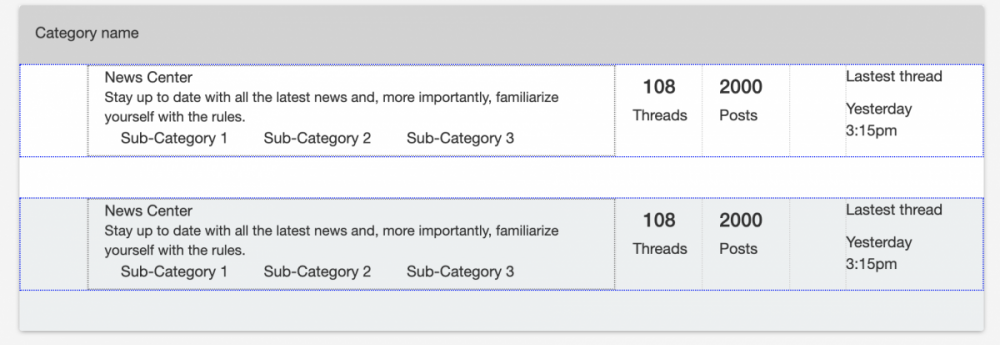
So I'm posting this in CSS because I think I'm having a CSS issue. Basically, I have this right now: I'm trying to vertically center the blue box and everything inside it. I've tried line-height, vertical-align, display: inline-block, position relative and absolute. The only way that works is if I do it manually with absolute or margin. But absolute isn't responsive so that's a problem. I'm using Bootstrap from the CDN if that matters. I'm only going to include code for the first box so that it doesn't get messy. HTML: <div class="container category-forums clearfix"> <div class="container category-forums-wrap"> <div class="container category-icon clearfix"></div> <div class="container forum-details-wrapper clearfix"> <div class="container forum-details-container"> <p class="forum-name">News Center</p> <p class="forum-desc">Stay up to date with all the latest news and, more importantly, familiarize yourself with the rules.</p> <div class="sub-forum-container container clearfix"> <p class="sub-forums clearfix">Sub-Category 1</p> <p class="sub-forums clearfix">Sub-Category 2</p> <p class="sub-forums clearfix">Sub-Category 3</p> </div> </div> </div> <div class="container forum-threads clearfix"> <h4>108</h4> <p>Threads</p> </div> <div class="container forum-posts clearfix"> <h4>2000</h4> <p>Posts</p> </div> <div class="container forum-latest-posts clearfix"> <div class="container last-avatar clearfix"></div> <p>Lastest thread</p> <p>Yesterday 3:15pm</p> </div> </div> </div> CSS: .category-forums { width: 100%; height: 41%; background-color: #ecf0f1; padding: 0; border-bottom-left-radius:.25rem!important; border-bottom-right-radius:.25rem!important; } .category-icon { width: 7%; height: 100%; border-right: 1px dotted lightgray; margin: 0; float: left; line-height: 100%; } .category-forums-wrap { height: 70%; width: 100%; border: 1px dotted blue; padding: 0; display: inline-block; vertical-align: middle; } .forum-details-wrapper { width: 55%; height: 100%; border-right: 1px dotted lightgray; margin: 0; float: left; padding: 0; } .forum-details-container { width: 100%; height: 100%; border: 1px dotted gray; margin: 0; } .forum-name { margin: 0; } .sub-forum-container { width: 100%; float: left; margin: 0; } .sub-forums { width: 31%; margin: 0; float: left; } .forum-desc { margin: 0; font-size: 1.3rem; } .forum-threads { width: 9%; height: 100%; border-right: 1px dotted lightgray; float: left; text-align: center; line-height: 100%; } .forum-posts { width: 9%; height: 100%; border-right: 1px dotted lightgray; float: left; line-height: 100%; } .forum-latest-posts { width: 20%; height: 100%; float: left; } .last-avatar { width: 25%; height: 100%; border-right: 1px dotted lightgray; float: left; text-align: center; line-height: 100%; } I'm having a tough time even centering the text vertically.
-
So I've done a search for pdf to html converters and there are plenty of free online options. The only problem is that they don't convert the pdf to html in an actual 8.5 x11 size, so that when you go to print or use them to be filled by code and then printed, they are to small. Now, some would say, simply resize the html file, but the issue there is when created it actually consists of two files. One an html file with absolute position values for all your text and the second as a jpeg for any backgrounds, frames or images. You can adjust the size of the background, borders and images, but then that would also mean you'd have to go line for line in the html to adjust the absolute positions of all the text. So my question would be, is there a converter that would create an html file in the actual 8.5 x 11 size that anyone knows of? And don't say, Acrobat, cause their conversion doesn't even come close to looking like the original document. Any insight on this matter would be greatly appreciated.
-
 I have a form that I decided to include Google recaptcha as an added measure of security. When I added the recaptcha it triggers an error because the recaptcha is not whitelisted. I read that HTML5 does not allow assigning the name attribute to div. i.e. <div name="myName"></div>. Against convention, I tried adding a name to the recaptcha div and adding that name to the whitelist. That approach failed. There is an iframe within the div that has the name attribute. I tried using the iframe name in the whitelist. That approach also failed. There is a hidden input that has an id="recaptcha-token". I added 'recaptcha-token' to the whitelist. This approach also failed. The hidden input is generated by the recaptcha api, so I don't think I have a means of assigning a name attribute to this input. Does anyone have a workaround or suggestion ? Note: form validation and whitelist all worked as expected prior to adding recaptcha. This is the div within the form. <div class="row"> <div class="col-md-12"> <div class="g-recaptcha" data-sitekey="<?php print $public_key;?>"></div> </div> </div> This is the code block using the whitelist. // VERIFY LEGITIMACY OF TOKEN if (verifyFormToken('form1')) { // Building a whitelist array with keys which will send through the form, no others would be accepted later on $whitelist = array('token','req-fName','req-lName','req-email','req-phone','req-address','req-city','req-state','req-zip','req-message','req_method','req-dateDepart','req-dateReturn','recaptcha-token','submit'); // Building an array with the $_POST-superglobal foreach ($_POST as $key=>$item) { // Check if the value $key (fieldname from $_POST) can be found in the whitelisting array, if not, die with a short message to the hacker if (!in_array($key, $whitelist)) { writeLog('Unknown form fields'); die('Hack-Attempt detected. Only the fields originally included in the form are allowed!'); } } } Thanks in advance for having a look at this.
 -
I'm having an issue related to creating forms within a foreach loop. As of now, I have 3 forms in a div, each with their own datepicker instance and submit button ( also using a hidden input for the pageID) The datepickers are unique and working independently, but when it comes to posting the data via ajax and handling it in a php script, It's not inserting data into my db because the names of my two inputs are not unique. I don't really know how to make them unique on the form and then handle those unique names back in the script. Only one form will be submitted at a time so I'm trying to make it to where the user can click on any of these datepickers, select a date and submit, and the ajax will handle only the page ID and the datepicker value for that form submitted and the PHP script will then insert. The sql in my php script works but my POST variables are where I'm having the issue here. Any help is much appreciated. <?php foreach($expiredPages as $expiredPage): ?> <form id="updateTime_<?php echo $expiredPage['id']?>" class="updateTime" method="POST"> <input type="hidden" name="currentPageID<?php echo $expiredPage['id']?>" value="<?php echo $expiredPage['id']?>"> <div class="datepick input-group date" id="datetimepicker_<?php echo $expiredPage['id']?>" data-target-input="nearest"> <input type="text" class="form-control datetimepicker-input" data-target="#datetimepicker_<?php echo $expiredPage['id']?>" name="datePicker<?php echo $expiredPage['id']?>" /> <span class="input-group-addon" data-target="#datetimepicker_<?php echo $expiredPage['id']?>" data-toggle="datetimepicker"> <span class="fa fa-calendar"></span> </span> </div> <input type="submit" name="Extend Date" class="extendDate"> </form> <?php endforeach; ?> <script type="text/javascript"> $(".extendDate").click(function(){ event.preventDefault(); var string = $('.updateTime').serialize(); console.log(string); // AJAX Code To Submit Form. $.ajax({ type: "POST", url: "extendTime.php", data: string, dataType: 'json', cache: false, success: function(response){ location.reload(); } }); }); </script> extendTime.php $pageID = $_POST['currentPageID']; $newTime = $_POST[$dtPick]; $newEndTime = DateTime::createFromFormat('m/d/Y h:i A', $newTime); $convertedDateTime = $newEndTime->format('Y-m-d H:i:s'); $extendExpiration = " UPDATE pages SET end_time = '$convertedDateTime' WHERE id = '$pageID'; "; if($mysqlConn->query($extendExpiration)=== TRUE){ echo "SUCCESS"; }else{ echo "Could not extend Time"; }
-
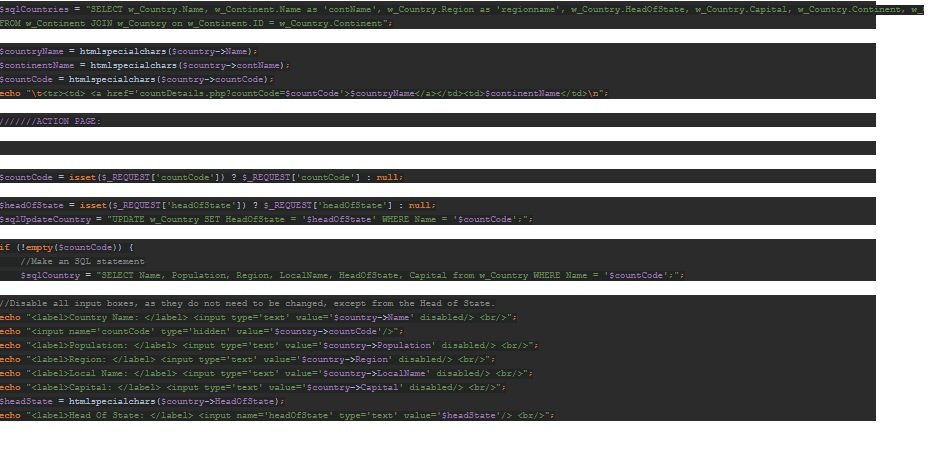
Hi all, I currently have a table listed, with one of the rows being hyperlinked and linking to an input form, should be autopopulated from the code (ID or other unique identifier) of the row, however, when clicking the link the form does not load. I will insert relevant code to this thread and if anyone would be able to shed some light on this that would be great. NOTE: SQL code has already been tested using PHPMyAdmin and works fine. Although, it may need changed to help with this issue - I'm not quite sure. Please see screenshots for relevant code.