Search the Community
Showing results for tags 'javascript'.
-
 I have a form allowing the user to enter students' attendance. The scenario is that the user selects the Academic Year, ASC center, and Date. The user selects the students, then selects their corresponding standard, and selects the attendance status as shown in the image below. I have applied a custom validation to the Standard field, where the validation errors should be displayed immediately if the validation logic fails. Everything works correctly as expected, but the validation errors are displayed only after the form is submitted and not immediately. Below is the action create public function actionCreate() { $model = new Attendancereport(); $modelsStudentattendance = [new Attendancereportdetails]; if (Yii::$app->request->isAjax && $model->load(Yii::$app->request->post())) { Yii::$app->response->format = Response::FORMAT_JSON; return ActiveForm::validate($model); } if ($model->load(Yii::$app->request->post())) { $identity = Yii::$app->user->identity->getonlyid(); $model->UserId = $identity; $modelsStudentattendance = Model::createMultiple(Attendancereportdetails::classname()); Model::loadMultiple($modelsStudentattendance, Yii::$app->request->post()); $valid = $model->validate(); $valid = Model::validateMultiple($modelsStudentattendance) && $valid; if($valid) { $transaction = \Yii::$app->db->beginTransaction(); try { if ($flag = $model->save()) { foreach ($modelsStudentattendance as $modelsStudentattendance) { $modelsStudentattendance->AttendanceReportId = $model->AttendanceReportId; if (! ($flag = $modelsStudentattendance->save())) { $transaction->rollBack(); break; } } } if ($flag) { $transaction->commit(); return $this->redirect(['view', 'id' => $model->AttendanceReportId]); } } catch (Exception $e) { $transaction->rollBack(); } } } return $this->render('create', [ 'model' => $model, 'modelsStudentattendance' => (empty($modelsStudentattendance)) ? [new Attendancereportdetails] : $modelsStudentattendance, ]); } Below is the form <?php use yii\helpers\Html; use yii\bootstrap\ActiveForm; use yii\jui\DatePicker; use wbraganca\dynamicform\DynamicFormWidget; use app\models\Ascassignment; use app\models\Asccenter; use app\models\Academicyear; use kartik\time\TimePicker; use yii\helpers\ArrayHelper; use app\models\Student; ?> <script> $(document).ready(function() { $(".i").each(function(k,v){ $(".i").attr("disabled","true"); }); }); $(document).ready(function(){ //When the user clicks on the plus button $(".dynamicform_studentattendance").on("afterInsert", function(e, item) { const $i = $(item).find('.i'); //Populates all the student drop-down with the student names belonging to the ASC center $.post("index.php?r=student/student-lists&id="+$("select#attendancereport-ascid").val(),function(data){ $i.html(data); }); }); $(".dynamicform_studentattendance").on("afterInsert", function(e, item) { //const $s = $(item).find('.s'); var e = $(this); //Populates the Standard drop-down for selected student $.post("index.php?r=attendancereport/standard&aid="+$("select#attendancereport-academicyearid").val()+"&ascid="+$("select#attendancereport-ascid").val()+"&sid="+e.val(),function(data){ e.closest("tr").find(".s").html(data); }); }); }); </script> <div class="attendancereport-form"> <?php $form = ActiveForm::begin([ 'id' => 'dynamic-form', 'enableAjaxValidation' => true, 'enableClientValidation' => true, 'validateOnChange' => true, 'validateOnBlur' => true, 'options' => ['class' => 'disable-submit-buttons'], ]);?> <div class="panel panel-primary " > <div class="panel panel-heading"><font size="3"><b>Student Attendance Report</b></font></div> <div class="row"> <div class="col-sm-4"> <?= $form->field($model, 'AcademicYearId')->dropDownList(ArrayHelper::map(Academicyear::find()->where(['DisplayStatus'=>'Enabled'])->all(),'Id','academicyear'), ['prompt' => 'Select Academic Year','onChange'=>' var e = $(this); $.post("index.php?r=attendancereport/standard&aid=' . '"+$("select#attendancereport-academicyearid").val()+"&ascid=' . '"+$("select#attendancereport-ascid").val()+"&sid=' . '"+e.val(),function(data){ e.closest("tr").find(".s").html(data); }); '])?> </div> <div class="col-sm-4"> <?= $form->field($model, 'ASCId')->dropDownList(ArrayHelper::map(Asccenter::find()->leftJoin('ascassignment','`ascassignment`.`ASCId`=`asccenter`.`ASCId`')->where(['ascassignment.UserId' => \Yii::$app->user->identity->getonlyid()])->all(),'ASCId','ASCName'), ['prompt' => 'Select ASC Center','class'=>'form-control ascid','onChange' => ' $.post("index.php?r=student/student-lists&id=' . '"+$("select#attendancereport-ascid").val(),function(data){ $(".i").each(function(k,v) { $(".i").attr("disabled",false); $(".i").html(data); } ); }); var e = $(this); $.post("index.php?r=attendancereport/standard&aid=' . '"+$("select#attendancereport-academicyearid").val()+"&ascid=' . '"+$("select#attendancereport-ascid").val()+"&sid=' . '"+e.val(),function(data){ $(".s option:not(:first-child)").remove(); e.closest("tr").find(".s").html(data); }); ' ]) ?> </div> <div class="col-sm-4"> <?= $form->field($model, 'DateofReport')->widget(DatePicker::classname(), [ //'language' => 'ru', 'dateFormat' => 'yyyy-MM-dd', 'options' => ['class' => 'form-control picker','readOnly'=>'readOnly'], 'clientOptions'=>['changeMonth'=>false, 'changeYear'=>false, 'maxDate'=>'today', 'stepMonths'=> false, ], ]) ?> </div> </div> </div> <div class="panel panel-primary"> <div class="panel-heading"><font size="3"><b>Student Attendance Details</b></font></div> <?php DynamicFormWidget::begin([ 'widgetContainer' => 'dynamicform_studentattendance', 'widgetBody' => '.container-studentattendance', 'widgetItem' => '.studentattendance-item', 'limit' =>500, 'min' => 1, 'insertButton' => '.add-studentattendance', 'deleteButton' => '.remove-studentattendance', 'model' => $modelsStudentattendance[0], 'formId' => 'dynamic-form', 'formFields' => [ 'StudentId', 'Standard', 'AttendanceStatus', ], ]); ?> <table class="table table-bordered"> <thead> <tr bgcolor='#B8B8B8'> <th style='border: 1px solid black;'></th> <th class ="text-center" style='border: 1px solid black;'>Student</th> <th class ="text-center" style='border: 1px solid black;'>Standard</th> <th class ="text-center" style='border: 1px solid black;'>Attendance Status</th> <th class="text-center" style='border: 1px solid black;'>Action</th> </tr> </thead> <tbody class="container-studentattendance"> <?php foreach ($modelsStudentattendance as $indexStudent => $modelStudentattendance): ?> <tr class="studentattendance-item"> <td class="vcenter" style='border: 1px solid black;'> <?php // necessary for update action. if (! $modelStudentattendance->isNewRecord) { echo Html::activeHiddenInput($modelStudentattendance, "[{$indexStudent}]AttendanceReportDetailsId"); } ?> </td> <td style='border: 1px solid black;'> <?= $form->field($modelStudentattendance, "[{$indexStudent}]StudentId")->label(false)->dropDownList(ArrayHelper::map(Student::find()->all(),'StudentId','StudentName'), ['prompt' => 'Select Student','class'=>'form-control i','onChange'=>' var e = $(this); $.post("index.php?r=attendancereport/standard&aid=' . '"+$("select#attendancereport-academicyearid").val()+"&ascid=' . '"+$("select#attendancereport-ascid").val()+"&sid=' . '"+e.val(),function(data){ e.closest("tr").find(".s").html(data); }); ']) ?> </td> <td style='border: 1px solid black;'> <?= $form->field($modelStudentattendance, "[{$indexStudent}]Standard")->label(false)->dropDownList([], [ 'prompt' => 'Select Standard', 'class' => 'form-control s', ]) ?> </td> <td style='border: 1px solid black;'> <?= $form->field($modelStudentattendance, "[{$indexStudent}]AttendanceStatus")->label(false)->dropDownList(['Present'=>'Present', 'Absent' => 'Absent'], ['prompt'=>'Select Attendance Status'])?> </td> <td class="text-center vcenter" style='border: 1px solid black;'> <button type="button" class="add-studentattendance btn btn-success btn-xs"><span class="fa fa-plus"></span></button> <button type="button" class="remove-studentattendance btn btn-danger btn-xs"><span class="fa fa-minus"></span></button> </td> </tr> <?php endforeach; ?> </tbody> </table> <?php DynamicFormWidget::end(); ?> </div> <div class="form-group"> <?= Html::submitButton($model->isNewRecord ? 'Create' : 'Update', ['class' => $model->isNewRecord ? 'btn btn-success' : 'btn btn-primary']) ?> <?= Html::resetButton('Reset',['class' => 'btn btn-default'])?> </div> <?php ActiveForm::end(); ?> </div>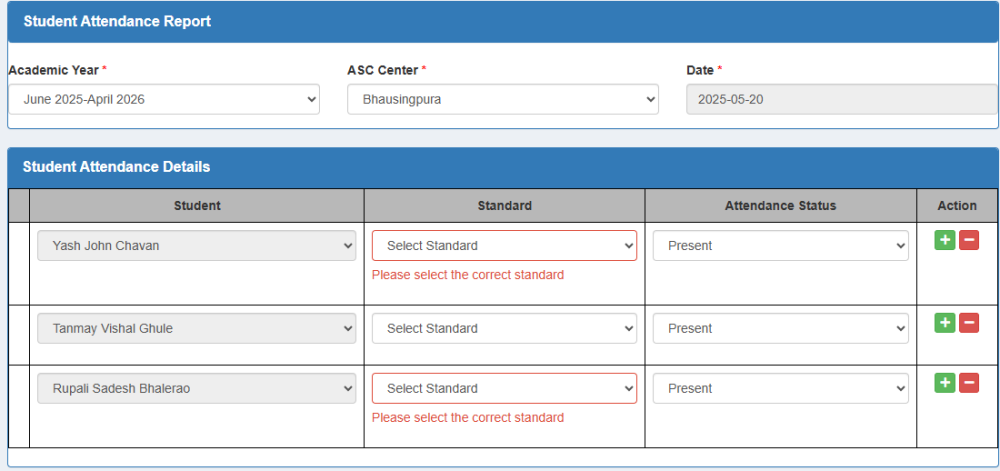
-
I have a form allowing the user to enter students' attendance as shown in the image. The scenario is that the user selects the ASC center. Upon choosing the ASC center, students belonging to that ASC center get populated in the Student drop-down. When the user selects Student, the student's standard should be displayed. I have a function called Standard that checks if the student's attendance record exists for the given academic year, ASC center, and student. If a record exists, then the standard of the student gets returned as shown below public function actionStandard($aid,$ascid,$sid) { $count = \Yii::$app->db->createCommand("SELECT COUNT(*) from attendancereportdetails,attendancereport where attendancereportdetails.AttendanceReportId=attendancereport.AttendanceReportId and attendancereport.AcademicYearId=:ayear and attendancereport.ASCId=:acenter and attendancereportdetails.StudentId=:student and attendancereportdetails.Standard!=''")->bindValues([':ayear'=>$aid,':acenter'=>$ascid,':student'=>$sid])->queryAll(); $count_result; foreach($count as $count_records) { $count_result = $count_records['COUNT(*)']; } $records = \Yii::$app->db->createCommand("SELECT * from attendancereportdetails,attendancereport where attendancereportdetails.AttendanceReportId=attendancereport.AttendanceReportId and attendancereport.AcademicYearId=:ayear and attendancereport.ASCId=:acenter and attendancereportdetails.StudentId=:student and attendancereportdetails.Standard!=''")->bindValues([':ayear'=>$aid,':acenter'=>$ascid,':student'=>$sid])->queryAll(); if ($count_result > 0) { echo "<option value>Select Standard</option>"; foreach ($records as $record) { ob_start(); if($record['Standard']==0) echo "<option value=" . $record['Standard'] . ">" . 'Nursery' . "</option>"; if($record['Standard']==1) echo "<option value=" . $record['Standard'] . ">" . '1st'. "</option>"; if($record['Standard']==2) echo "<option value=" . $record['Standard'] . ">" . '2nd'. "</option>"; if($record['Standard']==3) echo "<option value=" . $record['Standard'] . ">" . '3rd'. "</option>"; if($record['Standard']==4) echo "<option value=" . $record['Standard'] . ">" . '4th'. "</option>"; if($record['Standard']==5) echo "<option value=" . $record['Standard'] . ">" . '5th'. "</option>"; if($record['Standard']==6) echo "<option value=" . $record['Standard'] . ">" . '6th'. "</option>"; if($record['Standard']==7) echo "<option value=" . $record['Standard'] . ">" . '7th'. "</option>"; if($record['Standard']==8) echo "<option value=" . $record['Standard'] . ">" . '8th'. "</option>"; if($record['Standard']==9) echo "<option value=" . $record['Standard'] . ">" . '9th'. "</option>"; if($record['Standard']==10) echo "<option value=" . $record['Standard'] . ">" . '10th'. "</option>"; } } else { echo "<option value=''selected disabled>Select Standard</option>"; echo "<option value=0>Nursery</option>"; echo "<option value=1>1st</option>"; echo "<option value=2>2nd</option>"; echo "<option value=3>3rd</option>"; echo "<option value=4>4th</option>"; echo "<option value=5>5th</option>"; echo "<option value=6>6th</option>"; echo "<option value=7>7th</option>"; echo "<option value=8>8th</option>"; echo "<option value=9>9th</option>"; echo "<option value=10>10th</option>"; } } Below is the image of the form. The problem occurring here is that the first student selected, his standard, is only getting populated in all other students' standards, as shown below. The requirement is that for each different student, their standard should only get populated in their corresponding Standard drop-down. Below is the form <?php use yii\helpers\Html; use yii\bootstrap\ActiveForm; use yii\jui\DatePicker; use wbraganca\dynamicform\DynamicFormWidget; use app\models\Ascassignment; use app\models\Asccenter; use app\models\Academicyear; use kartik\time\TimePicker; use yii\helpers\ArrayHelper; use app\models\Student; ?> <script> $(document).ready(function() { $(".i").each(function(k,v){ $(".i").attr("disabled","true"); }); }); $(document).ready(function(){ //When the user clicks on plus button $(".dynamicform_studentattendance").on("afterInsert", function(e, item) { const $i = $(item).find('.i'); //Populates student names belonging to the selected ASC center $.post("index.php?r=student/student-lists&id="+$("select#attendancereport-ascid").val(),function(data){ $i.html(data); }); }); $(".dynamicform_studentattendance").on("afterInsert", function(e, item) { const $s = $(item).find('.s'); //Populates standard for the selected student $.post("index.php?r=attendancereport/standard&aid="+$("select#attendancereport-academicyearid").val()+"&ascid="+$("select#attendancereport-ascid").val()+"&sid="+$(".s").val(),function(data){ $s.html(data); }); }); }); </script> <div class="attendancereport-form"> <?php $form = ActiveForm::begin(['id' => 'dynamic-form', 'options' => ['class' => 'disable-submit-buttons'], ]);?> <div class="panel panel-primary " > <div class="panel panel-heading"><font size="3"><b>Student Attendance Report</b></font></div> <div class="row"> <div class="col-sm-4"> <?= $form->field($model, 'AcademicYearId')->dropDownList(ArrayHelper::map(Academicyear::find()->where(['DisplayStatus'=>'Enabled'])->all(),'Id','academicyear'), ['prompt' => 'Select Academic Year'])?> </div> <div class="col-sm-4"> <?= $form->field($model, 'ASCId')->dropDownList(ArrayHelper::map(Asccenter::find()->leftJoin('ascassignment','`ascassignment`.`ASCId`=`asccenter`.`ASCId`')->where(['ascassignment.UserId' => \Yii::$app->user->identity->getonlyid()])->all(),'ASCId','ASCName'), ['prompt' => 'Select ASC Center','class'=>'form-control ascid','onChange' => ' $.post("index.php?r=student/student-lists&id=' . '"+$(this).val(),function(data){ $(".i").each(function(k,v) { $(".i").attr("disabled",false); $(".i").html(data); // Populates the Student control having class .i with the data from the StudentList function } ); }); ' ]) ?> </div> <div class="col-sm-4"> <?= $form->field($model, 'DateofReport')->widget(DatePicker::classname(), [ //'language' => 'ru', 'dateFormat' => 'yyyy-MM-dd', 'options' => ['class' => 'form-control picker','readOnly'=>'readOnly'], 'clientOptions'=>['changeMonth'=>false, 'changeYear'=>false, 'maxDate'=>'today', 'stepMonths'=> false, ], ]) ?> </div> </div> </div> <div class="panel panel-primary"> <div class="panel-heading"><font size="3"><b>Student Attendance Details</b></font></div> <?php DynamicFormWidget::begin([ 'widgetContainer' => 'dynamicform_studentattendance', 'widgetBody' => '.container-studentattendance', 'widgetItem' => '.studentattendance-item', 'limit' =>500, 'min' => 1, 'insertButton' => '.add-studentattendance', 'deleteButton' => '.remove-studentattendance', 'model' => $modelsStudentattendance[0], 'formId' => 'dynamic-form', 'formFields' => [ 'StudentId', 'Standard', 'AttendanceStatus', ], ]); ?> <table class="table table-bordered"> <thead> <tr bgcolor='#B8B8B8'> <th style='border: 1px solid black;'></th> <th class ="text-center" style='border: 1px solid black;'>Student</th> <th class ="text-center" style='border: 1px solid black;'>Standard</th> <th class ="text-center" style='border: 1px solid black;'>Attendance Status</th> <th class="text-center" style='border: 1px solid black;'>Action</th> </tr> </thead> <tbody class="container-studentattendance"> <?php foreach ($modelsStudentattendance as $indexStudent => $modelStudentattendance): ?> <tr class="studentattendance-item"> <td class="vcenter" style='border: 1px solid black;'> <?php // necessary for update action. if (! $modelStudentattendance->isNewRecord) { echo Html::activeHiddenInput($modelStudentattendance, "[{$indexStudent}]AttendanceReportDetailsId"); } ?> </td> <td style='border: 1px solid black;'> <?= $form->field($modelStudentattendance, "[{$indexStudent}]StudentId")->label(false)->dropDownList(ArrayHelper::map(Student::find()->all(),'StudentId','StudentName'), ['prompt' => 'Select Student','class'=>'form-control i','onChange'=>' $.post("index.php?r=attendancereport/standard&aid=' . '"+$("select#attendancereport-academicyearid").val()+"&ascid=' . '"+$("select#attendancereport-ascid").val()+"&sid=' . '"+$(".i").val(),function(data){ $(".s").each(function(k,v) { $(".s").html(data); //Populates the Standard drop-down having class .s with the data from the Standard function } ); }); ']) ?> </td> <td style='border: 1px solid black;'> <?= $form->field($modelStudentattendance, "[{$indexStudent}]Standard")->label(false)->dropDownList([], ['prompt'=>'Select Standard','class'=>'form-control s']) ?> </td> <td style='border: 1px solid black;'> <?= $form->field($modelStudentattendance, "[{$indexStudent}]AttendanceStatus")->label(false)->dropDownList(['Present'=>'Present', 'Absent' => 'Absent'], ['prompt'=>'Select Attendance Status'])?> </td> <td class="text-center vcenter" style='border: 1px solid black;'> <button type="button" class="add-studentattendance btn btn-success btn-xs"><span class="fa fa-plus"></span></button> <button type="button" class="remove-studentattendance btn btn-danger btn-xs"><span class="fa fa-minus"></span></button> </td> </tr> <?php endforeach; ?> </tbody> </table> <?php DynamicFormWidget::end(); ?> </div> <div class="form-group"> <?= Html::submitButton($model->isNewRecord ? 'Create' : 'Update', ['class' => $model->isNewRecord ? 'btn btn-success' : 'btn btn-primary']) ?> <?= Html::resetButton('Reset',['class' => 'btn btn-default'])?> </div> <?php ActiveForm::end(); ?> </div>

-
Hi guys, I have this issue. It works fine in another piece of php code as in where I ban a user, it will show sweetalert to confirm and when I click unban this user, it will ask me in a nice sweetalert if I am sure. When I click Yes, the user ban gets lifted and then disaster strikes. It shows a normal js alert with html code inside. Here is the code that is used to lift the ban: <?php include_once('config.php'); // Function to unban a user function unbanUser($userId) { global $conn; // Prepare the SQL statement securely $stmt = $conn->prepare("UPDATE users SET status = ? WHERE user_id = ?"); $status = 'Active'; $stmt->bind_param("si", $status, $userId); // Execute the statement and handle the result if ($stmt->execute()) { echo '<script>Swal.fire("Success", "User has been unbanned.", "success");</script>'; } else { echo '<script>Swal.fire("Error", "Error removing user ban: ' . htmlspecialchars($stmt->error) . '", "error");</script>'; } $stmt->close(); } // Check if the request is made via POST and validate user input if ($_SERVER['REQUEST_METHOD'] === 'POST' && isset($_POST['userId'])) { $userId = filter_input(INPUT_POST, 'userId', FILTER_VALIDATE_INT); if ($userId !== false) { unbanUser($userId); } else { echo '<script>Swal.fire("Invalid Input", "Invalid user ID.", "warning");</script>'; } } ?> Just confirming, I do have Sweetalert script included in the header (because it needs to be before any execution). <script src="https://cdn.jsdelivr.net/npm/sweetalert2@11"></script> If anyone can work this out I would appreciate it. Thank you
-
Please could you help.. I need to make this code allow me to use the showDiv function multiple times on the page.. <script type="text/javascript"> function showDiv() { document.getElementById('welcomeDiv').style.display = "block"; } function hideDiv() { document.getElementById('welcomeDiv').style.display = "none"; } </script> <a name="answer" value="Show Div" onclick="showDiv()" >Show</a> <div id="welcomeDiv" style="display:none;" class="answer_list" > <h2>Hello</h2> <button onclick="hideDiv()" class="loginBut" style="font-family: 'Handjet', cursive; font-size: 2EM;">Close</button> </div> Thanks. It seems I need to add an index variable to the function. Don't know how though.. I'm new to JS.
-
I am using Yii 2 framework and I have a search form with input fields and 2 submit buttons Search and Export. When the user clicks on Search button then index action should execute and when user clicks on Export button then export action should execute. Now even if user clicks on Export button export action is not executed. Below is the search form <?php use yii\helpers\Html; use yii\widgets\ActiveForm; use yii\helpers\ArrayHelper; use app\models\Asccenter; use app\models\Ascuser; ?> <?php $form = ActiveForm::begin([ 'method' => 'get', 'id'=>'form1' ]); ?> <?= $form->field($model, 'ASCId')->dropDownList()?> <?php //Input field 1?> <?= $form->field($model, 'UserId')?> <?php // Input field 2?> <?= $form->field($model, 'Year')?> <?php // Input field 3?> <div class="form-group"> <?php // Search button. When user clicks on Search button then index action should execute ?> <?= Html::submitButton('Search' ,['class' => 'btn btn-primary','id'=>'searchbutton','name'=>'search1','value'=>'search2']) ?> <?php //Reset button to clear the form inputs?> <?= Html::a('Reset',['index'], ['class' => 'btn btn-default']) ?> <?php // Export button. When user clicks on Export button, then export action should execute?> <?= Html::submitButton('Export', ['class' => 'btn btn-default','id'=>'exportbutton','name'>'search1','value'=>'export1']) ?> </div> <?php ActiveForm::end(); ?> Below is the Controller <?php namespace app\controllers; use Yii; use app\models\Ascteacherreport; use app\models\AscteacherreportSearch; use yii\helpers\ArrayHelper; class AscteacherreportController extends Controller { public function actionIndex() { // When user clicks on Search button then this action should execute $searchModel = new AscteacherreportSearch(); if (!Yii::$app->user->can('indexAll')) { $searchModel->UserId = Yii::$app->user->identity->getonlyid(); } $dataProvider = $searchModel->search(Yii::$app->request->queryParams); $query= Ascteacherreport::find(); $count=$query->count(); $pagination= new Pagination(['defaultPageSize' => 5, 'totalCount' => $count]); $training = $query->offset($pagination->offset)->limit($pagination->limit)->all(); return $this->render('index', [ 'searchModel' => $searchModel, 'dataProvider' => $dataProvider, 'pagination' => $pagination, ]); } public function actionExport() { // When user clicks on Export button of the form then form parameters will be loaded and this action should execute. } }
-
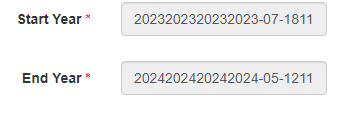
I am using jui datepicker. I have a table which has columns StartYear and EndYear set to varchar data type. I need to store the Start Year in the format of Month Year for example Start Year : Jan 2023 End Year : Jan 2024 I have configured the jui date picker to show only Month and Year. Data is getting correctly saved in the table in create action, but on the update form the same data is not fetched correctly as shown in below image Below is the code _form.php <?php use yii\helpers\Html; use yii\bootstrap\ActiveForm; use yii\jui\DatePicker; use yii\helpers\ArrayHelper; ?> <style type="text/css"> .ui-datepicker-calendar { display: none; } </style> <script> $(document).ready(function() { $('.picker').datepicker({ changeMonth: true, changeYear: true, dateFormat: 'MM yy', onClose: function() { var iMonth = $("#ui-datepicker-div .ui-datepicker-month :selected").val(); var iYear = $("#ui-datepicker-div .ui-datepicker-year :selected").val(); $(this).datepicker('setDate', new Date(iYear, iMonth, 1)); }, }); }); </script> <?php $form = ActiveForm::begin();?> <?= $form->field($model, 'StartYear')->widget(DatePicker::classname(), [ //'language' => 'ru', 'options' => ['class' => 'form-control picker','readOnly'=>'readOnly'], 'clientOptions'=>['changeMonth'=>true, 'changeYear'=>true, 'dateFormat' => 'MM yy', 'readOnly'=>true] ]) ?> <?= $form->field($model, 'EndYear')->widget(DatePicker::classname(), [ //'language' => 'ru', 'options' => ['class' => 'form-control picker','readOnly'=>'readOnly'], 'clientOptions'=>['changeMonth'=>true, 'changeYear'=>true, 'dateFormat' => 'MM yy', 'readOnly'=>true] ]) ?> <?= Html::submitButton($model->isNewRecord ? 'Create' : 'Update', ['class' => $model->isNewRecord ? 'btn btn-success' : 'btn btn-primary']) ?> <?php ActiveForm::end(); ?>
-
 I am trying to develop an PHP MySQL database application where edit details is not working.I am new to PHP and doing this with the help of various web resources such as youtube videos, tutorials, similar programs etc .I am able to fetch the data from the database, but when it comes to edit, the data remains the same even after changing.Can anyone suggest the solution of this problem. manage-profile.php <?php session_start(); require('connection.php'); //If your session isn't valid, it returns you to the login screen for protection if(empty($_SESSION['sl_no'])){ header("location:access-denied.php"); } //retrive student details from the student table $result=mysqli_query($con, "SELECT * FROM student WHERE sl_no = '$_SESSION[sl_no]'"); if (mysqli_num_rows($result)<1){ $result = null; } $row = mysqli_fetch_array($result); if($row) { // get data from db $stdId = $row['sl_no']; $stdRoll = $row['roll_no']; $stdName = $row['name']; $stdClass = $row['class']; $stdSex= $row['sex']; } ?> <?php // updating sql query if (isset($_POST['update'])){ $myId = addslashes( $_GET[$id]); $myRoll = addslashes( $_POST['roll_no'] ); $myName = addslashes( $_POST['name'] ); $myClass = addslashes( $_POST['class'] ); $myGender = $_POST['sex']; $sql = mysqli_query($con,"UPDATE student SET roll_no='$myRoll', name='$myName', class='$myClass', sex='$myGender' WHERE sl_no = '$myId'" ); // redirect back to profile header("Location: manage-profile.php"); } ?> <!DOCTYPE html PUBLIC "-//W3C//DTD XHTML 1.0 Transitional//EN" "http://www.w3.org/TR/xhtml1/DTD/xhtml1-transitional.dtd"> <html xmlns="http://www.w3.org/1999/xhtml"> <head> <meta http-equiv="Content-Type" content="text/html; charset=iso-8859-1" /> <title>Student Profile Management</title> <link href="css/student_styles.css" rel="stylesheet" type="text/css" /> <script language="JavaScript" src="js/user.js"> </script> </head> <body bgcolor="#e6e6e6"> <center><b><font color = "black" size="6">Online Voting System</font></b></center><br><br> <div id="page"> <div id="header"> <h2>Manage Profile</h2> <a href="student.php">Home</a> | <a href="vote.php">Current Polls</a> | <a href="manage-profile.php">Manage My Profile</a> | <a href="changepassword.php">Change Password</a>| <a href="logout.php">Logout</a> </div> <div id="container"> <table border="0" width="620" align="center"> <CAPTION><h3>Update Profile</h3></CAPTION> <form action="manage-profile.php?$id=<?php echo $_SESSION['sl_no']; ?>" method="post" onsubmit="return updateProfile(this)"> <table align="center"> <tr><td>Roll Number:</td><td><input type="text" style="background-color:#e8daef; font-weight:regular;" name="roll_no" maxlength="50" value="<?php echo $row["roll_no"]; ?>"></td></tr> <tr><td>Name:</td><td><input type="text" style="background-color:#e8daef; font-weight:regular;" name="Name" maxlength="30" value="<?php echo $row["name"]; ?>"></td></tr> <tr><td>Class:</td><td><select name='sclass' style='background-color:#e8daef; font-weight:regular;' maxlength='10' id='class' required='true'> <option value='HS-1st Year' <?php if($row["class"]=='HS-1st Year') { echo "selected"; } ?> >HS-1st Year</option> <option value='HS-2nd Year' <?php if($row["class"]=='HS-2nd Year') { echo "selected"; } ?> >HS-2nd Year</option> <option value='BA-1st Sem' <?php if($row["class"]=='BA-1st Sem') { echo "selected"; } ?> >BA-1st Sem</option> <option value='BA-3rd Sem' <?php if($row["class"]=='BA-3rd Sem') { echo "selected"; } ?> >BA-3rd Sem</option> <option value='BA-5th Sem' <?php if($row["class"]=='BA-5th Sem') { echo "selected"; } ?> >BA-5th Sem</option> <option value='BCom-1st Sem' <?php if($row["class"]=='BCom-1st Sem') { echo "selected"; } ?> >BCom-1st Sem</option> <option value='BCom-3rd Sem' <?php if($row["class"]=='BCom-3rd Sem') { echo "selected"; } ?> >BCom-3rd Sem</option> <option value='BCom-5th Sem' <?php if($row["class"]=='BCom-5th Sem') { echo "selected"; } ?> >BCom-5th Sem</option> </select> </td></tr> <tr><td>Sex:</td><td> <input type='radio' style='background-color:#e8daef; font-weight:regular;' name='gender' id='male' value='Male' <?php if($row["sex"]=='Male') { echo "checked"; } ?> >Male<br> <input type='radio' style='background-color:#e8daef; font-weight:regular;' name='gender' id='female' value='Female' <?php if($row["sex"]=='Female') { echo "checked"; } ?> >Female<br></td></tr> <tr><td> </td></tr><tr><td><input type="submit" name="update" value="Update Profile"></td></tr> </table> </form> </div> <div id="footer"> <div class="bottom_addr">Student Union Election,Anonymous College</div> </div> </body> </html>
 -
hey basically my code is something like taxi meter but with time i have made functions that calculates money by minute whenever it reaches a minute the money will add by far i made a confirm button which when i click on it i want to send money and time values to data base how ever i had no errors in all my codes but still the values don't want to be sent to my db help me <form id ="data" method ="post" > <h2 id ="done"></h2> <div class="jumbotron jumbotron-single d-flex align-items-center" style="background-image: url(img/billard.jpg)"> <div class="col-md-3 col-sm-10 text-center mt-2"> <div class="shadow rounded feature-item align-items-center p-2 mb-2" data-aos="fade-up"> <div class="my-4"> <i class="lnr lnr-cog fs-40"></i> </div> <h4>Post 1 </h4> <div id="timer"> <span id="hours">00:</span> <span id="mins">00:</span> <span id="seconds">00</span> <br><span id="money">0TND</span> </div> <div id="controls"> <button id="start">Start</button> <button id="stop">Stop</button> <button id="reset">Reset</button> <button id="confirm" >confirm</button><br> <button id="tarifA">TarifA</button> <button id="tarifB">TarifB</button> <button id="tarifC">TarifC</button> </div> <p>Post de PS5</p> </div> </form> $('#confirm').click(function(e) { e.preventDefault(); clearTimeout(timex); $.ajax({ method: "post", url : "collect.php", data: $('#data').serialize(), datatype: "text", success : function (response){ $('#done').html('done'),1000;} })}); <?php if (isset($_POST['money'])) { sleep(4); $servername='localhost'; $username='root'; $password=''; $dbname = "khalil"; $conn=mysqli_connect($servername,$username,$password,"$dbname"); if($conn){print_r("connected ");} $money=$_POST['money']; $hours=$_POST['hours']; $mins=$_POST['mins']; $seconds=$_POST['seconds']; $sql = "INSERT INTO `history` (`prix`,`time1`,`date1`) VALUES (`$money`,`mins`,`wassim`)"; // insert in database $rs = mysqli_query($conn, $sql); if($rs) { $success= "done"; } } ?>
-
I'm currently trying to building a websocket widget, using node package manager(NPM),WAMPserver and electronjs. the package was well installed because when i start it it works. It log into the console But i dont know how i can handle with html. it seems electronjs is not working fow wamp and websocket
-
I have this code. The players works and scales to the left side 0-23 but online scales to left side 0-23 instead of right side 0-1. What am I doing wrong? //arrays used in javascript //$labelsdb = array('2018-12-20 00:11', '2018-12-20 00:37', '2018-12-20 00:43', '2018-12-20 03:15', '2018-12-20 03:42', '2018-12-20 03:56', '2018-12-20 04:17', '2018-12-20 04:33', '2018-12-20 07:23', '2018-12-20 10:00', '2018-12-20 12:23', '2018-12-20 14:00', '2018-12-20 18:42', '2018-12-20 19:17', '2018-12-20 23:53'); //$datadb = array(2,12,2,7,23,5,8,2,0,4,0,8,1,0,3); //$datadon = array(1,0,1,1,1,1,1,0,1,1,0,1,1,0,1); //$datadoff = array(0,1,0,0,0,0,0,1,0,0,1,0,0,1,0); var labelsdb = <?php echo json_encode($labelsdb); ?>; //array from database for dates and times var datadb = <?php echo json_encode($datadb); ?>; // array from database for number of players var datadon = <?php echo json_encode($datadon); ?>; // array from database for number of players var datadoff = <?php echo json_encode($datadoff); ?>; // array from database for number of players var todays_date = "20Dec2018"; // todays date //var ctx = document.getElementById("myChart").getContext('2d'); // points to canvas var ctx = document.getElementById("myChart"); // points to canvas ctx.style.backgroundColor = "#2F3136"; //canvas background color var myChart = new Chart(ctx, { type: 'line', data: { labels: labelsdb, //data from database for dates and times datasets: [{ backgroundColor: '#593A45', // color for active players bars in graph label: 'Players', // label for legend yAxisId: 'y-axis-players', data: datadb, //data from database for number of players borderWidth: 1, // border for active players bars in graph borderColor: '#F45E7F', steppedLine: true, //true keeps even line horizontal until change, false displays curved line }, { yAxisId: 'y-axis-online', backgroundColor: '#E5E5E5', // color for active players bars in graph label: 'Online', // label for legend data: datadon, //data from database for number of players borderWidth: 1, // border for active players bars in graph borderColor: '#CECECE', steppedLine: true, //true keeps even line horizontal until change, false displays curved line },] }, options: { responsive: true, //wheteher graph is responsive when zoom in or out maintainAspectRatio: false, legend: { labels: { fontColor: '#FFFFFF' // color of legend label } }, scales: { xAxes: [{ scaleLabel: { display: true, //labelString: updated, //displays date at very bottom of graph fontColor: '#FFFFFF', fontStyle: 'bold', fontSize: 14, }, ticks: { autoSkip: false, maxTicksLimit: 24, maxRotation: 45, //rotate text for hours at bottom of graph minRotation: 45, //rotate text for hours at bottom of graph fontColor: '#FFFFFF', // color of hours at bottom of graph major: { enabled: true, // <-- This is the key line fontStyle: 'bold', //You can also style these values differently fontSize: 14 //You can also style these values differently } }, type: 'time', //to show time at bottom of graph time: { unit: 'hour', displayFormats: { hour: 'hA', //example displays 9AM or 6PM stepSize: 1 //1 for each hour to display at bottom of graph, 2 to show every 2 hrs. } }, display: true, gridLines: { display: true, // display vertical gridline color: '#686868', //color of vertical gridlines zeroLineColor: '#686868' //colors first vertical grid line } }], yAxes: [{ scaleLabel: { display: true, //display label at left vertical side of graph labelString: 'Players', //text to be displayed at left vertical side of graph fontColor: '#FFFFFF', fontStyle: 'bold', fontSize: 14, position: 'left', id: 'y-axis-players', }, ticks: { fontColor: '#FFFFFF', // color of numbers at left side of graph for number of players stepSize: 1 // 1 is to display 0, 1, 2, 3 or 2 will display 0, 2, 4, 6 }, gridLines: { display: true, //display horizontal gridlines color: "#686868" //color of horizontal gridlines } },{ scaleLabel: { display: true, labelString: 'Online', fontColor: '#E5E5E5', fontStyle: 'bold', fontSize: 14 }, position: 'right', id: 'y-axis-online', //type: 'linear', ticks: { min: 0, beginAtZero: true, stepSize: 1, max: 1, fontColor: '#E5E5E5', fontStyle: 'bold', fontSize: 14 }, ticks: { fontColor: '#FFFFFF', // color of numbers at right side of graph for online stepSize: 1 }, gridLines: { display: true, //display horizontal gridlines color: "#686868" //color of horizontal gridlines } }], } } });
-
Hi all, I am hopeless with Javascript etc but want to do updates, add, delete etc via a Bootstrap Modal. Everything works fine except for Update. No errors etc, just nothing happens. Here is the JS for the Update: $(document).on('click','.update',function(e) { var id=$(this).attr("data-id"); var name=$(this).attr("data-name"); var email=$(this).attr("data-email"); var phone=$(this).attr("data-phone"); var address=$(this).attr("data-address"); $('#id_u').val(id); $('#name_u').val(name); $('#email_u').val(email); $('#phone_u').val(phone); $('#address_u').val(address); }); $(document).on('click','#update',function(e) { var data = $("#update_form").serialize(); $.ajax({ data: data, type: "post", url: "includes/functions.php", success: function(dataResult){ var dataResult = JSON.parse(dataResult); if(dataResult.statusCode==200){ $('#editDriverModal').modal('hide'); alert('Data updated successfully !'); location.reload(); } else if(dataResult.statusCode==201){ alert(dataResult); } } }); }); Here is the php for the Update: if(count($_POST)>0){ if($_POST['type']==2){ $id=$_POST['id']; $name=mysqli_real_escape_string($con, $_POST['name']); $email=$_POST['email']; $phone=$_POST['phone']; $address=$_POST['address']; $query = "UPDATE `drivers` SET `name`='$name',`email`='$email',`phone`='$phone',`address`='$address' WHERE id=$id"; if (mysqli_query($con, $query)) { echo json_encode(array("statusCode"=>200)); } else { echo "Error: " . $query . "<br>" . mysqli_error($con); } mysqli_close($con); } } And finally the Bootstrap form: <!-- Edit Modal HTML --> <div id="editDriverModal" class="modal fade"> <div class="modal-dialog"> <div class="modal-content"> <form id="update_form"> <div class="modal-header"> <h4 class="modal-title">Edit User</h4> <button type="button" class="close" data-dismiss="modal" aria-hidden="true">×</button> </div> <div class="modal-body"> <input type="hidden" id="id_u" name="id" class="form-control" required> <div class="form-group"> <label>Name</label> <input type="text" id="name_u" name="name" class="form-control" required> </div> <div class="form-group"> <label>Email</label> <input type="email" id="email_u" name="email" class="form-control" required> </div> <div class="form-group"> <label>PHONE</label> <input type="phone" id="phone_u" name="phone" class="form-control" required> </div> <div class="form-group"> <label>Address</label> <input type="city" id="address_u" name="address" class="form-control" required> </div> </div> <div class="modal-footer"> <input type="hidden" value="2" name="type"> <input type="button" class="btn btn-default" data-dismiss="modal" value="Cancel"> <button type="button" class="btn btn-info" id="update">Update</button> </div> </form> </div> </div> </div> Data displays fine inside the Modal so it is communicating with the Database. But just when I click on Update nothing happens. Any help or guidance would really be appreciated. Thanks in advance...
-
I've been working on JSON and have found a way to send variables from the PHP to the JavaScript using AJAX and no JQuery. For an ecommerce site does it make more sense to send the variables : description, title, cost, etc. to the JavaScript page, or would it make more sense to echo the html on the PHP page? The idea, right now, is a product page for editing and deleting product. Thanks, Josh
-
Hi, new to this forum and got an issue here: I am getting a console error of a syntax error from the browser (chrome) console: var dataString='lookupId='+<?php echo $_GET['lookupId']; ?>; //Uncaught SyntaxError: Unexpected token ; var dataPlusLookID = dataString+lookId; var country_dest_id=""; $.ajax({ type : 'GET', url : 'https://www.example.co.uk/files/viator/ajax_statelist_left.php', data : dataString, dataType : 'json', success : function(data) { $("#currency_code").val(data.currency_code); $("#country_name").val(data.country_name_without_design); $("#country_dest_id").val(data.country_dest_id); country_dest_id=data.country_dest_id; } }); function searchadventurelist(path){ location.href=path+'&country_dest_id='+country_dest_id+'&lookupId=<?php echo $lookupId;?>'; } Appreciate the help
-
Hello! I'm new here, and this is my first post. Let's say I have a list of four links I want to display on a page using php, call them 1 2 3 and 4. Now, when link 2 is visited, or any of the links, the destination url opens in a new window, a cookie is set onclick and the page reloads, and the visited link goes to the bottom of my list, and the new the new order is: 1 3 4 2. php function to read cookie and calculate the new order here echo '<ul> <li> <a href="https://current-page" onClick="window.open(\'http://page-1\'); setCookie(\''.$cookie_name.'\', \'1\', '.$cookie_expires_time.');">Link One</a> </li> <li> <a href="https://current-page" onClick="window.open(\'http://page-2\'); setCookie(\''.$cookie_name.'\', \'2\', '.$cookie_expires_time.');">Link Two</a> </li> <li> <a href="https://current-page" onClick="window.open(\'http://page-3\'); setCookie(\''.$cookie_name.'\', \'3\', '.$cookie_expires_time.');">Link Three</a> </li> <li> <a href="https://current-page" onClick="window.open(\'http://page-4\'); setCookie(\''.$cookie_name.'\', \'4\', '.$cookie_expires_time.');">Link Four</a> </li> </ul>'; echo 'some javascript function to enable set cookie on click'; Any help is much appreciated. Thanks.
-
Hello all, I have a website with a form that I want a user to fill out then if it is valid I have the button submit and I want it to email me. The message. If success full I want a message to popup on screen saying success I am using bootstrap 4 <div class="messageSuccess"></div> <div class="row"> <div class="col-md-9 mb-md-0 mb-5"> <form id="contact-form" name="contact-form" action="" method="post"> <!--action="contactEmail.php" --> <div class="row "> <div class="col-md-6 "> <div class="md-form mb-0 "> <input class="form-control" type="text" id="txtName" name="txtName" required /> <label for="txtName">Your Name </label> <div class="nameError"></div> </div> </div> <div class="col-md-6 "> <div class="md-form mb-0 "> <input class="form-control" type="text" id="txtEmail" name="txtEmail" required /> <label id="lblEmail" for="txtEmail">Your Email Address </label> </div> </div> </div> <div class="row"> <div class="col-md-12"> <div class="md-form mb-0"> <input class="form-control" type="text" id="txtSubject" name="txtSubject" data-error="Subject Here" required /> <label for="txtSubject">Subject </label> <div class="help-block with-errors"></div> </div> </div> </div> <div class="row"> <div class="col-md-12"> <div class="md-form"> <textarea class="form-control" type="text" id="txtMessage" name="txtMessage" rows="4" required data-error="Please leave us a message."></textarea> <label for="txtMessage">Your Message </label> </div> </div> </div> <div class="text-center text-md-left"> <input type="submit" id="BtnFormSubmit" class="btn btn-primary btn-xl text-white" value="Send Message" /> </div> <div class="status"></div> </form> <!-- JavaScript Inner File Form Validation --> <script type="text/javascript"> $(document).ready(function () { var form = $("#contact-form"); var name = $("#txtName").val(); var email = $("#txtEmail").val(); var subject = $("#txtSubject").val(); var message = $("#txtMessage").val(); var btnSubmit = $("BtnFormSubmit"); $(form).submit(function (event) { if (this.checkValidity() == false) { $(this).addClass("was-validated"); event.preventDefault(); event.stopPropagation(); } alert("Form Valid to create message"); if (!event.isDefaultPrevented) { alert("passed prevent default"); var url = "testemail.php"; // POST values 'ajax' $.ajax({ type: "POST", url: url, data: $(this).serialize(), success: function (data) { // done: // data = JSON object object for contactEmail.php // recieve message type: success | danger var messageAlert = "alert- " + data.type; var messageText = data.message; // Bootstrap alert box HTML var alertBox = '<div class="alert ' + messageAlert + ' alert-dismissable"><button type="button" class="close" ' + 'data-dismiss="alert" aria-hidden="true">×</button>' + messageText + '</div>'; // if messageAlert and messageText if (messageAlert && messageText) { // Put message on page in messageSuccess section. $(form).find("#messageSuccess").html(alertBox); // Reset the form. $(form)[0].reset(); } } }); //return false; } }); //$(name).blur(function () { //}) // Validate :inputs $(":input").blur(function () { let controlType = this.type; switch (controlType) { case "text": case "password": case "textarea": validateText($(this)); break; case "email": validateEmail($(this)); break; default: break; } }); // each :input focusin remove existing validation messages if any. $(":input").click(function () { $(this).removeClass("is-valid is-invalid"); }) /* OPTIONAL ':input' KEYDOWN validation messages remove */ // Reset Form and remove all validation messages. $(":reset").click(function () { $(":input").removeClass("is-valid is-invalid"); $(form).removeClass("was-validated"); }); }); // Validate Text Function function validateText(control) { let textField = control.val(); if (textField.length > 1) { $(control).addClass("is-valid"); } else { $(control).addClass("is-invalid"); } } // Validate Email Function (Email newer regex: /^([\w-\.]+@([\w-]+\.)+[\w-]{2,6})?$/ ) function validateEmail(control) { let textField = control.val(); let regexPattern = /^\b[A-Z0-9._%-]+@[A-Z0-9.-]+\.[A-Z]{2,6}\b$/i; if (regexPattern.test(textField)) { $(control).addClass("is-valid"); } else { $(control).addClass("is-invalid"); } } </script> <?php $from = '[email protected]'; $sendTo = '[email protected]'; $subject = 'Your Message Subject Here';// Email Message Contact Form Fields // Array - ($varName => Text from controls) $controls = array('txtName' => 'Name', 'txtEmail' => 'Email', 'txtSubjext' => 'Subject', 'txtMessage' => 'Message'); $successMessage = 'Contact Message Successfully Sent. Thank you, I will get back to you soon.'; $errorMessage = 'There was an error submitting your message, Please try again. Or try later.'; error_reporting(E_ALL & ~E_NOTICE); try { if(count($_POST) == 0) throw new \Exception('Contact Form Message is empty'); $emailText = "You have a new message from your contact form\n------------------------------------------------------\n"; foreach($_POST as $key => $value) { if(isset($controls[$key])) { $emailText .= "$controls[$key]: $value\n"; } } $headers = array('Content-Type: text/plain; charset="UTF-8";', 'From: ' . $from, 'Reply-To: ' . $from, 'Return-Path: ' . $from, ); // Send email mail($sendTo, $subject, $emailText, implode("\n", $headers)); $responseArray = array('type' => 'success', 'message' => $successMessage); } catch(\Exception $e) { $responseArray = array('type' => 'danger', 'message' => $errorMessage); } // If AJAX request return JSON response **RARE** if(!empty($_SERVER['HTTP_X_REQUESTED_WITH']) && strtolower($_SERVER['HTTP_X_REQUESTED_WITH']) == 'xmlhttprequest') { $encodedJSON = json_encode($responseArray); header('Content-Type: application/json'); echo $encodedJSON; } else { echo $responseArray['message']; } ?>
-
Hi everyone, I want to know, will Javascript's onclick on button work in PHP while loop? I mean, If I out "onclick" with function inside html tag, then put html inside echo under while loop. Will JavaScript's onclick work? Like this script below: $i = 0; while( $i < 5) { echo "<button id='btn' onclick='test()'>Hello</button>"; $i++; } This loop will create 4 times loop with same echo with onclick, so will onclick call Javascript programming?
-
In general if I know how to do something I want to do I can code it in a language I'm less than fluent in, if I am fluent in a language I can figure out how to code something I want to do but don't know very well how to do it, but this time I have almost no clue how to do what I want to do and very limited fluency in JS. I want a script that will slowly fade from one color (red, green, blue, white, black) to a neutral color (grey) and then fade into one of the randomly selected other 4 colors. Then repeat. Forever. So like Rd>gy>wt>bu>gy>bk etc. I have no clue what to do, if you can help I will be grateful for all time. Oh, and I need to make sure the text color is always contrasting so it can be read, so I need to adjust that too?
-
I am working with the code from this: https://codepen.io/adventuresinmissions/pen/nrhHF I have made my own slight changes, but I am having a problem. I am getting data from a mysql table. If the page has more than one element (or row) from the table shown it will pop up the popup for each - if hitting "No" or "Cancel". I just want it to show one pop up and go away. Not go to the next pop up/row. Hope that makes sense. The Code I am Using on the Page: ECHO<<<END <script> jQuery(document).ready(function($){ //open popup $('.cd-popup-trigger$count').on('click', function(event){ event.preventDefault(); $('.cd-popup').addClass('is-visible'); }); //close popup $('.cd-popup').on('click', function(event){ if( $(event.currentTarget).is('.cd-popup-close') || $(event.currentTarget).is('.cd-popup') ) { event.preventDefault(); $(this).removeClass('is-visible'); } }); //close popup when clicking the esc keyboard button $(document).keyup(function(event){ if(event.which=='27'){ $('.cd-popup').removeClass('is-visible'); } }); }); </script> <style> .img-replace { /* replace text with an image */ display: inline-block; overflow: hidden; text-indent: 100%; color: transparent; white-space: nowrap; } .cd-popup { position: fixed; left: 0; top: 0; height: 100%; width: 100%; background-color: rgba(94, 110, 141, 0.9); opacity: 0; visibility: hidden; -webkit-transition: opacity 0.3s 0s, visibility 0s 0.3s; -moz-transition: opacity 0.3s 0s, visibility 0s 0.3s; transition: opacity 0.3s 0s, visibility 0s 0.3s; } .cd-popup.is-visible { opacity: 1; visibility: visible; -webkit-transition: opacity 0.3s 0s, visibility 0s 0s; -moz-transition: opacity 0.3s 0s, visibility 0s 0s; transition: opacity 0.3s 0s, visibility 0s 0s; } .cd-popup.show_button { opacity: 1; visibility: visible; -webkit-transition: opacity 0.3s 0s, visibility 0s 0s; -moz-transition: opacity 0.3s 0s, visibility 0s 0s; transition: opacity 0.3s 0s, visibility 0s 0s; display: block; height: 60px; line-height: 60px; text-transform: uppercase; color: #FFF; -webkit-transition: background-color 0.2s; -moz-transition: background-color 0.2s; transition: background-color 0.2s; } .cd-popup-container { position: relative; width: 90%; max-width: 400px; margin: 4em auto; background: #FFF; border-radius: .25em .25em .4em .4em; text-align: center; box-shadow: 0 0 20px rgba(0, 0, 0, 0.2); -webkit-transform: translateY(-40px); -moz-transform: translateY(-40px); -ms-transform: translateY(-40px); -o-transform: translateY(-40px); transform: translateY(-40px); /* Force Hardware Acceleration in WebKit */ -webkit-backface-visibility: hidden; -webkit-transition-property: -webkit-transform; -moz-transition-property: -moz-transform; transition-property: transform; -webkit-transition-duration: 0.3s; -moz-transition-duration: 0.3s; transition-duration: 0.3s; } .cd-popup-container p { padding: 3em 1em; } .cd-popup-container .cd-buttons:after { content: ""; display: table; clear: both; } .cd-popup-container .cd-buttons li { float: left; width: 50%; list-style: none; } .cd-popup-container .cd-buttons a { display: block; height: 60px; line-height: 60px; text-transform: uppercase; color: #FFF; -webkit-transition: background-color 0.2s; -moz-transition: background-color 0.2s; transition: background-color 0.2s; } .cd-popup-container .cd-buttons li:first-child a { background: #fc7169; border-radius: 0 0 0 .25em; } .no-touch .cd-popup-container .cd-buttons li:first-child a:hover { background-color: #fc8982; } .cd-popup-container .cd-buttons li:last-child a { background: #b6bece; border-radius: 0 0 .25em 0; } .no-touch .cd-popup-container .cd-buttons li:last-child a:hover { background-color: #c5ccd8; } .cd-popup-container .cd-popup-close { position: absolute; top: 8px; right: 8px; width: 30px; height: 30px; } .cd-popup-container .cd-popup-close::before, .cd-popup-container .cd-popup-close::after { content: ''; position: absolute; top: 12px; width: 14px; height: 3px; background-color: #8f9cb5; } .cd-popup-container .cd-popup-close::before { -webkit-transform: rotate(45deg); -moz-transform: rotate(45deg); -ms-transform: rotate(45deg); -o-transform: rotate(45deg); transform: rotate(45deg); left: 8px; } .cd-popup-container .cd-popup-close::after { -webkit-transform: rotate(-45deg); -moz-transform: rotate(-45deg); -ms-transform: rotate(-45deg); -o-transform: rotate(-45deg); transform: rotate(-45deg); right: 8px; } .is-visible .cd-popup-container { -webkit-transform: translateY(0); -moz-transform: translateY(0); -ms-transform: translateY(0); -o-transform: translateY(0); transform: translateY(0); } @media only screen and (min-width: 1170px) { .cd-popup-container { margin: 8em auto; } } </style> END; $stmt = $mysqli->prepare("SELECT state_name FROM states WHERE state_code = ?"); $stmt->bind_param('s', $state_code); $stmt->execute(); $stmt->store_result(); $stmt->bind_result($state_name); $stmt->fetch(); $stmt->close(); $stmt2 = $mysqli->prepare("SELECT toll, crime_rate, traffic, population, city, state_code, latitude, longitude, last_updated FROM states_cities WHERE `zip` = ?"); $stmt2->bind_param('i', $zip); $stmt2->execute(); $stmt2->store_result(); $stmt2->bind_result($toll, $crime_rate, $traffic, $population, $city, $state, $lat_to, $lon_to, $last_updated); $stmt2->fetch(); $stmt2->close(); echo "<h1>$city, <a href=\"state_details.php?state=$state_code\">$state_name</a></h1>"; if ($rank >= 10) { $stmt3 = $mysqli->prepare("SELECT latitude, longitude FROM states_cities WHERE zip = ?"); $stmt3->bind_param('i', $user_zip); $stmt3->execute(); $stmt3->store_result(); $stmt3->bind_result($lat_from, $lon_from); $stmt3->fetch(); $stmt3->close(); $travel_time = get_distance($lat_to, $lat_from, $lon_to, $lon_from); echo "Distance: $travel_time[distance] | Travel Time: $travel_time[time]"; } else { $travel_time = ""; } if($rank == 20) { if ((!empty($toll))) { //Add form to EDIT FORM city information } else { //Add form to ADD FORM city information to site } } if ($rank >= 18) { echo "<center><a href=\"attractions/index.php?state=$state_code\">Add Attraction</a> | <a href=\"stores/index.php?state=$state_code\">Add Store</a></center>"; } $stmt = $mysqli->prepare("SELECT name, price, free, parking_fee, discount, hours_daily, hours_weekend, address, city, zip, attract_id FROM states_attractions WHERE (city = ? OR zip = ?) AND `state` = ?"); $stmt->bind_param('sis', $city, $zip, $state_code); $stmt->execute(); $stmt->store_result(); $num_attracts = $stmt->num_rows; $stmt->bind_result($name, $price, $free, $parking_fee, $discount, $hours_daily, $hours_weekend, $address, $city, $zip, $attract_id); if ($num_attracts >= 1) { echo "<h2>Attractions</h2>"; //$count = 0; while ($stmt->fetch()) { //$count++; if ((!empty($parking_fee)) || ($parking_fee != "0.00")) { $total = $price + $parking_fee; $show_fee = " + $$parking_fee ($$total)"; } else { $show_fee = ""; } if ($rank >= 18) { $show_admin = " | <a href=\"attractions/edit.php?id=$attract_id\">EDIT</a> | <a href=\"\" class=\"cd-popup-trigger\"><font color=\"red\">DELETE</font></a>"; echo " <div class=\"cd-popup\" role=\"alert\"> <div class=\"cd-popup-container\"> <p>Are you sure you want to delete this attraction?</p> <ul class=\"cd-buttons\"> <li><a href=\"attractions/delete.php?id=$attract_id\">Yes</a></li> <li><a href=\"#0\" class=\"cd-popup-close\">No</a></li> </ul> <a href=\"#0\" class=\"cd-popup-close img-replace\">Close</a> </div> <!-- cd-popup-container --> </div> <!-- cd-popup -->"; } else { $show_admin = ""; } if ($rank >= 10) { $show_user = " | <a href=\"addtotrip.php?id=$attract_id\">ADD TO TRIP</a>"; } else { $show_user = ""; } if (!empty($discount)) {$show_discount = " Discount: $discount";} else {$show_discount = "";} if ($free == "yes") {$final_price = "FREE";} else {$final_price = "$$price";} $url_address = urlencode($address); $url_city = urlencode($city); echo "<div class=\"link_desc\">$name<sub>$final_price$show_fee $show_discount | Daily Hours: $hours_daily | Weekend Hours: $hours_weekend | <a href=\"http://maps.google.com/maps?q=$url_address,+$url_city,+$zip\" target=\"_blank\">$address, $city, $zip</a>$show_user$show_admin</sub></div>"; } } $stmt->close();
-
Hosting is Godaddy, share. I have a form textarea that creates a huge amount of data (pasted images via the ckeditor). A post with that much data will fail with 413 Request Entity Too Large. (It works until the data exceeds 1MB) If these were files, Godaddy can be configured to accept large ones. This is not a file. (I just wondered if you can create a file from this and process it that way.) Has anyone ever split up the data from a text area, sent multiple posts, and then reconstructed the multiple post outputs (left as files) at the server? Seems way too complicated to get data to Godaddy. If there is an example somewhere, I'd like to see it. Interesting aside. Godaddy spent a while on this problem until the agent contacted the 'big' guns. Seems this spec, posting limits, may be guarded information. Anyway, they wouldn't share it. Thank you.
-
 Hi all, The following code was working fine up until 1 hour ago and now fails to execute the PHP function call or anything within isset($_POST The JavaScript works successfully but I had to change the order in which form onsubmit and form action were called. As I said, I was getting the echo message back from the function until 1 hour ago. Here is the code. At the start of my page with the form: <?php session_start(); require_once 'class.user.php'; $user_home = new USER(); if(!$user_home->is_logged_in()) { $user_home->redirect('signin.php'); } $stmt = $user_home->runQuery("SELECT * FROM user WHERE id=:uid"); $stmt->execute(array(":uid"=>$_SESSION['userSession'])); $row = $stmt->fetch(PDO::FETCH_ASSOC); // print_r($row['learner_type']); ?> The code to check if the submit button has been clicked <?php if(isset($_POST['save_profile_changes'])) { $user_home->save_user_profile(); ?> <div class='alert alert-success alert-dismissible'> <button class='close' data-dismiss='alert'>×</button> <strong>Profile Submitted Successfully</strong> </div> <?php } else { //Left blank so it doesn't fire on form first load } ?> and the form code <form id="user_profile" name="user_profile" class="form-signin" onsubmit="return validateUserInput()" method="post" action="#"> <h2 class="form-signin-heading">Update Profile</h2> <!--Username, Email. Unchangeable for now--> <div> <strong> <label><strong>Username: </strong></label> <?php echo $row['username']; ?> <br> <label><strong>Email: </strong></label> <?php echo $row['email']; ?> </strong> <br> <a href="change_pass.php" style="padding-top:10px; font-weight: bolder">Change Password</a> <br><br> </div> <!-- First, Last Name --> <div> <input id="first_name" name="first_name" type="text" placeholder="First Name" class="form-control" minlength="2" maxlength="15" pattern="[A-Za-z]{2,15}" title="Only letters allowed" required> <input id="last_name" name="last_name" type="text" placeholder="Last Name" class="form-control" minlength="2" maxlength="25" pattern="[A-Za-z]{2,25}" title="Only letters allowed" required> </div> <!-- File Button --> <div> <label for="upload_photo">Upload Photo</label> <input class = "form-control" id="upload_photo" name="upload_photo" type="file" accept="image/*"> </div> <!-- DOB input--> <br> <div> <label for="dob">Date of Birth</label> <input id="dob" name="dob" type="date" class="form-control" min="1935-12-31" max="2014-12-31"required> </div> <!-- Gender --> <br> <div> <label for="Gender">Gender</label><br> <label class="radio-inline" for="gender-0"> <input type="radio" name="gender" id="gender-0" value="male" required> Male </label> <label class="radio-inline" for="gender-1"> <input type="radio" name="gender" id="gender-1" value="female"> Female </label> <label class="radio-inline" for="gender-2"> <input type="radio" name="gender" id="gender-2" value="other"> Other </label> </div> <!-- Region --> <br> <div> <label for="country">Select Your Country</label> <script type="text/javascript" src="assets/countries.js"></script> <select id="country" name="country" class="form-control" required></select> <script language="javascript"> populateCountries("country"); </script> </div> <!-- Occupation--> <br> <div> <label for="occupations">Select Your Occupation</label> <script type="text/javascript" src="assets/occupations.js"></script> <select id="occupations" name="occupations" class="form-control" required></select> <script language="javascript"> populateOccupations("occupations"); </script> </div> <!-- Primary Instructor Language --> <br> <div> <label for="languages">Primary Language of Instruction</label> <script type="text/javascript" src="assets/languages.js"></script> <select id="languages" name="languages" class="form-control" required></select> <script language="javascript"> populateLanguages("languages"); </script> </div> <!-- Bio --> <br> <div> <label for="bio">Bio (max 200 words)</label> <textarea class="form-control" rows="10" id="bio" name="bio" placeholder="Say a little about yourself." maxlength="200"> </textarea> </div> <!--Submission Buttons--> <hr> <div> <button class="btn btn-primary btn-common font18" type="submit" name="save_profile_changes">Save Changes</button> <a href="home.php" style="float:right; padding-top:10px;">Go Back Home</a> </div> </form> Thanks for any help you can provide.
 -
I have a table With 28 Rows & 18 Columns and I want every column header to be sortable When you click it and sort the column numerically Except for the first column which is the name column which I want to sort alphabetically. I am using a template off W3.CSS So I'm using there W3.CSS Javascript code to sort tables but I can't seem to get it to work. I will include my table code and the code that I tried to use to sort the table. Any help would be appreciated. Here is my html code <!DOCTYPE html> <html lang="en-us"> <head> <title>W3.CSS</title> <meta name="viewport" content="width=device-width, initial-scale=1"> <link rel="stylesheet" href="styles.css"> <script type="text/javascript" src="naddymyscript.js"></script> </head> <body> <div class="w3-container"> <hr> <div class="w3-center"> <h2>Individual Stats 2016-2017</h2> </div> <div class="w3-responsive w3-card-4"> <table class="w3-table w3-striped w3-bordered" id="otcindividualstatsTable"> <thead> <tr class="w3-theme"> <th onclick="sortTable">Name</th> <th onclick="sortTable">Grade</th> <th onclick="sortTable">Wins</th> <th onclick="sortTable">Losses</th> <th onclick="sortTable">Win %</th> <th onclick="sortTable">TD</th> <th onclick="sortTable">OP TD</th> <th onclick="sortTable">TD%</th> <th onclick="sortTable">3 Pt. NF</th> <th onclick="sortTable">2 Pt. NF</th> <th onclick="sortTable">Reversals</th> <th onclick="sortTable">Escapes</th> <th onclick="sortTable">OP Escapes</th> <th onclick="sortTable">Escape %</th> <th onclick="sortTable">Pen. Hm.</th> <th onclick="sortTable">Pen. Opp.</th> <th onclick="sortTable">Pins</th> <th onclick="sortTable">Team Pts.</th> </tr> </thead> <tbody> <tr class="w3-white"> <td>Laredo Bugbee</td> <td>9</td> <td>7</td> <td>14</td> <td>33.33333</td> <td>9</td> <td>24</td> <td>27.27273</td> <td>2</td> <td>0</td> <td>1</td> <td>6</td> <td>4</td> <td>60</td> <td>0</td> <td>0</td> <td>2</td> <td>39</td> </tr> <tr class="w3-gray"> <td>Ben Naddy</td> <td>11</td> <td>38</td> <td>4</td> <td>90.4762</td> <td>23</td> <td>6</td> <td>79.3103</td> <td>8</td> <td>4</td> <td>12</td> <td>10</td> <td>36</td> <td>21.7391</td> <td>1</td> <td>0</td> <td>21</td> <td>255</td> </tr> <tr class="w3-white"> <td>Marc Hendricks</td> <td>11</td> <td>28</td> <td>13</td> <td>68.2927</td> <td>96</td> <td>48</td> <td>66.6667</td> <td>13</td> <td>3</td> <td>7</td> <td>41</td> <td>88</td> <td>31.7829</td> <td>1</td> <td>2</td> <td>4</td> <td>133</td> </tr> <tr class="w3-gray"> <td>Nate Hart</td> <td>11</td> <td>38</td> <td>4</td> <td>90.4762</td> <td>75</td> <td>25</td> <td>75</td> <td>15</td> <td>7</td> <td>11</td> <td>30</td> <td>50</td> <td>37.5</td> <td>1</td> <td>0</td> <td>21</td> <td>239</td> </tr> <tr class="w3-white"> <td>Max Naddy</td> <td>10</td> <td>24</td> <td>16</td> <td>60</td> <td>87</td> <td>22</td> <td>79.8165</td> <td>11</td> <td>3</td> <td>5</td> <td>15</td> <td>62</td> <td>19.4805</td> <td>4</td> <td>1</td> <td>8</td> <td>135</td> </tr> <tr class="w3-gray"> <td>Zane Swanson</td> <td>9</td> <td>21</td> <td>15</td> <td>58.3333</td> <td>22</td> <td>31</td> <td>41.5094</td> <td>3</td> <td>8</td> <td>11</td> <td>16</td> <td>1</td> <td>94.1176</td> <td>0</td> <td>7</td> <td>6</td> <td>112</td> </tr> <tr class="w3-white"> <td>James Holen</td> <td>12</td> <td>15</td> <td>10</td> <td>60</td> <td>34</td> <td>21</td> <td>61.8182</td> <td>7</td> <td>1</td> <td>6</td> <td>21</td> <td>24</td> <td>46.6667</td> <td>2</td> <td>1</td> <td>3</td> <td>74</td> </tr> <tr class="w3-gray"> <td>Alex Erlandson</td> <td>11</td> <td>18</td> <td>13</td> <td>58.0645</td> <td>32</td> <td>33</td> <td>49.2308</td> <td>6</td> <td>3</td> <td>16</td> <td>20</td> <td>18</td> <td>52.6316</td> <td>0</td> <td>1</td> <td>7</td> <td>107</td> </tr> <tr class="w3-white"> <td>Noah Schleske</td> <td>9</td> <td>2</td> <td>2</td> <td>50</td> <td>3</td> <td>7</td> <td>30</td> <td>2</td> <td>0</td> <td>3</td> <td>3</td> <td>5</td> <td>37.5</td> <td>0</td> <td>0</td> <td>1</td> <td>9</td> </tr> <tr class="w3-gray"> <td>Jace Leabo</td> <td>11</td> <td>20</td> <td>23</td> <td>46.5116</td> <td>43</td> <td>41</td> <td>51.1905</td> <td>6</td> <td>4</td> <td>14</td> <td>32</td> <td>45</td> <td>41.5584</td> <td>2</td> <td>1</td> <td>4</td> <td>70</td> </tr> <tr class="w3-white"> <td>Wyatt Thorson</td> <td>9</td> <td>12</td> <td>22</td> <td>35.2941</td> <td>22</td> <td>46</td> <td>32.3529</td> <td>2</td> <td>4</td> <td>13</td> <td>7</td> <td>21</td> <td>25</td> <td>1</td> <td>1</td> <td>3</td> <td>53</td> </tr> <tr class="w3-gray"> <td>Nathan Stavas</td> <td>10</td> <td>2</td> <td>2</td> <td>50</td> <td>1</td> <td>3</td> <td>25</td> <td>0</td> <td>0</td> <td>1</td> <td>1</td> <td>3</td> <td>25</td> <td>0</td> <td>0</td> <td>2</td> <td>10</td> </tr> <tr class="w3-white"> <td>Ramon Lopez</td> <td>11</td> <td>17</td> <td>18</td> <td>48.5714</td> <td>34</td> <td>35</td> <td>49.2754</td> <td>5</td> <td>2</td> <td>3</td> <td>23</td> <td>23</td> <td>50</td> <td>0</td> <td>0</td> <td>10</td> <td>100</td> </tr> <tr class="w3-gray"> <td>Nick Haugen</td> <td>12</td> <td>19</td> <td>25</td> <td>43.1818</td> <td>27</td> <td>34</td> <td>44.2623</td> <td>2</td> <td>2</td> <td>10</td> <td>23</td> <td>16</td> <td>58.9744</td> <td>0</td> <td>1</td> <td>14</td> <td>95</td> </tr> <tr class="w3-white"> <td>RJ Ehlert</td> <td>11</td> <td>13</td> <td>11</td> <td>54.1667</td> <td>11</td> <td>5</td> <td>68.75</td> <td>0</td> <td>0</td> <td>5</td> <td>7</td> <td>6</td> <td>53.8462</td> <td>2</td> <td>0</td> <td>10</td> <td>81</td> </tr> <tr class="w3-gray"> <td>Ben Cole</td> <td>12</td> <td>0</td> <td>3</td> <td>0</td> <td>0</td> <td>5</td> <td>0</td> <td>0</td> <td>0</td> <td>0</td> <td>1</td> <td>1</td> <td>50</td> <td>0</td> <td>0</td> <td>1</td> <td>0</td> </tr> <tr class="w3-white"> <td>Michael Fielding</td> <td>11</td> <td>5</td> <td>14</td> <td>26.3158</td> <td>6</td> <td>21</td> <td>22.2222</td> <td>0</td> <td>0</td> <td>3</td> <td>7</td> <td>12</td> <td>36.8421</td> <td>0</td> <td>1</td> <td>0</td> <td>24</td> </tr> <tr class="w3-gray"> <td>Jacob Thompson</td> <td>12</td> <td>2</td> <td>5</td> <td>28.5714</td> <td>3</td> <td>9</td> <td>25</td> <td>3</td> <td>1</td> <td>1</td> <td>7</td> <td>2</td> <td>77.7778</td> <td>1</td> <td>0</td> <td>1</td> <td>16</td> </tr> <tr class="w3-white"> <td>Hunter Doll</td> <td>10</td> <td>6</td> <td>10</td> <td>37.5</td> <td>10</td> <td>17</td> <td>37.037</td> <td>2</td> <td>0</td> <td>6</td> <td>4</td> <td>11</td> <td>26.6667</td> <td>1</td> <td>0</td> <td>0</td> <td>21</td> </tr> <tr class="w3-gray"> <td>Christopher Kenyon</td> <td>12</td> <td>1</td> <td>2</td> <td>33.3333</td> <td>3</td> <td>3</td> <td>50</td> <td>0</td> <td>0</td> <td>2</td> <td>2</td> <td>3</td> <td>40</td> <td>1</td> <td>0</td> <td>1</td> <td>3</td> </tr> <tr class="w3-white"> <td>Jackson Boyum</td> <td>10</td> <td>0</td> <td>1</td> <td>0</td> <td>0</td> <td>3</td> <td>0</td> <td>0</td> <td>0</td> <td>0</td> <td>1</td> <td>3</td> <td>25</td> <td>0</td> <td>0</td> <td>0</td> <td>0</td> </tr> <tr class="w3-gray"> <td>Matt Hendricks</td> <td>9</td> <td>4</td> <td>7</td> <td>36.3636</td> <td>10</td> <td>11</td> <td>47.619</td> <td>2</td> <td>0</td> <td>1</td> <td>3</td> <td>9</td> <td>25</td> <td>2</td> <td>0</td> <td>2</td> <td>21</td> </tr> <tr class="w3-white"> <td>Kevin Tierney</td> <td>11</td> <td>7</td> <td>15</td> <td>31.8182</td> <td>5</td> <td>24</td> <td>17.2414</td> <td>5</td> <td>0</td> <td>3</td> <td>7</td> <td>2</td> <td>77.7778</td> <td>0</td> <td>0</td> <td>1</td> <td>36</td> </tr> <tr class="w3-gray"> <td>Cian Buehler</td> <td>8</td> <td>3</td> <td>6</td> <td>33.3333</td> <td>3</td> <td>5</td> <td>37.5</td> <td>2</td> <td>0</td> <td>4</td> <td>2</td> <td>2</td> <td>50</td> <td>0</td> <td>0</td> <td>5</td> <td>15</td> </tr> <tr class="w3-white"> <td>Hayden Hart</td> <td>9</td> <td>12</td> <td>10</td> <td>54.5455</td> <td>16</td> <td>13</td> <td>55.1724</td> <td>2</td> <td>1</td> <td>5</td> <td>14</td> <td>13</td> <td>51.8519</td> <td>4</td> <td>1</td> <td>2</td> <td>48</td> </tr> <tr class="w3-gray"> <td>Reed Leabo</td> <td>8</td> <td>1</td> <td>2</td> <td>33.3333</td> <td>1</td> <td>5</td> <td>16.6667</td> <td>0</td> <td>1</td> <td>0</td> <td>1</td> <td>2</td> <td>33.3333</td> <td>0</td> <td>0</td> <td>0</td> <td>6</td> </tr> <tr class="w3-white"> <td>Daniel Ukkelberg</td> <td>12</td> <td>1</td> <td>0</td> <td>100</td> <td>0</td> <td>0</td> <td>100</td> <td>0</td> <td>0</td> <td>0</td> <td>0</td> <td>0</td> <td>0</td> <td>0</td> <td>0</td> <td>0</td> <td>6</td> </tr> </tbody> </table> </div> </body> </html> </body> Here is my javascript code //Sort Table Numerically function sortTable() { var table, rows, switching, i, x, y, shouldSwitch; table = document.getElementById("otcindividualstatsTable"); switching = true; /*Make a loop that will continue until no switching has been done:*/ while (switching) { //start by saying: no switching is done: switching = false; rows = table.rows; /*Loop through all table rows (except the first, which contains table headers):*/ for (i = 1; i < (rows.length - 1); i++) { //start by saying there should be no switching: shouldSwitch = false; /*Get the two elements you want to compare, one from current row and one from the next:*/ x = rows[i].getElementsByTagName("TD")[0]; y = rows[i + 1].getElementsByTagName("TD")[0]; //check if the two rows should switch place: if (Number(x.innerHTML) > Number(y.innerHTML)) { //if so, mark as a switch and break the loop: shouldSwitch = true; break; } } if (shouldSwitch) { /*If a switch has been marked, make the switch and mark that a switch has been done:*/ rows[i].parentNode.insertBefore(rows[i + 1], rows[i]); switching = true; } } }
-
Hi I am using the javascript below to carry put an ajax call. $('#tokenfield') .on('tokenfield:createdtoken', function (e) { $.ajax({ url: 'processProduct.php?action=addTag', type: 'post', data: {tag:e.attrs.value ,photo:83}, }); }); .tokenfield({ autocomplete: { source: function (request, response) { jQuery.get("processProduct.php?action=getTags", { query: request.term }, function (data) { data = $.parseJSON(data); response(data); }); }, delay: 100 }, showAutocompleteOnFocus: true }); When the page loads I get the following error in the console yntaxError: expected expression, got '.' [Learn More] index.php:416 the unexpected '.' is the following line .tokenfield({ I am sure that the answer is really simple, but I can't figure it out at the moment, any hepp would be fantastic
-
I have an index.php file which includes my form and code to move the user's uploaded file to s3. My HTML form calls a js function sendEmails() which makes an AJAX request to another php script dbSystem() to validate the emails input and add it to a database. Everything is working except that the php code in my index.php file (at the very bottom) does not execute. It's supposed to execute when the user uploads a file and presses submit but it doesn't go into the if statement. I tried putting the $fileName = basename($_FILES["fileName"]["name"]) statement before the if statement but I get an undefined index error. I put my a comment in my code to show which if statement I am talking about. This is my HTML code in index.php: <form action="javascript:void(0)" method="POST" id="files" enctype="multipart/form-data"> <label class="col-md-4 col-form-label text-md-right">Select File: <span class="text-danger">*</span></label> <input type="file" id="userFile" name="fileName" style="cursor: pointer; max-width: 170px;" onchange="enableBtn()"> <label class="col-md-4 col-form-label text-md-right">Authorized Users: <span class="text-danger">*</span></label> <input placeholder="Enter e-mail(s) here..." id="req" autocomplete="off"/> <button id="submitBtn" name="submitBtn" class="<?php echo SUBMIT_BUTTON_STYLE; ?>" onclick="return sendEmails()" disabled>Submit</button> </form> This is my php code in index.php: <?php $conn = new mysqli($servername, $username, $password, $db); $sql = "SELECT sender_id, sender_email, receiver_emails, receiver_ids, file_name from filedrop_logs"; $result = mysqli_query($conn, $sql); if ($result) { echo "<div class='outputDiv'>"; echo "<table id='sharedOthers'>"; echo "<thead><tr class='headings'>"; echo "<th class='files'>Files</th>"; echo "<th class='users'>Users</th>"; echo "</tr></thead>"; while ($row = mysqli_fetch_assoc($result)) { $receiverEmails = $row['receiver_emails']; $fileName = $row['file_name']; echo "<tbody id='bodyOthers'>"; echo "<tr id='rowOthers'>"; echo "<td>$fileName<br>"; $objects = getListofObjects('FileDrop'); foreach ($objects as $object) { $file = $object['Key']; $splits = explode('/', $file); if (end($splits) !== '') { $presignedUrl = getPresignedUrlForPrivateFile($object['Key'], '+20 minutes'); $link = '<a href="'.$presignedUrl.'">Download</a>'; echo $link; } } echo " <a href=''>Delete</a></td>"; echo "<td>$receiverEmails</td>"; echo "</tr></tbody>"; } echo "</table></div>"; } ?> <?php //the if statement below doesn't execute if(isset($_SERVER['REQUEST_METHOD']) && $_SERVER['REQUEST_METHOD'] === 'POST' && isset($_FILES["fileName"])) { $fileName = basename($_FILES["fileName"]["name"]); $error = $_FILES["fileName"]["error"]; $tmpName = $_FILES["fileName"]["tmp_name"]; if (isset(fileName) && $fileName != '' && $tmpName != '' && sys_get_temp_dir()) { $separator = DIRECTORY_SEPARATOR; $newDir = sys_get_temp_dir() . $separator . "FileDrop" . microtime(true); if (!file_exists($newDir)) { mkdir($newDir, 0777, true); // creates temp FileDrop directory $tempFilePath = $newDir . $separator . $fileName; // creates temp file inside FileDrop directory if (move_uploaded_file($tmpName, $tempFilePath)) { // moves file to tmp folder $s3FileName = "FileDrop" . substr($newDir, 4) . $separator . $fileName; $result = putFileToS3($s3FileName, $tempFilePath, 'public-read'); deleteDir($newDir); } } } } ?> This is my js code in case you want to see it: function sendEmails() { var fileData = $('#userFile').prop('files')[0]; var formData = new FormData(); formData.append('tags', JSON.stringify(tags)); formData.append('fileName', fileData); $.ajax({ type: "POST", url: "../FileDrop/dbSystem.php", processData: false, contentType: false, data: formData, success: function(result) { result = JSON.parse(result); if (result.validity === "valid emails") { location.reload(); resetInputs(); //IMPORTANT $(".outputDiv").show(); } else { var tagsBrackets = result.emails.toString().replace(/[\[\]']+/g,''); var tagsQuotes = tagsBrackets.replace(/['"]+/g, ''); var tagsInvalid = tagsQuotes.replace(/,/g, ", "); $('#alertModal').modal({show:true}); document.getElementById('invalid').textContent = tagsInvalid; } } }); return false; } I've been stuck on this for so long, so I'd really appreciate the help!!
-
Hello Phreaks and Geeks, I hope the week has seen you all well and you're all gearing up for a great weekend. I've had to take up relearning of js and new learning of ajax recently and have a simple question I can't seem to resolve. Take this sample form here -> <form action="", method="post", onsubmit="return submitData(this)"> First Name: <br> <input type="text" name="firstname"> <br> Last Name: <br> <input type="text" name="lastname"> <br> Age: <br> <input type="text" name="age"> <br> <input type="submit" id="buttonOne" value="Submit"> </form> I've been passing the morning familiarizing myself with XMLHttpRequest() and FormData() classes and have the following super simple snippets function submitData(fdata) { var formData = new FormData(fdata); for (var pair of formData.entries()) { console.log( pair[0] + ' - ' + pair[1] ); } } AND var formData = new FormData(); formData.append('key_1', 'First value'); formData.append('key_2', 'Second value'); formData.append('key_3', 'Third value'); for (var pair of formData.entries()) { console.log( pair[0] + ' - ' + pair[1] ); } The bottom one, where I create the form data programatically displays the data in console properly. The top one where I try to pull the data from the form does not work. Could someone break down what is happening here and point out the errors in my thinking please. Thank you
-
I have two functions that execute an exe program (personal project for a minecraft back end.) Windows only. First one will execute the sending of commands (THIS ONE WORKS) /* check to see if admin is sending commands to terminal via web */ if(isset($_POST['command'])) { $content = $_POST['command']; writeMCCommandTxt($content); try { exec(SERVER_DIR.'mcCommand.exe',$output); } catch ( Exception $e ) { die ($e->getMessage()); } }// END COMMAND ENTRY This has been a head scratcher for most the week - any help or suggestions would be great!! thanks!! HTML <div id="commands"> <div id="command_input"> <form method="post" id="commandForm" action="index.php"> <label for="command" >Console Command:</label><br/> <input type="text" name="command" autofocuS/> <input type="submit" name="submit_command" value=" >> " /> <input type="button" value="Refresh page" onclick="location.reload(true);" /> </form> </div> </div> This is used to start the server // STARTING SERVER if(isset($_POST['startServerBtn'])){ try { exec(SERVER_DIR.'startServer.bat 2>&1' ,$output); } catch( Exception $e ) { die ($e->getMessage()); } } HTML <div id="server_control"> <ul> <li> <form action="index.php" method="post"> <input type="submit" value="START" id="startServerBtn" name="startServerBtn"/> </form> </li> </ul> </div> MCCOMMANDS.EXE will work from both browser(php) and file manager(tested) the STARTSERVER.EXE will NOT work from browser(php), but will work from file manager The function IS being accessed - debug is showing it going there, and it seems to be running Both exe's are in the same folder