Search the Community
Showing results for tags 'jquery'.
-
 I am using osclass Osclass v8.0.2 free classified. I am trying to implement load more i.e infinite scroll facility on homepage page. When user scrolls, listings should be loaded automatically to give users pleasant and engaging experiences. Below is my code: Got from plugin. That I want to directly insert in osclass script. For the learning purpose. I am trying it on my localhost. Please help to achieve this, any help is highly appreciated. Thanks. <?php $content_block = htmlspecialchars_decode(inf_param('#main')); $listings_parent_block = htmlspecialchars_decode(inf_param('#listing-card-list')); $pagination_block = htmlspecialchars_decode(inf_param('.paginate')); $pagination_next = htmlspecialchars_decode(inf_param('a.searchPaginationNext')); $loaded_listings_count = htmlspecialchars_decode(inf_param('loaded_listings_count')); $report_errors = htmlspecialchars_decode(inf_param('report_errors')); ?> <style> <?php echo $pagination_block; ?> {display:none!important;} .inf-loader {display:none;width:100%;padding:25px 5px;margin:20px 0;background:#eee;border-radius:6px;color:#777;font-size:16px;text-align:center;line-height:20px;} .inf-loader > div {display:inline-block;width:auto;position:relative;padding-left:44px;} .inf-loader img {position:absolute;display:inline-block;top:-6px;left:0;width:32px;height:32px;max-height:32px;max-width:32px;} .inf-loader span {display:inline-block;font-weight:bold;line-height:20px;font-size:14px;} <?php echo $content_block; ?>.loading .inf-loader {display:inline-block;} </style> <script async type="text/javascript"> $(document).ready(function() { var currentPag = 1; var isLoading = false; var pagUrl = ''; var newUrl = ''; var oldUrl = ''; // ADD LOADING BLOCK ABOVE PAGINATION var loadingBlock = '<div class="inf-loader"><div><img src="<?php echo osc_base_url(); ?>oc-content/plugins/infinite/img/loader.gif"/><span><?php echo osc_esc_js(__('Loading items...', 'infinite')); ?></span></div></div>'; $(window).scroll(function(e) { var scroll = $(window).scrollTop(); var threshold = $('<?php echo $content_block; ?>').position().top + $('<?php echo $content_block; ?>').innerHeight() - 100; var position = $(window).scrollTop() + $(window).innerHeight(); if($('<?php echo $pagination_next; ?>').length) { pagUrl = $('<?php echo $pagination_next; ?>').attr('href'); } else { pagUrl = ''; } //console.log(oldUrl + '--->' + pagUrl ); // loading block add above pagination now if(!$('<?php echo $content_block; ?>').find('.inf-loader').length) { $(loadingBlock).insertBefore($('<?php echo $pagination_block; ?>')); } if(!$('<?php echo $content_block; ?>').length || !$('<?php echo $listings_parent_block; ?>').length || !$('<?php echo $pagination_block; ?>').length || !$('<?php echo $pagination_next; ?>').length) { infCheckBlocks(); } else if(position > threshold && isLoading == false && pagUrl != oldUrl && pagUrl != '' && pagUrl != '#') { isLoading = true; $('<?php echo $content_block; ?>').addClass('loading'); $.ajax({ url: pagUrl, type: "GET", success: function(response){ var length = response.length; var data = $(response).contents().find('<?php echo $listings_parent_block ; ?>').html(); var pagBlock = $(response).contents().find('<?php echo $pagination_block; ?>'); var currItemCount = $(response).contents().find('<?php echo $loaded_listings_count; ?>').text(); oldUrl = pagUrl; $('<?php echo $pagination_block; ?>').html(pagBlock); $('<?php echo $listings_parent_block; ?>').append(data); if($('<?php echo $loaded_listings_count; ?>').length) { $('<?php echo $loaded_listings_count; ?>').text(currItemCount); } // lazy load if exists if(typeof $.fn.Lazy !== 'undefined') { $('<?php echo $listings_parent_block; ?>').find('img.lazy').Lazy({ appendScroll: window, scrollDirection: 'both', effect: 'fadeIn', effectTime: 300, afterLoad: function(element) { setTimeout(function() { element.css('transition', '0.2s'); }, 300); } }); } isLoading = false; currentPag = currentPag + 1; $('<?php echo $content_block; ?>').removeClass('loading'); }, error: function(response){ hasPag = false; $('<?php echo $content_block; ?>').removeClass('loading'); response = response.responseText; console.log(response); console.log(data); } }); } }); }); function infCheckBlocks() { <?php if($report_errors == 1) { ?> console.log('<?php echo osc_esc_js(__('Infinite scroll failed to load next items, check message bellow!', 'infinite')); ?>'); if(!$('<?php echo $content_block; ?>').length) { console.log('<?php echo osc_esc_js(sprintf(__('Content block does not exists, make sure selector is correct. Current selector: %s', 'infinite'), $content_block)); ?>'); } if(!$('<?php echo $listings_parent_block; ?>').length) { console.log('<?php echo osc_esc_js(sprintf(__('Listing parent block does not exists, make sure selector is correct. Current selector: %s', 'infinite'), $content_block)); ?>'); } if(!$('<?php echo $pagination_block; ?>').length) { console.log('<?php echo osc_esc_js(sprintf(__('Pagination block does not exists, maybe there are no other pages. Make sure selector is correct. Current selector: %s', 'infinite'), $pagination_block)); ?>'); } if(!$('<?php echo $pagination_next; ?>').length) { console.log('<?php echo osc_esc_js(sprintf(__('Pagination next button does not exists, maybe there are no other pages. Make sure selector is correct. Current selector: %s', 'infinite'), $pagination_next)); ?>'); } <?php } ?> } </script>
 -
 I have a form allowing the user to enter students' attendance. The scenario is that the user selects the Academic Year, ASC center, and Date. The user selects the students, then selects their corresponding standard, and selects the attendance status as shown in the image below. I have applied a custom validation to the Standard field, where the validation errors should be displayed immediately if the validation logic fails. Everything works correctly as expected, but the validation errors are displayed only after the form is submitted and not immediately. Below is the action create public function actionCreate() { $model = new Attendancereport(); $modelsStudentattendance = [new Attendancereportdetails]; if (Yii::$app->request->isAjax && $model->load(Yii::$app->request->post())) { Yii::$app->response->format = Response::FORMAT_JSON; return ActiveForm::validate($model); } if ($model->load(Yii::$app->request->post())) { $identity = Yii::$app->user->identity->getonlyid(); $model->UserId = $identity; $modelsStudentattendance = Model::createMultiple(Attendancereportdetails::classname()); Model::loadMultiple($modelsStudentattendance, Yii::$app->request->post()); $valid = $model->validate(); $valid = Model::validateMultiple($modelsStudentattendance) && $valid; if($valid) { $transaction = \Yii::$app->db->beginTransaction(); try { if ($flag = $model->save()) { foreach ($modelsStudentattendance as $modelsStudentattendance) { $modelsStudentattendance->AttendanceReportId = $model->AttendanceReportId; if (! ($flag = $modelsStudentattendance->save())) { $transaction->rollBack(); break; } } } if ($flag) { $transaction->commit(); return $this->redirect(['view', 'id' => $model->AttendanceReportId]); } } catch (Exception $e) { $transaction->rollBack(); } } } return $this->render('create', [ 'model' => $model, 'modelsStudentattendance' => (empty($modelsStudentattendance)) ? [new Attendancereportdetails] : $modelsStudentattendance, ]); } Below is the form <?php use yii\helpers\Html; use yii\bootstrap\ActiveForm; use yii\jui\DatePicker; use wbraganca\dynamicform\DynamicFormWidget; use app\models\Ascassignment; use app\models\Asccenter; use app\models\Academicyear; use kartik\time\TimePicker; use yii\helpers\ArrayHelper; use app\models\Student; ?> <script> $(document).ready(function() { $(".i").each(function(k,v){ $(".i").attr("disabled","true"); }); }); $(document).ready(function(){ //When the user clicks on the plus button $(".dynamicform_studentattendance").on("afterInsert", function(e, item) { const $i = $(item).find('.i'); //Populates all the student drop-down with the student names belonging to the ASC center $.post("index.php?r=student/student-lists&id="+$("select#attendancereport-ascid").val(),function(data){ $i.html(data); }); }); $(".dynamicform_studentattendance").on("afterInsert", function(e, item) { //const $s = $(item).find('.s'); var e = $(this); //Populates the Standard drop-down for selected student $.post("index.php?r=attendancereport/standard&aid="+$("select#attendancereport-academicyearid").val()+"&ascid="+$("select#attendancereport-ascid").val()+"&sid="+e.val(),function(data){ e.closest("tr").find(".s").html(data); }); }); }); </script> <div class="attendancereport-form"> <?php $form = ActiveForm::begin([ 'id' => 'dynamic-form', 'enableAjaxValidation' => true, 'enableClientValidation' => true, 'validateOnChange' => true, 'validateOnBlur' => true, 'options' => ['class' => 'disable-submit-buttons'], ]);?> <div class="panel panel-primary " > <div class="panel panel-heading"><font size="3"><b>Student Attendance Report</b></font></div> <div class="row"> <div class="col-sm-4"> <?= $form->field($model, 'AcademicYearId')->dropDownList(ArrayHelper::map(Academicyear::find()->where(['DisplayStatus'=>'Enabled'])->all(),'Id','academicyear'), ['prompt' => 'Select Academic Year','onChange'=>' var e = $(this); $.post("index.php?r=attendancereport/standard&aid=' . '"+$("select#attendancereport-academicyearid").val()+"&ascid=' . '"+$("select#attendancereport-ascid").val()+"&sid=' . '"+e.val(),function(data){ e.closest("tr").find(".s").html(data); }); '])?> </div> <div class="col-sm-4"> <?= $form->field($model, 'ASCId')->dropDownList(ArrayHelper::map(Asccenter::find()->leftJoin('ascassignment','`ascassignment`.`ASCId`=`asccenter`.`ASCId`')->where(['ascassignment.UserId' => \Yii::$app->user->identity->getonlyid()])->all(),'ASCId','ASCName'), ['prompt' => 'Select ASC Center','class'=>'form-control ascid','onChange' => ' $.post("index.php?r=student/student-lists&id=' . '"+$("select#attendancereport-ascid").val(),function(data){ $(".i").each(function(k,v) { $(".i").attr("disabled",false); $(".i").html(data); } ); }); var e = $(this); $.post("index.php?r=attendancereport/standard&aid=' . '"+$("select#attendancereport-academicyearid").val()+"&ascid=' . '"+$("select#attendancereport-ascid").val()+"&sid=' . '"+e.val(),function(data){ $(".s option:not(:first-child)").remove(); e.closest("tr").find(".s").html(data); }); ' ]) ?> </div> <div class="col-sm-4"> <?= $form->field($model, 'DateofReport')->widget(DatePicker::classname(), [ //'language' => 'ru', 'dateFormat' => 'yyyy-MM-dd', 'options' => ['class' => 'form-control picker','readOnly'=>'readOnly'], 'clientOptions'=>['changeMonth'=>false, 'changeYear'=>false, 'maxDate'=>'today', 'stepMonths'=> false, ], ]) ?> </div> </div> </div> <div class="panel panel-primary"> <div class="panel-heading"><font size="3"><b>Student Attendance Details</b></font></div> <?php DynamicFormWidget::begin([ 'widgetContainer' => 'dynamicform_studentattendance', 'widgetBody' => '.container-studentattendance', 'widgetItem' => '.studentattendance-item', 'limit' =>500, 'min' => 1, 'insertButton' => '.add-studentattendance', 'deleteButton' => '.remove-studentattendance', 'model' => $modelsStudentattendance[0], 'formId' => 'dynamic-form', 'formFields' => [ 'StudentId', 'Standard', 'AttendanceStatus', ], ]); ?> <table class="table table-bordered"> <thead> <tr bgcolor='#B8B8B8'> <th style='border: 1px solid black;'></th> <th class ="text-center" style='border: 1px solid black;'>Student</th> <th class ="text-center" style='border: 1px solid black;'>Standard</th> <th class ="text-center" style='border: 1px solid black;'>Attendance Status</th> <th class="text-center" style='border: 1px solid black;'>Action</th> </tr> </thead> <tbody class="container-studentattendance"> <?php foreach ($modelsStudentattendance as $indexStudent => $modelStudentattendance): ?> <tr class="studentattendance-item"> <td class="vcenter" style='border: 1px solid black;'> <?php // necessary for update action. if (! $modelStudentattendance->isNewRecord) { echo Html::activeHiddenInput($modelStudentattendance, "[{$indexStudent}]AttendanceReportDetailsId"); } ?> </td> <td style='border: 1px solid black;'> <?= $form->field($modelStudentattendance, "[{$indexStudent}]StudentId")->label(false)->dropDownList(ArrayHelper::map(Student::find()->all(),'StudentId','StudentName'), ['prompt' => 'Select Student','class'=>'form-control i','onChange'=>' var e = $(this); $.post("index.php?r=attendancereport/standard&aid=' . '"+$("select#attendancereport-academicyearid").val()+"&ascid=' . '"+$("select#attendancereport-ascid").val()+"&sid=' . '"+e.val(),function(data){ e.closest("tr").find(".s").html(data); }); ']) ?> </td> <td style='border: 1px solid black;'> <?= $form->field($modelStudentattendance, "[{$indexStudent}]Standard")->label(false)->dropDownList([], [ 'prompt' => 'Select Standard', 'class' => 'form-control s', ]) ?> </td> <td style='border: 1px solid black;'> <?= $form->field($modelStudentattendance, "[{$indexStudent}]AttendanceStatus")->label(false)->dropDownList(['Present'=>'Present', 'Absent' => 'Absent'], ['prompt'=>'Select Attendance Status'])?> </td> <td class="text-center vcenter" style='border: 1px solid black;'> <button type="button" class="add-studentattendance btn btn-success btn-xs"><span class="fa fa-plus"></span></button> <button type="button" class="remove-studentattendance btn btn-danger btn-xs"><span class="fa fa-minus"></span></button> </td> </tr> <?php endforeach; ?> </tbody> </table> <?php DynamicFormWidget::end(); ?> </div> <div class="form-group"> <?= Html::submitButton($model->isNewRecord ? 'Create' : 'Update', ['class' => $model->isNewRecord ? 'btn btn-success' : 'btn btn-primary']) ?> <?= Html::resetButton('Reset',['class' => 'btn btn-default'])?> </div> <?php ActiveForm::end(); ?> </div>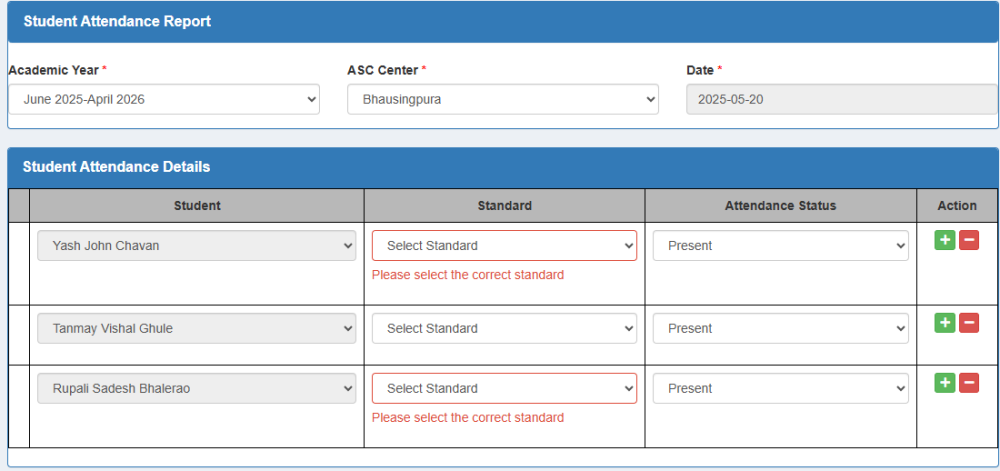
-
I have a form allowing the user to enter students' attendance as shown in the image. The scenario is that the user selects the ASC center. Upon choosing the ASC center, students belonging to that ASC center get populated in the Student drop-down. When the user selects Student, the student's standard should be displayed. I have a function called Standard that checks if the student's attendance record exists for the given academic year, ASC center, and student. If a record exists, then the standard of the student gets returned as shown below public function actionStandard($aid,$ascid,$sid) { $count = \Yii::$app->db->createCommand("SELECT COUNT(*) from attendancereportdetails,attendancereport where attendancereportdetails.AttendanceReportId=attendancereport.AttendanceReportId and attendancereport.AcademicYearId=:ayear and attendancereport.ASCId=:acenter and attendancereportdetails.StudentId=:student and attendancereportdetails.Standard!=''")->bindValues([':ayear'=>$aid,':acenter'=>$ascid,':student'=>$sid])->queryAll(); $count_result; foreach($count as $count_records) { $count_result = $count_records['COUNT(*)']; } $records = \Yii::$app->db->createCommand("SELECT * from attendancereportdetails,attendancereport where attendancereportdetails.AttendanceReportId=attendancereport.AttendanceReportId and attendancereport.AcademicYearId=:ayear and attendancereport.ASCId=:acenter and attendancereportdetails.StudentId=:student and attendancereportdetails.Standard!=''")->bindValues([':ayear'=>$aid,':acenter'=>$ascid,':student'=>$sid])->queryAll(); if ($count_result > 0) { echo "<option value>Select Standard</option>"; foreach ($records as $record) { ob_start(); if($record['Standard']==0) echo "<option value=" . $record['Standard'] . ">" . 'Nursery' . "</option>"; if($record['Standard']==1) echo "<option value=" . $record['Standard'] . ">" . '1st'. "</option>"; if($record['Standard']==2) echo "<option value=" . $record['Standard'] . ">" . '2nd'. "</option>"; if($record['Standard']==3) echo "<option value=" . $record['Standard'] . ">" . '3rd'. "</option>"; if($record['Standard']==4) echo "<option value=" . $record['Standard'] . ">" . '4th'. "</option>"; if($record['Standard']==5) echo "<option value=" . $record['Standard'] . ">" . '5th'. "</option>"; if($record['Standard']==6) echo "<option value=" . $record['Standard'] . ">" . '6th'. "</option>"; if($record['Standard']==7) echo "<option value=" . $record['Standard'] . ">" . '7th'. "</option>"; if($record['Standard']==8) echo "<option value=" . $record['Standard'] . ">" . '8th'. "</option>"; if($record['Standard']==9) echo "<option value=" . $record['Standard'] . ">" . '9th'. "</option>"; if($record['Standard']==10) echo "<option value=" . $record['Standard'] . ">" . '10th'. "</option>"; } } else { echo "<option value=''selected disabled>Select Standard</option>"; echo "<option value=0>Nursery</option>"; echo "<option value=1>1st</option>"; echo "<option value=2>2nd</option>"; echo "<option value=3>3rd</option>"; echo "<option value=4>4th</option>"; echo "<option value=5>5th</option>"; echo "<option value=6>6th</option>"; echo "<option value=7>7th</option>"; echo "<option value=8>8th</option>"; echo "<option value=9>9th</option>"; echo "<option value=10>10th</option>"; } } Below is the image of the form. The problem occurring here is that the first student selected, his standard, is only getting populated in all other students' standards, as shown below. The requirement is that for each different student, their standard should only get populated in their corresponding Standard drop-down. Below is the form <?php use yii\helpers\Html; use yii\bootstrap\ActiveForm; use yii\jui\DatePicker; use wbraganca\dynamicform\DynamicFormWidget; use app\models\Ascassignment; use app\models\Asccenter; use app\models\Academicyear; use kartik\time\TimePicker; use yii\helpers\ArrayHelper; use app\models\Student; ?> <script> $(document).ready(function() { $(".i").each(function(k,v){ $(".i").attr("disabled","true"); }); }); $(document).ready(function(){ //When the user clicks on plus button $(".dynamicform_studentattendance").on("afterInsert", function(e, item) { const $i = $(item).find('.i'); //Populates student names belonging to the selected ASC center $.post("index.php?r=student/student-lists&id="+$("select#attendancereport-ascid").val(),function(data){ $i.html(data); }); }); $(".dynamicform_studentattendance").on("afterInsert", function(e, item) { const $s = $(item).find('.s'); //Populates standard for the selected student $.post("index.php?r=attendancereport/standard&aid="+$("select#attendancereport-academicyearid").val()+"&ascid="+$("select#attendancereport-ascid").val()+"&sid="+$(".s").val(),function(data){ $s.html(data); }); }); }); </script> <div class="attendancereport-form"> <?php $form = ActiveForm::begin(['id' => 'dynamic-form', 'options' => ['class' => 'disable-submit-buttons'], ]);?> <div class="panel panel-primary " > <div class="panel panel-heading"><font size="3"><b>Student Attendance Report</b></font></div> <div class="row"> <div class="col-sm-4"> <?= $form->field($model, 'AcademicYearId')->dropDownList(ArrayHelper::map(Academicyear::find()->where(['DisplayStatus'=>'Enabled'])->all(),'Id','academicyear'), ['prompt' => 'Select Academic Year'])?> </div> <div class="col-sm-4"> <?= $form->field($model, 'ASCId')->dropDownList(ArrayHelper::map(Asccenter::find()->leftJoin('ascassignment','`ascassignment`.`ASCId`=`asccenter`.`ASCId`')->where(['ascassignment.UserId' => \Yii::$app->user->identity->getonlyid()])->all(),'ASCId','ASCName'), ['prompt' => 'Select ASC Center','class'=>'form-control ascid','onChange' => ' $.post("index.php?r=student/student-lists&id=' . '"+$(this).val(),function(data){ $(".i").each(function(k,v) { $(".i").attr("disabled",false); $(".i").html(data); // Populates the Student control having class .i with the data from the StudentList function } ); }); ' ]) ?> </div> <div class="col-sm-4"> <?= $form->field($model, 'DateofReport')->widget(DatePicker::classname(), [ //'language' => 'ru', 'dateFormat' => 'yyyy-MM-dd', 'options' => ['class' => 'form-control picker','readOnly'=>'readOnly'], 'clientOptions'=>['changeMonth'=>false, 'changeYear'=>false, 'maxDate'=>'today', 'stepMonths'=> false, ], ]) ?> </div> </div> </div> <div class="panel panel-primary"> <div class="panel-heading"><font size="3"><b>Student Attendance Details</b></font></div> <?php DynamicFormWidget::begin([ 'widgetContainer' => 'dynamicform_studentattendance', 'widgetBody' => '.container-studentattendance', 'widgetItem' => '.studentattendance-item', 'limit' =>500, 'min' => 1, 'insertButton' => '.add-studentattendance', 'deleteButton' => '.remove-studentattendance', 'model' => $modelsStudentattendance[0], 'formId' => 'dynamic-form', 'formFields' => [ 'StudentId', 'Standard', 'AttendanceStatus', ], ]); ?> <table class="table table-bordered"> <thead> <tr bgcolor='#B8B8B8'> <th style='border: 1px solid black;'></th> <th class ="text-center" style='border: 1px solid black;'>Student</th> <th class ="text-center" style='border: 1px solid black;'>Standard</th> <th class ="text-center" style='border: 1px solid black;'>Attendance Status</th> <th class="text-center" style='border: 1px solid black;'>Action</th> </tr> </thead> <tbody class="container-studentattendance"> <?php foreach ($modelsStudentattendance as $indexStudent => $modelStudentattendance): ?> <tr class="studentattendance-item"> <td class="vcenter" style='border: 1px solid black;'> <?php // necessary for update action. if (! $modelStudentattendance->isNewRecord) { echo Html::activeHiddenInput($modelStudentattendance, "[{$indexStudent}]AttendanceReportDetailsId"); } ?> </td> <td style='border: 1px solid black;'> <?= $form->field($modelStudentattendance, "[{$indexStudent}]StudentId")->label(false)->dropDownList(ArrayHelper::map(Student::find()->all(),'StudentId','StudentName'), ['prompt' => 'Select Student','class'=>'form-control i','onChange'=>' $.post("index.php?r=attendancereport/standard&aid=' . '"+$("select#attendancereport-academicyearid").val()+"&ascid=' . '"+$("select#attendancereport-ascid").val()+"&sid=' . '"+$(".i").val(),function(data){ $(".s").each(function(k,v) { $(".s").html(data); //Populates the Standard drop-down having class .s with the data from the Standard function } ); }); ']) ?> </td> <td style='border: 1px solid black;'> <?= $form->field($modelStudentattendance, "[{$indexStudent}]Standard")->label(false)->dropDownList([], ['prompt'=>'Select Standard','class'=>'form-control s']) ?> </td> <td style='border: 1px solid black;'> <?= $form->field($modelStudentattendance, "[{$indexStudent}]AttendanceStatus")->label(false)->dropDownList(['Present'=>'Present', 'Absent' => 'Absent'], ['prompt'=>'Select Attendance Status'])?> </td> <td class="text-center vcenter" style='border: 1px solid black;'> <button type="button" class="add-studentattendance btn btn-success btn-xs"><span class="fa fa-plus"></span></button> <button type="button" class="remove-studentattendance btn btn-danger btn-xs"><span class="fa fa-minus"></span></button> </td> </tr> <?php endforeach; ?> </tbody> </table> <?php DynamicFormWidget::end(); ?> </div> <div class="form-group"> <?= Html::submitButton($model->isNewRecord ? 'Create' : 'Update', ['class' => $model->isNewRecord ? 'btn btn-success' : 'btn btn-primary']) ?> <?= Html::resetButton('Reset',['class' => 'btn btn-default'])?> </div> <?php ActiveForm::end(); ?> </div>

-
I have a DataTables table and I have managed to get everything working fine. Within each row i have an action button with either accepts, approves or deletes the row. Like i say everything is working but after the respective button has been clicked I have to load the entire page again to get the table to refresh and it just doesnt look right. Anyway her is the code initial code to load the results into the table $(document).ready(function(){ $("#requests-container").html("<div class=\'col-sm-12 py-5\'><center><i class=\'fas fa-spinner fa-3x fa-spin mb-3 text-muted\'></i><br /></center></div>"); $("#requests-container").load("'.DIR.'admin/dashboard/requests", function(){ $("#project-requests").DataTable({ "order": [[0, "desc"]], "responsive": true, "lengthChange": true, "autoWidth": false, "pageLength": 25, "aLengthMenu": [ [10, 25, 50, -1], [10, 25, 50, "All"] ], "buttons": ["copy","pdf", "print", "colvis"] }).buttons().container().appendTo(\'#project-requests_wrapper .col-md-6:eq(0)\'); $("#project-requests_wrapper").children(":first").addClass("p-2"); $("#project-requests_wrapper").children(":first").next().next().addClass("p-2"); }); }); Then I have this once the link has been clicked $(document).on("click", ".action-requests", function(e){ e.preventDefault(); var Toast = Swal.mixin({ toast: true, position: \'top-end\', showConfirmButton: false, timer: 5000 }); var pageLink = $(this).attr("href"); var requestId = $(this).attr("data-id"); $.post("admin/dashboard/queries/" + pageLink, { id: requestId }, function(data, status){ if(status === "success") { if(pageLink == "approverequest") { Toast.fire({icon: "success",title: data}); $("#requests-container").html("<div class=\'col-sm-12 py-5\'><center><i class=\'fas fa-spinner fa-3x fa-spin mb-3 text-muted\'></i><br /></center></div>"); $("#requests-container").load("'.DIR.'admin/dashboard/requests", function(){ $("#project-requests").DataTable({ "order": [[0, "desc"]], "responsive": true, "lengthChange": true, "autoWidth": false, "pageLength": 25, "aLengthMenu": [ [10, 25, 50, -1], [10, 25, 50, "All"] ], "buttons": ["copy","pdf", "print", "colvis"] }).buttons().container().appendTo(\'#project-requests_wrapper .col-md-6:eq(0)\'); $("#project-requests_wrapper").children(":first").addClass("p-2"); $("#project-requests_wrapper").children(":first").next().next().addClass("p-2"); }); } else { Toast.fire({icon: "success",title: data}); $("#requests-container").html("<div class=\'col-sm-12 py-5\'><center><i class=\'fas fa-spinner fa-3x fa-spin mb-3 text-muted\'></i><br /></center></div>"); $("#requests-container").load("'.DIR.'admin/dashboard/requests", function(){ $("#project-requests").DataTable({ "order": [[0, "desc"]], "responsive": true, "lengthChange": true, "autoWidth": false, "pageLength": 25, "aLengthMenu": [ [10, 25, 50, -1], [10, 25, 50, "All"] ], "buttons": ["copy","pdf", "print", "colvis"] }).buttons().container().appendTo(\'#project-requests_wrapper .col-md-6:eq(0)\'); $("#project-requests_wrapper").children(":first").addClass("p-2"); $("#project-requests_wrapper").children(":first").next().next().addClass("p-2"); }); } } }); }); Like i said its a bit long winded for such a simple action but if its not like this DataTables wont load after the submission I was just wondering if anyone has a simpler idea to shorten the coding Thanks
-
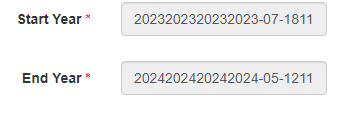
I am using jui datepicker. I have a table which has columns StartYear and EndYear set to varchar data type. I need to store the Start Year in the format of Month Year for example Start Year : Jan 2023 End Year : Jan 2024 I have configured the jui date picker to show only Month and Year. Data is getting correctly saved in the table in create action, but on the update form the same data is not fetched correctly as shown in below image Below is the code _form.php <?php use yii\helpers\Html; use yii\bootstrap\ActiveForm; use yii\jui\DatePicker; use yii\helpers\ArrayHelper; ?> <style type="text/css"> .ui-datepicker-calendar { display: none; } </style> <script> $(document).ready(function() { $('.picker').datepicker({ changeMonth: true, changeYear: true, dateFormat: 'MM yy', onClose: function() { var iMonth = $("#ui-datepicker-div .ui-datepicker-month :selected").val(); var iYear = $("#ui-datepicker-div .ui-datepicker-year :selected").val(); $(this).datepicker('setDate', new Date(iYear, iMonth, 1)); }, }); }); </script> <?php $form = ActiveForm::begin();?> <?= $form->field($model, 'StartYear')->widget(DatePicker::classname(), [ //'language' => 'ru', 'options' => ['class' => 'form-control picker','readOnly'=>'readOnly'], 'clientOptions'=>['changeMonth'=>true, 'changeYear'=>true, 'dateFormat' => 'MM yy', 'readOnly'=>true] ]) ?> <?= $form->field($model, 'EndYear')->widget(DatePicker::classname(), [ //'language' => 'ru', 'options' => ['class' => 'form-control picker','readOnly'=>'readOnly'], 'clientOptions'=>['changeMonth'=>true, 'changeYear'=>true, 'dateFormat' => 'MM yy', 'readOnly'=>true] ]) ?> <?= Html::submitButton($model->isNewRecord ? 'Create' : 'Update', ['class' => $model->isNewRecord ? 'btn btn-success' : 'btn btn-primary']) ?> <?php ActiveForm::end(); ?>
-
 <input name="weekday[8]" type="checkbox" value="21" class="weekday" checked=""> <input name="timing[8]" type="text" id="name" value="11" size="45" /> <input name="weekday[9]" type="checkbox" value="99" class="weekday" checked=""> <input name="timing[9]" type="text" id="name" value="12" size="45" /> <input name="weekday[10]" type="checkbox" value="77" class="weekday" checked=""> <input name="timing[10]" type="text" id="name" value="13" size="45" /> I have above html code 1. when checkbox for checkbox name="weekday[8]" is clicked, I want to check whether timing[8] is empty or not (we need to derive field name timing[8] from field name weekday[8] 2. when timing[8] some value is entered , i want to name="weekday[8]" -> checked (we need to derive field name weekday[8] from timing[8] we can find the name (jquery) $('.weekday').click(function(){ var checkboxname=$(this).attr('name'); // we get checkbox clicked name=name[8] console.log('checkbox name='+checkboxname); }) In simple case (without dimension) this is easy we get name of field (checkbox is clicked) as name[8] i want to derive field name timing[8] i tried (jquery) $('.weekday').click(function(){ var checkboxname=$(this).attr('name'); console.log('checkboxname='+checkboxname);// i got this correct weekday[8] in this case var splitname=checkboxname.split('weekday');// seperated [8] , console.log(splitname[0]+' 1='+splitname[1]); //splitname[1] will have [8] //now want to form or generate value of variable mobile[8] var n='mobile'+splitname[1];//the n will be mobile[8] console.log('n='+n);// ths will be mobile[8] var inp=$('input[name="'+n+'"]').val(); console.log(' inp='+inp);// but no success //here I want value of $('input[name=name[8]').val(); }) Please guide how i derive (using jquery) filed name mobile[8] from filed name[8]
 -
Hi, Please help me with the following situation. I have a jquery code like this: $('#go').on('click', function () { $.ajax({ type: 'POST', url: 'returnPDO.php', dataType: "json", data: { id: "1", rows: "7" }, success: function (data) { ...CODE.... } }); }); Now, I have another event (keypress) that I would like to execute the same code from on.click above . $( "#searchTbl" ).keypress(function() { $.ajax({ type: 'POST', url: 'returnPDO.php', dataType: "json", data: { id: "1", rows: "7" }, success: function (data) { ...CODE.... } }); }); It's there a way to include the whole $.ajax code only once ? Otherwise if I change something inside on.click I need to change on keypress code as well. Thank you
-
hi , please can someone check the fiddle https://jsfiddle.net/yqktb40L/18/ and say why the block remains stuck in its position and not oscillate up n down every 2 seconds as it is supposed to. There is nothing wrong with the code. It works great on a local server but does not work in jsfiddle. Thank you.
-
Hello all, I have a website with a form that I want a user to fill out then if it is valid I have the button submit and I want it to email me. The message. If success full I want a message to popup on screen saying success I am using bootstrap 4 <div class="messageSuccess"></div> <div class="row"> <div class="col-md-9 mb-md-0 mb-5"> <form id="contact-form" name="contact-form" action="" method="post"> <!--action="contactEmail.php" --> <div class="row "> <div class="col-md-6 "> <div class="md-form mb-0 "> <input class="form-control" type="text" id="txtName" name="txtName" required /> <label for="txtName">Your Name </label> <div class="nameError"></div> </div> </div> <div class="col-md-6 "> <div class="md-form mb-0 "> <input class="form-control" type="text" id="txtEmail" name="txtEmail" required /> <label id="lblEmail" for="txtEmail">Your Email Address </label> </div> </div> </div> <div class="row"> <div class="col-md-12"> <div class="md-form mb-0"> <input class="form-control" type="text" id="txtSubject" name="txtSubject" data-error="Subject Here" required /> <label for="txtSubject">Subject </label> <div class="help-block with-errors"></div> </div> </div> </div> <div class="row"> <div class="col-md-12"> <div class="md-form"> <textarea class="form-control" type="text" id="txtMessage" name="txtMessage" rows="4" required data-error="Please leave us a message."></textarea> <label for="txtMessage">Your Message </label> </div> </div> </div> <div class="text-center text-md-left"> <input type="submit" id="BtnFormSubmit" class="btn btn-primary btn-xl text-white" value="Send Message" /> </div> <div class="status"></div> </form> <!-- JavaScript Inner File Form Validation --> <script type="text/javascript"> $(document).ready(function () { var form = $("#contact-form"); var name = $("#txtName").val(); var email = $("#txtEmail").val(); var subject = $("#txtSubject").val(); var message = $("#txtMessage").val(); var btnSubmit = $("BtnFormSubmit"); $(form).submit(function (event) { if (this.checkValidity() == false) { $(this).addClass("was-validated"); event.preventDefault(); event.stopPropagation(); } alert("Form Valid to create message"); if (!event.isDefaultPrevented) { alert("passed prevent default"); var url = "testemail.php"; // POST values 'ajax' $.ajax({ type: "POST", url: url, data: $(this).serialize(), success: function (data) { // done: // data = JSON object object for contactEmail.php // recieve message type: success | danger var messageAlert = "alert- " + data.type; var messageText = data.message; // Bootstrap alert box HTML var alertBox = '<div class="alert ' + messageAlert + ' alert-dismissable"><button type="button" class="close" ' + 'data-dismiss="alert" aria-hidden="true">×</button>' + messageText + '</div>'; // if messageAlert and messageText if (messageAlert && messageText) { // Put message on page in messageSuccess section. $(form).find("#messageSuccess").html(alertBox); // Reset the form. $(form)[0].reset(); } } }); //return false; } }); //$(name).blur(function () { //}) // Validate :inputs $(":input").blur(function () { let controlType = this.type; switch (controlType) { case "text": case "password": case "textarea": validateText($(this)); break; case "email": validateEmail($(this)); break; default: break; } }); // each :input focusin remove existing validation messages if any. $(":input").click(function () { $(this).removeClass("is-valid is-invalid"); }) /* OPTIONAL ':input' KEYDOWN validation messages remove */ // Reset Form and remove all validation messages. $(":reset").click(function () { $(":input").removeClass("is-valid is-invalid"); $(form).removeClass("was-validated"); }); }); // Validate Text Function function validateText(control) { let textField = control.val(); if (textField.length > 1) { $(control).addClass("is-valid"); } else { $(control).addClass("is-invalid"); } } // Validate Email Function (Email newer regex: /^([\w-\.]+@([\w-]+\.)+[\w-]{2,6})?$/ ) function validateEmail(control) { let textField = control.val(); let regexPattern = /^\b[A-Z0-9._%-]+@[A-Z0-9.-]+\.[A-Z]{2,6}\b$/i; if (regexPattern.test(textField)) { $(control).addClass("is-valid"); } else { $(control).addClass("is-invalid"); } } </script> <?php $from = '[email protected]'; $sendTo = '[email protected]'; $subject = 'Your Message Subject Here';// Email Message Contact Form Fields // Array - ($varName => Text from controls) $controls = array('txtName' => 'Name', 'txtEmail' => 'Email', 'txtSubjext' => 'Subject', 'txtMessage' => 'Message'); $successMessage = 'Contact Message Successfully Sent. Thank you, I will get back to you soon.'; $errorMessage = 'There was an error submitting your message, Please try again. Or try later.'; error_reporting(E_ALL & ~E_NOTICE); try { if(count($_POST) == 0) throw new \Exception('Contact Form Message is empty'); $emailText = "You have a new message from your contact form\n------------------------------------------------------\n"; foreach($_POST as $key => $value) { if(isset($controls[$key])) { $emailText .= "$controls[$key]: $value\n"; } } $headers = array('Content-Type: text/plain; charset="UTF-8";', 'From: ' . $from, 'Reply-To: ' . $from, 'Return-Path: ' . $from, ); // Send email mail($sendTo, $subject, $emailText, implode("\n", $headers)); $responseArray = array('type' => 'success', 'message' => $successMessage); } catch(\Exception $e) { $responseArray = array('type' => 'danger', 'message' => $errorMessage); } // If AJAX request return JSON response **RARE** if(!empty($_SERVER['HTTP_X_REQUESTED_WITH']) && strtolower($_SERVER['HTTP_X_REQUESTED_WITH']) == 'xmlhttprequest') { $encodedJSON = json_encode($responseArray); header('Content-Type: application/json'); echo $encodedJSON; } else { echo $responseArray['message']; } ?>
-
 Hi All, Let’s suppose I have this DOM : <div id="Hello"> <div class="level_11"> <div class="level_111"> <div class="level_112"> <div class="level_11"> <div class="level_111"> <div class="level_112" id="button_33"> <div class="level_11"> <div class="level_111"> <div class="level_112"> Using jQuery, and supposing that in the line below id equals 33, how do I select all <div class="level_111"> elements except the one that has the sibling with id="button_33" ? I tried something like $('#Hello').children('.level_11').children('.level_111').not(siblings('#button_'+id)) but that does not work. I get the error " siblings is not defined ". Thanks !
 -
Hi all ! The following piece of code works fine. <?php $myVar1 = "best1"; $myVar2 = "best2"; ?> <!DOCTYPE html PUBLIC "-//W3C//DTD XHTML 1.0 Strict//EN" "http://www.w3.org/TR/xhtml1/DTD/xhtml1-strict.dtd"> <html xmlns="http://www.w3.org/1999/xhtml" xml:lang="en" lang="en"> <head> <meta http-equiv="Content-Type" content="text/html; charset=iso-8859-1" /> <title>SWFObject 2 dynamic publishing example page</title> <!-- <script type="text/javascript" src="https://ajax.googleapis.com/ajax/libs/jquery/3.1.1/jquery.min.js"></script> --> <script type="text/javascript" src="swfobject.js"></script> <script type="text/javascript"> var myVal1 = "<?php echo $myVar1; ?>"; var myVal2 = "<?php echo $myVar2; ?>"; var flashvars = { myVar1: myVal1, myVar2: myVal2 }; swfobject.embedSWF("AS3_swf_php_comm_1.swf", "myswf", "550", "400", "9.0.0", false, flashvars); </script> </head> <body> <div id="myswf"> <h1>Alternative content</h1> <h2> Best </h2> </div> </body> </html> I wish to convert the following bit : <script type="text/javascript"> var myVal1 = "<?php echo $myVar1; ?>"; var myVal2 = "<?php echo $myVar2; ?>"; var flashvars = { myVar1: myVal1, myVar2: myVal2 }; swfobject.embedSWF("AS3_swf_php_comm_1.swf", "myswf", "550", "400", "9.0.0", false, flashvars); </script> into a file jquery file movie.js thereby removing the above inline code. Please can someone help me convert this or convert it for me. Thanks all !
-
Hi all ! I am using this tutorial and I am modifying it to include csrf protection. The index.php uses getToken(); to generate an anti-csrf token which is then inserted in the form as a hidden input field as below: <tr> <td> <select id="country_dropdown" > <option value="-1">Select country</option> <?php while($stmt->fetch()) { ?> <option value="<?php echo $country_id ?>"><?php echo $country_name ?></option } <?php // token added as hidden field echo '<input type = "hidden" name = "token" value = "'.$_SESSION['token'].'" />'; ?> </select> </td> </tr> <tr> <td> <select id="state_dropdown" > <?php echo $_SESSION['token']; // debug ?> <option value="-1">Select state</option> </select> <?php // The token does not change even when it is changed in loaddata.php. The change values // does not get reflected here. So adding the below code is useless, so commented out. // echo '<input type = "hidden" name = "token" value = "'.$_SESSION['token'].'" />'; ?> <span id="state_loader"></span> </td> </tr> This scheme works if the same token is to be used for all drop downs. If I change destroy and change the token in loaddata.php, the ajax response file, where the data is sent and received from for proceeding to the next drop-down, the change in the token value is not reflected in the index.php since, i guess, that file is not refreshed to load the new token value. So how can I make this work? Please help. Thanks !
-
Hi all, I don't know if there's a gallery for this already or the right place to ask the question. User uploads multiple images. Images are store in a different folder and a unique name stored on the database. All images have a unique group for referencing purpose . When a user clicks on a link in his table he can view all images pertaining to a group. How can i go about that? What i want to achieve is for example SELECT ALL FROM IMAGE_TABLE WHERE USERNAME = USERNAME AND GROUP_ID = GROUP_ID Thanks
-
I have a php page tool.php that has a function named "create_event". I want to make a button in a different page (dashboard.php), that when I click on it, it runs the "create_event" function from tool.php and shows the output from the function on dashboard.php page. I'm totally new to ajax and jquery and not sure how to do this. I did google this but not much luck. My site is build with WordPress and this is part of custom plugin that I'm making. Thank you in advance.
-
Currently I have a table in my view class that is populated with data from the backend using MVC framework in codeigniter. Now I have a dropdown above each column that is filling in the same records from my database. So I want to be able to filter my records as soon as the person clicks the item in the dropdown list. To achieve this I'm using a Jquery to get the selected item and sending that value to my controller. Code: So far I have this in my view class: <table> <tr> <th width="10%">Source</th> </tr> <tr> <td width="5%"><select id="your_id_name"> <option value="">All </option> <?php if($sources) foreach($sources as $source): ?> <option value="<?php echo $source['title'] ?>"><?php echo $source['title'] ?></option> <?php endforeach;?> </select></td> <td width="10%"><select id="contact_type"> <option value="">All </option> <?php if($types) foreach($types as $type): ?> <option value="<?php echo $type['id'] ?>"><?php echo $type['title'] ?></option> <?php endforeach;?> </select></td> </tr> <tbody> <?php if(isset($records) && count($records) > 0) { foreach($records as $row ){ ?> <tr> <td><?= $row->source ?></td> <td><?= $row->title ?></td> </tr> <?php } } ?> </tbody> <script type="application/javascript"> $('#your_id_name').on('change', function() { console.log($('#your_id_name').val()); $.get('<?php echo base_url('ajax_dropdown'); ?>', { selected: $('#your_id_name').val() }, function(res) { var values = JSON.parse(res); // then do something var status = values.status; var records = values.records; var html = "" records.forEach(function(row){ html += `<tr><td>${row.source}</td> <td>${row.title }</td></tr> `; console.log(tbody_tag) }) var tbody_tag = $('tbody#table_body'); tbody_tag.html(html); }) }) $('#contact_type').on('change', function() { console.log($('#contact_type').val()); $.get('<?php echo base_url('ajax_dropdown'); ?>', { selected_contact: $('#contact_type').val() }, function(res) { var values = JSON.parse(res); // then do something var status = values.status; var records = values.records; var html = "" records.forEach(function(row){ html += `<tr><td>${row.source}</td> <td>${row.title}</td></tr> `; }) var tbody_tag = $('tbody#table_body'); tbody_tag.html(html); }) }) controller class: public function ajax_lists(){ $data = array(); // store data in here, store all data you need in data $selected_input = $this->input->get('selected'); $selected_input2 = $this->input->get('selected_contact'); $data['records'] =$this->contacts_model->get_records($selected_input,$selected_input2); echo json_encode($data); } Model Class: function get_records($selected_input = null,$selected_input2 =null){ $this->db->select("*"); $this->db->from("crm_contacts as con"); if($selected_input){ $this->db->where("con.added_by",$selected_input); } if($selected_input2){ $this->db->where("con.contact_type",$selected_input2); } $query = $this->db->get(); return $query->result(); } Here as of now I can filter all my records 1 at a time. So suppose I filter the table by source and then inside that source I want to filter the leftover data by contact_type, I cannot do it since doing so resets the 1st filter I had and filters all the data according to the new select item I have clicked.
-
Hi guys, I am trying to display tour information in fullcalendar but nothing is happening and no errors. Here is the php code from fetch-tours.php <?php require_once "config.php"; $json = array(); $sqlQuery = "SELECT * FROM jobs ORDER BY id"; $result = mysqli_query($con, $sqlQuery); $eventArray = array(); while ($row = mysqli_fetch_assoc($result)) { $title = isset($row['name']); $start = isset($row['dep_date']); $end = isset($row['ret_date']); $eventsArray['title'] = $title; $eventsArray['start'] = $start; $eventsArray['end'] = $end; array_push($eventArray, $row); } mysqli_free_result($result); mysqli_close($con); echo json_encode($eventArray); ?> And here is the Javascript that displays the calendar: <script type="text/javascript"> $(document).ready(function() { var date = new Date(); var d = date.getDate(); var m = date.getMonth(); var y = date.getFullYear(); $('#calendar').fullCalendar( { header: { left: 'prev,next today', center: 'title', right: 'month,basicWeek,basicDay' }, editable :true, events: "includes/fetch-tours.php", }); }) </script> The calendar displays fine but just no data. Any help is greatly appreciated. Cheers, Dan
-
Background: I'm comparing 2 styles of Ajax: 1.) "jquery style" 2.) "ActiveXObject Microsoft.XMLHTTP style" Question: Is one better (faster, more cross-browser compliant) than the other? My experience: Both seem equally fast. The Microsoft style is a bit longer, but I don't have to load jquery.js to my page! Code Examples: Jquery style on my PHP page: function getInfo(ProductNumber){ $.ajax({ url:'Ajax-PHP-Page.php?ProductNumber='+ProductNumber, success: function(html) { document.getElementById("my_div").value = ''; document.getElementById("my_div").value = html; } }); } Microsoft style on my PHP page: function getInfo(ProductNumber) { if (window.XMLHttpRequest) { // code for IE7+, Firefox, Chrome, Opera, Safari xmlhttp = new XMLHttpRequest(); } else { // code for IE6, IE5 xmlhttp = new ActiveXObject("Microsoft.XMLHTTP"); } xmlhttp.onreadystatechange = function() { if (this.readyState == 4 && this.status == 200) { document.getElementById("my_div").value = this.responseText; } }; xmlhttp.open("GET","Ajax-PHP-Page.php?ProductNumber="+ProductNumber,true); xmlhttp.send(); } Thank you!!
-
I always thought that the use of jQuery(document).ready(f() ... simply insured that before f() was called, the DOM was loaded and secured for use. So what is happening here? I'm misunderstanding something very basic. function f() { return 'something'; } jQuery(document).ready(function() { jQuery('#idb_submitstory_submit').on('click',function(){ var val = f(); // the value used here ... works fine jQuery(document).ready(function() { jQuery('#idb_submitstory_submit').on('click',function(){ var val = jQuery(document).ready(f()); // use the value here ... fails I do realize that the second wrap of ready is not necessary, since the click event already has insured the environment. Thank you.
-
If you try this link https://jsfiddle.net/u4bxz74c/10/. Later the result will be like this PART 1 <p id="posttextareadisplay"> <p class="ENGLISH">This is a samplasde textssss</p> <p class="ENGLISH"><b>فَإِذَا جَلَسْتَ فِي وَسَطِ الصلَاةِ فَاطْمَئِن، وَافْتَرِشْ فَخِذَكَ الْيُسْرَى ثُم تَشَهدْ</b></p> </p> PART 2 <p id="posttextareadisplay"> <p class="ENGLISH">This is a samplasde textssss <b>فَإِذَا جَلَسْتَ فِي وَسَطِ الصلَاةِ فَاطْمَئِن، وَافْتَرِشْ فَخِذَكَ الْيُسْرَى ثُم تَشَهدْ</b></p> </p> Question PART 1 : If you see the code below, all paragraphs or <p> are class="ENGLISH". How to make it into a paragraph or <p> class="ENGLISH" to be class="ARAB", if the writing in a paragraph is Arabic? But if the writing is not Arabic, so the paragraph of class="ENGLISH" PART 1 <p id="posttextareadisplay"> <p class="ENGLISH">This is a samplasde textssss</p> <p class="ENGLISH"><b>فَإِذَا جَلَسْتَ فِي وَسَطِ الصلَاةِ فَاطْمَئِن، وَافْتَرِشْ فَخِذَكَ الْيُسْرَى ثُم تَشَهدْ</b></p> </p> ***** I WANT TO BE LIKE THIS ******* <p id="posttextareadisplay"> <p class="ENGLISH">This is a samplasde textssss</p> <p class="ARAB"><b>فَإِذَا جَلَسْتَ فِي وَسَطِ الصلَاةِ فَاطْمَئِن، وَافْتَرِشْ فَخِذَكَ الْيُسْرَى ثُم تَشَهدْ</b></p> </p> Question PART 2 : But if the Arabic joins with plain writing or regular fonts. So paragraph or <p> remain class="ENGLISH" Like this <p class="ENGLISH"> This is a sa <b> لْيُسْرَى ثُم تَشَهدْ</b></p> <p class="ENGLISH"><b> لْيُسْرَى ثُم تَشَهدْ</b> This is a sa</p> <p class="ENGLISH"> This is a sa <b> ا لْيُسْرَى ثُم تَشَهدْ</b> This is a sa</p> <p class="ENGLISH"><b> لْيُسْرَى ثُم تَشَهدْ</b> This is a sa <b> لْيُسْرَى ثُم تَشَهدْ</b></p> Note: I've tried this code, but it seems, this code encapsulates the entire contents of the textarea if (pattern.test(newText)) { str = newText.replace($format_search[i], $arab_format_replace[i]); } else { str = newText.replace($format_search[i], $format_replace[i]); }
-
i'm trying to make a notification tab work but do not seem to get it right. The dropdown is working fine but the ajax call to newfriends.php is not working right, when viewed with firebug there are no results to be seen in the dropdown.Quite confusing. (note the dropdown menu is located in header and can only be displayed if the session is initialised) here is the ajax used in jquery: function load_notifications(view=''){ $.ajax({ url: "notification/new_friends.php", method: "POST", data:{view:"view"}, dataType:"json", success: function(data){ $(".dropdown-menu").html(data.notification); if(data.unseen_notification>0){ $(".badge1").html(data.unseen_notification); } } }); //$(".dynamic-notification").load("notification/pm_n.php"); // $(".dynamic-notification-f").load("notification/new_friends.php"); }; load_notifications(); $(document).on("click",".count_friend", function(){ load_notifications('yes'); }); //loads every 2 seconds for chat setInterval(function(){load_notifications();},2000); here is the new_friends.php content: <?php include '../includes/dbconfig.inc.php'; if (isset($_POST['view'])) {if($_POST['view'] !=''){ $update="update friends set count='1' where friend_one=:session and count='0'"; $stmt=$conn->prepare($update); $stmt->bindValue(":session", $_SESSION['uname']); $stmt->execute(); } $sql123="select id from friends where friend_two=:sess_uname and count='0'"; $stmt123=$conn->prepare($sql123); $stmt123->bindValue(":sess_uname", $_SESSION['uname']); $stmt123->execute(); $request_count=$stmt123->fetchColumn(); //$count_friend=$stmt123->rowCount(); /*$sql_f_count="select *from user where user_id=:session_id and activated='1' limit 1"; $stmt_f_count=$conn->prepare($sql_f_count); $stmt_f_count->bindValue(":session_id", $_SESSION['id']); $stmt_f_count->execute(); $user_details=$stmt_f_count->fetchAll(); $friend_badge=$user_details[0]['friend_count_badge'];*/ require "notification/friend_request_notification.php"; // $new_friends="<span class='dropdown'><a href='#' data-placement='bottom' class='btn dropdown-toggle' data-toggle='dropdown' title='Friend Requests' data-html='true'><span class='count_friend' style=' height:33px; width:30px;'><span class='badge1 label label-pill'>".$count."</span><img src='img/logo/group-button-white.png' style='height:25px; width:27px;' alt='new_friends_alert'></span></a><ul class='dropdown-menu'></ul></span>"; //if($request_count[0]>0){ //$new_friends="<a href='#' data-placement='bottom' class='btn' data-trigger='focus' title='Friend Requests' data-toggle='popover' data-html='true' data-content='".$friend_requests."'><span class='count_friend' style=' height:33px; width:30px;'><img src='img/logo/group-button-white.png' style='height:25px; width:27px;' alt='new_friends_alert'></span><span class='badge'>".$friend_badge."</span></a>"; /*}else{ $new_friends="<a href='all_notifications.php'><img src='img/logo/group-button-black.png' style='height:25px; width:27px;' alt='new_friends_alert'></a>"; }*/ //echo $new_friends; //} $data=array( 'notification'=>$friend_requests, 'unseen_notification' =>$request_count[0][0] ); and the code for friend requests output: <?php //error_reporting(0); require_once 'includes/dbconfig.inc.php'; $sql = "select * from friends where friend_two=:session and accepted='0' order by friends_date_made asc"; $stmt = $conn->prepare($sql); $stmt->bindparam(":session", $_SESSION['uname']); $stmt->execute(); $numrows = $stmt->fetchAll(PDO::FETCH_ASSOC); $friend_requests=""; if ($numrows < 1) { $friend_requests = "You do not have any friend requests"; echo "$friend_requests"; exit(); } else { foreach ($numrows as $i=>$row1 ) { $reqid = $row1['friend_id']; $user1 = $row1['friend_one']; $datemade = $row1['friends_date_made']; $datemade1 = strftime("%B %d, %y", strtotime($datemade)); $sql = "SELECT * FROM user WHERE uname=:user1 LIMIT 1"; $stmt = $conn->prepare($sql); $stmt->bindparam(":user1", $user1); $stmt->execute(); $thumbrow = $stmt->fetchAll(PDO::FETCH_ASSOC); $user1avatar = $thumbrow[$i]['avatar']; $user1id=$thumbrow[$i]['user_id']; if ($user1avatar =="") { $user1pic = '<img src="img/avatardefault.png" height="50" style="float:left;" width="50" alt="'.$user1.'" class="user_pic">'; } else { $user1pic = '<img src="../user/user/'.$user1id.'/'.$user1avatar.'" height="50" style="float:left;" width="50" alt="'.$user1.'" class="user_pic">';} $friend_requests .= '<li><div id="'.$reqid.'" float="right" class="friendrequests"> <a href="home.php?u='.$user1.'">'. $user1pic .'</a> <div class="user_info '.$reqid.'" id="'.$reqid.'"><small>' . $datemade1 . '</small> <a href="home.php?u='.$user1.'">'.$user1.'</a> is requesting your friendship<br /><br /> <button id="'.$reqid.'" name="'.$_SESSION['uname'].'" sess="'.$_SESSION['id'].'" class="accept_btn btn btn-warning">Accept</button><span class="show-spinner"></span> or <button id="'.$reqid.'" name="'.$_SESSION['uname'].'" sess="'.$_SESSION['id'].'" class="reject_btn btn btn-warning">Reject</button> </div> </div><hr></li>'; } }
-
i'm trying to make a notification tab work but do not seem to get it right. The dropdown is working fine but the ajax call to newfriends.php is not working right, when viewed with firebug there are no results to be seen in the dropdown.Quite confusing. (note the dropdown menu is located in header and can only be displayed if the session is initialised) here is the ajax used in jquery: function load_notifications(view=''){ $.ajax({ url: "notification/new_friends.php", method: "POST", data:{view:"view"}, dataType:"json", success: function(data){ $(".dropdown-menu").html(data.notification); if(data.unseen_notification>0){ $(".badge1").html(data.unseen_notification); } } }); //$(".dynamic-notification").load("notification/pm_n.php"); // $(".dynamic-notification-f").load("notification/new_friends.php"); }; load_notifications(); $(document).on("click",".count_friend", function(){ load_notifications('yes'); }); //loads every 2 seconds for chat setInterval(function(){load_notifications();},2000); here is the new_friends.php content: <?php include '../includes/dbconfig.inc.php'; if (isset($_POST['view'])) { if($_POST['view'] !=''){ $update="update friends set count='1' where friend_one=:session and count='0'"; $stmt=$conn->prepare($update); $stmt->bindValue(":session", $_SESSION['uname']); $stmt->execute(); } $sql123="select id from friends where friend_two=:sess_uname and count='0'"; $stmt123=$conn->prepare($sql123); $stmt123->bindValue(":sess_uname", $_SESSION['uname']); $stmt123->execute(); $request_count=$stmt123->fetchColumn(); //$count_friend=$stmt123->rowCount(); /*$sql_f_count="select *from user where user_id=:session_id and activated='1' limit 1"; $stmt_f_count=$conn->prepare($sql_f_count); $stmt_f_count->bindValue(":session_id", $_SESSION['id']); $stmt_f_count->execute(); $user_details=$stmt_f_count->fetchAll(); $friend_badge=$user_details[0]['friend_count_badge'];*/ require "notification/friend_request_notification.php"; // $new_friends="<span class='dropdown'><a href='#' data-placement='bottom' class='btn dropdown-toggle' data-toggle='dropdown' title='Friend Requests' data-html='true'><span class='count_friend' style=' height:33px; width:30px;'><span class='badge1 label label-pill'>".$count."</span><img src='img/logo/group-button-white.png' style='height:25px; width:27px;' alt='new_friends_alert'></span></a><ul class='dropdown-menu'></ul></span>"; //if($request_count[0]>0){ //$new_friends="<a href='#' data-placement='bottom' class='btn' data-trigger='focus' title='Friend Requests' data-toggle='popover' data-html='true' data-content='".$friend_requests."'><span class='count_friend' style=' height:33px; width:30px;'><img src='img/logo/group-button-white.png' style='height:25px; width:27px;' alt='new_friends_alert'></span><span class='badge'>".$friend_badge."</span></a>"; /*}else{ $new_friends="<a href='all_notifications.php'><img src='img/logo/group-button-black.png' style='height:25px; width:27px;' alt='new_friends_alert'></a>"; }*/ //echo $new_friends; //} $data=array( 'notification'=>$friend_requests, 'unseen_notification' =>$request_count[0][0] ); and the code for friend requests output: <?php //error_reporting(0); require_once 'includes/dbconfig.inc.php'; $sql = "select * from friends where friend_two=:session and accepted='0' order by friends_date_made asc"; $stmt = $conn->prepare($sql); $stmt->bindparam(":session", $_SESSION['uname']); $stmt->execute(); $numrows = $stmt->fetchAll(PDO::FETCH_ASSOC); $friend_requests=""; if ($numrows < 1) { $friend_requests = "You do not have any friend requests"; echo "$friend_requests"; exit(); } else { foreach ($numrows as $i=>$row1 ) { $reqid = $row1['friend_id']; $user1 = $row1['friend_one']; $datemade = $row1['friends_date_made']; $datemade1 = strftime("%B %d, %y", strtotime($datemade)); $sql = "SELECT * FROM user WHERE uname=:user1 LIMIT 1"; $stmt = $conn->prepare($sql); $stmt->bindparam(":user1", $user1); $stmt->execute(); $thumbrow = $stmt->fetchAll(PDO::FETCH_ASSOC); $user1avatar = $thumbrow[$i]['avatar']; $user1id=$thumbrow[$i]['user_id']; if ($user1avatar =="") { $user1pic = '<img src="img/avatardefault.png" height="50" style="float:left;" width="50" alt="'.$user1.'" class="user_pic">'; } else { $user1pic = '<img src="../user/user/'.$user1id.'/'.$user1avatar.'" height="50" style="float:left;" width="50" alt="'.$user1.'" class="user_pic">'; } $friend_requests .= '<li><div id="'.$reqid.'" float="right" class="friendrequests"> <a href="home.php?u='.$user1.'">'. $user1pic .'</a> <div class="user_info '.$reqid.'" id="'.$reqid.'"><small>' . $datemade1 . '</small> <a href="home.php?u='.$user1.'">'.$user1.'</a> is requesting your friendship<br /><br /> <button id="'.$reqid.'" name="'.$_SESSION['uname'].'" sess="'.$_SESSION['id'].'" class="accept_btn btn btn-warning">Accept</button><span class="show-spinner"></span> or <button id="'.$reqid.'" name="'.$_SESSION['uname'].'" sess="'.$_SESSION['id'].'" class="reject_btn btn btn-warning">Reject</button> </div> </div><hr></li>'; } }
-
 Here is my countdown counter code. It works. But I would like to show multiple of these countdown counters with different dates, on a single page. I tried duplicating them and giving them different "due" id name but I the result I get is like this "NaNd NaNh NaNm NaNs". What's the proper way to duplicate the code below and give them different dates? <div id="due"></div> <script> // Set the date we're counting down to var countDownDate = new Date("2017-05-05 19:01:58c").getTime(); // Update the count down every 1 second var x = setInterval(function() { // Get todays date and time var now = new Date().getTime(); // Find the distance between now an the count down date var distance = countDownDate - now; // Time calculations for days, hours, minutes and seconds var days = Math.floor(distance / (1000 * 60 * 60 * 24)); var hours = Math.floor((distance % (1000 * 60 * 60 * 24)) / (1000 * 60 * 60)); var minutes = Math.floor((distance % (1000 * 60 * 60)) / (1000 * 60)); var seconds = Math.floor((distance % (1000 * 60)) / 1000); // Display the result in the element with id="due" document.getElementById("due").innerHTML = days + "d " + hours + "h " + minutes + "m " + seconds + "s "; // If the count down is finished, write some text if (distance < 0) { clearInterval(x); document.getElementById("due").innerHTML = "OVERDUE"; } }, 1000); </script>
 -
 I have made an ajax call (using file activedirectory.php) to active directory to retrieve information such as name,thumbnail photo,mail etc. the ajax call is made on click of a name in a leaderboard ,to fetch only that person's info by matching the post['id']. The problem is that I am unable to retrieve any information and the console gives me an error saying : SyntaxError: JSON.parse: unexpected character at line 1 column 1 of the JSON data the error type makes it clear that it is unable to pull any data whatsoever. .php file that has been used here :(activedirectory.php) -- <?php /** * Get a list of users from Active Directory. */ $ad_users = ''; $message = ''; $ldap_password = 'Qwerty@33xxxxxx'; $ldap_username = 'maxxxxxxxxxxxx'; $server = 'ldap://xxxxxxxxxx'; $domain = '@asia.xxxxxx.com'; $port = 389; $ldap_connection = ldap_connect($server, $port); if (FALSE === $ldap_connection){ // Uh-oh, something is wrong... } // We have to set this option for the version of Active Directory we are using. ldap_set_option($ldap_connection, LDAP_OPT_PROTOCOL_VERSION, 3) or die('Unable to set LDAP protocol version'); ldap_set_option($ldap_connection, LDAP_OPT_REFERRALS, 0); // We need this for doing an LDAP search. if (TRUE === ldap_bind($ldap_connection, $ldap_username.$domain, $ldap_password)){ $base_dn = "OU=Employees,OU=Accounts,OU=xxxxx,DC=xxxxx,DC=xxxxxx,DC=com"; $kid = 'NonExistingAccount'; if (preg_match('#SAM_NAME_MATCHING_REGEX#', $_POST['id'])) { $kid = $_POST['id']; } $search_filter = "(&(objectCategory=person)(samaccountname={$kid}))"; $attributes = array(); $attributes[] = 'givenname'; $attributes[] = 'mail'; $attributes[] = 'samaccountname'; $attributes[] = 'sn'; $result = ldap_search($ldap_connection, $base_dn, $search_filter, $attributes); $maxPageSize = 1000; if (FALSE !== $result){ $entries = ldap_get_entries($ldap_connection, $result); for ($x=0; $x<$entries['count']; $x++){ if (!empty($entries[$x]['givenname'][0]) && !empty($entries[$x]['mail'][0]) && !empty($entries[$x]['samaccountname'][0]) && !empty($entries[$x]['sn'][0]) && 'Shop' !== $entries[$x]['sn'][0] && 'Account' !== $entries[$x]['sn'][0]){ $ad_users[strtoupper(trim($entries[$x]['samaccountname'][0]))] = array('email' => strtolower(trim($entries[$x]['mail'][0])),'first_name' => trim($entries[$x]['givenname'][0]),'last_name' => trim($entries[$x]['sn'][0])); } } } ldap_unbind($ldap_connection); // Clean up after ourselves. } $message .= "Retrieved ". count($ad_users) ." Active Directory users\n"; ?> the javascript that has been used here : $('.leaderboard li').on('click', function () { $.ajax({ url: "../popupData/activedirectory.php", // your script above a little adjusted type: "POST", data: {id:$(this).find('.parent-div').data('id')}, success: function(data){ console.log(data); data = JSON.parse(data); $('#popup').fadeIn(); //whatever you want to fetch ...... // etc .. }, error: function(){ alert('failed, possible script does not exist'); } }); });
 -
Hi there, I was trying to do a live table edit for our site. Everything seemed to be going ok, till i realised that its not actually updating the database, there are no error messages, you have to refresh the page to see it hasn't worked. I'm at a loss as to why was hoping someone might be able to point me in the right direction. thanks, MsKazza tableedit.php table_edit_ajax.php
-
I have this jquery code below. It basically shows a new div when mouse hover over another div. It works. But I noticed that on page load, it sometimes shows 1 or 2 products already hovered and showing the ".show-details" content. This doesn't happen on every page and sometimes it's only 1 product and sometimes it's 2 products. And they vary in the positions on a page. Do you know why it's doing that and how to fix it? By the way, I have ".show-details" set to display: none by default in the CSS file. <script> $(document).ready(function() { $(".product-small").hover(function() { $(this).find('.show-details').fadeIn("fast").css({ display: 'block'}); }, function(){ $(this).find('.show-details').fadeOut("fast").css({ display: 'block'}); }); }); </script>