Search the Community
Showing results for tags 'table'.
Found 16 results
-
Can anyone provide their method of getting the results to show as a table as the results it showing now is an unreadable mess, I'd also like the following css styling as follows: Padding: 20px Border: 1px solid grey th to be in light grey Id be greatfull if someone could put the code into a table as its driving me nuts lol Here is the code for showing the results: $sql = "SELECT animal_type, animal_breed, colour, owner_name, address, telephone, mobile, email, offence, offence_date, offence_location, case_status, case_ref, action_required, action_taken, microchipped, microchip_number, aggressive, dangerous, lost, date_lost, location_lost, stolen, date_stolen, location_stolen, found, date_found, location_found, other_information FROM `animals` WHERE 1"; $result = $conn->query($sql); if ($result->num_rows > 0){ while($row = $result->fetch_assoc() ){ echo $row["animal_type"]." ".$row["animal_breed"]." ".$row["colour"]." ".$row["owner_name"]." ".$row["address"]." ".$row["mobile"]." ".$row["email"]." ".$row["offence"]." ".$row["offence_date"]." ".$row["offence_location"]." ".$row["case_status"]." ".$row["case_ref"]." ".$row["action_required"]." ".$row["action_taken"]." ".$row["microchipped"]." ".$row["microchip_number"]." ".$row["aggressive"]." ".$row["dangerous"]." ".$row["lost"]." ".$row["date_lost"]." ".$row["location_lost"]." ".$row["stolen"]." ".$row["date_stolen"]." ".$row["location_stolen"]." ".$row["found"]." ".$row["date_found"]." ".$row["location_found"]." ".$row["other_information"]."<br>"; } } else { echo "0 records"; }
-

php Repeat a drop down list on each row of a HTML table
GregRickshaw posted a topic in PHP Coding Help
Hi all I want to display the same drop down list (selection) in every row of my table but I can't seem to work out how to do it, the drop down always seems to come at the end of the table and not on each row. The drop down list is a SQL query (a stored procedure) which is called. I managed to get the dropdown to appear in the correct place when it's just one row in a table. <?php $statement = db()->prepare("EXEC fe_uspAdminUserShowRegisteredAgencies"); $statement->execute(); $agencies= $statement->fetchAll(PDO::FETCH_ASSOC); ?> <p> <!DOCTYPE html> <html lang="en"> <head> <meta charset="UTF-8"> <meta name="viewport" content="width=device-width, initial-scale=1.0"> </head> <body> <table> <thead> <tr bgcolor="#FFF8DC"></b> <th><center><i>inviter</th> <th><center><i>inviter email</th> <th><center><i>inviter contact</th> <th><center><i>inviter region</th> <th><center><i>inviter skill</th> <th>refer to</th> <th></th> </i> </center> </tr> </thead> <p> </p> <?php if($inviterdetails) { foreach ($inviterdetails as $inviterdetail) { echo "<tr bgcolor=#FFF8DC>"; echo "<td><center>" . $inviterdetail['fullname'] . "</td>"; echo "<td><center>" . $inviterdetail['inviteremail'] . "</td>"; echo "<td><center>" . $inviterdetail['invitercontact'] . "</td>"; echo "<td><center>" . $inviterdetail['inviterregion'] . "</td>"; echo "<td><center>" . $inviterdetail['inviterskill'] . "</td>"; echo "<form action=LogReferal.php?email=referto>"; // echo "<td><left><input type=email id=referto name=referto></td>"; echo "<input type=hidden name=referred value=$inviterdetail[inviteremail]>"; echo "<td><left><input type=submit value=refer></td>"; } } ?> <td><select name="referto" id ="referto"> <?php foreach($agencies as $agencylist) { echo "<option><name=referto type=email>" . $agencylist['email'] . "</option>"; } Produces the desired result However when I try to repeat the process in a separate table which has multiple rows, I get the selection drop down all over the place in this case at the end of the row and not applicable to any particular row. I have managed to get it everywhere except on the row it should be and it doesn't repeat and be relevant to the row. <?php //Connection details section.. $email = current_user(); $statement = db()->prepare("EXEC fe_uspConnectionDetails ?;"); $statement->bindParam(1, $email, PDO::PARAM_STR); $statement->execute(); $details = $statement->fetchAll(PDO::FETCH_ASSOC); ?> <p> <p> <table> <thead> <tr> <th><i>name</th> <th><i>email</th> <th><i>skill</th> <th><i>mobile</th> <th><i>region</th> <th><i>days</th> <th><i><center>refer to</center></th> </tr> </thead> <hr color="#c7c34c" size="4" width="50%"> <p><i>my connections (below)</i></p> <?php if($details) { foreach ($details as $detail) { echo "<td><left>" . $detail['fullname'] . "</td>"; echo "<td><left>" . $detail['connectionemail'] . "</td>"; echo "<td><left>" . $detail['skill'] . "</td>"; echo "<td><left>" . $detail['phonenumber'] . "</td>"; echo "<td><left>" . $detail['region'] . "</td>"; echo "<td><left>" . $detail['daysremaining'] . "</td>"; echo "<form action=LogReferal.php?email=referto>"; // echo "<td><left><input type=email id=referto name=referto></td>"; echo "<input type=hidden name=referred value=$detail[connectionemail]>"; echo "<td><left><input type=submit value=refer></td>"; // echo "<form action=LogReferal.php?email=referto>"; // // echo "<td><left><input type=email id=referto name=referto></td>"; // echo "<input type=hidden name=referred value=$inviterdetail[inviteremail]>"; // echo "<td><left><input type=submit value=refer></td></tr></form>"; } } ?> <td><select name="referto" id ="referto"> <?php foreach($agencies as $agencylist) { echo "<option><name=referto type=email>" . $agencylist['email'] . "</option>"; } ?> </td> I kind of realise the repeating code (for each) has to be somewhere in the main table and not outside the table but I have just got stuck... Any help greatly received Cheers Greg

-
What is the best table structure when constructing what will be a potentially large multi-user platform? Example- Each user inputs their own individualized information into a table, for recall only to that specific user and to certain other users defined as administrators or half-administrators super users. Would it be better to store this all in a single table, or to give each user their own individual table on formation of the account?
-
 I am retrieving data from multiple joined tables that contain around 3,500 rows each. I am only showing limited results but the load time is the same. Like it takes 5 seconds to load the page. I don't want this same issue to continue if I am predicting over 1,000,000 rows from these tables. So what's the best way to fix this? Here is my query. $get_members = $db->prepare("SELECT users.*, approvals.*, sponsors.* FROM approvals LEFT JOIN users ON approvals.user_id = users.user_id LEFT JOIN sponsors ON approvals.user_id = sponsors.sponsored_user WHERE user_id > :user_id ORDER BY user_id DESC LIMIT 20"); $get_members->bindValue(':user_id', 0); $get_members->execute(); $result_members = $get_members->fetchAll(PDO::FETCH_ASSOC); if(count($result_members) > 0) { foreach($result_members as $row) { // show results here } } else { echo 'none'; } if(count($result_members) < 20) {} else { // show-more button here }
 -
I have a table With 28 Rows & 18 Columns and I want every column header to be sortable When you click it and sort the column numerically Except for the first column which is the name column which I want to sort alphabetically. I am using a template off W3.CSS So I'm using there W3.CSS Javascript code to sort tables but I can't seem to get it to work. I will include my table code and the code that I tried to use to sort the table. Any help would be appreciated. Here is my html code <!DOCTYPE html> <html lang="en-us"> <head> <title>W3.CSS</title> <meta name="viewport" content="width=device-width, initial-scale=1"> <link rel="stylesheet" href="styles.css"> <script type="text/javascript" src="naddymyscript.js"></script> </head> <body> <div class="w3-container"> <hr> <div class="w3-center"> <h2>Individual Stats 2016-2017</h2> </div> <div class="w3-responsive w3-card-4"> <table class="w3-table w3-striped w3-bordered" id="otcindividualstatsTable"> <thead> <tr class="w3-theme"> <th onclick="sortTable">Name</th> <th onclick="sortTable">Grade</th> <th onclick="sortTable">Wins</th> <th onclick="sortTable">Losses</th> <th onclick="sortTable">Win %</th> <th onclick="sortTable">TD</th> <th onclick="sortTable">OP TD</th> <th onclick="sortTable">TD%</th> <th onclick="sortTable">3 Pt. NF</th> <th onclick="sortTable">2 Pt. NF</th> <th onclick="sortTable">Reversals</th> <th onclick="sortTable">Escapes</th> <th onclick="sortTable">OP Escapes</th> <th onclick="sortTable">Escape %</th> <th onclick="sortTable">Pen. Hm.</th> <th onclick="sortTable">Pen. Opp.</th> <th onclick="sortTable">Pins</th> <th onclick="sortTable">Team Pts.</th> </tr> </thead> <tbody> <tr class="w3-white"> <td>Laredo Bugbee</td> <td>9</td> <td>7</td> <td>14</td> <td>33.33333</td> <td>9</td> <td>24</td> <td>27.27273</td> <td>2</td> <td>0</td> <td>1</td> <td>6</td> <td>4</td> <td>60</td> <td>0</td> <td>0</td> <td>2</td> <td>39</td> </tr> <tr class="w3-gray"> <td>Ben Naddy</td> <td>11</td> <td>38</td> <td>4</td> <td>90.4762</td> <td>23</td> <td>6</td> <td>79.3103</td> <td>8</td> <td>4</td> <td>12</td> <td>10</td> <td>36</td> <td>21.7391</td> <td>1</td> <td>0</td> <td>21</td> <td>255</td> </tr> <tr class="w3-white"> <td>Marc Hendricks</td> <td>11</td> <td>28</td> <td>13</td> <td>68.2927</td> <td>96</td> <td>48</td> <td>66.6667</td> <td>13</td> <td>3</td> <td>7</td> <td>41</td> <td>88</td> <td>31.7829</td> <td>1</td> <td>2</td> <td>4</td> <td>133</td> </tr> <tr class="w3-gray"> <td>Nate Hart</td> <td>11</td> <td>38</td> <td>4</td> <td>90.4762</td> <td>75</td> <td>25</td> <td>75</td> <td>15</td> <td>7</td> <td>11</td> <td>30</td> <td>50</td> <td>37.5</td> <td>1</td> <td>0</td> <td>21</td> <td>239</td> </tr> <tr class="w3-white"> <td>Max Naddy</td> <td>10</td> <td>24</td> <td>16</td> <td>60</td> <td>87</td> <td>22</td> <td>79.8165</td> <td>11</td> <td>3</td> <td>5</td> <td>15</td> <td>62</td> <td>19.4805</td> <td>4</td> <td>1</td> <td>8</td> <td>135</td> </tr> <tr class="w3-gray"> <td>Zane Swanson</td> <td>9</td> <td>21</td> <td>15</td> <td>58.3333</td> <td>22</td> <td>31</td> <td>41.5094</td> <td>3</td> <td>8</td> <td>11</td> <td>16</td> <td>1</td> <td>94.1176</td> <td>0</td> <td>7</td> <td>6</td> <td>112</td> </tr> <tr class="w3-white"> <td>James Holen</td> <td>12</td> <td>15</td> <td>10</td> <td>60</td> <td>34</td> <td>21</td> <td>61.8182</td> <td>7</td> <td>1</td> <td>6</td> <td>21</td> <td>24</td> <td>46.6667</td> <td>2</td> <td>1</td> <td>3</td> <td>74</td> </tr> <tr class="w3-gray"> <td>Alex Erlandson</td> <td>11</td> <td>18</td> <td>13</td> <td>58.0645</td> <td>32</td> <td>33</td> <td>49.2308</td> <td>6</td> <td>3</td> <td>16</td> <td>20</td> <td>18</td> <td>52.6316</td> <td>0</td> <td>1</td> <td>7</td> <td>107</td> </tr> <tr class="w3-white"> <td>Noah Schleske</td> <td>9</td> <td>2</td> <td>2</td> <td>50</td> <td>3</td> <td>7</td> <td>30</td> <td>2</td> <td>0</td> <td>3</td> <td>3</td> <td>5</td> <td>37.5</td> <td>0</td> <td>0</td> <td>1</td> <td>9</td> </tr> <tr class="w3-gray"> <td>Jace Leabo</td> <td>11</td> <td>20</td> <td>23</td> <td>46.5116</td> <td>43</td> <td>41</td> <td>51.1905</td> <td>6</td> <td>4</td> <td>14</td> <td>32</td> <td>45</td> <td>41.5584</td> <td>2</td> <td>1</td> <td>4</td> <td>70</td> </tr> <tr class="w3-white"> <td>Wyatt Thorson</td> <td>9</td> <td>12</td> <td>22</td> <td>35.2941</td> <td>22</td> <td>46</td> <td>32.3529</td> <td>2</td> <td>4</td> <td>13</td> <td>7</td> <td>21</td> <td>25</td> <td>1</td> <td>1</td> <td>3</td> <td>53</td> </tr> <tr class="w3-gray"> <td>Nathan Stavas</td> <td>10</td> <td>2</td> <td>2</td> <td>50</td> <td>1</td> <td>3</td> <td>25</td> <td>0</td> <td>0</td> <td>1</td> <td>1</td> <td>3</td> <td>25</td> <td>0</td> <td>0</td> <td>2</td> <td>10</td> </tr> <tr class="w3-white"> <td>Ramon Lopez</td> <td>11</td> <td>17</td> <td>18</td> <td>48.5714</td> <td>34</td> <td>35</td> <td>49.2754</td> <td>5</td> <td>2</td> <td>3</td> <td>23</td> <td>23</td> <td>50</td> <td>0</td> <td>0</td> <td>10</td> <td>100</td> </tr> <tr class="w3-gray"> <td>Nick Haugen</td> <td>12</td> <td>19</td> <td>25</td> <td>43.1818</td> <td>27</td> <td>34</td> <td>44.2623</td> <td>2</td> <td>2</td> <td>10</td> <td>23</td> <td>16</td> <td>58.9744</td> <td>0</td> <td>1</td> <td>14</td> <td>95</td> </tr> <tr class="w3-white"> <td>RJ Ehlert</td> <td>11</td> <td>13</td> <td>11</td> <td>54.1667</td> <td>11</td> <td>5</td> <td>68.75</td> <td>0</td> <td>0</td> <td>5</td> <td>7</td> <td>6</td> <td>53.8462</td> <td>2</td> <td>0</td> <td>10</td> <td>81</td> </tr> <tr class="w3-gray"> <td>Ben Cole</td> <td>12</td> <td>0</td> <td>3</td> <td>0</td> <td>0</td> <td>5</td> <td>0</td> <td>0</td> <td>0</td> <td>0</td> <td>1</td> <td>1</td> <td>50</td> <td>0</td> <td>0</td> <td>1</td> <td>0</td> </tr> <tr class="w3-white"> <td>Michael Fielding</td> <td>11</td> <td>5</td> <td>14</td> <td>26.3158</td> <td>6</td> <td>21</td> <td>22.2222</td> <td>0</td> <td>0</td> <td>3</td> <td>7</td> <td>12</td> <td>36.8421</td> <td>0</td> <td>1</td> <td>0</td> <td>24</td> </tr> <tr class="w3-gray"> <td>Jacob Thompson</td> <td>12</td> <td>2</td> <td>5</td> <td>28.5714</td> <td>3</td> <td>9</td> <td>25</td> <td>3</td> <td>1</td> <td>1</td> <td>7</td> <td>2</td> <td>77.7778</td> <td>1</td> <td>0</td> <td>1</td> <td>16</td> </tr> <tr class="w3-white"> <td>Hunter Doll</td> <td>10</td> <td>6</td> <td>10</td> <td>37.5</td> <td>10</td> <td>17</td> <td>37.037</td> <td>2</td> <td>0</td> <td>6</td> <td>4</td> <td>11</td> <td>26.6667</td> <td>1</td> <td>0</td> <td>0</td> <td>21</td> </tr> <tr class="w3-gray"> <td>Christopher Kenyon</td> <td>12</td> <td>1</td> <td>2</td> <td>33.3333</td> <td>3</td> <td>3</td> <td>50</td> <td>0</td> <td>0</td> <td>2</td> <td>2</td> <td>3</td> <td>40</td> <td>1</td> <td>0</td> <td>1</td> <td>3</td> </tr> <tr class="w3-white"> <td>Jackson Boyum</td> <td>10</td> <td>0</td> <td>1</td> <td>0</td> <td>0</td> <td>3</td> <td>0</td> <td>0</td> <td>0</td> <td>0</td> <td>1</td> <td>3</td> <td>25</td> <td>0</td> <td>0</td> <td>0</td> <td>0</td> </tr> <tr class="w3-gray"> <td>Matt Hendricks</td> <td>9</td> <td>4</td> <td>7</td> <td>36.3636</td> <td>10</td> <td>11</td> <td>47.619</td> <td>2</td> <td>0</td> <td>1</td> <td>3</td> <td>9</td> <td>25</td> <td>2</td> <td>0</td> <td>2</td> <td>21</td> </tr> <tr class="w3-white"> <td>Kevin Tierney</td> <td>11</td> <td>7</td> <td>15</td> <td>31.8182</td> <td>5</td> <td>24</td> <td>17.2414</td> <td>5</td> <td>0</td> <td>3</td> <td>7</td> <td>2</td> <td>77.7778</td> <td>0</td> <td>0</td> <td>1</td> <td>36</td> </tr> <tr class="w3-gray"> <td>Cian Buehler</td> <td>8</td> <td>3</td> <td>6</td> <td>33.3333</td> <td>3</td> <td>5</td> <td>37.5</td> <td>2</td> <td>0</td> <td>4</td> <td>2</td> <td>2</td> <td>50</td> <td>0</td> <td>0</td> <td>5</td> <td>15</td> </tr> <tr class="w3-white"> <td>Hayden Hart</td> <td>9</td> <td>12</td> <td>10</td> <td>54.5455</td> <td>16</td> <td>13</td> <td>55.1724</td> <td>2</td> <td>1</td> <td>5</td> <td>14</td> <td>13</td> <td>51.8519</td> <td>4</td> <td>1</td> <td>2</td> <td>48</td> </tr> <tr class="w3-gray"> <td>Reed Leabo</td> <td>8</td> <td>1</td> <td>2</td> <td>33.3333</td> <td>1</td> <td>5</td> <td>16.6667</td> <td>0</td> <td>1</td> <td>0</td> <td>1</td> <td>2</td> <td>33.3333</td> <td>0</td> <td>0</td> <td>0</td> <td>6</td> </tr> <tr class="w3-white"> <td>Daniel Ukkelberg</td> <td>12</td> <td>1</td> <td>0</td> <td>100</td> <td>0</td> <td>0</td> <td>100</td> <td>0</td> <td>0</td> <td>0</td> <td>0</td> <td>0</td> <td>0</td> <td>0</td> <td>0</td> <td>0</td> <td>6</td> </tr> </tbody> </table> </div> </body> </html> </body> Here is my javascript code //Sort Table Numerically function sortTable() { var table, rows, switching, i, x, y, shouldSwitch; table = document.getElementById("otcindividualstatsTable"); switching = true; /*Make a loop that will continue until no switching has been done:*/ while (switching) { //start by saying: no switching is done: switching = false; rows = table.rows; /*Loop through all table rows (except the first, which contains table headers):*/ for (i = 1; i < (rows.length - 1); i++) { //start by saying there should be no switching: shouldSwitch = false; /*Get the two elements you want to compare, one from current row and one from the next:*/ x = rows[i].getElementsByTagName("TD")[0]; y = rows[i + 1].getElementsByTagName("TD")[0]; //check if the two rows should switch place: if (Number(x.innerHTML) > Number(y.innerHTML)) { //if so, mark as a switch and break the loop: shouldSwitch = true; break; } } if (shouldSwitch) { /*If a switch has been marked, make the switch and mark that a switch has been done:*/ rows[i].parentNode.insertBefore(rows[i + 1], rows[i]); switching = true; } } }
-
Basically i want to match 2 columns from table1 to 1 column in table2. Here's my code. How do I do the joins properly? $get_earnings = $db->prepare("SELECT users.*, member_earnings.* FROM member_earnings LEFT JOIN users ON member_earnings.sent_by = users.user_id LEFT JOIN users ON member_earnings.guest_id = users.user_id WHERE record_id = :record_id AND status = :status ORDER BY earning_id DESC LIMIT 20"); $get_earnings->bindParam(':record_id', $url_id); $get_earnings->bindValue(':status', 1); $get_earnings->execute();
-
So I have two tables. Table 1 - Records Table 2 - Earnings I basically want to retrieve 6 active records from highest to lowest earnings. Here are the table setups. Records Table record_id | record_name | status 1 record_1 1 2 record_2 0 3 record_3 1 4 record_4 1 5 record_5 1 6 record_6 1 7 record_7 1 8 record_8 1 -------------------------------------------- Earnings Table earning_id | record_id | amount 1 1 $100 2 2 $200 3 3 $300 4 4 $400 5 5 $500 6 6 $600 7 7 $700 8 8 $800 9 1 $100 10 1 $100 As you can see I have total of 8 records. Only 7 of them are active. And record_1 has multiple earning rows. This is the tricky part. Normally I can retrieve the records seperatly and the earnings seperatly but I would like to know how can I combine this into a single query to achieve the same result so that I can list 6 active records from highest to lowest earnings? Here is my way so far. $find_records = $db->prepare("SELECT record_id, record_name, status FROM records WHERE status = :status"); $find_records->bindValue(':status', 1); $find_records->execute(); $result_find_records = $find_records->fetchAll(PDO::FETCH_ASSOC); if(count($result_find_records) > 0) { foreach($result_find_records as $row) { $record_id = $row['record_id']; $record_name = $row['record_name']; $record_status = $row['record_status']; $get_earnings = $db->prepare("SELECT amount FROM earnings WHERE record_id = :record_id"); $get_earnings->bindParam(':record_id', $record_id); $get_earnings->execute(); $result_earnings = $get_earnings->fetchAll(PDO::FETCH_ASSOC); if(count($result_earnings) > 0) { $ub = 0; foreach($result_earnings as $key=>$row) { $ub+= $row['deposit']; } $record_amount = $ub; } } }
-
I have a questions table and feedback table. I able to foreach the question header but not the feedback. My code as above: <?php $sql2 = "SELECT DISTINCT[question_id],[q_text] FROM [question]"; $ques = array(); $stmt2 = sqlsrv_query($conn, $sql2, $ques); while ($row = sqlsrv_fetch_array($stmt2, SQLSRV_FETCH_ASSOC)) { $ques[$row['question_id']] = $row['q_text']; } $sql = "SELECT [question_id], [Expr3],[Expr2] FROM [feedback] ORDER BY [Expr2] ASC"; $data = array(); $stmt = sqlsrv_query($conn, $sql); while (list($qid, $a, $eid) = sqlsrv_fetch_array($stmt, SQLSRV_FETCH_NUMERIC)) { if (!isset($data[$qid][$eid])) { $data[$qid][$eid] = $newArray2; } $data[$qid][$eid][] = $a; } ?> <div class="container"> <?php // produce table header echo "<table border='1' id='table2excel'>\n"; echo "<tr><th>Employee ID</th>"; // loop over array of questions for the header foreach ($ques as $question) { echo "<th>$question</th>"; } echo "</tr>\n"; foreach ($data as $qid => $question) { foreach ($question as $question => $replies) { echo "<tr><td>$question</td>"; foreach (array_keys($ques) as $q_id) { echo "<td>"; echo $replies[$q_id]; echo "</td>"; } echo "</tr>\n"; echo "</tr>\n"; } } echo "</table>\n"; Questions Table: question_id q_text 1 Do you Like Red Color? 02A Do you Like Yellow Color? 02B Do you Like Blue Color? 3 Do you Like Green Color? 4 What color you like among them? 5 Do you Like Purple Color? 6 Do you Like Gold Color? 7 Do you Like Rose Gold Color? 8 Do you Like Black Color? 9 Do you Like Orange Color? The question 4, might be multiple answer. Feedback Table: question_id Expr2 Expr3 1 EMP1001 Yes 02A EMP1001 No 4 EMP1001 Red 4 EMP1001 Yellow 4 EMP1001 Blue 5 EMP1001 No 6 EMP1001 No 3 EMP1001 Yes 02B EMP1001 Yes 7 EMP1001 Yes 8 EMP1001 Yes 9 EMP1001 Yes 1 EMP1002 Yes 02A EMP1002 No 4 EMP1002 Red 5 EMP1002 No 6 EMP1002 Yes 3 EMP1002 Yes 02B EMP1002 Yes 7 EMP1002 No 8 EMP1002 9 EMP1002 Yes Result: Employee ID Do you Like Red Color? Do you Like Yellow Color? Do you Like Blue Color? Do you Like Green Color? What color you like among them? Do you Like Purple Color? Do you Like Gold Color? Do you Like Rose Gold Color? Do you Like Black Color? Do you Like Orange Color? EMP1001 EMP1002 EMP1001 EMP1002 EMP1001 EMP1002 EMP1001 EMP1002 EMP1001 EMP1002 EMP1001 EMP1002 EMP1001 EMP1002 EMP1001 EMP1002 EMP1001 EMP1002 EMP1001 EMP1002 Expected Result: Employee ID Do you Like Red Color? Do you Like Yellow Color? Do you Like Blue Color? Do you Like Green Color? What color you like among them? Do you Like Purple Color? Do you Like Gold Color? Do you Like Rose Gold Color? Do you Like Black Color? Do you Like Orange Color? EMP1001 Yes No Yes Yes Red No No Yes Yes Yes EMP1001 Yes No Yes Yes Yellow No No Yes Yes Yes EMP1001 Yes No Yes Yes Blue No No Yes Yes Yes EMP1002 Yes No Yes Yes Red No Yes No Yes The question id no.4 will allow multiple choice to select, hence there will be multiple feedback for that particular question. foreach.txt
-
Here's what I am trying to do. Users Table user_id, sponsor_id, username, filled_positions, position_1, position_2, position_3, position_4, position_5 1 0 user 1 4 user 2 user 3 user 4 user 5 2 1 user 2 2 user 4 user 5 3 1 user 3 4 2 user 4 5 2 user 5 Above is a "Users" table. Here's what I am trying to do. Insert new users into the table. Say I already have the users table set up with 5 users. I want to add User 6. I want to loop through the users in the table and find the next empty position and update it with the new user id. In this scenario diagram above, the next empty position is Row 1 - position_5. The one after that is Row 2 - position_3 and then Row 2 - position_4...etc. It basically loops through rows and checks each position. So User 6 will be placed under Row 1 - position_5 and User 7 will be placed under Row 2 - position_3. How can one go on about doing that?
-
Hello guys, I have a page named compare.php with two dropdown lists wich are populated with same values from a specific table. Now what i want to do is when a user is selecting one value from the first dropdown and another value from the secound dropdown to be redirected to a page lets say compare-items.php?id=1&id=2 and here in two different cols to get the values for the items, in the first col the values for the first item, and in the secound col the values from the sec item. How can i achive that? Thank you very much!
-
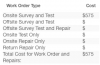
I have a page of html tables that are filled by database values through PHP, and there are no problems there. However, I have an issue on one of the tables. I have a pricing table, attached below. The $575 is currently filled from a field in the database that is set from a CSV upload, but the new CSV template is not doing this because it's missing the price field. This is the SQL statement that I'm using in the database, since the price is based off of meterSize, meterType and workOrderType2: UPDATE staging INNER JOIN pricing ON staging.meterType = pricing.meterType AND staging.meterSize = pricing.meterSize AND staging.workOrderType2 = pricing.workOrderType SET staging.onsiteTestSurveyPrice = pricing.price This works, but only with the original template, so I'm looking into doing this strictly in PHP with the table/row values, if possible. An example of what I'm looking for, using the html table and PHP: If $row['meterSize'] contains 3", $row['meterType'] contains COMPOUND and $row['workOrderType2'] contains ONSITE SURVEY AND TEST then $575 should go in <td><? echo $row['onsiteSurveyTestCost'];?> </td> Here's the code for those 3 conditional table rows: <tr style="border: none;"> <td style="border: none; text-align: left;">Meter Type:</td> <td style="border: none; text-align: right;"><? echo $row['meterType'];?> </td> </tr> <tr style="border: none;"> <td style="border: none; text-align: left;">Meter Size:</td> <td style="border: none; text-align: right;"><? echo $row['meterSize'];?> </td> </tr> <tr style="border: none;"> <td style="border: none; text-align: left;">Service Preformed:</td> <td style="border: none; text-align: right;"><? echo $row['workOrderType2'];?> </td> </tr> Is there a way to do this? I have multiple prices that are based on multiple conditions, but If I could figure out how to do this once then I can alter the values accordingly. Basically I want to mirror the db/SQL statement only with strictly PHP and the values in each table row. How can I do that, if possible?
-
 I have a page that displays about 12 tables that are filled from database values. These values correspond with a single record but some of these fields are based off of queries I'm making so that if something's wrong in the query, it will display red text. I'm only doing this for a few different fields but I want an option to edit and fix those fields and then save them to the database with an UPDATE. Basically, I don't want to wrap the whole page in a form since only a few fields in a few of the tables will need to be editable. Is there a way to do this so that I can edit only the few fields that need to be fixed? Here's a table as example: <div class="testResults" style=" width: 30%; clear:both; float: left;"> <!--Test Results Table--> <table style="width: 100%;"> <tr> <th colspan="2">Test Results</th> </tr> <tr> <td style="text-align: left;">Tested Within AWWA Standards</td> <td><? echo $row['standards'];?> </td> </tr> <tr> <td style="text-align: left;">Meter Failed on Low Side</td> <td><? echo $row['lowFail'];?> </td> </tr> <tr> <td style="text-align: left;">Meter Failed on High Side</td> <td><? echo $row['highFail'];?> </td> </tr> <tr> <td style="text-align: left;">Meter Failed Low and High Side</td> <td><? echo $row['bothFail'];?> </td> </tr> <tr> <td style="text-align: left;">Unable To Test</td> <td><? echo $row['unableTest'];?> </td> </tr> </table> So, for example, say I want to edit the data for just standards row and lowFail row. I tried this but it didn't work: <td><input type="text" name="test8TRGPM" value="<? echo $row['test8TestRateGPM'];?>"> </td> I know once this is done I'll need to have a submit button that attaches to a query to update with the input name, but right NOw i'm trying to find the best way to edit. Is it easiest to just wrap the whole page in a form and just create the few inputs where I need?
 -
I am finding that if I have "0"(zero) value in form select option, it won't select this option or submit data. If I change this value to any other number to text, it will work. Is there a way to fix this? I have to have an option where I am able to choose to submit "0" value to the database table. <option value="0" <?php if(empty($_POST['special'])) {} else { if($_POST['special'] == 0) { echo 'selected'; } } ?> >None</option>
-
Here's what I am trying to do. Retrieve "title" and "slug title" from all the rows in a table. Update them with new "title", "slug title" and "brand name". Here's my query. It updates the table with the brand names for each row. But for some reason, it removes the title and slug title from all the rows in the table. Is there a reason why it's doing that? function getIt($var) { $pos = strpos($var, ' - '); echo(substr($var, $pos+3)."\n"); } if(isset($_POST['submit'])) { $get_record = $db->prepare("SELECT * FROM items"); $get_record->execute(); $result_record = $get_record->fetchAll(PDO::FETCH_ASSOC); if(count($result_record) > 0){ foreach($result_record as $row) { $get_item_id = intval($row['item_id']); $get_item_title = trim($row['item_title']); $get_item_title_slug = trim($row['item_title_slug']); $new_title = getIt($get_item_title); $new_title_slug = Output::createSlug($new_title); $brand_name = substr($get_item_title, 0, strpos($get_item_title, ' - ')); $update_record = $db->prepare("UPDATE items SET brand_name = :brand_name, item_title = :item_title, item_title_slug = :item_title_slug WHERE item_id = :item_id"); $update_record->bindParam(':item_id', $get_item_id); $update_record->bindParam(':brand_name', $brand_name); $update_record->bindParam(':item_title', $new_title); $update_record->bindParam(':item_title_slug', $new_title_slug); if(!$update_record->execute()) { $errors[] = 'There was a problem updating the item.'; } } } else { $errors[] = 'No item found.'; } }
-
Say I have 2 tables. Table 1: Type(type_id, type_name) Table 2: Records(record_id, record_name, record_type) Under the "record_type" column, is it better to use type_id(eg. 10) or type_name(eg. Clothing & Watches)? If the answer is use the name, is it better to use the original name(Clothing & Watches) or a slug name(clothing-watches)?
-
I currently have a fulltext search that works. It matches against a item title column in mysql database. Now I would like to include another column to match against. How can that be done properly? Here's my code. Where it says MATCH, I would like to include the type_1 column as well; like this(type_1.type_1_name). $get_records = $db->prepare("SELECT items.*, type_1.* FROM items LEFT JOIN type_1 ON items.type_1 = type_1.type_1_id WHERE MATCH(items.item_title) AGAINST('$search_query' IN BOOLEAN MODE) ORDER BY items.item_id DESC LIMIT {$limit} OFFSET ".$offset); $get_records->execute(); $result_records = $get_records->fetchAll(PDO::FETCH_ASSOC); if(count($result_records) > 0){ foreach($result_records as $row) { // get results } }