
Description
Enhance user experience and site navigation with a lightweight, customizable « Scroll to Top » button. This plugin adds a smooth-scrolling button that appears as users scroll down the page and disappears when they return to the top.
Designed for speed and seamless integration, it works with any WordPress theme and includes options for custom icons, button position, color, animation, and intelligent display rules. No coding required—just install and configure in minutes.
Perfect for blogs, long-form articles, eCommerce sites, or any website where easy navigation improves usability.
Key Features & Customization
- Intelligent Display: Automatically appears as users scroll down, then disappears when at the top.
- Smooth Scroll Animation: Provides a fluid and pleasant « back to top » experience.
- Flexible Destinations:
- Internal Page Scroll: Link the button to any specific element within the current page.
- External Page Redirection: Redirect users to any other page or URL.
- Customizable Button Design:
- Choose between text, custom image (PNG/SVG), or Font Awesome icons.
- Use any image URL for complete branding control.
- Responsive Control:
- Mobile-Friendly: Option to hide the button on smaller devices/windows for better mobile UX.
- iFrame Compatibility: Ensures it doesn’t appear inappropriately within iframes.
- Targeted Visibility: Easily show or hide the button on specific pages or posts.
- Temporary Display: Auto-hide the button after a set duration for a cleaner interface.
- Optimized Performance: Utilizes Async JavaScript to ensure fast page loading.
- Accessibility Focused: Built with ARIA labels and screen reader text for inclusive navigation.
- SEO-Friendly Markup: Employs semantically correct HTML elements for optimal search engine and accessibility performance.
- Optimized Performance: Adds functionality without slowing down your site.
- Easy-to-Use Admin Panel: Configure all settings intuitively from your WordPress dashboard.
Captures d’écrans
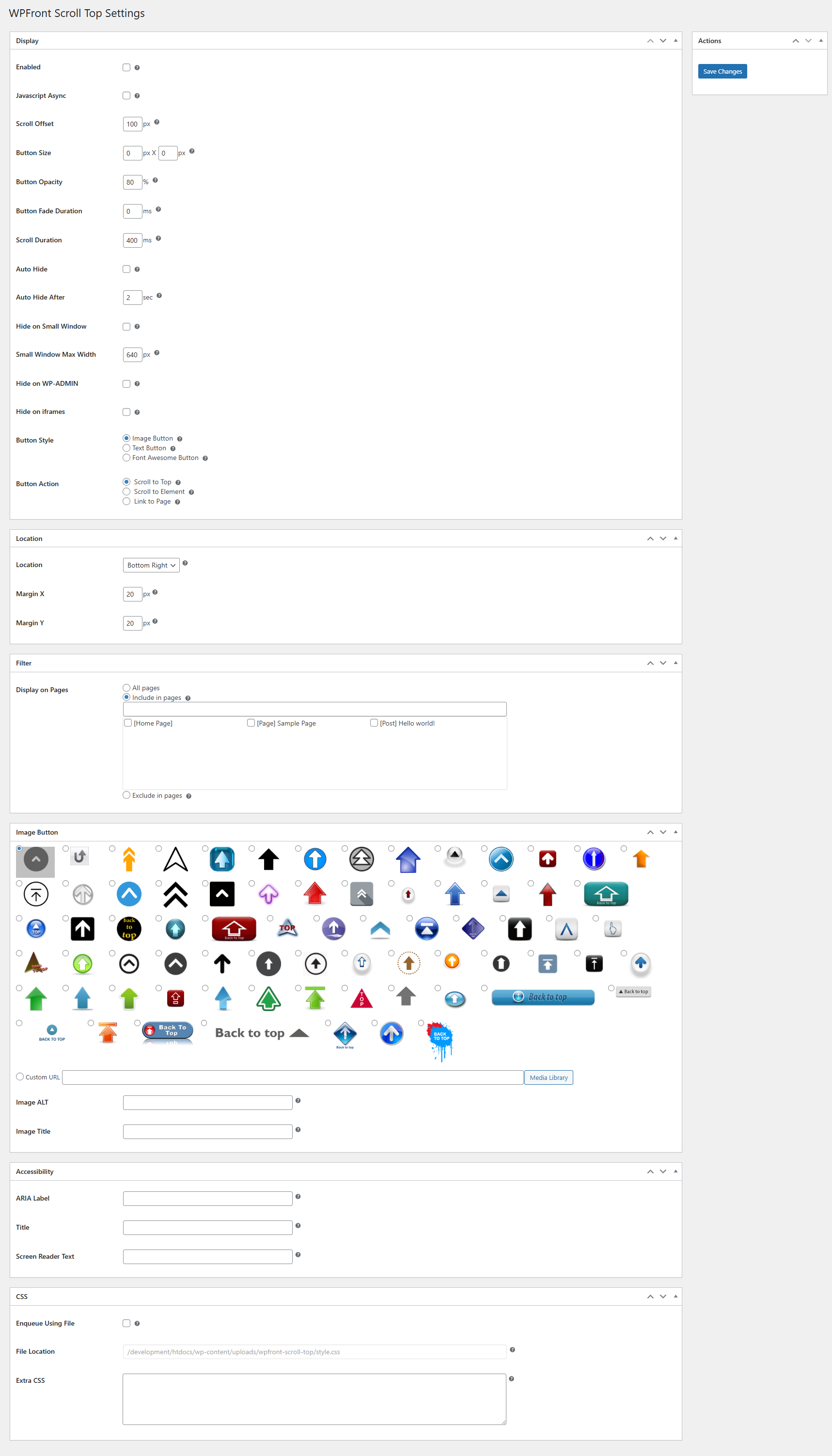
Page des paramètres.

Installation
- Click Plugins/Add New from the WordPress admin panel.
- Recherchez « WPFront Scroll Top » et installez.
- Configure plugin using Scroll Top link under Settings menu.
FAQ
-
What is the « Scroll to Top » button, and how does it work?
The « Scroll to Top » button is a convenient navigation feature that appears on your website as users scroll down a page. With a single click, it allows them to effortlessly return to the top of the page with a smooth, animated scroll, significantly improving the user experience, especially on long-form content. -
Is the « Scroll to Top » button always visible?
No. The button gracefully appears only after a user has scrolled down a certain distance on the page and disappears when they are at the top, ensuring it doesn’t obstruct content unnecessarily. You can also configure an Auto-Hide feature to make it disappear after a few seconds of inactivity. -
Can I customize the design of the button?
You can choose to use simple text, select from a wide range of Font Awesome icons, or upload your own custom image (PNG or SVG) to perfectly match your website’s branding. You also have full control over its position, size, colors, and hover effects. -
Can the button link to something other than the top of the page?
Besides scrolling to the top, you can configure the button to:- Link to an In-Page Element: Direct users to a specific section or HTML element (like an anchor point) anywhere on the current page.
- Redirect to a Different URL: Use the button to send users to another page on your site or even an external website.
-
Can I control where the button appears on my website?
You can easily enable or disable the « Scroll to Top » button on specific pages, posts, or custom post types through the plugin’s settings, giving you full flexibility over its visibility. -
Is the plugin accessible for all users?
The plugin is built with proper ARIA labels and includes screen reader text, ensuring that users relying on assistive technologies can navigate your site effectively and experience the benefits of the button.
Avis


Contributeurs/contributrices & développeurs/développeuses
« WPFront Scroll Top » est un logiciel libre. Les personnes suivantes ont contribué à cette extension.
Contributeurs
“WPFront Scroll Top” a été traduit dans 16 locales. Remerciez l’équipe de traduction pour ses contributions.
Traduisez « WPFront Scroll Top » dans votre langue.
Le développement vous intéresse ?
Parcourir le code, consulter le SVN dépôt, ou s’inscrire au journal de développement par RSS.
Journal des modifications
3.0.1
- Defect fix.
3.0.0
- Breaking changes are introduced. Please verify the display after the upgrade.
- These breaking changes are needed for accessibility and SEO friendly markup.
- The container will either be a button or an anchor element.
- There could be multiple span inside the container depending on your configuration.
- Minimum PHP version required is 7.2.
- Accessibility and more CSS settings are available.
- Deprecated settings are removed.
2.2
- Corrections de compatibilité.
2.1.1
- Bug fix.
2.1
- [Deprecated] Small device settings.
- New UI.
- Title HTML attibute.
- PHP compatibility fixes.
- HTML validation fixes.
- Amélioration des performances.
2.0.7
- XSS fix. Thanks to ‘Vlad Visse’.
2.0.6
- XSS fix. Thanks to ‘Asif Nawaz Minhas’.
2.0.5
- Correction de XSS.
2.0.4
- Correction de la compatibilité avec WP.
2.0.3
- Corrections de la dépréciation de jQuery.
- Corrections de compatibilité.
- Correction du conflit avec SiteGround.
2.0.2
- Corrige la santé du site WordPress 5.2, wp_version_check, conflit.
2.0.1
- Link to element.
- Lien vers la page.
- Sélectionnez facilement une image dans la bibliothèque multimédia.
- Amélioration des performances.
1.6.2
- Nécessite PHP 5.3 minimum.
- Correction de bugs.
- Déplacement du menu sous le menu « Paramètres ».
- Corrections de la compatibilité avec PHP 7.2.
1.6.1
- Undefined variable fix.
1.6
- Prise en charge des icônes Font Awesome.
- New image icons.
- Paramètre pour le menu de déplacement sous « Paramètres ».
- Amélioration des performances.
- UI improvement.
- Corrections de la compatibilité avec PHP 7.
1.5
- JavaScript async.
- Fichiers minimisés.
- Fichiers de langue supprimés.
1.4.5
- Traduction ukrainienne ajoutée. Merci à Ivanka Skakun.
1.4.4
- Correction de la compatibilité avec le thème Zerif.
1.4.3
- Media upload bug fix.
1.4.2
- Correction de bugs.
- Ajout de la langue allemande.
1.4.1
- Correction de bogues
- Ajout de la langue russe
1.4
- Image ALT attribute
- Traductions linguistiques
1.3
- Masquage automatique
- Masquer sur wp-admin
- Masquer sur les iframes
- Filtre pages/posts
1.2
- Option bouton texte
- Correction de bogues
1.1.1
- Amélioration de la stabilité
- Nouvelle structure de menu
1.1
- Nouvelle option de masquage sur les appareils mobiles
- Fixed conflicts with other plugins
1.0.1
- Correction de bogues
1.0
- Communiqué initial
