A view of Gephi Lite v1.0.0, with a graph opened with its caption, and over it the "Welcome" modal

Introducing Gephi Lite v1.0 🎉

The summer has been quite busy, and we are very thrilled to announce the release of Gephi Lite v1.0! This marks for us the first version of Gephi Lite we are really proud about.

You can play with it at lite.gephi.org 🚀


Previously, on Gephi Lite…

Since Gephi’s creation in 2008, multiple groups of people within the Gephi community conceived and developed various web applications1 to somehow extend Gephi to the web. Some of these projects were designed to help people publish or share their networks online somehow, while others were meant to bring some of Gephi’s core features to the web (layout, filters, nodes coloring)2.

Starting the Project

During 2022 Gephi Week in Paris, the Gephi team decided to endorse Gephi Lite as a new project, within the Gephi ecosystem. This new web application would be developed by the OuestWare team, who was already carrying other open-source graph visualization tools close to the Gephi ecosystem, such as sigma.js or Retina.

Image

From 2022 to 2025, the team worked on Gephi Lite. It quickly became a usable prototype, and found its place within the Gephi community. Dr. Veronica Espinoza wrote a tutorial on her blog on how to display node images in Gephi Lite, for instance. Also, Gephi Lite was used twice as an experimental playground to test new things:

  • Mathieu Jacomy’s connected-closeness layout evaluation metric was added to Gephi Lite in Gephi Week 2024;
  • A team of people (Mathieu Jacomy, Alexis Jacomy, Guillaume Plique, Benjamin Ooghe-Tabanou, Andrea Benedetti and Tommaso Elli) met at a workshop in Paris in December 2024 to design a new way to observe uncertainty in the Louvain Method – prototyped in Gephi Lite.

Some important limitations

But in early 2025, there were some big issues to tackle:

  • Gephi Lite’s design was a bit to chaotic and incoherent
  • Gephi Lite was mostly used by its developers
  • Nobody actually knew who was using Gephi Lite, nor why do people use it (or don’t)
Image

So, OuestWare hired an intern designer, Arthur Desaintjan, who spent some months on leading user interviews and redesigning Gephi Lite entirely. The full OuestWare team then basically spent the summer implementing these new designs.3

The current state

Basically, what’s new is:

  1. Gephi Lite has a new graphical identity, cleaner, with more space for the data
  2. Navigation has been revamped, so that features appear more clearly
  3. Gephi Lite now has a fresh new data table
Image

Gephi Lite for newcomers

So, what’s this all about? Gephi Lite is a lighter , web-based version of Gephi.

Gephi Lite is Gephi

Image

This one is really about what makes Gephi Gephi: Gephi Lite is Gephi, because:

  1. It serves the same purpose (visual network analysis)
  2. It’s from the same community (just not the exact same people)
  3. Its interface keeps the same blocks (filter, layout, appearance…)

Gephi Lite is light 🪶

Gephi Lite is light, or at least lighter than the well known Gephi desktop application, because:

  1. It does not need to be installed (it’s just a webpage, available to anyone with some internet connection and a Web browser)
  2. Its user interface is lighter (complex features are simplified or removed)
  3. It only supports lighter graphs 🥲 (no more than 10k nodes or 20k edges, at the moment)

Gephi Lite is a web application

Gephi Lite is a web application, which opens a lot of opportunities!

  • “Open in Gephi Lite” permalinks, or a way to share Gephi graphs as if they were actual web documents
  • Gephi Lite iframes, or a way to embed Gephi Lite directly inside web pages or web applications
  • Gephi Lite everywhere, or at least on every device with modern web browsers (and that includes tablets and mobiles)
Image

What’s Next

Now, Gephi Lite v1.0 is a very important milestone for us, but there are still clear ways to improve the project.

Gephi Viewer

The quite popular SigmaExporter plugin for Gephi is quite dated now, especially since it is based on a 10+ years old version of sigma.js.

In Gephi Week 2022, Clément Levallois and Alexis Jacomy developed WebPublishPlugin, a new plugin to publish graphs online using Retina. But there are various issues with using Retina as the “official” Gephi web-based graph viewer:

  1. Retina does things in its own way: It is not “just a viewer”. It preprocesses some layout when there is none, it allows filtering, changing appearance on the fly…
  2. Despite being developed by the same people as Gephi Lite, it has been designed outside Gephi ecosystem, with features prioritization driven by various OuestWare’s projects.
Image

So, latest 2025 Gephi Week in Nantes was the opportunity to challenge what an “official Gephi Viewer” should be, and basically:

  • It should share as much code with Gephi Lite as possible – to make maintaining both applications as simple as possible;
  • It should focus on displaying a graph with a specific appearance, but with zooming / panning / searching capabilities;
  • It should provide a proper caption, as does Gephi Lite.

Performance

Recent efforts on Gephi Lite were exclusively focused on featuresstability and usability. But there are many ways to improve its performances:

  • GPU-based force directed layout algorithms, like in Cosmograph
  • Web-worker based heavy computations (rather than freezing the browser’s rendering thread)
  • Additional “quick-wins” to ease using Gephi Lite with larger networks (toggle graph rendering while running ForceAtlas2, for instance)

Upcoming Features

There are also various feature opportunities that were out of scope, but remain very interesting:

  • Support for background map layers for spatial network context (already supported in sigma.js, which Gephi Lite is based on);
  • Better palettes and colors management (allowing to switch between base or user-defined palettes, etc…)
  • Better export paths (upcoming Gephi Viewer export, SVG export, caption display in PNG export…)

We hope you will like Gephi Lite v1.0. We can’t wait to hear feedback from the community: please let us know what you think!


  1. A lot of Gephi Lite’s ancestors and inspirations are listed in our 2024 FOSDEM presentation, Bridging Research and Open Source: the genesis of Gephi Lite. ↩︎
  2. In 2019 FOSDEM, we even explored if Gephi was portable to the web, how, and what it would allow, in our presentation Gephi JS: Exploring the dystopian future of a Javascript Gephi, FOSDEM 2019. ↩︎
  3. Arthur told his journey quite precisely on OuestWare’s blog. ↩︎

Gephi 0.10 released

Gephi 0.10.0 is here! Download it from http://gephi.org (only patch versions auto-update, it’s intentional). This time around we focused on a few long-awaited features, while keeping our pace on code and sustainability improvements. This release improves the usability and reliability. Here are 5 highlights:

1. Quick search

Searching the graph was previously only possible within the Data Laboratory. There is now a global quick search feature that allows to find nodes and edges in the graph and highlight them. Each result can be acted upon with the same right-click operations found in the Data Laboratory. Quick search is brand new and we’re interested in your feedback as we plan to extend it in future releases.

2. Dark mode

We’ve introduced a new dark look-and-feel in a previous version but a number of components weren’t adjusted accordingly. We have fixed all of these issues and the dark mode is now fully usable.

Image
New dark mode in Gephi

3. Support for Apple Silicon

Gephi now supports the Apple Silicon architecture. As a result, both x64 and aarch64 bundles now exist for Mac OS. The performance improvements for M1/M2 processors is substantial as Gephi can now run natively on this architecture. It loads much faster and complex operations such as layouts run smoother.

Image

4. Preview Improvements

We shipped two major improvements to the Preview module: arrows on curved edges and node border matching the Overview style.

Directed curved edges now have arrows as well. Previously only straight edges had arrows.

Node borders style now match the one seen on Overview: darker node color and size proportional to the node’s size. The border color and size remains entirely configurable.

5. Project and Workspace Management

We reorganised how projects work in Gephi to make it easier to use and pave the way for future features.

Gephi now keeps track of all the projects you’ve worked on in a project list. It’s also now easier to give projects and workspaces names so you can organise your work better. Finally, it’s now possible to duplicate any workspace with all of its settings.

Image
New workspace management

List of improvements

You can check our changelog in the release page:
https://github.com/gephi/gephi/releases/tag/v0.10.0

More about this release

This release is a follow-up to the code sustainability retreat 2022. You can read our report in our last blog post. Not all the features we discussed and worked on are included in this release but it certainly served as an accelerator. We also welcomed contributions from new developers with this release, which is great to see.

Check our road map as of Summer 2021 to have a better idea of where we are going. With this release, we continued to focus on core improvements that pave the way for future big features such as the undo/redo. Specifically, the core improvements to Project Management bring us much closer to it.

Mac OS Users

Note that some users have been experiencing hangs with previous versions, at startup or when switching perspectives. We are aware of the issue and unfortunately there isn’t a complete fix or workaround available at this point. We’re still working on it and you can follow updates on this thread. With this release we hope to have mitigated the issue, while we work on a complete resolution.

As usual, please share your experience/feedback on our Facebook group or on Twitter.

Gephi 0.9.3

Gephi 0.9.3 is here! Download it from http://gephi.org. No crazy new features, but many improvements and bug fixes. Here are 5 highlights:

1. No more Java installation required.

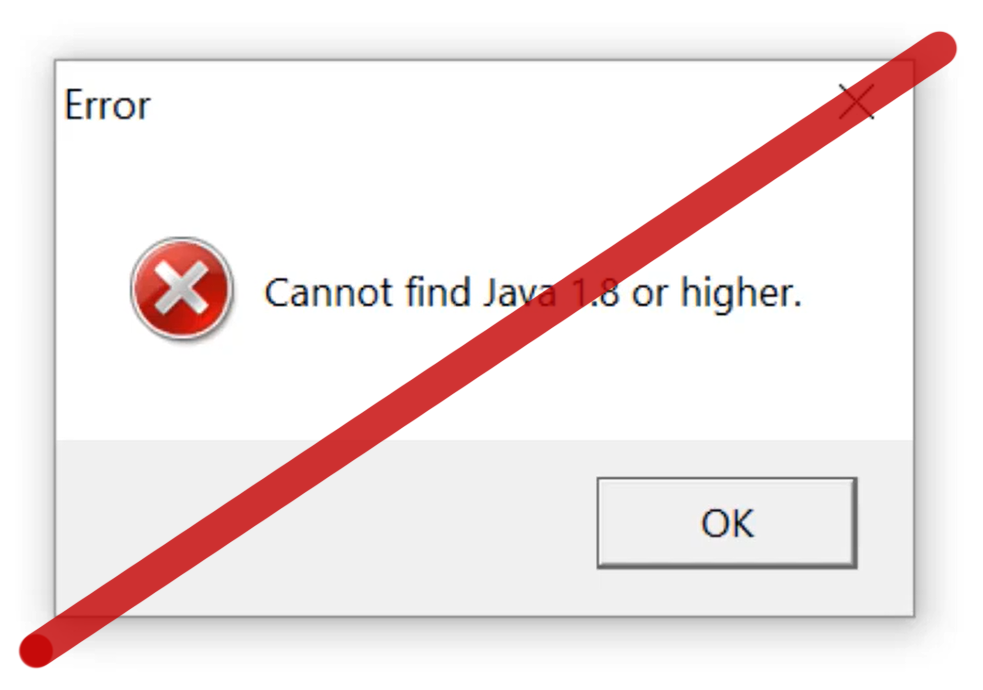
Gephi is installed on top of Java, so you had to install it before Gephi. On some computers, a bug related to theJava path caused the infamous “Cannot find Java 1.8” issue. This does not happen anymore, as you do not have to install Java anymore! It is packaged with Gephi.

Image

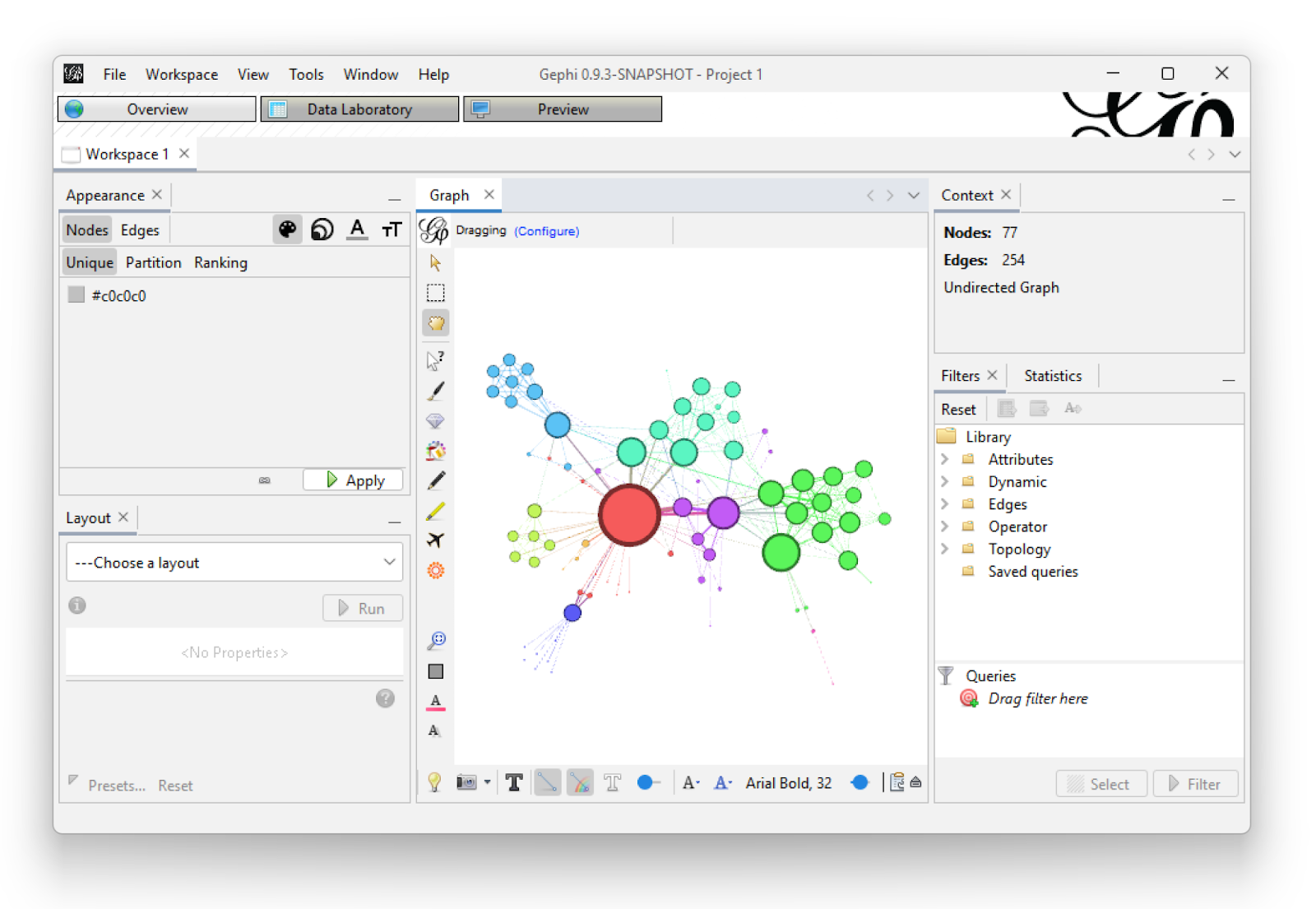
2. New look and feel

Gephi now has a flat look and feel. This is much better for Linux users, as well as some Mac users who had issues with the appearance (one did not see which tab was selected etc.).

Image

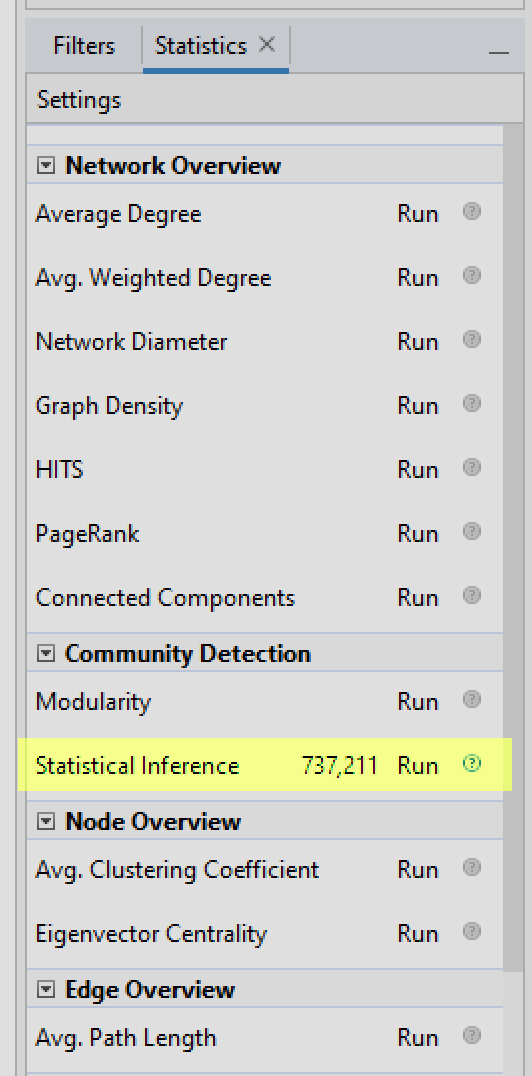
3. New community detection algorithm via statistical inference

Tiago Peixoto attended the code sustainability retreat 2021 and we implemented a version of his approach to community detection. It uses the same convergence heuristic as the Louvain algorithm (“modularity” in Gephi), also looks for assortative structures, but optimizes a different criterion, based on Bayesian inference.

Image

You can look at Tiago’s blog for more information about it, or the two papers it is based on:

4. GEXF 1.3

The file format often used with Gephi, GEXF, has been updated to 1.3. This version is more mature and reliable than the previous one, and is implemented in Gephi. Check the announcement for the final specification there:
http://gexf.net/history.html

5. High DPI screens

High resolution screens are mainstream. We corrected a number of issues to fully support them.

List of improvements

You can check our changelog in the release page:
https://github.com/gephi/gephi/releases/tag/v0.9.3

For plugin maintainers

Check a specific announcement about your plugin right there:
https://github.com/gephi/gephi-plugins/discussions/245

More about this update

This update is a follow-up to the code sustainability retreat 2021. You can read our report in our last blog post. Not all the features we discussed and worked on are included in this update. We are working on it, but it’s just better to release updates as soon as usable improvements are ready.

Check our road map as of Summer 2021 to have a better idea of where we are and where we go. We are still working on big features such as a new graphic engine and the infamous undo feature.

We will also have a code sustainability retreat in 2022 with funded travel and accommodation, if you are interested in contributing to Gephi. We will almost certainly hold it the week of the 29th of August. A call for participation will come soon.

As usual, please share your experience/feedback on our Facebook group or on Twitter.

Gephi 0.9.2 : a new CSV importer

A new version of Gephi has been released! Thanks to Eduardo’s relentless issue fixing, Gephi’s overall stability has been improved. Eduardo is the author of the Data Laboratory, and at this occasion he revamped its CSV importer for a more flexible and straightforward user experience.

The new CSV/spreadsheet importer

Did you know that Gephi can export and import just the table of nodes or the table of edges? This feature is useful in many situations, for instance to produce charts in Excel or to clean data in Open Refine. Below we will showcase the new features and more generally explain how to import a spreadsheet as a list of nodes.

To import a spreadsheet you have to reach the Data Laboratory and click on Import Spreadsheet. In the example below a network is already loaded: we will decide later whether the imported nodes will be merged into the existing ones or not.

Tuto01

Gephi is now able to recognize the type of file you upload, and the support of Excel files has been added. Choosing the right separator is crucial since improperly separated columns would compromise the data. In the example below Gephi recognized that the separator is the Comma (as in a properly formatted CSV file).

Tuto02

The encoding of the file is a common issue, notably with languages using accents and special characters. Gephi can guess the encoding and you can manually edit it if necessary. In the example below Gephi correctly guessed the UTF-8 encoding.

Tuto04

Selecting a different encoding would produce errors. Fortunately the Preview table allows you to see them and fix the encoding. In the screenshot below, see how the wrong encoding produces exotic characters in the data.

Tuto03

When you validate these settings, Gephi now opens the exact same panel as when you open a new network. I personally love this addition since it brings more consistency to the user experience. It allows Gephi to provide a number of useful informations like the number of nodes detected or the issues found during the import process.

Tuto05bis

Do not miss an important feature here: in this panel you decide either to create a new workspace with the imported data or to merge the new nodes with the old ones. This very useful feature was already present at the opening of a new network, but many users still ignore it exists. Mind to select the Append option if you intend to merge the nodes. In that case when an imported node has the same Id than an already present one, the new node data will override the old one.

Tuto06

More info

Take a look at the full list of improvements there:
https://github.com/gephi/gephi/releases/tag/v0.9.2

How do I get this release?

  • If you have a recent Gephi, the update will be automatically proposed to you
  • If you have an older version (0.8 or before) you have to download and install manually
  • This update can be downloaded from http://gephi.org

Gephi updates with 0.9.1 version

splash091A new Gephi version has been released and can be downloaded from gephi.org. This version is an update from the 0.9.0 version released last December and mostly addresses issues discovered since.

One notable improvement is a new localization: German! Gephi is now localized in nine languages (English, French, Spanish, Japanese, Brazilian Portuguese, Russian, Chinese, Czech and German) and we hope to continue the momentum on this effort in the future.

new_german_l10n

Other notable improvements include a better support for parallel edges, appending to existing workspaces and how filters are saved in .gephi files. More than 60 bugs were fixed with a majority of them reported by the community. Thanks to all users who took the time to help! The complete list of bugfixes and improvements can be found in the changelog on GitHub.

In the next few weeks we would like to focus on documentation as there’s still many features brought in the 0.9.0 version without up-to-date documentation. This is especially important for more complex features such as dynamic graphs, which got a major upgrade.

As usual, please share your experience/feedback on our Facebook group or on Twitter.

Gephi 0.9 released: Play with network data again

splash

We’re proud to announce the release of the next major version of Gephi! This 0.9.0 version has been more than three years in the making but today brings an exciting new life to this project, and the graph/network analytics community at large. You can download it here for Windows, Mac OS X and Linux.

Gephi is the leading graph visualization software – known as the “Photoshop for networks” and is open-source and free. It has been downloaded more than a million times and is used by many scholars and data scientists around the world. This new release brings new features in the area of dynamic networks (i.e. network over time) and major compatibility and performance improvements.

Since the last release in 2013, users were facing compatibility issues with Java, which have been resolved with this release. Development had slow down three years ago but had never stopped. In fact, in March 2013 the time had come to think about what Gephi 1.0 would look like and realize it needed a new core. This was by far the most complex project the team had to overcome but developers had a long-term vision and know that future developments will now rely on a robust and extensible core, with world-class performances.

The world is increasingly complex and interconnected. Gephi’s purpose is to unfold this complex relational data in a way anyone can understand them. It allows you to visualize graph data as a map and create the visualizations to support your narratives. State-of-the-art algorithms make readable layouts, highlighting communities or influential nodes. Visual tools tweak colors and shapes to reveal hidden patterns in the data, helping solving complex problems. More and more network-maps are pictured in online, offline press and other communication media. They spread from science to business, art and activism. People are increasingly exposed to them and learn how to read them. Gephi aims to accelerate this commoditization process by providing free and easy-to-use tools.

What’s new in Gephi 0.9?

The list is too long! The complete changelog for this version can be found on GitHub’s release page.

Next steps

There are a few immediate next steps coming up right after this release. Following-up on the recent plugin development announcement we’ll get in touch with plugin developers and start migrating plugins to this version. There’s more than 80 plugins to update!

Then, we’ll identify and resolve new issues that appeared with this version. A future Gephi 0.9.1 release will come next year to address those.

A Gephi Toolkit release will also be made very soon so developers can update their application built on top of Gephi’s modules. In the meantime, we’re interested in users’ feedback and want to hear from you on Twitter or Facebook. Issues can directly be reported on GitHub as well, where the developers are.

Finally, thanks to all contributors and the community for supporting this project!

Plugin development gets new tools and opens-up to the community

Since the introduction of the Gephi Marketplace and tools such as the Plugins Bootcamp we’ve seen more and more plugins being developed. Even developers with little experience with Java give it a try and succeed in creating their first plugin. We want developers to be productive and make it as easy as possible to get started with plugin development and find help along the way. As the release of the 0.9 version is near, it’s time to review our plan on that matter and upcoming improvements. Here’s the summary:

  • The gephi-plugins base repository (i.e. repository plugin developers fork) is now using Maven for building and is simpler. It contains only 4 files versus 890 for the Ant-based system.
  • All Gephi modules are published on Maven central, making it very easy to inspect and extend.
  • Introduction of a custom Maven plugin designed to facilitate plugin development.
  • The submission and review of plugins will be entirely based of GitHub, making it more scalable and transparent.
  • A new online portal for plugins is coming up with an easier edit experience and new features.

From Ant to Maven

Before diving into plugins, let’s first review what has changed on how Gephi is compiled, built and packaged – as this directly affects plugins as well. Since the Gephi 0.8.2 version we have migrated our build system from Ant to Maven. This is in line with what the Netbeans Platform (i.e. which Gephi is based on) community recommends. It already has increased the level of automation we’re capable of as a result. The main benefits are (compared to Ant):

  • Maven is great at dependencies management. It’s now very clear what version of what library Gephi depends on, making it simpler to integrate. Dependencies are also downloaded automatically instead of being checked in the codebase
  • Unlike the Ant-based system, it’s independent from Netbeans. This allows developers not using Netbeans to develop Gephi and produce a build entirely from the command-line.
  • Gephi modules can now be placed on Maven Central (i.e. global repository where Maven finds its dependencies). This allows plugins to automatically find the Gephi dependencies online, reducing the manual steps at each Gephi upgrade.

Build assistant

There are a few critical steps we want to help plugin developers with and as a result started the development of a custom Maven plugin. This new tool will work behind the scenes when developers build their plugin. No installation or configuration is needed as it comes already as dependency of the gephi-plugins module. It already addresses common pain points and hope to automate more and more of the steps in the future. This is what it can do as of today:

  • Plugin validation: The assistant reviews the plugin configuration and metadata at each build. This allows for instance to check if the plugin depends on the correct Gephi version or remind the developer to define an author or license in its configuration.
  • Run Gephi with plugins: A single command allows to run Gephi with the plugins pre-installed. This makes testing faster than ever when developing plugins.
  • New plugin generator: A step-by-step command-line tool that creates the correct folder structure and configuration to get started.

In the future, we want to rely on this build assistant to further automate the process and for instance do easy migration or code generation. For instance, you could ask to generate a Layout plugin code and configuration. Afterwards, all needed would be to fill in the blanks in the code.

A new way to review and submit plugins

As the number of plugins grows, it’s important to have a clear process how plugins are reviewed and updated. We also want this process to be transparent and open to the community. So far, the process was based on the submission of the plugin binaries with a manual review done by the team. This helped us get where we are today, but we want to get it to the next level and propose to entirely move this process to GitHub – using the pull-request mechanism. This has multiple advantages, listed below:

  • Reviewing new/updated plugins can scale because any developer can read the code and contribute to the pull requests.
  • Developers are already asked to fork the gephi-plugins repository so submitting the plugin via GitHub is a natural extension to it.
  • There’s a clear history of each version, comment and what code has changed from one version to another.
  • It makes it easier to test plugins and detect issues before the plugin is approved.

As part of this migration, we’ll no longer add plugins with closed source code but all existing plugins for Gephi 0.8.2 will remain available. For security and stability reasons, it’s essential that each plugin’s code can be inspected before approval. In order for this to work, all existing plugins not already on GitHub or not forking the gephi-plugins repository will need to migrate. For those already set up, the migration will be easier but Ant-based plugins will still need to migrate to Maven.

To summarize, this is what the new 4-steps process looks like for developers:

gephi-new-plugin-development-process

In the current submission process we ask for additional information such as description, author or license as well as allow the upload of images. Going forward with GitHub, all of these data will directly be defined in the plugin’s configuration making it easier to update.

A new home for plugins (again)

Plugins are currently available online from the Gephi Marketplace, where users could also reach people providing teachings and support.  We have ideas on how to improve these community services and will be migrating them to a new architecture, starting with the plugins. We will tell you more about these changes in an upcoming post but for now our focus is on developing a new lightweight plugin portal that can directly be connected with the data source on GitHub.

Here is a preview of what it will look like for plugin pages:

new-plugin-frontend-preview


The content of this website will be automatically updated when plugins are published or updated. The way it works is with Travis CI (i.e. continuous integration platform) simply refreshing the JSON file after changes to the plugin repository on GitHub. Developers can even embed images and write the description in Markdown. This will remove entirely the need for plugin developers to login to the marketplace, update NBMs and metadata.

Migrating plugins

This new Maven-based repository along with the new submission process will be introduced with the Gephi 0.9 release. Let’s review what plugin developers need to know to bring their plugin to this new major version.

As with all major Gephi release, plugins compatibility needs to be evaluated as APIs may have changed. In fact, given this new version is based on an entirely redeveloped core it’s very likely code changes will be required. Hopefully, these changes will often be minor and actually simplify things (i.e less, more efficient code). Documentation will be published on these API changes and core developers will be available to answer questions as well.

Plugin developers will also get contacted regarding moving their code to GitHub with a step-by-step guide. We’re considering adding a migrate command to the new Gephi Maven plugin to facilitate the transition from Ant but that’s an unfunded project at the moment (if you’re interested contributing to that, please let us know). Stay tuned for details right after the release on the path to migration.

And again, thanks for all your hard work on bringing your ideas to life though new Gephi plugins!


Announcing Gephi 0.9 release date

Gephi 0.9

Gephi has an amazing community of passionate users and developers. In the past few years, they have been very dedicated creating tutorials, developing new plugins or helping out on GitHub. They also have been patiently waiting for a new Gephi release! Today we’re happy to share with you that the wait will come to an end December 20th with the release of Gephi 0.9 for Windows, MacOS X and Linux.

We’re very excited about this upcoming release and developers are hard at work to deliver its roadmap before the end of 2015. This release will resolve a serie of compatibility issues as well as improve features and performance.

Our vision for Gephi remains focused on a few fundamentals, which were already outlined in our Manifesto back in 2009. Gephi should be a software for everyone, powerful yet easy to learn. In many ways, we still have the impression that we’ve only scratched the surface and want to continue to focus on making each module of Gephi better. As part of this release, we’ve undertaken one of the most difficult project we’ve worked on and completely rewrote the core of Gephi. Although not very visible for the end-user, this brings new capabilities, better performance and a level of code quality we can be proud of. This ensure a very solid foundation for the future of this software and paves the way for a future 1.0 version.

Below is an overview of the new features and improvements the 0.9 version will bring.

Java and MacOS compatibility

This release will restore Gephi’s compatibility with the latest Java versions on all platforms. This will resolve issues our users encounter with Java 7 and 8. Compatibility issues with Mac OS will also be resolved and full support for Retina display screens added.

New redeveloped core

This release will improve performance and reliability by a large margin. The graph structure at Gephi’s core has been redeveloped from scratch and will bring multiple new features, better performance and lower memory consumption. On benchmarks, simple operations such as reading nodes or setting attributes see performance improvements ranging from 2X to 100X. This new core will make many operations in Gephi faster and push the envelope even further in large graphs exploration. Reducing memory usage has also been an area of focus and we have measured a 2X reduction compared to Gephi 0.8.2 on a medium-size graph.

New Appearance module

We’re introducing a new user module named Appearance designed to combine and replace Ranking and Partition modules. Appearance will group in one place all controls acting on the node or edge appearance. The partition capabilities will also greatly improve as part of this new module and a new palette selector is being added. In addition of the default palettes, we’re also adding a cool palette generator designed to find the optimal colors (i.e. partitions can be differentiated from each other). Moreover, it will be possible to “Auto-apply” partitions as well, which is a feature that was only available for Ranking so far.

Appearance Partition Palette selector Palette Generator

Timestamp support

This 0.9 release adds a new way to represent networks over time: timestamps. So far, users could only represent time using intervals and that was cumbersome when the underlying network data was collected at fixed time intervals (e.g. one network per day). Starting with this release, Gephi will support both intervals and timestamps to represent evolving network topology and/or evolving attribute values.

GEXF 1.3 support

The GEXF format is also evolving to its 1.3 version. This version improves the support for graphs over time and introduces the ability to represent time using timestamps rather than intervals. In addition, it’s now possible to set a timestamp or an interval for the entire graph, allowing building collections of GEXF files where each represents a “slice”. This is a common request from the community and we hope this will greatly facilitate the exploration of longitudinal networks.

Multiple files import

With the 0.9 version users will be able to import multiple files in Gephi at the same time. Once the files have been read, two choices are offered, either to import each file into a separate workspace or merge them into the same workspace. The latter is a powerful option when used with dynamic graphs. Indeed, a collection of GEXF files representing the same network over time will be imported in Gephi in a single step.

Import Report Multiple Graphs

Multi-graph support

Multi-graph exampleThis release will bring support for multi-graphs, where multiple edges can exist between two nodes each with a different relationship. Users will be able to import, filter and run algorithms on these graphs but the support for visualizing these graphs will come in a further release.

New workspace selection UI

We’ve heard users’ feedback and the workspace selection user interface will be improved. The new interface will be a “tab-style” interface where each workspace is a tab and switching from one workspace to another only requires a single click. Tabs will be located at the top just under the perspective selection. The previous interface is located at the bottom right corner and will be entirely removed.Workspace Tabs

Gephi Toolkit release

A new release of the Gephi Toolkit, based on the 0.9 version will be made soon after December 20th.

Bug fixes

We’ve done a serious bug squash and already addressed many difficult issues, more to come until the release date.

separator

Follow us on Twitter or join the Facebook group to get the latest news. If you want to know more about this upcoming release, or want to help out please send us a note.

Gephi is asleep and up to awaken

gephi round graph

Gephi has been almost inactive since quite a long time: we did not release, we did not fix issues, we did not post on the blog. This lack of recent updates creates an increasing amount of difficulties, including installing Gephi on a recent Mac computer. A lot of users ask if the project is still alive. We understand why you wonder and decided to write this post to explain where we’re at and provide to the community a preview of what’s next in Gephi’s lifecycle.

In short, Gephi is still alive yet asleep, but its reawakening is in sight. However, a series of issues prevents us from doing better right now.

The ambitious yet incomplete 0.9 release

The next planned release is Gephi 0.9 and promises to be a major release with a complete rewrite of Gephi’s core module. Performance, and especially memory usage for large graphs has been a lingering issue since the first version of the software. As explained in this article written by Mathieu Bastian – Gephi’s lead developer – the solution resides in a more efficient graph structure implementation that we named “GraphStore”. This technology brings many new features and significantly reduces the memory usage but is a large development effort and requires all modules to be adapted. Indeed, the module which stores and manages the graph is pretty much used by every other module (e.g layout, filters, preview etc.).

This work on the core graph module was initiated as part of a larger vision focused towards a 1.0 release, which aims to address a much larger set of problems, missing measures and bugs. As you may know, the current version has a various set of problems. Some issues are preventing the normal use of the software, like the difficulties to install it on a recent Mac OS X (Yosemite and Maverick). Others are incomplete or missing features, such as various user interface design issues or the improper management of categories’ colors. Finally, some internal problems are hidden in the code but nevertheless real. For example, the technology used to code the user interface (Swing) has been replaced by a more modern technology named JavaFX. For the most part, these problems require a deep rework of the code. The good news is that the most difficult part in this 1.0 vision is probably the rewriting of Gephi’s core graph module, which is what the 0.9 version focus on already.

The current 0.9 developments have reached around 80% completion and many modules, but not all, have already been adapted to GraphStore. A stable version can’t be released until this reaches 100% and all the modules are converted to the new core implementation. Other important issues such as installation issues on recent Macs have already been addressed in this development version. Finally, a series of bugs will be fixed along with minor features and improvements. Finishing the last modules and releasing the 0.9 version is our current priority.

Limited resources

Like many other open source projects, Gephi’s development is for the most part unpaid and remains an activity on the side for all contributors. The notable exception is the Google Summer of Code, which sponsored students multiple years in a row to work on the project. Therefore, the project’s progress depends on the contributors’ professional and personal situations. Although individuals are ready and willing, time is limited and there was just not enough of it lately to make significant progress. Mathieu Bastian is Gephi’s architect and has been behind the software’s key iterations since 2007. This time again he holds the keys to its future and has been involved in the GraphStore project. This complex project requires all of his knowledge of Gephi’s code and is hardly a task someone else could do at this point. Therefore, a part of our development depends on his free time, and we accept it. This situation is temporary though. Indeed, Mathieu will eventually obtain more time to conclude the work on the 0.9 release and Gephi’s development will be less dependent on him in the future.

In addition, we are working on stabilizing some resources in the long run, but our strategy requires a readjustment. Gephi needs time and energy from good java developers, clear-minded designers, and seasoned software architects. We have to entice skilled people, support their involvement and get the best from their contributions. We aim to improve the management of our limited workforce to make the development more attractive and dynamic. This evolution is organized by our team but benefits from external support. For instance, the Sciences Po médialab, the institution I belong to, provides resources for organizing the project, rethinking the user interface and some coding. These changes may not be immediately visible but we’re committed for the medium and long term.

What is next

Releasing the Gephi 0.9 version is the immediate next step. This version will include compatibility fixes and the whole new core based on GraphStore. Then, an important project to rework the overall user experience will be kicked off. It requires a technology switch (from Swing to JavaFX) and the overhaul of a majority of the modules but aims to make Gephi simpler and more intuitive to use. We already have a good diagnostic of the user experience issues in Gephi but need to explore different designs. In an upcoming blog post, I will explain our thought process on this topic with the help of Professore Donato Ricci, senior interaction designer. Eventually, the 1.0 version will be worked on and released.

Gephi is almost 10 years old. It is usable but still plagued with many well-known issues. Though sometimes frustrating, it allows users to do incredible things. We think Gephi is still relevant to research, journalism, civil society and more. We are going to give it the renewal it deserves.

Mathieu Jacomy

Google Summer of Code 2013

Image

It’s a great news, Gephi has been accepted again for the Google Summer of Code for the 5th year! The program is the best way for students around the world to start contributing to an open-source project. Since 2009, each edition is a great success and dramatically boosted Gephi’s project development.

What is Gephi?

Networks are everywhere: email systems, financial transaction systems and gene-protein interaction networks are just a few examples. Gephi began as a university student project four years ago and has quickly become an open source software leader in the visualization and analysis of large networks. It is an important contribution to the ecosystem of tools used by researchers and big data analysts to explore and extract value from the deluge of relational data and disseminate a better understanding for people to think about a “connected” world.

Gephi is a “Photoshop” for graphs: designed to make data navigation and manipulation easy, it covers the entire process from data importing to aesthetics refinements and communication. Users interact with the visualization and manipulate structures, shapes and colors to reveal the properties of complex and messy data. The goal is to help data analysts make hypotheses and intuitively discover patterns or errors in large data collections.

Gephi’s project aims at providing the perfect tool to visualize and analyze networks. We focus on usability, performance and modularity:

  • Usability: Easy to install, an UI without scripts and real-time manipulation.
  • Performance: Visualization engine and data structures are built scalable. Supporting always-larger graphs is an endless challenge!
  • Modularity: Extensible software architecture, built on top of Netbeans Platform. Add plug-ins with ease.

ImageLearn more about Gephi, watch Introducing Gephi 0.7, download and try it by following Quick Start Tutorial.

Gephi’s project is young, the growing community is composed of engineers and scientists involved in network science, datavis and complex networks.

List of ideas

List of ideas are availabe on our wiki. They cover various skills and level of difficulties:

* Completing Legend moduleComplete the Legend module, which was started in last year GSoC.
* GraphStore benchmark and tuningOptimize and tune GraphStore based on a serie of new well-defined benchmarks.

Please also propose your ideas on the forum. They will be considered and discussed by the community. Have a look at our long-term Roadmap.

Students, join the network

Students, apply now for Gephi proposals. Join us on the forum and fill in the questionnaire. Be careful, deadline for submitting proposals is May 3 (timeline)!

Hélder Suzuki, student for Gephi in 2009 and now software engineer at Google, wrote:
At Gephi students will have the opportunity to produce high impact work on a rapidly growing area and be noted for it.

View our previous Google Summer of Code projects here and read former students interviews.

Follow Gephi on Twitter

Image