A lightweight desktop utility (built with Go + Fyne) to filter files and preview bulk renames before applying them.
- Website : https://renforgeapp.web.app
- Repo: https://github.com/blackarck/renforge
- Download : https://github.com/blackarck/RenForge/releases/tag/latest
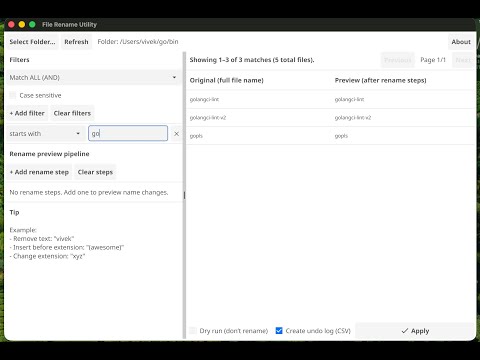
- Select a folder (non-recursive for now)
- Shows matching files with full file names
- Preview column shows the new file name after applying rename steps
- Preview text wraps and uses a smaller font so long names are readable
Add multiple filter rules like:
starts with→Thecontains→Whaleends with→.mp3extension→png
Options:
- Match ALL (AND) or Match ANY (OR)
- Case sensitive toggle
Add multiple rename steps and see the preview update live:
Supported rename steps:
- Remove text
- Replace text
- Insert before extension
- Append
- Prepend
- Change extension
Examples:
- Remove
vivekfrom all file names - Insert
(awesome)before the extension - Change extension to
xyz
- Browse results with Previous / Next (page size = 10)
Before renaming, FileRenUtil checks and warns about:
- Invalid names (empty, invalid characters, reserved names)
- Duplicate preview conflicts (two files would become the same name)
- Target exists on disk conflicts
These are skipped during Apply.
- Dry run mode lets you generate a rename plan without touching files
- Apply performs the renames that are safe to execute
Optional Undo Log (CSV) export so you can revert changes later. The log includes:
old_path,new_path,status,reason, etc.
Tip: Keep your undo CSV in the same folder as the renamed files for easy recovery.


- For the latest version, check the GitHub repo releases (if/when you add them): https://github.com/blackarck/renforge
- Go (recommended: latest stable)
- Fyne dependencies (platform-specific)
Fyne setup docs (recommended): https://developer.fyne.io/started/
go run .go build -o filerenu .- Recursive folder scan (include subfolders)
- Two-phase rename to support swaps/chains safely
- Regex filters and regex rename steps
- “Select subset” (checkbox per file)
- Export rename plan without Apply
- Export rename script
RenForge is licensed under a dual-license model:
- Non-commercial use: Free under CC BY-NC 4.0
- Commercial use: Requires a paid commercial license
If you are an organization or plan to use RenForge commercially, please contact us for licensing.

