


Unity package wrapper for stash-native, enabling native-feeling Stash Pay IAP checkout and webshop presentation directly inside your Unity game (Android/iOS).
- Unity 2019.4+ (LTS recommended)
- iOS 12.0+ / Android API 21+
Try the sample scene in the ./Sample folder, or try our demo in the Appetize online simulator.
When using the sample scene, input your own test API key in StashLinkGenerator.cs.
- iOS: Open in Appetize.io
- Android: Open in Appetize.io
- Download the latest release or repository as a zip file.
- Import the
.unitypackagefile into your Unity project - Select the components you need (Stash.Popup for Stash Pay)
- Open Window > Package Manager
- Click + → Add package from git URL
- Enter:
https://github.com/stashgg/stash-unity.git?path=Assets
Plugins/Android/- Contains the StashNative AAR and Unity bridge for Android.Plugins/iOS/- Contains the Unity bridge and native framework for iOS.
StashNative.cs- Singleton API that wraps and provides calls to the native iOS and Android libraries: useOpenCard,OpenModal,OpenBrowser,CloseBrowser, and listen to events for integration.
StashEditorPlugin/- (Optional) Editor window for testing Stash card and modal flows directly in the Unity Editor (Windows and macOS). Lets you simulate UI, trigger events, and test callback handling within the editor without building. The editor plugin is under active development and may not be fully stable.
StashSample.cs/StashSample.unity- (Optional) Reference implementation and demo scene: Open Card, Open Modal, Open Browser, and callback status.
Stash-native is used to handle Stash links - either Stash Pay links for IAP purchases or pre-authenticated links for embedded webshops. These links should always be generated securely on your backend server to ensure proper authentication and permissions.
Before you start integrating the library, we strongly recommend reading our integration guide for best practices and detailed instructions on generating checkout URLs and Stash links correctly.
iOS Development Note: The first OpenCard or OpenModal call may be slow when running under the Xcode debugger (especially if connected wirelessly), due to
WKWebViewprocesses being heavily instrumented by Xcode. This delay only affects debug sessions on the first call, not production builds.
Drawer-style card: slides up from the bottom on phones, centered on tablets. Suited for Stash Pay payment links, pre-authenticated webshop URLs or payment opt-in dialogs.
using Stash.Native;

public class MyStore : MonoBehaviour
{
    void PurchaseItem(string checkoutUrl)
    {
        StashNative.Instance.OpenCard(
            STASH_URL_TO_OPEN,
            dismissCallback: OnDialogDismissed,
            successCallback: OnPaymentSuccess,
            failureCallback: OnPaymentFailure
        );
    }

    void OnDialogDismissed() => VerifyPurchaseStatus();
    void OnPaymentSuccess() => VerifyPurchaseStatus();
    void OnPaymentFailure() => ShowErrorMessage("Payment could not be processed");
}
All callbacks and config are optional; you can pass only the ones you need or use the global events instead. See the API reference below for more details about configuration options.
Centered modal dialog on all devices. Same layout on phone and tablet; resizes on rotation. Suited for channel selection or as an alternative checkout style.
using Stash.Native;

StashNative.Instance.OpenModal(
    STASH_URL_TO_OPEN,
    dismissCallback: () => RefreshShopState(),
    successCallback: OnPurchaseComplete,
    failureCallback: OnPurchaseFailed
);
// All callbacks and config are optional
All callbacks and config are optional; you can pass only the ones you need or use the global events instead. See the API reference below for more details about configuration options.
Opens the URL in the platform browser (Chrome Custom Tabs on Android, SFSafariViewController on iOS). Use when you need an alternative lightweight, system-native browser view.
On iOS, CloseBrowser() dismisses the Safari view when your app regains focus; on Android it is a no-op as Chrome Custom tabs cant be dismissed by the app.
StashNative.Instance.OpenBrowser(STASH_URL_TO_OPEN);
// Later, on iOS only:
StashNative.Instance.CloseBrowser();All public API lives on the StashNative singleton. Access it via StashNative.Instance.
| Member | Description |
|---|---|
StashNative Instance |
Static read-only. The single instance. Created on first access and persisted across scenes (DontDestroyOnLoad). |
| Signature | Description |
|---|---|
void OpenCard(string url, Action dismissCallback, Action successCallback, Action failureCallback, StashNativeCardConfig config) |
Opens the URL in the native card (drawer). All callbacks and config are optional. |
void OpenModal(string url, Action dismissCallback, Action successCallback, Action failureCallback, StashNativeModalConfig config) |
Opens the URL in a centered modal. All callbacks and config are optional. |
void OpenBrowser(string url) |
Opens the URL in the platform browser (Chrome Custom Tabs on Android, SFSafariViewController on iOS). |
void CloseBrowser() |
iOS Only: Dismisses the Safari view programatically. |
void Dismiss() |
Dismisses the current card or modal. |
bool IsCurrentlyPresented |
True if a card or modal is currently visible. |
bool IsPurchaseProcessing |
True when a purchase is in progress and the dialog cannot be dismissed manually. |
Subscribe on StashNative.Instance.
| Event | When it fires |
|---|---|
OnDialogDismissed |
Card or modal was dismissed by the user. |
OnPaymentSuccess |
Payment completed successfully in the in-app UI. |
OnPaymentFailure |
Payment failed in the in-app UI. |
OnOptinResponse |
Opt-in / channel selection response (e.g. "stash_pay", "native_iap"). |
OnPageLoaded |
Page finished loading (argument: load time in ms). |
OnNetworkError |
Page load failed (no connection, HTTP error, timeout). |
OnNativeException |
Exception during a native call (operation name, exception, missing library). |
Callbacks / events: You can pass per-call callbacks to OpenCard / OpenModal (dismiss, success, failure) and/or subscribe to the events above. Per-call callbacks are ideal for handling the result of a specific open (e.g. refresh inventory after this purchase via Stash Pay/Webshop). Events are ideal for global listeners (e.g. analytics, logging, opt-in dialogs) that should run for every card/modal result. Both are invoked when a result occurs.
Optional per-call config for OpenCard. StashNativeCardConfig.Default for defaults.
| Field | Default | Description |
|---|---|---|
forcePortrait |
false |
Portrait-locked on phone when true. |
cardHeightRatioPortrait |
0.68f |
Card height ratio portrait (0.1–1.0). |
cardWidthRatioLandscape |
0.9f |
Card width ratio landscape. |
cardHeightRatioLandscape |
0.6f |
Card height ratio landscape. |
tabletWidthRatioPortrait |
0.4f |
Tablet width portrait. |
tabletHeightRatioPortrait |
0.5f |
Tablet height portrait. |
tabletWidthRatioLandscape |
0.3f |
Tablet width landscape. |
tabletHeightRatioLandscape |
0.6f |
Tablet height landscape. |
Optional per-call config for OpenModal. StashNativeModalConfig.Default for defaults.
| Field | Default | Description |
|---|---|---|
showDragBar |
true |
Show drag bar. |
allowDismiss |
true |
User can dismiss. |
phoneWidthRatioPortrait … tabletHeightRatioLandscape |
(see struct) | Size ratios 0.1–1.0. |
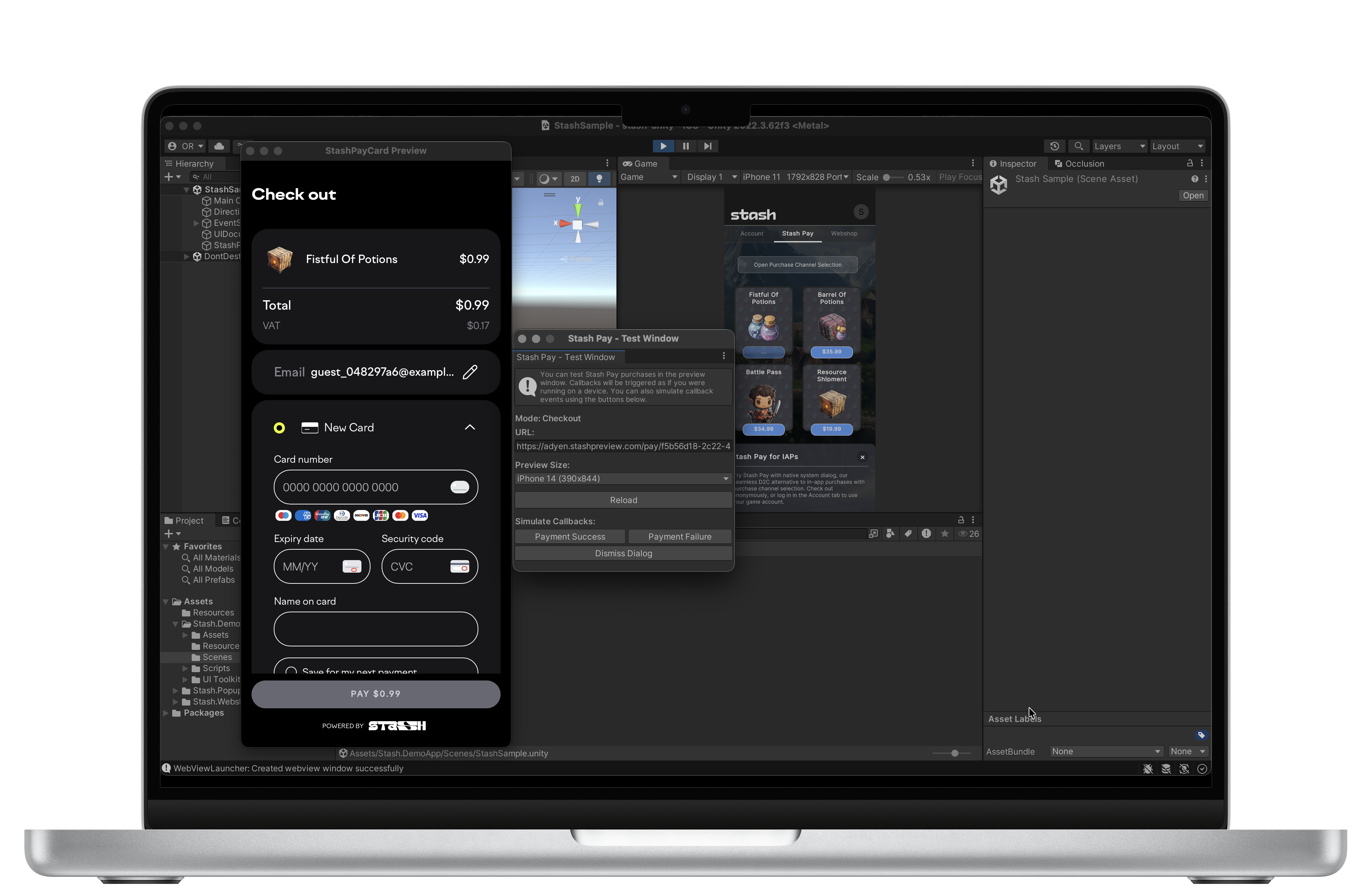
Unity Editor Simulation
Package includes a Unity editor extension that allows you to test Stash URLs directly in the Unity Editor without building to a device.
When you call OpenCard() or OpenModal() in the Editor, the extension intercepts and displays the flow in a preview window. You can interact with the UI and verify callback events. OpenBrowser() is not simulated; it opens the system browser.
Note: Currently Windows and macOS versions of Unity are supported for editor simulator. Linux versions of editor are not supported.
While highly unlikely, however if this happens add frameworks in Unity Project Settings → iOS → Other Settings → Linked Frameworks:
WebKit.frameworkSafariServices.framework
Clean and rebuild Xcode project.
The app is linked with StashNative, but the framework has not been embedded in the app bundle.
In the Unity Editor, select StashNative.xcframework file and make sure "Add to embedded binaries" is enabled in Inspector panel.
Or fix it in Xcode project:
- Open the Unity-generated Xcode project (e.g. after File → Build Settings → iOS → Build).
- Select the Unity-iPhone (main app) target in the project navigator.
- Open the General tab and scroll to Frameworks, Libraries, and Embedded Content.
- If StashNative.framework is missing, click + and add it from the project (it should appear under Frameworks or Plugins/iOS). If it is already listed, set it to Embed & Sign.
Ensure StashNative.xcframework is present in Assets/Stash.Popup/Plugins/iOS/ before building from Unity so the post-process can add it to the main target’s embed phase.
The Unity bridge expects the StashNative AAR to expose StashNative and related classes. If your AAR uses a different Java package than com.stash.stashnative, update the fully qualified class names in StashNativeCardUnityBridge.java to match the AAR.
Ensure internet permission in your AndroidManifest.xml.
When using browser mode, some Unity projects launch Chrome Custom Tabs while others fall back to a system browser window. (This may be due to differences in Android dependencies between Unity versions.) While both flows are valid, Chrome Custom Tabs generally provide a superior experience. If you notice your app is not using Chrome Custom Tabs, you can resolve this by including the AndroidX Browser library (androidx.browser:browser), which supports Android Custom Tabs.
-
Enable Custom Gradle Template in Unity:
- Go to Edit > Project Settings > Player
- Select Android tab
- Scroll to Publishing Settings
- Check Custom Main Gradle Template
- Unity will create
Assets/Plugins/Android/mainTemplate.gradle
-
Add the dependency to
Assets/Plugins/Android/mainTemplate.gradle:- Open the file and find the
dependenciesblock - Add:
implementation 'androidx.browser:browser:1.9.0'
- Open the file and find the
Example:
dependencies {
    implementation fileTree(dir: 'libs', include: ['*.jar'])
    implementation 'androidx.browser:browser:1.9.0'
**DEPS**}
Note: Stash Popup will automatically detect if Chrome Custom Tabs is available in the Android bundle and fall back gracefully to the default browser if not.
- Stash Documentation - Full API reference and integration guides.
This package follows Semantic Versioning (major.minor.patch):
- Major: Breaking changes
- Minor: New features (backward compatible)
- Patch: Bug fixes
- Documentation: https://docs.stash.gg
- Email: developers@stash.gg
