
Descrición
Displays your Twitter timeline in the sidebar of your blog. The plugin is widget ready and comes with many configuration options! Because every theme brings their very special style, Twitterwidget has very little preset css. Please see the css file twitterwidget.css to set collors, borders etc.
Check out more WordPress Plugins and lustige videos brought to you by Grobekelle.
Capturas
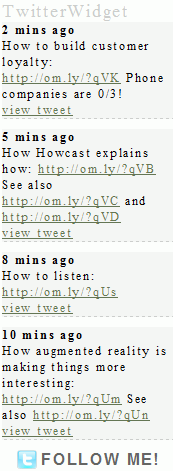
TwitterWidget injected to the blogs sidebar via widget 
TwitterWidget injected to the blogs sidebar via widget (german translation) 
admin panel


Instalación
- Unpack the zipfile twitterwidget-X.y.zip
- Upload folder
twitterwidgetto the/wp-content/plugins/directory - Activate the plugin through the ‘Plugins’ menu in WordPress
- Go to settings -> TwitterWidget and type in your username etc.
- Make sure that the
cachedirectory inside the plugin folder is writeable - Place
<?php if(function_exists('twitterwidget_display')) twitterwidget_display(); ?>in your template or use the sidebar widgets.
Preguntas frecuentes
- Does this plugin comes with a “follow me” button?
-
Yes it does. Please go to settings -> Twitterwidget to enable/disable this feature
- Does this plugin caches the tweets?
-
Yes, a Tweet gets cached for 2 minutes!
Comentarios
Non hai recensións para este plugin.
Colaboradores e desenvolvedores
“TwitterWidget” é un software de código aberto. As seguintes persoas colaboraron con este plugin.
Colaboradores
Traduce “TwitterWidget” ao teu idioma.
Interesado no desenvolvemento?
Revisa o código, bota unha ollada aorepositorio SVN, ou subscríbete ao log de desenvolvemento por RSS.
Rexistro de cambios
- v0.2 24.06.2010 minor xhmtl fixes
- v0.1 13.07.2009 initial release
