Gravity Perks by Gravity Wiz LLC provides you with extra, very handy options and functionalities for your Gravity Forms. Perks like Read only fields, minimum or/and maximum amount of words, copying values from one field to another, limiting checkboxes, choices, etc. There are almost 30 useful extensions of the Gravity Forms plugin available now.
About Gravity Wiz LLC
| Developer | Gravity Wiz LLC |
| Started | 2015 |
| Documentation | gravitywiz.com/documentation |
| Listed | gravityforms.com/developers/gravity-wiz |
| Languages | English |
| Main plugin | Gravity Perks |
| Extensions | 29 extensions (Perks) |
Interesting interviews and links David Smith & GravityWiz
- The Plugin Economy – Gravity Perks by David Smith
- Data Automation – The Brains, The Brawn, and The Beauty – David Smith (July 8, 2021)
- Founder David Smith: Twitter, WordPress profile, GitHub
How it works
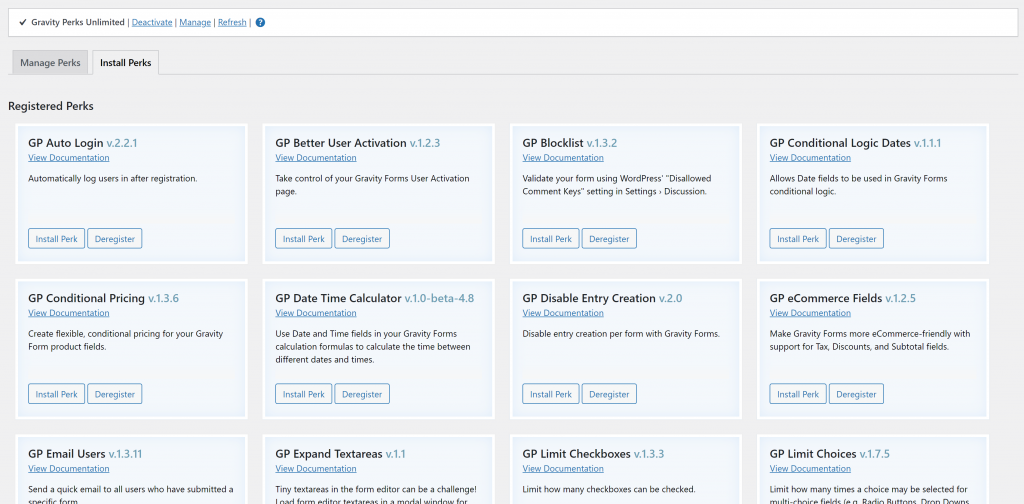
You download and install the Perks Add-on. This is the main plugin and once activated, it will give you easy access to all the individual perks.
Our favorite Perks
In our projects there are some Perks that we install right away.
GP Preview Submission
Since we’re building a lot of Multipage Gravity Forms, the Preview Submission Perk comes in super handy. It allows you to use Merge Tags (and Modifiers) from previous steps inside following steps. To populate standard values of a field or to use inside HTML Fields. Especially when you’re building complex forms, it’s a must have extension of Gravity Forms.
GP Unique ID
We need to generate unique references for our clients. The must have extension of Gravity Forms is the Unique ID Perk. With it you can generate a unique ID, code, number or combination of numbers and letters for each entry in Gravity Forms.
GP Limit Dates
We have a lot of client Forms with Date Fields with specific dates that are allowed. The Limit Dates Perk let’s you configure in a well thought out user interface which dates should be allowed inside the Date Field.
Tutorials GravityWiz
[gravitywp_custom_post_cards post_type=’tutorial’ numberposts=100 terms=7 col=6 ]
Our Premium add-ons for Gravity Forms

API Connector
Connect Gravity Forms to External API's: Query the API using form field values and automatically fill other form fields with the API response.

JWT Prefill
Fill forms with data you can trust. Prefill Gravity Forms fields with a secure token instead of links with editable url parameters, so your data is accurate, tamper-proof, and ready to use.

Advanced Number Field
Functionality for Number Fields, like rounding or only absolute numbers, fixed point notation, range calculation, custom units like % or m2 & show as slider.

Field to Entries
Create entries based on Checkboxes & Multi Select choices & List Field rows.
Read tutorials about

Gravity Flow Form Submission Step Tutorial
The Gravity Flow Form Submission step pauses a workflow until another form is submitted, then continues once the handoff is complete. This guide shows how to connect two forms, prefill fields with mapping, send the correct secure link, and troubleshoot the most common “workflow didn’t move” issues.

Gravity Flow Delete an Entry Step Tutorial
The Gravity Flow Delete Entry step lets you trash or permanently remove Gravity Forms entries as part of a workflow. This guide covers the key settings, scheduling options (delay or date-based), and safe testing tips so you can follow retention and privacy rules with confidence.

Gravity Flow Update Fields Step Tutorial
The Gravity Flow Update Fields step pulls values from another entry and writes them into the current entry, so your workflow can route using “live” data. This tutorial covers source form selection, entry lookup with filters and sorting, field mapping, and quick testing.

Gravity Flow Update an Entry Step Tutorial
The Gravity Flow Update Entry step lets you update an existing Gravity Forms entry using a stored Entry ID and field mapping. This guide shows a simple parent-child setup where a Task Tracker workflow pushes status updates back into the original Request Form entry.


Author: Erik van Beek
Published: 08-11-2021
Last update: 15-02-2022
