



















Identity is the New Perimeter.
Secure it with ITDR.

Stay ahead of identity-based attacks by transforming fragmented signals into real-time, AI detections and expert led response.

Image
Three people stand around an interactive digital table in a futuristic, neon-lit setting, analyzing graphics and data. The scene highlights teamwork and technology, emphasizing CyberSecurity solutions for MSPs to help Secure & Insure critical information.

Trusted by Leading Partners

SentinelOne
SuperOps
ATERA
V2 Version
Syncro
CONNECTWISE
pax8
Manage Protect
MULTIPOINT
RESILIUM.ai
Checkpoint
SentinelOne
SuperOps
ATERA
V2 Version
Syncro
CONNECTWISE
pax8
Manage Protect
MULTIPOINT
RESILIUM.ai
Checkpoint
SentinelOne
SuperOps
ATERA
V2 Version
Syncro
SentinelOne
SuperOps
ATERA
V2 Version
Syncro
CONNECTWISE
pax8
Manage Protect
MULTIPOINT
RESILIUM.ai
Checkpoint
CONNECTWISE
pax8
Manage Protect
MULTIPOINT
RESILIUM.ai
Checkpoint

Shift Your Defense To Identities

Identity compromise is at the root of most breaches, yet legacy controls drown in noisy log data and miss modern credential-focused attacks. Guardz ITDR unifies signals from cloud providers, endpoints, and more to benchmark user behavior.


Agentic AI, guided by human experts, then hunts anomalies, enriches findings and ranks risk. The result reduces alert fatigue, enables swift responses by suspending accounts and turns identity from a weak point into a self-defending perimeter.

A digital timeline titled Account Compromise highlights CyberSecurity events from June 11 to June 13, 2025, showing incident creation and security actions like forcing MFA, with colored bars and icons marking progress and responses for MSPs.
A digital dashboard for CyberSecurity shows an “Account Compromise” timeline with event labels like “Incident created,” “Detection,” and “Leaked Credentials.” MSPs can track incident progress through times and colored icons to help Secure & Insure client accounts.

Identity Threats Move Fast, Your Security Should Too

A purple padlock with three circular holes sits above three overlapping pink circles, symbolizing CyberSecurity and protection for MSPs—all on a transparent background.

Credential & Token Theft

Stolen logins and session tokens, captured through phishing or infostealers, give attackers legitimate access, allowing them to bypass MFA and move freely through systems.

A pink abstract shape with three purple dots connected by lines near the top, resembling a stylized electronic circuit or neural network—perfect for illustrating CyberSecurity concepts for MSPs.

Session Hijacking

Live sessions are intercepted using stolen cookies or injected malware, letting threat actors piggyback on active logins and impersonate users without raising alarms.

A purple user icon with a pink padlock in front, featuring an exclamation mark, representing CyberSecurity concerns such as account or user access restriction or security alert.

Account Takeover

With valid credentials in hand, threat actors escalate from basic access to full control, adjusting privileges, evading detection, and compromising entire environments.

A pink circular object with a capital letter A in the center and purple lines with small circles extending outward, resembling a stylized microchip or network—perfect for representing CyberSecurity or MSPs.

Data Exfiltration

Attackers enter via compromised accounts or tokens. After gaining access, they quietly extract sensitive data from inboxes, cloud drives, and devices over time.

An illustration of a purple envelope with a red circle containing a black exclamation mark, suggesting an important or urgent CyberSecurity alert for MSPs.

Business Email Compromise

Email accounts compromised through phishing or credential reuse become launchpads for scams that trick victims into sending money or confidential data.

A large red key pointing to a purple square with three purple arrows branching out to the right, symbolizing secure access or CyberSecurity distribution—ideal for MSPs focused on protecting information.

Authentication Bypass

Legacy protocols, misconfigurations, and token abuse allow intruders to skip MFA and log in without suspicion, gaining deep access without touching a password.

ITDR Turns Identity Signals Into AI-Powered Action

Backed by an elite research & threat hunting team, ITDR proactively verifies security configurations, while actively benchmarking and analyzing behavorial anomalies, allowing for real-time response.

Behavioral Analytics & Baselining

Monitors user behavior to build benchmarks over time and detect deviations from these normal patterns, spotting threats like credential abuse and privilege misuse.

Cross Signal Mapping

Correlates diverse findings from configurations, logins, mailboxes, and other log activity to expose complex identity attacks that would otherwise evade detection.

Automated Threat Response

One-click remediations like account suspension and user isolation are essential responses to minimize time to containment and prevent lateral movement.

Cloud-Native Coverage

Natively integrates with M365 and Google Workspace to run analysis across the most critical cloud logs without complex integrations or service accounts.

Built-In Use Cases & Playbooks

Attack scenarios like BEC, ATO, and Data Exfiltration, are formulated by expert researchers and threat hunters who also define playbooks to guide MSPs through incident response.

Incident Timeline & Forensic Visibility

Visualizes the full attack path across identity findings to help admins understand the who, what, when, and how, making incident investigation fast and actionable.

ITDR Turns Identity Signals Into AI-Powered Action

Backed by an elite research & threat hunting team, ITDR proactively verifies security configurations, while actively benchmarking and analyzing behavorial anomalies, allowing for real-time response.

Behavioral Analytics
& Baselining​

Monitors user behavior to build benchmarks over time and detect deviations from these normal patterns, spotting threats like credential abuse and privilege misuse.

Cross Signal
Mapping

Correlates diverse findings from configurations, logins, mailboxes, and other log activity to expose complex identity attacks that would otherwise evade detection.

Automated Threat
Response

One-click remediations like account suspension and user isolation are essential responses to minimize time to containment and prevent lateral movement.

Cloud-Native
Coverage

Natively integrates with M365 and Google Workspace to run analysis across the most critical cloud logs without complex integrations or service accounts.

Built-In Use Cases &
Playbooks

Attack scenarios like BEC, ATO, and Data Exfiltration, are formulated by expert researchers and threat hunters who also define playbooks to guide MSPs through incident response.

Incident Timeline &
Forensic Visibility

Visualizes the full attack path across identity findings to help admins understand the who, what, when, and how, making incident investigation fast and actionable.

MDR Transformed
AI + Human-Led

Image

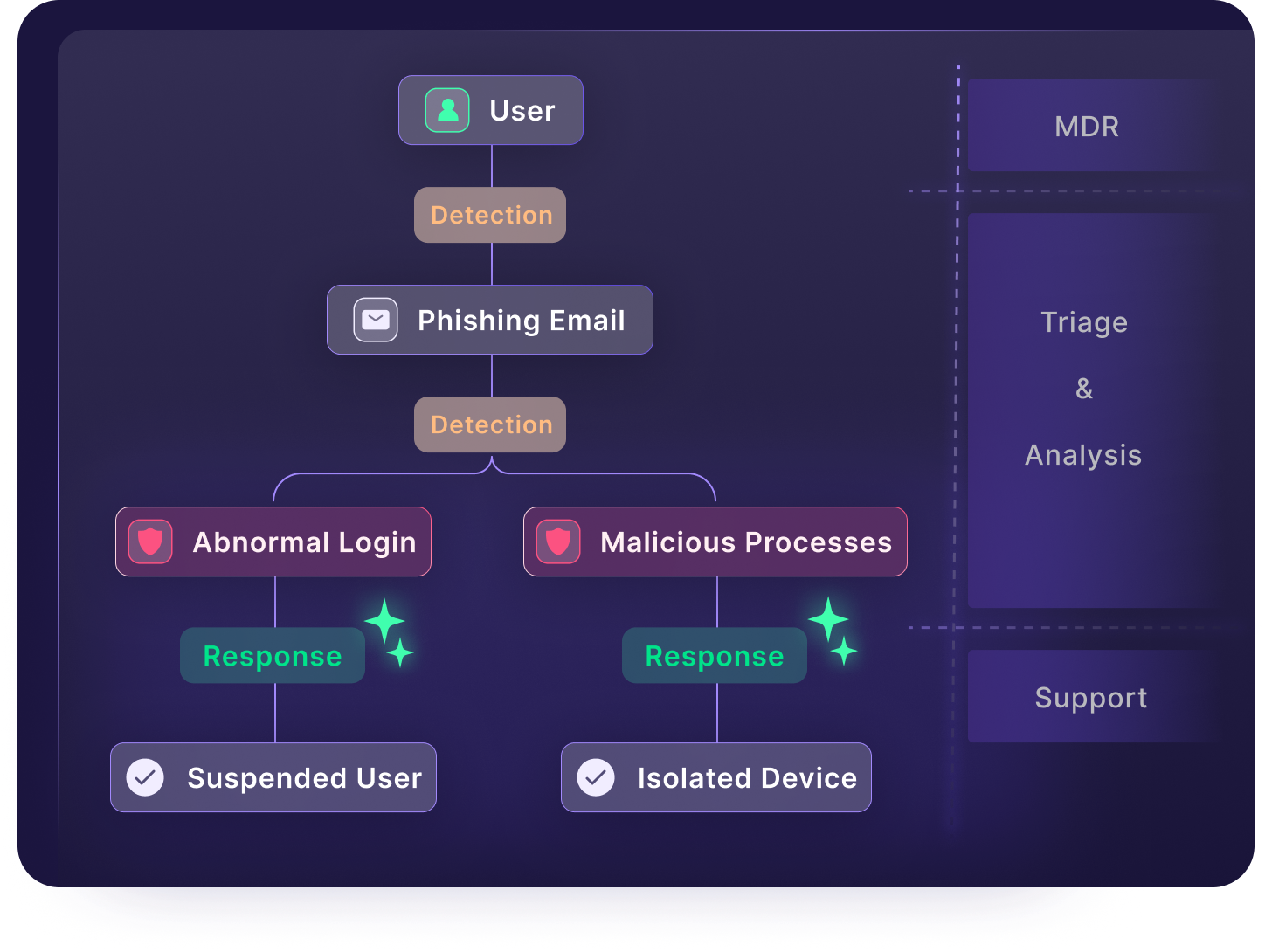
The Guardz MDR delivers 24/7 managed detection and response across SentinelOne EDR, ITDR, and other platform findings by combining AI-powered alerts with expert threat hunting to keep MSPs secure, informed, and in control.

A flowchart showing a security process: a user receives a phishing email, triggering detection. Abnormal login suspends the user; malicious processes isolate the device. On the right, MSPs, MDR, Triage & Analysis, and Support ensure strong CyberSecurity.

Cybersecurity, Simplified.

Deploy Cloud Apps

MSPs install the Detection & Response apps on behalf of their clients.

Incident Triggered

Incident will open when anomalies indicate a real time attack

Respond with Strength

How ITDR Works

Deploy Cloud Apps

MSPs install the Detection & Response apps on behalf of their clients.

A dialog box on a software interface prompts users, including MSPs focused on CyberSecurity, to install a response application by logging into Google Workspace or Microsoft 365 with admin access. The Microsoft 365 option is selected. An Install button is at the bottom.

Incident Triggered

Incidents will open when anomalies indicate a real time attack.

CyberSecurity incident dashboard showing details of a potential token theft detected on May 20, 2025. Includes incident timeline, user info, and a red “Suspend User Account” button—helping MSPs quickly Secure & Insure client environments.

Respond with Strength

A digital Security Incident Report titled Potential OAuth Token Theft Via Device Code Flow By Users displays an incident timeline with findings, user information, and status indicators—ideal for CyberSecurity teams and MSPs—on a dark, rounded interface.
A pop-up window prompts users to securely install a response application, with options to log in via Google Workspace or Microsoft 365. Designed for MSPs and CyberSecurity, the interface features a purple Install button at the bottom.
A Secure & Insure dashboard displays details of a security incident titled Potential Auth Token Theft via Device Code Flow by Users. It lists the date, user name, a timeline of incident events, and features a Suspend User Account button.
A security incident report details potential OAuth token theft via device code flow, highlighting multiple CyberSecurity detections for user Alice on June 17, 2025. The timeline logs suspicious authentication from different user agents.

Frequently Asked Questions

Identity Threat Detection & Response. It’s a critical security control that continuously monitors for abnormal identity-based behaviors that could indicate compromise or abuse.

Currently, ITDR leverages Microsoft 365 logs (Graph API) for identity threat detection and response. Google Workspace support is coming soon.

Yes, both Google and M365 logs are ingested and evaluated for ITDR incidents. 

No. ITDR is a core security control available on all Guardz plans. It helps reduce human risk and protect identities without requiring an upgrade. However, with the Ultimate plan, ITDR is paired with the Guardz 24/7 MDR team, who monitor alerts, triage incidents, and respond to threats, so you get a human-powered safety net on top of automated protection.

Yes. ITDR replaces and goes well beyond the capabilities of the former Cloud Directory Posture.
While “posture” focuses on static misconfigurations at the individual user level, ITDR delivers dynamic, behavior-based threat detection, identifying anomalous activity, privilege escalations, authentication-related attacks, and more. It’s smarter, deeper, and built to evolve with modern identity risks.

The main response action is to suspend the user, thereby preventing further spread of the attack. This remediation, along with isolating a device, are designed to be strong but reversible actions to mitigate a threat without hindering long term productivity. Suspending a user can be done by the admin at the click of a button or by the Guardz SOC when approval has been granted.

The image shows a red logo featuring a stylized letter G combined with the number 2, designed to look like an arrow.

Recognized, Reviewed, Proofed.

Guardz is the top choice for MSPs, offering a unified platform powered by AI to streamline cybersecurity and drive growth.

Five red stars are displayed in a horizontal row against a transparent background.
Badge with G2 logo at the top, featuring the text Users Love Us in the center, and a small star symbol at the bottom. The badge has a simple, clean design.
A badge with the G2 logo in the top right corner, labeled Winter 2026 at the top, and Most Implementable in bold black text in the center. The badge features blue accents at the bottom and subtle purple lines, adding to its Badges design.
Badge design features WINTER 2026 at the top, the G2 logo in the corner, and High Performer bold in the center. The badge has red, orange, and yellow stripes near the bottom, adding flair to your collection of standout badges.
A badge labeled Winter 2026 Asia with the G2 logo in the top right and the words High Performer in bold black text at the center. The badge features purple lines and a pink border at the bottom, fitting perfectly among G2 Badges.
A badge with the G2 logo in the top right corner, labeled Winter 2026 at the top, and Momentum Leader in bold text at the center, featuring red, orange, yellow stripes and purple lines along the bottom edge. Perfect for showcasing badges.
Badge with the G2 logo, labeled Winter 2026 at the top. High Performer in bold text takes center stage, Small Business below, and a red, orange, and yellow striped border at the bottom—enhanced with purple lines for standout badges.
A stylized graphic with orange numbers and squares on the left, overlaid with a blue grid, highlights CyberSecurity themes, featuring a green logo resembling a lowercase g in a white circle on the upper right.
Abstract graphic with an orange and red curved arrow, white squares, and a magnified area showing a green square icon with a white stylized G on a grid background—perfect for CyberSecurity or MSPs looking to Secure & Insure their digital assets.

Experience the Power
of Unified
Detection & Response

Navigate the Guardz platform and experience how it protects your MSP clients in real time.

LinkedIn
Slack
LinkedIn
Slack
Chat with us No account needed
Support Agent Support Agent Support Agent

Chat now with our experts ✌️

Connect with one of our experts in your preferred way