




















The Right Security Controls, Seamlessly Connected.

Connect the dots across identities, endpoints, email, cloud, and data, unifying security into an AI-native platform built for MSPs

Image
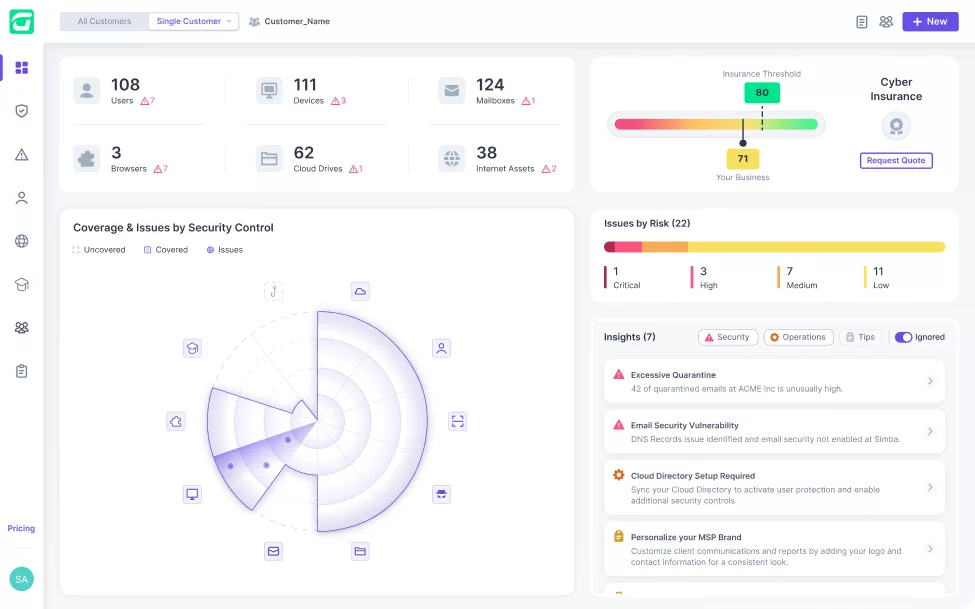
A Secure & Insure cybersecurity dashboard displays stats on customers, devices, mailboxes, domains, issues, and risks. A radar chart shows security control coverage, with insights and risk levels highlighted for MSPs on the right side.
A circular play button with a purple border and a purple triangle pointing right in the center, commonly used by MSPs to indicate media playback in CyberSecurity training modules.
A purple button with the text Take The Tour, a right-facing triangle arrow icon, ideal for MSPs exploring Secure & Insure or CyberSecurity solutions.

Trusted by Leading Partners

SentinelOne
SuperOps
ATERA
V2 Version
Syncro
CONNECTWISE
pax8
Manage Protect
MULTIPOINT
RESILIUM.ai
Checkpoint
SentinelOne
SuperOps
ATERA
V2 Version
Syncro
CONNECTWISE
pax8
Manage Protect
MULTIPOINT
RESILIUM.ai
Checkpoint
SentinelOne
SuperOps
ATERA
V2 Version
Syncro
SentinelOne
SuperOps
ATERA
V2 Version
Syncro
CONNECTWISE
pax8
Manage Protect
MULTIPOINT
RESILIUM.ai
Checkpoint
CONNECTWISE
pax8
Manage Protect
MULTIPOINT
RESILIUM.ai
Checkpoint

Natively Built Security Controls In One Backbone

Identity Threat Detection and Response, backed by an elite research and threat hunting team, proactively verifies security settings, while actively benchmarking and analyzing user behavior to flag suspicious activity.

A digital interface displays an Account Compromise timeline, helping MSPs track events like leaked credentials, suspicious login, MFA actions, and incident times between June 13, 2025, 03:46 am and 09:27 am for enhanced CyberSecurity.

Stop malware, ransomware, and advanced threats at the source. AI-native EDR (with SentinelOne embedded) and Managed AV (with Windows Defender) ensure real-time protection across devices.

A software dashboard displays endpoint security options for MSPs, including Guardz Endpoint Agent, Microsoft Defender Policy Settings, Microsoft Defender Exclusions, and SentinelOne—empowering CyberSecurity to help you Secure & Insure your clients.

Strengthen your cybersecurity with best-in-class email protection seamlessly integrated into the Guardz platform. Powered by Check Point, delivering real-time defense against phishing, ransomware, and more.

A digital security dashboard displays Email Protection status and shows Check Point as the recommended provider, highlighting advanced email threat monitoring and alerts—ideal for MSPs seeking comprehensive CyberSecurity solutions.

Lock down sensitive business data with seamless cloud protection, without the need for complex policies, ensuring secure file collaboration while preventing unauthorized access and data leaks.

A dashboard displays connected applications for cloud data security, showing Google Workspace, Monday, and Dropbox as active. CyberSecurity icons and status indicators are visible next to each app name on a dark interface.

Transform employees into a strong line of defense against cyber threats with pre-scheduled security awareness training that alters behavior and limits human-driven cyber risks before they escalate.

A dashboard for an employee training program shows details for Employee Training 2025, featuring campaign progress, CyberSecurity video modules like Compliance 101, and a list of assigned users at the bottom.

Identify security weaknesses before attackers do by using generative AI and branded templates to automate phishing simulations to measure employee resilience and reinforce cybersecurity awareness.

A digital dashboard helps MSPs strengthen CyberSecurity by showing options to create a phishing simulation or schedule an awareness template, along with details of active training sessions, completion status, and user engagement metrics.

Scan the digital footprint of businesses to discover exposures and eliminate vulnerabilities across domains, IPs, and cloud assets; closing security gaps before they’re exploited.

A dashboard showing Detection & Response insights for MSPs, listing security issues with dates and severity, such as Vulnerable Technologies, Application Security, and Mail Server Unsecured—helping you Secure & Insure your CyberSecurity posture.

Knowledge of the dark corners of the internet can be exposed by scraping, analyzing and continuously monitoring the dark web for malicious activity targeting businesses and user credentials.

A screen displays a report titled Dark Web Scan Findings - 5/10, listing partially redacted compromised email addresses and passwords, each flagged with a red warning icon—a crucial alert for MSPs focused on CyberSecurity and protecting client credentials.

Cloud ITDR

Identity Threat Detection & Response (ITDR) proactively verifies MFA and security settings, while actively benchmarking and analyzing user behavior to flag suspicious activity.

Endpoint Security

Stop malware, ransomware, and advanced threats at the source. AI-native EDR (with SentinelOne embedded) and Managed AV (with Windows Defender) ensure real-time protection across devices.

Email Security

Block sophisticated phishing and email-based attacks before they reach users with an API-based and AI-native engine to prevent credential theft, ransomware, and impersonation threats in real time.

Cloud Data Protection

Lock down sensitive business data with seamless cloud protection, without the need for complex policies, ensuring secure file collaboration while preventing unauthorized access and data leaks.

Security Awareness Training

Transform employees into a strong line of defense against cyber threats with pre-scheduled security awareness training that alters behavior and limits human-driven cyber risks before they escalate.

Phishing Simulation

Identify security weaknesses before attackers do by using generative AI and branded templates to automate phishing simulations to measure employee resilience and reinforce cybersecurity awareness.

Secure Browsing

Web security through a browser extension that escalates risk around employees exposed to malicious sites, web redirects, unsafe extensions, and more during their day-to-day internet activity.

External Footprint

Scan the digital footprint of businesses to discover exposures and eliminate vulnerabilities across domains, IPs, and cloud assets; closing security gaps before they’re exploited.

Dark Web

Knowledge of the dark corners of the internet can be exposed by scraping, analyzing and continuously monitoring the dark web for malicious activity targeting businesses and user credentials.

ITDR

Identity Threat Detection and Response, backed by an elite research and threat hunting team, proactively verifies security settings, while actively benchmarking and analyzing user behavior to flag suspicious activity.

Stop malware, ransomware, and advanced threats at the source. AI-native EDR (with SentinelOne embedded) and Managed AV (with Windows Defender) ensure real-time protection across devices.

Strengthen your cybersecurity with best-in-class email protection seamlessly integrated into the Guardz platform. Powered by Check Point, delivering real-time defense against phishing, ransomware, and more.

Lock down sensitive business data with seamless cloud protection, without the need for complex policies, ensuring secure file collaboration while preventing unauthorized access and data leaks.

Transform employees into a strong line of defense against cyber threats with pre-scheduled security awareness training that alters behavior and limits human-driven cyber risks before they escalate.

Identify security weaknesses before attackers do by using generative AI and branded templates to automate phishing simulations to measure employee resilience and reinforce cybersecurity awareness.

Scan the digital footprint of businesses to discover exposures and eliminate vulnerabilities across domains, IPs, and cloud assets; closing security gaps before they’re exploited.

Knowledge of the dark corners of the internet can be exposed by scraping, analyzing and continuously monitoring the dark web for malicious activity targeting businesses and user credentials.

A CyberSecurity dashboard displays an account compromise timeline with color-coded events, including suspicious logins, incident creation, MFA issues, and admin responses on June 12, 2025. The Create Report button helps MSPs easily generate Secure & Insure reports.
A digital dashboard displays CyberSecurity Endpoint Security options for MSPs, including Guardz Endpoint Agent, Microsoft Defender Policy Settings, Microsoft Defender Exclusions, and SentinelOne, with brief descriptions and selection highlights.
A dashboard displays CyberSecurity Controls with 20% protections activated. Email Protection is enabled. Check Point is the recommended provider, and Guardz offers built-in email security for MSPs. Status information appears at the bottom.
A dashboard interface for MSPs showing connected applications for cloud data and CyberSecurity, including Google Workspace, Microsoft 365, Monday, and Dropbox. Options to add new apps are available, with some apps marked as Active.
A digital dashboard for Employee Training 2025 displays 24 CyberSecurity training campaigns, including compliance, passwords, social engineering, and ransomware, with assigned users and campaign progress—ideal for MSPs to Secure & Insure their teams.
A dashboard for starting a new CyberSecurity campaign with options to create a phishing simulation, schedule an awareness template, or send a campaign. Below, active training cards display progress and completion statistics.
A Chrome browser window shows a pop-up notification stating the Guardz Extension has been added to Chrome, helping MSPs Secure & Insure their clients’ online activities. It instructs users to turn on sync for extensions on all computers.
A dashboard for MSPs displays CyberSecurity detection and response insights, listing vulnerabilities like vulnerable technologies, application security, mail server unsecured, and TLS unsecured with issue counts, severity, dates, and external footprint scan details.
A report titled Dark Web Scan Findings – 5/10 lists five compromised user emails and masked passwords, each marked with a red warning icon. A note below highlights the CyberSecurity impact of compromised credentials.

More Than Just A Security Platform

Providing security that MSPs trust, packaged with the operational ease and client-focused tools needed to drive growth and show value.

The Right Security Controls to Protect Your Clients

A CyberSecurity dashboard displaying Security Controls with 20% protections activated. Listed controls include Identity Threat Detection & Response, External Footprint Scan, and Dark Web Monitoring, ideal for MSPs seeking secure & insure solutions.

Detect threats faster by connecting the dots across security controls in a unified platform. Guardz normalizes detections into a single view, to cut through the noise, and take preventative action.

Guardz ties every detection to real users, making responses fast & precise. Armed with behavioral intelligence and identity threat analytics, MSPs can pinpoint attacks, stop breaches, and educate users.

Gain 24/7 protection with Guardz MDR on top of the security controls. Detect and respond to endpoint and identity threats in real time, with machine-speed precision and expert support

Evidence mapping streamlines compliance preparation by reporting how Guardz security controls align with frameworks like SOC 2, ISO 27001, HIPAA, and GDPR, making the audit process faster and easier.

A CyberSecurity dashboard for MSPs shows 20% protections activated, with 10 total controls—2 active and others inactive. Listed controls include identity threat detection, external footprint scan, and dark web monitoring from Secure & Insure.
A CyberSecurity dashboard for MSPs, Secure & Insure displays customer risk data, including issue counts, risk levels, and a circular graph of security controls. Alerts and issues by risk level are detailed in a side panel.

Operational Efficiency That Gives You Time Back

A CyberSecurity dashboard for MSPs displays device stats, risk issues by severity, customer details, a radar chart, and alerts on quarantine excesses and email vulnerabilities—all in a sleek dark theme. Secure & Insure your clients with ease.

Centrally navigate security of multiple clients, either aggregated or with their unique individual environments; ensuring efficiency, visibility, and consistency when protecting their users and assets.

Security is only as good as the ability to manage it, so global configurations, customizations and automations are used to programmatically identify threats and remediate them before they can spread.

With one-click remediations, machine learning systems, AI workflows and powerful integrations, even non-security experts can swiftly respond to cyber events and ensure optimal security outcomes.

The use of LLMs makes it simple to summarize large volumes of detections, gain insights into risky assets, explain detection reasons to end users, and even spin up custom phishing simulations on the fly.

Scale with Confidence. Retain with Ease.

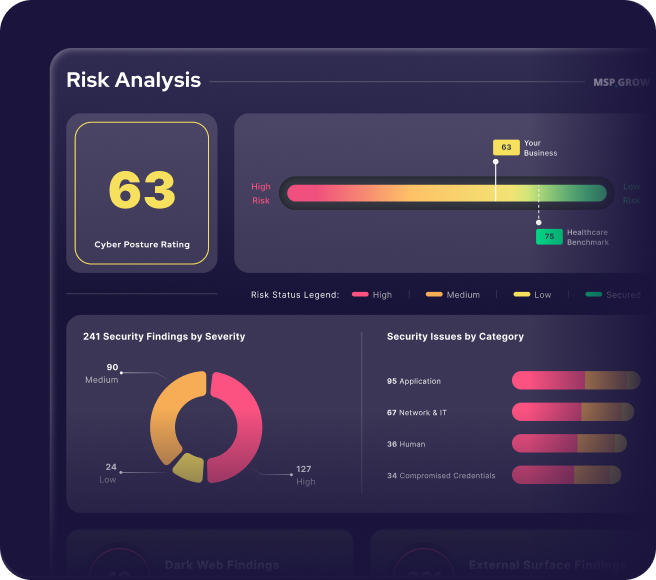
A CyberSecurity dashboard for MSPs displaying a cyber posture rating of 63, risk levels from low to high, and charts of security findings by severity and issues by category—helping you Secure & Insure your business.

Use Prospecting Reports to instantly scan a clients public-facing assets to uncover security gaps, drive conversation with real insights, prove your expertise, and win business with data that hits home.

Leverage tools and resources to enhance client engagement and drive overall business growth in one centralized hub that includes marketing assets, tailored reports, branding customization and more.

Demonstrate your impact by giving clients a data-backed look at their security posture. Delivered monthly, quarterly, or on-demand, the report highlights threats, risk, and mitigation activity.

Give clients visibility and control with configurable admin roles. They can manage detections, response and policies, while you retain oversight; building trust, boosting hygiene, and proving your value.

A dashboard displays a CyberSecurity risk analysis with a cyber posture rating of 63. A horizontal bar shows the business score above the healthcare benchmark of 75. Charts below help MSPs track severity and security issues by category.
The image shows a red logo featuring a stylized letter G combined with the number 2, designed to look like an arrow.

Recognized, Reviewed, Proofed.

Guardz is the top choice for MSPs, offering a unified platform powered by AI to streamline cybersecurity and drive growth.

Five red stars are displayed in a horizontal row against a transparent background.
Badge with G2 logo at the top, featuring the text Users Love Us in the center, and a small star symbol at the bottom. The badge has a simple, clean design.
A badge with the G2 logo in the top right corner, labeled Winter 2026 at the top, and Most Implementable in bold black text in the center. The badge features blue accents at the bottom and subtle purple lines, adding to its Badges design.
Badge design features WINTER 2026 at the top, the G2 logo in the corner, and High Performer bold in the center. The badge has red, orange, and yellow stripes near the bottom, adding flair to your collection of standout badges.
A badge labeled Winter 2026 Asia with the G2 logo in the top right and the words High Performer in bold black text at the center. The badge features purple lines and a pink border at the bottom, fitting perfectly among G2 Badges.
A badge with the G2 logo in the top right corner, labeled Winter 2026 at the top, and Momentum Leader in bold text at the center, featuring red, orange, yellow stripes and purple lines along the bottom edge. Perfect for showcasing badges.
Badge with the G2 logo, labeled Winter 2026 at the top. High Performer in bold text takes center stage, Small Business below, and a red, orange, and yellow striped border at the bottom—enhanced with purple lines for standout badges.
A stylized graphic with orange numbers and squares on the left, overlaid with a blue grid, highlights CyberSecurity themes, featuring a green logo resembling a lowercase g in a white circle on the upper right.
Abstract graphic with an orange and red curved arrow, white squares, and a magnified area showing a green square icon with a white stylized G on a grid background—perfect for CyberSecurity or MSPs looking to Secure & Insure their digital assets.

Cybersecurity, Simplified.

Onboard & Activate

Link your Google Workspace or Microsoft 365 business account, deploy endpoint agents, and configure the system for real time threat analysis.

Detect & Respond

Continuous monitoring of digital assets promptly alerts on critical issues, escalates incidents to the MDR team, all the while guiding resolution through automated remediations, playbooks and reporting.

Secure & Insure

Cybersecurity, Simplified.

Onboard & Activate

Get started by linking your Google Workspace or Microsoft 365 business account, grant the necessary permissions for real time threat analysis, and enable remediation plans.

Onboard & Activate

Get started by linking your Google Workspace or Microsoft 365 business account, grant the necessary permissions for real time threat analysis, and enable remediation plans.

Detect & Respond

Continuous monitoring of digital assets promptly alerts on critical issues, escalates incidents to the MDR team, all the while guiding resolution through automated remediations, playbooks and reporting.

Detect & Respond

Guardz continuously monitors internal and external digital assets and promptly alerts on critical issues while guiding resolution through automated and manual remediations

Secure & Insure

Guardz continuously monitors internal and external digital assets and promptly alerts on critical issues while guiding resolution through automated and manual remediations

Secure & Insure

Guardz continuously monitors internal and external digital assets and promptly alerts on critical issues while guiding resolution through automated and manual remediations

Six icons are arranged in a cross pattern, featuring Google, Windows, Google Drive, Outlook, macOS, and a stylized envelope logo—each glowing blue—on a black background. Ideal for MSPs focused on CyberSecurity and Secure & Insure solutions.

Integrate Your Tools, Enhance Your Protection

Guardz integrations and apps help you work seamlessly, enhance security, and boost efficiency.

Six circular icons representing Microsoft OneDrive, Gmail, Microsoft Exchange, Microsoft 365, Chrome, and another app with a check mark, arranged in a grid with blue glowing outlines—ideal for MSPs focused on CyberSecurity and Secure & Insure solutions.

Reviews
From Our Partners

More MSPs are turning to Guardz to streamline security and outpace cyber threats.

Experience The Power

Of Unified
Detection & Response

×
×
0:00 / 0:00
Guide To Boosting The Security of Your M365 Identities

Before you go, grab our free guide highlighting underutilized security settings and best practices every MSP should know about identity posture.

Download the Guide
Guide To Boosting The Security of Your M365 Identities

Before you go, grab our free guide highlighting underutilized security settings and best practices every MSP should know about identity posture.

Download the Guide
Guide To Boosting The Security of Your M365 Identities
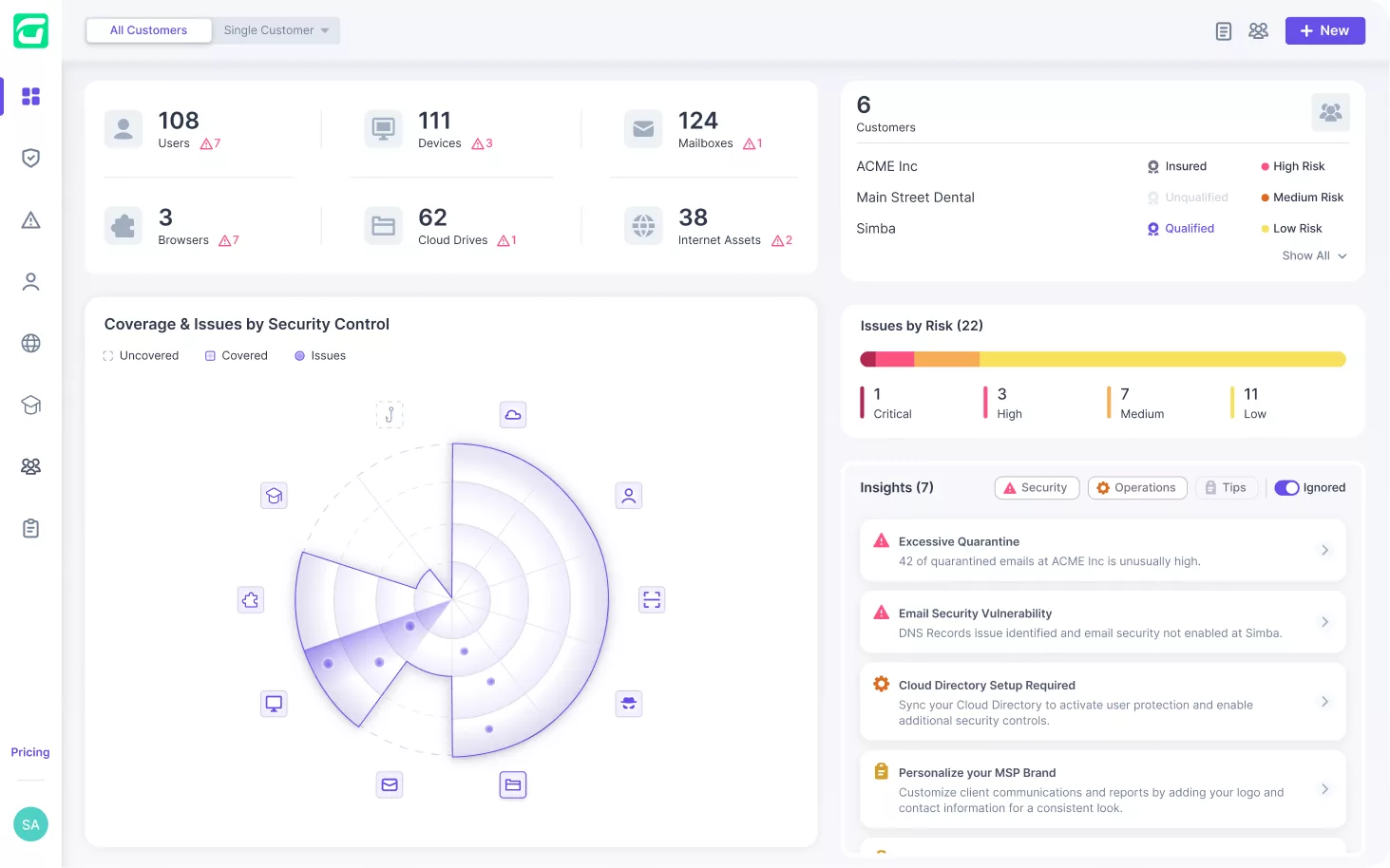
Screenshot of a dashboard displaying security data. It shows numbers of users, mailboxes, domains, and internet assets. A radar chart visualizes issue coverage, while a bar graph categorizes risk levels. Insights on security concerns are listed on the right.
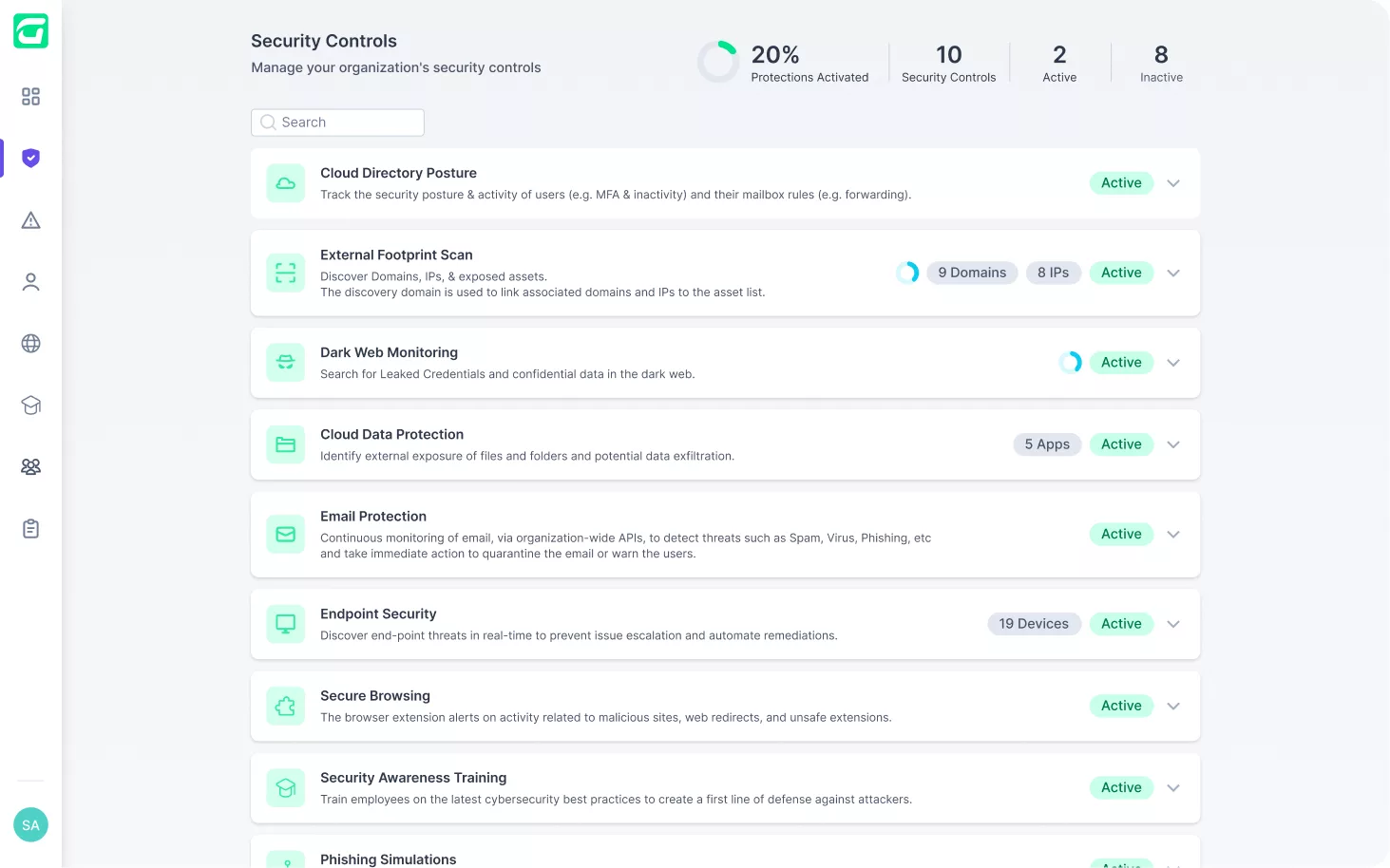
Screenshot of a security controls dashboard displaying various active controls, including Cloud Directory Posture, External Endpoint Scan, Dark Web Monitoring, Data Protection, Email Protection, Endpoint Security, Secure Browsing, Training, and Simulations.
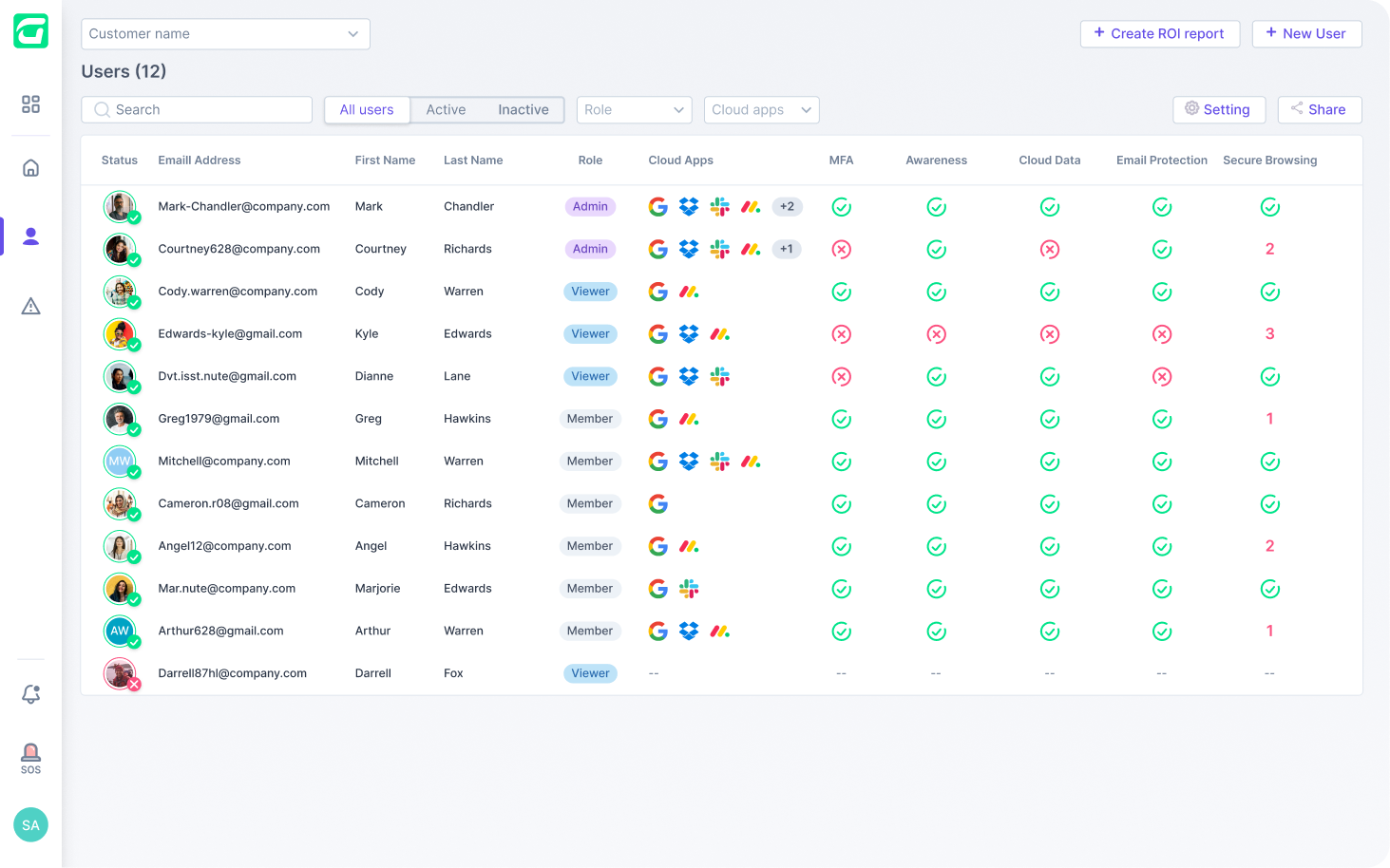
A user interface showcases a list of 12 users, detailing names, email addresses, roles (admin, editor, viewer), cloud apps in use, and MFA status. With enhanced cybersecurity measures and status icons for awareness and email protection, it’s an essential tool for MSPs aiming to secure & insure data integrity.
Dashboard interface displaying user statistics, device counts, cloud drives, and internet assets. Features a security control radar chart on the left and insights categorized by severity on the right. Vibrant colors indicate risk levels and thresholds.
A person in a green jacket stands confidently with hands on hips, casting a large superhero shadow—like Guardz protecting against threats—on a dark, gradient background.

Start the Guardz Tour 🕺

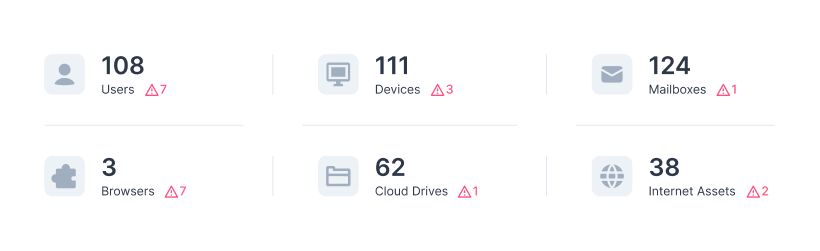
All Your Customers' Assets in One Place 👨‍💻

Guardz automatically discovers and monitors all your customers’ digital assets. Drill down to see more details and discover related issues.

Dashboard displaying statistics: 108 Users (7 changes), 111 Devices (3 changes), 124 Mailboxes (1 change), 3 Browsers, 62 Cloud Drives, and 38 Internet Assets, with red delta symbols indicating changes.

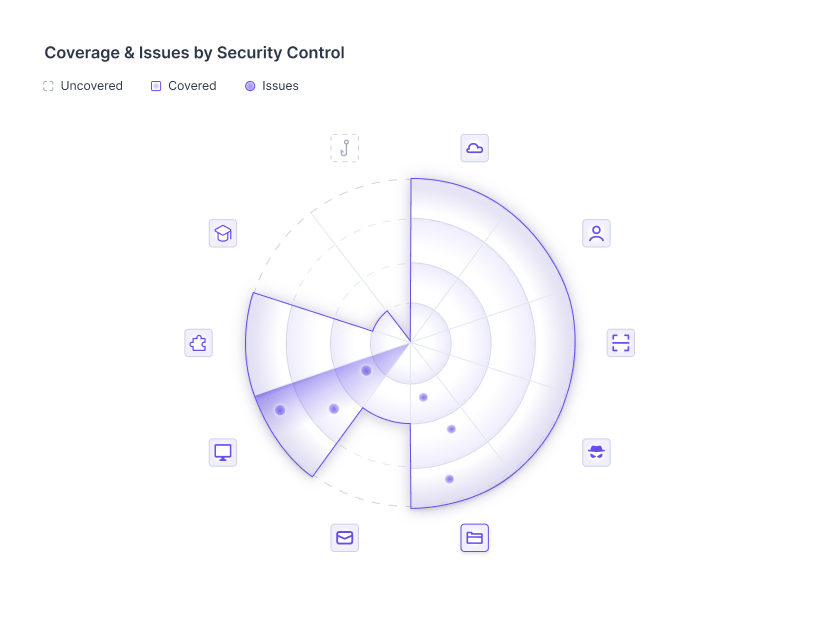
You're in the Pilot Seat 🚀

Guardz provides the security controls and coverage across your customers and detects issues in real-time.

A radar chart titled Coverage & Issues by Security Control shows sections with varying shades. Icons around the chart represent different categories, with sections labeled as uncovered, covered, and issues.

Consolidate Your Security Controls 💪

Get all the security controls needed to fortify your client’s cyber posture.

Gain a Holistic Aggregated View 🤩

Real-time protection of all business employees across all applications, devices, and communication channels.

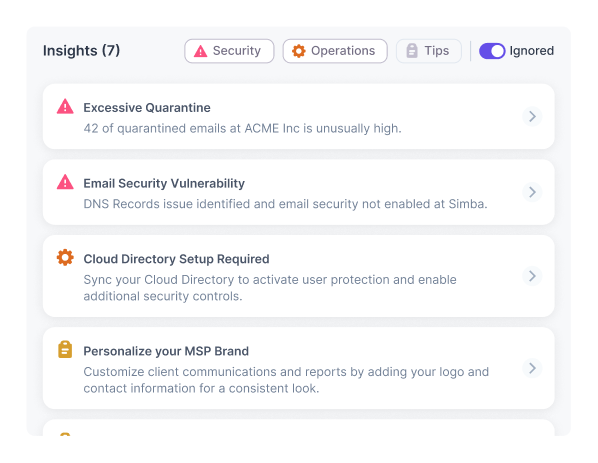
Take Action Based on AI-Driven Security Insights 🦾

Connect the dots across detections and swiftly remediate, regardless of the attack vector.

A dashboard titled Insights (7) displays alerts with icons in various categories: Security, Operations, Tips, and Ignored. Alerts include issues like excessive quarantine and email security vulnerability.

Strengthen Cyber Posture ⚡️

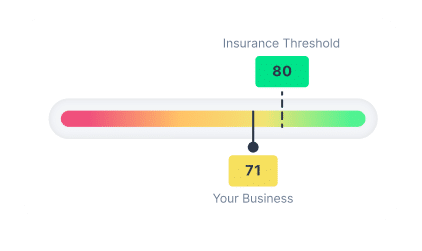
Real-time cybersecurity posture score that reflects the cyber risk and remediation progress.

A bar gauge with colors from red to green. An indicator shows Your Business score as 71. A dashed line marks the Insurance Threshold at 80.

Transfer the Risk for Peace of Mind 😌

Get the coverage you need at the right price based on your client’s posture.

Cyber
Insurance

Medal

Discover the Power of Guardz

LinkedIn
Slack
LinkedIn
Slack
Chat with us No account needed
Support Agent Support Agent Support Agent

Chat now with our experts ✌️

Connect with one of our experts in your preferred way