



















Smarter Email Security.
Stronger Business Protection.

Prevent the most dangerous email-based attacks through continuous monitoring, contextual analysis, and automated response.

Image
Two people in business attire sit at a table, smiling and interacting with floating digital email icons. Neon green highlights create a futuristic, tech-focused vibe—perfectly capturing the dynamic role of MSPs in cybersecurity.

Trusted by Leading Partners

SentinelOne
SuperOps
ATERA
V2 Version
Syncro
CONNECTWISE
pax8
Manage Protect
MULTIPOINT
RESILIUM.ai
Checkpoint
SentinelOne
SuperOps
ATERA
V2 Version
Syncro
CONNECTWISE
pax8
Manage Protect
MULTIPOINT
RESILIUM.ai
Checkpoint
SentinelOne
SuperOps
ATERA
V2 Version
Syncro
SentinelOne
SuperOps
ATERA
V2 Version
Syncro
CONNECTWISE
pax8
Manage Protect
MULTIPOINT
RESILIUM.ai
Checkpoint
CONNECTWISE
pax8
Manage Protect
MULTIPOINT
RESILIUM.ai
Checkpoint

Basic Protection to Full EDR

Email Is Where Attacks Start
And We Stop Them Cold

While Check Point Harmony (formerly Avanan) delivers best-in-class email security, Guardz connects the dots, transforming fragmented signals into coordinated protection that contains incidents and closes gaps fast.


With API-based integration for instant setup, MSPs get powerful phishing and BEC protection that works seamlessly across their entire security stack for complete, connected defense.

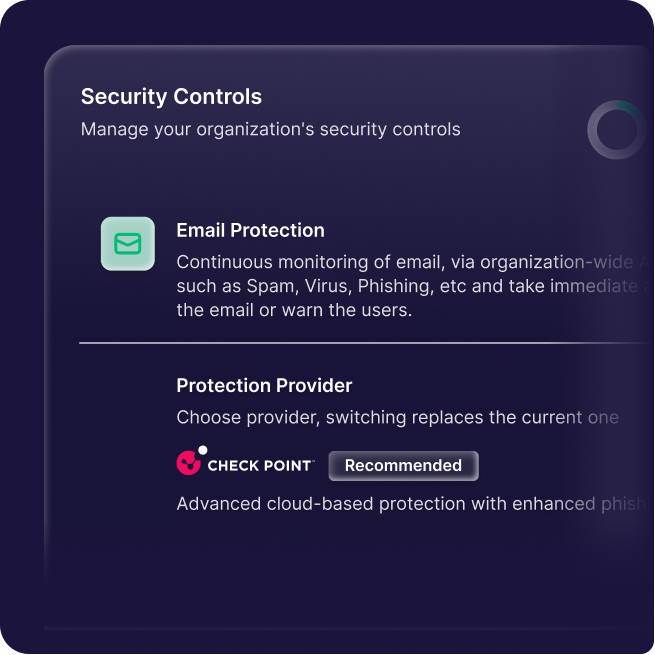
A digital security controls dashboard for MSPs, featuring Email Protection monitoring and a Protection Provider section with Check Point labeled as Recommended, ensuring CyberSecurity to help you Secure & Insure your digital assets.
A digital dashboard displays CyberSecurity controls with 20% protections activated. Email protection is enabled, with Check Point recommended for MSPs and Guardz as an alternative. Status and other details are listed below.

Common Email Threats & Attack Techniques

Common Email Threats & Attack Techniques

A pink brain-like shape with four lavender circuit lines on top, each ending in a circular node, symbolizing artificial intelligence and CyberSecurity solutions for MSPs within the Secure & Insure framework.

Credential Phishing

Fake login pages or forms used to steal usernames and passwords, often bypassing filters using trusted-looking domains and lures.

A purple silhouette of a person is shown in the background, while a red silhouette with a large question mark in front highlights CyberSecurity challenges and the mystery of unknown identity, relevant for MSPs seeking to Secure & Insure their clients.

Email Spoofing & Impersonation

Forged sender identities used to mimic executives, vendors, or brands, tricking users into clicking, replying, or sending data.

A purple and black symbol with an exclamation mark, representing CyberSecurity awareness for MSPs—protect your business with Secure & Insure.

Business Email Compromise

Compromised or impersonated accounts used to manipulate users into transferring funds or sharing sensitive business information.

Icon of a purple bug inside a circle, with a red warning symbol featuring an exclamation mark overlapping the lower right side, highlighting a CyberSecurity bug or error alert for MSPs.

Payload Delivery

Malicious attachments or links deliver malware or ransomware, exploiting user trust to gain system access or encrypt files.

Illustration of a purple envelope with a black X, symbolizing CyberSecurity, accompanied by a large red check mark in the background.

Spear Phishing

Targeted attacks tailored to specific users or roles, using personal or organizational context to increase credibility and impact.

A purple broken link icon, symbolizing CyberSecurity risks for MSPs, with movement lines and a large pink circle in the upper right. The transparent background supports the Secure & Insure theme.

Weaponized URLs

Emails with malicious or hidden links that evade detection and lead users to phishing sites or malware-hosting infrastructure.
Email Threats Become Actionable Intelligence

Guardz detects and responds to modern email threats in real time by quarantining, alerting, educating, and correlating risk.

LLM‑Enhanced
Threat Detection

Email & phishing analysis using fine-tuned LLM models across a large volume of metadata and authentication signals.

Impersonation Detection
with Sender History

Detects alias mismatches and impersonation via user patterns and historical sender behavior to flag anomalies and suspicious mail. 

Customizable Risk
Thresholds & Actions

Admin assigned responses (quarantine, banners, spam) per risk level, managed globally and tailored per organization.

API‑Based Integration
(No Gateway)

Seamless deployment via Microsoft and Google APIs, without agents or MX record changes, for instant mailbox scanning on delivery.

User Reporting &
Adaptive Learning

End user reporting of email for investigation, cross remediation, and continuous tuning of models, to adapt with evolving threats.

Advanced Payload
Detection

Deep inspection of embedded links and attachments using AI and threat intelligence, including file scans to detect hidden malware.

Email Threats Become Actionable Intelligence

Guardz detects and responds to modern email threats in real time by quarantining, alerting, educating, and correlating risk.

LLM‑Enhanced
Threat Detection

Email & phishing analysis using fine-tuned LLM models across a large volume of metadata and authentication signals.

Impersonation Detection
with Sender History

Detects alias mismatches and impersonation
via user patterns and historical sender behavior to flag anomalies and suspicious mail. 

Customizable Risk
Thresholds & Actions

Admin assigned responses (quarantine, banners, spam) per risk level, managed globally and tailored per organization.

API‑Based Integration
(No Gateway)

Seamless deployment via Microsoft and Google APIs, without agents or MX record changes, for instant mailbox scanning on delivery.

User Reporting &
Adaptive Learning

End user reporting of email for investigation, cross remediation, and continuous tuning of models, to adapt with evolving threats.

Advanced Payload
Detection

Deep inspection of embedded links and attachments using AI and threat intelligence, including file scans to detect hidden malware.

How it Works

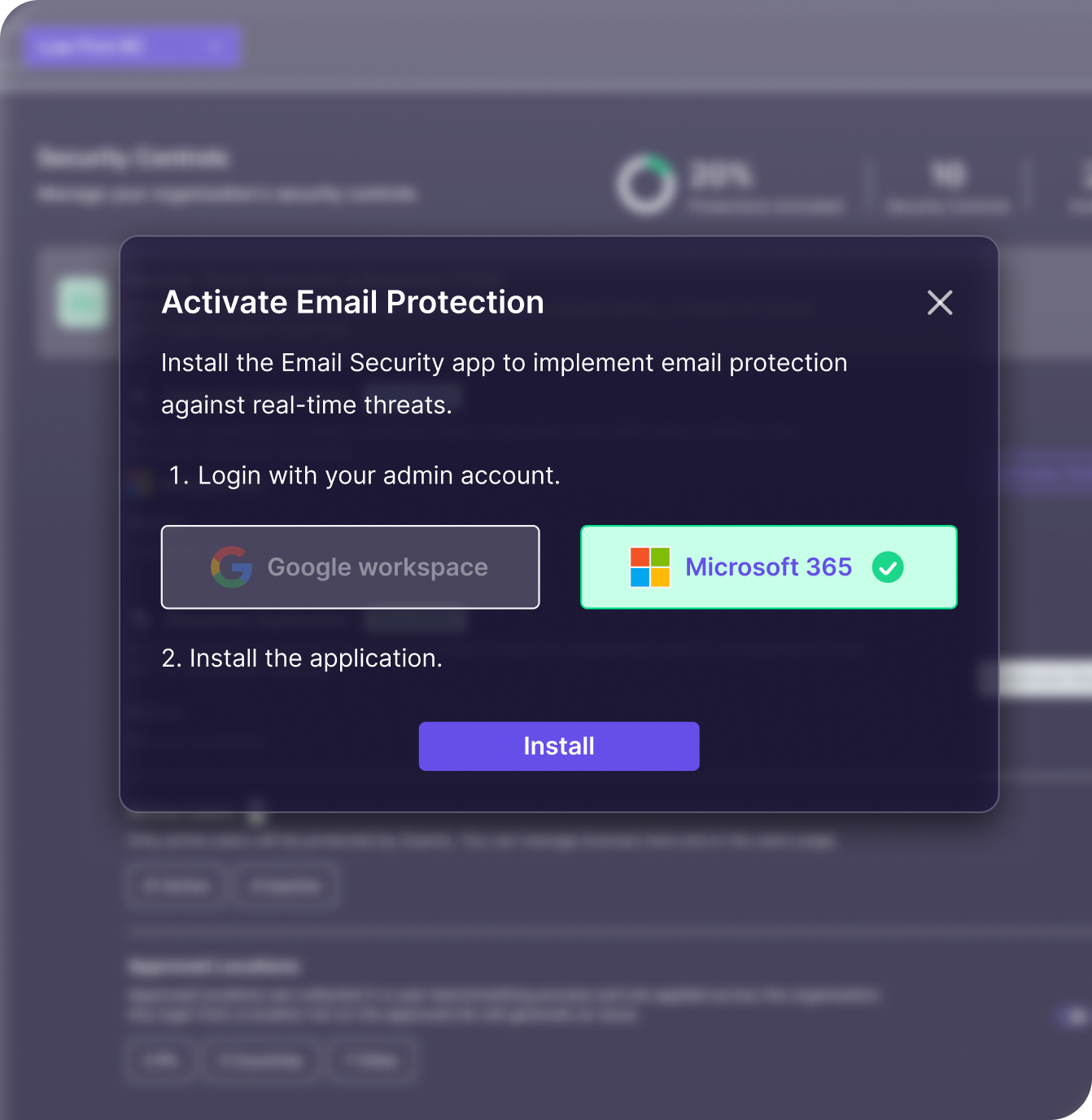
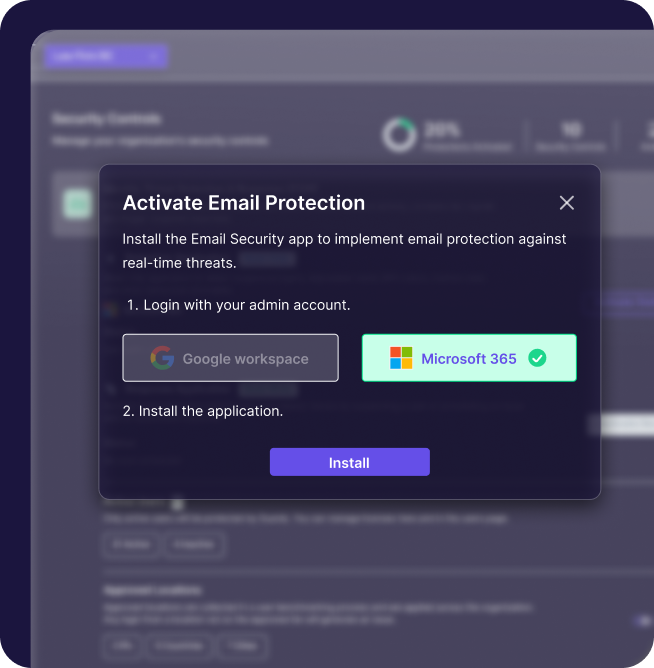
Install & Authorize App

Connect via Microsoft 365 or Google Workspace APIs.

A pop-up window titled Activate Email Protection displays instructions to log in with either Google Workspace or Microsoft 365, then install a CyberSecurity email app. An Install button is at the bottom.

Real-Time Scanning & Alerts

Scan emails instantly and alert users and admins to threats.

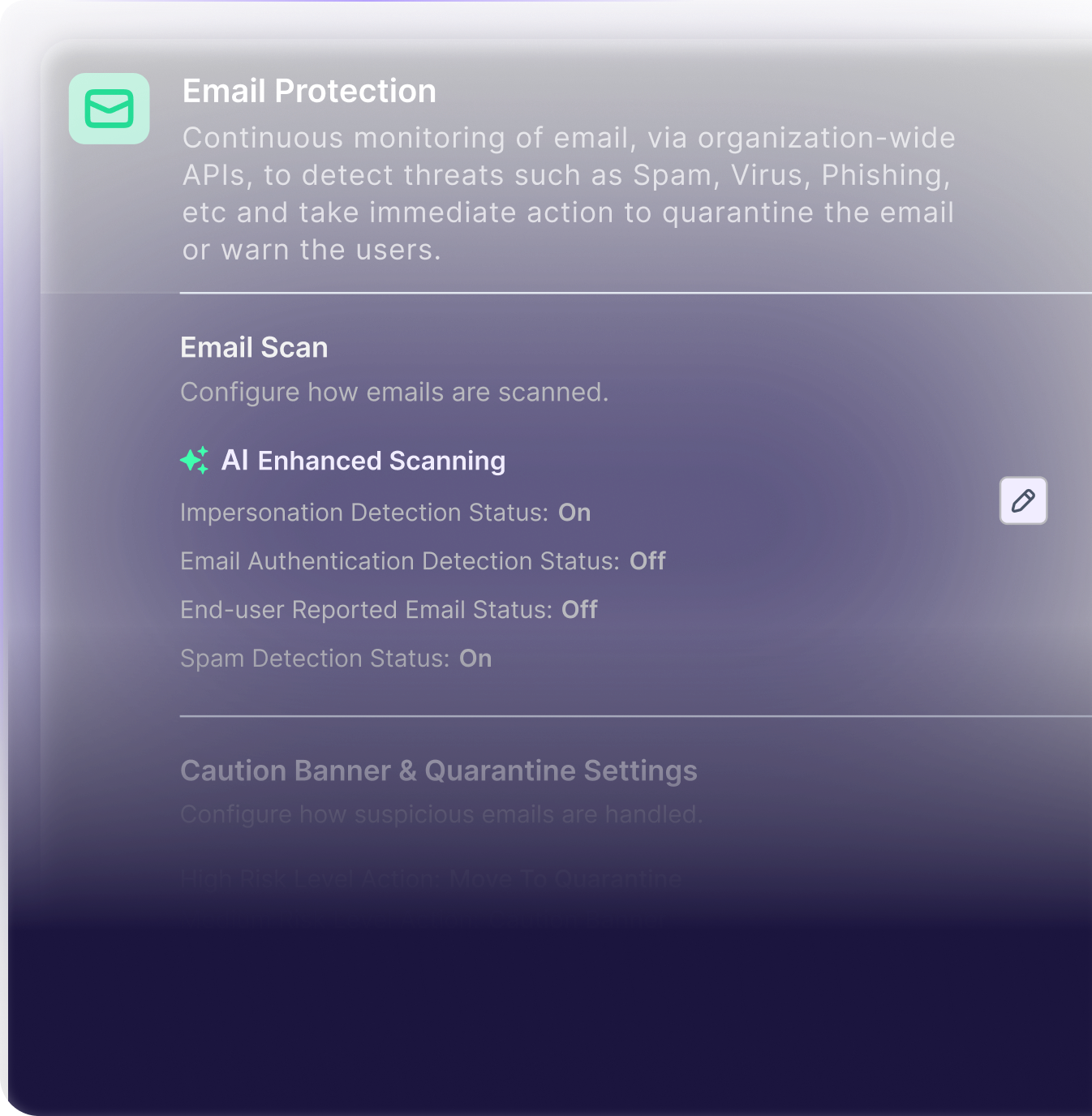
A software interface screen titled Email Protection, powered by Secure & Insure, shows settings for scanning emails—including AI Enhanced Scanning, impersonation checks, email authentication, and spam detection—helping MSPs boost cybersecurity. Some options are turned off.

Report & Learn

User reports train the system and trigger threat removal.

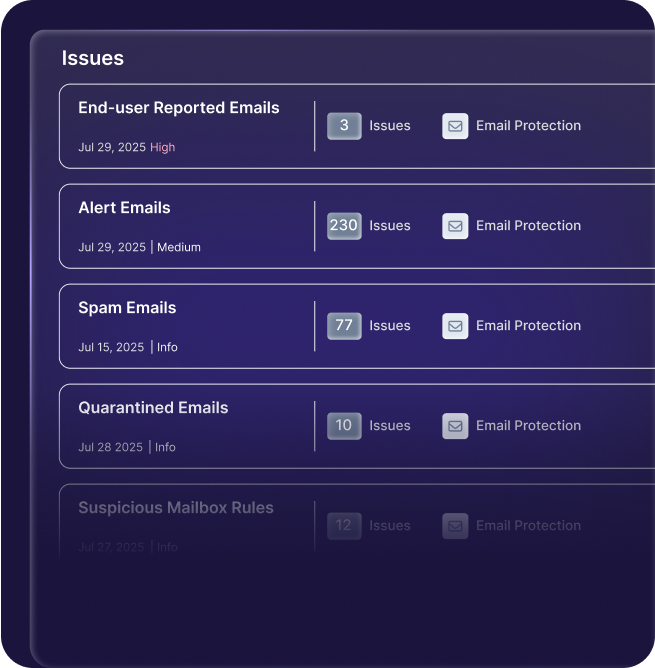
A dark-themed dashboard for MSPs, displaying a list of email-related CyberSecurity issues: End-user Reported Emails (3), Alert Emails (230), Spam Emails (77), Quarantined Emails (10), and Suspicious Mailbox Rules (12).

Auto Response & Admin Oversight

A CyberSecurity software screen displays options for handling a suspicious email from evil_genius@microsoft365fake.net, including allow/block lists, marking as safe, or quarantining the email—essential tools for MSPs to Secure & Insure client inboxes.
Smiling man with short hair wearing a black collared shirt, posed in front of a gray gradient background within a circular purple border, radiating trust and professionalism in compliance.
A screen displaying email protection settings for MSPs, including CyberSecurity scan options, AI enhanced scanning enabled, and various threat detection statuses such as impersonation detection and spam detection, both set to On.
A dashboard for MSPs lists five email issues—End-user Reported Emails (3), Alert Emails (230), Spam Emails (77), Quarantined Emails (10), and Suspicious Mailbox Rules (12)—alongside dates, protection status, and key CyberSecurity insights.
A security alert screen in Secure & Insure shows options to remediate a suspicious email, including adding domains or senders to allow/block lists, marking email as safe, or quarantining emails—ideal for MSPs and CyberSecurity needs.

Frequently Asked Questions

Email security is the process of protecting email accounts, content, and communications from threats such as phishing, malware, spoofing, and unauthorized access. For MSPs, it means providing customers with layered protection, real-time threat detection, and quick remediation to prevent business disruption.

Because it’s the easiest way for attackers to trick users into clicking a link, opening a malicious file, or revealing sensitive information. SMBs are often targeted because they lack dedicated security teams, making MSP-provided email protection critical.

Unfamiliar sent items, password reset notifications you didn’t request, unusual login activity, or complaints from contacts about suspicious emails from you are strong indicators.

Guardz is a unified cybersecurity platform, not a point solution. It connects email threat data with other critical signals, enabling MSPs to stop attacks across multiple vectors without juggling separate tools or losing visibility.

If an attack starts in email but also triggers suspicious identity logins, endpoint alerts, or unusual cloud activity, Guardz automatically links these events so MSPs can take coordinated action across all affected systems.

Reusing passwords, disabling multi-factor authentication, ignoring warning banners or alerts, and failing to report suspicious emails are top risks. Many SMBs also skip regular phishing simulations and cyber awareness training, leaving employees unprepared for real-world attacks

The image shows a red logo featuring a stylized letter G combined with the number 2, designed to look like an arrow.

Recognized, Reviewed, Proofed.

Guardz is the top choice for MSPs, offering a unified platform powered by AI to streamline cybersecurity and drive growth.

Five red stars are displayed in a horizontal row against a transparent background.
Badge with G2 logo at the top, featuring the text Users Love Us in the center, and a small star symbol at the bottom. The badge has a simple, clean design.
A badge with the G2 logo in the top right corner, labeled Winter 2026 at the top, and Most Implementable in bold black text in the center. The badge features blue accents at the bottom and subtle purple lines, adding to its Badges design.
Badge design features WINTER 2026 at the top, the G2 logo in the corner, and High Performer bold in the center. The badge has red, orange, and yellow stripes near the bottom, adding flair to your collection of standout badges.
A badge labeled Winter 2026 Asia with the G2 logo in the top right and the words High Performer in bold black text at the center. The badge features purple lines and a pink border at the bottom, fitting perfectly among G2 Badges.
A badge with the G2 logo in the top right corner, labeled Winter 2026 at the top, and Momentum Leader in bold text at the center, featuring red, orange, yellow stripes and purple lines along the bottom edge. Perfect for showcasing badges.
Badge with the G2 logo, labeled Winter 2026 at the top. High Performer in bold text takes center stage, Small Business below, and a red, orange, and yellow striped border at the bottom—enhanced with purple lines for standout badges.
A stylized graphic with orange numbers and squares on the left, overlaid with a blue grid, highlights CyberSecurity themes, featuring a green logo resembling a lowercase g in a white circle on the upper right.
Abstract graphic with an orange and red curved arrow, white squares, and a magnified area showing a green square icon with a white stylized G on a grid background—perfect for CyberSecurity or MSPs looking to Secure & Insure their digital assets.

Experience the Power
of Unified
Detection & Response

Navigate the Guardz platform and experience how it protects your MSP clients in real time.

LinkedIn
Slack
LinkedIn
Slack
Chat with us No account needed
Support Agent Support Agent Support Agent

Chat now with our experts ✌️

Connect with one of our experts in your preferred way