Image

Arnis Brings The World To Minecraft: Bedrock Edition

A couple of years ago, we covered a project called Arnis, created by [Louis Erbkamm], which allowed you to generate any portion of Earth into Minecraft blocks and maps. It was already impressive, but since we last checked in the open source project has made some incredible progress.

When we first covered Arnis, it was stuck on the Java edition of Minecraft. But now the project has been updated to support the more modern Bedrock Edition, meaning you can put your home into any device’s version of Minecraft!

Image

Beyond Bedrock version support, the actual tool has improved with proper elevation generation using data provided from NASA. This allows you to view the Alps or the Himalayas in all their voxel glory, or explore an entire map of the Moon. Perhaps what’s even more impressive is that the generation is accurate enough to be used in an actual research study involving flood mitigation education.

All of this has been made possible with help from a passionate community who have volunteered their time to assist [Louis] with the project — a testament to the power of open source.
Image

ESP32-P4 Powers Retro Handheld After A Transplant

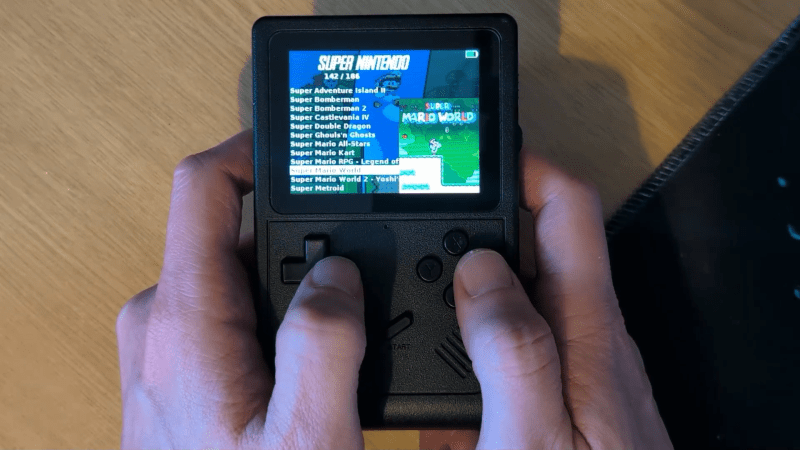
The ESP32-P4 is the new hotness on the microcontroller market. With RISC-V architecture and two cores running 400 MHz, to ears of a certain vintage it sounds more like the heart of a Unix workstation than a traditional MCU. Time’s a funny thing like that. [DynaMight] was looking for an excuse to play with this powerful new system on a chip, so put together what he calls the GB300-P4: a commercial handheld game console with an Expressif brain transplant.

ImageOlder ESP32 chips weren’t quite up to 16-bit emulation, but that hadn’t stopped people trying; the RetroGo project by [ducalex] already has an SNES and Genesis/Mega Drive emulation mode, along with all the 8-bit you could ask for. But the higher-tech consoles can run a bit slow in emulation on other ESP32 chips. [DynaMight] wanted to see if the P4 performed better, and to no ones surprise, it did.

If the build quality on this handheld looks suspiciously professional, that’s because it is: [DynaMight] started with a GB300, a commercial emulator platform. Since the ESP32-P4 is replacing a MIPS chip clocked at 914 MHz in the original — which sounds even more like the heart of a Unix workstation, come to think of it — the machine probably doesn’t have better performance than it did from factory unless its code was terribly un-optimized. In this case, performance was not the point. The point was to have a handheld running RetroGo on this specific chip, which the project has evidently accomplished with flying colours. If you’ve got a GB300 you’d rather put an “Expressif Inside” sticker on, the project is on github. Otherwise you can check out the demo video below. (DOOM starts at 1:29, because of course it runs DOOM.)

The last P4 project we featured was a Quadra emulator; we expect to see a lot of projects with this chip in the new year, and they’re not all going to be retrocomputer-related, we’re sure. If you’re cooking up something using the new ESP32, or know someone who is, you know what to do.

Continue reading “ESP32-P4 Powers Retro Handheld After A Transplant”

Image

Hacking The Krups Cook4Me Smart Cooking Pot For Doom

ImageWith more and more kitchen utilities gaining touch screens and capable microcontrollers it’d be inconceivable that they do not get put to other uses as well. To this end [Aaron Christophel] is back with another briefly Doom-less device in the form of the Krups Cook4Me pressure cooking pot with its rather sizeable touch screen and proclaimed smarts in addition to WiFi and an associated smartphone app.

Inside is an ESP32 module for the WiFi side, with the brains of the whole operation being a Renesas R7S721031VC SoC with a single 400 MHz Cortex-A9. This is backed by 128 MB of Flash and 128 MB of RAM. The lower touch interface is handled by a separate Microchip PIC MCU to apparently enable for low standby power usage until woken up by touch.

The developers were nice enough to make it easy to dump the firmware on the SoC via SWD, allowing for convenient reverse-engineering and porting of Doom. With the touch screen used as the human input device it was actually quite playable, and considering the fairly beefy SoC, Doom runs like a dream. Sadly, due to the rarity of this device, [Aaron] is not releasing project files for it.

As for why a simple cooking pot needs all of this hardware, the answer is probably along the lines of ‘because we can’.

Continue reading “Hacking The Krups Cook4Me Smart Cooking Pot For Doom

Image

The Issue With Wii U Gamepads And How To Clone Them

The Wii U running Mario Kart with the Gamepad duplicating the main screen. (Credit: MattKC, YouTube)

How hard would it be to clone the Wii U gamepad, the quirky controller with its unique embedded screen? This is the question that [MattKC] faced as he noticed the complete lack of Wii U gamepad replacements from either Nintendo or third-parties, leading him down the rabbit hole of answering said question.

Although unloved and even despised in compared to the Nintendo Wii, the Wii U was a solid system in its own right. One of its interesting additions was the gamepad controller, whose screen games used for features like a private screen during multiplayer and 3DS-like map screens. Its main weakness is however that the Wii U gamepad was considered an irreplaceable part of the console, which is obviously not fun if your gamepad breaks and your console along with it.

The Wii U console and gamepad communicate via 5 GHz 802.11n WiFi, but in order to deter other parties from simply hopping onto the access point, Nintendo slightly obfuscated this WiFi standard. Specifically the WPA authentication was modified by a byte swap in the PTK, rendering every existing WiFi stack incompatible with the Wii U.

Continue reading “The Issue With Wii U Gamepads And How To Clone Them”

Image

Super Mario 64, Now With Microtransactions

Besides being a fun way to pass time, video gaming is a surprisingly affordable hobby per unit time. A console or budget PC might only cost a few hundred dollars, and modern games like Hollowknight: Silksong can provide 40-60 hours of experience for only around $20 USD. This value proposition wasn’t really there in the 80s, where arcade cabinets like Gauntlet might have cost an inflation-adjusted $8 per hour in quarters. This paradigm shift is great for gamers, but hasn’t been great for arcade owners. [PrintAndPanic] wanted to bring some of that old coin munching vibe into console gaming, and so added a credit system to Super Mario 64.

The project is a fork of a decompilation of Super Mario 64, which converts the original machine code into a human-friendly format so bugs can be fixed and other modern features added. With the code available, essentially anyone can add features into the game that weren’t there already. In this case, [PrintAndPanic] is using a Raspberry Pi connected to a coin slot, so when coins are put into the game like an old arcade machine, the Raspberry Pi can tell the modified version of Super Mario 64 to add credits. These credits allow the player to run and jump, and when the credits run out Mario becomes extremely limited and barely able to outrun even the slowest Bombombs and Goombas.

With some debugging out of the way and the custom game working, [PrintAndPanic] built a custom enclosure for the game and the coin slot to turn it into a more self-contained arcade-style machine. The modified code for this project is available on the project’s GitHub page for those who want to play a tedious version of a favorite video game that costs more money than it should.

There are plenty of other modifications for this classic as well, most of which involve improving the game instead of adding a modern microtransaction-based system.

Continue reading Super Mario 64, Now With Microtransactions”

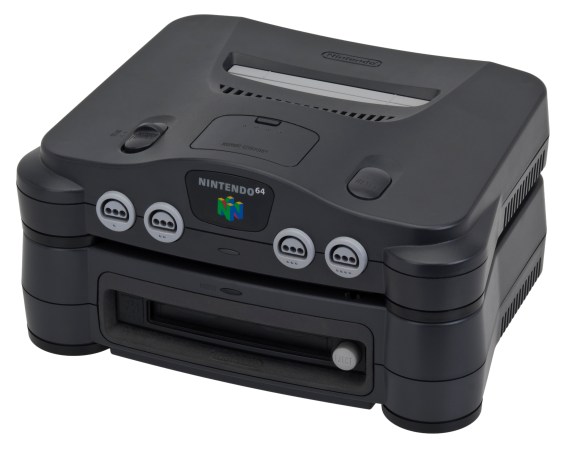
The Nintendo 64DD, an N64 add-on released only in Japan in 1999.

Exploring Nintendo 64DD Code Remnants In Ocarina Of Time

What if you took a Nintendo 64 cartridge-based game and allowed it to also use a large capacity magnetic disc format alongside it? This was the premise of the Nintendo 64DD peripheral, and the topic of a recent video by [Skawo] in which an archaeological code dig is performed to see what traces of the abandoned product may remain.

The 64DD slots into the bottom of the console where the peripheral connector is located, following which the console can read and write the magnetic discs of the 64DD. At 64 MB it matched the cartridge in storage capacity, while also being writable unlike cartridges or CDs. It followed on previous formats like the Famicom Disk System.

For 1998’s Game of the Year title The Legend of Zelda: Ocarina of Time such a 64DD-based expansion was worked on for a while before being cancelled along with the 64DD. With this Zelda game now decompiled, its source code has shown to be still full of 64DD-related code that [Skawo] takes us through in the video.

Continue reading “Exploring Nintendo 64DD Code Remnants In Ocarina Of Time

Image

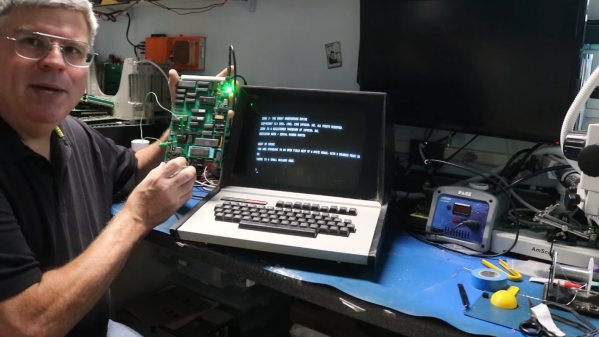
Zork Running On 4-Bit Intel Computer

Before DOOM would run on any computing system ever produced, and indeed before it even ran on its first computer, the game that would run on any computer of the pre-DOOM era was Zork. This was a text-based adventure game first published in the late 70s that could run on a number of platforms thanks to a virtual machine that interpreted the game code. This let the programmers write a new VM for each platform rather than porting the game every time. [smbakeryt] wanted to see how far he could push this design and got the classic game running on one of the oldest computers ever produced.

The computer in question is the ubiquitous Intel 4004 processor, the first commercially available general-purpose microprocessor produced. This was a four-bit machine and predates the release of Zork by about eight years. As discussed earlier, though, the only thing needed to get Zork to run on any machine is the Z-machine for that platform, so [smbakeryt] got to work. He’s working on a Heathkit H9 terminal, and the main limitation here is the amount of RAM needed to run the game. He was able to extended the address bus to increase the available memory in hardware, but getting the Z-machine running in software took some effort as well. There’s a number of layers of software abstraction here that’s a bit surprising for 70s-era computing but which make it an extremely interesting challenge and project.

As far as [smbakeryt]’s goal of finding the “least amount of computer” that would play Zork, we’d have a hard time thinking of anything predating the 4004 that would have any reasonable user experience, but we’d always encourage others to challenge this thought and [smbakeryt]’s milestone. Similarly, DOOM has a history of running on machines far below the original recommended minimum system requirements, and one of our favorites was getting it to run on the NES.

Continue reading Zork Running On 4-Bit Intel Computer”