Image

What To Do With A Flash-less ESP32-C3 Super Mini Board?

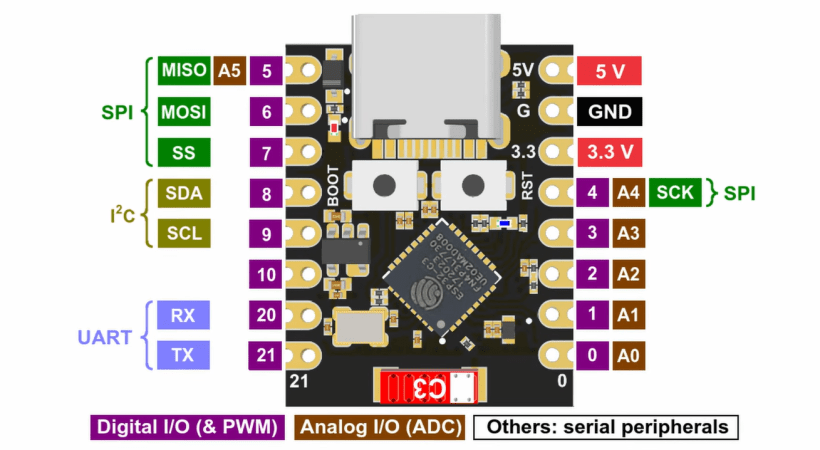
ImageIn an update video by [Hacker University] to an earlier video on ESP32-C3 Super Mini development boards that feature a Flash-less version of this MCU, the question of adding your own Flash IC to these boards is addressed. The short version is that while it is possible, it’s definitely not going to be easy, as pins including SPIHD (19) and SPICLK (22) and SPIQ (24) are not broken out on the board and thus require one to directly solder wires to the QFN pads.

Considering how sketchy it would be to have multiple wires running off to an external Flash IC, this raises many questions about the feasibility, as well as cost-effectiveness. Some in the comments to the video remark that instead you may as well swap the MCU with a version that does contain built-in Flash, but this is countered with the argument that a new ESP32-C3 Super Mini board with the right MCU costs as much as a loose MCU from your favorite purveyor of ICs.

Ultimately this lends some credence to calling these zero Flash Super Mini boards a ‘scam’, as their use cases would seem to be extremely limited and their Flash-less nature very poorly advertised.

Continue reading “What To Do With A Flash-less ESP32-C3 Super Mini Board?”
The Mini PC. Without a banana for scale, you might be fooled.

Jam Like It’s The 1980s With A Mini-IBM PC

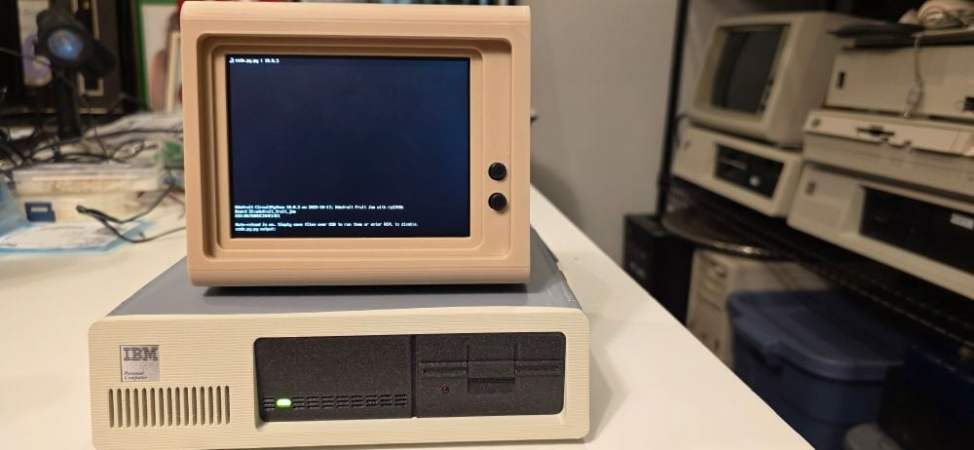
A lot of retrocomputer enthusiasts have a favourite system, to the point of keeping up 40 year old flame wars over which system was “best”.   In spite of the serious, boring nature of the PC/AT and its descendants, those early IBMs have a certain style that Compaq and the Clones never quite matched. Somehow, we live in a world where there are people nostalgic for Big Blue. That’s why [AnneBarela] built a miniature IBM PC using an Adafruit Fruit Jam board.

If you haven’t seen it before, the Fruit Jam board is an RP2350 dev board created specifically to make minicomputers, with its two USB host sockets, DVI-out and 3.5mm jack. [Anne] loaded a PC emulator by [Daft-Freak] called PACE-32 that can emulate an IBM compatible PC with an 80386 and up-to 8 MB of RAM on this particular board. The video is VGA, 640×480 — as god intended– piped to a 5″ LCD [Anne] picked up from AliExpress.

That display is mounted inside a replica monitor designed by [giobbino], and is sitting on top of a replica case. Both are available on Thingiverse, though some modification was required to provide proper mounting for the Fruit Jam board. [giobbino] designed it to house a FabGL ESP32 module– which has us wondering, if an RP2350 can be a 386, what level of PC might the ESP32-P4 be capable of? We’ve seen it pretend to be a Quadra, so a 486 should be possible. It wasn’t that long ago that mini builds of this nature required a Raspberry Pi, after all.

Speculation aside, this diminutive IBM build leaves us but with but one question: if you played Links386 on it, would it count as miniature golf?

Image

ESP32-P4 Powers Retro Handheld After A Transplant

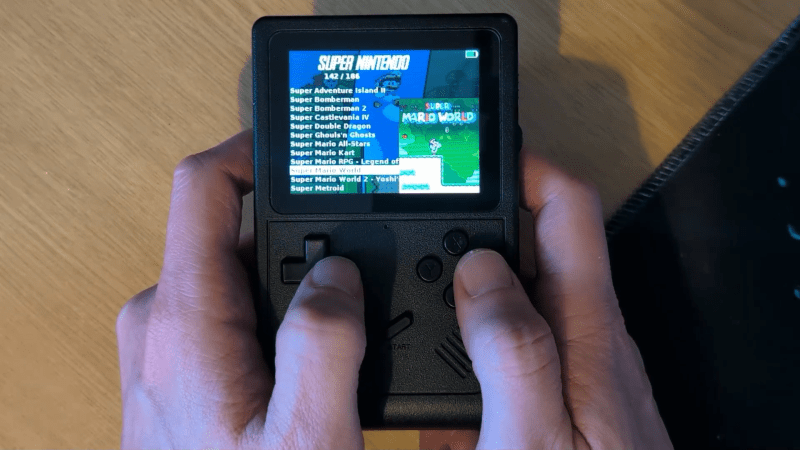
The ESP32-P4 is the new hotness on the microcontroller market. With RISC-V architecture and two cores running 400 MHz, to ears of a certain vintage it sounds more like the heart of a Unix workstation than a traditional MCU. Time’s a funny thing like that. [DynaMight] was looking for an excuse to play with this powerful new system on a chip, so put together what he calls the GB300-P4: a commercial handheld game console with an Expressif brain transplant.

ImageOlder ESP32 chips weren’t quite up to 16-bit emulation, but that hadn’t stopped people trying; the RetroGo project by [ducalex] already has an SNES and Genesis/Mega Drive emulation mode, along with all the 8-bit you could ask for. But the higher-tech consoles can run a bit slow in emulation on other ESP32 chips. [DynaMight] wanted to see if the P4 performed better, and to no ones surprise, it did.

If the build quality on this handheld looks suspiciously professional, that’s because it is: [DynaMight] started with a GB300, a commercial emulator platform. Since the ESP32-P4 is replacing a MIPS chip clocked at 914 MHz in the original — which sounds even more like the heart of a Unix workstation, come to think of it — the machine probably doesn’t have better performance than it did from factory unless its code was terribly un-optimized. In this case, performance was not the point. The point was to have a handheld running RetroGo on this specific chip, which the project has evidently accomplished with flying colours. If you’ve got a GB300 you’d rather put an “Expressif Inside” sticker on, the project is on github. Otherwise you can check out the demo video below. (DOOM starts at 1:29, because of course it runs DOOM.)

The last P4 project we featured was a Quadra emulator; we expect to see a lot of projects with this chip in the new year, and they’re not all going to be retrocomputer-related, we’re sure. If you’re cooking up something using the new ESP32, or know someone who is, you know what to do.

Continue reading “ESP32-P4 Powers Retro Handheld After A Transplant”

Image

An SD Card Of Your Own For Microcontroller Projects

If you’ve wiring up a microcontroller and need some kind of storage, it’s likely you’ll reach for an SD card. Compared to other ways of holding data on your project, SD cards are just so much cheaper, resilient to physical and magnetic shocks, and simpler to work with from both a hardware and software perspective. On the other hand, it might seem silly to put a SD card slot on a board that’s never going to see a replacement card. [DIY GUY Chris] wants to advertise a solution for that: a cardless SD card chip by XTX that can act as a drop-in replacement for your projects. 

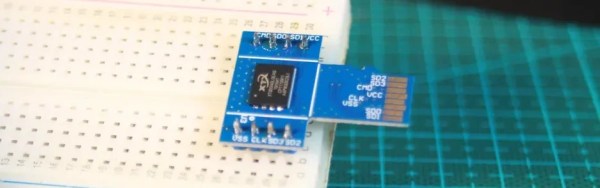
The XTXD0*G series are NAND flash chips of precisely the sort you’d find in an SD card, except without the SD card. That means you can use your usual SD card access libraries to speed prototyping, but skip the BOM cost of an actual card reader. In his Instructable and the video embedded below [Chris] shows how he used the 4 Gbit version, the XTSD04GLGEAG to make a custom SD-compatible breakout board that is equally happy in your laptop’s card reader or on a breadboard.

To get it plugged into the breadboard, [Chris] is using the standard 2.54 mm headers you can get anywhere; to get it plugged into a card reader, he’s just relying on the PCB being cut to shape. [Chris] notes that you’ll want to have the board built at 0.6 mm thickness if you’re going to plug it in like a micro SD card.

Of course once you’ve gotten used to the little NAND chips, there’s no need to put them on breakouts but this looks like a fun way to test ’em out. You don’t need to keep your flash chip on an SD-card sized PCB, either; we saw something similar used to make modern game cartridges. If you insist on using a standard SD card and don’t want to buy a slot, you can certainly DIY that instead. 

Continue reading “An SD Card Of Your Own For Microcontroller Projects”

Image

A Much Faster Mac On A Microcontroller

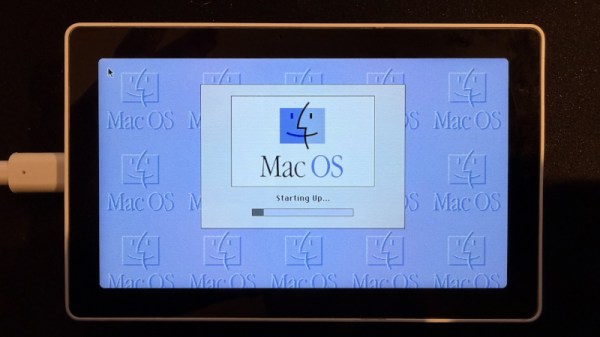
Emulating older computers on microcontrollers has been a staple of retrocomputing for many years now, with most 8-bit and some 16-bit machines available on Atmel, ARM, or ESP32 platforms. But there’s always been a horsepower limit, a point beyond which a microcontroller is no longer enough, and a “proper” computer is needed. One of those barriers now appears to have been broken, as microcontroller-based emulation moves into the 32-bit era. [Amcchord] has the Basilisk II emulator ported to the ESP32-P4 platform, providing a 68040 Mac able to run OS8.1. This early-1990s-spec machine might not seem like much in 2026, but it represents a major step forward.

The hardware it uses is the M5Stack Tab5, and it provides an emulated Mac with up to 16 MB of memory. Remember, in 1992 this would have been a high-spec machine. It manages a 15 frames per second refresh rate, which is adequate for productivity applications. The emulator uses the Tab5’s touchscreen to emulate the Mac mouse alongside support for USB input devices. To 1990 hackers, it’s almost the Mac tablet you didn’t know you would want in the future.

We like this project, both because it’s advancing the art of emulation on microcontrollers, and also because it delivers a computer that’s useful for some of the things you might have done with a Mac in 1992 and could even do today. Pulling this out on the train back then would have blown people’s minds. There’s even a chance that MacOS on something like this would turn a few heads in 2026. It’s certainly not the first emulated Mac we’ve seen though.

Image

A UI-Focused Display Library For The ESP32

If you’re building a project on your ESP32, you might want to give it a fancy graphical interface. If so, you might find a display library from [dejwk] to be particularly useful.

Named roo_display for unclear reasons, the library is Arduino-compatible, and suits a wide range of ESP32 boards out in the wild. It’s intended for use with common SPI-attached display controllers, like the ILI9341, SSD1327, ST7789, and more. It’s performance-oriented, without skimping on feature set. It’s got all kinds of fonts in different weights and sizes, and a tool for importing more. It can do all kinds of shapes if you want to manually draw your UI elements, or you can simply have it display JPEGs, PNGs, or raw image data from PROGMEM if you so desire. If you’re hoping to create a touch interface, it can handle that too. There’s even a companion library for doing more complex work under the name roo_windows.

If you’re looking to create a simple and responsive interface, this might be the library for you. Of course, there are others out there too, like the Adafruit GFX library which we’ve featured before. You could even go full VGA if you wanted, and end up with something that looks straight out of Windows 3.1. Meanwhile, if you’re cooking up your own graphics code for the popular microcontroller platform, you should probably let us know on the tipsline!

Thanks to [Daniel] for the tip!

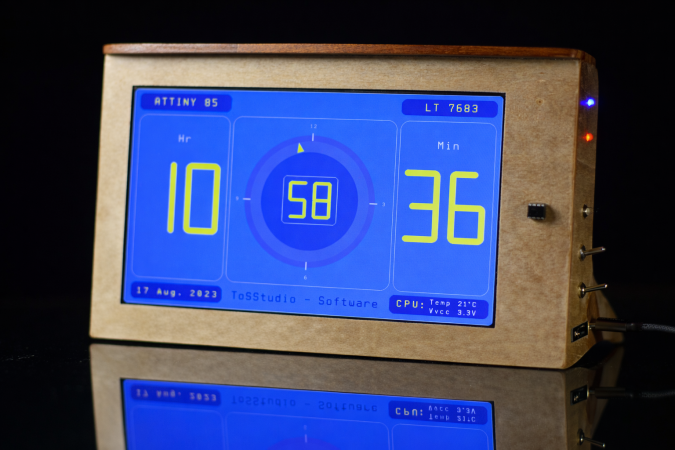
The clock demo on display

Drive 1024×600 Pixels Via I2C With An ATtiny85

If you need to drive a big screen for a project, it’s fair to say your first thought isn’t going to be to use the ATtiny85. With just 512 bytes of RAM and 8 kilobytes of flash memory, the 8-bit micro seems a little cramped to drive, say, a 10″ screen. Yet that’s exactly what [ToSStudio] is doing with TinyTFT_LT7683: 1024 x 600 pixels of TFT goodness, over I2C no less.

Image
With the right TFT controller, this little micro-controller can do magic.

The name kind of gives away the secret: it won’t work on just any TFT display. It’s using properties of the LT7683 display driver, though if you don’t have one of those, the RA8875 is also compatible. Those drivers can take more than just a pixel stream– a good thing, since you’d be hard pressed to get that many pixels streaming from an ATtiny. These are character/graphic display drivers, which means you can get them to draw both characters and graphics on the screen if you speak the lingo.

It’s still not blazing fast; the documentation suggests “static or moderately dynamic UIs” as the suggested use case, and a clock is of the pre-programmed examples. From that, we can surmise that you can get 1 FPS or better with this code. You’re limited both by the simple micro-controller and the bandwidth of the I2C bus, but within those limits this seems like a very powerful technique.

This isn’t the first ATtiny graphics library to blow our minds, but if you really want an impressive graphics demo from the little micro that could, you really need to race the beam.

Thanks to [Thomas Scherer] for the tip!