Image

2025: As The Hardware World Turns

If you’re reading this, that means you’ve successfully made it through 2025! Allow us to be the first to congratulate you — that’s another twelve months of skills learned, projects started, and hacks….hacked. The average Hackaday reader has a thirst for knowledge and an insatiable appetite for new challenges, so we know you’re already eager to take on everything 2026 has to offer.

But before we step too far into the unknown, we’ve found that it helps to take a moment and reflect on where we’ve been. You know how the saying goes: those that don’t learn from history are doomed to repeat it. That whole impending doom bit obviously has a negative connotation, but we like to think the axiom applies for both the lows and highs in life. Sure you should avoid making the same mistake twice, but why not have another go at the stuff that worked? In fact, why not try to make it even better this time?

As such, it’s become a Hackaday tradition to rewind the clock and take a look at some of the most noteworthy stories and trends of the previous year, as seen from our rather unique viewpoint in the maker and hacker world. With a little luck, reviewing the lessons of 2025 can help us prosper in 2026 and beyond.

Continue reading “2025: As The Hardware World Turns”

Image

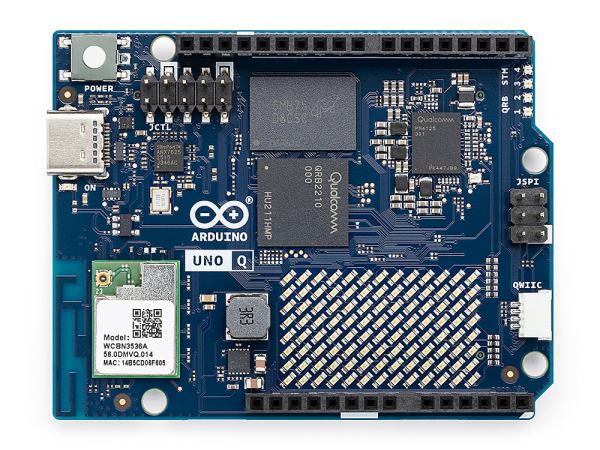
Qualcomm Introduces The Arduino Uno Q Linux-Capable SBC

Generally people equate the Arduino hardware platforms with MCU-centric options that are great for things like low-powered embedded computing, but less for running desktop operating systems. This looks about to change with the Arduino Uno Q, which keeps the familiar Uno formfactor, but features both a single-core Cortex-M33 STM32U575 MCU and a quad-core Cortex-A53 Qualcomm Dragonwing QRB2210 SoC.

According to the store page the board will ship starting October 24, with the price being $44 USD. This gets you a board with the aforementioned SoC and MCU, as well as 2 GB of LPDDR4 and 16 GB of eMMC. There’s also a WiFi and Bluetooth module present, which can be used with whatever OS you decide to install on the Qualcomm SoC.

This new product comes right on the heels of Arduino being acquired by Qualcomm. Whether the Uno Q is a worthy purchase mostly depends on what you intend to use the board for, with the SoC’s I/O going via a single USB-C connector which is also used for its power supply. This means that a USB-C expansion hub is basically required if you want to have video output, additional USB connectors, etc. If you wish to run a headless OS install this would of course be much less of a concern.

Image

Embedded USB Debug For Snapdragon

According to [Casey Connolly], Qualcomm’s release of how to interact with their embedded USB debugging (EUD) is a big deal. If you haven’t heard of it, nearly all Qualcomm SoCs made since 2018 have a built-in debugger that connects to the onboard USB port. The details vary by chip, but you write to some registers and start up the USB phy. This gives you an oddball USB interface that looks like a seven-port hub with a single device “EUD control interface.”

So what do you do with that? You send a few USB commands, and you’ll get a second device. This one connects to an SWD interface. Of course, we have plenty of tools to debug using SWD.

Continue reading “Embedded USB Debug For Snapdragon”

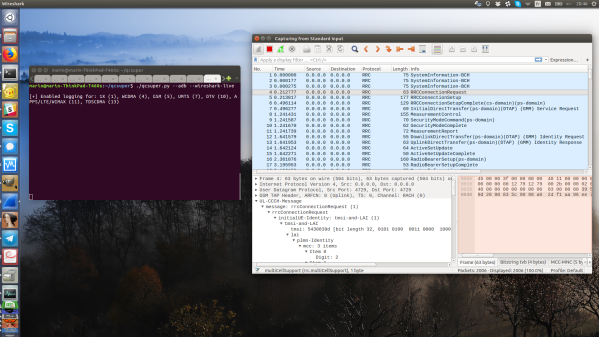
Wireshark screenshot with QCSuper-produced packets streaming into it; QCSuper script running in an adjacent terminal

Turn Your Qualcomm Phone Or Modem Into Cellular Sniffer

If your thought repurposing DVB-T dongles for generic software defined radio (SDR) use was cool, wait until you see QCSuper, a project that re-purposes phones and modems to capture raw 2G/3G/4G/5G. You have to have a Qualcomm-based device, it has to either run rooted Android or be a USB modem, but once you find one in your drawers, you can get a steady stream of packets straight into your Wireshark window. No more expensive SDR requirement for getting into cellular sniffing – at least, not unless you are debugging some seriously low-level issues.

It appears there’s a Qualcomm specific diagnostic port you can access over USB, that this software can make use of. The 5G capture support is currently situational, but 2G/3G/4G capabilities seem to be pretty stable. And there’s a good few devices in the “successfully tested” list – given the way this software functions, chances are, your device will work! Remember to report whether it does or doesn’t, of course. Also, the project is seriously rich on instructions – whether you’re using Linux or Windows, it appears you won’t be left alone debugging any problems you might encounter.

This is a receive-only project, so, legally, you are most likely allowed to have fun — at least, it would be pretty complicated to detect that you are, unlike with transmit-capable setups. Qualcomm devices have pretty much permeated our lives, with Qualcomm chips nowadays used even in the ever-present SimCom modules, like the modems used in the PinePhone. Wondering what a sniffer could be useful for? Well, for one, if you ever need to debug a 4G base station you’ve just set up, completely legally, of course.

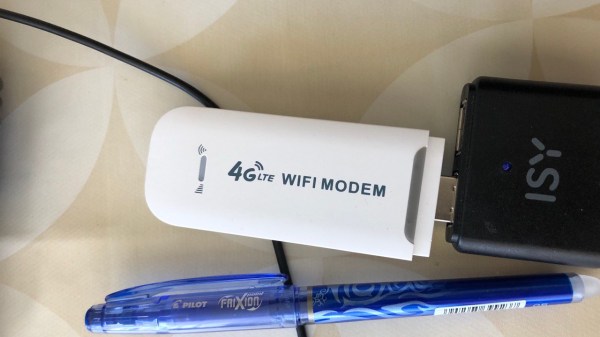
The modem in question plugged into a black powerbank.

Hackable $20 Modem Combines LTE And Pi Zero W2 Power

[extrowerk] tells us about a new hacker-friendly device – a $20 LTE modem stick with a quadcore CPU and WiFi, capable of running fully-featured Linux distributions. This discovery hinges on a mountain of work by a Chinese hacker [HandsomeYingYan], who’s figured out this stick runs Android, hacked its bootloader, tweaked a Linux kernel for it and created a Debian distribution for the stick – calling this the OpenStick project. [extrowerk]’s writeup translates the [HandsomeYingYan]’s tutorial for us and makes a few more useful notes. With this writeup in hand, we have unlocked a whole new SBC to use in our projects – at a surprisingly low price!

At times when even the simplest Pi Zero is unobtainium (yet again!), this is a wonderful find. For a bit over the price of a Zero 2W, you get a computer with a similar CPU (4-core 1GHz A53-based Qualcomm MSM8916), same amount of RAM, 4GB storage, WiFi – and an LTE modem. You can stick this one into a powerbank or a wallwart and run it at a remote location, make it into a home automation hub, or perhaps, process some CPU-intensive tasks in a small footprint. You can even get them with a microSD slot for extra storage – or perhaps, even extra GPIOs? You’re not getting a soldering-friendly GPIO header, but it has a few LEDs and, apparently, a UART header, so it’s not all bad. As [extrowerk] points out, this is basically a mobile phone in a stick form factor, but without the display and the battery.
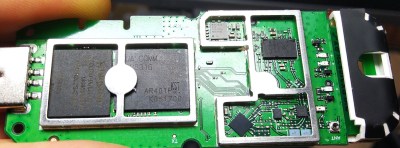
The modem with its cover taken off, showing the chips on its board.Now, there’s caveats. [extrowerk] points out that you should buy the modem with the appropriate LTE bands for your country – and that’s not the only thing to watch out for. A friend of ours recently obtained a visually identical modem; when we got news of this hack, she disassembled it for us – finding out that it was equipped with a far more limited CPU, the MDM9600. That is an LTE modem chip, and its functions are limited to performing USB 4G stick duty with some basic WiFi features. Judging by a popular mobile device reverse-engineering forum’s investigations (Russian, translated), looks like the earlier versions of this modem came with the way more limited MDM9600 SoC, not able to run Linux like the stick we’re interested in does. If you like this modem and understandably want to procure a few, see if you can make sure you’ll get MSM8916 and not the MDM9600.

Days of using WiFi routers to power our robots are long gone since the advent of Raspberry Pi, but we still remember them fondly, and we’re glad to see a router stick with the Pi Zero 2W oomph. We’ve been hacking at such sticks for over half a decade now, most of them OpenWRT-based, some as small as an SD card reader. Now, when SBCs are hard to procure, this could be a perfect fit for one of your next projects.

Update: in the comments below, people have found a few links where you should be able to get one of these modems with the right CPU. Also, [Joe] has started investigating the onboard components!


Image

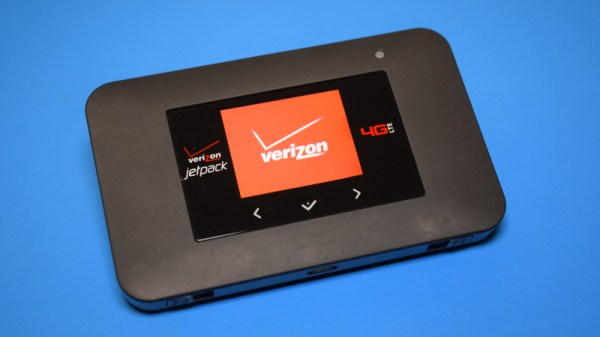
Teardown: Verizon AC791L Jetpack 4G Mobile Hotspot

The saying “time and tide wait for no man” is usually used as a verbal kick in the pants, a reminder that sometimes an opportunity must be seized quickly before it passes by. But it can also be interpreted as a warning about the perpetual march of time and how it impacts the world around us. In that case, we would do well to add cellular technology to the list of proverbial things that wait for no one. Do you need 5G? No. Do you want it? Probably not. But it’s here, so be a good consumer and dump all your 4G hardware in the name of technical progress.

This line of logic may explain how the Verizon-branded Netgear AC791L 4G “Jetpack” hotspot you see here, despite being in perfect working order, found itself in the trash. The onset of 5G must have been particularly quick for the previous owner, since they didn’t even bother to wipe their configuration information from the device. In the name of journalistic integrity I won’t divulge the previous owner’s identity; but I will say that their endearing choice of WPA2 key, iluvphysics, makes for a nice fit with our publication.

A quick check of eBay shows these devices, and ones like it, are in ample supply. At the time of this writing, there were more than 1,500 auctions matching the search term “Verizon jetpack”, with most of them going for between $20 and $50 USD. We like cheap and easily obtainable gadgets that can be hacked, but is there anything inside one of these hotspots that we can actually use? Let’s find out.

Continue reading “Teardown: Verizon AC791L Jetpack 4G Mobile Hotspot”

Image

5G Power Usage Is Making Phones Overheat In Warm Weather

As reported by ExtremeTech, the brand new 5G network is running into a major snag with mobile devices as Qualcomm 5G modems literally cannot handle the heat. After just a few minutes of use they’re going into thermal shutdown and falling back to measly 4G data rates. Reports by both PCMag and the Wall Street Journal (paywall) suggest that 5G-enabled phones consistently see problems when used in environments where temperatures hit or exceed 29.5 °C (85.1 °F).

The apparent cause is the increased power draw required by current 5G modems which make heavy use of beam forming and other advanced technologies to increase reception and perform processing on the received data. Unlike 4G and older technologies, 5G needs to have multiple antennas (three or more) to keep a signal, especially when you grab your shiny new smartphone with your millimeter-wave blocking hands.

The spin-off from all of this seems to be that perhaps 5G technology isn’t ready for prime-time, or that perhaps our phones need to have bigger batteries and liquid cooling to keep the 5G modem in it happy. Anyone up for modding a liquid cooling loop and (tiny) radiator into their phone?