Car Mastery – Free Inquiry 4


For this post, I moved on to installing a backup camera on my Lancer. This was definitely a bigger challenge than the head unit because it involved running wires from the back of the car all the way to the dash. I used the video linked below as an installation guide.

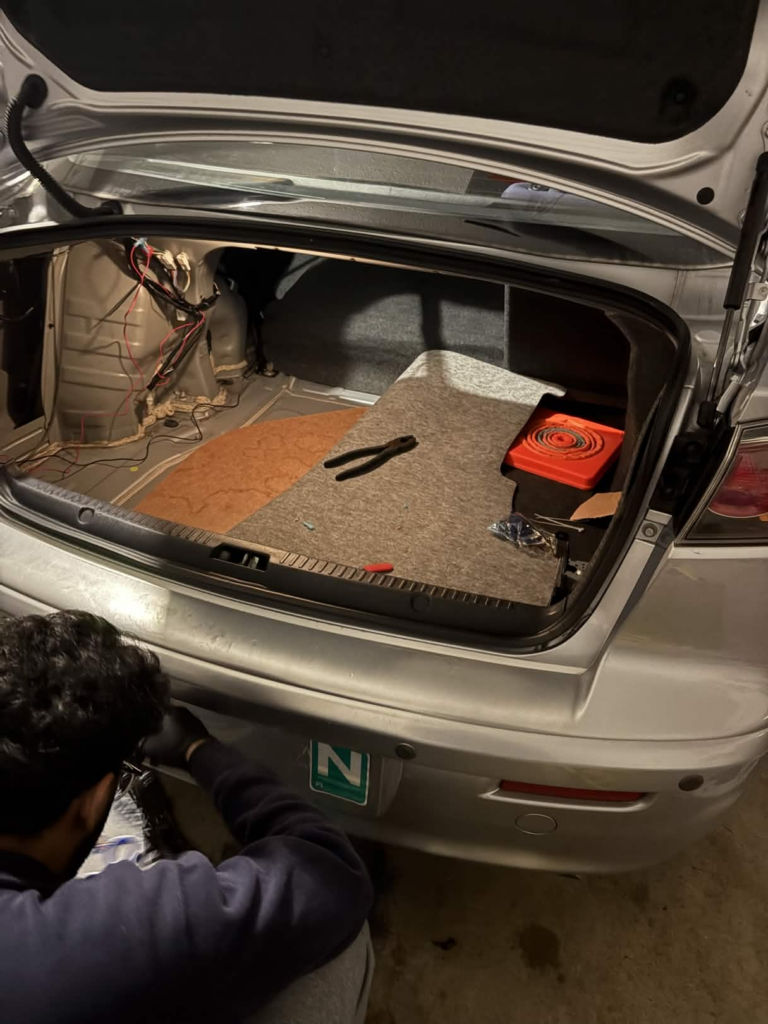
I picked up a license plate mount to secure the camera in the ideal spot above the plate, giving me a clear view when reversing. Once mounted, I realized the cable from the camera was a bit too short to reach the dashboard, so I had to extend it using some spare wire I found in my dad’s garage. Using a T-tap connector, I joined the wires and made sure the connection was secure before moving on.
Image

Next, I connected the main long cable to the reverse light so that the camera would turn on automatically when I put the car in reverse. Then came the tricky part: running the cable along the length of the car. I had to carefully tuck it under trim panels and along the edges of the interior, making sure nothing would get pinched or damaged while driving.

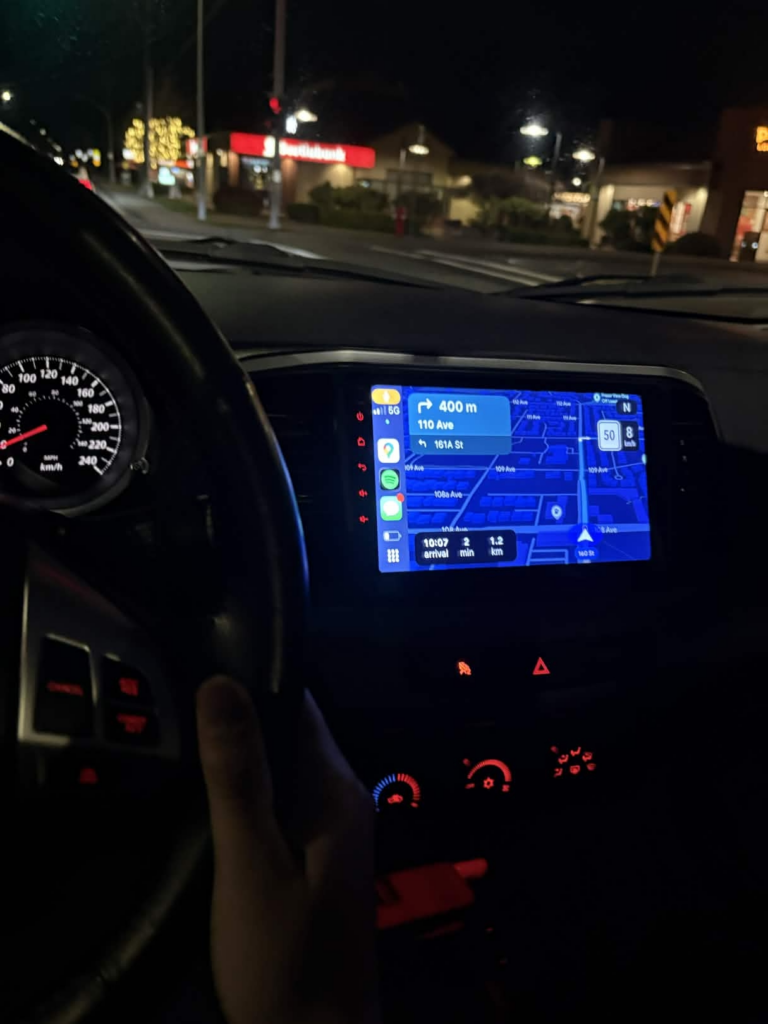
After running it to the new head unit that i had installed I tried to to put my car in reverse however i got no signal from the backup camera. I quickly tried to diagnose it and figured out that there could only be two reasons as to why. Either my T-Tap connections were not properly secured or the backup camera itself was faulty.

Thus I made sure my T-Tap connections were secured and then gave it a try, yet it did not work. I don’t think the backup camera itself was the issue as i tested it using a voltmeter so I would assume that the T-Tap i ordered off amazon were faulty sadly. Since it was getting late i opted to order some better quality T-Tap and try the installation next week.

At least my head unit was working so it wasn’t a complete loss this week!
Image

Car Mastery – Free Inquiry 3


For this post, I finally got to the part I’ve been waiting for: installing the Head Unit on my Lancer. Below is the video i used as a guide throught the installation process.

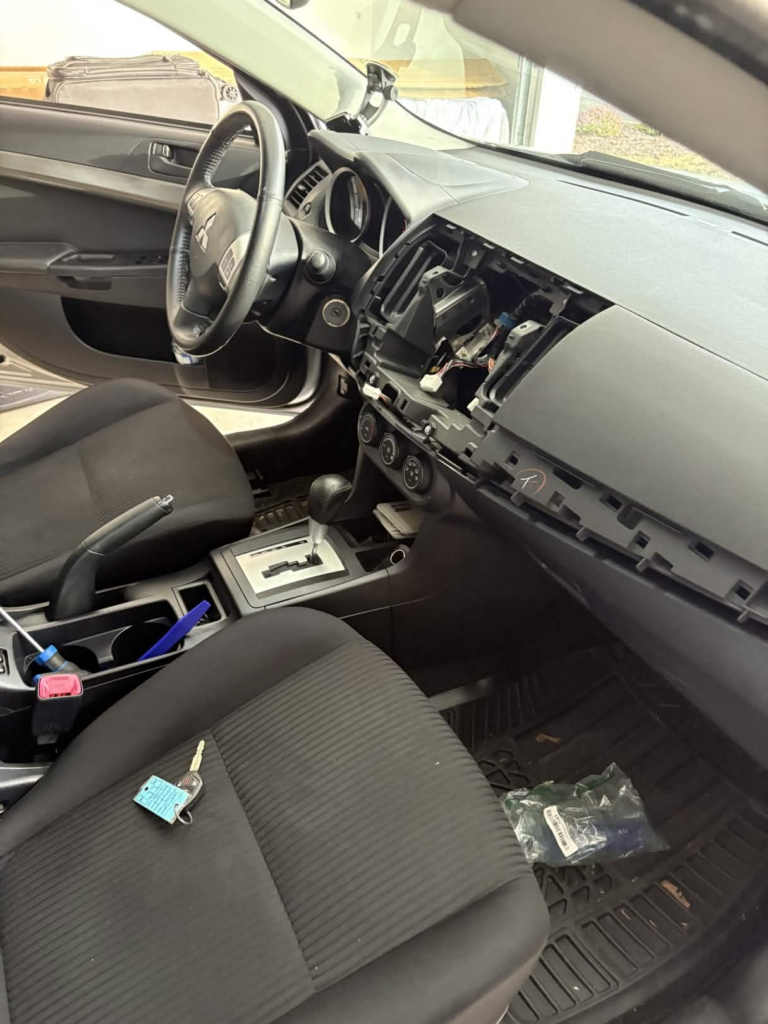
Installing the new head unit started with removing parts of the dash to access the stock unit. First, I had to open the glove box and loosen two screws to get it out of the way. Once the glove box was removed, I tackled a plastic trim piece that runs along the dash. It was attached with clips, so I carefully used a pry tool to pop it off without breaking anything.

Next, I had to remove the hazard switch module, which was held in place by three screws. Once that was out, I carefully pried out the center console to create enough space to reach the head unit. This part was a little tricky, but taking it slow and making sure nothing was forced helped me avoid any scratches or broken clips.

Image

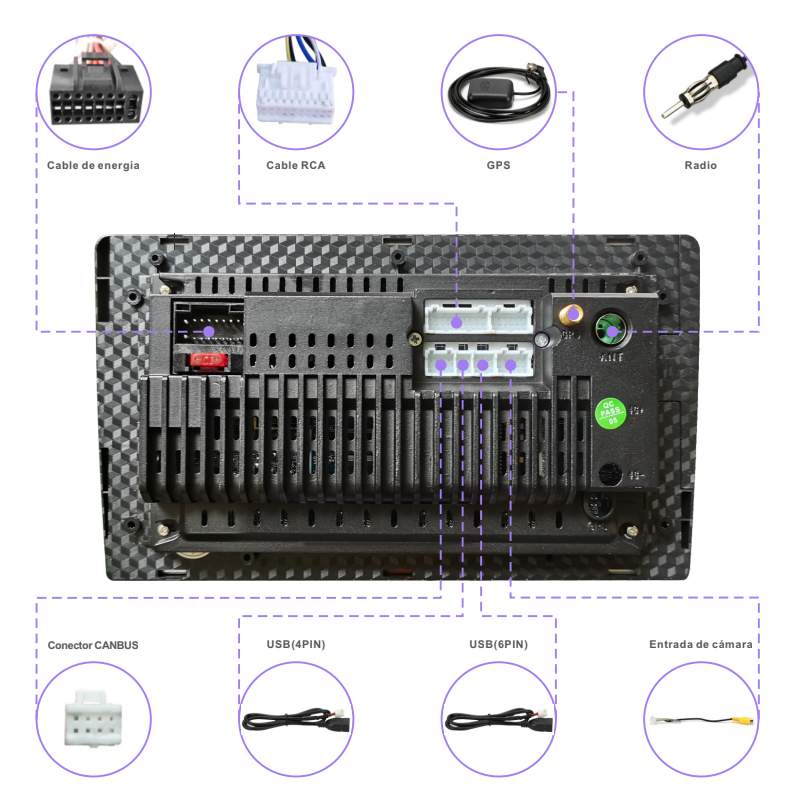
Finally, I got to the head unit itself. It was held in by four screws, and after removing them, the old unit came out cleanly. I disconnected the cables from the old head unit and installed them in the new head unit. The installation process was quite easy as all the cables was plug and play. Below is a picture that I used to plug in the correct cables.

Image

In the next post I will test the head unit and try to install the backup camera hopefully.

Car Mastery – Free Inquiry 2


My Lancer already has Bluetooth, which is great for music and calls, but it doesn’t have a built-in navigation system. Living in a new city like Vancouver without maps has been… awkward, to say the least. I’ve definitely gotten lost more times than I’d like to admit, and relying on my phone while driving just isn’t ideal.

That’s why I decided it was finally time to order a proper head unit with navigation. At first, I thought it would be as simple as picking any touchscreen, but there’s actually a lot to consider to make sure it fits my Lancer perfectly.

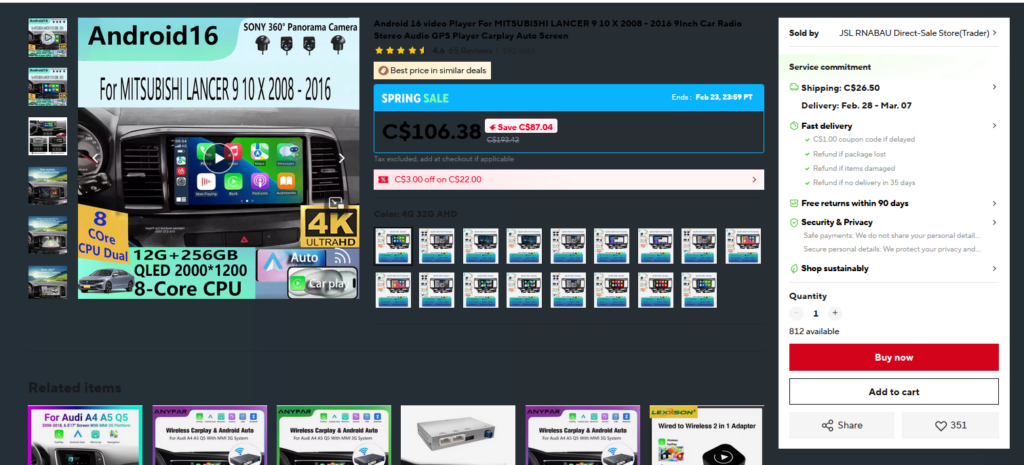
So I started looking at head units to add navigation. I narrowed it down to two options. The first one looked decent in the photos, but it bulged out a bit from the dash, which didn’t sit right with me. The second option was a smaller 9.1-inch screen, and after checking the customer reviews, it seemed to fit much better in the dash and had more of an OEM (original equipment manufacturer) look. I also made sure to get a model with a CANbus adapter. This is really important because it lets me still use my steering wheel controls with the new head unit, so I won’t lose any of the convenience I already have.

Image

While searching for the right unit, I stumbled upon this YouTube video that replaces the head unit in a car exactly like mine (linked below). It was reassuring to see how the process works, and it gives me confidence to try installing it myself.

In my next post, I’ll attempt to install the new unit with my friend so hopefully everything goes well!

Weekly Reflection Blog Post #4

This week’s discussion is focused on the environmental impact of Generative AI, more specifically, the power and water depletion required to run large server farms. While power and water are essential components that are catalysts in fulfilling the world’s digital needs, they sometimes make me question if living near a data center affects the people and communities around it.

To gain a better sense of understanding regarding the discussion and the questions lingering my thoughts, I watched a video that explored the environmental consequences of AI data centres.

The video compelled me to notice that AI and large data centers can actually affect the electricity in the local power grid. The narrator explained that operating thousands of servers simultaneously can cause something called harmonic oscillations within electricity. This means the flow of electricity can get wobbly and fluctuate rather than flow smoothly. These instabilities can make the grid less secure and reliable, and even affect other devices or appliances in nearby homes.

Another rising issue for people living near data centers is noise pollution. As the cooling systems of many servers run constantly, they produce a buzzing sound that is undoubtedly hard to ignore, especially at night. Due to the fact that these facilities run continuously, nearby residents might experience constant background noise which can be frustrating.

Image

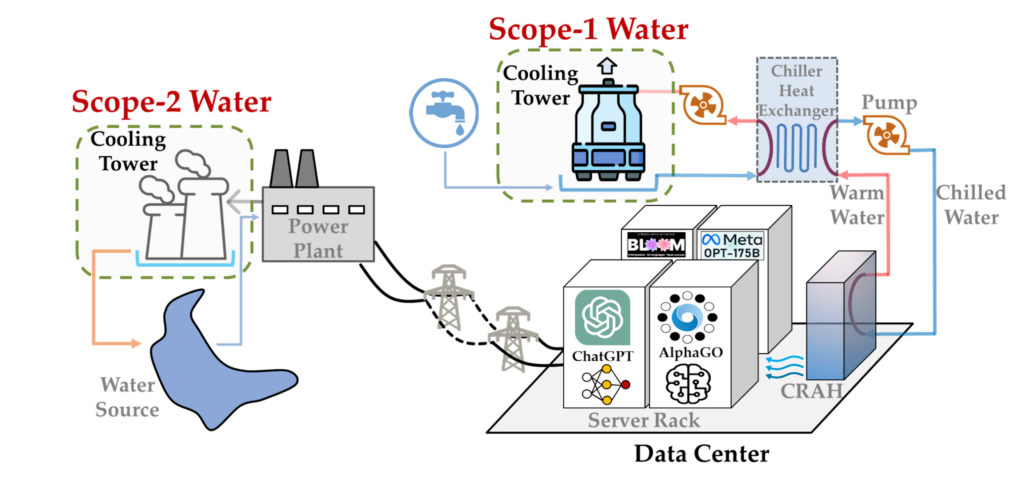
One of the biggest and most concerning factors is water consumption. As many data centres rely on water cooling systems to prevent overheating within an intricate network; it leads to them drawing large amounts of water from local supplies, this creates a huge problem for areas dealing with limited water resources that also struggle with putting the water to other uses such as farming and etc.

Overall, I believe that AI is undoubtedly useful and can exceptionally make life and learning easier; however, it comes with underlying depletion like high electricity and water usage. While our generation may not notice these effects as much, future generations could end up paying a much higher price that’s hard to cover.

Car Mastery – Free Inquiry 1


For my free inquiry, I decided to write about my new car, which I picked up right after New Year’s. Growing up in Dubai, UAE, you can only get a license after turning 18. By the time I turned 18, I had moved to UVic for my higher education. After passing my driver’s test last summer in Vancouver, I finally saved up enough money over the fall semester to buy my first car!

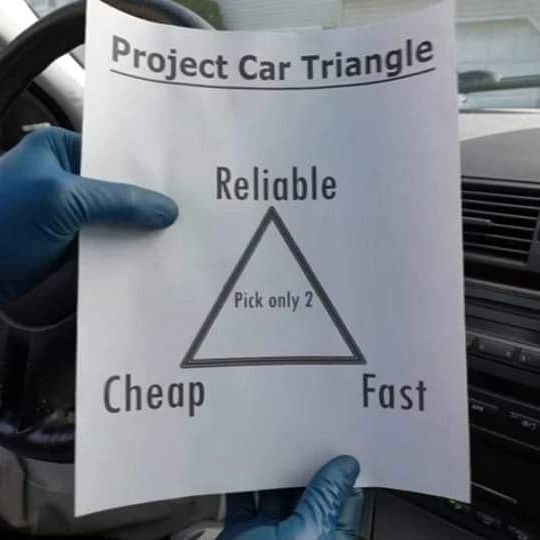
Before picking a car, I made a list of what was important to me. First, I needed something reliable that wouldn’t constantly break down, since I’d be using it for school and commuting. I also wanted a car that was fun to drive and had some sporty appeal, not just something basic and boring. Maintenance and costs were also a factor, I wanted a car that I could afford to take care of on my own.

Image

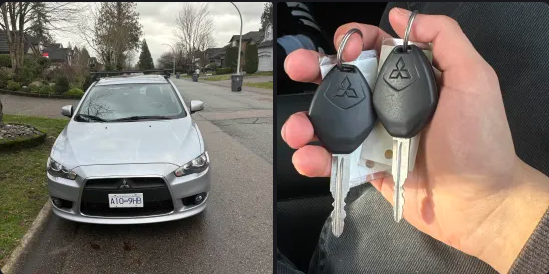
Since I’m still in university, I had to prioritize cheap and reliable, which meant ignoring the ā€œfastā€ part of the car triangle. After comparing my options, I decided on the Mitsubishi Lancer, which struck the right balance of reliability, affordability, and sporty style that I was looking for.

I also researched about the common issues with the car to prepare myself about the money that i needed to reserve for maintenance costs. I also used ChatGPT to negotiate a price with the seller and to look for any important issues with the car.

I’ve always loved the red Mitsubishi Lancer Evo from Fast & Furious: Tokyo Drift, but obviously I don’t have the funds for an Evo so I’ll stick with the base Lancer (for now)

Image

Anyways here is my new Lancer!

In my upcoming posts, I’ll be sharing the mods I plan to do on this car, such as installing a new head unit, adding a backup camera, and upgrading the interior lights. Doing these upgrades will help me learn more about my car and reduce the need to run to a mechanic for every minor issue, allowing me to handle things myself.

Weekly Reflection Blog Post #3

AI as a Time-Saver (With Caveats)

Using Gemini to create my lesson plan last week saved a lot of time. What might have taken over an hour took about 15 minutes. But this efficiency only works if we bring our own pedagogical knowledge to the table.

For example, I usually tell AI something like, ā€œact as a grade 12 teacher and create a calculus lesson.ā€ Normally, I don’t spend much time on prompts and just tweak things as I go. However this time, I set out all my goals and expectations at the start as expected by the workbook and really worked on the prompt before asking AI to generate anything. Doing this saved a ton of time because the AI gave me exactly what I needed on the first try, instead of going back and forth.

Connecting AI to Instructional Design Frameworks

This week’s frameworks also revealed how AI can support each stage of instructional design with proper guidance. When I used Gemini, I jumped straight to development without working through ADDIE’s analysis and design phases. Looking back, I can see that skipping those steps meant that I missed thinking carefully about what students already knew, what they needed to learn, and how best to structure the lesson. Using AI is way more effective when you plan first and let it help you build on that plan, instead of just asking it to generate content out of nowhere.

Image

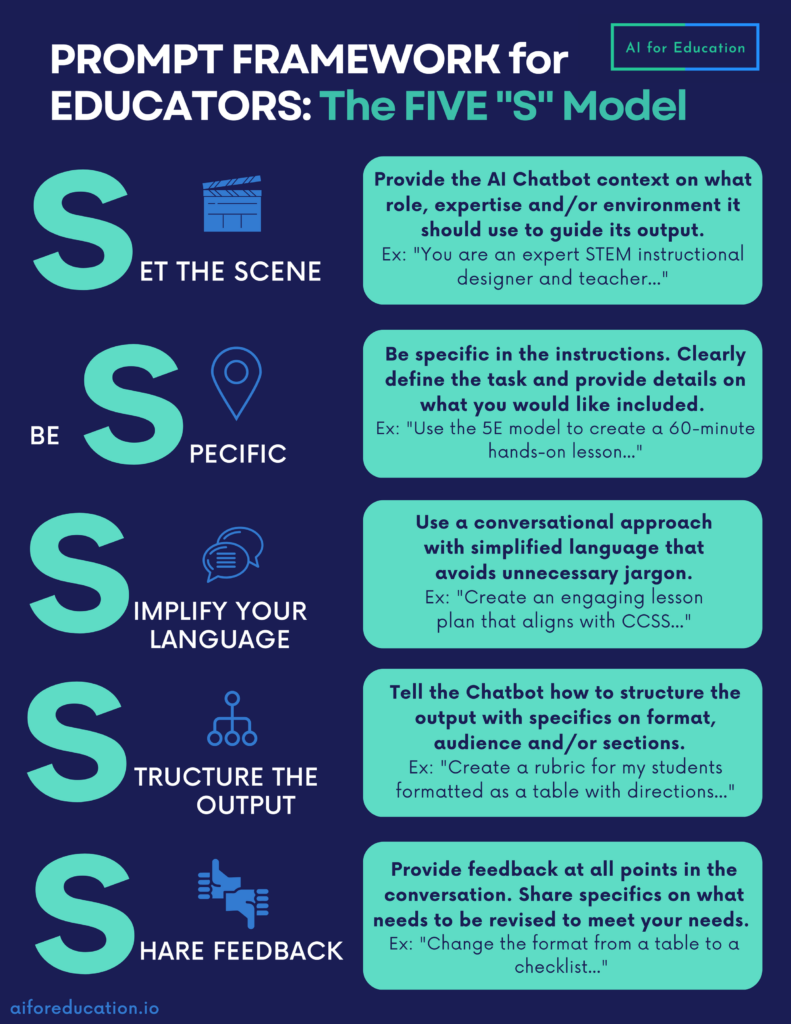
Here is a five S model from aiforeducation.io to write an effective prompt as an educator!

I think if students use GenAI for school work, they should be taught how to use it well, specifically how to write prompts and evaluate responses. Teachers also need to learn how to use AI effectively without cutting corners in the education that they are providing. It should be a learning process for both parties, and we have to keep on improving so that we can give the students the best support and guidance.


Weekly Reflection Blog Post #2

What are some of the major limitations of GenAI?

The biggest limitation of GenAI is its weak ethical and moral decision making. AI does not understand right from wrong as it relies on training data, this data could be manipulated by human biases which can lead to problematic outputs. Another limitation I find is that it lacks originality and creativity since it just recombines existing patterns rather than producing new ideas.

This video also highlights how AI still struggles with creativity and ethical decision-making. It shows that while AI can generate answers quickly, it doesn’t actually understand meaning the way humans do, which reinforces the limitations I discussed above.

Possible use cases for GenAI in school settings

I have tutored Calculus and Pre-Calculus to high school students so my answers would be catered towards them. Students could use AI to get step by step explanations for topics such as derivatives and integrals when they’re stuck, especially outside classroom hours. It can also generate extra practice problems at different difficulty levels, which helps with exam prep. Here is gemini solving a typical derivative problem at the 12th grade level perfectly with explanation too.

Image

From a teacher’s perspective, it could help create worksheets, quizzes, or even visual explanations of graphs and functions. That being said, it shouldn’t replace the problem solving process, because struggling through math is how students actually learn in my experience.

Week 2 Reflection Blog Post #1

Do we need to re-imagine education?

Looking back at my own schooling from six to seven year ago, learning felt quite structured and standard for every student in the classroom. Everyone was expected to learn the same material at same pace. We did use technology in the classrooms however it was limited to just youtube videos and interactive powerpoints.

However when you compare such a standard experience from my generation with my sisters learning experience, there is a clear change in the experience. My sisters teachers recommend her to use AI tools to edit essays and use it to organize her ideas more efficiently. This kind of service was never really available to me as I had to ask the teachers in class and then act upon the feedback at home. Seeing how AI helps her refine her work and learn from mistakes makes me think education does need to be reimagined so it better supports different learning styles and keeps students more engaged.

What are the risks or roadblocks?

In thinking about the risks of AI in education, I watched a TEDx talk titled ā€œIs AI making us dumber? Maybe.ā€ by Charlie Gedeon, which argues that depending too much on AI can hurt deep learning because it tends to give answers quickly without forcing students to think things through themselves.

I see that a lot of my sisters friends cant even begin the assignment without putting it into chatGPT first as well as a lot of my university friends do act the same way. Of course AI can help us learn, but it needs to be designed for that. What we have now, is designed to promote laziness, not learning and teachers cant really enforce this concept within the students.

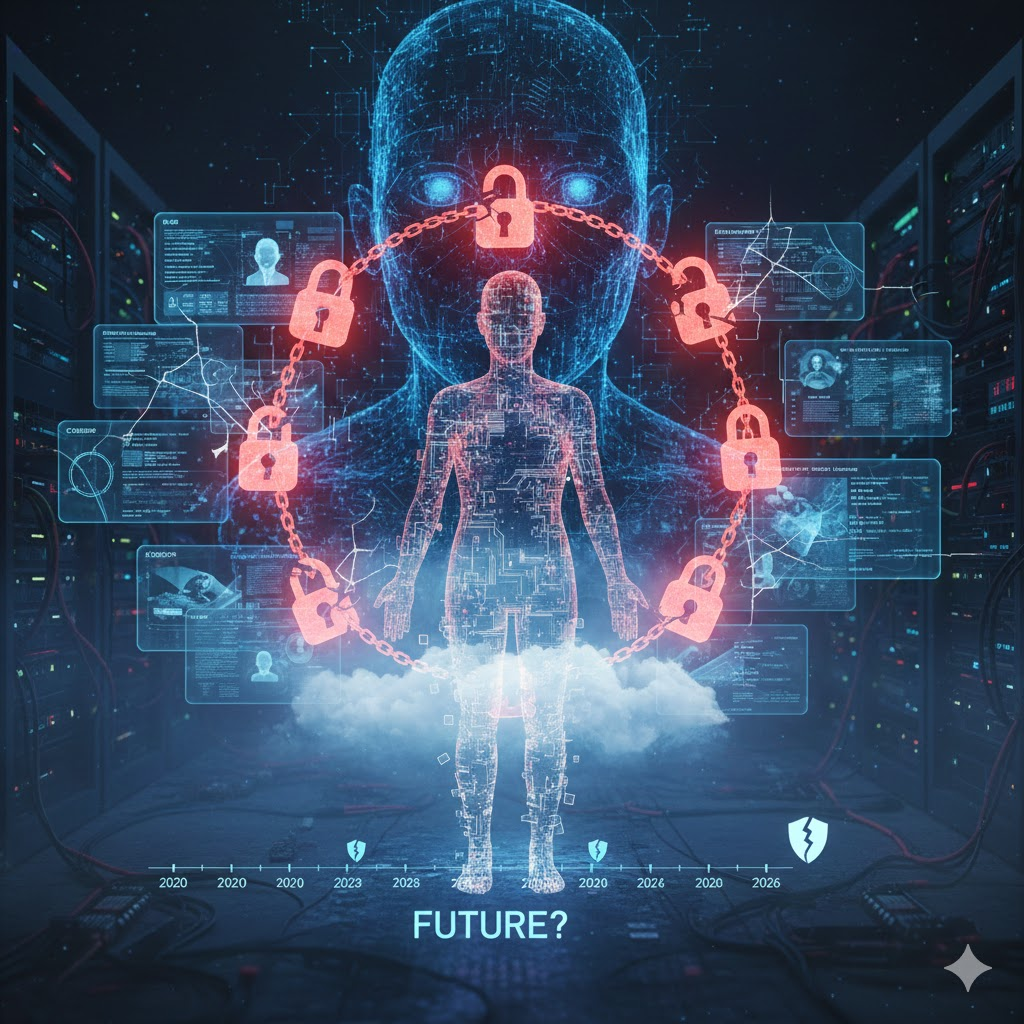
Another major risk with AI in education is privacy. Many AI tools and online platforms collect data on students’ work, writing patterns, and even their behavior while using the programs. This raises questions about who owns the data, how it’s stored, and whether it could be shared without permission. I think governments must have strict guidelines about data collection when it comes to data collection as this would ensure safety. Below is an image generated by Gemini when prompted “gen an image about ai privacy risks”.

Image

What are the potential benefits of developing a personal learning approach?

More engagement: Students can follow topics they enjoy and learn at their own pace. Thus they may not feel bored while learning as they would be learning them in a classroom. Students may also prefer a different style of teaching that the AI could replicate.

Better skills: AI tools can help organize ideas, check grammar, and give quick feedback, so students focus on understanding and not just fixing mistakes.

Independence: Students take ownership of their learning and develop critical thinking as teachers cannot focus on an individual students learning difficulties. These difficulties can be worked on with AI if used correctly.