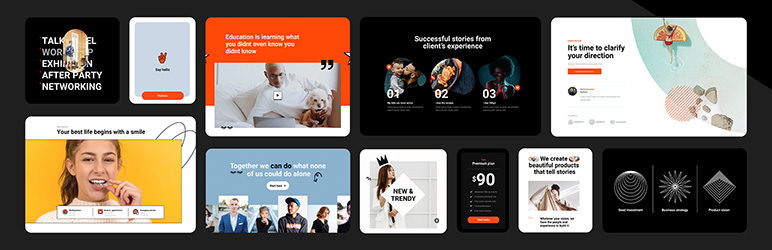

תיאור
Build professional WordPress sites faster with MaxiBlocks.
All features free forever. No locked blocks. Optional Cloud Library saves you time.
The Challenge
As a WordPress creator, you might be facing:
- Frustration with complex, time-consuming design tools
- Page builders that lock essential features behind paywalls
- Difficulty finding and customising suitable templates
- Pressure to create unique, professional-looking websites efficiently
No one wants to produce generic-looking websites or pay monthly fees just to access basic functionality.
The Complete MaxiBlocks Ecosystem 🎈
MaxiBlocks is a complete website building solution with three components that work together:
MaxiBlocks Builder (Free)
The core plugin with everything unlocked from day one.
- 19 powerful foundation blocks
- Visual style controls
- Advanced design tools
- Dynamic content
- Animations and scroll effects
- Custom CSS
- No feature restrictions
MaxiBlocks Go Theme (Free)
Our Full Site Editing theme, available on WordPress.org.
- Complete site editing
- Responsive templates
- Performance optimised
- Works with any starter site
MaxiBlocks Cloud Library (Free + Paid)
A design library to speed up your workflow.
- 2,180+ block patterns
- 231 page templates
- 379 theme templates
- 14,417 SVG icons and shapes
- 100 style cards
- 11 starter sites
- 17,342 total assets
The Builder and Go Theme are free and open source forever. The Cloud Library offers both free and premium designs to save you time.
11 Starter Sites — Live in Minutes
Complete websites ready to install with one click:
- Interior Design
- Acupuncture
- Coffee Shop
- Cafe
- Business
- SaaS
- Invest
- Conference
- Architecture
- Co-working
- Hair Dresser
Each starter site includes homepage, about, services, contact, blog templates, archive pages, search results, and 404 pages. Install one and start customising immediately.
Get Started in Three Steps
- Install the MaxiBlocks Builder plugin and Go Theme
- Choose a starter site or browse patterns from the Cloud Library
- Customise with style cards and launch your site
Design websites that stand out. Save time doing it.
Key Features
Powerful Blocks
Build anything with 19 flexible, customisable foundation blocks. No complexity, no limits.
Instant Designs
Choose from 2,180+ patterns to create pages in seconds. Drag, drop and personalise.
Massive Icon Library
Enhance your design with 14,417 built-in SVG icons and shapes. No extra plugins needed.
No-Code Editing
See changes instantly with a visual editor. Experiment freely, never touch code.
One-Click Styles
Transform your entire site with style cards. Instantly swap between 100 professional designs.
Design Tools
Use background layers, image masks and scroll effects. Achieve bold visuals without extra software.
Dynamic Content
Display custom fields and real-time updates. Create dynamic, interactive pages.
Full Site Editing
Go beyond pages with the MaxiBlocks Go Theme. Edit headers, footers and templates visually.
Lightning Fast
Clean, optimised code. No domain limits. Zero hidden fees. Freedom on every site.
Who It's For
MaxiBlocks works for:
- WordPress developers seeking efficient design tools
- Designers transitioning from other page builders
- Beginners looking to create professional sites without coding
- Agencies and freelancers delivering client projects
- Anyone moving from Elementor, Divi or other builders to Gutenberg
What's Free vs What Requires a Cloud Account
Always Free (Open Source):
- MaxiBlocks Builder plugin (19 foundation blocks)
- MaxiBlocks Go Theme (Full Site Editing)
- 542 free patterns and 17 pages
- Free starter sites
- 14,417 icons and shapes
- 100 style cards
- All features unlocked (animations, dynamic content, custom CSS)
- Unlimited websites
- No restrictions
Optional Cloud Library:
- 2,180+ patterns
- 231 complete pages
- Premium starter sites
- Regular new designs
- Priority support
The Cloud Library saves you 10+ hours per project. You can build the same sites with free tools. Cloud just makes it faster.
Success Stories
Here's what creators are saying:
"MaxiBlocks is one of the best WordPress plugins I've found, and I'm in love with this tool." – Muhammad Ali Iqbal
"I know this category of plugins very well — I have probably tested all Gutenberg add-ons available on the market and I must admit that MaxiBlocks is really top shelf and top league!" – Peter
"It's great to see that a lot of the new designs come from special requests from MaxiBlocks users and the developers listen to their user base!" – MeditatingSurgeon
"Easy, clean, and responsive designs with great support. They're always adding new designs on top of what they already offer." – Verdant
"After some more time poking around I see a lot of potential in your product. It has the ability to be the Elementor in Gutenberg field." – Kazi Mahbub
Ready to build?
Install MaxiBlocks for free and start creating today.
Not sure yet? Explore the demo library to see MaxiBlocks in action, or browse starter sites for complete website examples.
Resources & Support
Learn and master MaxiBlocks:
- Documentation – Step-by-step guides and troubleshooting
- Video Tutorials – From basics to advanced techniques
- Support Forum – Get help from our team
- Changelog – Latest improvements
Join Our Community
MaxiBlocks is more than a plugin—it's a growing community of creators:
- Twitter – Follow for updates and tips
- Discord – Connect with other users
- GitHub – Contribute to our open-source project
Share your creations with #maxiblocks or #madewithmaxi
"We're on a mission to make website creation faster, easier, and more enjoyable. Can't wait to see what you'll create!"
– Kyra, Design Lead & Co-founder
צילומי מסך

Learn to change style cards: Find out how to switch style cards to improve the appearance of your website with our helpful guide. 
Explore the template library: Discover a variety of block patterns and pages in our extensive library, designed to help you build your website more efficiently. 
Customize button styles with presets: Quickly adjust your button styles using our selection of presets, making it easier to achieve the look you want on your website. 
Create background layers for images: Follow our guide to layer images, enhancing the visual interest of your website with this design technique. 
Improve efficiency with custom block toolbars: Work more effectively using our convenient block toolbars, designed to streamline your website design process. 
Access the 100 style card library: Choose from a wide range of style cards in our library, featuring global styles to suit various design requirements. 
Browse the SVG shape library: View our comprehensive collection of SVG shapes, offering versatile design elements to enhance your website's aesthetics. 
Discover the SVG icons library: Search through our extensive SVG icons library, providing a broad selection of icons to give your website a polished appearance. 
Customize your style cards: Use our guide to personalize your style cards, giving your website a unique touch. 
Use the transform function for shape mask layers: Learn to manipulate design elements effectively with our guide on using the transform function for shape mask layers. 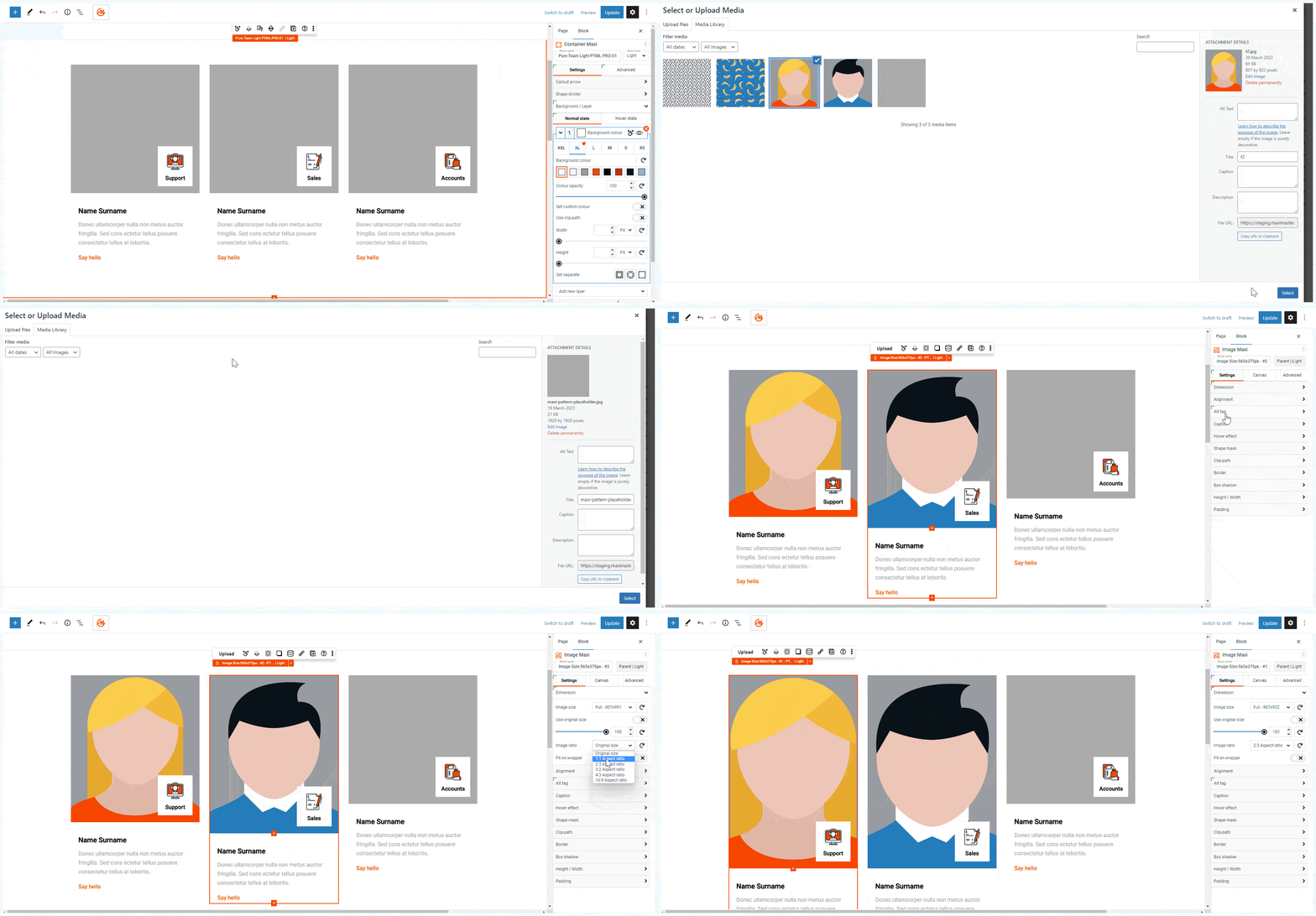
Set automatic image size ratios: See how to set automatic image size ratios to maintain consistent visuals throughout your entire website. 
Load an icon from the editing experience: Simplify your design process with our easy-to-follow method for loading icons directly from your editing experience.


בלוקים
תוסף זה מספק 18 בלוקים.
- Container Maxi Wrap blocks within a container
- Button Maxi Insert, modify or style a button
- Search Maxi Add a search bar with icon
- Slider Maxi (beta) Create slider with blocks, controls and animations
- Text Maxi Insert, modify or style text
- Image Maxi Insert, modify or style an image
- Divider Maxi Create a divider between visual elements
- Map Maxi (beta) Create a map with marker and description
- Group Maxi Combine a set of blocks in a group
- Video Maxi Insert a video with controls or lightbox
- Number Counter Maxi Create a number counter
- Accordion Maxi Expand or collapse content inside of a panel
- Icon Maxi Add icon or shape and style it
- List Item Maxi Create list items with numbers, bullets or icons
- Column Maxi Stack blocks vertically inside a column
- Pane Maxi Expand or collapse content inside of a panel
- Slide Maxi Sliding component of Slider Maxi
- Row Maxi Organise blocks horizontally inside a row
התקנה
Install MaxiBlocks from the WordPress plugin directory:
- Go to Plugins > Add New
- Search for "MaxiBlocks"
- Click "Install Now" then "Activate"
For the best experience, also install the MaxiBlocks Go Theme:
- Go to Appearance > Themes > Add New
- Search for "MaxiBlocks Go"
- Click "Install" then "Activate"
Getting started:
- Click the MaxiBlocks icon in the editor toolbar to open the template library
- Browse patterns or choose a starter site
- Select a style card to instantly update your site's look
- Use the (?) icon for help docs and tutorials
Quick links:
YouTube | Cloud Library | Starter Sites | Documentation | Discord | Roadmap
שאלות נפוצות
-
What is MaxiBlocks?
-
MaxiBlocks is a complete website building solution that combines the MaxiBlocks Builder, MaxiBlocks Go Theme, and MaxiBlocks Cloud Library. The Builder and Go Theme are free and open source forever.
The optional Cloud Library gives you access to 2,180+ patterns, 231 pages, and 11 starter sites to save time.
-
What features are free, and what's included in the Cloud Library?
-
All core features are free with no restrictions: 19 blocks, 14,417 icons, 100 style cards, 542 patterns, 17 pages, animations, dynamic content, custom CSS, and full functionality.
The Cloud Library offers premium designs to speed up development. You can create the same patterns and pages from scratch with the free version — a Cloud account simply reduces development time.
-
Why does MaxiBlocks have fewer blocks than other libraries?
-
We take a different approach. Instead of offering numerous specialised blocks, we've built extensive functionality into each foundation block. This allows you to create complex designs with fewer blocks, making the system easier to learn and more flexible to use.
Our 19 core blocks are highly versatile, as demonstrated in our pattern library. By focusing on a smaller set of powerful blocks, we ensure they're well-maintained and continually improved.
Unlike builders that restrict features to encourage paid upgrades, MaxiBlocks provides full functionality in every block from the start.
-
What are starter sites and how do they work?
-
Starter sites are complete, ready-to-use websites you can install with one click. Each includes all pages (homepage, about, services, contact, blog, archives, 404) with coordinated design and styling.
Install a starter site, then customise the content, images, and colours to match your brand. It's the fastest way to launch a professional WordPress site.
-
Is MaxiBlocks compatible with Gutenberg and my theme?
-
Yes, MaxiBlocks is fully integrated with the Gutenberg editor. For the best experience, we recommend using a block theme like Twenty Twenty-Four or our own MaxiBlocks Go Theme, which is free and available on WordPress.org.
-
What is a Cloud account?
-
A Cloud account gives you access to the premium design library with 2,180+ patterns, 231 pages, and starter sites. Use these designs on any WordPress site with the MaxiBlocks Builder installed.
The MaxiBlocks Builder and Go Theme are always free. The Cloud Library just speeds up your workflow.
-
How does the licensing work for Cloud Library designs?
-
Once you have a Cloud account, you can use the designs on your activated domains. Websites you create with Cloud designs continue to function indefinitely, even if you cancel your subscription.
Cloud Library access is based on domain activations:
- Cloud 1: 1 domain
- Cloud 3: 3 domains
- Cloud 2000: 2,000 domains
-
What happens if I cancel my Cloud subscription?
-
Your free MaxiBlocks Builder and Go Theme continue working perfectly forever. They're open source with no restrictions.
When you cancel Cloud Library access:
- All Builder features keep working (free forever)
- All Go Theme features keep working (free forever)
- Any Cloud designs you already downloaded stay on your sites
- Your websites continue working perfectly
- You still get Builder and Theme updates
You just won't be able to download new premium Cloud Library items. Rejoin anytime to regain access.
-
Do I need an active license for plugin updates?
-
No. The MaxiBlocks Builder plugin receives updates forever — no active license required. Once you've used Cloud Library designs on a website, those designs remain functional forever.
Plugin updates, security patches, and feature improvements continue regardless of Cloud status.
-
Can I use MaxiBlocks for client projects?
-
Yes. The free Builder and Go Theme have no restrictions. Use them on unlimited client sites.
Cloud Library access for client sites depends on your plan. You can build excellent client sites with just the free tools — Cloud Library just speeds up the process.
-
Is support included?
-
Support is always included at no extra cost. Cloud Library subscribers receive priority support with faster response times, while free users have access to community support forums and documentation.
-
How can I learn more about MaxiBlocks' future plans?
-
Check out our public roadmap.
סקירות


מפתחים
"MaxiBlocks Builder | 17,000+ Design Assets, Patterns, Icons & Starter Sites" הוא תוסף קוד פתוח. האנשים הבאים תרמו ליצירת התוסף הזה.
תורמים


מעוניינים בפיתוח?
עיינו בקוד, ראו את הקוד ב-SVN repository, או הירשמו ללוג פיתוח באמצעות RSS.
שינויים
Updates 5 Feb 2026
MaxiBlocks v2.1.8
* Update: Introduced support for Custom fonts from WordPress Site Editor options.
* Update: Enhanced relation control, hidden blocks, and background interactions with improved highlighting in List View and Editor Experience.
* Update: Enabled loading patterns and layouts from Cloud modal with Style Cards styles exclusively.
* Update: Refreshed wordpress.org readme.txt to better reflect MaxiBlocks branding and feature set.
* Update: Delivered comprehensive UI/UX enhancements for the Style Cards editor, providing a more intuitive interface.
* Update: Upgraded npm packages and dependencies to latest versions for strengthened security and improved stability across all plugin functionality.
* Update: Built translation toolkit to generate mo translation files from po files, including German translation.
* Update: Optimized backend processing speed with comprehensive performance improvements.
* Update: Accelerated editing speed for settings within Advanced Number Control.
* Update: Redesigned toolbar and sidebar architecture for enhanced editor compatibility and streamlined editing workflow.
* Update: Integrated Settings link into plugin action links on the Plugins page.
* Update: Configured master toolbar to open by default on first launch and memorize state per site user.
* Update: Eliminated cache notice from admin pages.
* Update: Aligned start and end time validation for Video block controls.
* Update: Introduced customizable popup animation duration for Video block.
* Update: Expanded Dynamic Content options for Button block with tags and categories support.
* Update: Integrated Text Wrap control in Typography settings with options: Wrap, No Wrap, Balance, Pretty, and Stable.
* Fix: Background Shape scale 0 values now function correctly.
* Fix: Video block transition behaviour on hover.
* Fix: Overflow handling for Image block.
* Fix: Column exclusion when pasting into column blocks.
* Fix: Move actions now properly prevented when mover buttons are disabled, with corrected block animation behaviour.
* Fix: Transition properties for buttons and SVG icons in Editor Experience.
* Fix: Flex wrapping behaviour in colour control within Editor Experience.
* Fix: Column Picker tone now adapts based on parent block tone.
* Fix: Hover border palette toggle and axis unit switching for image hover controls.
* Fix: Responsive styles with vh/vw units in Editor.
* Fix: SVG element processing with enhanced error recovery and fallback mechanisms for consistent behaviour across different environments and edge cases.
Updates 26 Nov 2025
MaxiBlocks v2.1.7
* Update: Implemented comprehensive UI/UX improvements across the Editor Experience, delivering a more intuitive interface.
* Update: Rebuilt translation system architecture to ensure proper localization support on WordPress.org, enabling seamless multilingual functionality and improved plugin accessibility for international users.
* Update: Updated npm packages and dependencies to latest versions for enhanced security measures and improved stability across all plugin features.
* Fix: Resolved styling inconsistencies with synced blocks and template parts in the Editor Experience for proper visual presentation and consistent design rendering across all editing contexts.
* Fix: Corrected Starter Sites functionality to properly overwrite existing templates and template parts on block themes instead of creating duplicates, maintaining a cleaner template structure and preventing conflicts.
* Fix: Enhanced Interaction Builder reliability for Show/Hide actions with consistent behaviour and proper execution of visibility toggles across all interactive elements.
* Fix: Resolved frontend pagination issues when displaying posts from child taxonomies with accurate post filtering and proper navigation through hierarchical taxonomy structures.
* Fix: Corrected Scroll Effects functionality on smaller screens when using anchor links for proper navigation across all responsive breakpoints.
Updates 5 Nov 2025
MaxiBlocks v2.1.6
* Update: Rebranded Pro features to Cloud, providing clearer terminology and improved user understanding of cloud-based functionality.
* Update: Updated npm packages and dependencies to the latest versions for enhanced security measures and improved stability across all plugin features.
* Update: Introduced option to hide native Gutenberg responsive preview controls, allowing for a cleaner and more streamlined editing interface.
* Fix: Resolved Interaction Builder relations disappearing after duplicating blocks and removing the original, ensuring a consistent editing experience and maintaining interaction configurations.
* Fix: Corrected copy-paste functionality for blocks and page duplication, ensuring all block settings and styles are properly transferred.
* Fix: Enhanced template parts rendering and editing experience in the Site Editing Experience editor, ensuring proper functionality and consistent behaviour.
* Fix: Addressed taxonomy styling issues on the frontend when using the All Archive template, ensuring custom taxonomy pages display correctly with proper style inheritance.
* Fix: Resolved custom colours in Style Cards breaking frontend styles in specific scenarios, maintaining consistent visual presentation across all pages.
