
- Current Mood:productive
- Current Music:Bang A Gong by Ministry(yeah. they covered it, yo.)
This isn't a particularly complicated tutorial, though it does involve curves. It was done in photoshop, but a lot of it's translatable.
We'll be going from this to .
.
( Under hereCollapse )
We'll be going from this to
.( Under hereCollapse )
Okay, so I set out to write a tutorial for the icon I made for an icon challenge the other day. Unfortunately, I hadn't saved the .psd, so I had to recreate the icon and, naturally, couldn't remember exactly what I did. I got close to my original, but not exactly the same, but that only bugs me since I'm not posting the original icon here anyhow! Nur!
Anyway! So today we're going to be going from this to
( Under here!Collapse )
Anyway! So today we're going to be going from this to
( Under here!Collapse )
braggadocio
 100x100_brushes
aces-butterfly
Allstars Online
auctrix_icons
brush_fanatic
calajane
 colorfilter
dj_capslock
Encre
foxxie-chan
grrliz_icons
hires_hotties
hires_hunks
icon_extras
icon_textures
~ianthinae
~ivy-poison
jojosangm
_joni
justforeverme
karanna1
~lorienmaiden
~mah-rie
masterjinn
padabee
nemesisdivina666
netnessie
photoshop-addict28
~Pinkly-Icons
prettybrush
Resurgere
sarah-dipity
scully7491
texturize
=wolfgrrlone
Vbrush
verbalsphyxiation
victoriaely
xgraphicjunkie
100x100_brushesaces-butterfly
Allstars Online
auctrix_iconsbrush_fanaticcalajane
colorfilterdj_capslockEncre
foxxie-chan
grrliz_iconshires_hottieshires_hunksicon_extrasicon_textures~ianthinae
~ivy-poison
jojosangm
_jonijustforeverme
karanna1~lorienmaiden
~mah-rie
masterjinn
padabeenemesisdivina666
netnessiephotoshop-addict28
~Pinkly-Icons
prettybrush
Resurgere
sarah-dipity
scully7491
texturize=wolfgrrlone
Vbrush
verbalsphyxiation
victoriaely
xgraphicjunkie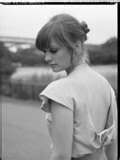 to
to 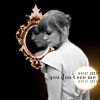 in five steps. I used photoshop cs but it should be fully translatable. <3
How to create this.
Created in Photoshop, but should be good for any decent graphics programme.
( Cut to save spaceCollapse )
Created in Photoshop, but should be good for any decent graphics programme.
( Cut to save spaceCollapse )
Today I'll be showing you how to go from this to 
I was going for a Silent Hill-y look. I think I succeeded. Basic details: I used Photoshop CS, but this one should be fully translatable. I used no curves, no selective coloring, and no special tools of shinydom of any kind. Heavens to crap!
( Let's get down to business!Collapse )
I was going for a Silent Hill-y look. I think I succeeded. Basic details: I used Photoshop CS, but this one should be fully translatable. I used no curves, no selective coloring, and no special tools of shinydom of any kind. Heavens to crap!
( Let's get down to business!Collapse )
Profile
- hollow_tutorial
- Hollow Art Tutorials
Page Summary
- ithika : Header Tutorial - Raven [+0]
- ithika : Icon Tutorial - Marion Raven [+0]
- justforeverme : Alex Pettyfer tutorial [+0]
- justforeverme : Sarah Connor Chronicles Tutorial [+0]
- hollow_art_ads : Resources Post [+0]
- justforeverme : Header Tutorial [+0]
- laurasue : (no subject) [+1]
- justforeverme : The Tutorial That Goes Like This [+0]
- laurasue : (no subject) [+0]
- ithika : Header Tutorial--Josh Hartnett [+0]
Syndicate


Comments
Here's the original:
And here's the mostly-finished product:
When I colorized the skin I set…
Pays you money....gonna go try it first......i am fairly an idiot at putting two pictures on the same page...
THANK YOU!