
Deskripsi
Useful for websites where the default Admin Toolbar is not fitting well into the design. Many website owners/clients show the their website to their customers from laptops that are also used for administration of the website and thus the experience is ruined by the black toolbar right in the top.
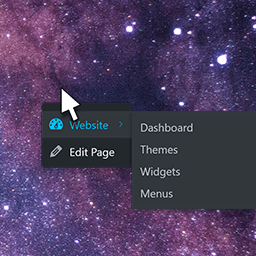
With Admin Right Click Menu you can still use the handy frontend admin shortcuts – e.g. ‘Edit Page’ – just in a small fly-out menu. The menu is initially hidden but is activated by right clicking on user-defined element(s) on the website.
Tangkapan Layar

The settings found in ‘Settings’ > ‘Admin Right Click Menu’ 
At the frontend right click the element(s) that you have put in the Settings


Instalasi
Extract the zip file and drop the contents in wp-content/plugins/ folder of your WordPress installation and then activate the plugin from \’Plugins\’ menu.
Go to ‘Settings’ > ‘Admin Right Click Menu’ for options.
The most important thing is to set a selector. You coud start by just typing in body
Ulasan
Belum ada ulasan untuk plugin ini.
Kontributor & Pengembang
“Admin Right Click Menu” adalah perangkat lunak open source. Berikut ini mereka yang sudah berkontribusi pada plugin ini.
Kontributor
Terjemahkan “Admin Right Click Menu” dalam bahasa Anda.
Tertarik mengembangkan?
Lihat kode, periksa repositori SVN , atau mendaftar ke log pengembangan melalui RSS.
Log Perubahan
1.0
- First version. First plug-in. First time with SVN 🙂
1.1
- Spelling errors.
1.3
- FIX: Update menu was not removed correctly.
