
Descrizione
Cloud Storage Manager bridges the gap between your fluent forms and popular cloud storage platforms. This integration ensures that all files uploaded through Fluent Forms are automatically sent to your preferred cloud storage service, helping you save server space while keeping your files organized and accessible.
Why Cloud Storage Manager?
- Integrate with native image and input field – Connect your preferred cloud service and upload files or images directly using your existing form fields
- Flexible folder naming for effortless organization – Easily name and organize folders your way to keep uploads structured and your workflow efficient
- Fast, smooth submissions with background uploads – Files upload quietly in the background, allowing instant form submission and a seamless user experience
- Clean and Improved UI for File Input Fields – Redesigned file input fields with an optimized layout for clarity and ease of use. Built to look great across all devices and integrations
- Built-in File Explorer and Analytics – Access, organize, and manage your uploaded files directly inside Fluent Forms with the integrated file explorer
- Multiple Cloud Storage Service – Choose from popular cloud platforms such as Google Drive, Dropbox, or AmazonS3, and connect the one that fits your needs
🎁 Powerful Features in the Free Version
✨ Google Drive Integration
Effortlessly connect your forms to Google Drive for seamless uploads.
✨ Dropbox Integration
Easily link with Dropbox for quick and reliable cloud file storage.
✨ Automatic File Transfer
Form uploads are instantly and securely transferred to your connected cloud storage—no manual downloads!
✨ Basic Folder Organization
Select the parent folder from your cloud service where uploads will be stored.
✨ OAuth Security
All authentication uses official & secure OAuth methods for maximum protection.
🏆 Premium Features in the Pro Version
🌩️ Storage Services
🔸 Amazon S3 Integration
🔸 Cloudflare R2 Integration
🗃️ Advanced File Explorer
Browse, organize, download, and manage all uploaded files right within Fluent Forms.
🗂️ Custom Folder Organization
Effortlessly create custom folder structures with dynamic ShortCodes.
📊 Analytics & Reporting
View comprehensive usage insights and storage statistics at a glance.
🛡️ Enhanced Security Controls
Leverage advanced encryption and detailed access restrictions for peace of mind.
🚀 Priority Support
Enjoy fast-tracked responses and expert assistance from our dedicated team.
Supported Storage Services
✅ Google Drive (Free):
Connect your forms effortlessly and organize uploads securely in Google Drive folders.
✅ Dropbox (Free):
Store files instantly in Dropbox — simple and reliable file storage in the cloud.
⭐ Amazon S3 (Pro):
Experience enterprise-level cloud storage with Amazon S3’s power and scalability.
⭐ Cloudflare R2 (Pro):
Store and access your files worldwide with Cloudflare R2 — no egress fees, ever!
External Services
This plugin integrates with several cloud storage services to store and manage files uploaded through Fluent Forms. The following services are used:
Google Drive
- Used for storing and managing uploaded files
- Data sent: Files uploaded through forms, file metadata
- Authentication fields collected from users:
- Client ID
- Client Secret
- Access Code
- Sub-Folder (optional)
- Terms of Service: https://cloud.google.com/terms
- Privacy Policy: https://policies.google.com/privacy
Dropbox
- Used for storing and managing uploaded files
- Data sent: Files uploaded through forms, file metadata
- Authentication fields collected from users:
- App Key
- App Secret
- Authorization Code
- Sub-Folder (optional)
- Terms of Service: https://www.dropbox.com/terms
- Privacy Policy: https://www.dropbox.com/privacy
Screenshot
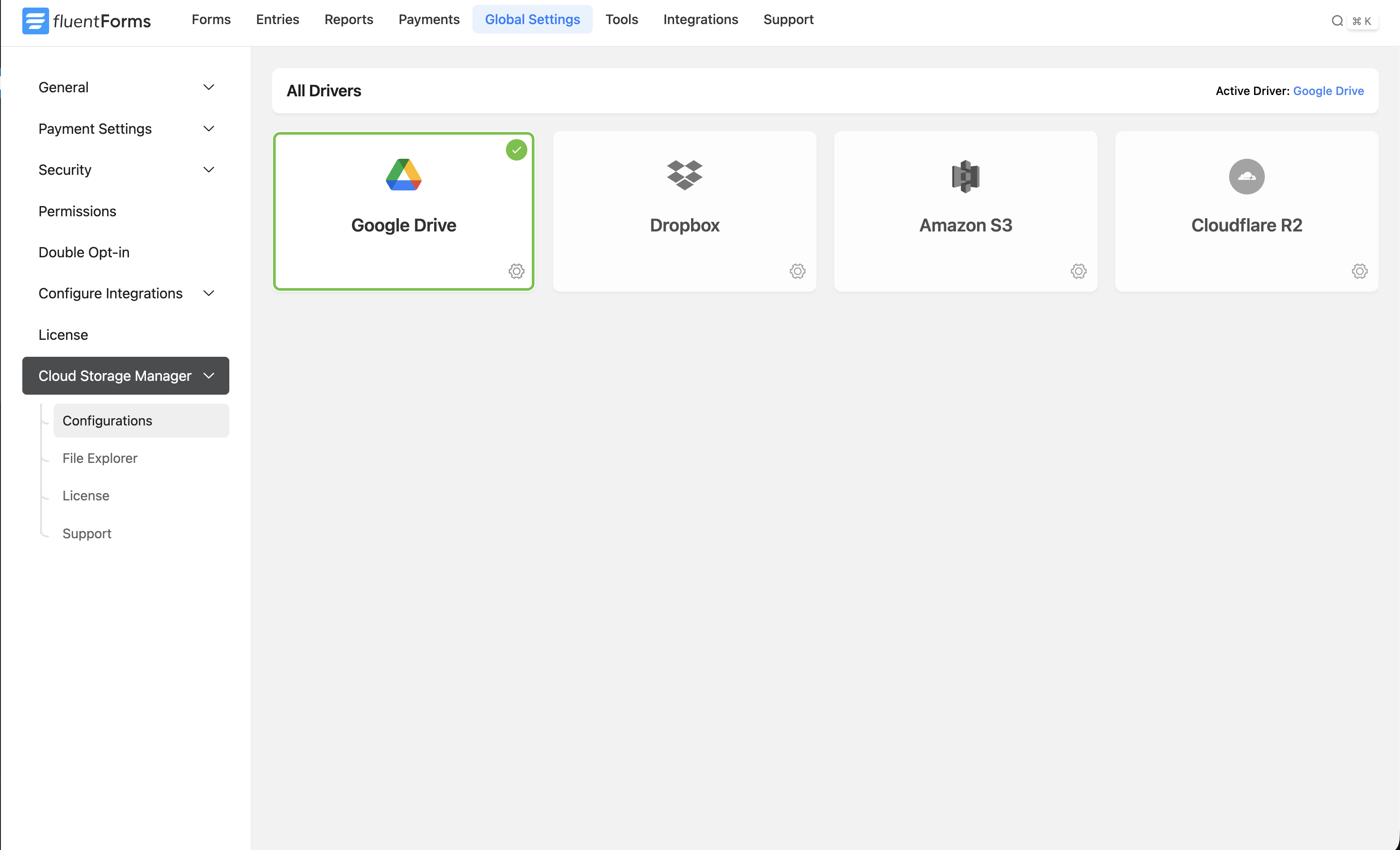
Configuration Dashboard 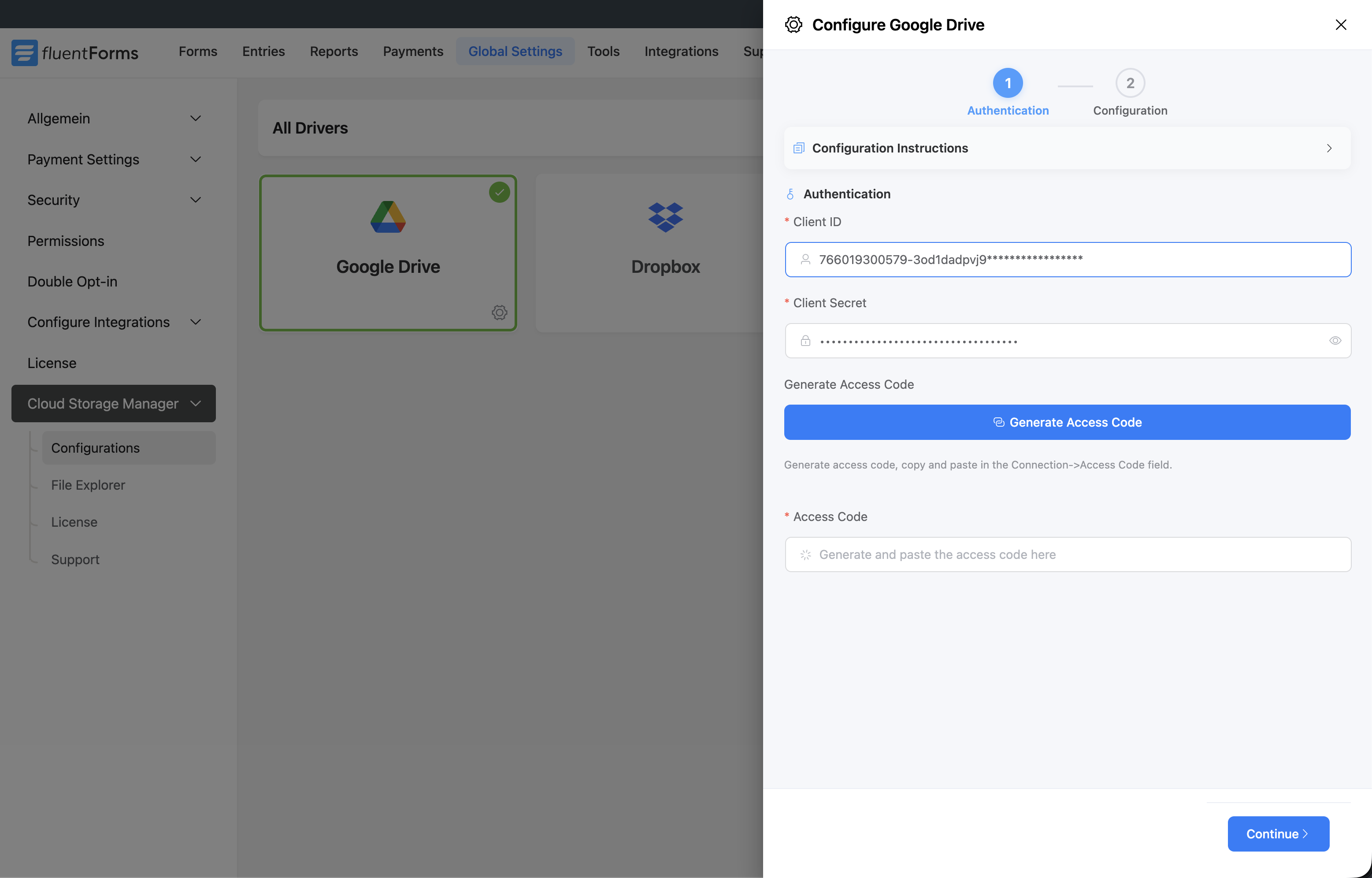
Driver Authentication Step 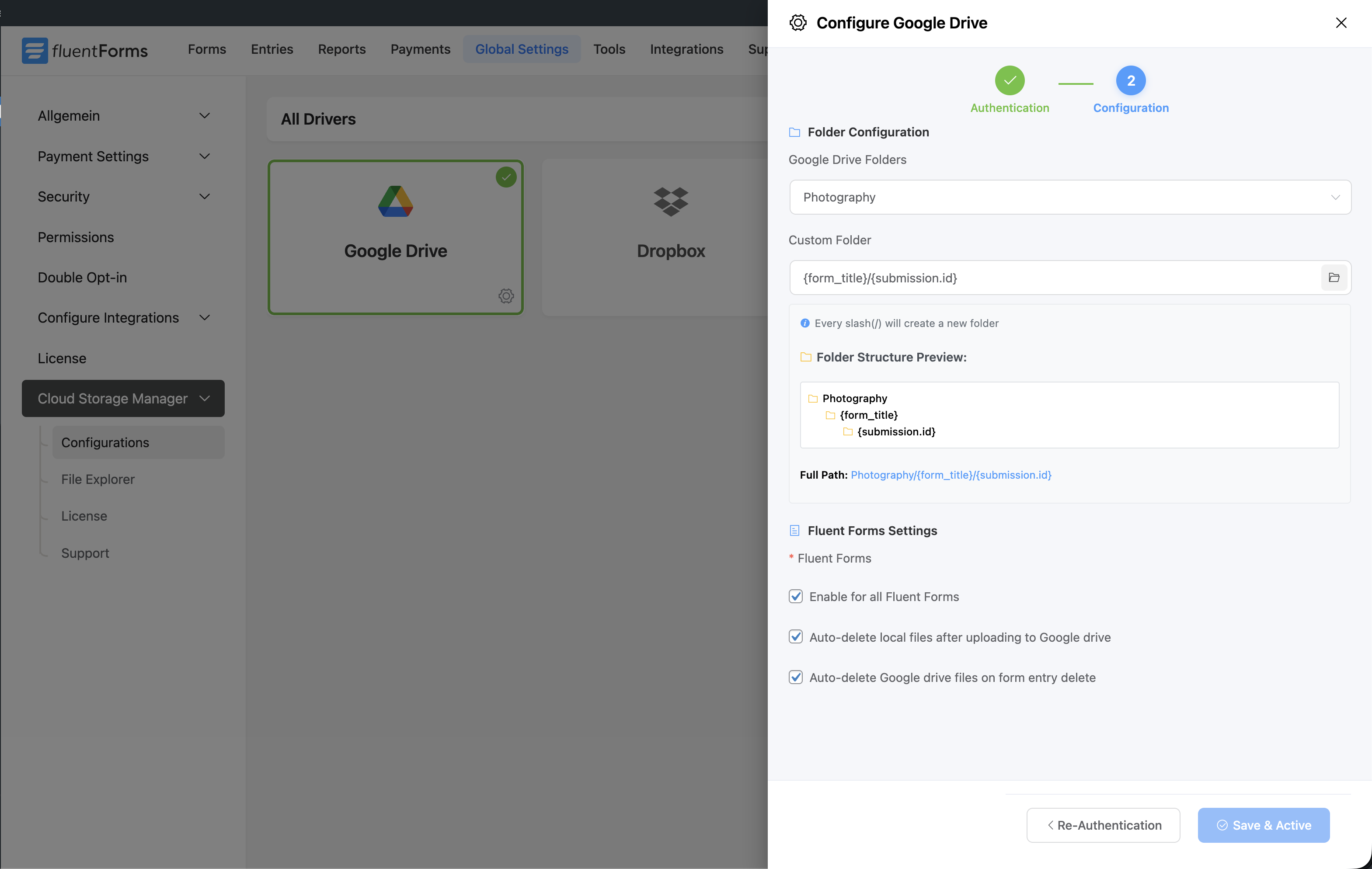
Driver Folder Configuration Step 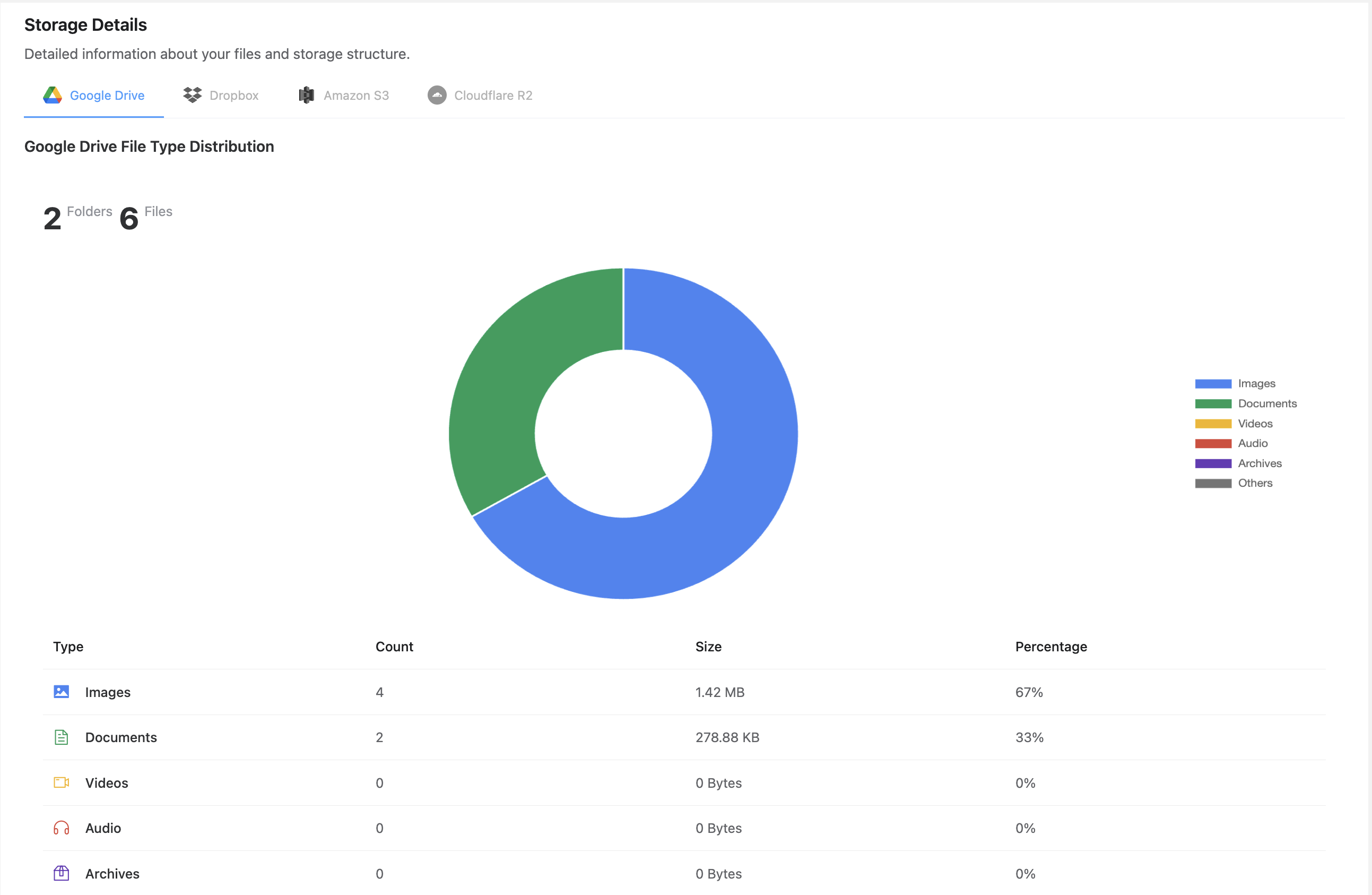
Storage Analytics 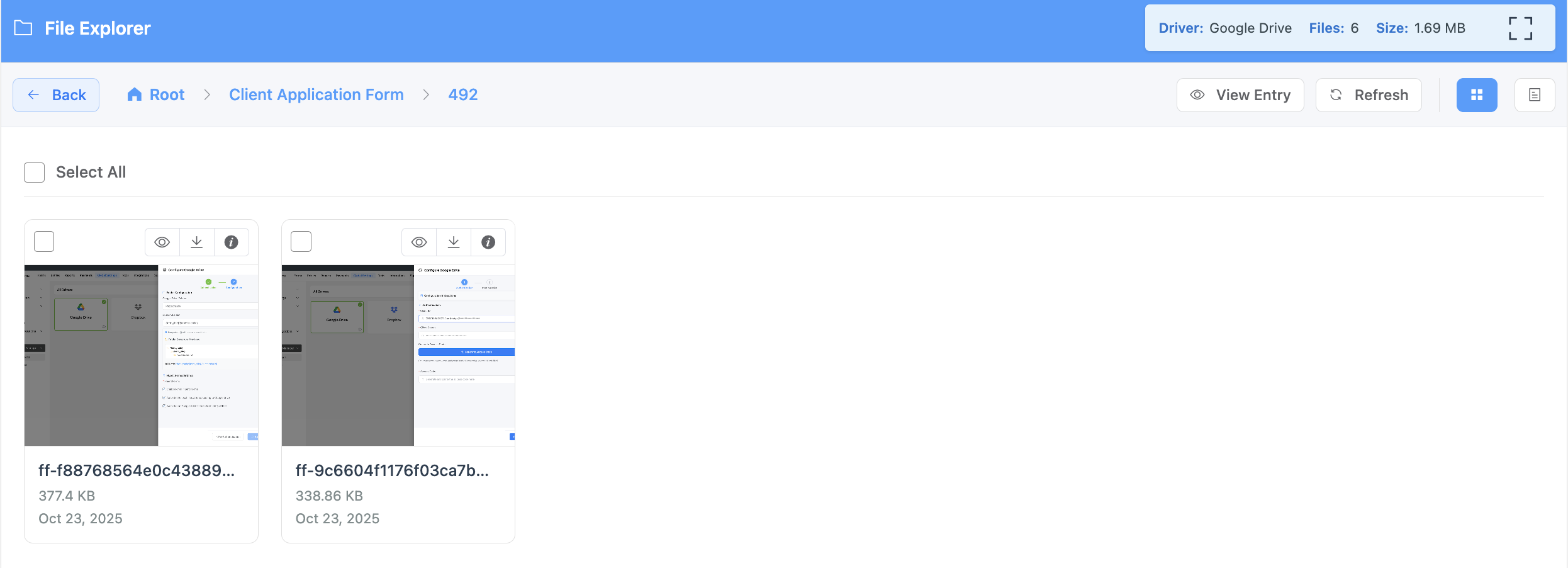
File Explorer


Installazione
- Upload the plugin folder to
/wp-content/plugins/cloud-storage-manager, or install it directly via the WordPress Plugins screen. - Activate Cloud Storage Manager from the ‘Plugins’ menu in your WordPress dashboard.
- Navigate to Fluent Forms Cloud Storage Manager to begin configuring your storage connections.
- Enter your cloud storage credentials as prompted and authorize each connection.
Setting Up Google Drive
- Create a Google Cloud Platform project and enable the Google Drive API.
- Create OAuth credentials for your application.
- Enter the Client ID and Client Secret in the plugin settings.
- Authorize the connection by clicking the “Connect” button.
- Choose your preferred default folder for uploads.
Setting Up Dropbox
- Sign in to the Dropbox App Console (https://www.dropbox.com/developers/apps).
- Create a new app and set permissions for file access.
- Copy the App Key and App Secret.
- Enter these credentials in the plugin settings in your Fluent Forms.
- Click the “Connect” button to authorize Dropbox and link your account.
- Choose or create a target folder for form uploads.
FAQ
-
Is this plugin compatible with the free version of Fluent Forms?
-
No, Cloud Storage Manager works with Pro versions of Fluent Forms only.
-
Which cloud storage services are included in the free version?
-
The free version includes Google Drive and Dropbox integration.
Amazon S3, Cloudflare R2, and upcoming integrations are available in the Pro version. -
Do I need paid accounts on cloud storage services?
-
No, you can use free accounts from Google Drive or Dropbox with their standard storage limitations. Amazon S3 and Cloudflare R2 require paid accounts based on usage.
-
Will the files still be stored on my server?
-
By default, files are still kept on your server as a backup. You can enable the option to delete local copies after successful upload to save space.
-
Can I organize uploads into different folders?
-
Yes, you can create custom folder structures with dynamic shortCodes based on form names, dates, or custom naming conventions (Pro version requires).
-
Is it possible to set up different storage services for different forms?
-
No, currently only one storage connection can be configured globally for all forms.
-
What happens if the cloud storage connection fails?
-
If a connection fails, files will remain on your server.
-
How do I upgrade to the Pro version?
-
Visit our website at FluentWiz.com to purchase the Pro version. After purchase, you’ll receive an automatic upgrade or a Pro plugin to install alongside the free version.
Recensioni


Contributi e sviluppo
“Cloud Storage Manager for Fluent Forms” è un software open source. Le persone che hanno contribuito allo sviluppo di questo plugin sono indicate di seguito.
Collaboratori


Traduci “Cloud Storage Manager for Fluent Forms” nella tua lingua.
Ti interessa lo sviluppo?
Esplora il codice segui il repository SVN, segui il log delle modifiche tramite RSS.
Changelog
1.0.7
- New: File name convention (Original and Encrypted)
- New: File Visibility Control – Google Drive & Dropbox
- Fixed: Security and performance improvements
- Fixed: Minor bugs fixed
1.0.6
- Fixed: FluentBoards multiple file attachment issue
- Fixed: Minor bugs and security improvements
1.0.5
- New: Form-specific parent folder path selection
- New: Form-specific option to auto-delete local files after uploading to cloud storage
- New: Form-specific option to auto-delete cloud files when the related form entry is deleted
- New: FluentBoards files/attachments support for newly uploaded files
- New: FluentCRM integration—file link support for new uploads
- Fixed: Minor bugs and security improvements
1.0.4
- Enhanced: Custom folder naming and parent folder naming module
- Enhanced: Optimized file upload speed
- Fixed: Small bugs and security vulnerabilities
1.0.3
- New: Module added for cleaning up unused files automatically
- Enhanced: Security method for managing credentials
- Fixed: Small bugs and security vulnerabilities
1.0.2
- New: Dropbox integration
- New: Option to choose parent folder of Google Drive and Dropbox
- New: Background File Uploads
- New: Custom Folder Naming Using Dynamic ShortCodes
- New: Clean and Improved UI for File Input Fields
1.0.1
- Initial release with Google Drive integration
- Automatic file transfers
- OAuth secure authentication
