Indie game storeFree gamesFun gamesHorror games
Game developmentAssetsComics
SalesBundles
Jobs
TagsGame Engines

Patchmonk

11
Posts
24
Followers
12
Following
A member registered Apr 02, 2016 · View creator page →

Creator of

Recent community posts

Hi there!

I hope you're doing well. I wanted to follow up about the tutorial I shared on item manipulation in the inventory system. I want to make sure I’m supporting you effectively.

In the tutorial, I have shownan example of how you can manipulate items. I'm not sure the tutorial may have been too long for your current needs or patience?

You might not have noticed how you could trigger events with items, or maybe you don't have knowledge of how to do that, even though I didn't provide exactly how to give it to a character, but the concept is pretty simple. Maybe you lack experience, or perhaps you were hoping for something more advanced?

Just to confirm, do you need the simplest possible method to give any item to any character in your game?

🌟 My question for you:

If I show you a clear, step-by-step, simple method to assign/give items to characters (no extra fluff), is that enough for your project?

Or would you prefer a full, structured selection system like those found in typical RPGs (with inventory, slots, permissions, etc.)?

I’m here to help! I’ve already got a lot planned ("My plate is full" 😊), but I’d genuinely want to help you:

Option A: Keep it simple, just the core functionality to give any item to any character.

Option B: Build a polished, scalable selection system (RPG-style).

If you choose option A, I can help you immediately. Option B is not possible for me right now because I am already working on a new version of the inventory system, and I will release it to fulfill all the requests I have received so far. Which path would you prefer? Let me know.
I’m really glad to hear my project is making a difference! It’s a bit tricky for me to figure out exactly what’s happening on your end, and I can’t quite pinpoint what you changed in the code whether it’s the button type, a hover trigger, or something else entirely. Ren’Py’s screen language definitely has its quirks, and it can be challenging for new developers to navigate.

That said, I’m genuinely impressed. Unlike many who simply request the feature, you’ve actually managed to create a change that seems to work, at least from my perspective. Since I’ve received quite a few requests for this already, I suppose I’ll need to develop the feature properly, though it’s not as straightforward as it sounds.

Since I can't exactly guess what exactly happened, I wish you be able to solve the issue if not The good news is that I’m currently working on a new inventory system, and I’ll be sharing details soon. It’ll be mostly the same, but with the advanced functionality everyone’s been asking for. I’ve just been a bit too busy lately, so thank you for your patience.

Happy to hear that, I’m making some structural changes to bring this feature to life and rewriting the tutorial to break down the complexity into a simple, easy-to-digest format. It may take a bit of time as I’ll be working on it during my free hours, so stay tuned for the next exciting update.

Anything is possible if you have a clear goal! There’s more than one way to make inventory slots clickable in Ren’Py. Every developer has their own approach so you’re not limited to just buttons. For now, just know it’s achievable with a bit of Python and UI work.

Also, I’ve seen other people request this feature, so there’s a good chance I’ll include clickable inventory in a future update. Stay tuned and keep experimenting don’t hesitate to share your ideas or suggestions!  These suggestion will shape the new version of the inventory system.

You're welcome! Yes, style customization is fully supported the "style" file has everything you need to create a custom inventory to match your game's UI. Just change the source images or adjust the slot size  as you like. Everything's accessible, so modify away! Check out the docs (especially "Ren'py Official") to get familiar with the style code. Have fun customizing!

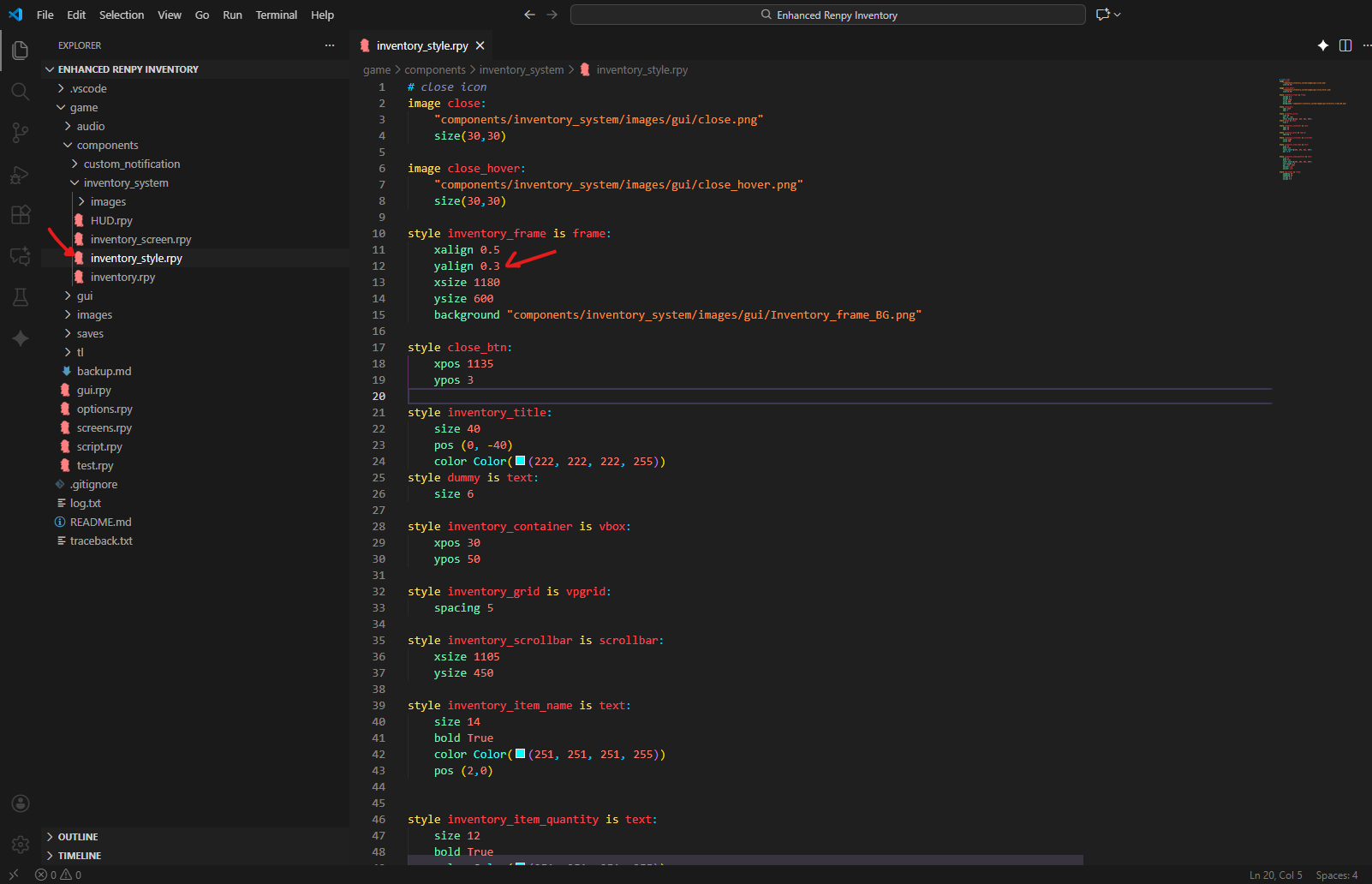
It's super simple just go to components > inInventory_system> inventory_style.rpy  Find the code block name: 
style inventory_frame is frame: 

To change the  Y Position, you will see something like this:   yalign 0.3. Change its value to 0.4 or 0.5 based on your need. The position should go up and down based on incrementing or decrementing the value. If you want to go try left and right, then change the X position. 

Image


So happy to hear that. I would love to play your game. Please share the links when it's done. I can tell you're enjoying the process, and this is the most important thing. Don't quit if it takes more time than expected. The first time is the hardest. Wishing you the best of luck with your project. 

Hey, thanks for showing interest in my project. I'm happy to hear it's saving time. Well, that was the intention. So beginner can instantly integrate the inventory system in their game without going through all the technical stuff.  

And about the quick hover menu action, you ask, currently it does not have such a feature, 'cause I wanted to make it more generalized so it suits all types of projects, but it's possible if you add that feature to the project code. The system is scalable in nature, so anybody can modify and do whatever they want.

I did not add such features 'cause it will add more complexity to the code, and possibly it might introduce more bugs. Currently, the system is stable, so I kinda kept it like that, but I do understand that such a feature would be nice.

If enough people think it's necessary, then I will add it in the future.  If you don't like using the item function currently, you can use it with a menu. That might not be exactly what you're looking for, but it's more interactive. Also, if you have any more questions, feel free to reach out. 

Thank you so much for taking the time to leave such a fantastic review! I'm genuinely thrilled to hear that it was an easy and effective way for a beginner to learn and adapt. Knowing I could help a newcomer is the best compliment I could receive. And I'm glad the comedy landed! 😄

Sounds great! Let me know if anything comes up. Happy tinkering!

You're welcome! If you encounter any bugs or issues, please feel free to let me know. Also, if possible, could you give it a rating?