
Change your keyboard layout
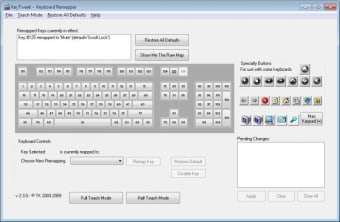
KeyTweak is a free utility designed for Windows users who want to change the physical layout of their keyboard without any hardware modifications. It acts as a visual interface for editing the Windows Registry, the Scancode Map key, which tells the operating system how to interpret signals from specific buttons.
KeyTweak is useful for those dealing with broken keys, users transitioning between international layouts, or gamers who need custom control schemes. By providing a virtual map of a standard keyboard, it simplifies the otherwise mandatory manual editing of complex hex codes in the registry, making advanced customization accessible to everyone.
Control your keyboard however you like
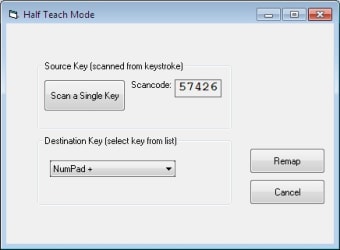
KeyTweak works by intercepting the signal sent from a key and rerouting it to a different command of your choice. Its Full Teach Mode is a standout feature, allowing you to simply press the physical button you want to change, followed by the desired output, which removes much of the guesswork involved in identifying key numbers, which means less hassle for you.
Because it modifies the system registry directly, the program does not need to stay open or run in the background after the initial setup. This is a huge benefit for system performance, as it consumes zero extra RAM or CPU resources once the changes are applied. It’s an incredibly efficient way to fix annoying keyboard quirks or disable accidentally pressed keys like Caps Lock.
However, the software has some significant limitations, such as its inability to create hotkeys or combinations like mapping a single button to a multi-key shortcut. Users should also be aware that every change requires a full system reboot to take effect, which can make the trial-and-error process feel tedious. Furthermore, since the changes are global, they will affect every user profile on the computer.
An unexpected essential tool
In conclusion, KeyTweak is a reliable and time-tested solution for anyone needing basic keyboard remapping on a Windows PC. While it lacks the advanced macro capabilities of newer, heavier software, its tiny footprint and simplicity make it a perfect "set it and forget it" tool. For fixing broken hardware or optimizing a layout for a specific task, it remains a highly effective utility.