
ຄຳອະທິບາຍ
ການຈັດການເວັບໄຊ WordPress ຫຼາຍເວັບໄຊອາດເປັນວຽກທີ່ເສຍເວລາ ແລະ ໜ້າເບື່ອໜ່າຍ. MainWP Dashboard ຊ່ວຍໃຫ້ທ່ານໄດ້ເວລາກັບຄືນມາ ໂດຍຊ່ວຍໃຫ້ທ່ານຈັດການ ແລະ ປົກປ້ອງທຸກເວັບໄຊ WordPress ຂອງທ່ານໄດ້ຢ່າງມີປະສິດທິພາບຈາກແຜງຄວບຄຸມສູນກາງຂອງທ່ານເອງ.
ອອກແບບມາສຳລັບເອເຈນຊີ, ຟຣີແລນຊ໌ ແລະ ມືອາຊີບດ້ານເວັບ, MainWP ໃຫ້ການຄວບຄຸມທີ່ຄອບຄຸມດ້ວຍແນວທາງທີ່ເນັ້ນຄວາມເປັນສ່ວນຕົວເປັນຫຼັກ. ນຳໃຊ້ປະສິດທິພາບຂອງ MainWP ສຳລັບການອັບເດດ, ການສຳຮອງຂໍ້ມູນ ແລະ ອື່ນໆ ເພື່ອໃຫ້ໝັ້ນໃຈວ່າເວັບໄຊຂອງທ່ານເຮັດວຽກໄດ້ຢ່າງຄ່ອງຕົວ ແລະ ປອດໄພສະເໝີ.
ຟີເຈີສຳລັບການຈັດການ WordPress ແບບຂັ້ນສູງ:
- ການອັບເດດຈາກສູນກາງ: ເຮັດໃຫ້ທຸກເວັບໄຊ WordPress ຂອງທ່ານທັນສະໄໝຢູ່ສະເໝີດ້ວຍການອັບເດດພຽງຄລິກດຽວ.
- ການສຳຮອງຂໍ້ມູນທີ່ປອດໄພ: ຕັ້ງຄ່າການສຳຮອງຂໍ້ມູນແບບກຳນົດເວລາ ຫຼື ຕາມຄວາມຕ້ອງການ ເພື່ອຄວາມປອດໄພຂອງເວັບໄຊທີ່ສົມບູນ.
- ຈັດການທັງເວັບໄຊ ແລະ ລູກຄ້າຂອງທ່ານດ້ວຍໂມດູນການຈັດການລູກຄ້າ
- ລະບົບຕິດຕາມຄ່າໃຊ້ຈ່າຍໃນຕົວ ຊ່ວຍໃຫ້ທ່ານຕິດຕາມຄ່າໃຊ້ຈ່າຍຂອງລູກຄ້າໄດ້ຢ່າງງ່າຍດາຍ
- ເປັນສ່ວນຕົວ ແລະ ໂຮສດ້ວຍຕົນເອງ: ຂໍ້ມູນຂອງທ່ານຍັງເປັນຂອງທ່ານ, ດ້ວຍຄວາມເປັນສ່ວນຕົວ ແລະ ການຄວບຄຸມທີ່ສົມບູນ.
ຢຸດການຕິດກັບຢູ່ໃນວົງຈອນຂອງ Software as a Service (SaaS):
ສ້າງຂຶ້ນບົນຫຼັກການພື້ນຖານຂອງ WordPress, ປລັກອິນ MainWP Dashboard ຖືກວາງຕຳແໜ່ງໃຫ້ເປັນທາງອອກອັນດັບໜຶ່ງສຳລັບການຈັດການ WordPress. ມັນລວມເອົາຄວາມງ່າຍໃນການໃຊ້ງານ ເຂົ້າກັບຟີເຈີທີ່ແຂງແກ່ນ ແລະ ຄວາມເປັນສ່ວນຕົວທີ່ຫາອັນໃດປຽບບໍ່ໄດ້.
ປລັກອິນ MainWP ແມ່ນເປັນໂອເພນຊອດ ແລະ ເນັ້ນຄວາມເປັນສ່ວນຕົວ, ໂດຍມີນະໂຍບາຍຄວາມເປັນສ່ວນຕົວຂອງຕົນເອງເພື່ອໃຫ້ໝັ້ນໃຈວ່າປລັກອິນຈະບໍ່ມີການເກັບຂໍ້ມູນທີ່ລະບຸຕົວຕົນບຸກຄົນ (PII) ໃດໆ.
MainWP Dashboard ສາມາດຂະຫຍາຍຕໍ່ໄດ້, ເຊິ່ງຊ່ວຍໃຫ້ນັກພັດທະນາພາຍນອກສາມາດເຊື່ອມຕໍ່ເຂົ້າໄປໄດ້. ນອກຈາກນີ້ຍັງຮອງຮັບ CLI ແລະ ມີ REST API ເປັນຂອງຕົນເອງ, ສະນັ້ນທຸກຢ່າງທີ່ທ່ານຕ້ອງການເພື່ອດຳເນີນທຸລະກິດໃນແບບຂອງທ່ານ ສາມາດພັດທະນາຂຶ້ນມາເພື່ອໃຊ້ກັບ MainWP Dashboard ໄດ້.
ທັງໝົດນີ້ເຮັດໃຫ້ MainWP ເປັນທາງເລືອກທີ່ດີທີ່ສຸດທີ່ບໍ່ແມ່ນ SaaS ສຳລັບ ManageWP, InfiniteWP, WPRemote, ແລະ WP Umbrella.
ເລີ່ມຕົ້ນໃຊ້ງານ MainWP:
MainWP ຖືກອອກແບບມາໃຫ້ໃຊ້ງານງ່າຍ ແລະ ເຂົ້າໃຈໄດ້ທັນທີ, ເຖິງແມ່ນວ່າຈະເປັນມືໃໝ່ສຳລັບປລັກອິນຈັດການ WordPress. ດ້ວຍຂັ້ນຕອນການຕັ້ງຄ່າທີ່ບໍ່ຍຸ້ງຍາກ ແລະ ແຜງຄວບຄຸມທີ່ສະອາດຕາ ເປັນລະບຽບ, ທ່ານຈະສາມາດເລີ່ມຈັດການເວັບໄຊ WordPress ຂອງທ່ານໄດ້ຢ່າງມີປະສິດທິພາບໃນເວລາອັນສັ້ນ.
- ການຕັ້ງຄ່າ MainWP ແມ່ນງ່າຍດາຍ—ພຽງແຕ່ຕິດຕັ້ງ dashboard ໃນເວັບໄຊ WordPress ສ່ວນຕົວ, ຕິດຕັ້ງປລັກອິນ MainWP Child ໃນເວັບໄຊ WordPress ອື່ນໆຂອງທ່ານ, ແລະ ເລີ່ມການຄວບຄຸມໄດ້ເລີຍ.
ການຮັບປະກັນຄວາມເປັນສ່ວນຕົວຂອງທ່ານ
ປລັກອິນ MainWP ມາພ້ອມກັບ ນະໂຍບາຍຄວາມເປັນສ່ວນຕົວ ຂອງຕົນເອງ ເພື່ອໃຫ້ໝັ້ນໃຈວ່າປລັກອິນຈະບໍ່ມີການເກັບຂໍ້ມູນທີ່ລະບຸຕົວຕົນບຸກຄົນ (PII) ໃດໆ.
ເປັນຫຍັງ MainWP ຈຶ່ງຟຣີ? ມີເງື່ອນໄຂຫຍັງຊ້ອນເຣັ້ນບໍ່? ແລະ ພວກເຮົາຈະເອົາເງິນໃສ່ມາຈ່າຍຄ່າພັດທະນາຕໍ່ໄປ?
MainWP Dashboard ແມ່ນ ຟຣີ 100% ແລະ ຈະເປັນແບບນັ້ນຕະຫຼອດໄປ. ບໍ່ວ່າທ່ານຈະຈັດການ 5 ເວັບໄຊ ຫຼື 5,000 ເວັບໄຊ, ແຜງຄວບຄຸມຫຼັກກໍຍັງຄົງຟຣີ.
ພວກເຮົາສ້າງລາຍໄດ້ຈາກການສະເໜີ MainWP Pro, ເຊິ່ງຊ່ວຍໃຫ້ເຂົ້າເຖິງສ່ວນເສີມແບບພຣີມຽມໄດ້ຫຼາກຫຼາຍ. ສ່ວນເສີມແບບພຣີມຽມເຫຼົ່ານີ້ຖືກຈັດແບ່ງອອກເປັນສອງໝວດໝູ່ຢ່າງຈະແຈ້ງຄື:
-
ການເຊື່ອມຕໍ່ (Integrations):
ສ່ວນເສີມໃນໝວດນີ້ຊ່ວຍໃຫ້ການເຊື່ອມຕໍ່ກັບບໍລິການ ແລະ ປລັກອິນຈາກພາຍນອກທີ່ເປັນທີ່ນິຍົມນັ້ນເປັນໄປຢ່າງຕໍ່ເນື່ອງ, ຊ່ວຍໃຫ້ທ່ານສາມາດນຳໃຊ້ເຄື່ອງມືທີ່ທ່ານໃຊ້ຢູ່ແລ້ວເຂົ້າໃນ MainWP Dashboard ໄດ້ໂດຍກົງ. -
ສ່ວນຂະຫຍາຍ (Extensions):
ນີ້ແມ່ນສ່ວນເສີມທີ່ສ້າງຂຶ້ນເອງ ແລະ ເຮັດວຽກເປັນເອກະລາດ ເຊິ່ງພັດທະນາຂຶ້ນມາສຳລັບ MainWP Dashboard ໂດຍສະເພາະ, ອອກແບບມາເພື່ອເພີ່ມຟັງຊັນທີ່ເປັນເອກະລັກ ແລະ ສະເພາະທາງ ເພື່ອຍົກລະດັບປະສົບການໃນການຈັດການ WordPress ຂອງທ່ານ.
ສຳລັບລາຍລະອຽດເພີ່ມເຕີມ, ເຂົ້າເບິ່ງໜ້າ Premium Add-ons ຂອງພວກເຮົາ ແລະ ເບິ່ງການປຽບທຽບລະຫວ່າງຟີເຈີແບບຟຣີ ແລະ ແບບໂປຣ ໄດ້ທີ່ Free vs. Pro: ຮູ້ເຖິງຄວາມແຕກຕ່າງ.
ສຳຜັດຄວາມແຕກຕ່າງຂອງ MainWP
ທ່ານພ້ອມແລ້ວບໍ່ທີ່ຈະກຳຈັດຄວາມຍຸ້ງຍາກໃນການຈັດການເວັບໄຊ WordPress ຂອງທ່ານ? MainWP ຊ່ວຍໃຫ້ທຸກຢ່າງເປັນເລື່ອງງ່າຍໃນການອັບເດດ, ຄວາມປອດໄພ ແລະ ການເຮັດວຽກຕາມທີ່ທ່ານຕ້ອງການ. ດ້ວຍເຈົ້າຂອງເວັບໄຊຫຼາຍກວ່າ 2 ໝື່ນລາຍ ທີ່ໄວ້ວາງໃຈໃຫ້ MainWP ຈັດການເວັບໄຊ WordPress ກວ່າ 7 ແສນເວັບໄຊໃນທຸກໆມື້, ທ່ານຈະເຫັນໄດ້ທັນທີວ່າການຈັດການເວັບໄຊນັ້ນງ່າຍຂຶ້ນຫຼາຍສຳ່ໃດ. ລອງໃຊ້ເລີຍມື້ນີ້ ແລະ ສຳຜັດກັບຄວາມແຕກຕ່າງດ້ວຍຕົວທ່ານເອງ!
ພາບໜ້າຈໍ
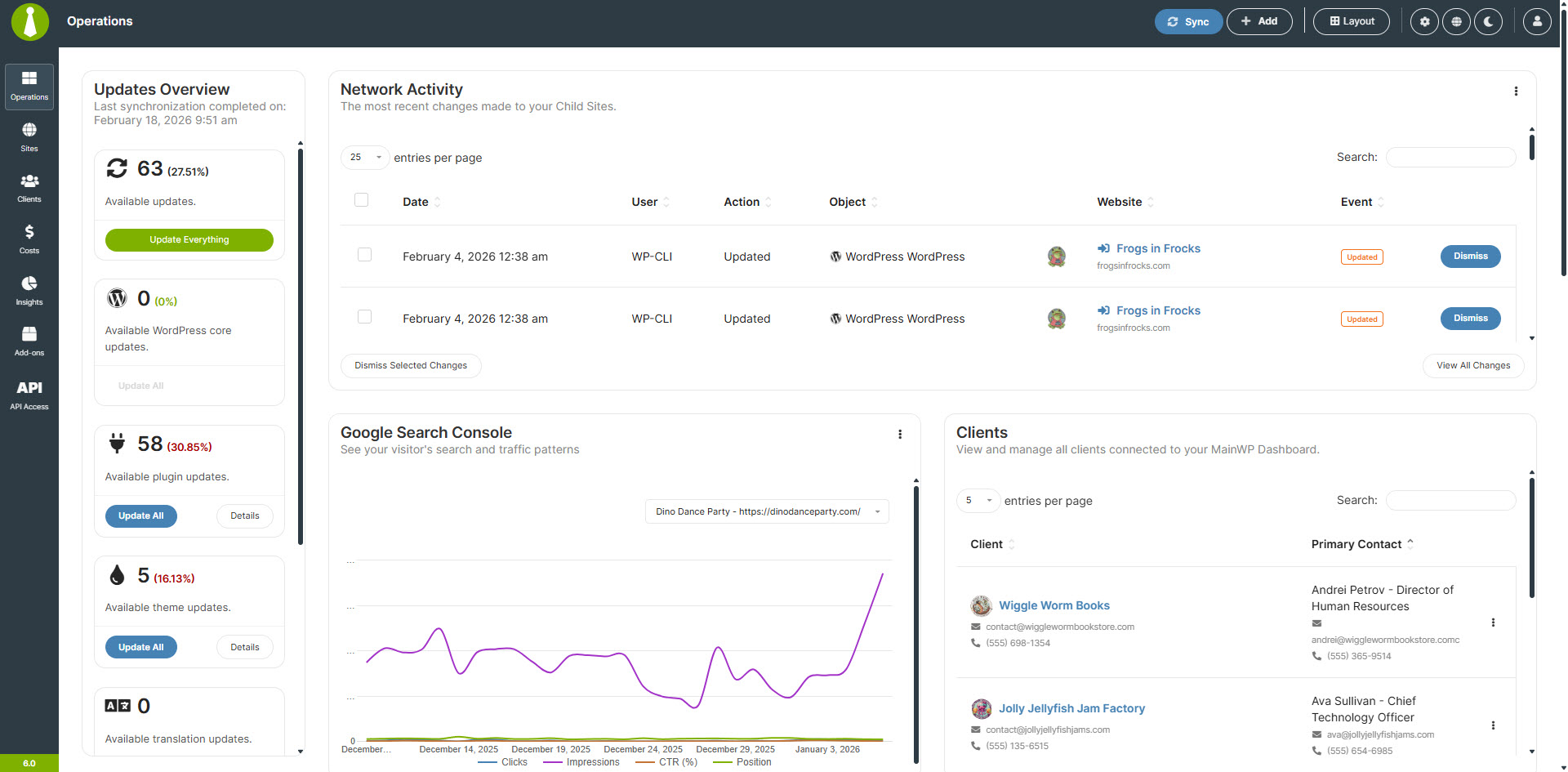
Sites – Operations 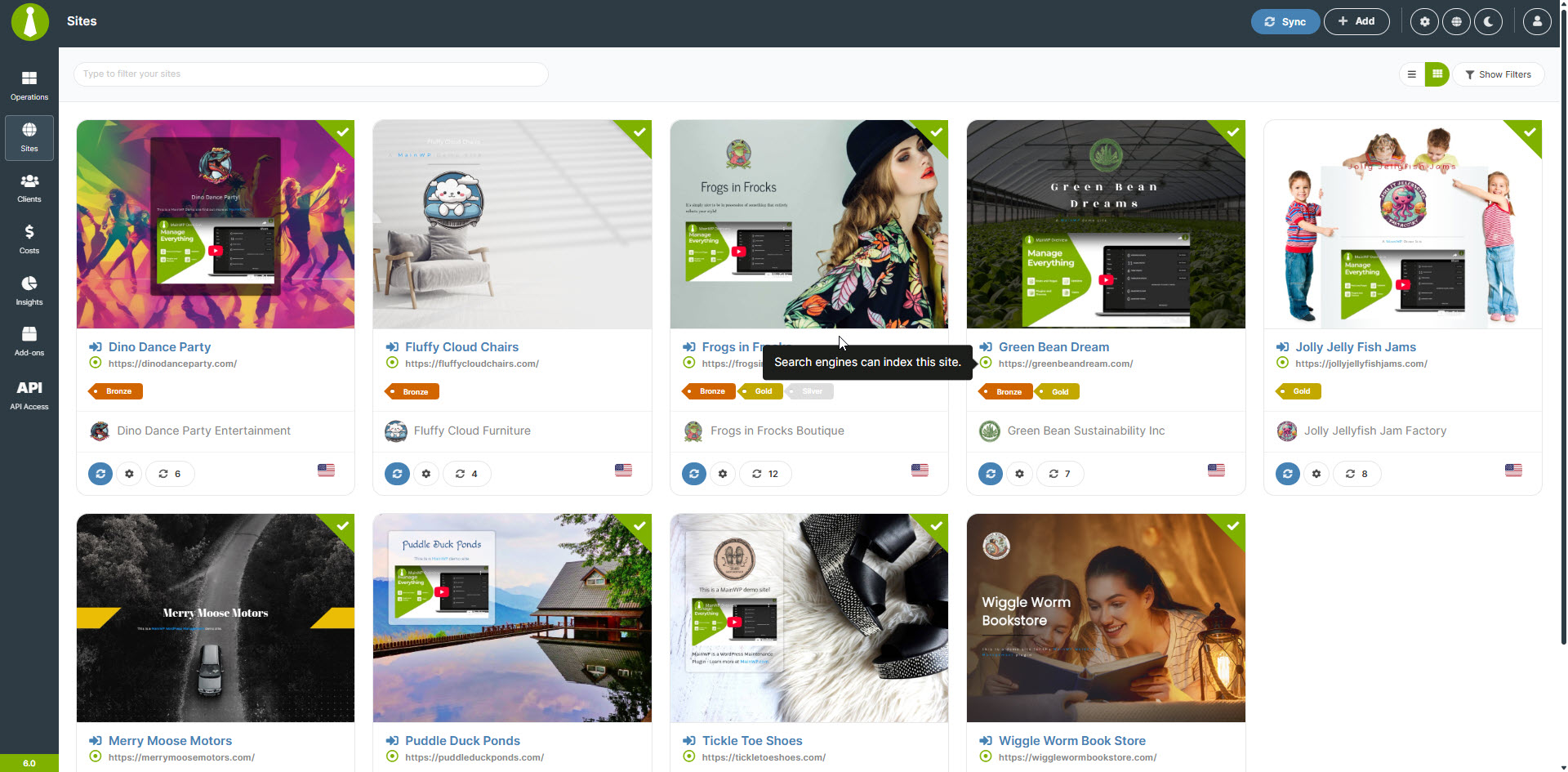
ເວັບໄຊ – ຈັດການເວັບໄຊ 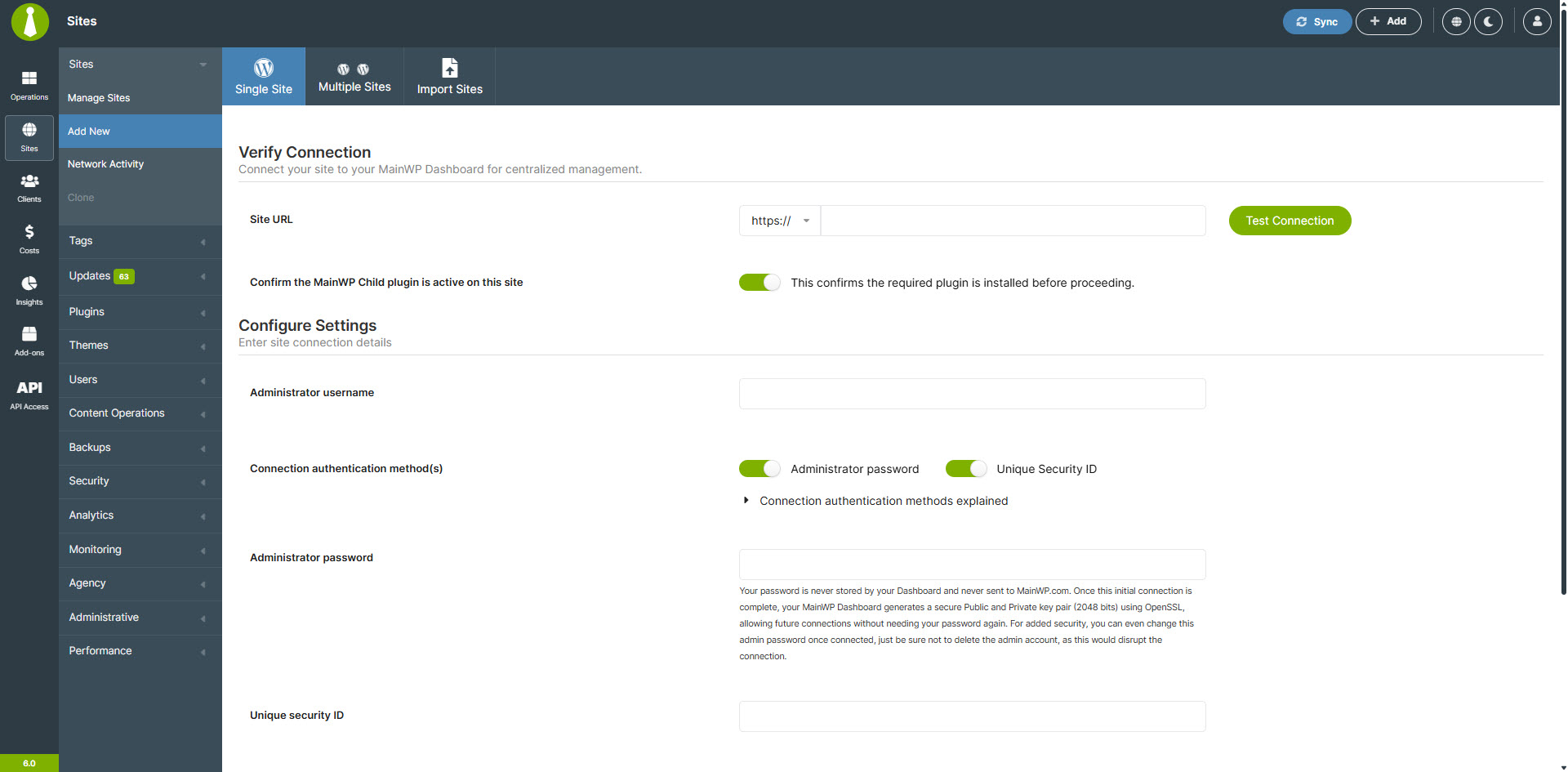
ເວັບໄຊ – ເພີ່ມເວັບໄຊໃໝ່ 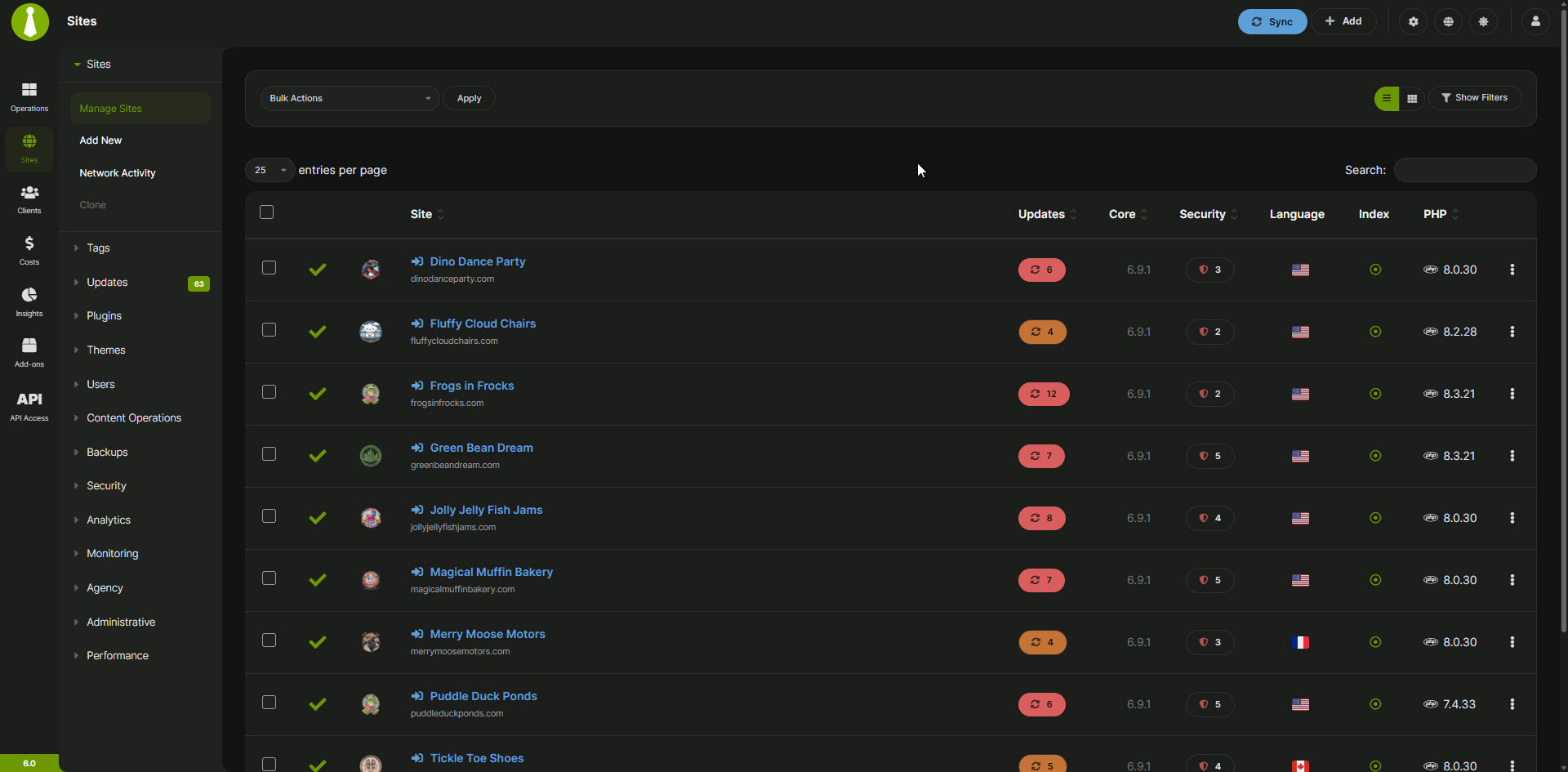
Sites – Dark Mode – Manage Sites 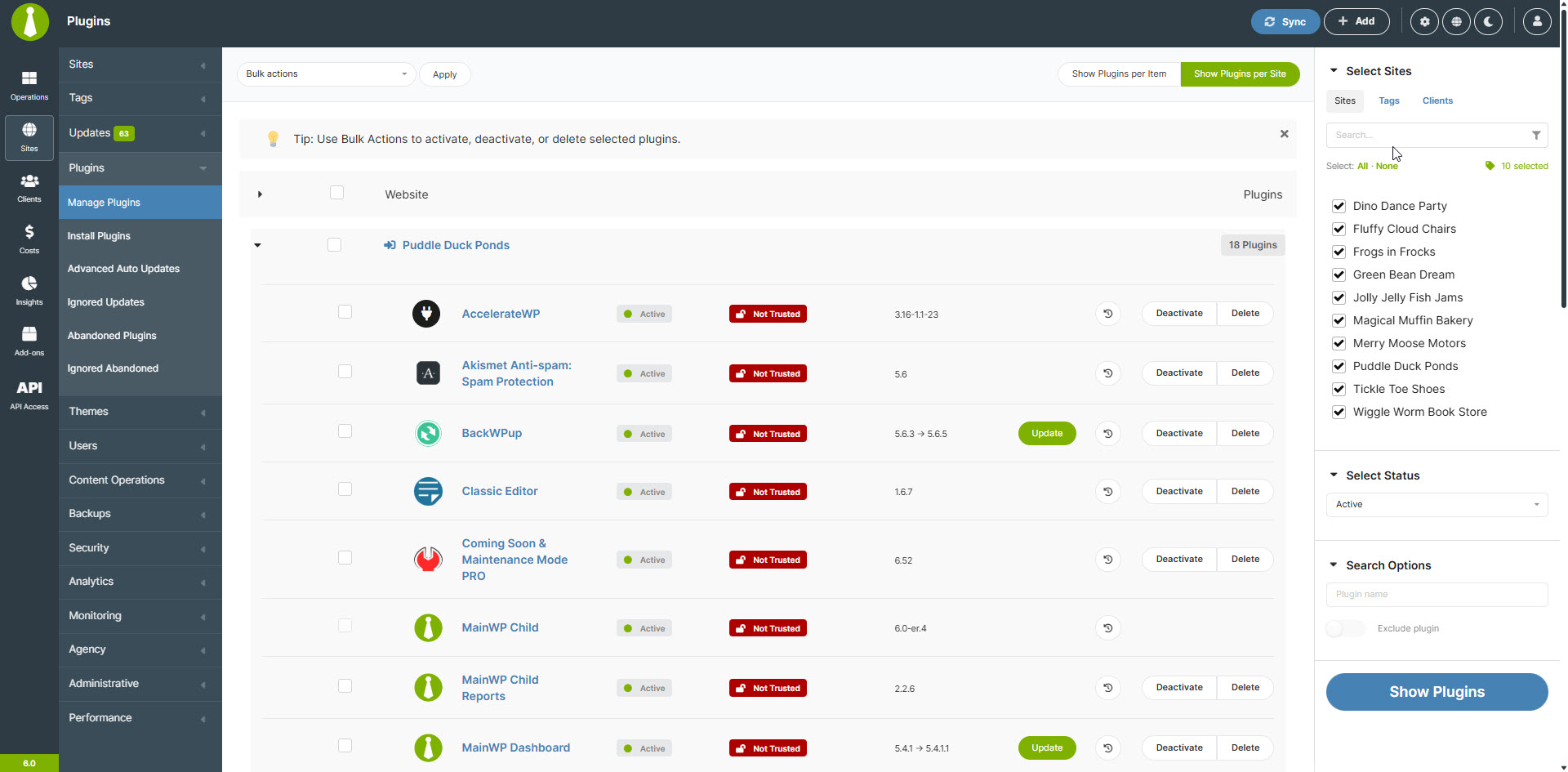
ເວັບໄຊ – ຈັດການປລັກອິນ 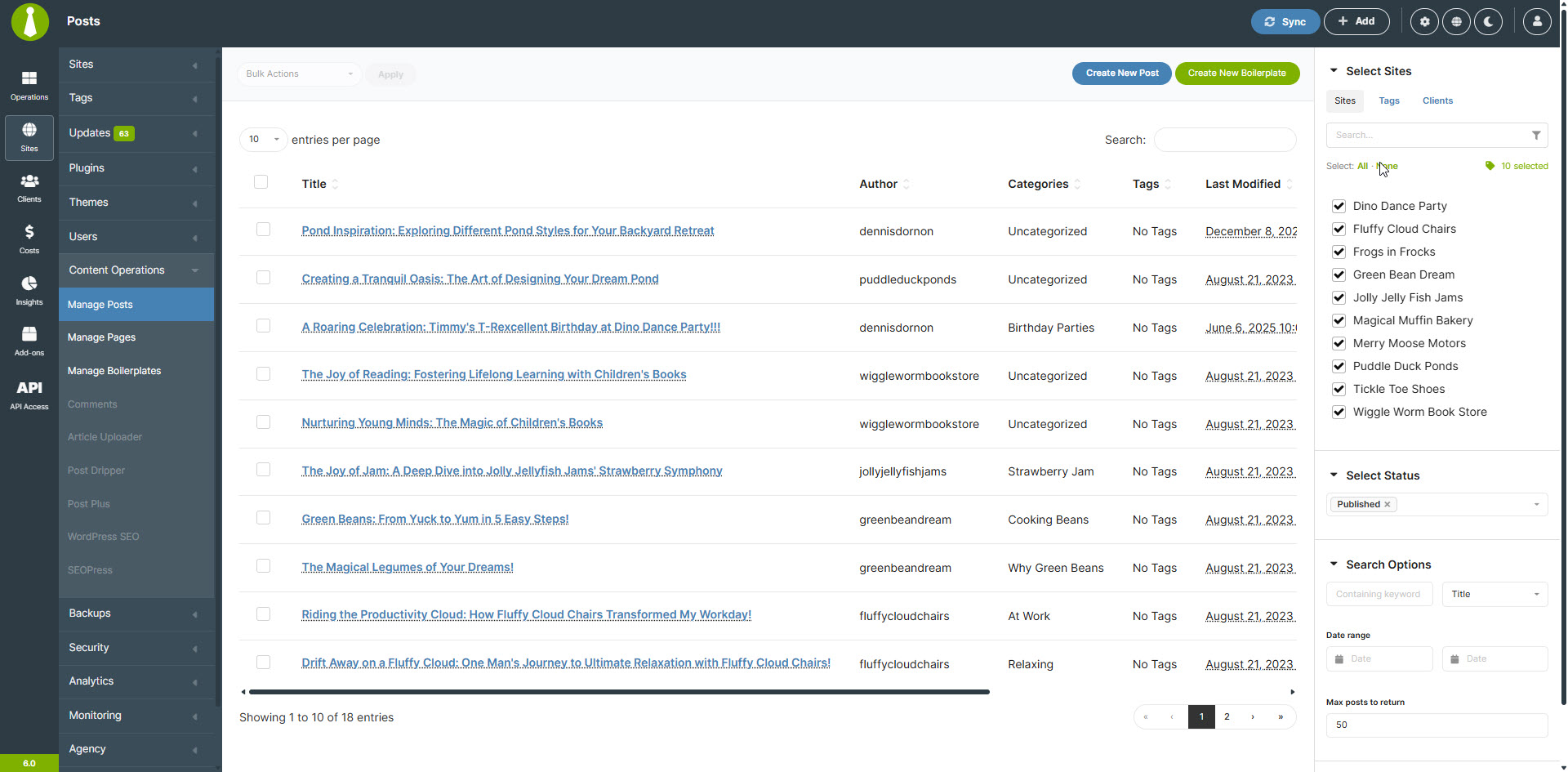
ເວັບໄຊ – ຈັດການໂພສ 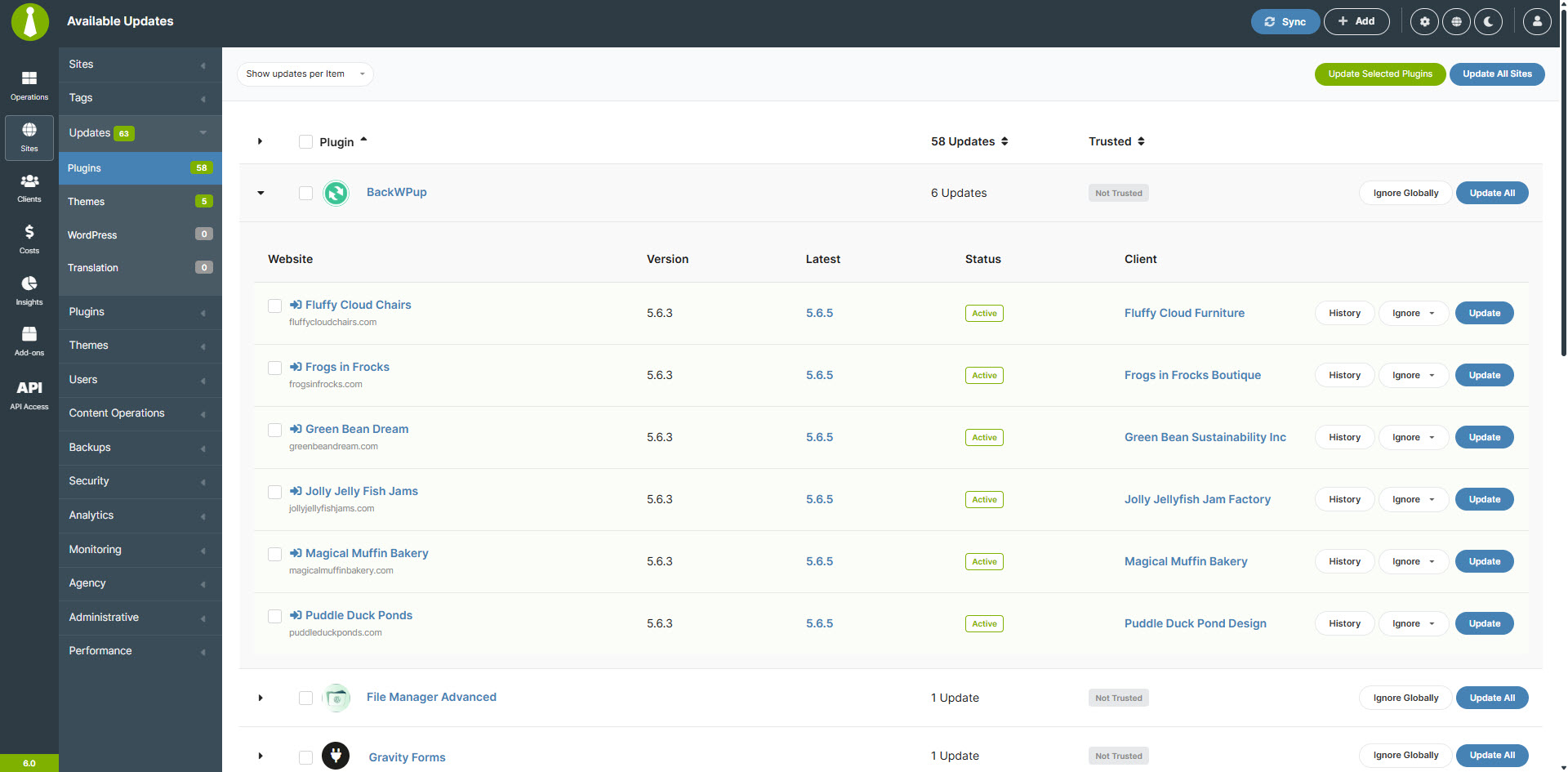
ເວັບໄຊ – ຈັດການການອັບເດດ 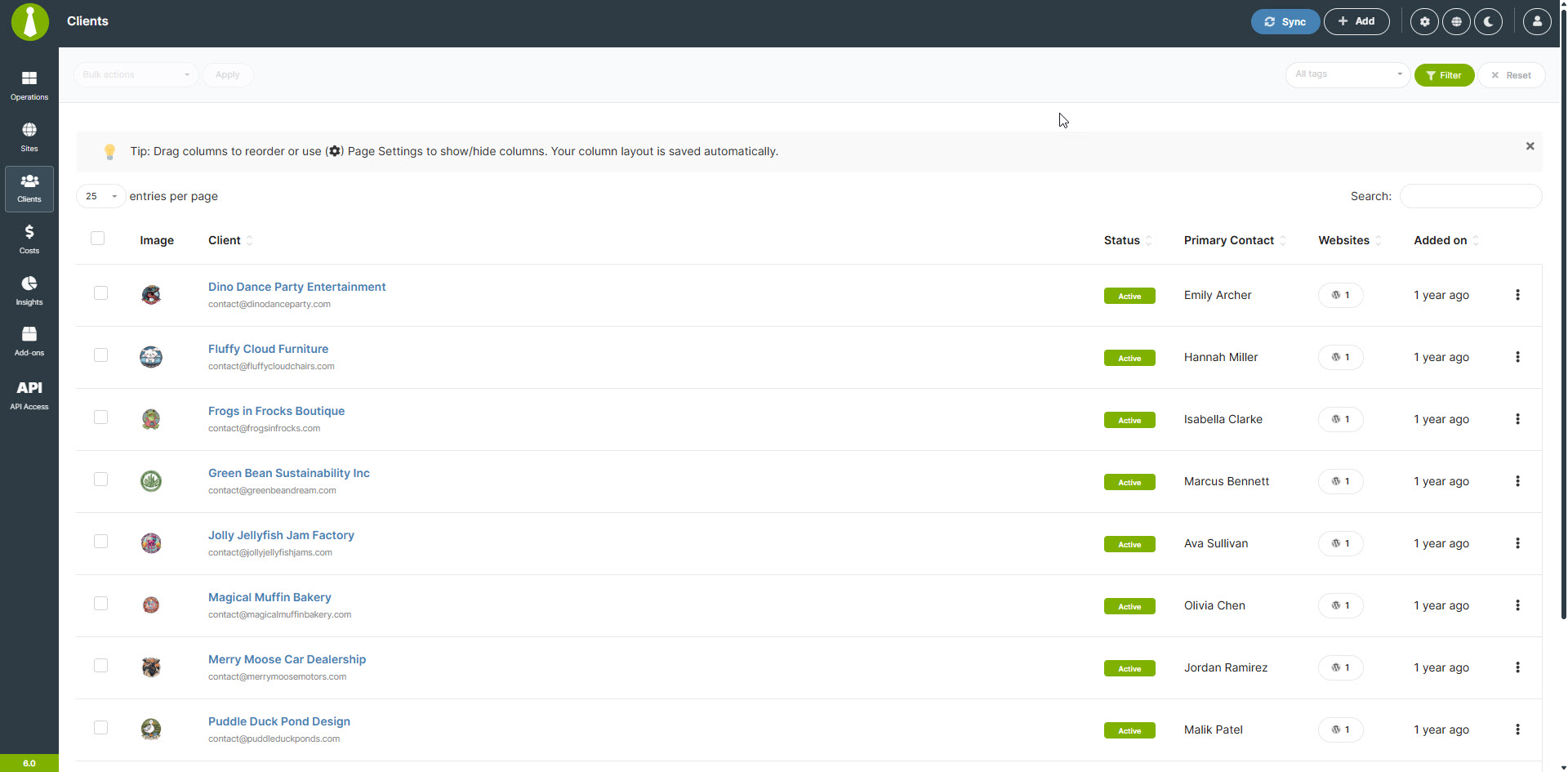
ລູກຄ້າ – ຈັດການລູກຄ້າ 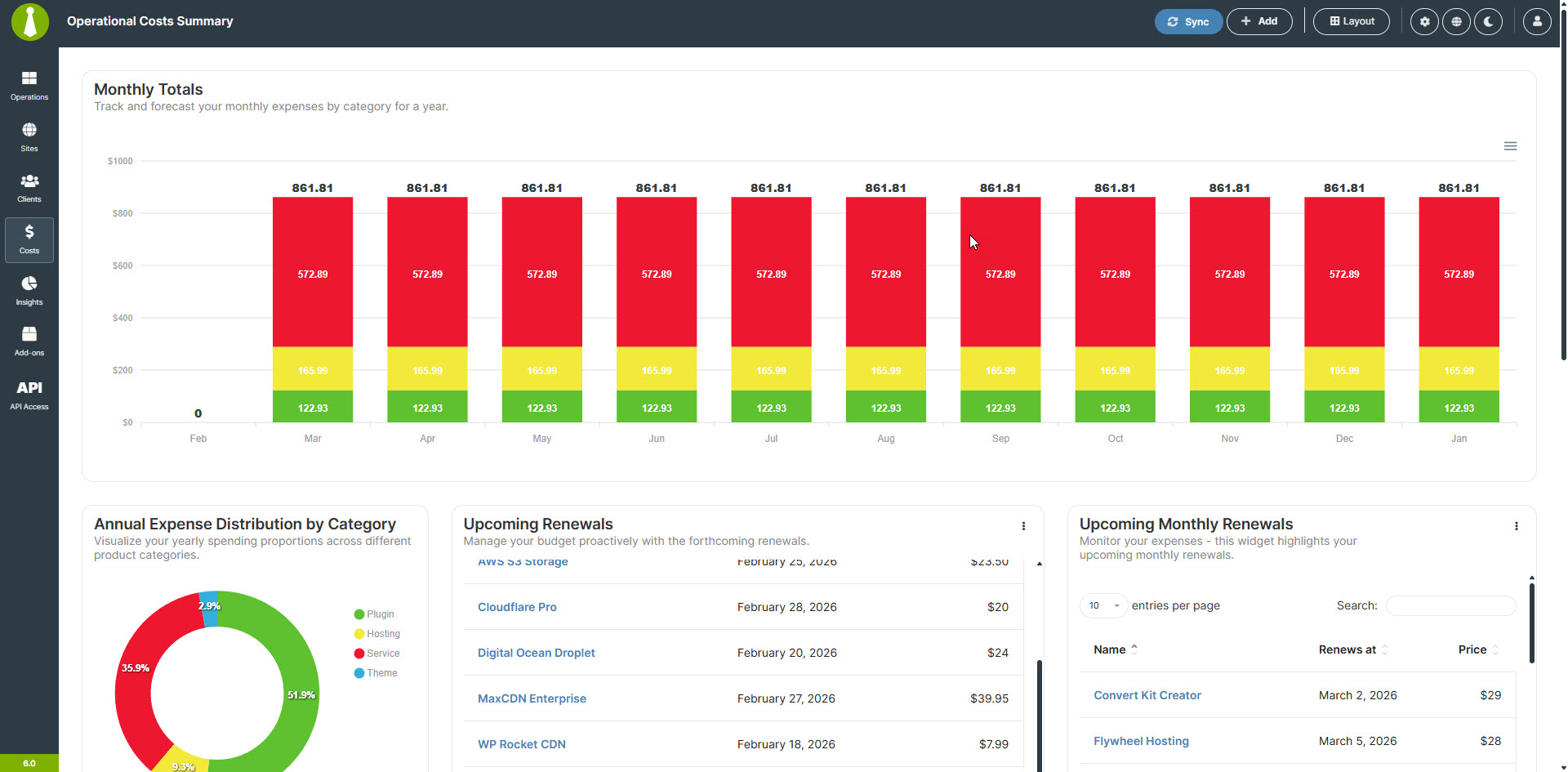
ລະບົບຕິດຕາມຄ່າໃຊ້ຈ່າຍ – ສະຫຼຸບຄ່າໃຊ້ຈ່າຍ 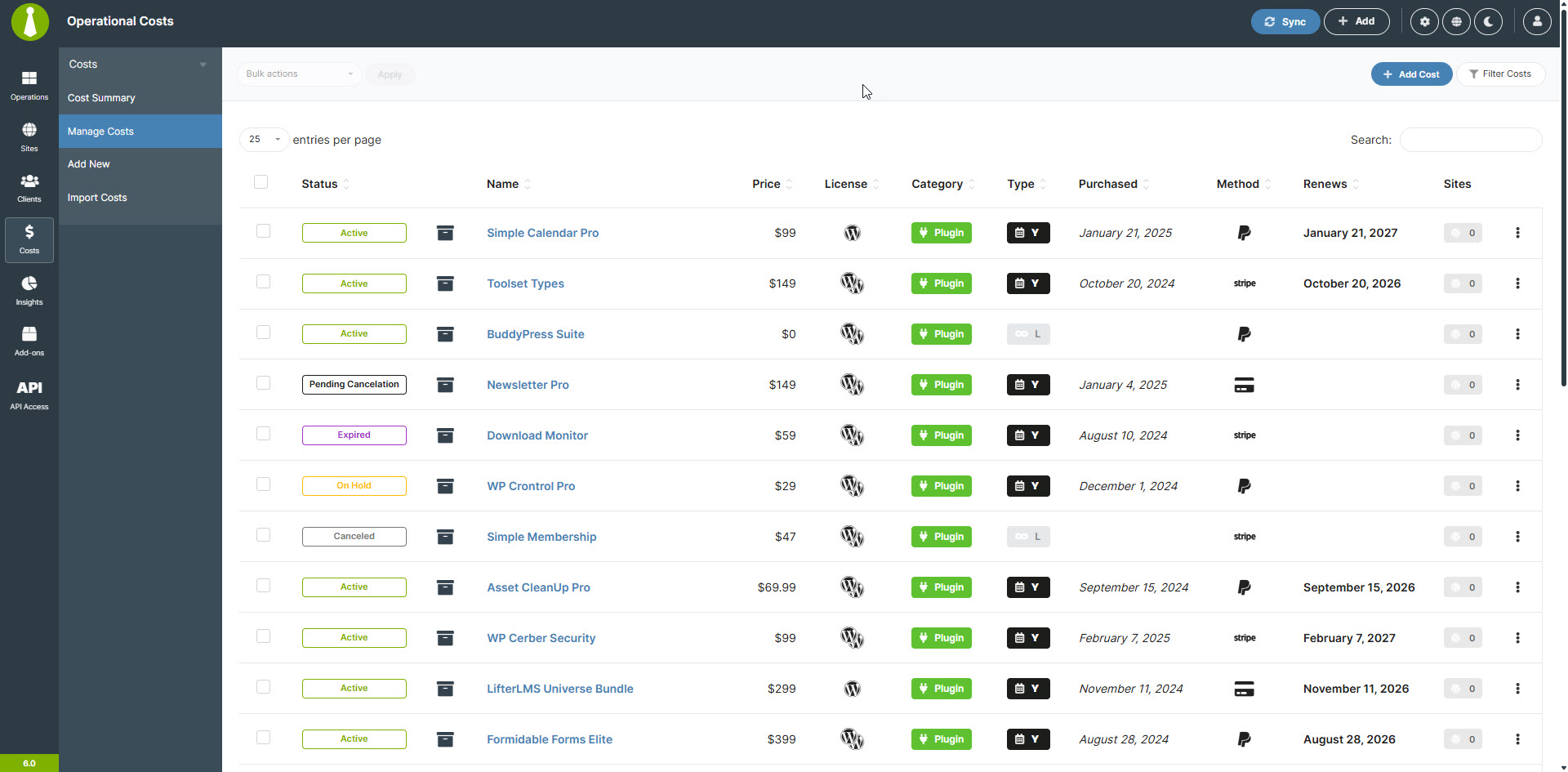
ລະບົບຕິດຕາມຄ່າໃຊ້ຈ່າຍ – ຈັດການຄ່າໃຊ້ຈ່າຍ 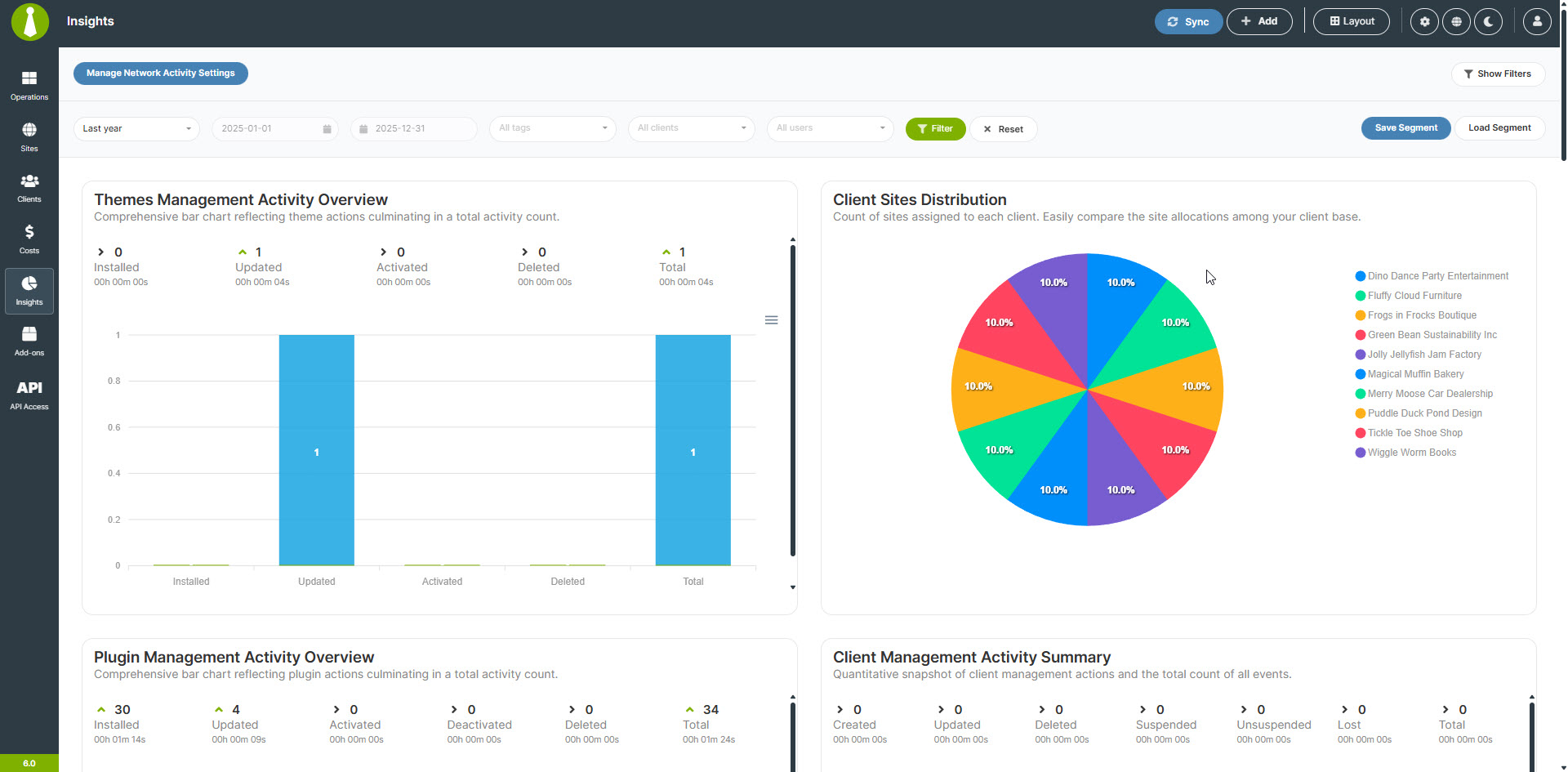
ຂໍ້ມູນເຈາະເລິກແຜງຄວບຄຸມ


ການຕິດຕັ້ງ
ໝາຍເຫດ: MainWP ບໍ່ໄດ້ຜ່ານການທົດສອບ ຫຼື ອອກແບບມາສຳລັບການຕິດຕັ້ງແບບ Multisite.
ແນວໃດກໍຕາມ, ພວກເຮົາມີລາຍງານຈາກຜູ້ໃຊ້ວ່າຟັງຊັນສ່ວນໃຫຍ່ເຮັດວຽກໄດ້ປົກກະຕິ, ແຕ່ການສະໜັບສະໜູນຈະມີຂີດຈຳກັດ. ພວກເຮົາ ບໍ່ແນະນຳ ໃຫ້ຕິດຕັ້ງປລັກອິນ MainWP Dashboard ໃນລະບົບແບບ Multisite.
- ພວກເຮົາ ແນະນຳຢ່າງຍິ່ງ ໃຫ້ໃຊ້ການຕິດຕັ້ງ WordPress ໃໝ່ ສຳລັບ MainWP Dashboard ຂອງທ່ານ.
ການໃຊ້ການຕິດຕັ້ງ WordPress ໃໝ່ຈະຊ່ວຍຫຼຸດຜ່ອນການຂັດແຍ່ງກັນຂອງປລັກອິນ ແລະ ບັນຫາອື່ນໆ ທີ່ເກີດຈາກການພະຍາຍາມໃຊ້ MainWP Dashboard ຮ່ວມກັບເວັບໄຊທີ່ກຳລັງໃຊ້ງານຢູ່.
ບໍລິສັດໂຮສຕິງສ່ວນໃຫຍ່ມີຊັບໂດເມນ (subdomains) ໃຫ້ຟຣີ (“demo.yourdomain.com”), ແລະ ພວກເຮົາແນະນຳໃຫ້ສ້າງຂຶ້ນມາໃໝ່ອັນໜຶ່ງ ຫາກທ່ານບໍ່ມີໂດເມນສະເພາະສຳລັບໃຊ້ງານ MainWP Dashboard. ຖ້າທ່ານບໍ່ແນ່ໃຈວ່າຈະຕັ້ງຄ່າຊັບໂດເມນແນວໃດ, ໃຫ້ຕິດຕໍ່ຝ່າຍສະໜັບສະໜູນຂອງບໍລິສັດໂຮສຕິງຂອງທ່ານ.
ທ່ານຍັງສາມາດຕິດຕັ້ງ MainWP Dashboard ໃນເວັບໄຊ WordPress ທີ່ຢູ່ໃນຄອມພິວເຕີຂອງທ່ານເອງໄດ້ ໂດຍໃຊ້ WAMP ຫຼື ການຕັ້ງຄ່າອື່ນໆ ທີ່ຊ່ວຍໃຫ້ທ່ານສາມາດໃຊ້ງານ WordPress ແບບທ້ອງຖິ່ນ (locally) ໄດ້.
-
ເມື່ອທ່ານຕັ້ງຄ່າເວັບໄຊ WordPress ແຍກຕ່າງຫາກແລ້ວ, ໃຫ້ຕິດຕັ້ງປລັກອິນ MainWP Dashboard ຕາມຂັ້ນຕອນການຕິດຕັ້ງປົກກະຕິ, ບໍ່ວ່າຈະເປັນການຕິດຕັ້ງແບບອັດຕະໂນມັດໂດຍການຄົ້ນຫາຊື່ MainWP ຫຼື ໂດຍການອັບໂຫລດປລັກອິນ MainWP ໄປທີ່ໄດເຣັກທໍຣີ ‘/wp-content/plugins/’.
-
ເມື່ອຕິດຕັ້ງແລ້ວ ໃຫ້ເປີດໃຊ້ງານ (Activate) ປລັກອິນຜ່ານເມນູປລັກອິນໃນ WordPress.
-
Add your first Child Site to the MainWP Dashboard – Documentation
-
Set your MainWP Settings – Documentation
ຄຳຖາມທີ່ພົບເລື້ອຍ
-
ສິ່ງໃດທີ່ເຮັດໃຫ້ MainWP ແຕກຕ່າງຈາກແພລດຟອມຈັດການ WordPress ອື່ນໆ ເຊັ່ນ ManageWP ຫຼື InfiniteWP?
-
MainWP ແມ່ນປລັກອິນຈັດການ WordPress ແບບໂອເພນຊອດ ແລະ ໂຮສດ້ວຍຕົນເອງ ເຊິ່ງໃຫ້ຄວາມສຳຄັນກັບຄວາມເປັນສ່ວນຕົວຂອງຜູ້ໃຊ້ ແລະ ການປັບແຕ່ງ.
ຕ່າງຈາກແພລດຟອມແບບ SaaS ເຊັ່ນ ManageWP, WPUmbrella ຫຼື WPRemote, MainWP ໃຫ້ທ່ານຄວບຄຸມຂໍ້ມູນຂອງທ່ານໄດ້ຢ່າງສົມບູນ ແລະ ສາມາດປັບແຕ່ງໄດ້ຢ່າງກວ້າງຂວາງຜ່ານໂຄງສ້າງແບບໂອເພນຊອດ.
-
MainWP ສາມາດຈັດການອັບເດດພ້ອມກັນຫຼາຍອັນ ສຳລັບລະບົບຫຼັກ WordPress, ປລັກອິນ ແລະ ທິມ ໄດ້ບໍ່?
-
ແມ່ນແລ້ວ, MainWP ຊ່ວຍໃຫ້ການອັບເດດພ້ອມກັນຫຼາຍອັນ (Bulk updates) ສຳລັບລະບົບຫຼັກ WordPress, ປລັກອິນ ແລະ ທິມ ໃນທຸກເວັບໄຊທີ່ທ່ານຈັດການນັ້ນເປັນເລື່ອງງ່າຍ. ພຽງແຕ່ບໍ່ກີ່ຄລິກ, ທ່ານກໍສາມາດໝັ້ນໃຈໄດ້ວ່າທຸກເວັບໄຊກຳລັງໃຊ້ເວີຊັນລ້າສຸດ, ເຊິ່ງຊ່ວຍປະຢັດເວລາ ແລະ ແຮງງານຂອງທ່ານໄດ້ຫຼາຍ.
-
MainWP ຊ່ວຍໃນການຈັດການລູກຄ້າສຳລັບເອເຈນຊີ WordPress ແລະ ຟຣີແລນຊ໌ ແນວໃດ?
-
MainWP ມີລະບົບຈັດການລູກຄ້າທີ່ແຂງແກ່ນ ເຊິ່ງຊ່ວຍໃຫ້ທ່ານສາມາດຈັດກຸ່ມເວັບໄຊຕາມລູກຄ້າ, ຕັ້ງແທັກ, ແລະ ສ້າງລາຍງານລູກຄ້າທີ່ສາມາດປັບແຕ່ງໄດ້. ສິ່ງນີ້ຈະຊ່ວຍເພີ່ມປະສິດທິພາບໃນການເຮັດວຽກ ແລະ ຊ່ວຍໃຫ້ທ່ານບໍລິການລູກຄ້າໄດ້ດີຂຶ້ນ ໂດຍການເກັບຂໍ້ມູນເວັບໄຊທັງໝົດໃຫ້ເປັນລະບຽບ ແລະ ເຂົ້າເຖິງໄດ້ງ່າຍ.
-
MainWP ມີຟີເຈີສຳລັບຕິດຕາມຄ່າໃຊ້ຈ່າຍທີ່ກ່ຽວຂ້ອງກັບການຈັດການເວັບໄຊ WordPress ບໍ່?
-
ແມ່ນແລ້ວ, MainWP ມີລະບົບຕິດຕາມຄ່າໃຊ້ຈ່າຍ (Cost Tracker) ໃນຕົວ. ຟີເຈີນີ້ຊ່ວຍໃຫ້ທ່ານສາມາດ:
* ບັນທຶກ ແລະ ແຍກປະເພດຄ່າໃຊ້ຈ່າຍສຳລັບແຕ່ລະເວັບໄຊ
* ຕັ້ງຄ່າຄ່າໃຊ້ຈ່າຍແບບຕໍ່ເນື່ອງ
* ສ້າງລາຍງານຄ່າໃຊ້ຈ່າຍແບບລະອຽດ
* ເບິ່ງພາບລວມຂອງການກະຈາຍຄ່າໃຊ້ຈ່າຍຂອງທ່ານ
* ຕິດຕາມການຊຳລະເງິນທີ່ໄດ້ຮັບ ແລະ ການຕໍ່ອາຍຸທີ່ກຳລັງຈະມາເຖິງ -
MainWP ມີຟີເຈີຄວາມປອດໄພໃດແດ່ເພື່ອປົກປ້ອງເວັບໄຊ WordPress ຂອງຂ້ອຍ?
-
MainWP ໃຫ້ຄວາມສຳຄັນກັບຄວາມປອດໄພໂດຍການໃຫ້ຟີເຈີຕ່າງໆ ເຊັ່ນ: ການຕິດຕາມຄວາມປອດໄພແບບທັນເວລາ, ການສະແກນມັນແວ, ແລະ ການກວດສອບຊ່ອງໂຫວ່. ນອກຈາກນີ້ ປລັກອິນຍັງສາມາດເຊື່ອມຕໍ່ກັບປລັກອິນຄວາມປອດໄພອື່ນໆ ທີ່ເປັນທີ່ນິຍົມໄດ້ນຳ.
-
ຂ້ອຍສາມາດໃຊ້ MainWP ເພື່ອຈັດການເວັບໄຊ WordPress ທີ່ໂຮສຢູ່ໃນເຊີເວີ ຫຼື ຜູ້ໃຫ້ບໍລິການໂຮສຕິງທີ່ຕ່າງກັນໄດ້ບໍ່?
-
ແມ່ນແລ້ວ, MainWP ຖືກອອກແບບມາເພື່ອເຮັດວຽກກັບເວັບໄຊ WordPress ທີ່ໂຮສຢູ່ໃນເຊີເວີ ຫຼື ຜູ້ໃຫ້ບໍລິການໂຮສຕິງໃດກໍໄດ້.
-
MainWP ຈັດການການສຳຮອງຂໍ້ມູນເວັບໄຊ WordPress ແນວໃດ?
-
MainWP ມີຕົວເລືອກການສຳຮອງຂໍ້ມູນຫຼາຍຮູບແບບ, ລວມທັງລະບົບສຳຮອງຂໍ້ມູນໃນຕົວສຳລັບຜູ້ໃຫ້ບໍລິການໂຮສຕິງທີ່ໄດ້ຮັບຄວາມນິຍົມ ແລະ ການເຊື່ອມຕໍ່ກັບປລັກອິນສຳຮອງຂໍ້ມູນທີ່ມີການຕິດຕັ້ງຫຼາຍທີ່ສຸດ.
-
ວິທີການອອກສຽງ MainWP ແມ່ນແນວໃດ?
-
MainWP ແມ່ນຊື່ສະເພາະທີ່ພວກເຮົາສ້າງຂຶ້ນສຳລັບບໍລິສັດຂອງພວກເຮົາ, ສະນັ້ນມັນເປັນເລື່ອງປົກກະຕິຖ້າທ່ານບໍ່ແນ່ໃຈວ່າຈະອອກສຽງແນວໃດ. ນີ້ແມ່ນວິທີຈື່ທີ່ງ່າຍທີ່ສຸດ:
Main + WP = MainWP
ໃຫ້ຄິດວ່າມັນແມ່ນຄຳວ່າ “Main” ຕາມດ້ວຍຕົວອັກສອນ “WP” (ອອກສຽງວ່າ “ດັບເບິນຢູ ພີ”). ໃນການຂຽນແບບອອກສຽງ ມັນຈະເປັນແບບນີ້: /ˈmeɪn ˈdʌbəl juː ˈpiː/.
ແຕ່ບໍ່ຕ້ອງກັງວົນຖ້າທ່ານອອກສຽງຕ່າງອອກໄປ – ພວກເຮົາຮັບຮູ້ໄດ້ເກືອບທຸກຊື່, ລວມທັງ WP Main ແລະ WPMain!
-
ຂ້ອຍມີໄອເດຍສຳລັບ MainWP; ຂ້ອຍຈະບອກທ່ານໄດ້ແນວໃດ?
-
ກະລຸນາປະຕິບັດຕາມຂັ້ນຕອນທີ່ລະບຸໄວ້ໃນ MainWP Feature Requests ເພື່ອໃຫ້ທ່ານສາມາດເພີ່ມໄອເດຍຂອງທ່ານເຂົ້າໃນຊຸມຊົນ MainWP ເພື່ອລໍຖ້າການໂຫວດ.
-
ຂ້ອຍມີຄຳຖາມເພີ່ມເຕີມ. ທ່ານມີຂໍ້ມູນອື່ນໆ ອີກບໍ່?
-
ແມ່ນແລ້ວ, ພວກເຮົາມີຄຳຖາມທີ່ພົບເລື້ອຍ (FAQ) ພ້ອມຄຳຖາມ ແລະ ຄຳຕອບອື່ນໆ ອີກຫຼາຍຢ່າງ ທີ່ນີ້.
ການຣີວິວ


ຜູ້ຮ່ວມພັດທະນາ ແລະ ຜູ້ພັດທະນາ
“MainWP Dashboard: Self-hosted WordPress Management for Agencies” ແມ່ນຊອຟແວໂອເພັນຊອດ (Open Source). ບຸກຄົນຕໍ່ໄປນີ້ໄດ້ມີສ່ວນຮ່ວມໃນການພັດທະນາປລັກອິນນີ້.
ຜູ້ຮ່ວມພັດທະນາ
“MainWP Dashboard: Self-hosted WordPress Management for Agencies” ໄດ້ຖືກແປເປັນ 17 ພາສາທ້ອງຖິ່ນ. ຂໍຂອບໃຈ ທີມງານຜູ້ແປ ສຳລັບການປະກອບສ່ວນຂອງເຂົາເຈົ້າ.
ແປ “MainWP Dashboard: Self-hosted WordPress Management for Agencies” ເປັນພາສາຂອງເຈົ້າ.
ສົນໃຈຮ່ວມພັດທະນາບໍ່?
ເບິ່ງລະຫັດ, ກວດເບິ່ງ ຄັງເກັບ SVN, ຫຼື ຕິດຕາມ ບັນທຶກການພັດທະນາ ຜ່ານ RSS.
ບັນທຶກການປ່ຽນແປງ
6.0 – 2-24-2026
- Fixed: Improved monitor record handling by filling missing monitor IDs from the related site ID and preventing unintended site ID updates when partial monitor data is received.
- Fixed: Navigation menu rendering to prevent ID conflicts and duplicate element references.
- Fixed: Nonce input handling in setup and posting forms for better form submission reliability.
- Fixed: An issue with setting the
activeclass on the active tab menu item on the Manage Plugins and Manage Themes pages. - Fixed: Resolved an issue where the date picker would no longer open in the Network Activity filters after a date/time value was set.
- Fixed: An issue where sorting in Sites > Updates did not persist after page reload.
- Fixed: An issue where using Page Reset on a child site’s Operations page incorrectly redirected to Manage Sites.
- Fixed: Resolved an issue where post categories were not showing when creating posts in bulk.
- Fixed: A usability issue where the “Enable Site Health monitoring” tooltip could cover dropdown options in the “Quick Setup Wizard”.
- Fixed: A usability issue where the confirmation modal after creating a new user did not close automatically.
- Fixed: An issue where the page could remain blank after closing the add-on promo modal because it didn’t reload properly.
- Fixed: Resolved various browser console errors caused by duplicate element IDs and related issues.
- Fixed: Corrected multiple typos across the plugin UI.
- Fixed: An issue where the “Get Tags” REST API endpoint returned no results.
- Fixed: Resolved multiple PHP warnings related to undefined variables.
- Fixed: Admin link generation to ensure consistent and reliable access to WordPress admin pages.
- Fixed: An issue with displaying site selection after using the search filter.
- Fixed: Missing user information for certain objects and events in the Sites Changes feature.
- Fixed: Duplicate records appearing for certain objects and events in the Sites Changes feature.
- Fixed: Incorrect display of user information in the Sites Changes table where user IP addresses were unintentionally shown.
- Fixed: Malformed timezone information in uptime monitoring email notifications.
- Fixed: A database error that occurred when dismissing Sites Changes logs.
- Fixed: Sites Changes columns not resetting to their default state when clicking the “Reset Page” button.
- Fixed: Multiple minor cosmetic issues related to the new Dark theme to improve visual consistency.
- Fixed: Multiple PHP warnings and notices to ensure cleaner operation.
- Fixed: An issue with displaying global cPanel API settings in individual site settings.
- Fixed: An issue with saving widget size and position on widgetized pages.
- Fixed: Dashboard email alignment has been updated to center the content for improved readability.
- Fixed: Resolved an issue where the “Dismiss Changes” button remained disabled after selecting items to dismiss.
- Fixed: Prevented dismissed site changes from reappearing in the “Sites Changes” table after updating to version 5.5.
- Fixed: An issue with the accordion element icon not rotating when the element is expanded or collapsed.
- Fixed: In multiple places there was “Are you sure.” so it was fixed to “Are you sure?” in confirmation popups.
- Added: Password policy management to set and enforce password expiration rules. (Request by Julia)
- Added: Cost import functionality for easier cost entry management.
- Added: “Jump to WP Admin” quick link in site dropdown menu.
- Added: Monitoring data retention settings with configurable duration options (30, 90, 180, 365 days, or keep forever).
- Added: Bulk delete support for client general fields to speed up cleanup and maintenance.
- Added: A confirmation step when removing installed add-ons to help prevent accidental removals.
- Added: Action buttons for quick page and post creation.
- Added: Inline license key input and validation flow on the “Add-ons” page, including a “Remember Key” option and a dedicated validation action to simplify license management.
- Added: Granular, per-action permission controls for REST API access and application passwords to improve security and administrative flexibility.
- Added: Permission-aware UI for managing application passwords, including per-row actions and dedicated edit flows based on user access rights.
- Added: Introduced new REST API endpoints for user management, including listing, creating, editing, and deleting users, CSV-based user imports, and cross-site administrator password updates with per-site result reporting.
- Added: Introduced Application Password management in the “REST API” page, allowing users to view, create, and revoke Application Passwords directly from the MainWP Dashboard (mirroring WordPress “Users” > “Edit User” for easier access).
- Added: Green coloring for the ‘Enable’ icon in the extensions view for better visual feedback.
- Added: Sync status tooltips that show the last synchronization time for each site.
- Added: Introduced an outdated data indicator (red badge) for sites that haven’t synced in over 24 hours.
- Added: Plugin compatibility validation for PHP versions across update and activation workflows.
- Added: A quick theme switcher so users can toggle between light and dark modes from the UI.
- Added: Support for the Abilities API.
- Added: New REST API v2 endpoints for Monitoring (Request by James), Settings, and Client Fields.
- Added: A new “Plugin and Theme History” feature to provide an accessible history of actions by item and by day.
- Added: An “Import Sites” menu item on the “Add Sites” page for quicker access.
- Added: Support for the
[site.name]token in the Site Health Monitoring notification template to allow dynamic site name insertion. - Added: WordPress transient caching for frequently executed database queries to improve performance.
- Added: Site IP address as an available column option for the “Manage Sites” page. (Request by Ken)
- Added: Comprehensive object caching layer to enhance overall dashboard performance.
- Added: Smart prefetching for common navigation paths to reduce page load times and improve user experience.
- Added: New tracking events to the Non-MainWP Changes logging feature to provide more comprehensive monitoring capabilities.
- Added: New default “WP Version” column in the Manage Sites table.
- Added: Child site timezone information to the
$websiteobject. - Added: Ability to delete plugins and themes that are currently active while respecting the recommended process of deactivating before deleting in the background. (Request by Chrilles)
- Added: New default dark theme.
- Added: Loading element to widgetized pages that hides widgets before all data is loaded properly and Gridstack is loaded. (Request by Mario)
- Added: Descriptive labels for disabled bulk actions in the Manage Plugins and Themes pages explaining why they’re disabled.
- Added: Optional auto-archiving for Sites Changes logs and the ability to delete archived logs.
- Added: Option to select which Sites Changes logs to track.
- Added: Support ticket element to the Support modal.
- Added: Color coding to the Updates columns data in the Manage Sites table. (Request by Orchid) and (Nazar)
- Updated: Site filter PHP version options – removed “PHP Ver < 7.0” and added filters for PHP 8.1, 8.2, 8.3, and 8.4. (Request by Philip)
- Updated: Reorganized site management forms with collapsible accordion sections.
- Updated: Enhanced empty-state placeholders across widgets with clearer messaging.
- Updated: Improved site connection verification flow with better guidance.
- Updated: Refined authentication setup options with clearer descriptions.
- Updated: Backup settings layout for better organization.
- Updated: Improved cost tracker terminology (Operational Costs).
- Updated: Better table layouts with improved column organization.
- Updated: Optimized cURL handle management to reduce unnecessary handle recreation and improve resource efficiency during multi-request operations.
- Updated: Redesigned the “Select Sites” header with text links and a live selection counter for clearer bulk actions.
- Updated: Improved empty-state guidance with helpful actions to make next steps more obvious.
- Updated: Refined the “Select Sites” header controls for a cleaner, more consistent workflow.
- Updated: Moved widget layout controls (save, load, delete) from the dedicated action bar into the page header to reduce UI clutter and free up space.
- Updated: Refreshed the “Create REST API Key” screen with clearer permission chips/labels, improved messaging, and better placement for the compatibility toggle.
- Updated: Applied a broader UI polish pass with more consistent spacing, cleaner page structure, and reorganized layouts across affected screens.
- Updated: Improved action buttons and bulk controls so they enable or disable correctly based on the current selection.
- Updated: Repositioned and simplified several informational notices to improve visibility and reduce clutter.
- Updated: Improved uptime monitoring retry behavior with better handling and enhanced logging of retry attempts for easier troubleshooting.
- Updated: Reorganized navigation categories with new “Content Operations” group and improved menu structure.
- Updated: Interface terminology from “Overview” to “Operations” throughout.
- Updated: Changed update count label colors to green and made badges more compact.
- Updated: Increased default page size for retrieving posts from 10 to 50 items per request.
- Updated: Consolidated website-filtering logic across REST API endpoints for more consistent behavior.
- Updated: Endpoints now return a clear error when no websites match the provided filters, preventing ambiguous responses.
- Updated: Consolidated the licensing actions bar in the “Add-ons” page header with contextual action buttons and API-key-aware prompts for clearer guidance.
- Updated: Reorganized the extensions view into segmented, accordion-style sections for “Enabled Add-ons” and “Disabled Add-ons,” with aligned search behavior and slimmer action buttons for improved usability.
- Updated: Refined extension cards with clearer license and status headers, revised badges and text, improved documentation link formatting, and more intuitive remove and activate controls.
- Updated: Localized titles and implemented context-aware menu and submenu rendering to ensure correct labeling across different access levels.
- Updated: Centralized user-facing messages and field descriptions to provide consistent error text and schema help across REST API endpoints.
- Updated: Improved request validation logic to return clearer failure messages for invalid inputs, including search, count, and date-range parameters.
- Updated: Centralized message and translation handling across page operations, API responses, and error states to ensure consistent wording throughout the dashboard.
- Updated: Enhanced the REST API keys controller to support both v1 and v2 key formats, improving backward compatibility.
- Updated: Consolidated site administration link generation across dashboard pages and widgets for more consistent behavior.
- Updated: Consolidated review request notices into a single method with conditional messaging based on installed extensions, simplifying review prompt logic.
- Updated: Improved UI elements in the “Install Add-ons” modal to make add-on details easier to scan. Request by Chrilles
- Updated: Refined tooltips in the “Install Add-ons” modal to provide clearer, more helpful guidance.
- Updated: Reorganized helper messages in the “Install Add-ons” modal to better guide users through installation steps.
- Updated: Changed the privacy icon to “fingerprint” in the “Install Add-ons” modal for clearer visual meaning and consistency.
- Updated: Updated status icons in the “Install Add-ons” modal for more consistent and recognizable states.
- Updated: Clarified add-on installation instructions in the “Install Add-ons” modal to reduce confusion during setup.
- Updated: Improved button text and secondary segment styling in the “Install Add-ons” modal for better readability and dark theme consistency.
- Updated: Enhanced the reconnect actions to better handle sites with synchronization errors.
- Updated: Made the “Add” button label visible in the header controls for clearer navigation.
- Updated: Refined the site opening overlay styling and layout for a cleaner, more consistent experience.
- Updated: Updated theme installation header buttons with improved styling and larger interaction targets for better usability.
- Updated: Restricted backup link generation to authorized users only.
- Updated: Reorganized site and title column display in updates tables for improved visual consistency across views.
- Updated: Updated the theme management interface to replace deactivate buttons with lock icons for active themes.
- Updated: Updated the display of active theme status indicators across theme rows.
- Updated: Updated the API backup solution message to include direct links to the relevant settings pages.
- Updated: All help documentation links throughout the application to point to the new documentation site instead of the legacy knowledge base.
- Updated: Enhanced error reporting for upgrade operations with improved code identification.
- Updated: Improved detection and status handling for suspended sites during updates.
- Updated: Improved error handling for API response data to prevent potential crashes when unexpected data formats are received.
- Updated: Refined multiple UI labels and tooltip/button texts for clarity (e.g., “See Details” to “Details”, “See Monitors” to “View Monitors”).
- Updated: Improved Manage Sites table labels and core version display (e.g., “WP Version” to “Core”, “Indexable” to “Index”, and better core update link display).
- Updated: Adjusted table column alignment in CSS for numeric and date columns.
- Updated: Refactored updates tables for consistency by standardizing table classes/IDs and removing duplicate
<thead>sections. - Updated: Improved updates table column headers for clarity (e.g., “Version” to “Detected Version”) and adjusted alignment.
- Updated: Standardized dark theme table border radius using the
--area-radiusvariable and added specific rules for table corners. - Updated: Removed the emails settings table footer (
<tfoot>) and disabled DataTables search for that view. - Updated: Aligned checkboxes in the Manage Updates table for more consistent row layout.
- Updated: Unified MainWP review notice rendering into
render_review_mainwp_notice, varying messaging based on installed extension count for easier maintenance. - Updated: Default MainWP Dashboard theme selection to follow the detected OS theme preference.
- Updated: Simplified the MainWP Dashboard theme selection to Light and Dark only for new users.
- Updated: Improved the password generator on the “Add New User” page for better usability.
- Updated: Reduced console logging noise to make troubleshooting easier.
- Updated: Redesigned the “Quick Setup Wizard” for a more streamlined setup experience.
- Updated: Improved empty-state placeholders across multiple screens for clearer guidance when no data is available.
- Updated: Improved the “Admin Passwords” page UX with clearer error messages, a confirmation step before execution, an improved password generator, and an informational notice.
- Updated: Improved the “Manage Tags” page flow to make tagging more intuitive (Select Sites Create Tag Name Save).
- Updated: Improved the “Manage Plugins and Themes” page with clearer info labels and updated default status indicators.
- Updated: Improved the “Network Activity” page layout by decluttering the actions bar and adjusting spacing for better readability.
- Updated: Improved the “Plugins and Themes” search results screen by showing the search keyword after search and adding pagination controls to the top of results.
- Updated: Improved the “REST API” page with a new welcome message and confirmation modals when copying API keys.
- Updated: Improved the “Add-ons” page with a welcome message, clearer separation between active and inactive add-ons, and a more prominent active add-on indicator.
- Updated: Improved the “Insights” and “Cost Tracker Summary” page with an onboarding banner, clearer element hierarchy, and more helpful empty-state placeholders.
- Updated: Default widget layouts on the “Insights” and “Cost Tracker” pages.
- Updated: Changed the display logic for the “Encrypt SSL Keys” information message so it no longer appears once encryption is completed.
- Updated: Optimized DataTables initial load configuration to improve table rendering performance.
- Updated: Added missing database indexes on filterable columns to speed up queries on large datasets.
- Updated: Repositioned the loader element on the “Add-ons” page that displays during the add-on information loading and activation process.
- Updated: Refined the status icon displayed after running updates to remove the excessive “sign in” icon.
- Updated: Disabled cron event tracking as the default value for Sites Changes logging to reduce unnecessary log entries.
- Updated: Removed excessive progress bar elements from the “Site Connection” and “Site Hardening” widgets for a cleaner interface.
- Updated: Improved monitor status display consistency across multiple dashboard views.
- Updated: Added referrer information to cURL requests used for syncing websites to enhance connection reliability and debugging capabilities.
- Updated: Redesigned the “Sites Changes” table content and styling to reflect the new logging abilities and improve user experience.
- Updated: Improved various interface elements and navigation flows throughout the dashboard to enhance user experience and streamline common workflows.
- Updated: Refined styling and layout consistency across multiple screens to improve visual clarity and reduce cognitive load for users managing large numbers of sites.
- Updated: Repositioned Updates column to a new default location.
- Updated: Adjusted alignment of sort indicator icons across data tables for improved visual consistency.
- Updated: Refined sort indicator icons in the “Updates” section to maintain design consistency throughout the interface.
- Updated: Restored border radius styling to the main content area.
- Updated: Email notification links to use new “Add-ons” terminology instead of “Extensions”.
- Updated: Increased checkbox border contrast for improved visibility in Dark Theme.
- Updated: Enhanced modal element border contrast for better visibility in Dark Theme.
- Updated: Increased font weight on green buttons for improved readability in Dark Theme.
- Updated: Excluded “site sync” event from tracking in Sites Changes feature by default.
- Updated: Renamed the old Dark theme to Dark 2024.
- Updated: Dimmer element background color and blur intensity.
- Updated: Loading element style changed to double.
- Updated: Recent Posts and Pages widget layout on small screens.
- Updated: Form layout and some input field styles in the Edit User modal.
- Updated: Removed redundant tooltip elements cluttering UI.
- Updated: “Delete extensions API Activation data” feature labels and button label verbiage to “Delete add-on API Activation data”.
- Updated: Label style indicating the plugin status and trusted status in Manage Plugins and Themes area.
- Updated: Moved the Quick Help menu item to the bottom of the first-level navigation bar.
- Updated: Renamed the Quick Help menu to Support and updated the item style.
- Updated: Support modal functionality to allow users to enable or disable certain features from a single screen.
- Updated: API Backups settings tab menu to display it in horizontal view.
- Updated: Server Info tables to use defined column widths for a more consistent look.
- Updated: Mobile screen navigation menu style and content by removing the hamburger.js script and introducing the Fomantic UI native Flyout element.
- Updated: Data alignment in Updates columns in the Manage Sites table.
- Updated: Edit and View Email Template modal content background color.
- Updated: Optimized the Manage Plugins and Manage Themes tables for better user experience so it does not reload data after each individual action is processed.
- Updated: Optimized the Manage Plugins and Manage Themes tables for better performance so bulk actions won’t run all at once, but instead in smaller batches.
- Dev: Restructured request validation into focused helper methods to improve maintainability and error handling across REST API endpoints.
- Dev: Improved internal organization of website filtering logic to enhance code clarity and long-term maintainability.
- Dev: Enhanced validation workflows and error handling processes to reduce redundancy, strengthen stability, and improve overall code quality.
- Dev: Added the
mainwp_open_site_addition_urlhook to allow customization of the target WordPress admin URL when opening a site. - Dev: Updated ApexCharts, DataTables, File Saver, Fomantic UI, Gridstack, PHPSecLib, and Sorting packages to their latest versions to maintain security and compatibility standards.
