
Don’t upgrade to MacOS Sequoia yet for the remote LSAT
Update: It is now fine to take upgrade to MacOS Sequoia if you are taking the LSAT remotely. (As of October 22nd, 2024)
The article below remains as it was originally written. You can verify the requirements on Prometric’s proproctor compatibility page.
———
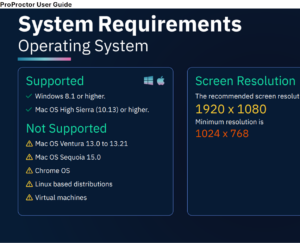
MacOS Sequoia was just released by Apple. The new operating system has some cool features, but if you’re taking the LSAT remotely or might be, hold off on updating to Apple’s newest OS, for now. This includes people registered for both the October and November 2024 LSAT Administrations.
The reason to wait is that Prometric has not yet certified that their ProProctor software can run on MacOS Sequoia. I expect Sequoia will probably be certified for November, but I wouldn’t take the chance. It is quite difficult to downgrade MacOS. You can check Prometric’s system requirements page for updates, and LSAC will also be emailing once Sequoia is supported. They sent an email out today, September 16th alerting students not to upgrade to Sequoia yet.
MacOS Sequoia and LSAT FAQ
How do I check my MacOS Version?
Click on the apple logo in your top left menu bar. Apple Logo –> About this Mac –> MacOS Version is right above “More Info”
Can I use MacOS Sonoma?
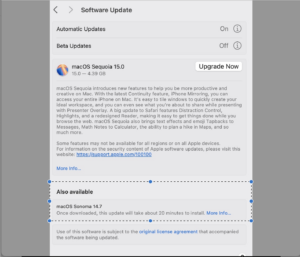
Upgrade to Sonoma’s latest version by clicking more info where it says Sonoma 14.7 at the bottom
Yes. Any MacOS from High Sierra through more recent versions is supported, including Sonoma. This includes the newest version of Sonoma, 14.7. LSAC has confirmed that Prometric supports 14.7 and all versions of Sonoma.
You can update Sonoma instead of upgrading to Sequoia by looking at the bottom where they say Sonoma and clicking more info.
What about Ventura and earlier systems?
Ventura and earlier are fine. The only exception is Ventura 13.0 to 13.21. These are legacy versions and almost no one is on these system. If you are, then upgrade to a later version of Ventura.
When can I update to MacOS Sequoia?
I would wait for an announcement from LSAC or Prometric. Last year a fix came within a month or so.
What if I already upgraded?
There’s unfortunately no good solution. I would take the test in a testing center, or borrow a computer.


Leave a Reply