LC Easy

LC Easy 4.0 is an application that students and staff can use to learn how to understand the LC Classification system. It is designed in a game format and is readily available to here:

Windows App

This does not require a download nor any kind of installation on a local machine. But if you launch the program and you get denied access, please submit an INFORM. What that means is the user attempting to run LC Easy has not been added to the group authorized for access. Currently all student workers should have access as well as most Fulfillment staff.

Camtasia and Snagit

Have you been using Camtasia and/or Snagit to create materials?  TechSmith,  the creators or software,  has moved away from a standard perpetual license to a subscription model.  As a result,  we have moved to ScreenPal which includes both screen capturing and video recording in one package. ScreenPal (Screen-cast-matic) has been used by some staff for several years successfully.   Although this software also uses a subscription model for licensing it is much more reasonable for very similar functionality.  Please contact LTAS if you have any questions.

Why INFORM?

Often Library personnel will contact members of the LTAS staff directly for assistance. As members in this service profession, we are not going to turn you down, but we will often ask you to submit an INFORM or create a ticket for you. You may wonder, “Why do we do this?”

First and foremost, LTAS staff often are in the middle of tasks or meetings, conferences or even on vacation. So if you want to get your issue seen, always submit an INFORM. But then if there has been no movement within 72 hours, contact one of us and we will see what is going on.

Second, LTAS is staffed by multiple personnel who can assist – you should not rely upon one individual. Please make use of INFORM so the work can be distributed as needed.

Third, we really would like for you, the user, to submit the INFORM since only you can describe what you are experiencing. Having someone else submit the ticket for you often causes confusion and/or a back-and-forth exchange as we try to get more information. When submitting tickets, please provide as much details as possible so we do not have to approach you again with clarification. Otherwise, this will delay in resolving your issue.

And finally, we need to be able to objectively state we have been able to serve our users and one of the best ways we can do that is through INFORM. By providing this essential data, we are able to track issues and our responsiveness to resolving those issues. We can also track the volume and any possible patterns. For instance, the start of the semester we normally see an uptick in tickets so we need to plan for this accordingly.

So to address the question, “Why do we do this?” – it’s for your benefit, the user, in the long run. Work with us and help us make Vanderbilt Libraries the best place to work at Vanderbilt!

Directly accessing a network share

There are times when you need to access a network share, but you don’t need to have it mounted as a drive. There is an easy way to do this and here are the steps.

First, go to File Explorer. This is the folder at the bottom of your task bar in Windows 11:

Windows 11 File Explorer button
You’ll get something that looks similar to this:
File explorer window
At the top, where it shows “Home”, you will want to put the address of the network share you want to access:
Network share to access via file explorer
If you have been granted access, once you hit return, it should populate File Explorer with the folders in that share. Then, once you are finished with what you are doing and you close out File Explorer, that share will not be mounted as a drive. This is just a quick way to access a network share. If you have any questions about this, please do not hesitate to contact us.

Adding a Shared Exchange Mailbox to Outlook 365

Adding a Shared Exchange Mailbox to Outlook 365 is a little different from previous versions of Outlook. Here is a little step-by-step guide on accomplishing this task.

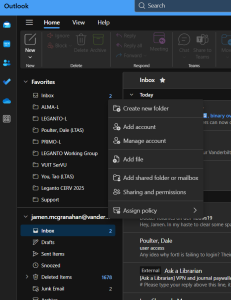
  1. Start Outlook 365 and next to your name, click the button with the 3 dots:

Outlook 365 More menu options

2. Click on the “Add shared folder or mailbox” option:

Add shared folder or mailbox prompt

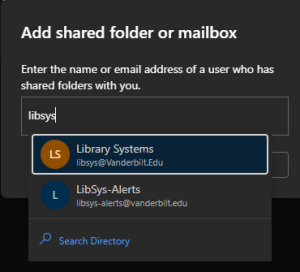
3. Enter the email address of the shared mailbox:

Begin entering the email address of the shared exchanged mailbox.

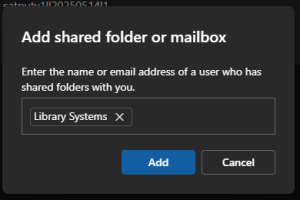
4. If Outlook recognizes the email address, it will pop up. Just click the one that you want and then select Add:

Outlook 365 identifies mailbox

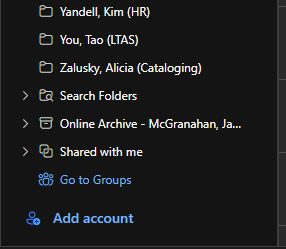
5. Now back in Outlook 365, in your list of folders, look for “Shared with me” folder:

Where to find your Shared Exchange Mailbox? Look in the "Shared with me" group near bottom of the listing of folders.

6. Expand that folder:

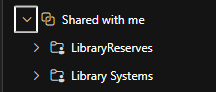
Expand the Shared with me group to see all of the Shared Exchange Mailboxes you have added.

And this is where your Shared Exchange Mailboxes are located.

LTDS is now LTAS

Library Technology and Digital Services (LTDS) name has changed to Library Technology and Assessment Services (LTAS) to emphasize the addition of library assessment. The team continues to support all library systems and digital initiatives. Over the next few weeks, we will update various websites to reflect the change. Please let me know if you have any questions or concerns. Thank you.

LTAS Team Members:
Dale Poulter ÔÇô Director
Jamen McGranahan ÔÇô Associate Director
Matt Dillingham ÔÇô Web developer
Jodie Gambill ÔÇô Web Development Lead and Librarian for Digital Projects
Lee Ann Lannom ÔÇô Assessment Librarian
Seeraj Somla ÔÇô Associate Cloud Engineer
Scott Walker ÔÇô Library Web Applications Administrator
Tao You ÔÇô Librarian for Assessment and Digital Projects

The full organizational chart for the Library is available here.

LTDS Second Quarter Fiscal Year 2023

Library Technology and Digital Services (LTDS) Second Quarter Fiscal Year 2023 (October 1, 2022 ÔÇô December 31, 2022)┬á

This second quarter of fiscal year 2023 was busy for the team but they also had the opportunity to take a break for the holidays. The team was able to complete several projects (tasks requiring more than 40 hours of work) and still resolve an impressive number of INFORM tickets.
  

A few of the projects that LTDS completed during the past quarter are:  

  • Completed implementing new campus branding on LTDS managed sites.┬á
    • Brings the library into compliance with campus guidelines.┬á
  • Performed an additional upgrade of ArchivesSpace and continued work to integrate with other systems.┬á
    • Assures that security patches are applied and allows us to continue to work towards a more inclusive discovery environment.┬á
  • Completed cleanup of diacritics for the Green Glass process┬á
    • This was required for the project to move forward.┬á
  • Completed testing of the AWS storage gateway┬á
    • The AWS Storage Gateway (ASG) will provide growth opportunities for the library digital collections.┬á
  • Completed migration of common area phones┬á
  • Created new quarterly report site for ACE┬á
    • This new site will enable ACE to publish information about the library.┬á┬á
  • Upgraded all Omeka instances┬á
  • Created display for Occuspace data┬á
    • Provides a tool to determine where study space is available.┬á
  • Officially completed Alma-D implementation┬á
    • Alma-D allows users to access some items, such as digital scores, directly through Primo.┬á
  • Completed automation of BPA record additions to Fedora.┬á
  • Completed updates to the staff directory┬á
    • This updated to staff information with contact changes that have occurred over the last few years. The form remains available for future changes.┬á
  • Implemented new solution for email processing in INFORM┬á


 Partnerships:  

LTDS continues to work with other groups in the libraries, on campus, and in the broader library community. Selected partnerships during the first quarter are listed below.  

  • ACE on the web migration project. This project is co-chaired by Jodie Gambill and Kristina Bisbee and will migrate the primary library website from Omni to WordPress.┬á┬á
  • SCUA and Digital Preservation to develop improved workflows for assuring that digital collections are preserved and discoverable.┬á┬á┬á
  • VUIT Genesis project to complete migration of library application authentication to the new campus system. These changes allow us to continue to use VUNetIDs for authentication.┬á┬á
  • PSI and Center for Teaching to maintain LTI integration between Leganto and Brightspace.┬á
  • Digital Strategies to utilize the new campus web templates and deploy the new server.┬á┬á┬á
  • VUIT Cloud Services team and VUIT Storage team to explore storage options for the growing needs for library digital collections.┬á┬á
  • VUIT Desktop Engineering continued collaboration to support library staff and circulating laptops.┬á┬á


LTDS by the numbers:   

  • Number of Proxy Sessions:┬á 162,713┬á
  • Number of Informs Resolved: 452┬á┬á
  • Number of servers managed: 35+┬á┬á┬á
  • Number of items added to Fedora:┬á 73,482┬á
  • Number of sites and applications managed: 150+┬á


During the coming months LTDS will continue to work on several projects including:  

  • Creating a set of tools for staff to assist in sharing metadata from digital objects between systems┬á┬á
  • Continued work to migrate resources from older systems to current technologies.┬á
  • Increased transparency concerning storage use┬á
  • Migrate additional digital content to the storage gateway┬á


Inability to Access Oracle Due to a Locked Account

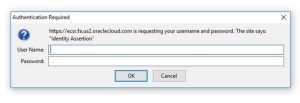
We have had reports of users receiving the a popup window upon attempting to login:

authentication popup

Recommended action/workaround:

Please note that users should only enter their VUnetID and ePassword for Oracle login through the Vanderbilt Single Sign-On screen.

If you see a pop-up window or prompt for VUnetID on a screen other than the Single Sign-On page, DO NOT enter your VUnetID and password there – this can lock your account.┬á Please clear your browser history, close and reopen your browser, and then reattempt login from the SkyVU webpage – the link there is:┬áhttps://oraclecloud.vanderbilt.edu/

If you have already entered your VUnetID and password on this page, please email [email protected] to have your account unlocked.


A LibrarianÔÇÖs Guide to Cybercrime Mitigation – Review

Yesterday, I attended the Choice webinar, “A LibrarianÔÇÖs Guide to Cybercrime Mitigation” and it was one of the more rewarding webinars I have attended. It reminded me of why we do the things we do when it comes to security. I would encourage any and all Library staff to watch the recording, found here:

https://www.choice360.org/webinars/a-librarians-guide-to-cybercrime-mitigation/

They provided several tools that can help you yourself protect your digital footprint. From checking how secure your password might be to seeing if a website is malicious or not. Here are a few of the tools mentioned:

How secure is my password? https://www.security.org/how-secure-is-my-password/

Check if sites have been reported malicious: https://www.virustotal.com/gui/home/url

Check to see if your email address has been a part of a data breach: https://haveibeenpwned.com/

Please, secure your passwords; use a password manager; donÔÇÖt re-use passwords; and above all else, donÔÇÖt leave passwords laying around on sticky note! ­ƒÿè

LTDS First Quarter Fiscal Year 2023 

LTDS First Quarter Fiscal Year 2023 (July 1, 2022 – September 30, 2022)


This first quarter of fiscal year 2023 was another productive period for LTDS (Library Technology and Digital Services). The team was able to complete several projects (tasks requiring more than 40 hours of work) and still resolve an impressive number of INFORM tickets.
 

A few of the projects that LTDS completed during the past quarter are: 

  • Migrated systems using LDAP authentication to the new LDAP authentication servers┬á
    • This will allow us to continue to access resources using the campus LDAP instance. ┬á┬á
    • The change does not allow VUMC users to access some resources due to information not being available in the system. ┬á
  • Migrated the Digital Commons website to the library website┬á
    • Allows the Digital Commons resources to be available and the web presence maintained through the library website.┬á
  • Redeveloped Primo views to utilize the upgraded software provided by Ex Libris┬á
    • Ex Libris changed the version of the programming language (AngularJS) that is used to present the Primo interface. ┬á┬á
    • Several parts of the Vanderbilt code needed to be adjusted to maintain compatibility with the recent changes.┬á
  • Upgraded ArchivesSpace┬á
    • The updated version of ArchivesSpace provides a foundation for new services in the coming years.┬á
  • Began use of CloudFront distribution┬á
    • The CloudFront distribution (CDN) provides a central repository for library web assets. This AWS (Amazon Web Services) based system allows for core web elements (branding, menus, styles, etc.) to be changed in one place and reflected across all library sites utilizing the CDN. ┬á
    • The next project is to incorporate the CDN into additional systems.┬á

Partnerships: 

LTDS continues to work with other groups in the libraries, on campus, and in the broader library community. Selected partnerships during the first quarter are listed below. 

  • ACE on the web migration project. This project is co-chaired by Jodie Gambill and Kristina Bisbee and will migrate the primary library website from Omni to WordPress.┬á
  • SCUA and Digital Preservation to develop improved workflows for assuring that digital collections are preserved and discoverable. ┬á
  • VUIT Genesis project to complete migration of library application authentication to the new campus system. These changes allow us to continue to use VUNetIDs for authentication.┬á
  • PSI and Center for Teaching to implement the improved LTI integration┬ábetween Leganto and Brightspace.┬á
  • Digital Strategies to utilize the new campus web templates and deploy the new server. ┬á
  • VUIT Cloud Services team and VUIT Storage team to explore storage options for the growing needs for library digital collections.┬á
  • VUIT Desktop Engineering continued collaboration to support library staff and circulating laptops.┬á


LTDS by the numbers:  

  • Number of Proxy Sessions: 145,166┬á
  • Number of Informs Resolved: 697┬á
  • Number of servers managed: 35+ ┬á
  • Number of items added to Fedora: 484┬á
  • Number of websites rebranded: 110+┬á
  • Number of sites and applications managed: 150+


During the coming months LTDS will continue to work on several projects including: 

  • Creating a set of tools for staff to assist in sharing metadata from digital objects between systems┬á
  • Adding information about space usage in the libraries to the website.┬á
  • Adding additional storage capacity to digital collections.┬á
  • Continued work to migrate resources from older systems to current technologies.┬á