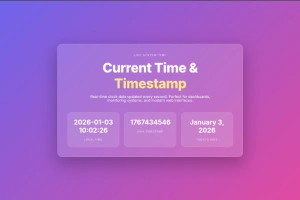
Current Time
It’s a dynamic widget that prints the exact server or local time, updating automatically. Display just the date, just the time, or both in any format you choose. Use standard WordPress formatting, or craft your own custom string. Then, style it to fit your site’s design perfectly. Perfect for current local time displays, event pages, or any place where showing “now” matters.
Time Format Flexibility
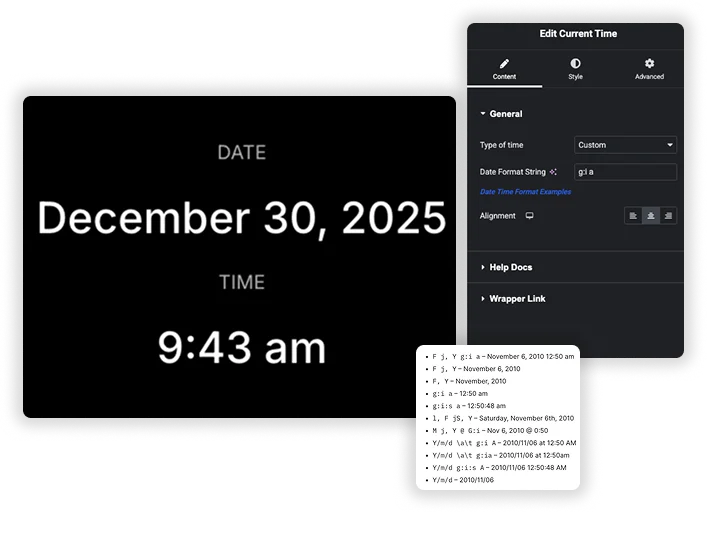
Don’t be boxed in by a few rigid date formats. With support for standard WordPress time format strings, you have endless possibilities. Choose a pre-defined Type (Custom, mySQL, Timestamp) and then fine-tune. Use the intuitive format string builder or enter your own pattern. Want a classic "F j, Y" (December 14, 2025)? Or a compact "Y/m/d \a\t g:i a" (2025/12/14 at 5:01 pm)? You can do it all. This ensures your displayed time matches your site’s tone, whether formal, minimalist, or technical.
- Multiple Format Types: Select from Custom, mySQL, and Timestamp bases for your time data.
- WordPress Format Standard: Use the powerful, familiar PHP date formatting strings (e.g., l for full weekday name, F for full month).
- Live Examples: Reference common format examples directly in the settings to copy, paste, and modify.
Advanced Typography & Text Styling
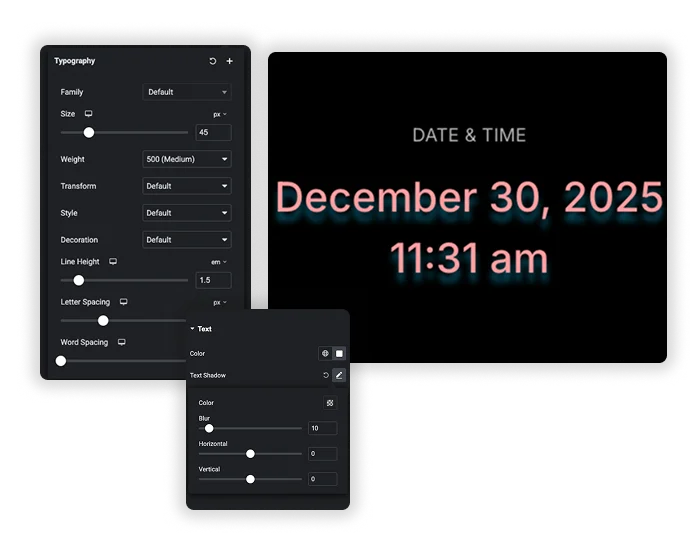
A timestamp shouldn’t just be informational – it can be beautiful. Take full design control over the dynamic text. Use the comprehensive Typography panel to choose the perfect font Family, Size, and Weight. Make it bold and large for emphasis, or small and subtle for footer copyrights. Adjust Letter Spacing and Line Height for premium readability. Then, apply Text Color and add a Text Shadow to make it pop against any background. This turns a simple time display into a considered part of your page’s visual hierarchy.
- Professional Typography: Full control over Font Family, Size, Weight, and Style.
- Detailed Text Spacing: Fine-tune Letter Spacing and Word Spacing for a custom, polished look.
- Visual Effects: Apply Text Color and dynamic Text Shadow for depth and contrast.
Simple Alignment & Clean Integration
The final touch is placement. Use the simple Alignment controls (Left, Center, Right) to position your Current Time element exactly where it needs to go in its container – no extra CSS needed. This, combined with your typographic styling, allows the element to integrate cleanly into headers, footers, sidebars, or hero sections. It provides vital, auto-updating information while looking like it was always a native part of the design.
- One-Click Alignment: Instantly align your time text Left, Center, or Right within its widget area.
- Context-Aware Design: Style and align it to work perfectly in a bold page header or a discreet copyright line.
Frequently Asked Questions For Current Time
What time does this widget actually show?
By default, it typically displays the time based on your website server’s timezone, which is set in your WordPress Settings > General . This ensures consistency for all visitors. For “local time” displays, you would usually need a different, JavaScript-based solution.
How often does the displayed time update?
The time updates automatically each time a visitor loads or refreshes the page. It is a server-side dynamic shortcode/widget. It does not “tick” like a live clock in real-time on the page unless custom JavaScript is added. It’s perfect for “Page generated on…” timestamps or daily date displays.
Can I use this to show a time in the future or past?
No, this element is specifically designed to show the current date and time at the moment of page load. To display a fixed future or past date (like an event date), you would use a static Text widget or the Countdown Timer element for future dates.
What's the difference between the "Custom", "mySQL", and "Timestamp" types?
- Custom: Lets you input any WordPress/PHP-style format string (e.g., F j, Y).
- mySQL: Outputs the time in the standard MySQL datetime format (Y-m-d H:i:s – 2025-12-14 17:01:11).
- Timestamp: Displays the raw Unix timestamp (e.g., 1734202871), which is the number of seconds since January 1, 1970. Useful for technical or development contexts.
What's a good format for a copyright line in my footer?
A clean, professional format is \© Y Master Addons. This would output: © 2025 Master Addons. The \ escapes the copyright symbol, and Y shows the full current year. It will automatically update every January 1st.
Can I show the time in a different language?
The format codes (like F for month) output text in your site’s defined language from WordPress. If your site is translated (using a plugin like WPML or Polylang), the month and day names should appear in the chosen language. The format itself remains the same.
Where are the best places to use this element?
- Footer Copyright: Y for the auto-updating year.
- News/Blog Sidebar: “Today: l, F j, Y” to show the full date.
- “Last Updated” timestamp on documentation or policy pages.
- Event Pages: To show the current date relative to the event date.
- Dashboard/Admin Areas: Using the H:i format for a clean time display.
Some Format String Examples
Here are some examples of date format with the result output from WordPress Docs.
- F j, Y g:i a – November 6, 2010 12:50 am
- F j, Y – November 6, 2010
- F, Y – November, 2010
- g:i a – 12:50 am
- g:i:s a – 12:50:48 am
- l, F jS, Y – Saturday, November 6th, 2010
- M j, Y @ G:i – Nov 6, 2010 @ 0:50
- Y/m/d \a\t g:i A – 2010/11/06 at 12:50 AM
- Y/m/d \a\t g:ia – 2010/11/06 at 12:50am
- Y/m/d g:i:s A – 2010/11/06 12:50:48 AM
- Y/m/d – 2010/11/06
Trending Elementor Widgets & Extensions
Build sophisticated websites in less time.
Popup Trigger
Off-Canvas Content
Caldera Forms