Icon of program: MathType

MathType for Windows

  • Trial version
  • 3.7
    3447
  • 1.5M
  • V7.10.1.458
Image

Swati Mishra

Updated last week

Professional tools for math and science

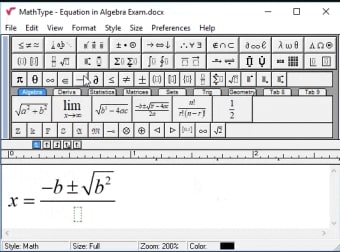
Finding a reliable way to write complex formulas in digital documents can be a significant challenge. And for that, MathType can help. It is widely recognized as a leading educational reference and solution for students and teachers who need high-quality scientific notation for their academic work and professional reports.

Whether you are working on a complex thesis or preparing an interactive classroom lecture, MathType offers a vital bridge between manual calculation and digital presentation. It integrates seamlessly into the apps you already use, making the transition to professional formatting smooth and efficient for all students, educators, and technical researchers.

Powerful features

MathType’s standout feature is the AI-powered handwriting tool. This is incredibly helpful for anyone using a touch device, as it converts natural handwriting into editable formulas instantly. You can easily switch between math and chemistry symbols with the built-in ChemType toolbar. While the integration with Microsoft Word and PowerPoint is seamless, some users might find the initial setup slightly technical depending on their specific learning management system or web platform.

The sheer volume of symbols available is impressive, with over 500 specialized characters for matrices and multiline equations. This ensures that every statistical or mathematical requirement is met with precision. However, it is important to note that because it is a premium tool, there is a subscription cost after the trial period ends. This is a downside for casual users who only need to write occasional simple equations.

Professionals and technical writers will appreciate the XML and HTML editor support, which allows for consistent scientific content across web platforms. The interface is designed to keep documentation neat and presentable, saving hours of manual formatting. Despite these benefits, a potential drawback is that the desktop version can occasionally feel a bit dated compared to modern web apps, though its deep functionality and reliability usually outweigh this aesthetic concern.

Elevate your scientific needs

MathType remains a top choice for anyone serious about clear and professional mathematical documentation. Its ability to simplify complex notations across multiple platforms makes it an essential tool for educators and scientists alike. While there is a learning curve for some advanced features, the 30-day free trial provides an excellent opportunity to explore how it can transform your workflow and improve your digital document clarity.


Image

Swati Mishra

Swati has over a decade of experience in content strategy, SEO, and editorial writing across technology and travel. She specializes in technical reviews, structured guidelines, and long-form pieces. Her work focuses on clear organization, search intent, and practical takeaways for readers evaluating software and digital tools.

  • Pros

    • AI handwriting recognition for touch devices
    • Seamless integration with Microsoft Office apps
    • Access to over 500 specialized symbols
    • Built-in ChemType for chemistry notations
  • Cons

    • Subscription required after the free trial
Image
 0/2

App specs

Program available in other languages


Icon of program: MathType

MathType for PC

  • Trial version
  • 3.7
    3447
  • 1.5M
  • V7.10.1.458

User reviews about MathType

3.7

12 reviews

Add review

Main reviews for you

  • Image

    Anonymous user

    Yes its very good..very easy to type the sums with all sins and symbols

  • Image

    Anonymous user

    It is easy to use even newly qualified teachers can be trained to use it early enough.

  • Image

    Anonymous user

    It is very helpful in typing long and very complicated equations, specially for those who are working in robotics, nonlinear dynamics, and Mathematics (of course),

  • Image

    Anonymous user

    Great good one i love this one and its easy to use this one i have send to all my friends

  • Image

    Anonymous user

    It's not only suitable for putting things in a legible form, but it's also good for actually doing long computations.

  • Image

    Anonymous user

    Mathtype is good softwere for the math calculation and we can type easily math equation thanks,

More

You may also like

Alternatives to MathType

Explore Apps

Latest articles

Laws concerning the use of this software vary from country to country. We do not encourage or condone the use of this program if it is in violation of these laws.


Softonic

Is MathType safe?

100/100

Score result: Clean

This file passed a comprehensive security scan using VirusTotal technology. It is safe to download.

  • Virus free
  • Spyware free
  • Malware free
  • Verified by Security Partners

    VirusTotal logo

Scan Info

Last scan
Tuesday, November 25, 2025
Scan provider
VirusTotal · Full report

File Integrity

File
MathType_win_en-7.10.1.458.exe
SHA256
dadc5fb8e08b376065bc4d922744a7553ea4deef77e9d16c67a7f0a435299dd0
SHA1
f6ab1d9639b986347faacf7f7b66502af78feabc

Softonic security commitment

MathType has been thoroughly scanned by our advanced security systems and verified by industry-leading partners. This file comes from the official developer and has passed all our security checks, showing no signs of viruses, malware, or spyware. For more information, visit our Security and Trust Center