MBconnect24 –

Account request

01

Download mbDialup

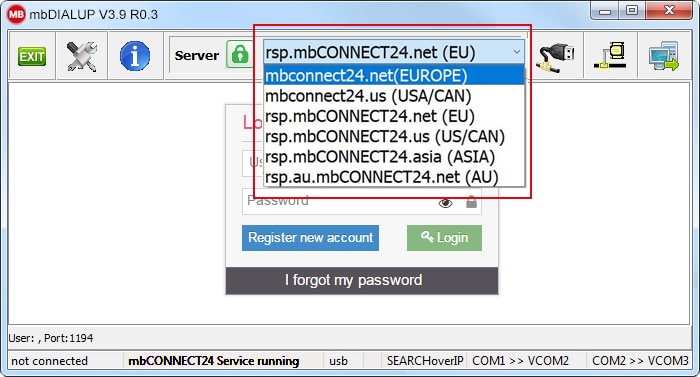
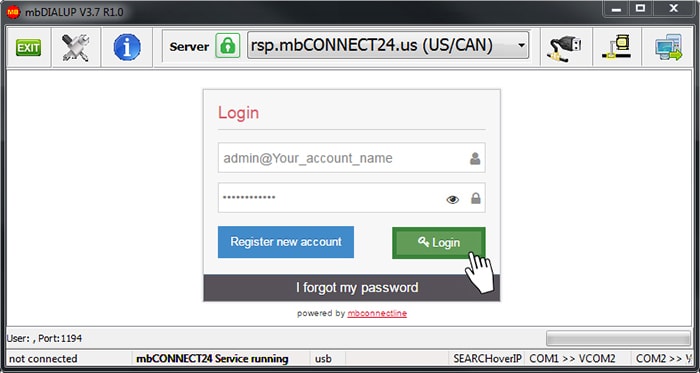
Download and install the latest version of mbDIALUP software in our download portal. Open the mbDIALUP software and select the appropriate server location from the drop-down menu.
Image
Image
Image
02

Register your personal account

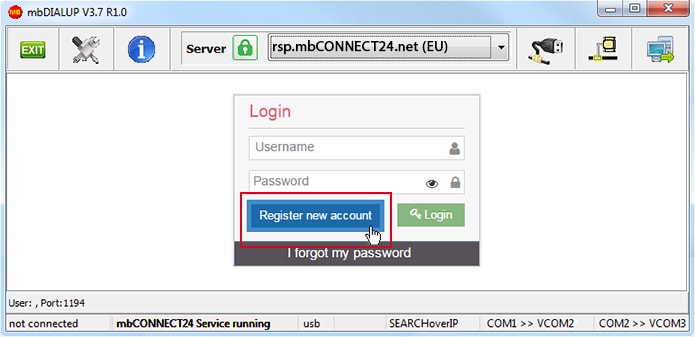
Click “Register new account” and fill in the registration data. At the end, you will receive an activation email with a link to activate your account.

03

Log in to your account

Enter your access data and click on “Login”. In a few seconds you are connected to your customer account.
Image

You can find out how you can now configure your routers and get online, in the following manual:

Find your sales partner

Find your personal contact person in your area.

Start your remote services

Are you looking for an all-in-one solution? Try our web-based remote access portal today.

u

We are here to help you

Questions? We can help you. For direct support, you can also call us.

mbTECHWIRE

Stay informed: updates to our hard- and software, bug fixes, and the latest security patches.

You have questions?

Write us!

Allgemeine Anfrage EN

Callmeback

Image

As an expert for secure remote access, IIoT and industrial security, we are committed to the highest standards in cyber security and the protection of industrial control systems.

With certifications such as IEC 62443-4-1, we are demonstrating a strong commitment to quality, security and trust in our development processes and products.

Our DNA: 100% IT-Security
for more than 25 years.

Image
MB connect line GmbH

Winnettener Str. 6
91550 Dinkelsbühl
Germany

Contact
Follow us