
Description
aBlocks is the all in one WordPress website builder that lets you design complete websites, themes, GSAP animations, user dashboards, forms, Popups, and dynamic layouts — all inside the WordPress default editor (Gutenberg)
With over 100 powerful blocks and deep customization control, aBlocks lets you build fully animated(GSAP-powered) websites, user login and dashboard pages, dynamic content layouts, advanced forms, pop-ups, coming soon and maintenance modes, and complete store or course websites — all without relying on multiple plugins. Every block comes with rich styling, animation, and layout controls, so you can shape your site exactly the way you want.
What You Can Build with aBlocks?
aBlocks is built to replace everything you need to build and scale a WordPress website.
Instead of stacking plugins for design, layout, animation, forms, dashboards, performance, and launch control, aBlocks delivers one connected system inside the Gutenberg. That’s why aBlocks works as a true all-in-one website and theme builder — not just another block plugin.
With aBlocks, you can build:
aBlocks offers a comprehensive collection of highly customizable Gutenberg blocks to elevate your WordPress website. Whether building a simple blog or a complex website, aBlocks provides the flexibility and control you need.
- Fully customized websites with advanced layouts, rich design controls, and smooth animations — from simple sites to complex platforms.
- User dashboards for stores, courses, memberships, or SaaS-style websites, including custom login, registration, and profile pages.
- GSAP-powered Animated websites and landing pages with smooth scrolling, hover effects, motion sections, and interactive elements that feel modern and alive.
- Dynamic content layouts using loop-based templates for blogs, products, courses, listings, and repeatable sections.
- Advanced store and course websites with custom product pages, carts, checkout sections, course grids, enrollment pages, and student views.
- Coming soon and maintenance systems with fully designed pages and proper site visibility control.
- All types of forms, including login, registration, contact, lead collection, subscription, and multi-step forms — built with full layout and style control.
- Popups, modals, payments, and interactive elements to turn static pages into conversion-focused experiences.
- Fast, flexible layouts built with 100+ powerful blocks — each block offering deep customization, animation options, and precise control.
- Top-level lightweight performance with smart asset generation, where only the styles and scripts you actually use are loaded — no unused code, no builder bloat.
- A large library of pre-made templates, pages, and patterns, with a built-in demo importer so you can launch complete designs instantly and customize everything your way.
Check our overview video of aBlocks 👇
Who aBlocks Is For
- Business websites: For companies that need flexible layouts, strong visuals, and fast-loading pages without design limits.
- Agency & client sites: Build different site types quickly, customize everything deeply, and hand over clean, manageable sites to clients.
- eCommerce stores: Design product pages, carts, checkout flows, and customer areas visually instead of being locked into theme templates.
- LMS & education websites: Create course listings, enrollment pages, student areas, and instructor sections with full layout and motion control.
- Membership & community sites: Build custom login, registration, profile, and member dashboards that feel like real platforms, not basic pages.
- User Dashboard Builder: Design frontend user dashboards, account areas, and role-based experiences directly in WordPress.
- Blogs & content-driven sites: Use dynamic layouts, loop-based templates, and structured designs without heavy builders.
- Marketing websites & landing pages: Create animated, conversion-focused pages with forms, popups, and payment actions built in.
- Portfolio & personal sites: Showcase work with motion, interaction, and full visual control — without performance issues.
- Performance-focused websites: For site owners who care about speed, clean output, and scalable performance as the site grows.
- Anyone tired of using 10+ plugins: For layouts, forms, popups, animations, dashboards, coming soon pages, and performance fixes — all handled in one system.
Why aBlocks Is Different from Other Builders
If you want visual design, you can use Elementor.
If you want speed, you can choose Spectra.
If you want a no-code builder, Divi can work.
If you want something clean and stable, Beaver Builder is ok.
If you only need landing pages, SeedProd is enough.
But if you want all of these together, in one place, aBlocks is the answer.
aBlocks brings visual freedom, performance, no-code building, stability, and conversion tools into a single all-in-one WordPress website builder. This is what makes aBlocks fundamentally different from every other builder.
And it doesn’t stop there. aBlocks includes deep customization controls, built-in animation and effects, a powerful dashboard builder, an advanced form builder, dynamic content with loop layouts, modal and popup creation, smart asset generation for fast performance, coming soon and maintenance modes, a large library of pre-made templates, pages, and patterns, plus a built-in demo importer — all in one system. Together, these features replace the need for 20+ separate plugins.
This all-in-one capability is what truly sets aBlocks apart. If you are choosing a plugin for a startup that you plan to grow and scale in the future, aBlocks is a confident, long-term choice. It doesn’t just give you what you need today — it already includes what you’ll need as your website grows. And with every new release, aBlocks continues to expand these capabilities even further.
Launch & Visibility Control System
aBlocks includes a built-in system to control when and how your website is visible — without using a separate plugin. You can enable Coming Soon mode or Maintenance mode and design those pages directly inside the gutenberg.
It supports SEO-safe Coming Soon pages, proper 503 Maintenance mode, and page-level visibility control, so you can launch, pause, or update your site with full control and clean structure.
GSAP powered WordPress Animation & Motion System
aBlocks includes a built-in motion control system inside the WordPress default editor (gutenberg). Every block supports scroll-based motion, hover and mouse effects, sticky behavior, entrance animations, floating effects, transform controls and more.
For advanced needs, aBlocks adds native GSAP-powered animation right inside the gutenberg. You can trigger GSAP effects on scroll, hover, click, or interaction events directly from block settings, without writing code or installing animation plugin.
Result: WordPress Gutenberg animation revolution by aBlocks
Professional-grade, smooth, high-performance GSAP animations in WordPress — fully visual, fully controlled, and optimized for speed.
Dashboard Builder
aBlocks lets you build real user dashboards, not just styled pages. You can design custom login, registration, password reset, and account pages, then connect them into a complete frontend dashboard — fully inside the gutenberg.
With role-based layout control and dynamic content support, you can create store dashboards, LMS student panels, instructor areas, membership accounts, or SaaS-style user frontend dashboards that look and work like modern apps — not confusing WordPress admin pages
Performance by Design (Smart Asset Generation)
aBlocks is built for speed from the core. It uses smart asset generation, which means your website loads only the styles and scripts that are actually used on each page — nothing extra, nothing unused.
Every block generates its own CSS and JavaScript only when needed. Editor assets stay in the editor, frontend assets stay on the frontend. This keeps pages clean, lightweight, and fast, even as your site grows.
👉 What this means for you:
– Faster loading pages
– No builder bloat
– Better Core Web Vitals
– Smooth performance on large sites
You don’t need extra performance plugins just to fix builder overhead. With aBlocks, performance is designed into the system, not added later.
Forms, Popups & Conversion Tools
aBlocks lets you collect data, trigger actions, and drive conversions without relying on separate form or popup plugins. You can build login, registration, contact, lead collection, subscription, survey, and multi-step forms directly inside the gutenberg — with full control over layout, styling, and behavior.
Alongside forms, aBlocks includes a built-in modal and popup builder for announcements, offers, gated content, and user actions. You can also add Stripe and PayPal buttons, countdowns, notifications, and call-to-action elements to turn static pages into interactive, conversion-focused experiences.
Templates, Pages & Pattern Library with Demo Importer
aBlocks includes a complete library of ready-made templates, full pages, and reusable patterns. You can import an entire page, a specific section, or a layout pattern with one click, then customize everything freely without restrictions.
Unlike many builders that require separate demo importer plugins or only offer partial templates, aBlocks provides templates, pages, and patterns together, with a built-in demo importer. This means you can launch full website designs instantly — then adjust structure, styling, animation, and content without adding any extra plugins.
aBlocks — Blocks That Build Real Websites
aBlocks includes 100+ powerful blocks designed to build complete websites, systems, and user experiences — not just page sections. Every block comes with advanced layout control, animation support, and deep customization, so you can create complex structures, dynamic content, and interactive interfaces without stacking extra plugins.
Creative Blocks
- Image Comparison: slider-based before/after views with hover and drag control
- Accordion & Tabs: clean content organization with animation and interaction control
- Countdown & Counter: time-based and number animations for urgency and highlights
- Video & Player: styled video embeds with layout and interaction options
- Code Highlighter: display styled code snippets for docs, tutorials, or dev-focused pages
- Stacked Cards: create layered, scroll-driven card layouts with depth and interaction
- Image, Featured Image & Image Scroll: full control over display, motion, and effects
- Image Hotspot & Flip Box: interactive content reveal with hover and click actions
- Content Timeline & Progress Tracker: step-based and journey-style layouts
- Carousel & Stacked Cards: animated content sliders and layered visual sections
- Info Box & Filterable Cards: structured content blocks with dynamic filtering
- SVG Draw & Lottie Animation: vector and motion graphics with smooth animation
- Marquee & Text Path: moving text and curved text effects for creative sections
- Chart & Table: visual data presentation with layout control
- Simple & Mega Menu: advanced navigation layouts for complex sites
- Loop Builder & Dynamic Text: dynamic content layouts powered by real data
- Breadcrumb, Scroll To Top & Logout: UX-focused blocks for navigation and user flow
- Frontend Dashboard: interactive dashboard layouts built visually
Content Blocks
- Heading: advanced typography, multi-color text, animations, and link support
- Paragraph: rich text styling with spacing, animation, and layout control
- List: styled lists with icons, spacing control, and clean content flow
- Advance Lists: feature-style lists with icons, alignment, and visual emphasis
- Button: fully customizable buttons with hover effects, icons, and animations
- Dual Button: two-action buttons with balanced layout and interaction control
- Toggle: switchable content blocks for clean, interactive layouts
- Icon: scalable icons with color, size, hover, and animation control
- Star Ratings: visual rating display for reviews, products, and feedback
- Table of Contents: auto-generated navigation for long pages and articles
- Search: styled search layouts with flexible placement and design control
- Container: advanced layout wrapper with spacing, alignment, and responsive control
- Spacer: precise spacing control without breaking layout flow
- Divider: styled separators with size, color, and layout control
- Taxonomy Listing: dynamic display of categories, tags, or custom taxonomies
Form Blocks
- Form Builder: one flexible system to create any type of form with full layout, style, and logic control
- Login, Registration & Password Forms: user access flows built visually — login, signup, reset, and account actions
- Contact, Newsletter & Lead Forms: simple to advanced lead collection with full design and field control
- Single-step & Multi-step Forms: clean forms or guided step-by-step flows for better completion rates
- Conversational, Survey & Quiz Forms: interactive, question-based forms that feel natural and engaging
- Order, Payment & Donation Forms: collect orders, payments, or donations directly from the page
- Feedback & Custom Forms: fully customizable forms for any custom workflow or business need
Academy Blocks
- Course Grid & Course Search: dynamic course listings with filters, layouts, and real-time data
- Enroll Form & Enroll Content: custom enrollment sections with full layout and style control
- Student Registration & Instructor Registration Forms: role-based onboarding flows built visually
- Login Form & Password Reset Form: custom access pages connected to your learning system
- PDF Embed & Course Media: lesson materials, videos, and documents displayed cleanly
- Course Curriculum & Course Description: structured lesson layouts with flexible presentation
- Course Instructor & Additional Info: instructor profiles and metadata shown dynamically
- Course Reviews, Reviews Form & Reviews List: collect and display feedback inside your site
- Certificate Builder: generate and display course certificates with custom design
eCommerce Blocks
- Products, Product Summary & Product Description: flexible product layouts with full design and content control
- Add To Cart, Continue Button & Checkout Button: conversion-focused actions designed to guide users smoothly
- Cart List, Mini Cart & Cart Sub Table: real-time cart views with clear structure and easy customization
- Checkout Form, Billing Info & Shipping Info: fully customizable checkout sections without theme limits
- Order Details & Order Info: clean order summaries that improve post-purchase clarity
- Product Filter & Coupon Form: smarter browsing and promotions to boost conversions
- Product Review & Cart Notice: trust-building feedback and timely user messages
Pro Controls
- Display Condition: show or hide content based on user role, login state, device, page, or rules
- Motion Effects & Scrolling Effect: animate elements on scroll with smooth, controlled movement
- Mouse Effects: react to cursor movement for interactive, modern UI
- Sticky & Floating Effect: keep key elements visible or floating while users scroll
- Tooltip: show contextual info on hover without cluttering layouts
- Group Image Effect: apply shared motion and effects across multiple images
aBlocks Replaces Multiple Plugins
aBlocks is designed to reduce plugin dependency, not increase it. Instead of stacking different tools for design, animation, dashboards, forms, popups, performance, and launch control, aBlocks brings these capabilities into one connected system — built to work together from the start.
With aBlocks, you can replace the need for:
Page builders – visual layouts, advanced blocks, responsive control
Theme builders – headers, footers, templates, dynamic layouts
Dashboard plugins – frontend user dashboards, login, account pages
Animation plugins – scroll, hover, motion, GSAP-powered effects
Popup & modal plugins – popups, modals, notices, interactions
Form plugins – login, registration, lead, payment, survey forms
Coming soon plugins – coming soon & maintenance modes
Performance helpers (partially) – smart asset generation and optimized loading
The result is a cleaner setup, faster sites, fewer conflicts, and easier scaling.
Instead of managing 10–20 separate plugins, you build everything inside one flexible builder that grows with your website.
🔥 WHAT’S NEXT
If you like aBlocks, then consider checking out our other WordPress Plugins for FREE:
🔝 Academy LMS – eLearning and online course solution for WordPress
🔝 Easy Content Manager – Powerful Custom Post types, Fields, Taxonomy & Settings Builder
🔝 StoreEngine – Complete eCommerce Solution with Memberships, Licensing, Affiliates & More
🔝 ZenCommunity – Real-Time Community Plugin with Messaging, Feeds, Live Chat & Support System
🤝 Join the thriving aBlocks community today!
👉 Join Our Community
👉 Our Official Facebook Page
👉 Follow us on Twitter
👉 Connect in our Linkedin
…
Screenshots
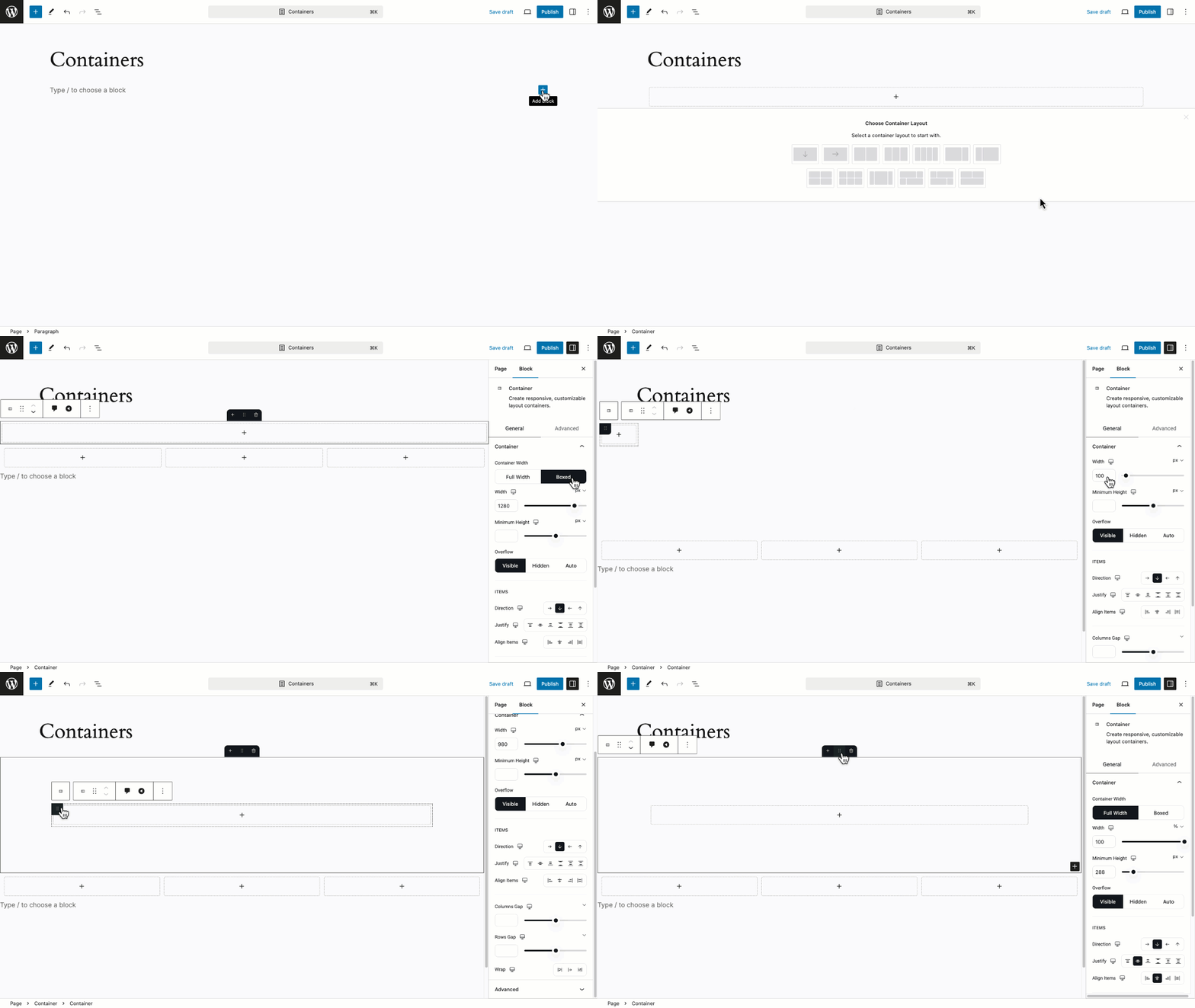
Dynamic Container Control 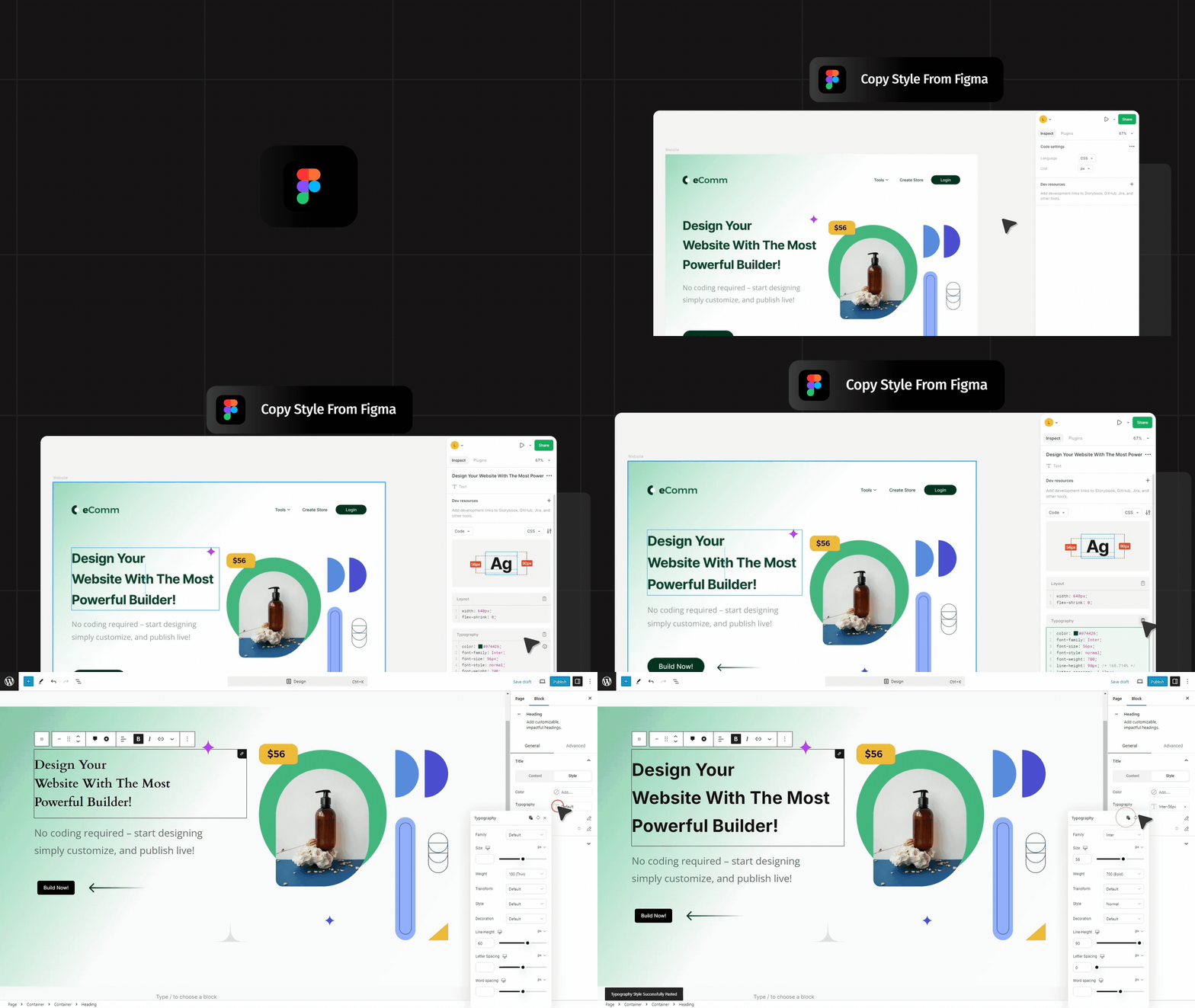
Instant Figma Style Copy-Pasting to WordPress 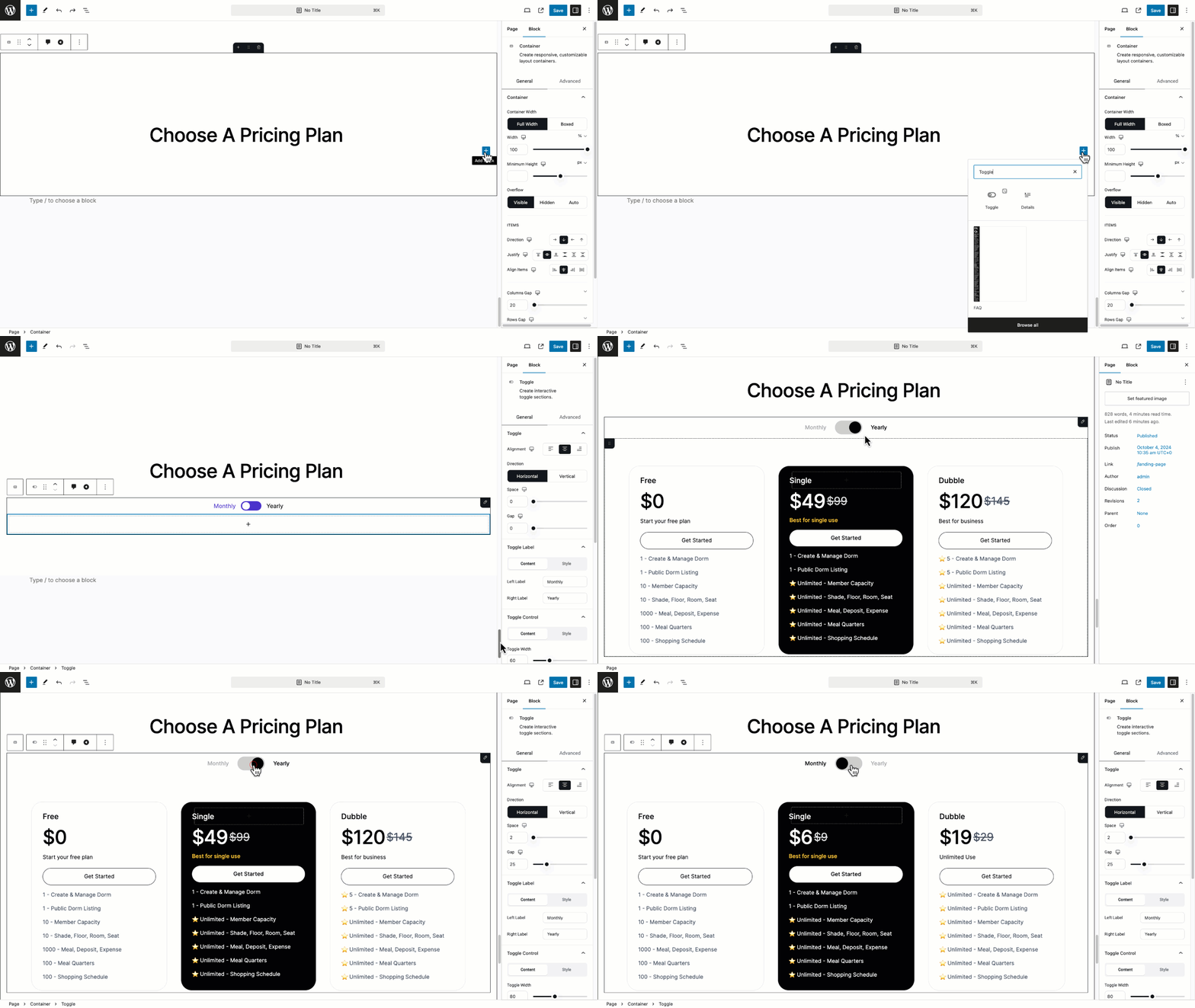
Easy Switching with Toggle 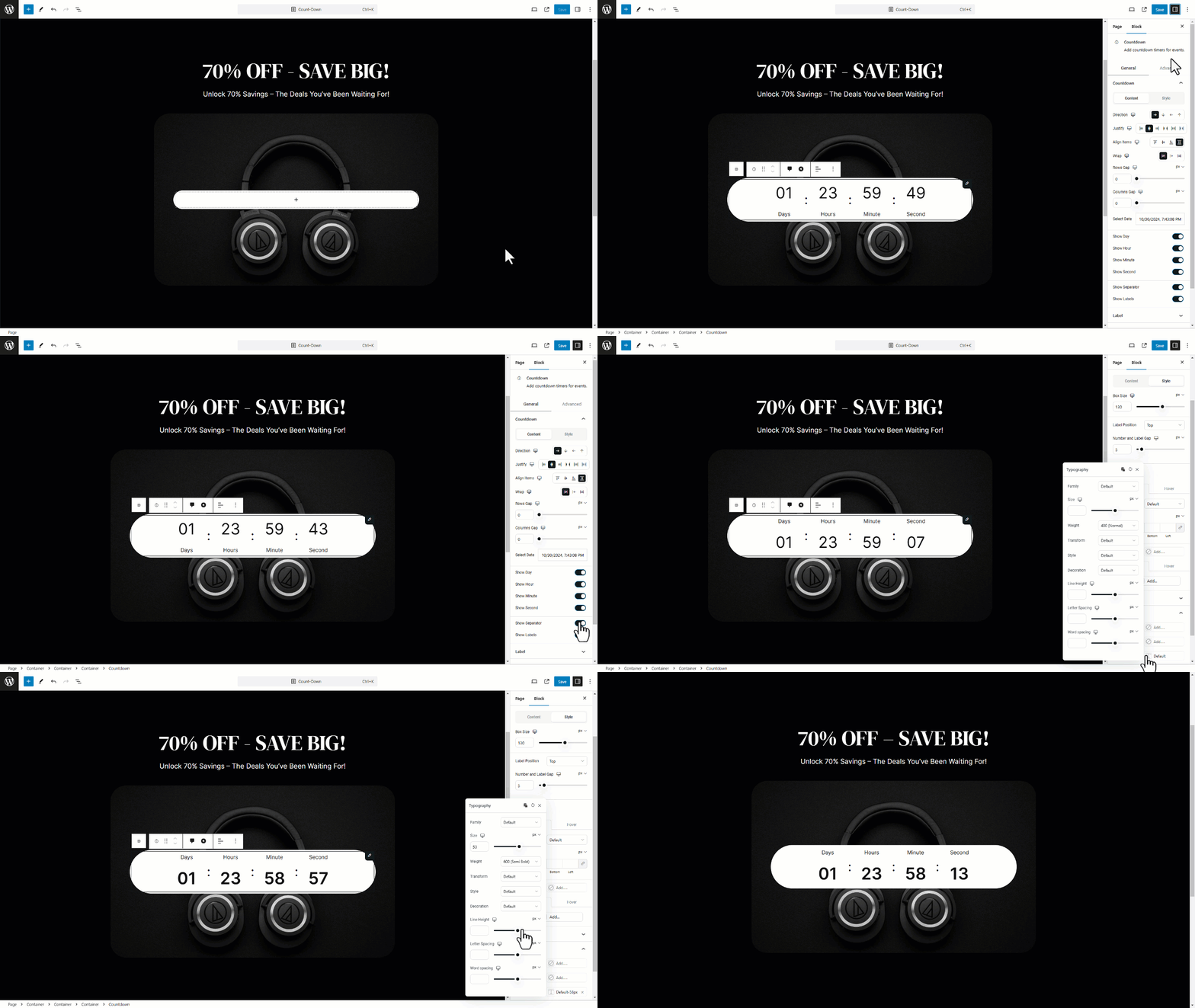
Flexible Countdown Display 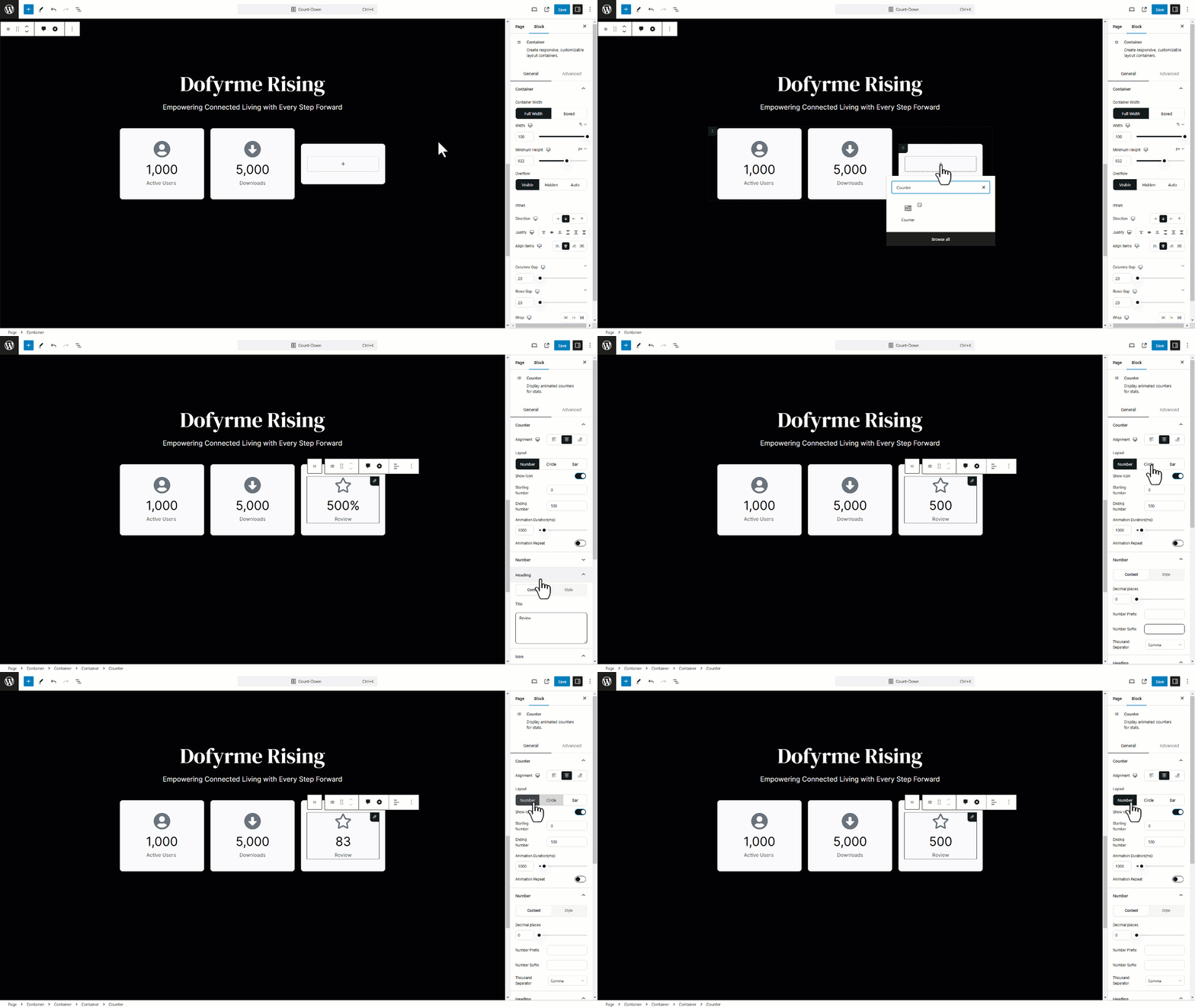
Show Matrices with Counter 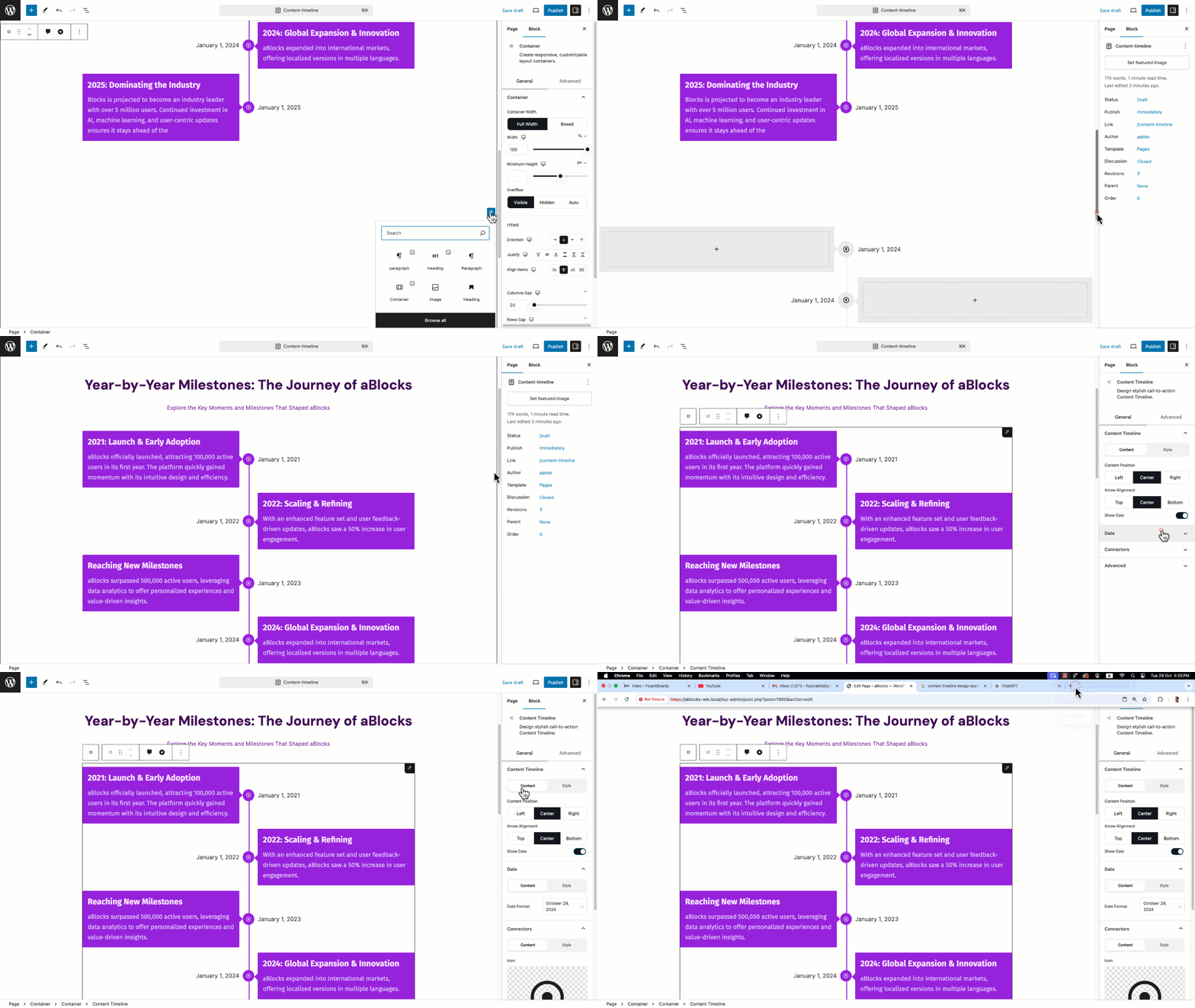
Content Timeline for Organized Flow 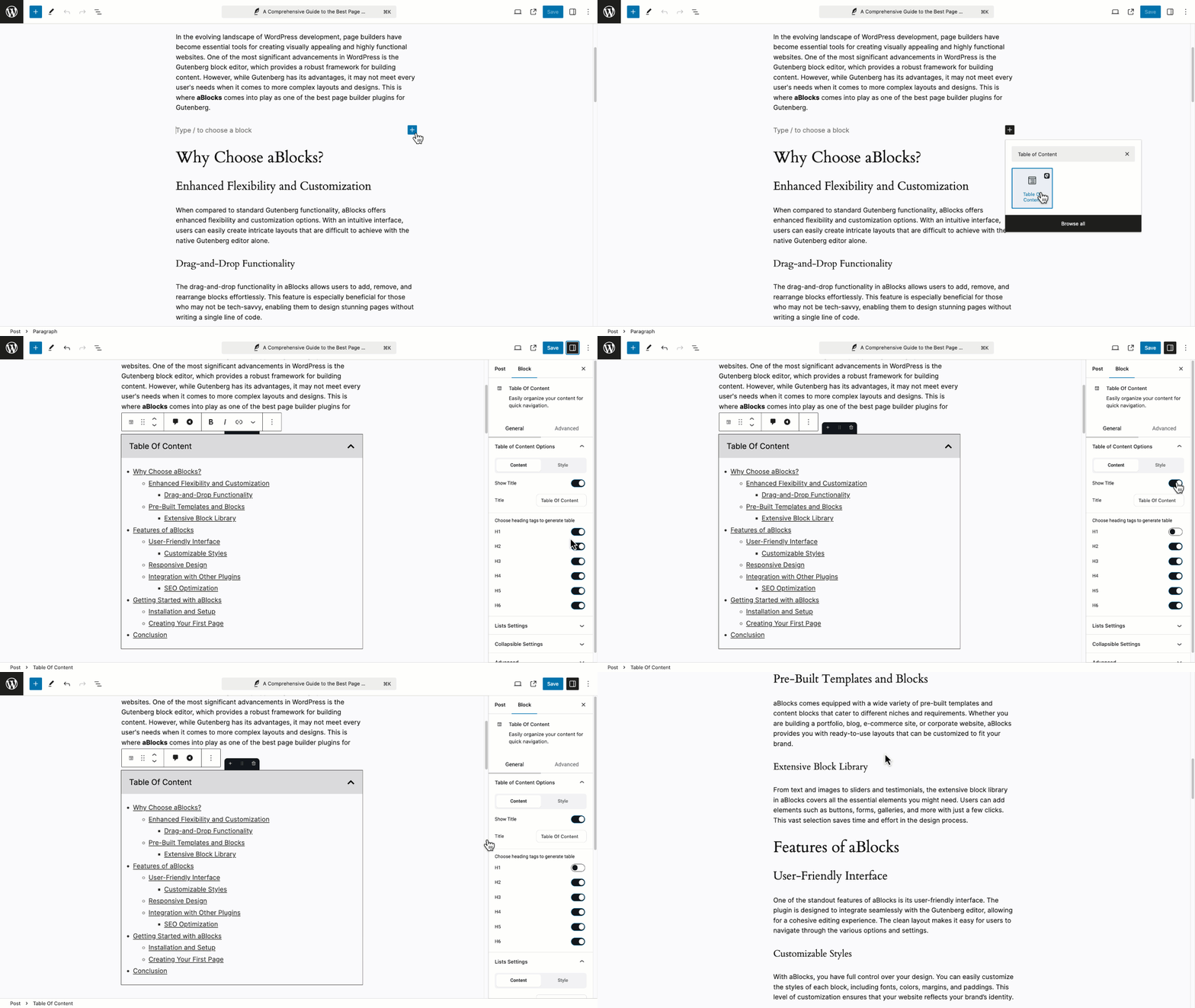
Advanced Table of Content 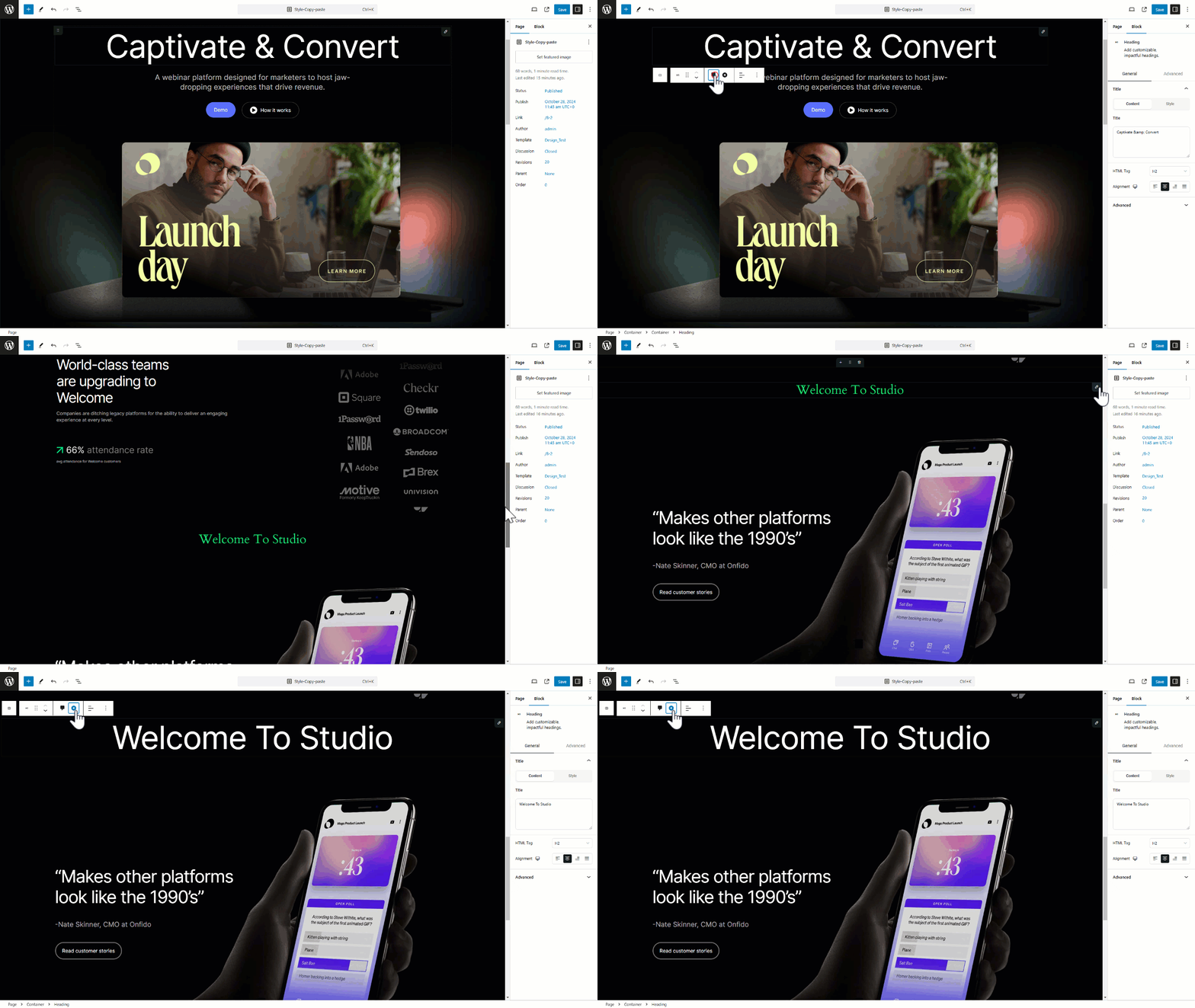
Instant Style Copy-Paste


Blocks
This plugin provides 114 blocks.
- StoreEngine Login Form Shows a user login form for customers to log into their accounts before checking out or viewing orders.
- Academy Instructor Registration Form Showcase Academy LMS instructor registration form attractively.
- Search Add customizable, impactful search.
- Academy Course Instructor Showcase student reviews and testimonials in a styled list.
- Icon Enhance content with a diverse library of icons.
- Lottie Animation Embed responsive, customizable Animations.
- Button Design stylish call-to-action buttons.
- Coupon Add clickable coupons that copy codes instantly.
- Container Create responsive, customizable layout containers.
- StoreEngine Products Display a dynamic list of products with customizable layout and sorting options.
- Toggle Create interactive toggle sections.
- Academy Course Reviews Showcase Academy LMS courses attractively.
- Breadcrumb Dynamic Breadcrumb Blocks
- Menu Show Navigation
- Academy Password Reset Showcase Academy LMS password reset form attractively.
- Tabs Display content in tabbed sections.
- StoreEngine Product Review Display key product Review Overview, and excerpt in a clean, organized layout.
- StoreEngine Checkout Button Displays the final button for confirming and placing the order after all required checkout fields are completed.
- Loop Builder Use Advanced Query Loop Builder
- Player Embed responsive, customizable video.
- Academy Enroll Content Display detailed additional information for a specific course.
- Fetured Image Showcase Featured Image attractively.
- StoreEngine Add To Cart A customizable Add to Cart button that adds products and advances customers in the purchase process.
- Academy Enroll Form Showcase Academy LMS Enroll Form attractively.
- List Design customizable, organized lists.
- StoreEngine Product Summary Display key product information description, and excerpt in a clean, organized layout.
- Carousel Make attractive image presentation with carousel
- Star Ratings Display reviews with star ratings.
- Academy Course Curriculum Showcase Academy LMS courses attractively.
- Image Hotspot Add customizable, impactful image hotspot.
- Info Box Add customizable, impactful headings.
- StoreEngine Mini Cart Button Display a button for shoppers to quickly view their cart.
- StoreEngine Cart Sub Table Shows the cart summary table, including subtotal, shipping cost, tax, and total price. Useful to display in cart or checkout pages.
- PayPal Button Add PayPal payment functionality to your site.
- Academy Review List Showcase student reviews and testimonials in a styled list.
- Chart Add customizable, impactful charts.
- StoreEngine Billing Info Show the billing address associated with the customer’s order.
- Scroll To Top Add a scroll-to-top button that helps visitors quickly return to the top of the page.
- Price Menu Craft beautiful, fully customizable price-menu.
- Dual Button Craft beautiful, fully customizable Dual Button.
- Flip Box Engaging content flip effect.
- Certificate Certificate Block
- Academy Student Registration Form Showcase Academy LMS Student Registration form attractively.
- Marquee Auto scrolling item display.
- StoreEngine Cart Notice Display a customizable notice or confirmation message when a product is added to the cart. Perfect for upsells, promotions, or feedback.
- Academy Course Searchbar Course search bar for Academy LMS.
- Image Insert and style customizable images.
- Image Comparison Compare two images easily.
- Notification A customizable notification block for displaying important messages .
- Academy Review Form Showcase Academy LMS courses attractively.
- Text-Path Create interactive text paths for visually engaging effects.
- Filterable Cards Filterable card-based layout.
- Form Builder Add customizable, impactful forms.
- SVG Draw Add customizable, impactful SVG Draw.
- Frontend Dashboard User Dashboard
- QR Code Transform boring links into branded QR codes that pop!
- StoreEngine Products Filter Adds filter options (by category, price, tag, etc.) to your product archive or shop page for improved user experience.
- StoreEngine Cart List Displays the list of products currently added to the shopping cart, including quantity, price, and remove buttons.
- Countdown Add countdown timers for events.
- Academy Login Form Showcase Academy LMS login form attractively.
- Divider Add stylish content section dividers.
- Academy Course Description Showcase student reviews and testimonials in a styled list.
- Progress Tracker Add customizable, impactful Progress
- Map Show google map or OpenStreet map
- Dynamic Text Dynamic text used for trimming and formatting content
- StoreEngine Order Details Provide essential order information like order ID, status, and date.
- Table Of Content Easily organize your content for quick navigation.
- Content Timeline Design stylish call-to-action Content Timeline.
- Video Embed responsive, customizable video.
- Advance lists Customizable, dynamic, organized lists.
- Academy Addition Info Display detailed additional information for a specific course.
- Heading Add customizable, impactful headings.
- Image Scroll Insert and style customizable images.
- Social Shares Add customizable social media share buttons
- StoreEngine Product Description Show you Product Description Customizeable UI
- Academy Course Media Easily customize the main course image/video in one click
- Spacer Easily add adjustable layout spacing.
- Logout Quick user logout option.
- Counter Display animated counters for stats.
- StoreEngine Coupon Form Allows users to apply discount codes during the checkout process. Supports error and success message handling.
- Academy Courses Showcase Academy LMS courses attractively.
- StoreEngine Order Info Provide essential order information like order ID, status, and date.
- StoreEngine Checkout Form Renders the full checkout form, including billing, shipping, and payment sections.
- Accordion Organize content into collapsible sections.
- Academy PDF Showcase Academy LMS PDF attractively.
- Modal Create customizable modal popups.
- StoreEngine Product Gallery Display product images in an elegant, customizable gallery
- Taxonomy Listing Display posts from selected taxonomies
- StoreEngine Continue Button A customizable button that takes users to the next step in the shopping or checkout process (e.g., from cart to checkout).
- StoreEngine Shipping Info Show the shipping address provided during the checkout process.
- Paragraph Craft beautiful, fully customizable paragraphs.
- Stripe Button Stripe payment integration.
- Certificate Container Certificate Container Block
- Filterable Cards Item Filterable card-based layout Child.
- Loop Template Use Advanced Query Loop template
- Multi Select Easily add adjustable layout spacing.
- Advance list item Design customizable, organized advance list item.
- Modal Trigger Modal block trigger element
- Tabs Child Design stylish call-to-action tabs-child.
- Certificate Text Certificate Text Block
- Select Easily add adjustable layout spacing.
- Loop Filter Use Advanced Query Loop Filter
- Modal Panel Modal block panel element
- Content Timeline Child Design stylish call-to-action content-timeline-child.
- Certificate ID Certificate ID Block
- Toggle child Easily add conditional content
- Password Easily add adjustable layout spacing.
- Textarea Easily add adjustable layout spacing.
- Input Easily add adjustable layout spacing.
- Single Accordion Show Accordion Item
- table-row Create a fully customizable, responsive table. Supports multiple rows and columns
- Price Menu Item Craft beautiful, fully customizable price-menu-item.
- Loop Load More Use Advanced Query Loop Load More
- Checkbox Easily add adjustable layout spacing.
FAQ
-
Can I Use aBlocks with any WordPress Themes?
-
Yes, aBlocks works with any WordPress theme. It integrates with the Gutenberg editor, so you can use its customizable blocks no matter which theme you have. For the best results, make sure your theme supports the latest version of Gutenberg.
-
Is aBlocks suitable for beginners with no coding experience?
-
Absolutely! aBlocks has an easy-to-use interface, making it accessible for all skill levels. Whether you’re new to website building or a seasoned developer, you can create beautiful, functional pages without any coding knowledge. The controls are intuitive, and customization options are comprehensive.
-
Can I Customize the styling of individual blocks in aBlocks?
-
Yes, each block in aBlocks offers extensive customization options. You can adjust background colors, gradients, images, padding, margins, borders, shadows, and more. There are also responsive settings to apply different styles for desktop, tablet, and mobile views, maintaining a consistent look across devices.
Reviews


Contributors & Developers
“aBlocks – Gutenberg Blocks, User Dashboard Builder, Popup Builder, Form Builder & Animation Builder” is open source software. The following people have contributed to this plugin.
Contributors


Interested in development?
Browse the code, check out the SVN repository, or subscribe to the development log by RSS.
Changelog
2.7.0 – 12/01/2026
- Removed – GSAP integration from the free version; it is now included only in aBlocks Pro. (GSAP is not GPL-licensed, so including it in the free version would violate ORG rules.)
- Fixed – Multiple security issues.
2.6.1 – 25/12/2025
- Fixed – PHPCS and Security Related all issues
2.6.0 – 25/12/2025
- Added – GSAP Integration
2.5.3 – 23/12/2025
- Added – Marquee Block Up and Down Direction
- Added – QuizPress plugin compatibility
- Fixed – Form Builder checkbox block not working issue
2.5.2 – 14/12/2025
- Improved – Loop Builder filter button loading UI
- Fixed – Redirect issues in Form Login and Registration blocks
- Added – support for editing dashboard slugs in the Frontend Dashboard
- Fixed – Checkbox selection issue in Form Multiselect block
2.5.1 – 10/12/2025
- Improved – padding option in countdown block
- Improved – Added Global data import export feature
- Improved – Added email template feature and Added Quill Editor Features
- Improved – Added load-font-locally and font download issues
- Fixed – Taxonomy listing issues
- Fixed – Frontend Dashboard Active Color
- Fixed – Template search undefined issues
- Fixed – Form multiple select issues
2.5.0 – 24/11/2025
- Added – Dynamic Text Block
- Improved Added frontend dashboard breadcrumb and quick edit button
- Improved Added Global data import export feature
- Improved Added mouse hover effect in our dynamic block
- Fixed – CSS Classes generated auto when use Entrance Animation
- Fixed – search block icon and background color
- Fixed – store engine blocks css conflict issues
- Fixed – ORG security issue imp
- Fixed – feature image block issue in template
2.4.1 – 15/11/2025
- Added – Academy Container Block
- Added – Frontend Dashboard Block
- Added – StoreEngine Product Gallery Block
- Added – StoreEngine Product Summary Block
- Added – StoreEngine Product Description Block
- Added – StoreEngine Product Review Block
- Added – StoreEngine Product Comments Block
- Added – StoreEngine Cart Notice Block
- Added – Notice Component
- Improved Added From Builder multiple new features
- Improved Added Player block autoplay, loop, and mute options
- Improved Added Icon control border and box-shadow
- Fixed – Global color multiple issues
- Fixed – Global typography multiple issues
- Fixed – Fixed multiple bugs for next release
2.4.0 – 30/10/2025
- Added – Global Color & Typography Control support
- Added – Social share block new styling control
- Added – New Academy LMS Media Block
- Fixed – Dashboard UI issues
- Fixed – Table of Content issue
- Fixed – Tabs Block issue
2.3.1 – 07/10/2025
- Added – New Academy Enroll Content Block
- Added – New Academy Course Description Block
- Added – New Academy Course Instructor Block
- Added – New Academy Addition Info Block
- Added – New Academy Reviews List Block
- Added – New Academy Reviews Form Block
- Added – New Academy Course Reviews Block
- Added – New Academy Course Curriculums Block
- Added – New Storeengine mini cart Block
- Fixed – Advance container position issue
- Fixed – Product Card Gap issues on Dashboard
- Fixed – Dashboard Dynamic page support for blocks
- Fixed – Dashboard Dynamic page support for Academy LMS
- Fixed – Store and academy active button loading issues
- Fixed – Container shape auto css Generation issue
- Fixed – Container shape auto css Generation issue
- Improved – Added Carousel Pagination Border type
- Improved – Added Form Integration Docs link
2.3.0 – 29/09/2025
- Added – New BreadCrumb Block
- Added – New Featured Image Block
- Improved – Loop Builder Featured Image
- Improved – Demo Importer UI
- Improved – Scroll To Top bar block
- Improved – StoreEngine Add to cart button block
2.2.2 – 17/09/2025
- Fixed – Block icon issues
2.2.1 – 17/09/2025
- Added – Container Block Link support
- Fixed – Typography Control alignment issue
- Fixed – Image Block extra space issue
- Fixed – Container Margin Left and right not working
- Fixed – Academy LMS & StoreEngine Integration Block Control issue
- Fixed – QR Code block issue
- Fixed – Search Block Background not working issue
- Fixed – Advance List Block issue
2.2.0 – 01/09/2025
- Added – Form Builder Upload Block compatibility
- Added – New QR Code Block
- Added – New StoreEngine add to cart button Block
- Added – Next highlights option for rich text editor
- Added – Info box responsive control support
- Added – Theme Global color support for all block
- Updated – Carousel Block Improvements
- Updated – Content timeline Block Improvements
- Updated – Tabs Block Menu UI update
- Fixed – StoreEngine Integration block issue
- Fixed – Image Scroll block height issue
- Fixed – Video Block issue
- Fixed – Integration block search issues
- Fixed – Background Overlay issue
- Fixed – Accordion block animation issue
- Fixed – Heading block anchor color issue
- Fixed – Group Button Block Responsive issue
- Fixed – Container alignment issue
- Fixed – Icon Block issue
- Fixed – Text/Textarea Field number conflict issue
- Fixed – Form submission dashboard update
2.1.0 – 05/08/2025
- Added – New 4 StoreEngine supported Blocks
- Added – Popup Builder inside theme builder
- Improved – Form Builder Child Block Improvement
- Improved – Reduce child block css file for better optimized
- Fixed – Device Responsive issue
- Fixed – FSE theme assets generation issue
- Fixed – Block Validation error
2.0.2 – 24/07/2025
- Added – Academy LMS Enroll Button Block
- Added – StoreEngine Integration Block
- Update – Modal Block Improvement
- Fixed – Range Control frontend responsive unit value issue
2.0.1 – 16/07/2025
- Added – Video Background Support
- Fixed – Form Builder column issue
- Fixed – Dynamic Content meta fatal error
2.0.0 – 14/07/2025
- Added – New Player Block
- Added – Heading Block typing effects
- Added – Container Grid Support
- Added – Container Shape Divider
- Added – Heading block link support
- Added – New Loop Builder Block
- Added – StoreEngine 9+ Integration Block
- Updated – 60+ Blocks Dom optimized
- Updated – Search Block Improvement
- Updated – Modal Block
- Fixed – responsive css generating issue
- Fixed – Container inner block inline issue
- Fixed – Icon Block Merging issue
- Fixed – Table of Content List issue
- Fixed – Spacer Block resize issue
- Fixed – Countdown Block alignment issue
- Fixed – Map Block Icon Issue
- Fixed – Info Box block theme compatibility issue
- Fixed – Social Share Block Improvement
1.9.3 – 26/05/2025
- Fixed – Security issue
1.9.2 – 26/05/2025
- Fixed – Security issue
1.9.1 – 22/04/2025
- Fixed – Form Builder FSE theme compatibility issue
- Fixed – Social Share block issue
- Fixed – Demo Importer required plugin not install issue
1.9.0 – 17/04/2025
- Added – New Theme Builder Features
- Added – New Text Path Block
- Added – New Chart Block
- Fixed – Filterable Card block responsive issue
- Fixed – Global Tooltip not worked issue
- Fixed – Demo Import image not worked issue
1.8.0 – 09/04/2025
- Added – New Marquee Block
- Added – New Dynamic Content Features
- Fixed – Disabled block show inside editor after search
- Fixed – From Builder frontend width issue
- Fixed – Slider Block navigation UI
- Fixed – Image Block drag sizing issue
- Fixed – Icon block link issue
- Fixed – Filterable Block filter not selectable inside container
1.7.0 – 05/03/2025
- Added – New Form Builder Subscription, Contact, format password, reset password and custom form
- Added – Full Site Demo Importer
- Added – One Click Demo Importing option for theme developer
- Added – Custom CSS
- Added – New Filterable Cards Block
- Added – New Stripe Button Block
- Added – Menu Block Parent Block Settings option
- Added – New Advance List Block
- Added – New Logout Block
- Added – New Button Group Control
- Updated – Every Block Icon Responsive control
- Updated – Every block Button Group Control and added responsive option
- Fixed – Modal Block Scroll issue
- Fixed – Social Share Block Icon height issue
- Fixed – List Block Range Control issue
- Fixed – Tabs Block Image size issue
- Fixed – Select Control Dropdown issue
- Fixed – Google Fonts API unnecessary loading issue
- Fixed – Coupon Block Style issue
1.6.3 – 07/02/2025
- Fixed – WP File System error solved
1.6.2 – 07/02/2025
- Fixed – PCP Plugin Issue
1.6.1 – 03/02/2025
- Fixed – Container Block Full width, alignment and width issue
- Fixed – Transform Unit Select issue
- Improved – Every Block ID saving logic
1.6.0 – 29/01/2025
- Added – New Image Scroller Block
- Added – Background Overlay Control
- Added – Tab Block Auto Play & Sub Text show option
- Fixed – Reset attribute saved issue
- Fixed – Spacer Block Hight Responsive issue
- Fixed – Typography, Text Stoke Range & Unit value issue
1.5.15 – 22/01/2025
- Added – New News Ticker block
- Added – Demo Importer
- Added – Quick Container and Demo Importer option
- Added – Button block shadow control
- Fixed – Counter Block Unit Hide & Responsive issue
- Fixed – Divider Block Range & Unit value issue
- Fixed – Image Comparison responsive issue
- Fixed – Advance panel Background color not working
1.5.14 – 15/01/2025
- Fixed – Container width & alignment issue
1.5.13 – 14/01/2025
- Fixed – Container parent class issue
1.5.12 – 13/01/2025
- Improved – Sidebar Settings Button Hover
- Fixed – Control unit hide issue
- Fixed – Divider Block frontend color issue
- Fixed – Menu block mobile responsive control
- Fixed – Container Block Width issue
1.5.11 – 01/01/2025
- Added – New PayPal Block
- Fixed – Search Block Issue
- Fixed – Container Width issue
1.5.10 – 25/12/2024
- Update – Revamped Range Control
- Fixed – Range Control responsive issue
- Fixed – Carousel Block issue
- Fixed – Typography Reset
- Fixed – Alignment Control Responsive Selected issues
- Fixed – Image Hotspot child Position issue
- Fixed – Image comparison issue
- Fixed – Menu Block Toggle issue improved
- Fixed – Transform PHP warning issue
- Fixed – Redux Toolkit implement
- Fixed – Typography, Border, TextStoke responsive issue solved
- Fixed – Select Control Responsive issue
- Fixed – Info box icon css issue
1.5.9 – 11/12/2024
- Added – Map Block default marker option
- Fixed – Figma copy/paste typography not worked for variable font family
- Fixed – Info Box variation picker not show and sub heading styling not worked
- Fixed – Mega Menu width not worked
1.5.8 – 06/12/2024
- Update – Revamped block attribute maintaining
- Fixed – Divider Block issue
- Fixed – Price Menu Divider issue
- Fixed – Unit control hide issue for responsive
- Fixed – List Block alignment issue
- Fixed – Social Share Block alignment issue
- Fixed – Typography Reset not working issue
- Fixed – Dual Button CSS issue
- Fixed – Advance Position issue
1.5.7 – 30/11/2024
- Added – CSSFilter Responsive control
- Added – All Child Block Parent settings control option
- Fixed – Price Menu Block issue
- Fixed – Unit value hide issue
- Fixed – Modal Block Copy/Paste Error
- Fixed – Notice Block issue
- Fixed – Form Builder Block Icon issue
- Fixed – Every Block Advance tab Width issue
- Fixed – Toggle Block issue
- Fixed – Carousel Block Slide Per View issue
- Fixed – Coupon Block Validation issue
1.5.6 – 26/11/2024
- Fixed – Image Hotspot Block PHP version compatibility issue
1.5.5 – 26/11/2024
- Added – New Info-box block
- Added – New Image-Hotspot block
- Fixed – Icon Block Copy/paste issue
- Fixed – Global Box Shadow
1.5.4 – 24/11/2024
- Fixed – Countdown Block Typography issue
- Fixed – Block Shadow transition not worked issue
- Fixed – Background Overlay Opacity issue
- Fixed – Range Control Unit issue
1.5.3 – 21/11/2024
- Fixed – Range Control & Unit Data Saved issue
- Fixed – Form Builder Editor form submit not disable issue
1.5.2 – 21/11/2024
- Fixed – Container Width issue
1.5.1 – 20/11/2024
- Fixed – Block appender conflicts with multiple block
- Fixed – Tabs Block editor show/hide issue
- Fixed – Toggle Block editor show/hide issue
- Fixed – Counter Block UI issue
- Update – Simple Menu & Mega Menu UI issue
1.5.0 – 18/11/2024
- Added – New Modal & Popup Builder
- Added – New Form Builder (Login, Register)
- Added – New Search Block
- Added – New Price List Block
- Added – New Progress Tracker Block
- Fixed – Academy Instructor Registration Block PHP undefined warning
- Fixed – Start Rating Block issue
- Fixed – List Block Block issue
- Fixed – Toggle Block hide issue
- Fixed – Academy PDF Block delete issue
- Fixed – Table Block checkbox ui issue
- Fixed – Tabs Block hide issue
- Fixed – Icon Uploader image upload issue
1.4.0 – 14/11/2024
- Added – New Table Block
- Added – New Simple & Mega Menu
- Added – aBlocks Pro Integration
- Fixed – Carousel Block issue
- Fixed – Text Shadow value showing issue
- Fixed – Accordion Block Advance padding not working
- Fixed – Countdown Block and UI issue
- Fixed – Toggle Block issue
- Fixed – Button Block issue
- Fixed – Image Block Image Ratio issue
1.3.2 – 06/11/2024
- Fixed – Icon & Button No follow link issue
- Fixed – Image Block custom URL issue
- Fixed – Divider Solid UI issue
- Fixed – Lint:Js & PHPCS issue
1.3.1 – 03/11/2024
- Improved – Figma to WordPress Copy / paste feature
- Fixed – Social share block conflicts with theme
- Fixed – List Block color conflicts with theme
- Fixed – Star Rating PHP Error
1.3.0 – 24/10/2024
- Added – New Social Share Block
- Added – New Svg Draw Block
- Added – New Coupon Block
- Added – New Content Timeline Block
- Fixed -Table of Content issue fixed
- Fixed -Accordion Pattern Conflict issue fix
1.2.3 – 21/10/2024
- Added – New Map Block
- Fixed – Dual Button Block Pattern conflicts issues
- Fixed – Image Comparison Block Pattern conflicts issues
1.2.2 – 16/10/2024
- Fixed – Pattern Assets conflicts with assets generate
1.2.1 – 16/10/2024
- Fixed – Button icon hover css not worked issue
- Fixed – Table of content link generate issue
- Fixed – Carousel navigation Position issue
1.2.0 – 15/10/2024
- Added – New Dual Button Block
- Added – New Carousel Block
- Added – New Notice Block
- Added – New Table of Content Block
- Added – New Notification Block
- Added – Responsive Group Button control
- Fixed – Border Radius undefined php warning
- Fixed – List Block layout issues
- Fixed – React Props Error
- Fixed – Icon Ratio issue
1.1.2 – 08/10/2024
- Fixed – Fix Page Speed issues while editing
1.1.1 – 07/10/2024
- Fixed – Block Duplicate issues
- Fixed – Pattern Creation issues
1.1.0 – 06/10/2024
- Added – New Flip Box Block
- Added – New Image Comparison Block
- Added – New Academy Certificate Block
- Fixed – Popup Close not worked properly
- Fixed – Icon Block SVG Conflicts
1.0.3 – 30/09/2024
- Fixed – Icon spacing issues
- Fixed – Image Block device type not worked
- Fixed – Tabs Block spacing issue
- Fixed – Toggle Block spacing issue
- Fixed – Border Control Hover issue
- Fixed – Box Shadow issue
- Fixed – Background Overlay control issue
- Fixed – Divider Block Icon Support issue
- Fixed – Lot of Bugs & improvements
1.0.2 – 22/09/2024
- Added – Button hover transition
- Fixed – Typography css generate issue
1.0.1 – 20/09/2024
- Fixed – Assets generation issues
1.0 – 19/09/2024
- Added – 22+ Blocks
1.0-beta3 – 13/06/2024
- Added – Icon Block Link option
- Improved – Block Editor experience
- Fixed – Wrapper and Container CSS generate issues
- Fixed – Lot of Bugs
1.0-beta2 – 04/06/2024
- Added – SVG icon insert
- Added – Button block link control
- Improved – All Blocks Markup
- Improved – Revamped icon settings
- Improved – Make all blocks left align
- Fixed – Image Block attribute improvements
- Fixed – Icon Rotation issue
- Fixed – Transform CSS generate issue
- Fixed – Mask CSS generate issue
- Fixed – Reorder Wrapper and Container CSS
- Fixed – Removed undefined and true/false class
- Fixed – Lot of Bugs
1.0-beta1 – 29/05/2024
- Initial beta release
