
The code element is a handy tool that lets you add custom code, such as HTML, CSS, and JavaScript to your pages. It’s perfect for when you need to go beyond the usual features, like putting in unique forms or embedding videos from external sources.
Settings tab
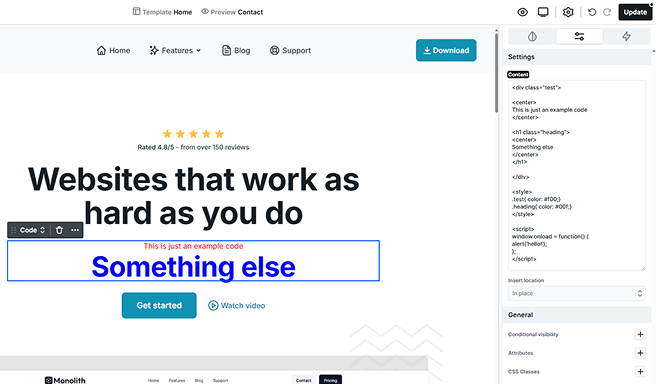
Content
You can write any HTML / CSS / JS codes directly into the code element. This will be an HTML inline code, so make sure you wrap your CSS in <style>…</style> tags and your JavaScript in <script>…</script> tags.
While we’re here to help you with Mosaic, please be aware that we do not offer support for custom coding. Any code you choose to implement will be fully managed by you, as we’re unable to assist with it.
Here are some examples of what you can insert into your page using the code element:
WordPress only allow you to save codes, if your user has unfiltered_html capability! Administrators usually have this permission.
If you cannot save, check your wp-config.php file, to not have DISALLOW_UNFILTERED_HTML constant in it with true value.
In case you aren’t administrator, use User Role Editor plugin to check/modify your user role’s capabilities.
Insert location
The Insert location setting determines where your custom code will be placed in the page’s HTML output. This gives you control over when and how the code is executed.
- In place: Inserts the code exactly where the Code element is added on the page. Useful for inline scripts, widgets, or small HTML snippets that need to appear in a specific spot.
- Head: Places the code inside the <head> of your page. Ideal for meta tags, tracking scripts, or stylesheets that should load before the content.
- Body start: Inserts the code right after the opening <body> tag. This is a common choice for scripts that need to load early but don’t belong in the <head>.
- Body end: Places the code just before the closing </body> tag. Often used for analytics, tracking, or scripts that don’t need to block the initial page rendering.
