

Beschrijving
Een gratis en eenvoudig te gebruiken twee-factor authenticatie plugin voor WordPress
Add an extra layer of security to your WordPress website login and protect your users. Enable two-factor authentication (2FA), the best protection against password leaks, automated password guessing, and brute force attacks.
Gebruik de WP 2FA plugin om twee-factor authenticatie in te schakelen voor je WordPress beheerder, 2FA af te dwingen voor alle gebruikers van je site, of voor gebruikers met specifieke rollen. Deze plugin is heel eenvoudig te gebruiken; alles kan worden geconfigureerd via wizards met duidelijke instructies, dus zelfs niet-technische gebruikers kunnen 2FA instellen zonder technische hulp.
Functies | Aan de slag | Verkrijg de Premium!
🔒 WP 2FA sleutel plugin functies en mogelijkheden
- Passkeys support for passwordless logins
- Free two-factor authentication (2FA) for all users
- Multiple 2FA methods supported, including authenticator app (TOTP) and code over email
- Developer API to integrate any alternative 2FA method (WhatsApp, OTP Token, etc.)
- Universal 2FA app support – works with Google Authenticator, Authy, and any TOTP-compatible app
- Backup codes (16 digits) for recovery access
- Wizard-driven setup – no technical knowledge required
- 2FA policies to enforce setup with grace periods or instant activation
- REST API endpoints for custom integrations and headless WordPress setups
- Dashboard-free setup – users can configure 2FA without WP admin access
- Editable email templates for full customization
- Much more!
💎 upgrade naar WP 2FA premium en krijg nog meer voordelen
De premium versie van WP 2FA wordt geleverd met nog meer functies om de loginbeveiliging van je WordPress site naar een hoger niveau te tillen.
Met de premium editie van WP 2FA krijg je meer 2FA methodes, 1-klik integratie met WooCommerce, vertrouwde apparaten functie, en uitgebreide white labeling mogelijkheden.
Lijst met premium functies
- Everything in the free version
- Full white labeling capabilities to change all text and visuals in the wizards, emails, SMS, and 2FA pages
- Support for multiple passkeys per user for flexible passwordless logins
- Zero-setup email 2FA that automatically enrolls users without manual configuration
- YubiKey hardware key support for enterprise-grade security
- Additional 2FA methods such as SMS, email link, and more
- Trusted devices so users can log in without 2FA for a configured period
- Require 2FA on password reset to strengthen account protection
- Allow next user login without 2FA to help recover accounts locked out of authentication
- One-click WooCommerce integration to enable 2FA for customers and store admins
- And much more!
Raadpleeg de WP 2FA plugin functies en voordelen pagina om meer te leren over de voordelen van het upgraden naar WP 2FA Premium.
🛠️ Gratis en premium ondersteuning
Support for the free edition of WP 2FA is free on the WordPress support forums. Premium world-class support via one-to-one email is available to the Premium users – upgrade to premium to benefit from email support.
Voor alle andere vragen, feedback, of als je gewoon contact met ons wil opnemen, gebruik dan ons contactformulier.
ONDERHOUDEN & ONDERSTEUND DOOR MELAPRESS
Melapress develops high-quality WordPress management and security plugins, such as Melapress Login Security, Melapress Role Editor, and WP Activity Log; the #1 user-rated activity log plugin for WordPress.
Bekijk onze lijst van WordPress beveiliging en beheer plugins om te zien hoe onze plugins je kunnen helpen bij het beter beheren en verbeteren van de beveiliging en het beheer van je WordPress sites en gebruikers.
WP 2FA installeren
Vanuit WordPress
- Navigeer naar ‘Plugins’ > Nieuwe toevoegen
- Zoek naar ‘WP 2FA’
- Installeer & activeer de WP 2FA vanaf je Plugins pagina
Handmatig
- Download de plugin uit de WordPress plugin repository
- Pak het zipbestand uit en upload de map naar de ‘/wp-content/plugins/ folder’
- Activeer de WWP 2FA plugin via het ‘Plugins’ menu in WordPress
Zoals uitgelicht op:
Schermafbeeldingen
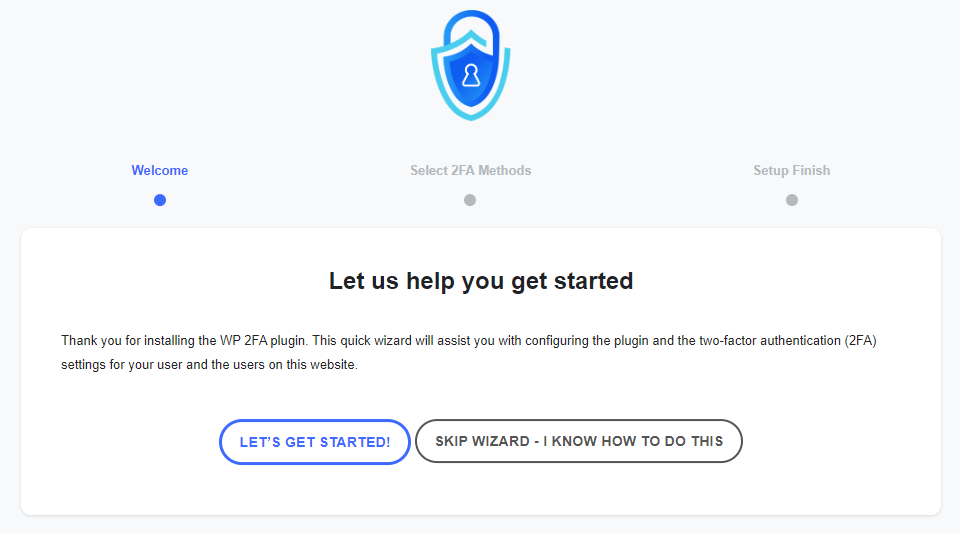
De wizard voor eerste installatie stelt je in staat om 2FA op je site en voor je gebruikers binnen enkele seconden in te stellen. 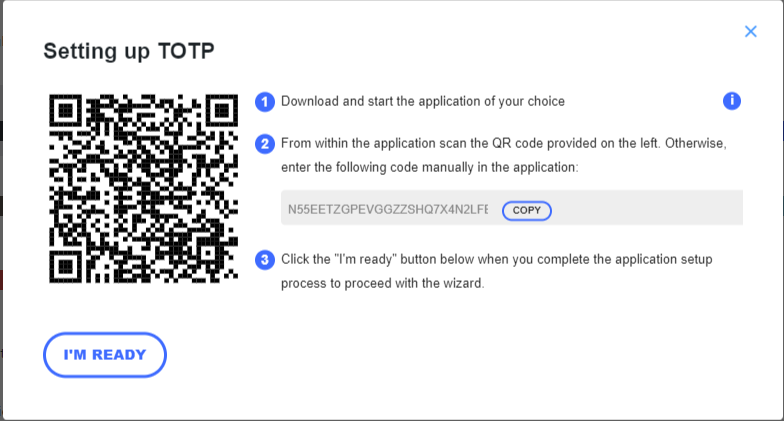
De wizards maken het instellen van 2FA erg gemakkelijk, zodat zelfs niet-technische gebruikers 2FA kunnen instellen zonder hulp nodig te hebben. 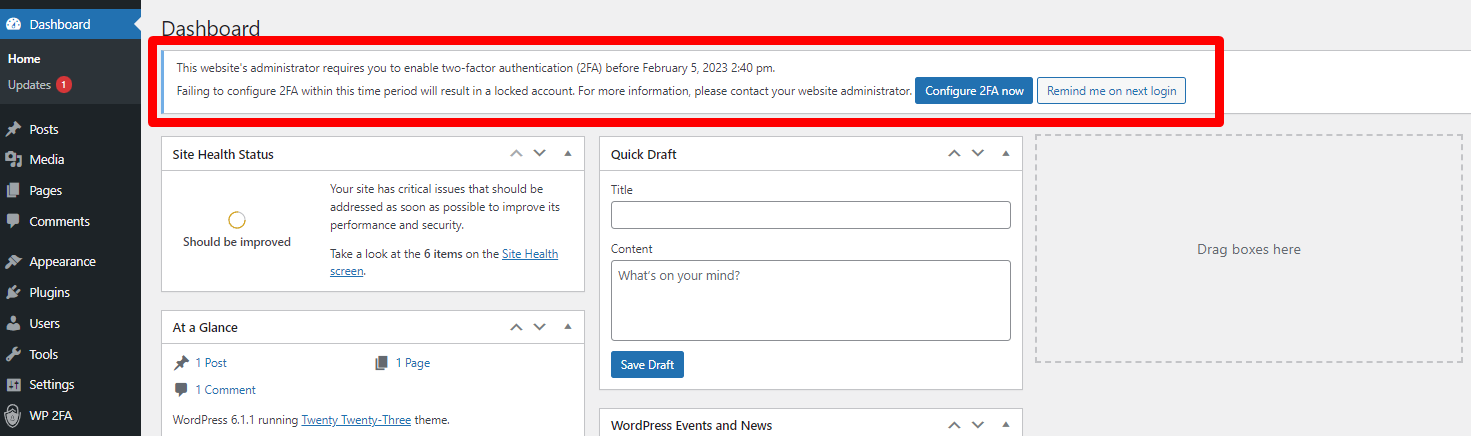
Je kunt van gebruikers eisen 2FA in te schakelen en hen ook een respijtperiode geven om dat te doen. 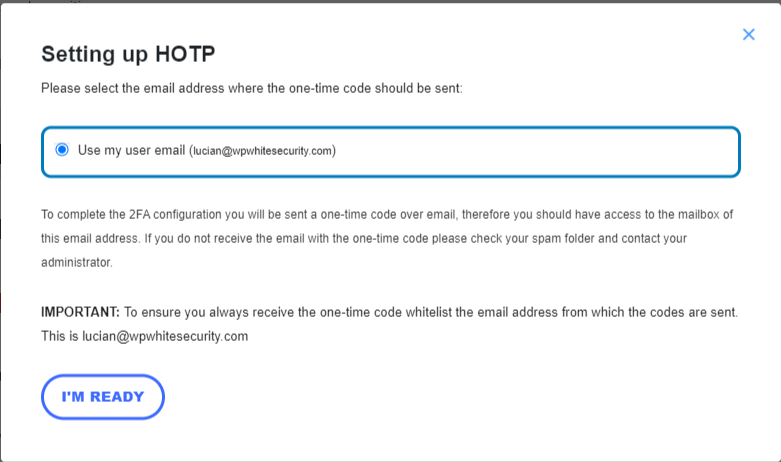
Gebruikers kunnen ook eenmalige codes via e-mail gebruiken als twee-factor authenticatiemethode. 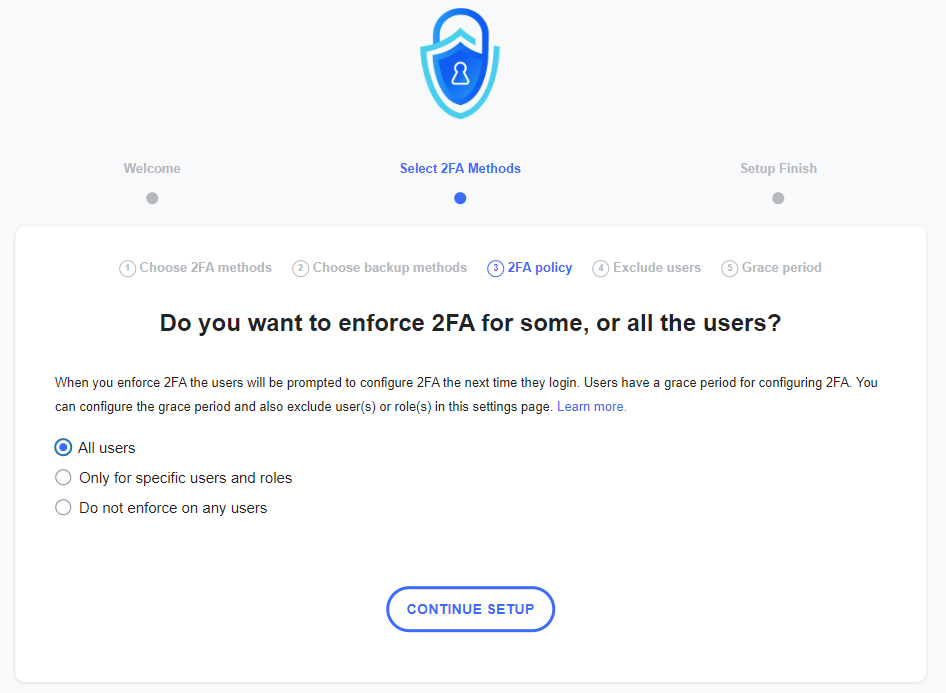
Je kunt beleidsregels gebruiken om te eisen van gebruikers om 2FA onmiddellijk in te stellen en te gebruiken, zodat ze de volgende keer dat ze inloggen, hierom wordt gevraagd. 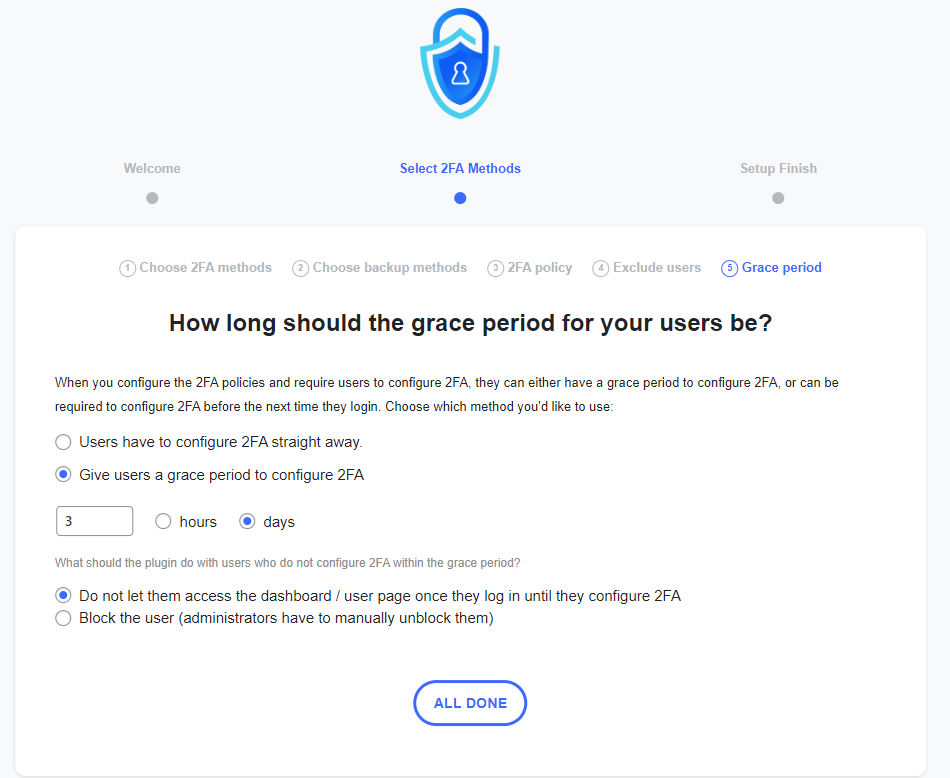
Je kunt gebruikers een respijtperiode geven totdat zij 2FA configureren. Je kunt ook opgeven wat de plugin moet doen zodra de respijtperiode voorbij is. 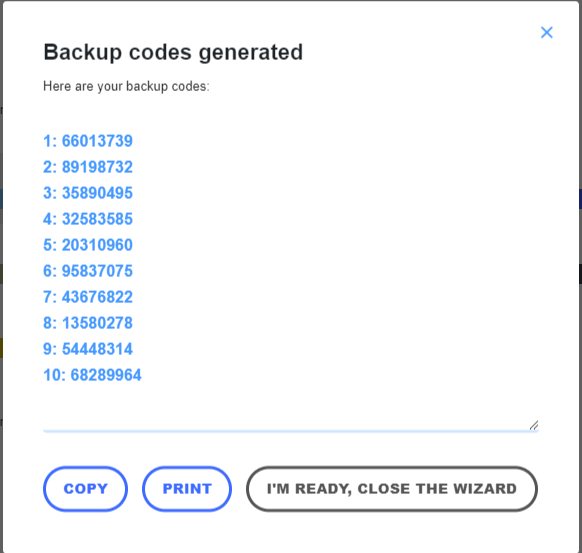
Het verdient aanbeveling dat alle gebruikers ook back-up codes genereren, voor het geval ze geen toegang hebben tot het primaire apparaat. 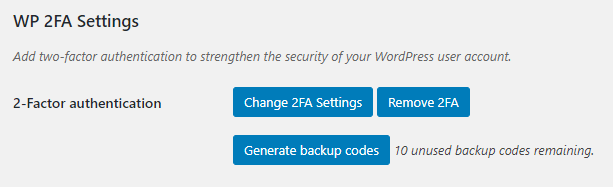
In het gebruikersprofiel hebben gebruikers slechts enkele 2FA-opties, dus het is niet verwarrend voor hen, en alles spreekt voor zich.


FAQ
-
Verstuurt de plugin gegevens naar Melapress?
-
Nee, de plugin stuurt ons helemaal geen gegevens. De enige gegevens die we ontvangen zijn licentiegegevens van de premium editie van de plugin.
-
What 2FA methods are available with the plugin?
-
The free edition of WP 2FA includes the following 2FA methods: Authenticator app 2FA and code over email. This allows you to use Google Authenticator OTP The premium edition adds YubiKey, one-click email link, SMS 2FA, and Authy push notifications.
-
How can I ensure I do not get locked out?
-
WP 2FA includes backup authentication methods so that if the primary authentication method fails, you and your users can still log in. The free version of the plugin includes backup codes, which can be configured during 2FA configuration or at any point after that from the profile page. The premium edition adds 2FA backup codes over email.
-
What happens if I get locked out?
-
In the unlikely event that you are unable to supply your 2FA code, there are several steps you can take to gain access to your WordPress dashboard. First, check if there is another administrator who can reset your 2FA. If this is not possible, manually deactivate the plugin, log in without 2FA, re-activate the plugin, and then reconfigure your 2FA.
-
Does WP 2FA support multi-site networks?
-
Yes, WP 2FA is multisite compatible. The plugin can be activated at the network level. 2FA policies can be enforced on all users, a subsection of users, or per site on the network. It also supports network setups with different domains.
-
Ontvangt de plugin updates?
-
We updaten de plugin vrij regelmatig om ervoor te zorgen dat de plugin in topvorm blijft draaien terwijl we van tijd tot tijd nieuwe functies toevoegen.
-
Does the plugin support Google Authenticator?
-
Yes, WP 2FA fully supports Google Authenticator on WordPress. WP 2FA also supports many other 2FA authenticator apps.
-
Can I get support if I get stuck?
-
Support for the free edition of the plugin is provided only via the WordPress.org support forums. You can also refer to our support pages for all the technical and product documentation.
If you are using the Premium edition, you get direct access to our support team via one-to-one email support.
-
Hoe kan ik beveiligingsfouten rapporteren?
-
Je kunt beveiligingsproblemen melden via het patchstack vulnerability disclosure program. Gebruik dit formulier. Voor meer informatie, raadpleeg ons Melapress plugins beveiligingsprogramma.
Beoordelingen


Bijdragers & ontwikkelaars
“WP 2FA – Two-factor authentication for WordPress” is open source software. De volgende personen hebben bijgedragen aan deze plugin.
Bijdragers

“WP 2FA – Two-factor authentication for WordPress” is vertaald in 14 localen. Dank voor de vertalers voor hun bijdragen.
Vertaal “WP 2FA – Two-factor authentication for WordPress” in je eigen taal.
Interesse in ontwikkeling?
Bekijk de code, haal de SVN repository op, of abonneer je op het ontwikkellog via RSS.
Changelog
3.1.0 (2025-12-17)
-
Nieuwe functies
- Passkeys support – allow users to use Passkeys, a cryptographic and secure passwordless solution.
-
Plugin & functionaliteit verbeteringen
- Removed some redundant text from the Free edition first-time setup wizard.
- Added a number of KB links to the admin notification email that is sent when a user bypasses 2FA due to lack of frontend configuration options.
- Simplified the user flow in the wizard by removing some redundant steps when only one 2FA method is available.
- Added the new tag {wp_admin_email} to be used in the email templates. This one retrieves the site administration email address.
- Added the final steps of the wizard, to the white labeling module, making it possible to white label all the wizards’ slides.
- Removed the plugin usage survey notice from the plugin.
- Strengthened the authentication flow validation and improved the database query sanitization to prevent potential security vulnerabilities. These enhancements ensure more robust protection of user accounts and data integrity.
- The 2FA setup wizard now automatically opens when users are redirected to the custom frontend 2FA configuration page after login, eliminating the need to click “Configure 2FA” to start the 2FA configuration process.
- Improved the 2FA code page logic so it properly hides the “Log in” button and “Remember this device” options when When a 2FA method becomes unavailable, for example, due to service outage.
-
Bug fixes
- Fixed: The [wp-2fa-setup-notice] shortcode now properly respects the configure_2fa_url set in the plugin settings.
- Fixed: When using REST validation method, disabling the anti-brute force attack protection now works correctly.
- Fixed: On WordPress multisite installations with WooCommerce active, users logging into a subsite’s admin area are now correctly redirected to that subsite’s admin dashboard after completing 2FA authentication.
- Fixed: When using REST API validation method, users can now successfully authenticate through WordPress’s interim login modal (session timeout re-login).
Raadpleeg de volledige plugin wijzigingslog voor meer gedetailleerde informatie over wat er nieuw, verbeterd en opgelost is in eerdere versie-updates van WP 2FA.
