Icon of program: ODIN

ODIN for Windows

  • Free
  • 3.5
    367
  • 486.1K
  • V0.34.308

Comprehensive Backup Solution for Windows Users

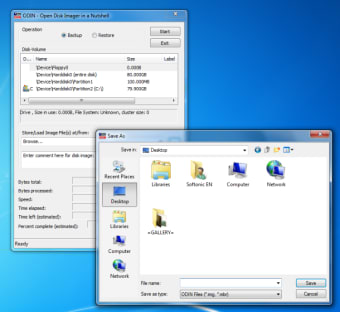
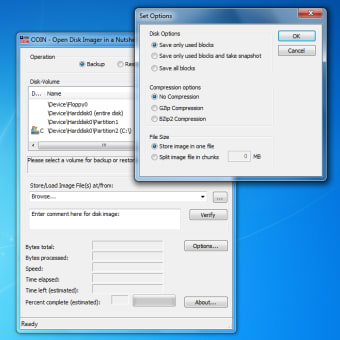
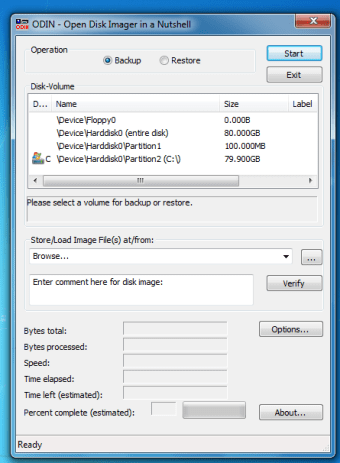
ODIN is a free backup and cloud storage software designed specifically for Windows. It provides users with the essential tools needed to safeguard their data through efficient backup processes. The program focuses on simplifying the backup experience, allowing users to easily create and manage backups of their important files and folders. Its intuitive interface makes it accessible for users of all skill levels, ensuring that everyone can protect their data with minimal effort.

In addition to its core backup functionalities, ODIN offers features that enhance data security and recovery options. Users can schedule automatic backups, ensuring that their data is consistently protected without manual intervention. The program also supports cloud storage integration, providing a reliable solution for offsite data retention. Overall, ODIN is a robust tool that meets the needs of individuals and businesses looking for a reliable backup solution.


Image
 0/3

App specs

  • License

    Free

  • Version

    0.34.308
  • Latest update

  • Platform

    Windows

    Other platforms (2)
  • OS

    Windows Vista

  • Language

    English

  • Downloads

    486.1K

    Last month's downloads

    • 208
  • Size

    369.20 KB

  • Developer

Also available in other platforms

Program available in other languages


Icon of program: ODIN

ODIN for PC

  • Free
  • 3.5
    367
  • 486.1K
  • V0.34.308

User reviews about ODIN

3.5

1 reviews

Add review

Main reviews for you

  • Image

    Anonymous user

    Love it. Note: Perhaps the original reviewer was using an earlier version (program is still in Beta) but you CAN specify the destination folder.Odin is the only piece of software that meets all of the requirements I had (see Pros).I created a nice little script attached to Windows task scheduler to perform scheduled backups on all of our servers. So far works awesome!Keep up the good work guys, would definitely purchase this software having seen it in action. Pros: - Command-line capable, for automation purposes- Supports 'hot-imaging', which means you can make an image while Windows is still running- Can copy over the network- Compression available- Only backs up used bytes (skipping free space, which would create enormous image files)- Free for both client (Windows XP/Vista/7) and servers (Windows 2003+)- Portable Cons: - Still in beta- Occasional cryptic messages, often due to user error- Compression levels aren't completely up to par with high-end commercial software, but not bad enough to pose a problem

More

You may also like

Alternatives to ODIN

Explore Apps

Latest articles

Laws concerning the use of this software vary from country to country. We do not encourage or condone the use of this program if it is in violation of these laws.
Softonic

Is ODIN safe?

100/100

Score result: Clean

This file passed a comprehensive security scan using VirusTotal technology. It is safe to download.

  • Virus free
  • Spyware free
  • Malware free
  • Verified by Security Partners

    VirusTotal logo

Scan Info

Last scan
Tuesday, September 22, 2020
Scan provider
VirusTotal · Full report

File Integrity

File
ODIN-0.34-32Bit.zip
SHA256
f2675690afcdea49b8a04648031e1b7c15586be7347ebfdab475edcbd018b622
SHA1
eb3b7d5685078bc06f062a6802121ce4fda96d23

Softonic security commitment

ODIN has been thoroughly scanned by our advanced security systems and verified by industry-leading partners. This file comes from the official developer and has passed all our security checks, showing no signs of viruses, malware, or spyware. For more information, visit our Security and Trust Center