Quickly Identify and Manage Image Copyrights on Your Website – Now with Site Monitoring!
Navigate image copyright challenges effortlessly with PicDefense. Our AI-powered platform scans your site, flags potential copyright issues, and now offers continuous monitoring of new images to keep your website compliant at all times.
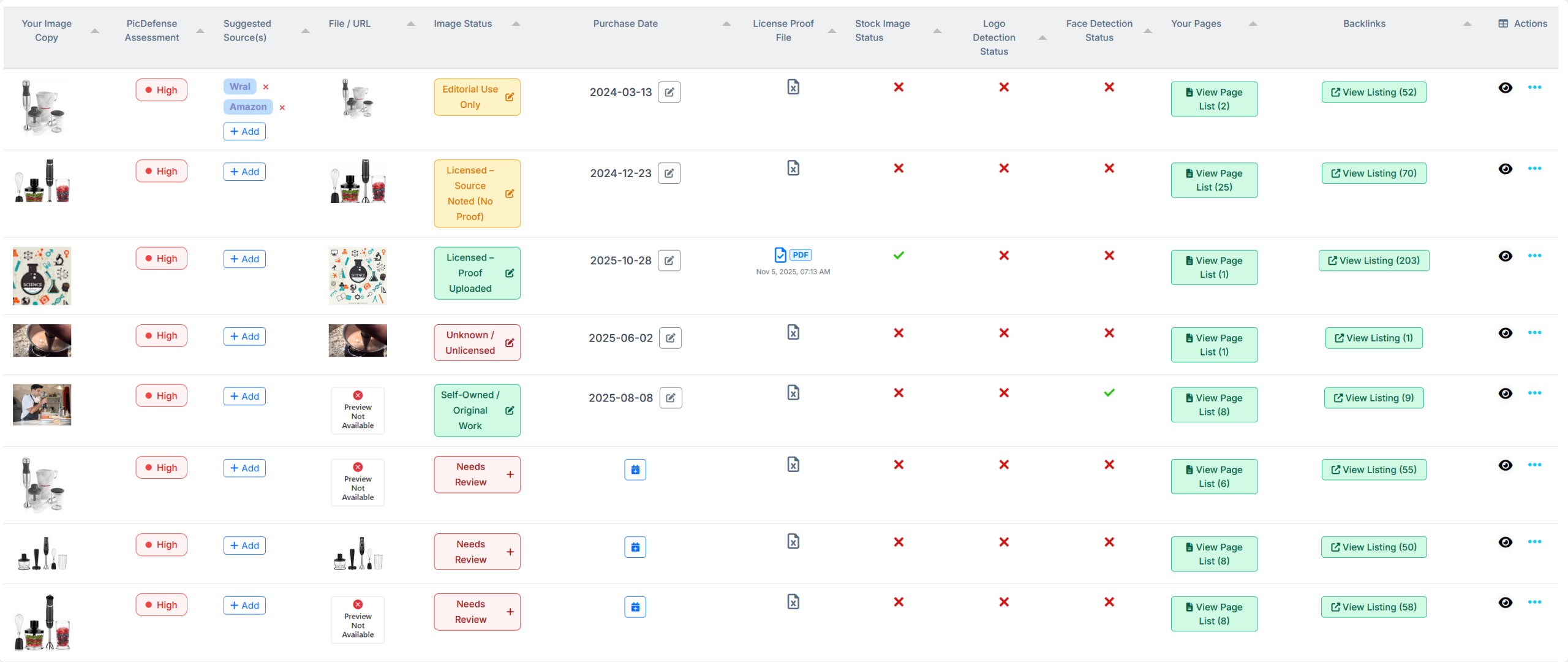
Identify potentially copyrighted images on your website swiftly.
Protecting Your Online Content: At PicDefense, we specialize in making image copyright management understandable and actionable. Facing a copyright demand letter or aiming to prevent future issues? We provide the tools and guidance to secure your website’s content legally.
Why PicDefense.io?
Accurate and Efficient: We scan your website and catalog all images, using advanced algorithms for precise copyright risk identification. With our new Site Monitoring feature, we automatically detect newly added images, so your website stays compliant in real-time.
For Web Agencies: Managing multiple sites? Our WordPress plugin, API access, and Zapier integration make it easy to handle image copyright compliance for all your clients, saving you time and providing peace of mind.
⭐ New Feature! Site Monitoring now ensures your website is always protected. Detect new images automatically, track licensing, and avoid future copyright claims.
How It Works: A Clear Path to Compliance
Image Copyright Checking in Minutes
Step 1: Website Scan
Submit your entire website or specific images for a thorough analysis. Our system is designed to be flexible, accommodating your unique needs. Want to automate compliance? Our Site Monitoring feature runs scans every week, keeping you protected effortlessly.
- Full Site Scan: Enter your website’s URL to start. Our crawler systematically goes through your site, identifying and cataloging every image. For example, a small site might be processed in just a few minutes, while larger sites with thousands of images will take longer but are efficiently managed to ensure comprehensive coverage.
- Specific Image Analysis: For targeted analysis, you can directly submit URLs of specific images you’re concerned about.
- Efficient Processing: Our process ensures a complete review of your digital assets, without overlooking any image. Here’s what happens:
- Counting Images: We tally the total number of images on your site to give you a comprehensive overview.
- De-duplication: To ensure efficiency, our system identifies and removes duplicates based on image URLs, focusing analysis on unique images.
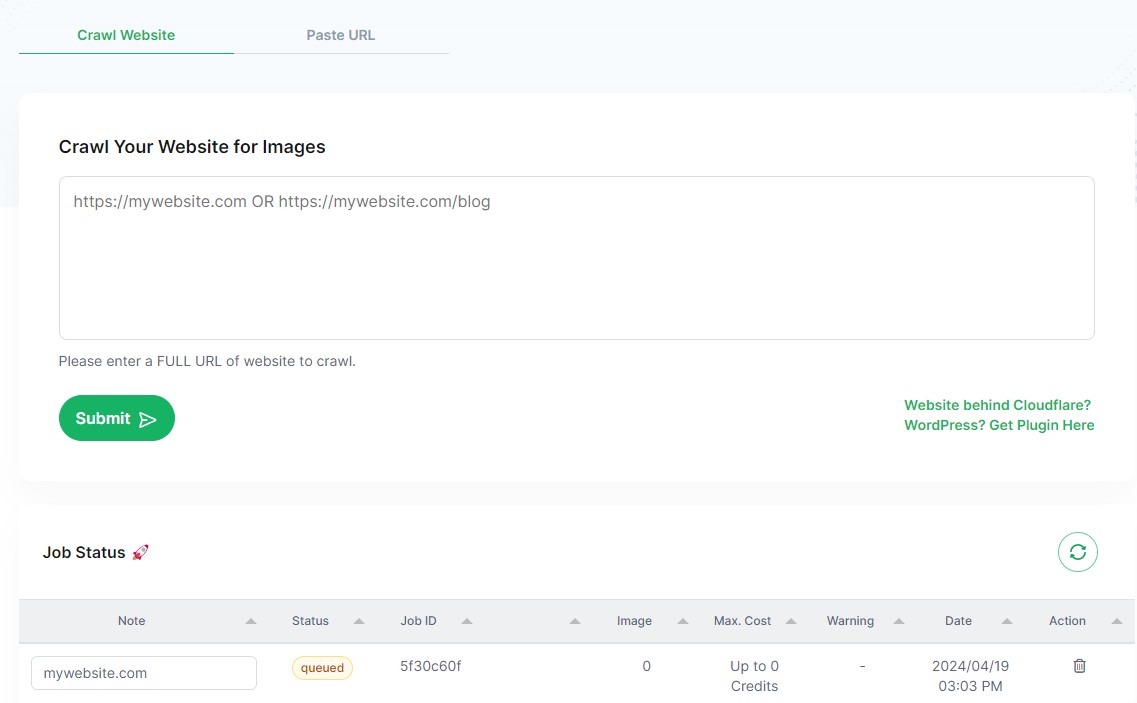

Step 2. Risk Analysis: Evaluate Copyright Exposure
After cataloging, each image undergoes a thorough comparison against an extensive database, including a detailed analysis of EXIF data and advanced detection features, to assess its copyright risk. This comprehensive approach results in a detailed PicRisk score.
- Database Comparison: Our system meticulously searches through billions of indexed web images, including analyzing modified or manipulated images for a more accurate match.
- EXIF Data Analysis: Examines the EXIF data of each image for copyright information, offering deeper insights into the copyright status and history of the image.
- Keyword Labeling: Automatically tags each image with relevant keywords, enhancing description accuracy and aiding in efficient image cataloging and searchability.
Advanced Detection Features:
- Faces, Landmarks, and Logos: Our system identifies if an image contains recognizable features such as faces, landmarks, and logos. This detection is crucial as it can significantly influence the copyright risk score:
- Faces: The presence of identifiable faces can increase the risk due to potential privacy rights or personality rights issues.
- Landmarks: Images featuring famous landmarks might be subject to specific copyright or trademark protections, especially if the landmark is a significant element of the image.
- Logos: The detection of logos helps assess the likelihood of trademark infringement, which can pose a high copyright risk.
- Stock Photo Detection: Flags images likely sourced from stock photo databases, aiding in determining usage rights.
- Backlink Analysis: Evaluates backlinks and attempts to trace origins, guiding you on where rights might be acquired.
Step 3: Actionable Insights – Direct Path to Compliance
Receive a clear report that combines transparency with actionable guidance:
- Risk Scores: Each image receives a detailed risk rating, explaining potential issues based on advanced detections.
- Guidance: Offers tailored recommendations for mitigating identified risks, including viewing EXIF data to ensure image compliance.
Solutions at Your Fingertips:
- Source Tracing (When Feasible): Aims to identify sources for high-risk images, guiding on rights acquisition.
- License Documentation: Log where and when licenses were obtained—vital against image copyright claims.
- Alternative Images: Suggests free, commercially usable images as safe replacements.
Empowering Your Compliance Strategy:
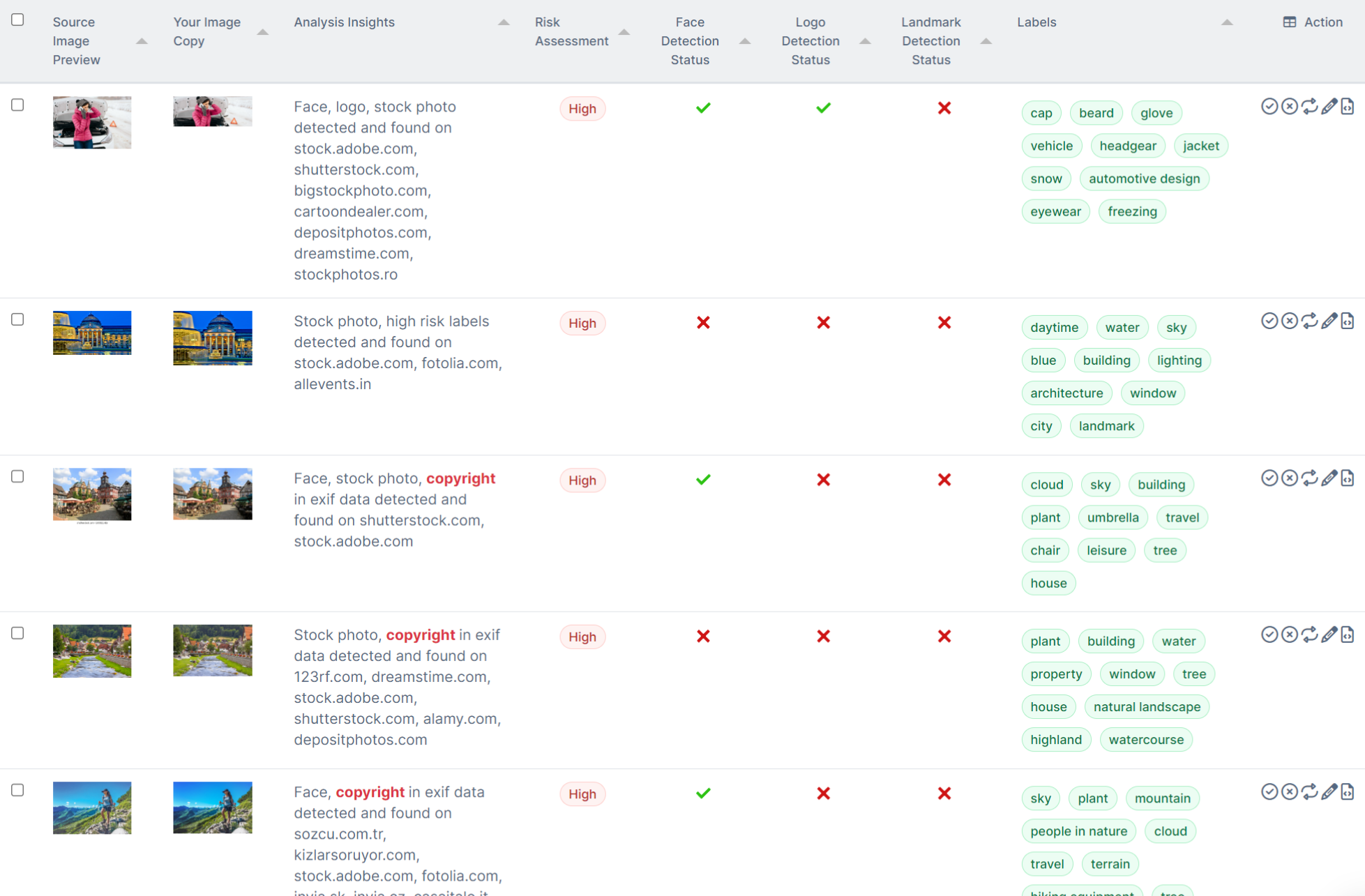
- Image Cataloging: Helps build a complete inventory of your site’s images, including those you’re licensed to use. This comprehensive inventory is essential for effective image management and compliance monitoring.
- Efficient Management: Use our whitelist feature to mark cleared images, streamlining future reviews. This process helps to minimize redundant checks and focuses resources on newly added or unverified images.
- EXIF Data Viewing: Allows users to view the EXIF data of each analyzed image, providing additional proof of compliance. This feature is crucial for verifying the copyright status and understanding the full context of your digital assets.
- Usage Tracking: Monitor where your images are used across the web with our advanced backlink analysis. This feature provides detailed backlinks showing where each image appears online, including instances of edited or manipulated versions. This is to ensure you have a comprehensive view of where else that image is being used.
Outcomes: Gain a clear understanding of your site’s copyright status with actionable steps for each image. Document licensing directly in PicDefense.io, creating a robust compliance record. Our tool emphasizes strategic image management, laying the groundwork for ongoing, demonstrable compliance.
PicDefense.io offers more than risk assessment; it’s a comprehensive toolkit for achieving and showcasing image copyright compliance.
PicDefense.io offers more than risk assessment; it’s a comprehensive toolkit for achieving and showcasing image copyright compliance.
Stay on Top of Your Images with Site Monitoring! 🚀
Pricing Plans That Fit Your Scale
Affordable, Pay-As-You-Go Image Copyright Checking in Minutes
Check 500 Images for $85
Why Choose Us?
PicDefense is a robust and user-friendly online tool designed to simplify the process of verifying the copyright status of images. Ideal for bloggers, content creators, and anyone committed to using images responsibly, our platform offers a streamlined approach to ensure you remain compliant with copyright laws.
Key Features
- Advanced AI Analysis: Harness the power of cutting-edge artificial intelligence to scan and analyze images thoroughly.
- Keyword Labeling: Automatically generate descriptive keywords for each image, enhancing searchability and organization of your digital assets.
- Cost-Efficiency: Enjoy a flexible pricing model that ensures you only pay for the services you need, without compromising on quality or accessibility.
- Precise Risk Analysis: Benefit from our detailed PicRisk scores, which categorize images based on their potential for copyright infringement, enabling focused and informed decisions.
- Wide Format Compatibility: Our system supports a broad array of image formats including JPEG, PNG, WEBP, and GIF, ensuring comprehensive coverage.
- Large Image Repository: Compare your images against a vast database of over 67.1 billion indexed images, constantly updated to include the latest available data.

Avoid legal issues – check for copyrighted images 🚀
Frequently Asked Questions
Introduction & Key Concepts
- What is PicDefense, and how does it protect my website?
PicDefense is an AI-powered image copyright checker that helps website owners, bloggers, and businesses identify potentially copyrighted images before they become a legal risk.
🔍 How it works:
✔ Website Scanning – Enter your URL, and PicDefense will analyze all images for potential copyright risks.
✔ Risk Assessment – Each image gets a risk score, so you know which ones need further review.
✔ Site Monitoring – Continuously scans newly added images, ensuring ongoing compliance.
✔ License Management – Track and whitelist images you have permission to use.
✔ Seamless Integration – Works with WordPress, Zapier, and APIs for automated compliance.🚀 Stay protected from copyright disputes—PicDefense helps you identify risks before they become costly problems!
- How does PicDefense work?
PicDefense automates image compliance by scanning and monitoring your website for potentially copyrighted images.
🛠️ Step-by-Step Process:
1️⃣ Scan Your Website – Enter your URL, and PicDefense will crawl all images or let you upload specific ones for review.
2️⃣ Analyze Copyright Risk – Our AI checks images against an extensive database of 73 billion images, even if they’ve been modified or resized, flagging potentially copyrighted images.
3️⃣ Generate a Detailed Report – Instantly view:
✔ Risk Scores – Prioritize which images need attention.
✔ Reverse Image Search & Backlink Info – Track down where the image appears online.
✔ Face, Logo & Landmark Detection – Identifies faces, brand logos, or famous landmarks in images.
✔ Stock Image & Collection Matching – See if an image is from a known stock library or part of a set.
✔ EXIF Data Analysis – Extract metadata like camera details, timestamps, and potential ownership info.
4️⃣ Take Action – Replace, license, or whitelist images to ensure compliance.
5️⃣ Monitor for New Images (Recommended) – Ongoing weekly scans catch unverified images before they become a legal issue.🚀 PicDefense provides the insights you need to stay compliant—before copyright issues arise!
- Why do I need PicDefense?
If you use images on your website, you could be at risk of copyright infringement—without even realizing it. Many businesses, bloggers, and website owners receive copyright demand letters for images they thought were safe to use.
⚠️ Even if you didn’t knowingly infringe, you can still be held liable.
🔍 PicDefense helps you:
✔ Avoid Expensive Copyright Claims – Identify potentially copyrighted images before they become a legal issue.
✔ Protect Your Website from Copyright Trolls – Stop bad actors from exploiting copyright laws to demand unfair payments.
✔ Track Your Image Licenses – Detect stock images and ensure you’ve properly licensed them.
✔ Monitor New Images Automatically – Site Monitoring scans your site weekly to catch any new, unverified images before they cause problems.
✔ Stay Confident in Your Compliance – Get clear reports with risk scores, image sources, and metadata so you can take action if needed.🚀 PicDefense gives you peace of mind—protecting your website from legal risks while keeping your content safe and compliant.
- How accurate is PicDefense?
PicDefense is highly accurate, leveraging a 73-billion-image database and advanced AI detection to flag potentially copyrighted images—even if they’ve been resized, cropped, or modified.
🔍 How we ensure accuracy:
✔ Reverse Image Search – Matches images against billions of online sources.
✔ Face, Logo & Landmark Detection – Identifies key elements that could indicate copyright risks.
✔ Stock Image & Collection Matching – Recognizes if an image belongs to a known stock library.
✔ EXIF Data Analysis – Extracts metadata to help verify ownership.⚠️ Important:
- PicDefense detects if an image is a stock photo, but we don’t know if you have a license for it. If an image is flagged as stock, it’s up to you to track and document where you licensed it from.
- No tool can guarantee 100% accuracy because copyright depends on licensing rights, permissions, and context. A flagged image isn’t always copyrighted, and an unflagged image isn’t always safe.
🚀 PicDefense helps you detect potential risks, but keeping records of your image licenses is key to staying fully compliant!
- What’s the difference between the Web-Based PicDefense Scanner and the WordPress Plugin?
PicDefense offers two ways to scan your images for copyright risks: the web-based scanner and the WordPress plugin. However, we strongly recommend starting with the web-based version, especially with Site Monitoring for ongoing protection.
🔍 Web-Based Scanner (Recommended Starting Point)
✔ No installation needed—fully cloud-based.
✔ Scans all publicly visible images on your website, not just WordPress uploads.
✔ Works for any website, whether built on WordPress or another platform.
✔ Supports Site Monitoring, which automatically detects new images weekly, helping you stay compliant over time.
✔ Includes a “Replace” feature—PicDefense suggests potential replacement images, but you must manually update them on your site.
✔ Ideal for businesses, blogs, agencies, and eCommerce sites that need full website compliance.
🔧 WordPress Plugin (Optional for WordPress Users)
✔ Requires installation of the PicDefense WordPress Plugin.
✔ Only scans images in your WordPress Media Library (not the full site).
✔ Includes an automatic “Replace Image” feature, allowing you to swap out flagged images directly in WordPress.
✔ Best for WordPress users who use only the WordPress Media Library for images and need the replace functionality.
⚠ Important: Due to the complexity of automatically replacing images in WordPress, the Replace Image feature may not work in all cases. Some themes, page builders, or custom setups may prevent seamless replacements. If issues arise, you may need to manually update images in certain areas of your site.
📌 Which one should I use?
- We recommend starting with the web-based version, as it scans your entire site and works with Site Monitoring for continuous compliance.
- If you manage images only through WordPress, the plugin can help with image replacement, but it’s not a full-site solution and may have limitations based on your site’s setup.
🚀 For complete protection, start with the web-based scanner and Site Monitoring!
- Is my data secure with PicDefense?
Yes! PicDefense prioritizes your privacy and security at every step. We built PicDefense to fight against copyright trolls, not work for them—we’re on your side.
🔒 How we protect your data:
✔ No Image Storage – Images are never saved or indexed after analysis.
✔ End-to-End Encryption – All data is securely transmitted and protected.
✔ Read-Only Website Scanning – We only scan publicly visible images, keeping private content untouched (unless you use our WordPress plugin for image replacement).
✔ Strict Access Control – Only you can view your scan results—nothing is shared with third parties.🚀 With PicDefense, your data stays private, secure, and in your control.
Copyright & Legal Basics
- What should I do if I discover a copyrighted image on my site?
If PicDefense flags an image as potentially copyrighted, it’s important to act fast to avoid legal trouble.
🔍 Step 1: Verify the Image Source
✔ Check your PicDefense report for reverse search results, metadata, and stock image detection.
✔ If it’s a stock image, confirm whether you have a valid license for it.📌 Reminder: PicDefense can detect if an image is from a stock library, but we don’t know if you have a license—be sure to keep track of where you sourced your images.
📂 Step 2: Take Action
✔ If you have permission or a license – Document it! Add notes in PicDefense for future reference.
✔ If you don’t have permission – Replace, remove, or properly license the image immediately.
✔ If unsure – Reach out to the original owner or stock provider for clarity, or replace the image with one you have a license for or permission to use.🚀 Act quickly—resolving copyright risks early can help you avoid demand letters and legal fees.
- If an image isn’t copyrighted, am I free to do anything with it?
Not always! Even if an image isn’t copyrighted, there may still be other legal restrictions on how you can use it.
⚠️ Consider these factors:
✔ Public Domain vs. Other Rights – Some images are in the public domain (free to use), but others may have trademark, privacy, or publicity restrictions.
✔ Trademarked Logos & Brands – Even if an image is copyright-free, using a logo or brand name could still violate trademark laws.
✔ Images of People – Photos of recognizable individuals may require permission (especially for commercial use) due to privacy or publicity rights.
✔ Moral & Ethical Use – Some images have restrictions on how they can be used (e.g., editorial use only or no commercial modifications).📌 Always double-check licensing terms and usage rights—even if an image isn’t copyrighted.
🚀 When in doubt, use images with clear licensing or obtain proper permissions!
- Am I safe if I use “royalty-free” images?
Not necessarily. “Royalty-free” doesn’t mean “copyright-free”—it just means you don’t have to pay ongoing fees after purchasing a license. You still need to follow specific licensing terms.
⚠️ Things to watch out for:
✔ License Restrictions – Some royalty-free images prohibit commercial use, modifications, or resale.
✔ Exclusive vs. Non-Exclusive – The same image can be licensed by multiple people, meaning competitors could use the same visual.
✔ Misuse of Watermarked or Unlicensed Images – Downloading images from Google, Pinterest, or stock sites without proper licensing can still lead to copyright claims.
✔ Model & Property Releases – Some images featuring people, landmarks, or private property may require additional permissions for commercial use.📌 Always check the licensing terms of royalty-free images to ensure you’re using them legally.
🚀 Best practice: Keep a record of your licenses and source details for every image you use.
- What does “Fair Use” really mean?
Fair Use is a legal doctrine that allows limited use of copyrighted material without permission under certain circumstances, typically for purposes like:
✔ Commentary & Criticism – Reviewing or critiquing a copyrighted work.
✔ News Reporting – Using copyrighted content for journalistic purposes.
✔ Education & Research – Non-commercial teaching, scholarship, or academic study.
✔ Parody & Satire – Transformative use that mocks or criticizes the original work.⚠️ Fair Use is not a free pass! Courts consider these four factors:
1️⃣ Purpose & Use – Is it for commercial gain, or is it transformative (adding new meaning or context)?
2️⃣ Nature of the Work – Is the original content factual or creative? (Creative works get more protection.)
3️⃣ Amount Used – Are you using a small portion or the entire work?
4️⃣ Effect on Market Value – Does your use compete with or harm the original creator’s ability to profit?📌 Fair Use is complex and subjective—just because you think it applies doesn’t mean a copyright owner will agree.
🚀 When in doubt, get permission or use properly licensed images to avoid legal risks!
- Do I need more than image attribution?
Yes! Giving credit (attribution) is not the same as having permission to use an image.
🔍 What attribution does (and doesn’t) do:
✔ Attribution acknowledges the creator but does NOT grant legal rights to use the image.
✔ Some licenses (like Creative Commons) require attribution, but you must follow the specific license terms (e.g., non-commercial use only, no modifications).
✔ Stock images and paid licenses often don’t require attribution, but you still need to purchase the correct license for your intended use.⚠️ Attribution does NOT protect you from copyright claims if you don’t have the right to use the image!
🚀 Always check the image’s license and permissions—credit alone is not enough!
Single Scan Features & Pricing
- What is a “Single Scan”?
A Single Scan is a one-time analysis of your website’s images to check for potential copyright risks. It’s perfect for website owners who want a quick compliance check before deciding if they need ongoing monitoring.
🔍 How it works:
✔ Enter your website URL or upload image URLs – PicDefense will scan and analyze all detected images.
✔ Get a detailed report – See risk scores, reverse image search results, stock image detections, and metadata insights.
✔ Take action – Replace, remove, or properly license flagged images.📌 A Single Scan gives you a snapshot of your site’s copyright risks, but it does NOT provide ongoing monitoring. If you frequently add new images, Site Monitoring is recommended for continuous protection.
🚀 Use a Single Scan for a quick compliance check—upgrade to Site Monitoring for automatic, ongoing protection!
- What are the costs and how does billing work for Single Scans?
What are the costs and how does billing work for Single Scans?
PicDefense uses a credit-based pricing system, so you only pay for the images you scan—with no subscriptions or hidden fees.
💰 Sample Pricing:
✔ 100 credits – $20
✔ 500 images – $85
✔ 1,000 images – $150📌 For the latest pricing, visit PicDefense.io or check your dashboard.
🚀 Need ongoing protection? Consider Site Monitoring ($30/month) for automatic weekly scans of newly added images.
- Can I do a Single Scan, then upgrade to Monitoring?
Can I do a Single Scan, then upgrade to Monitoring?
At this time, there’s no direct upgrade path from a Single Scan to Site Monitoring, but we plan to add this in the future.
📌 If you want Site Monitoring, you’ll need to start with it from the beginning to ensure ongoing automatic scans of new images as they’re added to your site.
🚀 For continuous protection, we recommend starting with Site Monitoring from the start!
- Is there a limit to how many images I can check at once?
No, there’s no limit to how many images you can check at once—it all depends on the number of credits you have.
📌 How it works:
✔ Each image scanned uses 1 credit (e.g., 500 images = 500 credits).
✔ Large scans may take longer, but you can check thousands of images in one go.
✔ Bulk uploads and full website crawls are supported for efficient scanning.🚀 Want continuous compliance? Site Monitoring automatically checks new images added to your website weekly—so you never have to run manual scans again!
- How quickly will I receive my PicDefense report?
Your PicDefense report is typically generated within 15 minutes, but processing time varies depending on the number of images being scanned.
📌 Estimated Processing Time:
✔ Small scans (under 100 images) – Usually completes within 15 minutes.
✔ Medium scans (under 1,000 images) – Usually completes within 30 minutes.
✔ Larger scans (thousands of images) – May take longer, but you can track progress in your dashboard.🔍 Why does it take time?
PicDefense performs deep analysis, verifying all backlinks, tracking image appearances, checking metadata, and detecting potential stock sources. This ensures you get the most comprehensive copyright risk assessment available.🚀 Once your scan is complete, you’ll receive a detailed report with risk scores, reverse image search results, and metadata insights—so you can take action confidently!
- Do whitelisted images consume credits in future Single Scans?
No, whitelisted images do not consume credits in future Single Scans.
📌 How it works:
✔ Once you whitelist an image, PicDefense recognizes it as safe and skips it in future scans.
✔ This helps you avoid unnecessary credit usage for images you’ve already verified.
✔ If an image is removed from the whitelist, it will be scanned again in future Single Scans.🚀 Whitelisting saves you credits and keeps your compliance checks efficient!
- Do I need to install any software for Single Scans?
It depends! PicDefense is fully web-based, so for most users, no installation is required—you can simply run a scan from your browser.
📌 However, if you’re using WordPress, you might prefer our plugin:
✔ Web-Based – No installation needed, just visit PicDefense.io and start scanning.
✔ WordPress Plugin (Optional) – If you want direct integration with your WordPress site, you can install our PicDefense WordPress Plugin.
🛠️ Important Note About the WordPress Plugin:
✔ Scans Media Library Only – Unlike our web-based scanner, which crawls your full website, the WordPress plugin analyzes images directly from your Media Library.
✔ “Replace Image” Feature – If an image is flagged, you can swap it out automatically without manually editing your website.
🚀 For full-site scanning, use the web version. If you manage images in WordPress, the plugin is a powerful tool for quick compliance checks and replacements!
Site Monitoring
- What is Site Monitoring?
Site Monitoring is PicDefense’s automated solution that continuously scans your website for newly added images, helping you stay copyright-compliant over time.
📌 How it works:
✔ Automated Weekly Scans – PicDefense automatically detects and analyzes new images on your website every week.
✔ Real-Time Compliance Tracking – Get alerts when new, unverified images are found.
✔ Detailed Reports – See risk scores, reverse image search results, stock image detections, and metadata insights for each new image.
✔ Seamless Protection – Instead of running manual scans every time you update your site, Site Monitoring does the work for you.🚀 Site Monitoring is the best way to ensure your website stays copyright-compliant without constant manual checks!
- How does Site Monitoring differ from a Single Scan?
The key difference is that Site Monitoring provides ongoing protection, while a Single Scan is a one-time check.
🔍 Single Scan (One-Time Check)
✔ Manually initiated—you scan your website or specific images once.
✔ Checks all publicly visible images at the time of the scan.
✔ Great for a quick compliance audit but does not track new images over time.🔄 Site Monitoring (Ongoing Protection)
✔ Automatically scans your website weekly for newly added images.
✔ Alerts you when unverified images appear, helping you stay compliant.
✔ Ideal for websites that frequently add content (e.g., blogs, eCommerce, agencies).📌 Which one should I use?
- If you need a one-time check, a Single Scan works well.
- If you regularly update your website, Site Monitoring is the best option to stay compliant without constant manual scans.
🚀 For full protection, we recommend starting with Site Monitoring!
- How much does Site Monitoring cost?
How much does Site Monitoring cost?
Site Monitoring costs $30 per month and includes 150 image analyses per month, with unused credits rolling over indefinitely.
📌 Key Pricing Details:
✔ Covers up to 3 websites per plan—great for businesses or agencies managing multiple sites.
✔ Includes 150 image scans per month—with additional scans priced at $0.15 per image.
✔ Unused credits roll over, so you never lose what you don’t use.
✔ The first scan establishes a baseline by analyzing all existing images on your site. If you have more than 150 images initially, extra images are billed at $0.15 per image.
✔ Bulk Discounts Available – Site Monitoring uses the same credit system as Single Scans, so if you prepay for credits in bulk, you get discounted rates just like Single Scan users.📌 For the latest pricing and bulk credit discounts, visit PicDefense.io or check your dashboard.
🚀 Site Monitoring is the most cost-effective way to keep multiple websites copyright-compliant over time!
- What if I exceed 150 new images in a month?
If you exceed 150 new images in a month, PicDefense will continue scanning them at a rate of $0.15 per additional image.
📌 Ways to Manage Extra Scans:
✔ Unused credits roll over, so if you didn’t use all 150 in a previous month, they’ll carry forward.
✔ Bulk Discounts Available – Since Site Monitoring uses the same credit system as Single Scans, you can prepay for credits in bulk to get a lower per-image cost.
✔ Monitor Image Uploads – If you frequently add large numbers of images, consider purchasing credits in advance to save.📌 For the latest pricing and bulk credit options, check the PicDefense dashboard.
🚀 No surprises—PicDefense ensures you stay protected while giving you flexibility in managing your scans!
- Does Site Monitoring rescan existing images every time?
No, Site Monitoring does not rescan existing images every time—it only checks for newly added images on your website.
📌 How it works:
✔ First Scan (Baseline Check) – The initial Site Monitoring scan analyzes all existing images on your site to establish a baseline.
✔ Ongoing Weekly Scans – After the baseline is set, Site Monitoring only scans new images added to your website.
✔ No Duplicate Charges – Previously scanned images do not consume credits again, unless they are re-uploaded or modified in a way that changes the file name or location.🚀 Site Monitoring ensures your website stays compliant without wasting credits on images you’ve already checked!
- How often does Site Monitoring scan my website?
Site Monitoring scans your website once per week, automatically detecting and analyzing any newly added images.
📌 How it works:
✔ Weekly Automated Scans – Runs in the background, so you don’t have to manually check for new images.
✔ Only Scans New Images – Previously scanned images are not rescanned unless re-uploaded or modified.
✔ Real-Time Alerts – Get notified if any newly detected images require your attention.
🚀 With Site Monitoring, you stay compliant without having to manually scan your website every time you upload new images!
- Can I monitor multiple websites?
Yes! Each Site Monitoring plan covers up to 3 websites at no additional cost.
📌 How it works:
✔ Monitor up to 3 websites per plan—perfect for businesses, agencies, or multi-site owners.
✔ Each site gets its own automated weekly scan, ensuring all new images are checked.
✔ Manage everything from a single dashboard—view reports and compliance status for all your monitored sites.🚀 Need to monitor more than 3 sites? You can purchase additional Site Monitoring plans to cover extra websites!
- What if an image is flagged, but I have a license?
If PicDefense flags an image that you legally own or have licensed, you can whitelist it to prevent it from being flagged in future scans.
📌 How to handle a flagged image with a license:
✔ Verify Your License – Check your records to confirm you have the proper rights to use the image.
✔ Whitelist the Image – In your PicDefense dashboard, mark the image as licensed so it won’t be flagged again.
✔ Add Notes for Future Reference – We recommend storing license details in PicDefense or keeping a record of where you purchased the image.⚠ Reminder:
- PicDefense detects stock images but doesn’t know if you have a license for them.
- Keeping documentation helps you respond quickly if you ever receive a copyright claim.
🚀 Whitelisting makes it easy to track licensed images and maintain copyright compliance without unnecessary alerts!
Support & Additional Info
- How does PicDefense handle duplicate images?
PicDefense detects duplicate images based on their Image URL. If the same image appears multiple times on different pages of the same website using the same URL, it will only be counted once and will not consume additional credits.
However, if the same image is hosted under a different URL, even if it is visually identical, it will be treated as a separate image and will require an additional credit for analysis.
For monitoring and whitelisting, once an image is whitelisted under a specific URL, all duplicate instances of that URL remain whitelisted. If the same image is added under a new URL, it will need to be reviewed and whitelisted again.
- Can PicDefense check images from social media or specific URLs?
Yes! PicDefense allows you to check images from specific URLs, including images used on social media. Simply go to Single Scan and navigate to the “Submit Image URLs” section.
📌 How it works:
✔ Specific URL Checks – You can submit any direct image URL for analysis.
✔ Social Media Images – PicDefense can scan publicly accessible images, but some platforms (like Instagram, Facebook, and Twitter) may have restrictions that prevent scanning.
✔ Bulk Image URL Uploads – You can submit multiple URLs at once for faster processing.🚀 If you’re unsure about an image’s copyright status, simply paste the URL into PicDefense and let it analyze the risk for you!
- If I whitelist an image, do I need to whitelist it again if I reuse it on another webpage?
If an image is whitelisted under a specific URL, it remains whitelisted across all instances of that same URL. However, if the image is hosted under a new URL, it will be treated as a new or duplicate image and will need to be whitelisted again.
- How often should I run a scan if not using Site Monitoring?
If you’re not using Site Monitoring, we recommend running a scan at least once a month or whenever you add new images to your website.
📌 Suggested Scan Frequency:
✔ Regular Updates (e.g., blogs, eCommerce sites, agencies) – Scan monthly or quarterly to stay compliant.
✔ High-Volume Image Use – If you frequently add new content, scan more often to catch potential risks early.
✔ Before Major Website Changes – If you’re redesigning your site or switching image providers, run a scan to ensure compliance.
✔ After Receiving a Copyright Claim – If you’ve been targeted by a copyright demand letter, scan your entire site immediately to check for other potential risks.🚀 For effortless, ongoing compliance, we recommend using Site Monitoring—it automatically scans new images for you!
- Does PicDefense guarantee outcomes or offer legal advice?
No, PicDefense does not guarantee outcomes or provide legal advice.
📌 What PicDefense does:
✔ Identifies potentially copyrighted images using AI-powered analysis.
✔ Provides risk scores, reverse image search results, and metadata insights to help you make informed decisions.
✔ Helps you track and manage image licenses to stay compliant.⚠ What PicDefense does NOT do:
❌ Guarantee that flagged images are copyrighted or that unflagged images are safe to use.
❌ Provide legal advice—copyright laws vary by region and depend on specific usage rights.
❌ Prevent or resolve legal disputes—if you receive a copyright claim, we recommend consulting a legal professional.🚀 PicDefense is a powerful tool for detecting risks, but it’s up to you to verify licensing and comply with copyright laws!
- How do I submit a support ticket?
If you need assistance, you can submit a support ticket directly through our help center.
📌 Steps to Submit a Ticket:
✔ Go to https://help.picdefense.io/ and click on “Submit Ticket”.
✔ Describe your issue – Provide as much detail as possible, including any relevant screenshots or URLs.
✔ Submit your request – Our team will review and get back to you as soon as possible.🚀 Need quick answers? Check our Docs for common troubleshooting solutions!


Join our PicDefense newsletter for the latest updates on copyright enforcement trends, expert tips, and exclusive deals. Stay ahead and protect your digital content.
