


Erik Marsja: Pandas: Drop Columns By Name in DataFrames
The postPandas: Drop Columns By Name in DataFramesappeared first onErik Marsja.
This blog post will cover Pandas drop columns by name from a single DataFrame and multiple DataFrames. This is a common task when working with large datasets in Python, especially when you want to clean your data or remove unnecessary information. We have previously looked at how todrop duplicated rows in a Pandas DataFrame, and now we will focus on dropping columns by name.
Table of Contents
- How to use Pandas to drop Columns by Name from a Single DataFrame
- Dropping Multiple Columns by Name in a Single DataFrame
- Dropping Columns from Multiple Pandas DataFrames
- Dropping Columns Conditionally from Panda DataFrame Based on Their Names
- Summary
- Resources
How to use Pandas to drop Columns by Name from a Single DataFrame
The simplest scenario is when we have a single DataFrame and want to drop one or more columns by their names. We can do this easily using thedrop()Pandas function. Here is an example:
importpandasaspd# Create a simple DataFramedf = pd.DataFrame({'A': [1,2,3],'B': [4,5,6],'C': [7,8,9] })# Drop column 'B' by namedf = df.drop(columns=['B']) print(df)In the code chunk above, we drop column ‘B’ from the DataFramedfusing thedrop()function. We specify the column to remove by name within thecolumnsparameter. The operation returns a new DataFrame with the ‘B’ column removed, and the result is assigned back todf.
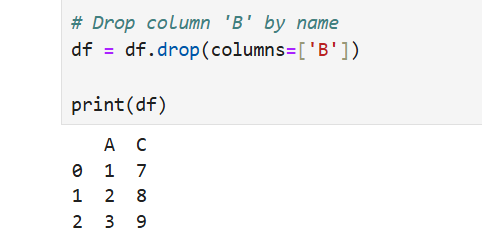
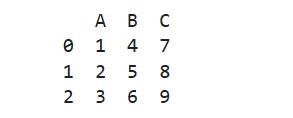
Compare it to the original dataframe before column ‘B’ was dropped:
Dropping Multiple Columns by Name in a Single DataFrame
If we must drop multiple columns simultaneously, we can pass a list of column names to thedrop()function. Here is how we can remove multiple columns from a DataFrame:
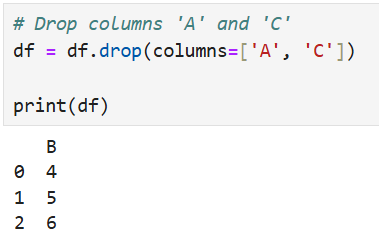
# Drop columns 'A' and 'C'df = df.drop(columns=['A','C'])print(df)In the code above, we removed both columns ‘A’ and ‘C’ from the DataFrame by specifying them in a list. The resulting DataFrame only contains the column ‘B’. Here is the result:
Dropping Columns from Multiple Pandas DataFrames
When working with multiple DataFrames, we might want to drop the same columns by name. We can achieve this by iterating over our DataFrames and applying thedrop()function to each one.
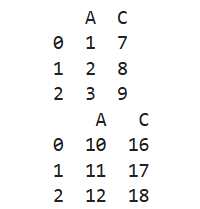
# Create two DataFramesdf1 = pd.DataFrame({'A': [1,2,3],'B': [4,5,6],'C': [7,8,9]}) df2 = pd.DataFrame({'A': [10,11,12],'B': [13,14,15],'C': [16,17,18]})# List of DataFramesdfs = [df1, df2]# Drop column 'B' from all DataFramesdfs = [df.drop(columns=['B'])fordf in dfs]# Print the resultfordf in dfs:print(df)In the code chunk above, we first added our two DataFrames,df1anddf2, to a list calleddfsto efficiently perform operations on multiple DataFrames at once. Then, using a list comprehension, we drop column ‘B’ from each DataFrame in the list by applying thedrop()function to each one. The result is a new list of DataFrames with the ‘B’ column removed from each.
Dropping Columns Conditionally from Panda DataFrame Based on Their Names
In some cases, we might not know in advance which columns we want to drop but wish to drop columns based on specific conditions. For instance, we might want to drop all columns that contain a particular string or pattern in their name.
# Drop columns whose names contain the letter 'A'df = df.drop(columns=[colforcol in df.columnsif'A'in col])print(df)In the code above, we used a list comprehension to identify columns whose names contain the letter ‘A’. We then dropped these columns from the DataFrame.
Summary
In this post, we covered several ways to pandas drop columns by name in both a single DataFrame and across multiple DataFrames. We demonstrated how to remove specific columns, drop multiple columns at once, and even apply conditions for column removal. These techniques are essential for data cleaning and preparation in Python, especially when working with large datasets. By mastering these methods, you can handle your data more efficiently and streamline your data manipulation tasks.
Feel free to share this post if you found it helpful, and leave a comment below if you would like me to cover other aspects of pandas or data manipulation in Python!
Resources
Here are some more Pandas-related tutorials:
- Pandas Tutorial: Renaming Columns in Pandas Dataframe
- A Basic Pandas Dataframe Tutorial for Beginners
- Six Ways to Reverse Pandas dataframe
The postPandas: Drop Columns By Name in DataFramesappeared first onErik Marsja.
