


Rodrigo Girão Serrão: TIL #131 – Change casing in search & replace

Today I learned you can change the casing of matched groups when doing a search & replace in VS Code with regex.
VS Code has a search & replace feature that lets you use regex to look for patterns and then reference groups in the replacement... But it lets you do something else that's really cool.
Changing casing with special sequences
When you are replacing groups, you can use special sequences to change the casing of the group you're inserting, according to the following table:
The picture below shows an example of a search & replace operation where I looked for the text “all in one go”. I enclosed that in a regex group and I'm replacing it with the pattern\U$1, which means the replacement would be the all-uppercase string “ALL IN ONE GO”:
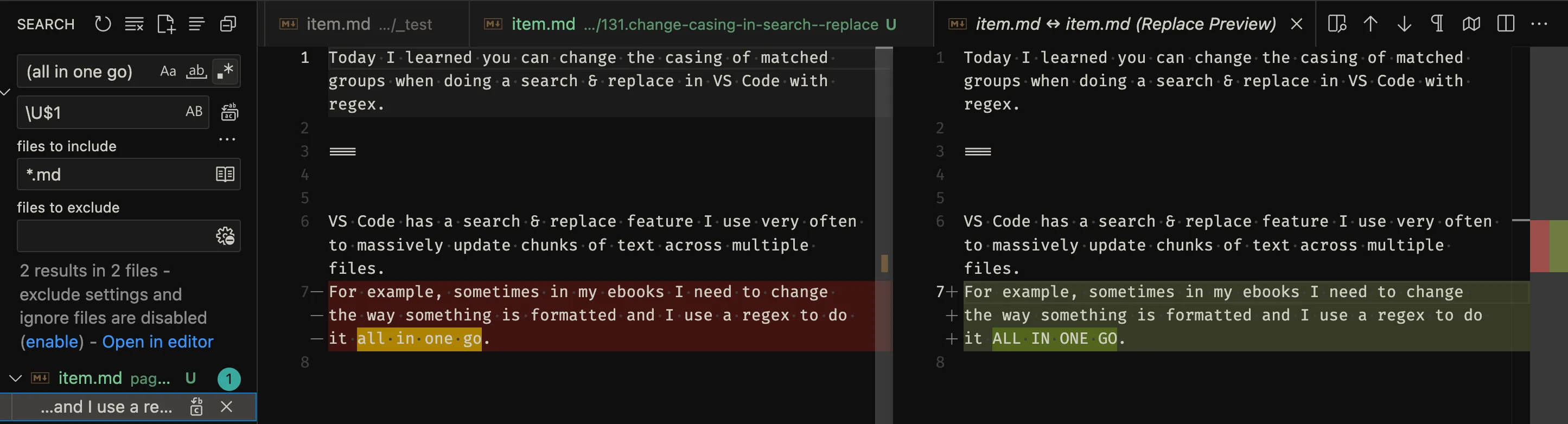
Search and replace with \U.
Pretty nifty, right?
The same thing in Python
The modulerein Python supports searching and replacing with the functionre.subbut it doesn't let you do the same case-changing operations with special sequences. Instead, you have to use the fact thatre.subsupports dynamic string replacementsand then implement the logic yourself.
First, you can't use the string methodsupperandlowerdirectly for\Uand\L; you have to grab the text from the objectMatch. You also have to pick the string apart to implement the\uand\l:
def all_upper(match): # \U return match.group(0).upper() def first_upper(match): # \u s = match.group(0) return s[0].upper() + s[1:] def all_lower(match): # \L return match.group(0).lower() def first_lower(match): # \l s = match.group(0) return s[0].lower() + s[1:]Here's an example:
# E.g., same behaviour as \U$0 in VS Code: re.sub( "all in one go", # pattern to search for all_upper, # dynamic replacement "... all in one go ...", # source text ) # -> '... ALL IN ONE GO ...'https://mathspp.com/blog/til/change-casing-in-search-and-replace
