


Django Weblog: Keyboard shorcuts in Django via GSoC 2025
This summer I participated in theGoogle Summer of Codeprogram with Django. My work focused on introducing keyboard shortcuts to the Django admin interface which led to a new package:django-admin-keyshortcuts.
Proposal and Community Discussions
My original GSoC proposal was to improve the existingdjango-admin-keyboard-shortcutspackage maintained by one of my mentors, Tom. The plan was to fix bugs, add new keyboard shortcuts, build a command palette, and eventually merge these features into Django's core admin. I initially thought getting my GSoC proposal accepted meant I could dive straight into coding. But Tom explained that Django has its own process for new features, which starts off with community discussions.
After posting on the forum and gathering feedback, we decided to focus on keyboard shortcuts only, and continue exploring that in packages rather than target Django core immediately. This way the feature can be tested and improved more quickly without waiting on Django'slong release cycle.
Theaccessibility teamhelped drafting keyboard shortcuts outlining key requirements and expected outcomes, in particular making sure shortcuts would be widely compatible with browsers and assistive technologies. That document served as the base for developing django-admin-keyshortcuts.
django-admin-keyshortcuts
This package adds useful keyboard shortcuts to the Django admin interface. The goal is to make the Django admin interface faster to navigate and more accessible to keyboard-first users. Here are some of the shortcuts we have added so far:
- /focuses the search bar.
- j/kfocuses next/previous object.
- Ctrl+ssaves the object.
- Alt+dprompts to delete the object.
The package also comes with a keyboard shortcuts dialog, crucial so users of the admin can discover those new features:
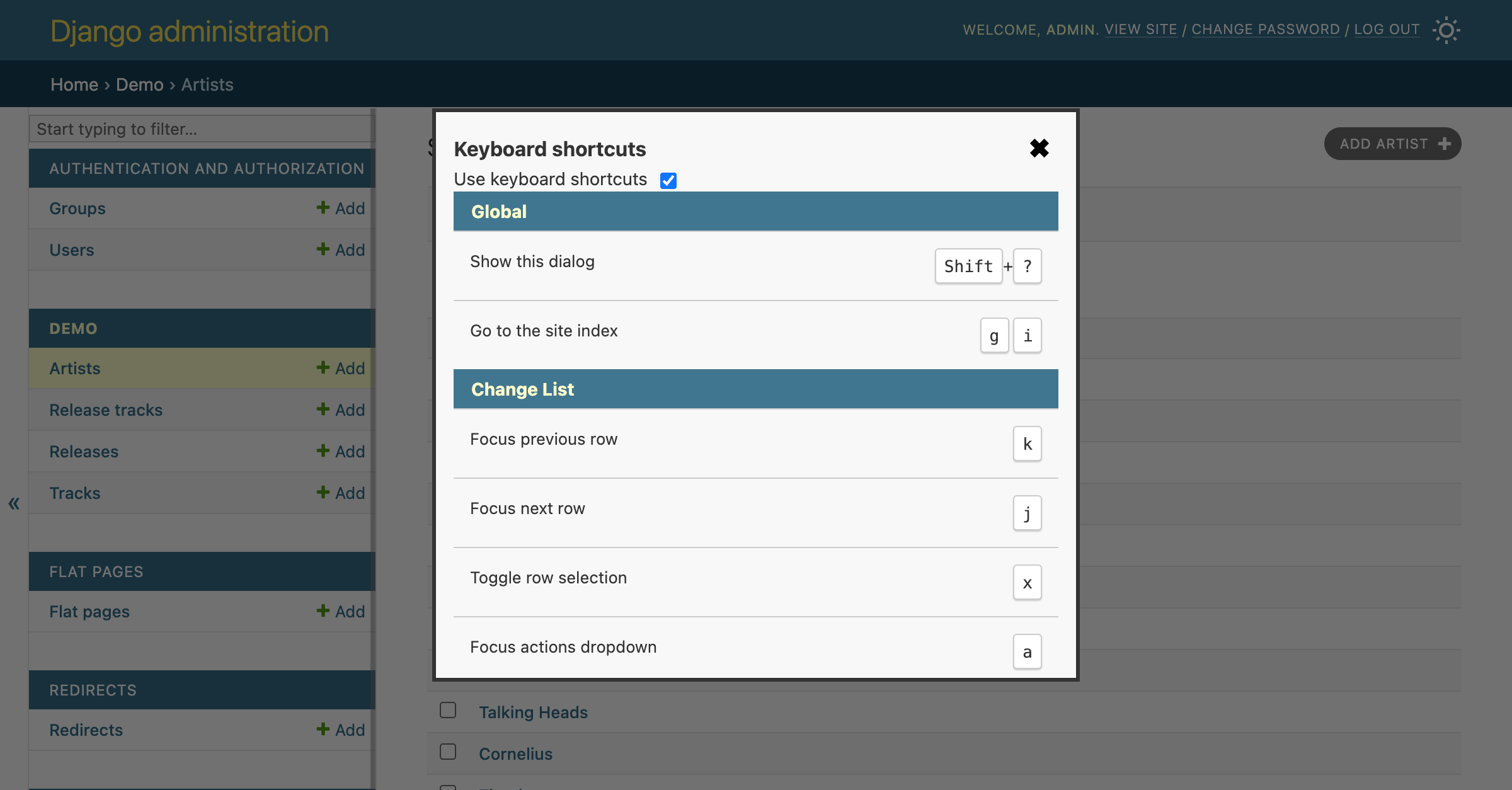
Developers can also define custom shortcuts by extending admin templates. Detailed instructions can be found in the package's README.
Under the hood, the package uses thehotkey libraryfor handling shortcuts. The library seems to be well maintained (compared to other alternatives) and is used for keyboard shortcuts in GitHub.
What's next
We have made a lot of progress, but there's still work to do before we can push to merge this functionality inside Django core.
Implementation issues
Right now, there are a couple of known problems:
- Shortcuts do not trigger when input or textfield is focused:
- Shortcut keys not consistent when switched to non-US layouts:
To address these we may wait for the hotkey library maintainers to implement the necessary fixes, or look for alternatives.
Gather feedback
We want more users to try it out! Testing in different scenarios will help find bugs faster and improve the package. The default shortcut set is also small, we need feedback to determine which shortcuts are most useful. We also plan to list the package on a new "Experiments" section on the newDjango Ecosystempage to make it more visible.
But for now, try it out and let us know what you think! We have astatic admin demofor people to directly try the shortcuts. Or installdjango-admin-keyshortcutsto test it on your own project.
Let us know what you thinkover on the Django Forum!
https://www.djangoproject.com/weblog/2025/sep/04/keyboard-shorcuts-in-django-via-gsoc-2025/
