DataTypeSystem


This blog post proclaims and briefly describes the Python package “DataTypeSystem” that provides a type system for different data structures that are coercible into full arrays. The package is a Python translation of the Raku package “Data::TypeSystem”, [AAp1].

Installation

Install from GitHub

pip install -e git+https://github.com/antononcube/Python-packages.git#egg=DataTypeSystem-antononcube\&subdirectory=DataTypeSystem

From PyPi

pip install DataTypeSystem


Usage examples

The type system conventions follow those of Mathematica’s Dataset — see the presentation “Dataset improvements”.

Here we get the Titanic dataset, change the “passengerAge” column values to be numeric, and show dataset’s dimensions:

import pandas dfTitanic = pandas.read_csv('https://raw.githubusercontent.com/mwaskom/seaborn-data/master/titanic.csv') dfTitanic = dfTitanic[["sex", "age", "pclass", "survived"]] dfTitanic = dfTitanic.rename(columns ={"pclass": "class"}) dfTitanic.shape

(891, 4)

Here is a sample of dataset’s records:

from DataTypeSystem import * dfTitanic.sample(3)

sexageclasssurvived
555male62.010
278male7.030
266male16.030

Here is the type of a single record:

deduce_type(dfTitanic.iloc[12].to_dict())

Struct([age, class, sex, survived], [float, int, str, int])

Here is the type of single record’s values:

deduce_type(dfTitanic.iloc[12].to_dict().values())

Tuple([Atom(<class 'str'>), Atom(<class 'float'>), Atom(<class 'int'>), Atom(<class 'int'>)])

Here is the type of the whole dataset:

deduce_type(dfTitanic.to_dict())

Assoc(Atom(<class 'str'>), Assoc(Atom(<class 'int'>), Atom(<class 'str'>), 891), 4)

Here is the type of “values only” records:

valArr = dfTitanic.transpose().to_dict().values() deduce_type(valArr)

Vector(Struct([age, class, sex, survived], [float, int, str, int]), 891)


References

[AAp1] Anton Antonov, Data::TypeSystem Raku package, (2023), GitHub/antononcube.
Tries with frequencies

Introduction

This blog post introduces and gives usage examples of the Machine Learning (ML) data structure Tries with frequencies, [AA1], creation and usage through the Python package “TriesWithFrequencies”.

For the original Trie (or Prefix tree) data structure see the Wikipedia article “Trie”.


Setup

Imagefrom TriesWithFrequencies import *

Creation examples

In this section we show a few ways to create tries with frequencies.

Consider a trie (prefix tree) created over a list of words:

Imagetr = trie_create_by_split( ["bar", "bark", "bars", "balm", "cert", "cell"] )
trie_form(tr)
TRIEROOT => 6.0
├─b => 4.0
│ └─a => 4.0
│   ├─r => 3.0
│   │ └─k => 1.0
│   │ └─s => 1.0
│   └─l => 1.0
│     └─m => 1.0
└─c => 2.0
  └─e => 2.0
    ├─r => 1.0
    │ └─t => 1.0
    └─l => 1.0
      └─l => 1.0

Here we convert the trie with frequencies above into a trie with probabilities:

Imageptr = trie_node_probabilities( tr )
trie_form(ptr)
TRIEROOT => 1.0
├─b => 0.6666666666666666
│ └─a => 1.0
│   ├─r => 0.75
│   │ ├─k => 0.3333333333333333
│   │ └─s => 0.3333333333333333
│   └─l => 0.25
│     └─m => 1.0
└─c => 0.3333333333333333
  └─e => 1.0
    ├─r => 0.5
    │ └─t => 1.0
    └─l => 0.5
      └─l => 1.0


Shrinking

Here we shrink the trie with probabilities above:

Imagetrie_form(trie_shrink(ptr))
TRIEROOT => 1.0
└─ba => 1.0
  └─r => 0.75
    └─k => 0.3333333333333333
    └─s => 0.3333333333333333
  └─lm => 1.0
└─ce => 1.0
  └─rt => 1.0
  └─ll => 1.0

Here we shrink the frequencies trie using a separator:

Imagetrie_form(trie_shrink(tr, sep="~"))
TRIEROOT => 6.0
└─b~a => 4.0
  └─r => 3.0
    └─k => 1.0
    └─s => 1.0
  └─l~m => 1.0
└─c~e => 2.0
  └─r~t => 1.0
  └─l~l => 1.0


Retrieval and sub-tries

Here we retrieve a sub-trie with a key:

Imagetrie_form(trie_sub_trie(tr, list("bar")))
r => 3.0
└─k => 1.0
└─s => 1.0


Classification

Create a trie:

Imagewords = [*(["bar"] * 6), *(["bark"] * 3), *(["bare"] * 2), *(["cam"] * 3), "came", *(["camelia"] * 4)]
tr = trie_create_by_split(words)
tr = trie_node_probabilities(tr)

Show node counts:

Imagetrie_node_counts(tr)
{'total': 13, 'internal': 10, 'leaves': 3}

Show the trie form:

Imagetrie_form(tr)
TRIEROOT => 1.0
├─b => 0.5789473684210527
│ └─a => 1.0
│   └─r => 1.0
│     ├─k => 0.2727272727272727
│     └─e => 0.18181818181818182
└─c => 0.42105263157894735
  └─a => 1.0
    └─m => 1.0
      └─e => 0.625
        └─l => 0.8
          └─i => 1.0
            └─a => 1.0

Classify with the letters of the word \”cam\”:

Imagetrie_classify(tr, list("cam"), prop="Probabilities")
{'a': 0.5, 'm': 0.375, 'e': 0.12499999999999997}


References

Articles

[AA1] Anton Antonov, “Tries with frequencies for data mining”, (2013), MathematicaForPrediction at WordPress.

[AA2] Anton Antonov, “Removal of sub-trees in tries”, (2013), MathematicaForPrediction at WordPress.

[AA3] Anton Antonov, “Tries with frequencies in Java” (2017), MathematicaForPrediction at WordPressGitHub Markdown.

[WK1] Wikipedia entry, Trie.

Packages

[AAp1] Anton Antonov, Tries with frequencies Mathematica Version 9.0 package, (2013), MathematicaForPrediction at GitHub.

[AAp2] Anton Antonov, Tries with frequencies Mathematica package, (2013-2018), MathematicaForPrediction at GitHub.

[AAp3] Anton Antonov, Tries with frequencies in Java, (2017), MathematicaForPrediction at GitHub.

[AAp4] Anton Antonov, Java tries with frequencies Mathematica package, (2017), MathematicaForPrediction at GitHub.

[AAp5] Anton Antonov, Java tries with frequencies Mathematica unit tests, (2017), MathematicaForPrediction at GitHub.

[AAp6] Anton Antonov, ML::TriesWithFrequencies Raku package, (2021), GitHub/antononcube.

Videos

[AAv1] Anton Antonov, “Prefix Trees with Frequencies for Data Analysis and Machine Learning”, (2017), Wolfram Technology Conference 2017, Wolfram channel at YouTube.

Image

Facing data with Chernoff faces

Introduction

This blog post proclaims the Python package “ChernoffFace” and outlines and exemplifies its function chernoff_face that generates Chernoff diagrams.

The design, implementation strategy, and unit tests closely resemble the Wolfram Repository Function (WFR) ChernoffFace, [AAf1], and the original Mathematica package “ChernoffFaces.m”, [AAp1].


Installation

To install from GitHub use the shell command:

python -m pip install git+https://github.com/antononcube/Python-packages.git#egg=ChernoffFace\&subdirectory=ChernoffFace

To install from PyPI:

python -m pip install ChernoffFace


Usage examples

Setup

from ChernoffFace import *
import numpy
import matplotlib.cm

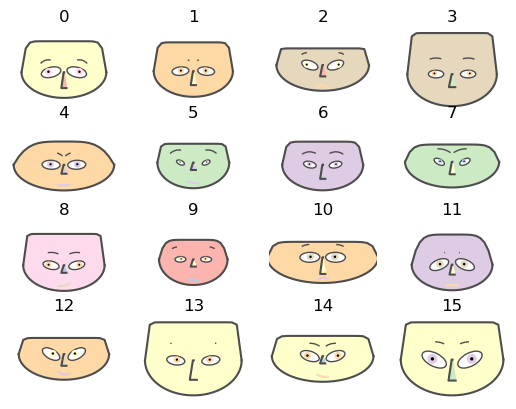
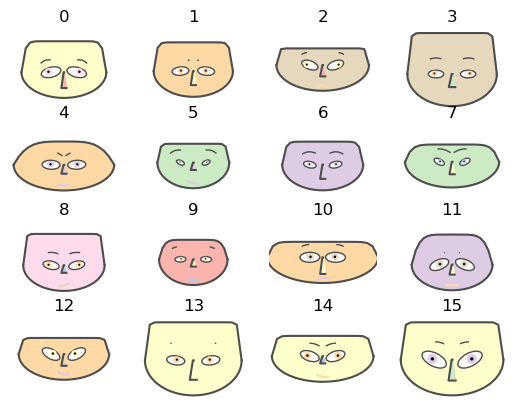
Random data

# Generate data
numpy.random.seed(32)
data = numpy.random.rand(16, 12)
# Make Chernoff faces
fig = chernoff_face(data=data,
                    titles=[str(x) for x in list(range(len(data)))],
                    color_mapper=matplotlib.cm.Pastel1)
png

Employee attitude data

Get Employee attitude data

dfData=load_employee_attitude_data_frame()
dfData.head()
RatingComplaintsPrivilegesLearningRaisesCriticalAdvancement
043513039619245
163645154637347
271706869768648
361634547548435
481785666718347

Rescale the variables:

dfData2 = variables_rescale(dfData)
dfData2.head()
RatingComplaintsPrivilegesLearningRaisesCriticalAdvancement
00.0666670.2641510.0000000.1219510.4000001.0000000.425532
10.5111110.5094340.3962260.4878050.4444440.5581400.468085
20.6888890.6226420.7169810.8536590.7333330.8604650.489362
30.4666670.4905660.2830190.3170730.2444440.8139530.212766
40.9111110.7735850.4905660.7804880.6222220.7906980.468085

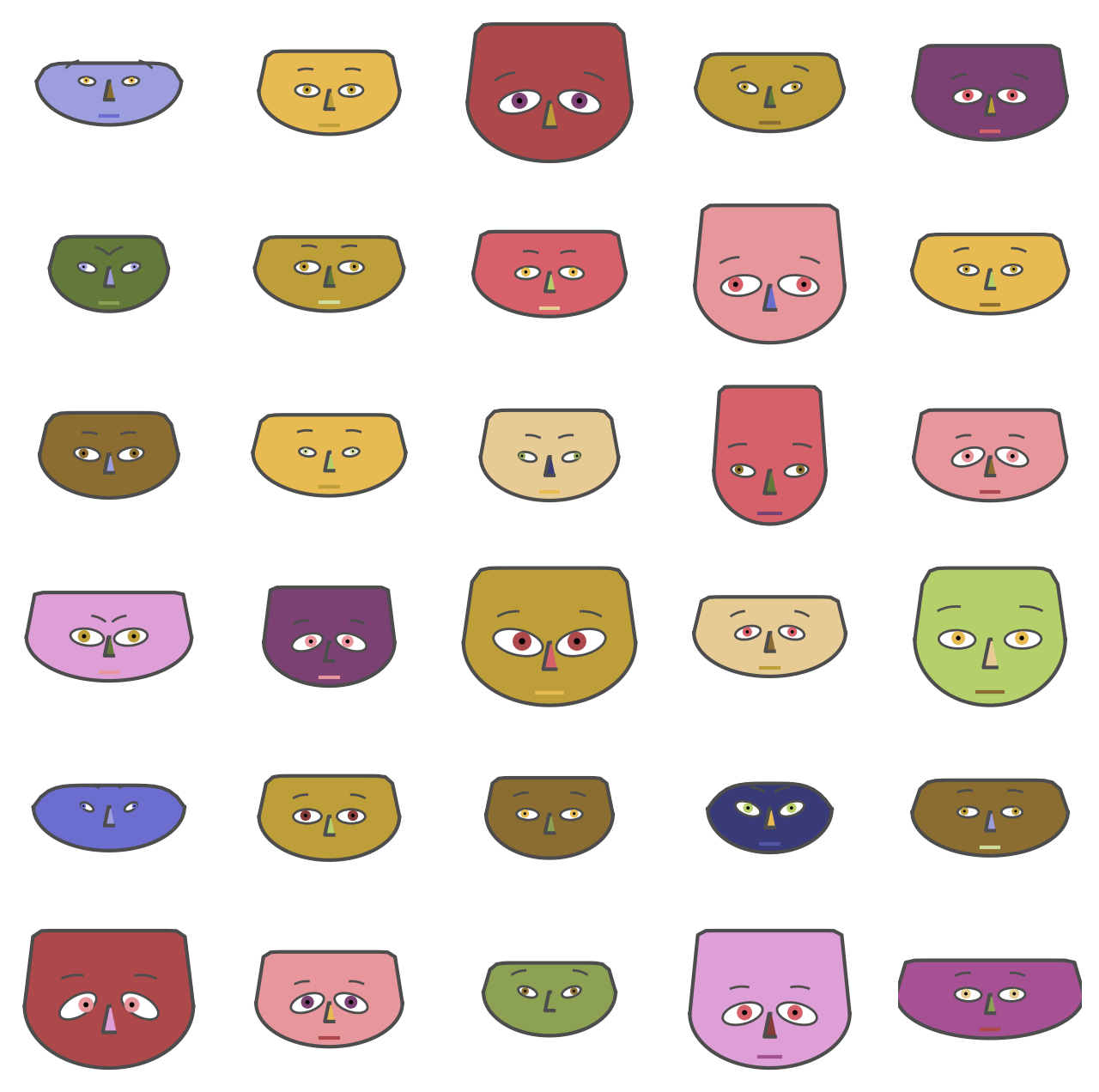
Make the corresponding Chernoff faces:

fig = chernoff_face(data=dfData2,
                    n_columns=5,
                    long_face=False,
                    color_mapper=matplotlib.cm.tab20b,
                    figsize=(8, 8), dpi=200)
png

USA arrests data

Get USA arrests data:

dfData=load_usa_arrests_data_frame()
dfData.head()
StateNameMurderAssaultUrbanPopulationRape
0Alabama13.22365821.2
1Alaska10.02634844.5
2Arizona8.12948031.0
3Arkansas8.81905019.5
4California9.02769140.6

Rescale the variables:

dfData2 = variables_rescale(dfData)
dfData2.head()
StateNameMurderAssaultUrbanPopulationRape
0Alabama0.7469880.6541100.4406780.359173
1Alaska0.5542170.7465750.2711860.961240
2Arizona0.4397590.8527400.8135590.612403
3Arkansas0.4819280.4965750.3050850.315245
4California0.4939760.7910961.0000000.860465

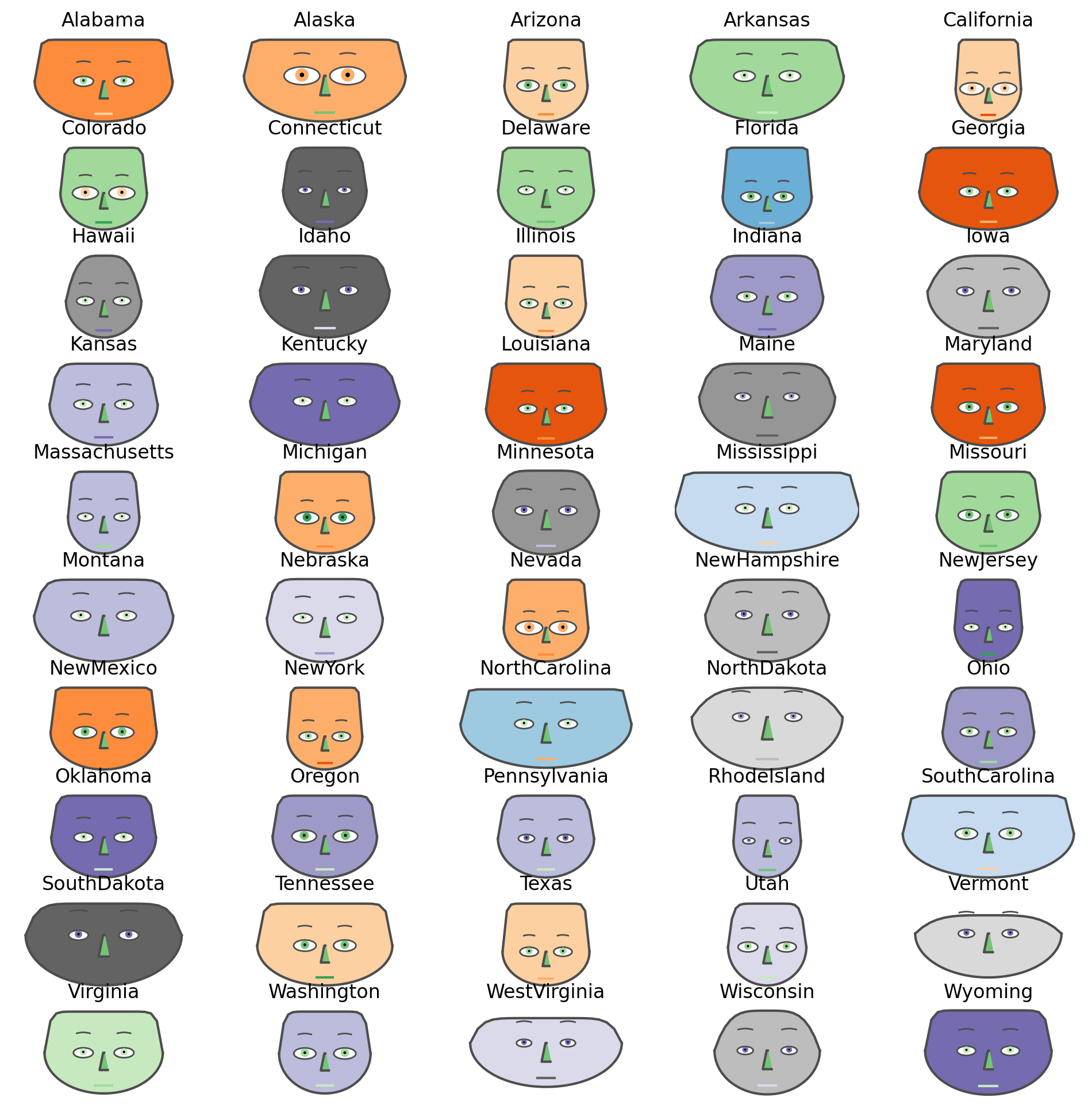
Make the corresponding Chernoff faces using USA state names as titles:

fig = chernoff_face(data=dfData2,
                    n_columns=5,
                    long_face=False,
                    color_mapper=matplotlib.cm.tab20c_r,
                    figsize=(12, 12), dpi=200)
png

References

Articles

[AA1] Anton Antonov, “Making Chernoff faces for data visualization”, (2016), MathematicaForPrediction at WordPress.

Functions and packages

[AAf1] Anton Antonov, ChernoffFace, (2019), Wolfram Function Repository.

[AAp1] Anton Antonov, Chernoff faces implementation in Mathematica, (2016), MathematicaForPrediction at GitHub.