Image

NLPTemplateEngine vignette

This blog post describes and exemplifies the Python package “NLPTemplateEngine”, [AAp1], which aims to create (nearly) executable code for various computational workflows.

Package’s data and implementation make a Natural Language Processing (NLP) Template Engine (TE), [Wk1], that incorporates Question Answering Systems (QAS’), [Wk2], and Machine Learning (ML) classifiers.

The current version of the NLP-TE of the package heavily relies on Large Language Models (LLMs) for its QAS component.

Future plans involve incorporating other types of QAS implementations.

This Python package implementation closely follows the Raku implementation in “ML::TemplateEngine”, [AAp4], which, in turn, closely follows the Wolfram Language (WL) implementations in “NLP Template Engine”, [AAr1, AAv1],
and the WL paclet “NLPTemplateEngine”, [AAp5, AAv2].

An alternative, more comprehensive approach to building workflows code is given in [AAp2]. Another alternative is to use few-shot training of LLMs with examples provided by, say, the Python package “DSLExamples”, [AAp6].

Remark: See the vignette notebook corresponding to this document.

Problem formulation

We want to have a system (i.e. TE) that:

  1. Generates relevant, correct, executable programming code based on natural language specifications of computational workflows
  2. Can automatically recognize the workflow types
  3. Can generate code for different programming languages and related software packages

The points above are given in order of importance; the most important are placed first.

Reliability of results

One of the main reasons to re-implement the WL NLP-TE, [AAr1, AAp1], into Raku is to have a more robust way of utilizing LLMs to generate code. That goal is more or less achieved with this package, but YMMV — if incomplete or wrong results are obtained run the NLP-TE with different LLM parameter settings or different LLMs.

Image

Installation

From Zef ecosystem:

python3 -m pip install NLPTemplateEngine

Setup

Load packages and define LLM access objects:

from NLPTemplateEngine import *
from langchain_ollama import ChatOllama
import os
llm = ChatOllama(model=os.getenv("OLLAMA_MODEL", "gemma3:12b"))

Usage examples

Quantile Regression (WL)

Here the template is automatically determined:

from NLPTemplateEngine import *
qrCommand = """
Compute quantile regression with probabilities 0.4 and 0.6, with interpolation order 2, for the dataset dfTempBoston.
"""
concretize(qrCommand, llm=llm)
# qrObj=
# QRMonUnit[dfTempBoston]⟹
# QRMonEchoDataSummary[]⟹
# QRMonQuantileRegression[12, {0.4,0.6}, InterpolationOrder->2]⟹
# QRMonPlot["DateListPlot"->False,PlotTheme->"Detailed"]⟹
# QRMonErrorPlots["RelativeErrors"->False,"DateListPlot"->False,PlotTheme->"Detailed"];

Remark: In the code above the template type, “QuantileRegression”, was determined using an LLM-based classifier.

Latent Semantic Analysis (R)

lsaCommand = """
Extract 20 topics from the text corpus aAbstracts using the method NNMF.
Show statistical thesaurus with the words neural, function, and notebook.
"""
concretize(lsaCommand, template = 'LatentSemanticAnalysis', lang = 'R')
# lsaObj <-
# LSAMonUnit(aAbstracts) %>%
# LSAMonMakeDocumentTermMatrix(stemWordsQ = Automatic, stopWords = Automatic) %>%
# LSAMonEchoDocumentTermMatrixStatistics(logBase = 10) %>%
# LSAMonApplyTermWeightFunctions(globalWeightFunction = "IDF", localWeightFunction = "None", normalizerFunction = "Cosine") %>%
# LSAMonExtractTopics(numberOfTopics = 20, method = "NNMF", maxSteps = 16, minNumberOfDocumentsPerTerm = 20) %>%
# LSAMonEchoTopicsTable(numberOfTerms = 10, wideFormQ = TRUE) %>%
# LSAMonEchoStatisticalThesaurus(words = c("neural", "function", "notebook"))

Random tabular data generation (Raku)

command = """
Make random table with 6 rows and 4 columns with the names <A1 B2 C3 D4>.
"""
concretize(command, template = 'RandomTabularDataset', lang = 'Raku', llm=llm)
# random-tabular-dataset(6, 4, "column-names-generator" => <A1 B2 C3 D4>, "form" => "table", "max-number-of-values" => 24, "min-number-of-values" => 24, "row-names" => False)

Remark: In the code above it was specified to use Google’s Gemini LLM service.

Recommender workflow (Python)

command = """
Make a commander over the data set @dsTitanic and compute 8 recommendations for the profile (passengerSex:male, passengerClass:2nd).
"""
concretize(command, lang = 'Python', llm=llm)
# smrObj = (SparseMatrixRecommender()
# .create_from_wide_form(data = dsTitanic, item_column_name='id', columns=None, add_tag_types_to_column_names=True, tag_value_separator=':')
# .apply_term_weight_functions(global_weight_func = 'IDF', local_weight_func = 'None', normalizer_func = 'Cosine')
# .recommend_by_profile(profile=(passengerSex:male, passengerClass:2nd), nrecs=8)
# .join_across(data=dsTitanic, on='id')
# .echo_value())

How it works?

The following flowchart describes how the NLP Template Engine involves a series of steps for processing a computation specification and executing code to obtain results:

Image

Here’s a detailed narration of the process:

  1. Computation Specification:
    • The process begins with a “Computation spec”, which is the initial input defining the requirements or parameters
      for the computation task.
  2. Workflow Type Decision:
    • A decision node asks if the workflow type is specified.
  3. Guess Workflow Type:
    • If the workflow type is not specified, the system utilizes a classifier to guess relevant workflow type.
  4. Raw Answers:
    • Regardless of how the workflow type is determined (directly specified or guessed), the system retrieves “raw
      answers”, crucial for further processing.
  5. Processing and Templating:
    • The raw answers undergo processing (“Process raw answers”) to organize or refine the data into a usable format.
    • Processed data is then utilized to “Complete computation template”, preparing for executable operations.
  6. Executable Code and Results:
    • The computation template is transformed into “Executable code”, which when run, produces the final “Computation
      results”.
  7. LLM-Based Functionalities:
    • The classifier and the answers finder are LLM-based.
  8. Data and Templates:
    • Code templates are selected based on the specifics of the initial spec and the processed data.

Bring your own templates

0. Load the NLP-Template-Engine package (and others):

from NLPTemplateEngine import *
import pandas as pd

1. Get the “training” templates data (from CSV file you have created or changed) for a new workflow (“SendMail”):

url = 'https://raw.githubusercontent.com/antononcube/NLP-Template-Engine/main/TemplateData/dsQASParameters-SendMail.csv'
dsSendMail = pd.read_csv(url)
dsSendMail.describe()

2. Add the ingested data for the new workflow (from the CSV file) into the NLP-Template-Engine:

add_template_data(dsSendMail, llm=llm)
# (ParameterTypePatterns Defaults ParameterQuestions Questions Shortcuts Templates)

3. Parse natural language specification with the newly ingested and onboarded workflow (“SendMail”):

cmd = "Send email to joedoe@gmail.com with content RandomReal[343], and the subject this is a random real call."
concretize(cmd, template = "SendMail", lang = 'WL', llm=llm)
# SendMail[<|"To"->{"joedoe@gmail.com"},"Subject"->"this is a random real call","Body"->RandomReal[343],"AttachedFiles"->None|>]

4. Experiment with running the generated code!


References

Articles, blog posts

[AA1] Anton Antonov, “DSL examples with LangChain”, (2026), PythonForPrediction at WordPress.

[Wk1] Wikipedia entry, Template processor.

[Wk2] Wikipedia entry, Question answering.

Functions, packages, repositories

[AAr1] Anton Antonov, “NLP Template Engine”, (2021-2022), GitHub/antononcube.

[AAp1] Anton Antonov, NLPTemplateEngine, Python package, (2026), GitHub/antononcube.

[AAp2] Anton Antonov, DSL::Translators, Raku package, (2020-2025), GitHub/antononcube.

[AAp3] Anton Antonov, DSL::Examples, Raku package, (2024-2025), GitHub/antononcube.

[AAp4] Anton Antonov, ML::TemplateEngine, Raku package, (2023-2025), GitHub/antononcube.

[AAp5] Anton Antonov, NLPTemplateEngine, WL paclet, (2023), Wolfram Language Paclet Repository.

[AAp6] Anton Antonov, DSLExamples, Python package, (2026), GitHub/antononcube.

[WRI1] Wolfram Research, FindTextualAnswer, (2018), Wolfram Language function, (updated 2020).

Videos

[AAv1] Anton Antonov, “NLP Template Engine, Part 1”, (2021), YouTube/@AAA4Prediction.

[AAv2] Anton Antonov, “Natural Language Processing Template Engine” presentation given at WTC-2022, (2023), YouTube/@Wolfram.

DSL examples with LangChain

Introduction

This blog post (notebook) demonstrates the usage of the Python data package “DSLExamples”, [AAp1], with examples of Domain Specific Language (DSL) commands translations to programming code.

The provided DSL examples are suitable for LLM few-shot trainingLangChain can be used to create translation pipelines utilizing those examples. The utilization of such LLM-translation pipelines is exemplified below.

The Python package closely follows the Raku package  “DSL::Examples”, [AAp2], and Wolfram Language paclet “DSLExamples”, [AAp3], and has (or should have) the same DSL examples data.

Remark: Similar translations — with much less computational resources — are achieved with grammar-based DSL translators; see “DSL::Translators”, [AAp4].


Setup

Load the packages used below:

from DSLExamples import dsl_examples, dsl_workflow_separators
from langchain_core.output_parsers import StrOutputParser
from langchain_ollama import ChatOllama
import pandas as pd
import os

Retrieval

Get all examples and retrieve specific language/workflow slices.

all_examples = dsl_examples()
python_lsa = dsl_examples("Python", "LSAMon")
separators = dsl_workflow_separators("WL", "LSAMon")
list(all_examples.keys()), list(python_lsa.keys())[:5]
# (['WL', 'Python', 'R', 'Raku'],
['load the package',
'use the documents aDocs',
'use dfTemp',
'make the document-term matrix',
'make the document-term matrix with automatic stop words'])

Tabulate Languages and Workflows

rows = [
{"language": lang, "workflow": workflow}
for lang, workflows in all_examples.items()
for workflow in workflows.keys()
]
pd.DataFrame(rows).sort_values(["language", "workflow"]).reset_index(drop=True)
languageworkflow
PythonLSAMon
PythonQRMon
PythonSMRMon
Pythonpandas
RDataReshaping
RLSAMon
RQRMon
RSMRMon
RakuDataReshaping
RakuSMRMon
RakuTriesWithFrequencies
WLClCon
WLDataReshaping
WLLSAMon
WLQRMon
WLSMRMon
WLTabular
WLTriesWithFrequencies

Python LSA Examples

pd.DataFrame([{"command": k, "code": v} for k, v in python_lsa.items()])
commandcode
load the packagefrom LatentSemanticAnalyzer import *
use the documents aDocsLatentSemanticAnalyzer(aDocs)
use dfTempLatentSemanticAnalyzer(dfTemp)
make the document-term matrixmake_document_term_matrix()
make the document-term matrix with automatic s…make_document_term_matrix[stemming_rules=None,…
make the document-term matrix without stemmingmake_document_term_matrix[stemming_rules=False…
apply term weight functionsapply_term_weight_functions()
apply term weight functions: global IDF, local…apply_term_weight_functions(global_weight_func…
extract 30 topics using the method SVDextract_topics(number_of_topics=24, method=’SVD’)
extract 24 topics using the method NNMF, max s…extract_topics(number_of_topics=24, min_number…
Echo topics tableecho_topics_interpretation(wide_form=True)
show the topicsecho_topics_interpretation(wide_form=True)
Echo topics table with 10 terms per topicecho_topics_interpretation(number_of_terms=10,…
find the statistical thesaurus for the words n…echo_statistical_thesaurus(terms=stemmerObj.st…
show statistical thesaurus for king, castle, p…echo_statistical_thesaurus(terms=stemmerObj.st…

LangChain few-shot prompt

Build a few-shot prompt from the DSL examples, then run it over commands.

from langchain_core.prompts import FewShotPromptTemplate, PromptTemplate
# Use a small subset of examples as few-shot demonstrations
example_pairs = list(python_lsa.items())[:5]
examples = [
{"command": cmd, "code": code}
for cmd, code in example_pairs
]
example_prompt = PromptTemplate(
input_variables=["command", "code"],
template="Command: {command}\nCode: {code}"
)
few_shot_prompt = FewShotPromptTemplate(
examples=examples,
example_prompt=example_prompt,
prefix=(
"You translate DSL commands into Python code that builds an LSA pipeline."
"Follow the style of the examples."
),
suffix="Command: {command}\nCode:",
input_variables=["command"],
)
print(few_shot_prompt.format(command="show the topics"))
# You translate DSL commands into Python code that builds an LSA pipeline.Follow the style of the examples.
#
# Command: load the package
# Code: from LatentSemanticAnalyzer import *
#
# Command: use the documents aDocs
# Code: LatentSemanticAnalyzer(aDocs)
#
# Command: use dfTemp
# Code: LatentSemanticAnalyzer(dfTemp)
#
# Command: make the document-term matrix
# Code: make_document_term_matrix()
#
# Command: make the document-term matrix with automatic stop words
# Code: make_document_term_matrix[stemming_rules=None,stopWords=True)
#
# Command: show the topics
# Code:

Translation With Ollama Model

Run the few-shot prompt against a local Ollama model.

llm = ChatOllama(model=os.getenv("OLLAMA_MODEL", "gemma3:12b"))
commands = [
"use the dataset aAbstracts",
"make the document-term matrix without stemming",
"extract 40 topics using the method non-negative matrix factorization",
"show the topics",
]
llm = ChatOllama(model="gemma3:12b")
chain = few_shot_prompt | llm | StrOutputParser()
sep = dsl_workflow_separators('Python', 'LSAMon')
result = []
for command in commands:
result.append(chain.invoke({"command": command}))
print(sep.join([x.strip() for x in result]))
# LatentSemanticAnalyzer(aAbstracts)
# .make_document_term_matrix(stemming_rules=None)
# .extract_topics(40, method='non-negative_matrix_factorization')
# .show_topics()

Simulated Translation With a Fake LLM

For testing purposes it might be useful to use a fake LLM so the notebook runs without setup and API keys.

try:
from langchain_community.llms.fake import FakeListLLM
except Exception:
from langchain_core.language_models.fake import FakeListLLM
commands = [
"use the dataset aAbstracts",
"make the document-term matrix without stemming",
"extract 40 topics using the method non-negative matrix factorization",
"show the topics",
]
# Fake responses to demonstrate the flow
fake_responses = [
"lsamon = lsamon_use_dataset(\"aAbstracts\")",
"lsamon = lsamon_make_document_term_matrix(stemming=False)",
"lsamon = lsamon_extract_topics(method=\"NMF\", n_topics=40)",
"lsamon_show_topics(lsamon)",
]
llm = FakeListLLM(responses=fake_responses)
# Create a simple chain by piping the prompt into the LLM
chain = few_shot_prompt | llm
for command in commands:
result = chain.invoke({"command": command})
print("Command:", command)
print("Code:", result)
print("-")
# Command: use the dataset aAbstracts
# Code: lsamon = lsamon_use_dataset("aAbstracts")
# -
# Command: make the document-term matrix without stemming
# Code: lsamon = lsamon_make_document_term_matrix(stemming=False)
# -
# Command: extract 40 topics using the method non-negative matrix factorization
# Code: lsamon = lsamon_extract_topics(method="NMF", n_topics=40)
# -
# Command: show the topics
# Code: lsamon_show_topics(lsamon)
# -

References

[AAp1] Anton Antonov, DSLExamples, Python package, (2026), GitHub/antononcube.

[AAp2] Anton Antonov, DSL::Examples, Raku package, (2025-2026), GitHub/antononcube.

[AAp3] Anton Antonov DSLExamples, Wolfram Language paclet, (2025-2026), Wolfram Language Paclet Repository.

[AAp4] Anton Antonov, DSL::Translators, Raku package, (2020-2024), GitHub/antononcube.

Image

Latent semantic analyzer package

Introduction

This post proclaims and briefly describes the Python package, LatentSemanticAnalyzer, which has different functions for computations of Latent Semantic Analysis (LSA) workflows (using Sparse matrix Linear Algebra.) The package mirrors the Mathematica implementation [AAp1]. (There is also a corresponding implementation in R; see [AAp2].)

The package provides:

  • Class LatentSemanticAnalyzer
  • Functions for applying Latent Semantic Indexing (LSI) functions on matrix entries
  • “Data loader” function for obtaining a pandas data frame ~580 abstracts of conference presentations

Installation

To install from GitHub use the shell command:

python -m pip install git+https://github.com/antononcube/Python-packages.git#egg=LatentSemanticAnalyzer\&subdirectory=LatentSemanticAnalyzer

To install from PyPI:

python -m pip install LatentSemanticAnalyzer


LSA workflows

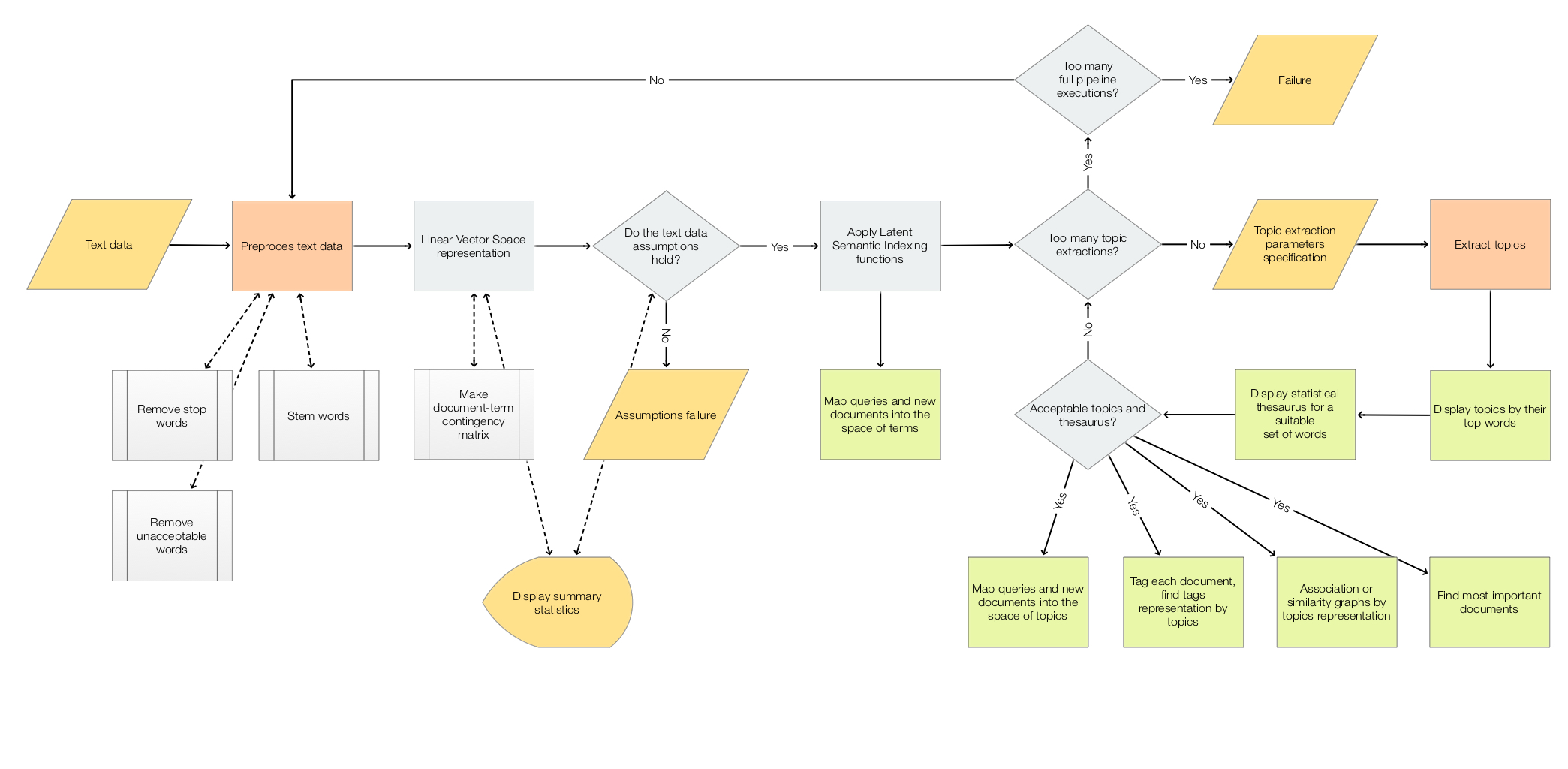
The scope of the package is to facilitate the creation and execution of the workflows encompassed in this flow chart:

LSAworkflows

For more details see the article “A monad for Latent Semantic Analysis workflows”, [AA1].


Usage example

Here is an example of a LSA pipeline that:

  1. Ingests a collection of texts
  2. Makes the corresponding document-term matrix using stemming and removing stop words
  3. Extracts 40 topics
  4. Shows a table with the extracted topics
  5. Shows a table with statistical thesaurus entries for selected words
import random
from LatentSemanticAnalyzer.LatentSemanticAnalyzer import *
from LatentSemanticAnalyzer.DataLoaders import *
import snowballstemmer

# Collection of texts
dfAbstracts = load_abstracts_data_frame()
docs = dict(zip(dfAbstracts.ID, dfAbstracts.Abstract))

# Stemmer object (to preprocess words in the pipeline below)
stemmerObj = snowballstemmer.stemmer("english")

# Words to show statistical thesaurus entries for
words = ["notebook", "computational", "function", "neural", "talk", "programming"]

# Reproducible results
random.seed(12)

# LSA pipeline
lsaObj = (LatentSemanticAnalyzer()
          .make_document_term_matrix(docs=docs,
                                     stop_words=True,
                                     stemming_rules=True,
                                     min_length=3)
          .apply_term_weight_functions(global_weight_func="IDF",
                                       local_weight_func="None",
                                       normalizer_func="Cosine")
          .extract_topics(number_of_topics=40, min_number_of_documents_per_term=10, method="NNMF")
          .echo_topics_interpretation(number_of_terms=12, wide_form=True)
          .echo_statistical_thesaurus(terms=stemmerObj.stemWords(words),
                                      wide_form=True,
                                      number_of_nearest_neighbors=12,
                                      method="cosine",
                                      echo_function=lambda x: print(x.to_string())))


Related Python packages

This package is based on the Python package “SSparseMatrix”, [AAp3]

The package “SparseMatrixRecommender” also uses LSI functions — this package uses LSI methods of the class SparseMatrixRecommender.


Related Mathematica and R packages

Mathematica

The Python pipeline above corresponds to the following pipeline for the Mathematica package [AAp1]:

lsaObj =
  LSAMonUnit[aAbstracts]⟹
   LSAMonMakeDocumentTermMatrix["StemmingRules" -> Automatic, "StopWords" -> Automatic]⟹
   LSAMonEchoDocumentTermMatrixStatistics["LogBase" -> 10]⟹
   LSAMonApplyTermWeightFunctions["IDF", "None", "Cosine"]⟹
   LSAMonExtractTopics["NumberOfTopics" -> 20, Method -> "NNMF", "MaxSteps" -> 16, "MinNumberOfDocumentsPerTerm" -> 20]⟹
   LSAMonEchoTopicsTable["NumberOfTerms" -> 10]⟹
   LSAMonEchoStatisticalThesaurus["Words" -> Map[WordData[#, "PorterStem"]&, {"notebook", "computational", "function", "neural", "talk", "programming"}]];

R

The package LSAMon-R, [AAp2], implements a software monad for LSA workflows.


LSA packages comparison project

The project “Random mandalas deconstruction with R, Python, and Mathematica”, [AAr1, AA2], has documents, diagrams, and (code) notebooks for comparison of LSA application to a collection of images (in multiple programming languages.)

A big part of the motivation to make the Python package “RandomMandala”, [AAp6], was to make easier the LSA package comparison. Mathematica and R have fairly streamlined connections to Python, hence it is easier to propagate (image) data generated in Python into those systems.


Code generation with natural language commands

Using grammar-based interpreters

The project “Raku for Prediction”, [AAr2, AAv2, AAp7], has a Domain Specific Language (DSL) grammar and interpreters that allow the generation of LSA code for corresponding Mathematica, Python, R packages.

Here is Command Line Interface (CLI) invocation example that generate code for this package:

> ToLatentSemanticAnalysisWorkflowCode Python 'create from aDocs; apply LSI functions IDF, None, Cosine; extract 20 topics; show topics table'
# LatentSemanticAnalyzer(aDocs).apply_term_weight_functions(global_weight_func = "IDF", local_weight_func = "None", normalizer_func = "Cosine").extract_topics(number_of_topics = 20).echo_topics_table( )

NLP Template Engine

Here is an example using the NLP Template Engine, [AAr2, AAv3]:

Concretize["create from aDocs; apply LSI functions IDF, None, Cosine; extract 20 topics; show topics table", 
  "TargetLanguage" -> "Python"]
(* 
lsaObj = (LatentSemanticAnalyzer()
          .make_document_term_matrix(docs=aDocs, stop_words=None, stemming_rules=None,min_length=3)
          .apply_term_weight_functions(global_weight_func='IDF', local_weight_func='None',normalizer_func='Cosine')
          .extract_topics(number_of_topics=20, min_number_of_documents_per_term=20, method='SVD')
          .echo_topics_interpretation(number_of_terms=10, wide_form=True)
          .echo_statistical_thesaurus(terms=stemmerObj.stemWords([\"topics table\"]), wide_form=True, number_of_nearest_neighbors=12, method='cosine', echo_function=lambda x: print(x.to_string())))
*)


References

Articles

[AA1] Anton Antonov, “A monad for Latent Semantic Analysis workflows”, (2019), MathematicaForPrediction at WordPress.

[AA2] Anton Antonov, “Random mandalas deconstruction in R, Python, and Mathematica”, (2022), MathematicaForPrediction at WordPress.

Mathematica and R Packages

[AAp1] Anton Antonov, Monadic Latent Semantic Analysis Mathematica package, (2017), MathematicaForPrediction at GitHub.

[AAp2] Anton Antonov, Latent Semantic Analysis Monad in R (2019), R-packages at GitHub/antononcube.

Python packages

[AAp3] Anton Antonov, SSparseMatrix Python package, (2021), PyPI.

[AAp4] Anton Antonov, SparseMatrixRecommender Python package, (2021), PyPI.

[AAp5] Anton Antonov, RandomDataGenerators Python package, (2021), PyPI.

[AAp6] Anton Antonov, RandomMandala Python package, (2021), PyPI.

[MZp1] Marinka Zitnik and Blaz Zupan, Nimfa: A Python Library for Nonnegative Matrix Factorization, (2013-2019), PyPI.

[SDp1] Snowball Developers, SnowballStemmer Python package, (2013-2021), PyPI.

Raku packages

[AAp7] Anton Antonov, DSL::English::LatentSemanticAnalysisWorkflows Raku package, (2018-2022), GitHub/antononcube. (At raku.land).

Repositories

[AAr1] Anton Antonov, “Random mandalas deconstruction with R, Python, and Mathematica” presentation project, (2022) SimplifiedMachineLearningWorkflows-book at GitHub/antononcube.

[AAr2] Anton Antonov, “Raku for Prediction” book project, (2021-2022), GitHub/antononcube.

Videos

[AAv1] Anton Antonov, “TRC 2022 Implementation of ML algorithms in Raku”, (2022), Anton A. Antonov’s channel at YouTube.

[AAv2] Anton Antonov, “Raku for Prediction”, (2021), The Raku Conference (TRC) at YouTube.

[AAv3] Anton Antonov, “NLP Template Engine, Part 1”, (2021), Anton A. Antonov’s channel at YouTube.

[AAv4] Anton Antonov “Random Mandalas Deconstruction in R, Python, and Mathematica (Greater Boston useR Meetup, Feb 2022)”, (2022), Anton A. Antonov’s channel at YouTube.