Instantly change display resolution
QuickChangeResolution is a personalization software developed by Jacek Pazera. This application allows users to modify the display resolution of their Windows desktop with ease. This lightweight open-source program is free to download and use. More it comes in five languages, including English, Greek, Japanese, Polish, Portuguese.
In actuality, the function of this desktop app is already built-in in your Windows system. However, you will need to go through a couple of menus to make the simple changes. Thanks to this small and portable software, the process is streamlined for more speedy access.
Shortens the lengthy process
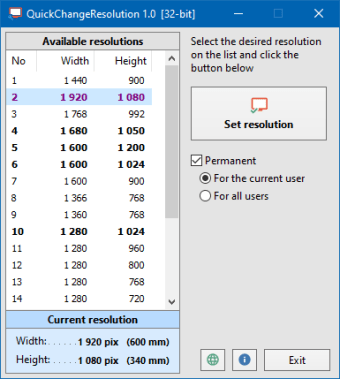
Once installed and launch, a plain and straightforward interface will greet you, showing only information and buttons to help you do the job. The left sidebar of the software displays the lists of screen resolutions that vary from width and height. Bear in mind that the presented sizes are in pixel measurements. The current resolution you're using will be highlighted in the list and cited below just below the left sidebar.
To change your computer's display settings, choose your preferred resolution on the list and click the 'Set Resolution' button located in your right. The result is instantaneous, allowing you to see the changes on your desktop monitor immediately. For the record, QuickChangeResolution offers a lot more screen resolutions than Windows operating system. Thus, if you want to have a low or high-level resolution, you'll have the liberty to do it here.
On top of that, you can also utilize a command-line script to alter your display resolution instantly. Unfortunately, it provides no support for hotkey combinations, which could make the process easier. Another thing to note is that the app requires you to uncheck the Permanent Box if you will only temporarily use the resolution you selected. Doing so allows the app to automatically revert to the default settings when you reboot the computer.
A streamlined way to alter your desktop's resolution
If you wish to have a less hassle solution to change your PC's display resolution, QuickChangeResolution is the key. Its minimal user interface enables you to select the resolution you desire to have. Alternatively, you can also use the command line to modify them. Moreover, you will also enjoy more resolution size options in this app compared to the Windows system.