Wolfram Function Repository
Instant-use add-on functions for the Wolfram Language
Function Repository Resource:
Move symbols into a context
ResourceFunction["Contextualize"][context,"name"] gives the symbol context`name. | |
ResourceFunction["Contextualize"][context,symbol] gives the symbol context`symbol. | |
ResourceFunction["Contextualize"][context,expr] contextualizes symbols within an expression. | |
ResourceFunction["Contextualize"][context] gives an operator for contextualizing expressions. |
| "OnlyExistingNames" | True | whether to only apply context to names with existing symbols |
| "BlobFormatting" | Automatic | function to create a blob |
| ColorFunction | ResourceFunction["HashHue"] | color of the blob when using default blob formatting |
Define a function in a new context:
| In[1]:= | ![MyContext`func[x_] := x + 2](https://www.wolframcloud.com/obj/resourcesystem/images/024/02439441-1eb4-4928-845f-7477719dda6d/6739b99cbf717946.png) |
Define the symbol using Contextualize:
| In[2]:= | ![f = ResourceFunction["Contextualize"]["MyContext", "func"]](https://www.wolframcloud.com/obj/resourcesystem/images/024/02439441-1eb4-4928-845f-7477719dda6d/647991af593b1513.png) |
| Out[2]= |  |
Use it:
| In[3]:= | ![f[10]](https://www.wolframcloud.com/obj/resourcesystem/images/024/02439441-1eb4-4928-845f-7477719dda6d/0c1690349f4ed2cc.png) |
| Out[3]= |  |
Use a symbol name instead:
| In[4]:= | ![ResourceFunction["Contextualize"]["MyContext", func]](https://www.wolframcloud.com/obj/resourcesystem/images/024/02439441-1eb4-4928-845f-7477719dda6d/2d9cc5d321e88caf.png) |
| Out[4]= |  |
Create a context blob:
| In[5]:= | ![toMy = ResourceFunction["Contextualize"]["MyContext"]](https://www.wolframcloud.com/obj/resourcesystem/images/024/02439441-1eb4-4928-845f-7477719dda6d/5a342445388adbfc.png) |
| Out[5]= |  |
Use the operator to get a symbol:
| In[6]:= | ![toMy[func]](https://www.wolframcloud.com/obj/resourcesystem/images/024/02439441-1eb4-4928-845f-7477719dda6d/48a3896816ab71dd.png) |
| Out[6]= |  |
Apply the function using the operator:
| In[7]:= | ![toMy[func][10]](https://www.wolframcloud.com/obj/resourcesystem/images/024/02439441-1eb4-4928-845f-7477719dda6d/0b664a7b53fd3d18.png) |
| Out[7]= |  |
Re-contextualize symbols with an expression:
| In[8]:= | ![toMy[g[{func[10], func[-10]}]]](https://www.wolframcloud.com/obj/resourcesystem/images/024/02439441-1eb4-4928-845f-7477719dda6d/21361c8793f7ae86.png) |
| Out[8]= |  |
Deeper contexts work as well:
| In[9]:= |  |
Create a context blob for the long context:
| In[10]:= | ![longC = ResourceFunction["Contextualize"][
Context[This`Is`A`Long`ContextPath`$symb]]](https://www.wolframcloud.com/obj/resourcesystem/images/024/02439441-1eb4-4928-845f-7477719dda6d/32f200415f28e7fa.png) |
| Out[10]= | 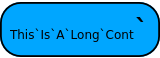 |
Use it:
| In[11]:= | ![longC[$symb]](https://www.wolframcloud.com/obj/resourcesystem/images/024/02439441-1eb4-4928-845f-7477719dda6d/6feee4442fcc5e5a.png) |
| Out[11]= |  |
Customize a context blob:
| In[12]:= | ![Stars`And`Stripes[] := "USA"](https://www.wolframcloud.com/obj/resourcesystem/images/024/02439441-1eb4-4928-845f-7477719dda6d/279afc67d6ec140d.png) |
| In[13]:= | ![starblob = ResourceFunction["Contextualize"]["Stars`And`", "BlobFormatting" -> (Tooltip[Framed["***"], #1] &)]](https://www.wolframcloud.com/obj/resourcesystem/images/024/02439441-1eb4-4928-845f-7477719dda6d/31a116adc4afdb23.png) |
| Out[13]= |  |
Use it:
| In[14]:= | ![starblob[Stripes]](https://www.wolframcloud.com/obj/resourcesystem/images/024/02439441-1eb4-4928-845f-7477719dda6d/0e5c8e14ef47a53e.png) |
| Out[14]= |  |
| In[15]:= | ![%[]](https://www.wolframcloud.com/obj/resourcesystem/images/024/02439441-1eb4-4928-845f-7477719dda6d/4e34cb124b5811ab.png) |
| Out[15]= |  |
Choose the background color:
| In[16]:= | ![toMy = ResourceFunction["Contextualize"]["MyContext", ColorFunction -> (Red &)]](https://www.wolframcloud.com/obj/resourcesystem/images/024/02439441-1eb4-4928-845f-7477719dda6d/412b9de6ff147233.png) |
| Out[16]= |  |
This work is licensed under a Creative Commons Attribution 4.0 International License

![MyNewContext`func[x_] := x + 2](https://www.wolframcloud.com/obj/resourcesystem/images/024/02439441-1eb4-4928-845f-7477719dda6d/01866e542f655c95.png)
![ResourceFunction[
"Contextualize"]["MyNewContext`", {func, newsymbol, Plot, otherc`foo}]](https://www.wolframcloud.com/obj/resourcesystem/images/024/02439441-1eb4-4928-845f-7477719dda6d/7645e0b2557a3f9f.png)

![ResourceFunction[
"Contextualize"]["MyNewContext`", {func, newsymbol, Plot, otherc`foo}, "OnlyExistingNames" -> False]](https://www.wolframcloud.com/obj/resourcesystem/images/024/02439441-1eb4-4928-845f-7477719dda6d/73a0030b51634fb7.png)
