Wolfram Function Repository
Instant-use add-on functions for the Wolfram Language
Function Repository Resource:
Compute the evolution of a multiway system and many associated properties
ResourceFunction["MultiwaySystem"][rules,init,n] generates the results of n steps in the evolution of the multiway system with the specified rules, starting from initial conditions init. | |
ResourceFunction["MultiwaySystem"][rules,init,n,"prop"] gives the property "prop" for the specified multiway system evolution. | |
ResourceFunction["MultiwaySystem"][rules→sel,init,n,…] uses the function sel to select which of the events obtained at each step to include in the evolution. |
| {"lhs1"→"rhs1",…} | string substitution system |
| {{l11,l12,…}→{r11,r12,..},…} | list substitution system |
| SubstitutionSystem[rules] | string or list substitution system |
| CellularAutomaton[rules] | cellular automaton system |
| "type"→rules | system of the specified type |
| assoc | system with properties defined by an Association |
| "StringSubstitutionSystem" | rules given as replacements on strings |
| "ListSubstitutionSystem" | rules given as replacements on lists |
| "CellularAutomaton" | rules given as a list of CellularAutomaton rule specifications |
| "WolframModel" | rules given as replacements on hypergraphs |
| "StateEvolutionFunction" | gives the list of successors to a given state |
| "StateEquivalenceFunction" | determines whether two states should be considered equivalent |
| "StateEventFunction" | gives the list of events applicable to a given state |
| "EventApplicationFunction" | applies an event to a given state |
| "EventDecompositionFunction" | decomposes an event into creator and destroyer events for individual elements |
| "SystemType" | system type name |
| "EventSelectionFunction" | determines which events should be applied to a given state |
| "Sequential" | applies the first possible replacement (sequential substitution system) |
| "Random" | applies a random replacement |
| {"Random",n} | applies n randomly chosen replacements |
| "MaxScan" | applies the maximal set of spatially separated replacements (strings only) |
| "AllStatesList" | the list of all states generated at each successive step (default) |
| "StatesCountsList" | the number of distinct states generated at each successive step |
| "AllStatesListUnmerged" | the list of all states without any merging |
| "PredecessorRulesList" | the list of states and their corresponding predecessor states at each successive step |
| "EvolutionGraph" | graph formed by the evolution process, with no merging between different time steps |
| "EvolutionGraphStructure" | evolution graph without labeling |
| "EvolutionGraphFull" | graph formed by the evolution process, including equivalent events |
| "EvolutionGraphFullStructure" | full evolution graph without labeling |
| "EvolutionGraphUnmerged" | graph formed by the evolution process, with no merging of equivalent states |
| "EvolutionGraphUnmergedStructure" | unmerged evolution graph without labeling |
| "EvolutionGraphWeighted" | graph formed by the evolution process, with edges weighted by event multiplicity |
| "EvolutionGraphWeightedStructure" | weighted evolution graph without labeling |
| "StatesGraph" | graph of how each distinct state leads to other states |
| "StatesGraphStructure" | states graph without labeling |
| "AllEventsList" | the list of all events that occur at each successive step |
| "EvolutionEventsGraph" | graph showing the evolution process with updating events explicitly included |
| "EvolutionEventsGraphStructure" | evolution events graph without labeling |
| "CausalGraph" | graph of all causal relations between updating events |
| "CausalGraphStructure" | causal graph without labeling |
| "EvolutionCausalGraph" | combined graph of evolution process and causal relationships between events |
| "EvolutionCausalGraphStructure" | evolution causal graph without labeling |
| "CausalGraphInstances" | list of distinct causal graphs for all possible choices of event sequences |
| "CausalGraphStructureInstances" | causal graph instances without labeling |
| "EvolutionCausalGraphInstances" | list of distinct evolution causal graphs for all possible choices of events sequences |
| "EvolutionCausalGraphStructureInstances" | evolution causal graph instances without labeling |
| "BranchPairsList" | list of all branch pairs (i.e. critical pairs) generated in the states graph |
| "NewBranchPairsList" | list of all new branch pairs generated at each successive step |
| "EvolutionBranchPairsList" | list of all branch pairs generated in the evolution graph |
| "NewEvolutionBranchPairsList" | list of all new evolution branch pairs generated at each successive step |
| "BranchPairEventsList" | list of all events yielding branch pairs |
| "NewBranchPairEventsList" | list of all events yielding new branch pairs at each successive step |
| "EvolutionBranchPairEventsList" | list of all events yielding evolution branch pairs |
| "NewEvolutionBranchPairEventsList" | list of all events yielding new evolution branch pairs at each successive step |
| "BranchialGraph" | graph of branch pair ancestry at a given step |
| "BranchialGraphStructure" | branchial graph without labeling |
| "AllStatesBranchialGraph" | graph of branch pair ancestry across all steps |
| "AllStatesBranchialGraphStructure" | all states branchial graph without labeling |
| "EvolutionBranchialGraph" | graph of evolution branch pair ancestry at a given step |
| "EvolutionBranchialGraphStructure" | evolution branchial graph without labeling |
| "AllStatesEvolutionBranchialGraph" | graph of evolution branch pair ancestry across all steps |
| "AllStatesEvolutionBranchialGraphStructure" | all states evolution branchial graph without labeling |
| "EventBranchialGraph" | graph of branch pair event ancestry at a given step |
| "EventBranchialGraphStructure" | event branchial graph without labeling |
| "AllEventsBranchialGraph" | graph of branch pair event ancestry across all steps |
| "AllEventsBranchialGraphStructure" | all events branchial graph without labeling |
| "EvolutionEventBranchialGraph" | graph of evolution branch pair event ancestry at a given step |
| "EvolutionEventBranchialGraphStructure" | evolution event branchial graph without labeling |
| "AllEventsEvolutionBranchialGraph" | graph of evolution branch pair event ancestry across all steps |
| "AllEventsEvolutionBranchialGraphStructure" | all events evolution branchial graph without labeling |
| "BranchPairResolutionsList" | association of all resolved and unresolved branch pairs up to a given step |
| "EvolutionBranchPairResolutionsList" | association of all resolved and unresolved evolution branch pairs up to a given step |
| "CausalInvariantQ" | whether the system is causal invariant (all branch pairs converge) |
| "EvolutionCausalInvariantQ" | whether the system is evolution causal invariant (all evolution branch pairs converge) |
| "KnuthBendixCompletion" | list of Knuth–Bendix completion rules required to force causal invariance |
| "EvolutionKnuthBendixCompletion" | list of Knuth–Bendix completion rules required to force evolution causal invariance |
| "CanonicalBranchPairsList" | list of canonical (initial condition-independent) branch pairs |
| "CanonicalBranchPairResolutionsList" | association of all resolved and unresolved canonical branch pairs up to a given step |
| "TotalCausalInvariantQ" | whether the system is total causal invariant (all canonical branch pairs converge) |
| "CanonicalKnuthBendixCompletion" | minimal list of canonical Knuth–Bendix completion rules required to force total causal invariance |
| "StateWeights" | list of weights for all vertices in the states graph |
| "IncludeStepNumber" | False | whether to label states and events with their respective step numbers |
| "IncludeStateID" | False | whether to label states and events with unique IDs |
| "IncludeInitializationEvents" | False | whether to include pseudoevents that set up initial conditions |
| "IncludeEventInstances" | False | whether to show distinct updating events that connect the same states as separate edges |
| "IncludeStateWeights" | False | whether to weight state vertices by their rate of occurrence at a particular time step |
| "IncludeStatePathWeights" | False | whether to weight state vertices by the number of distinct evolution paths that lead to them |
| "StateRenderingFunction" | Automatic | how to label states that appear in graphs |
| "EventRenderingFunction" | Automatic | how to label events that appear in graphs |
| MaxItems | Infinity | how many instances of a causal graph or evolution causal graph to return |
| "GivePredecessors" | False | whether to label branch pairs with their predecessor state |
| "GiveResolvents" | False | whether to label branch pairs with their resolvent state |
| "IncludeSelfPairs" | False | whether to include trivial branch pairs |
| "IncludeFullBranchialSpace" | False | whether to show all possible states in a given branchial graph |
| "LineThickness" | 1 | absolute line thickness for graph edges |
| Automatic | make a label from the name of the vertex |
| Inherited | use the explicit vertex name as the label |
| None | use no label for the vertex |
| "string" | use a shape from the VertexShapeFunction collection |
| func | apply the function func to the name of the vertex |
Show basic multiway system evolution:
| In[1]:= |
![ResourceFunction["MultiwaySystem"]["A" -> "AA", "A", 7]](https://www.wolframcloud.com/obj/resourcesystem/images/2e0/2e01e7b9-9618-41ef-95c1-ed6532f16094/18293702dab2303a.png)
|
| Out[1]= |

|
| In[2]:= |
![ResourceFunction["MultiwaySystem"][{"A" -> "AB", "B" -> "A"}, "A", 5]](https://www.wolframcloud.com/obj/resourcesystem/images/2e0/2e01e7b9-9618-41ef-95c1-ed6532f16094/491c271f0b9d2980.png)
|
| Out[2]= |

|
| In[3]:= |
![ResourceFunction[
"MultiwaySystem"][{"AA" -> "BAA", "BAA" -> "AB"}, {"AAA"}, 3]](https://www.wolframcloud.com/obj/resourcesystem/images/2e0/2e01e7b9-9618-41ef-95c1-ed6532f16094/74eadfdd4eb894cc.png)
|
| Out[3]= |

|
Generate a graph showing how each state is obtained from the others:
| In[4]:= |
![ResourceFunction[
"MultiwaySystem"][{"A" -> "AA", "B" -> "AB"}, "ABA", 3, "StatesGraph"]](https://www.wolframcloud.com/obj/resourcesystem/images/2e0/2e01e7b9-9618-41ef-95c1-ed6532f16094/53cab1e8844f38d2.png)
|
| Out[4]= |
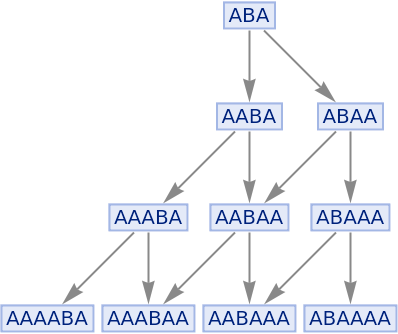
|
Show the structure of the graph, without labels:
| In[5]:= |
![ResourceFunction[
"MultiwaySystem"][{"A" -> "AA", "B" -> "AB"}, "ABA", 3, "StatesGraphStructure"]](https://www.wolframcloud.com/obj/resourcesystem/images/2e0/2e01e7b9-9618-41ef-95c1-ed6532f16094/634a63b186daf98a.png)
|
| Out[5]= |
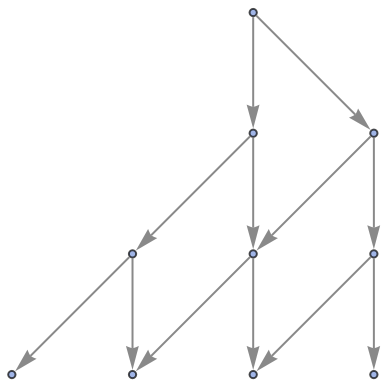
|
Generate the list of all updating events applied at each step:
| In[6]:= |
![ResourceFunction[
"MultiwaySystem"][{"A" -> "ABA", "AA" -> "B"}, {"ABA"}, 3, "AllEventsList"]](https://www.wolframcloud.com/obj/resourcesystem/images/2e0/2e01e7b9-9618-41ef-95c1-ed6532f16094/686067adb0e57371.png)
|
| Out[6]= |

|
Generate a graph of the evolution history, with updating events included:
| In[7]:= |
![ResourceFunction[
"MultiwaySystem"][{"A" -> "ABA", "AA" -> "B"}, {"ABA"}, 3, "EvolutionEventsGraph"]](https://www.wolframcloud.com/obj/resourcesystem/images/2e0/2e01e7b9-9618-41ef-95c1-ed6532f16094/5b92686816fd2cab.png)
|
| Out[7]= |
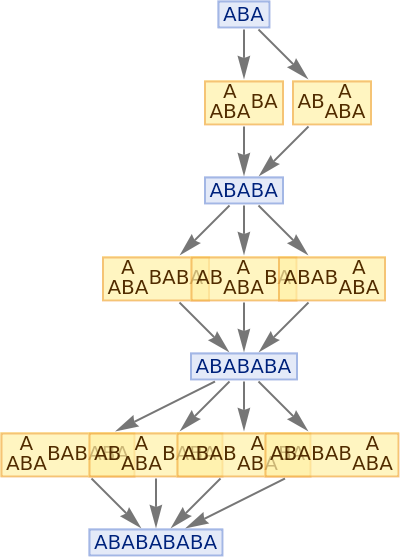
|
Show the structure of the graph, without labels:
| In[8]:= |
![ResourceFunction[
"MultiwaySystem"][{"A" -> "ABA", "AA" -> "B"}, {"ABA"}, 3, "EvolutionEventsGraphStructure"]](https://www.wolframcloud.com/obj/resourcesystem/images/2e0/2e01e7b9-9618-41ef-95c1-ed6532f16094/40ebe70bd0c911b9.png)
|
| Out[8]= |
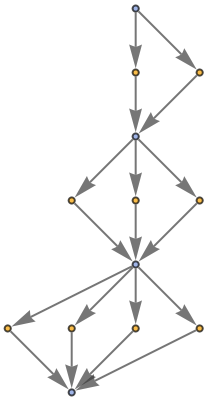
|
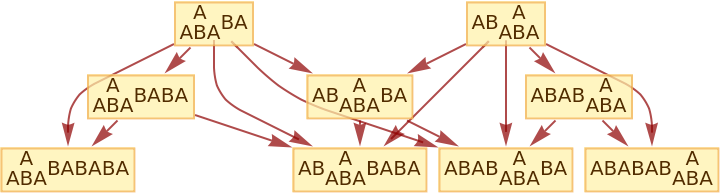
Generate the causal graph, showing dependencies between updating events:
| In[9]:= |
![ResourceFunction[
"MultiwaySystem"][{"A" -> "ABA", "AA" -> "B"}, {"ABA"}, 3, "CausalGraph"]](https://www.wolframcloud.com/obj/resourcesystem/images/2e0/2e01e7b9-9618-41ef-95c1-ed6532f16094/1605bfc9ae61f48b.png)
|
| Out[9]= |
|
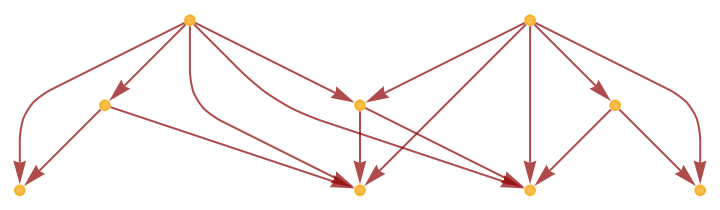
Show the structure of the graph, without labels:
| In[10]:= |
![ResourceFunction[
"MultiwaySystem"][{"A" -> "ABA", "AA" -> "B"}, {"ABA"}, 3, "CausalGraphStructure"]](https://www.wolframcloud.com/obj/resourcesystem/images/2e0/2e01e7b9-9618-41ef-95c1-ed6532f16094/1a31810a07bb4386.png)
|
| Out[10]= |
|
Generate the evolution events graph, with causal connections included:
| In[11]:= |
![ResourceFunction[
"MultiwaySystem"][{"A" -> "ABA", "AA" -> "B"}, {"ABA"}, 3, "EvolutionCausalGraph"]](https://www.wolframcloud.com/obj/resourcesystem/images/2e0/2e01e7b9-9618-41ef-95c1-ed6532f16094/0cd09cce8a1ba7da.png)
|
| Out[11]= |

|
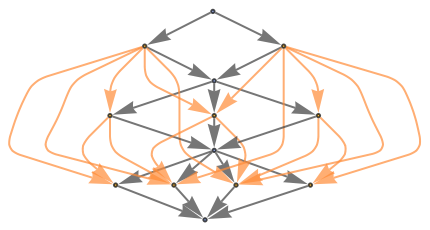
Show the structure of the graph, without labels:
| In[12]:= |
![ResourceFunction[
"MultiwaySystem"][{"A" -> "ABA", "AA" -> "B"}, {"ABA"}, 3, "EvolutionCausalGraphStructure"]](https://www.wolframcloud.com/obj/resourcesystem/images/2e0/2e01e7b9-9618-41ef-95c1-ed6532f16094/2b2c90ceb468fc80.png)
|
| Out[12]= |
|
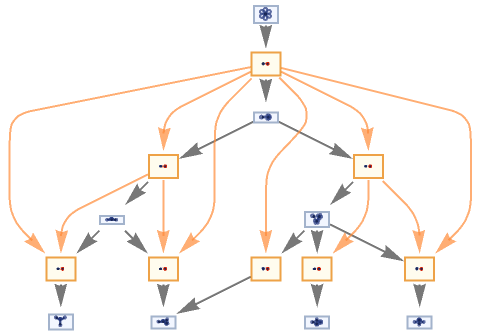
MultiwaySystem can handle Wolfram models and other rule types:
| In[13]:= |
![ResourceFunction["MultiwaySystem"][
"WolframModel" -> {{{2, 2, 1}, {2, 2, 2}} -> {{1, 1, 3}, {1, 1, 1}, {2, 1, 2}, {3, 3, 2}}}, {Table[{0, 0, 0}, 3]}, 3, "EvolutionCausalGraph", VertexSize -> 1]](https://www.wolframcloud.com/obj/resourcesystem/images/2e0/2e01e7b9-9618-41ef-95c1-ed6532f16094/6eb6fc69083e8fe0.png)
|
| Out[13]= |
|
| In[14]:= |
![ResourceFunction["MultiwaySystem"][
CellularAutomaton[30], {0, 0, 1, 0, 0}, 2, "EvolutionCausalGraph", VertexSize -> 1]](https://www.wolframcloud.com/obj/resourcesystem/images/2e0/2e01e7b9-9618-41ef-95c1-ed6532f16094/1103123013020dbe.png)
|
| Out[14]= |
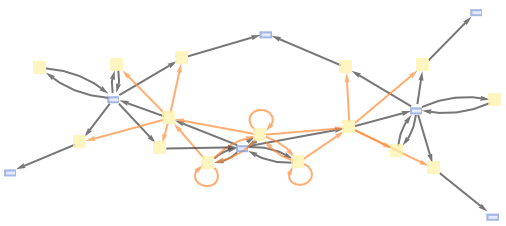
|
| In[15]:= |
![ResourceFunction[
"MultiwaySystem"][{{0} -> {0, 1, 0}, {0, 0} -> {1}}, {0, 1, 0}, 3, "EvolutionCausalGraph"]](https://www.wolframcloud.com/obj/resourcesystem/images/2e0/2e01e7b9-9618-41ef-95c1-ed6532f16094/53f8cfa6c82c5d2c.png)
|
| Out[15]= |
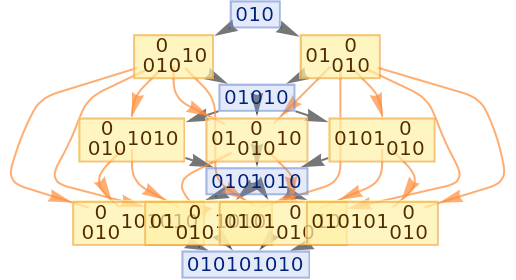
|
Specify an event selection function that picks only up to two events at each step:
| In[16]:= |
![ResourceFunction[
"MultiwaySystem"][{"A" -> "AA", "B" -> "AB"} -> (Take[#, UpTo[2]] &), "ABABA", 3, "StatesGraph"]](https://www.wolframcloud.com/obj/resourcesystem/images/2e0/2e01e7b9-9618-41ef-95c1-ed6532f16094/53ab0c9720ca08cf.png)
|
| Out[16]= |
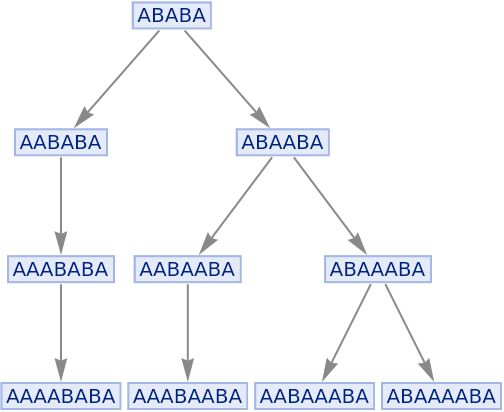
|
Generate causal graphs for all possible choices of event sequences:
| In[17]:= |
![ResourceFunction[
"MultiwaySystem"][{"A" -> "AA", "B" -> "AB"}, {"AB"}, 3, "CausalGraphInstances"]](https://www.wolframcloud.com/obj/resourcesystem/images/2e0/2e01e7b9-9618-41ef-95c1-ed6532f16094/662ac350e656b711.png)
|
| Out[17]= |
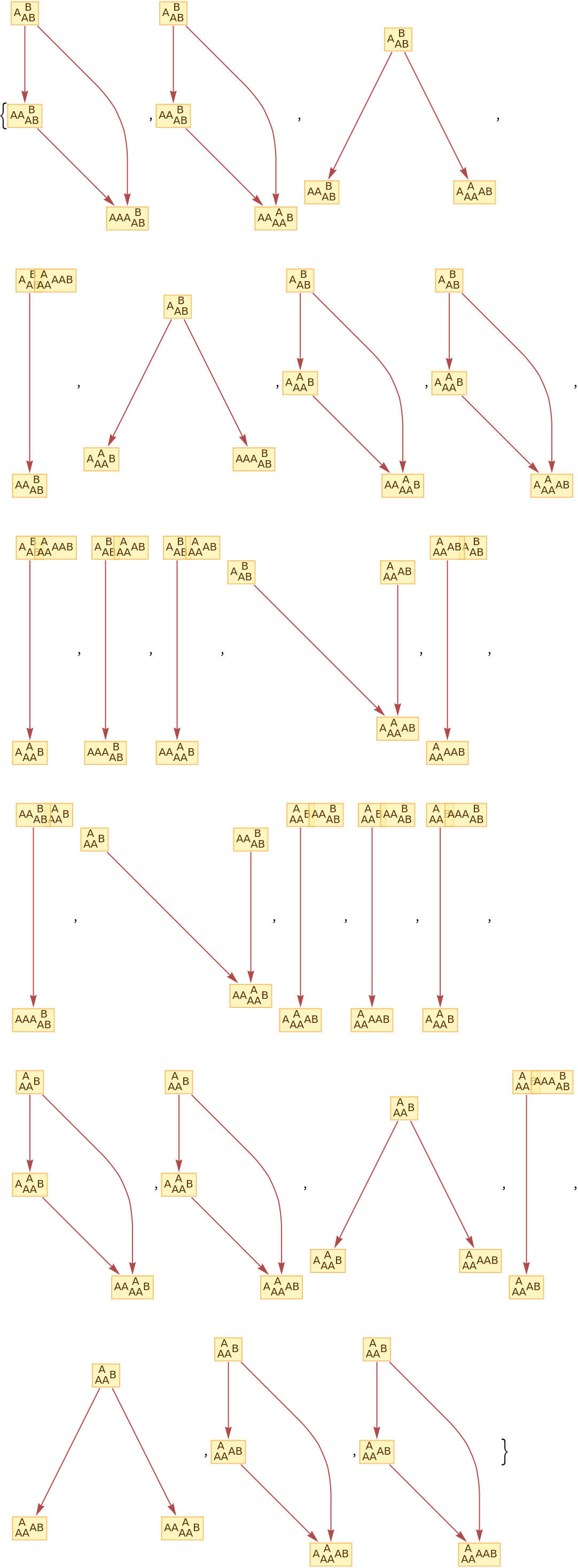
|
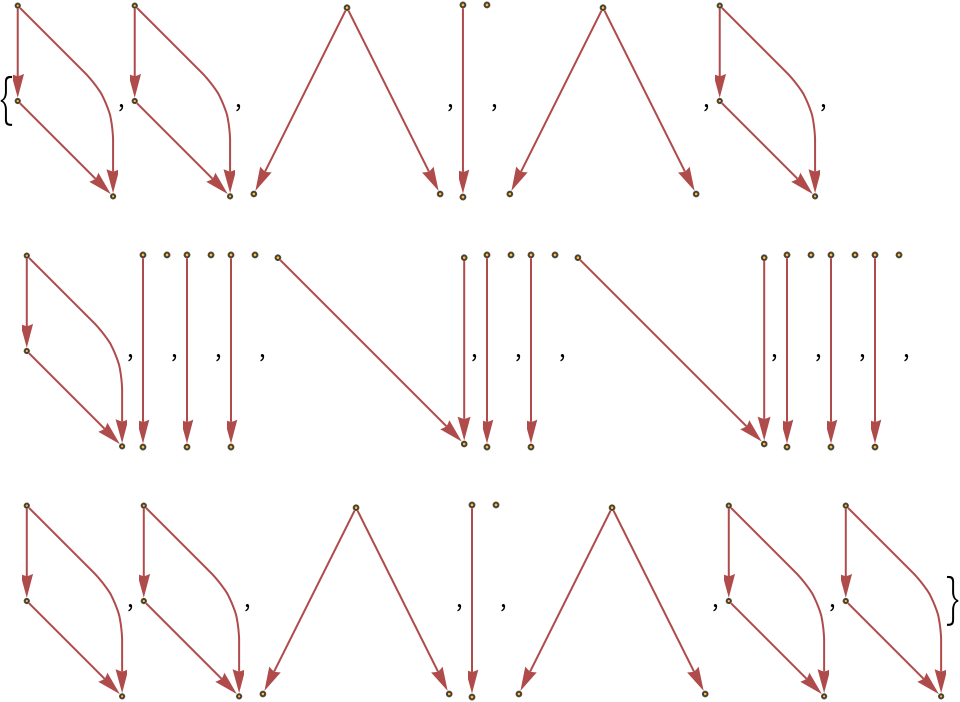
Show the structures of the graphs, without labels:
| In[18]:= |
![ResourceFunction[
"MultiwaySystem"][{"A" -> "AA", "B" -> "AB"}, {"AB"}, 3, "CausalGraphStructureInstances"]](https://www.wolframcloud.com/obj/resourcesystem/images/2e0/2e01e7b9-9618-41ef-95c1-ed6532f16094/407a51121568051d.png)
|
| Out[18]= |
|
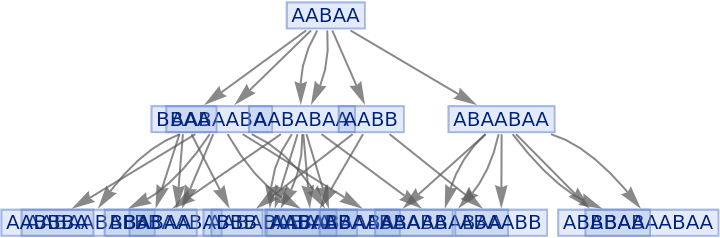
Generate a graph of full evolution history, with all events included:
| In[19]:= |
![ResourceFunction[
"MultiwaySystem"][{"A" -> "ABA", "AA" -> "B"}, "AABAA", 2, "EvolutionGraphFull"]](https://www.wolframcloud.com/obj/resourcesystem/images/2e0/2e01e7b9-9618-41ef-95c1-ed6532f16094/4bdb29010e09dc75.png)
|
| Out[19]= |
|
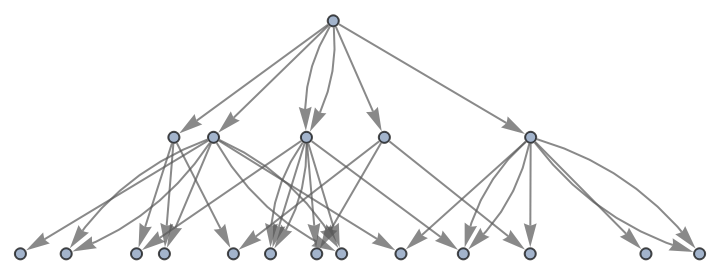
Show the structure of the graph, without labels:
| In[20]:= |
![ResourceFunction[
"MultiwaySystem"][{"A" -> "ABA", "AA" -> "B"}, "AABAA", 2, "EvolutionGraphFullStructure"]](https://www.wolframcloud.com/obj/resourcesystem/images/2e0/2e01e7b9-9618-41ef-95c1-ed6532f16094/7805edb6140a0eb1.png)
|
| Out[20]= |
|
Generate a graph of evolution history, with no merging of equivalent states:
| In[21]:= |
![ResourceFunction[
"MultiwaySystem"][{"A" -> "ABA", "AA" -> "B"}, "AABAA", 2, "EvolutionGraphUnmerged"]](https://www.wolframcloud.com/obj/resourcesystem/images/2e0/2e01e7b9-9618-41ef-95c1-ed6532f16094/399087aae37c387d.png)
|
| Out[21]= |

|
Show the structure of the graph, without labels:
| In[22]:= |
![ResourceFunction[
"MultiwaySystem"][{"A" -> "ABA", "AA" -> "B"}, "AABAA", 2, "EvolutionGraphUnmergedStructure"]](https://www.wolframcloud.com/obj/resourcesystem/images/2e0/2e01e7b9-9618-41ef-95c1-ed6532f16094/5bb18a81fbd78a3e.png)
|
| Out[22]= |

|
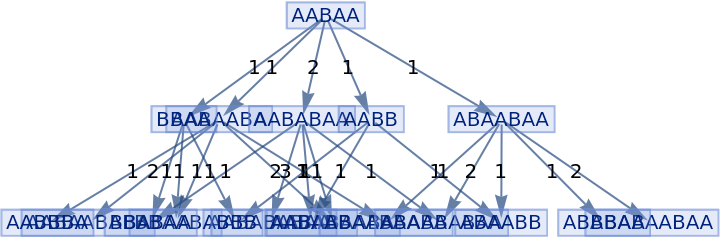
Generate a graph of evolution history, with edges weighted by event multiplicity:
| In[23]:= |
![ResourceFunction[
"MultiwaySystem"][{"A" -> "ABA", "AA" -> "B"}, "AABAA", 2, "EvolutionGraphWeighted", EdgeLabels -> "EdgeWeight"]](https://www.wolframcloud.com/obj/resourcesystem/images/2e0/2e01e7b9-9618-41ef-95c1-ed6532f16094/7bab9a407b9d3e73.png)
|
| Out[23]= |
|
Show the structure of the graph, without labels:
| In[24]:= |
![ResourceFunction[
"MultiwaySystem"][{"A" -> "ABA", "AA" -> "B"}, "AABAA", 2, "EvolutionGraphWeightedStructure", EdgeLabels -> "EdgeWeight"]](https://www.wolframcloud.com/obj/resourcesystem/images/2e0/2e01e7b9-9618-41ef-95c1-ed6532f16094/454141d689eb283a.png)
|
| Out[24]= |
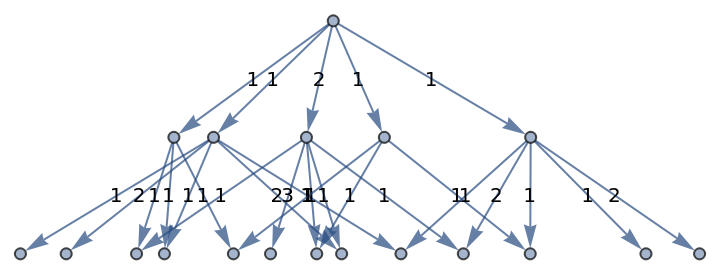
|
Generate a states graph with vertices weighted by their rate of occurrence on each time step:
| In[25]:= |
![ResourceFunction[
"MultiwaySystem"][{"A" -> "AA", "B" -> "AB"}, "AABABAA", 3, "StatesGraph", "IncludeStateWeights" -> True, VertexLabels -> "VertexWeight"]](https://www.wolframcloud.com/obj/resourcesystem/images/2e0/2e01e7b9-9618-41ef-95c1-ed6532f16094/243a008b6521bac4.png)
|
| Out[25]= |
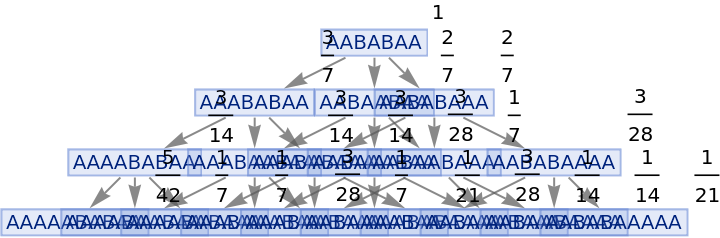
|
Show the structure of the graph, without labels:
| In[26]:= |
![ResourceFunction[
"MultiwaySystem"][{"A" -> "AA", "B" -> "AB"}, "AABABAA", 3, "StatesGraphStructure", "IncludeStateWeights" -> True, VertexLabels -> "VertexWeight"]](https://www.wolframcloud.com/obj/resourcesystem/images/2e0/2e01e7b9-9618-41ef-95c1-ed6532f16094/216061c5ffe6550f.png)
|
| Out[26]= |
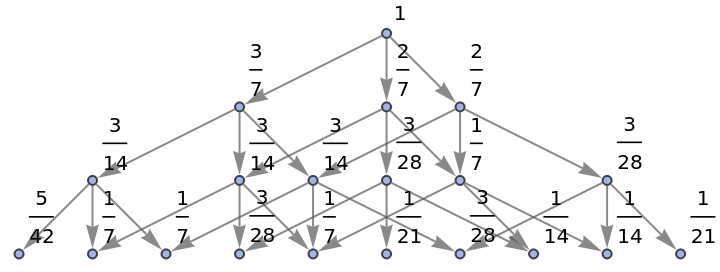
|
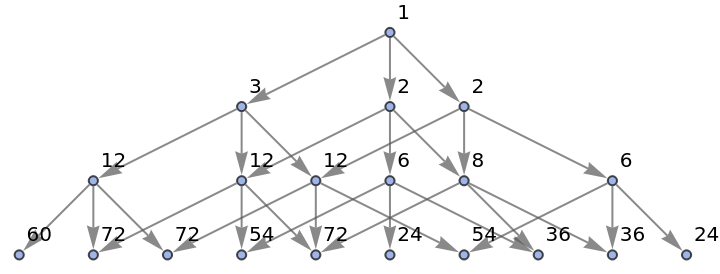
Generate a states graph with vertices weighted by the number of distinct evolution paths that lead to them:
| In[27]:= |
![ResourceFunction[
"MultiwaySystem"][{"A" -> "AA", "B" -> "AB"}, "AABABAA", 3, "StatesGraph", "IncludeStatePathWeights" -> True, VertexLabels -> "VertexWeight"]](https://www.wolframcloud.com/obj/resourcesystem/images/2e0/2e01e7b9-9618-41ef-95c1-ed6532f16094/630d4dfe29589be1.png)
|
| Out[27]= |
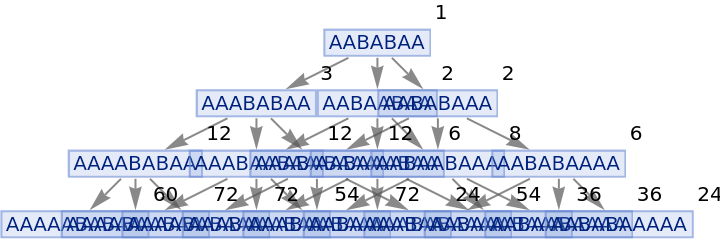
|
Show the structure of the graph, without labels:
| In[28]:= |
![ResourceFunction[
"MultiwaySystem"][{"A" -> "AA", "B" -> "AB"}, "AABABAA", 3, "StatesGraphStructure", "IncludeStatePathWeights" -> True, VertexLabels -> "VertexWeight"]](https://www.wolframcloud.com/obj/resourcesystem/images/2e0/2e01e7b9-9618-41ef-95c1-ed6532f16094/0915faba796bdd28.png)
|
| Out[28]= |
|
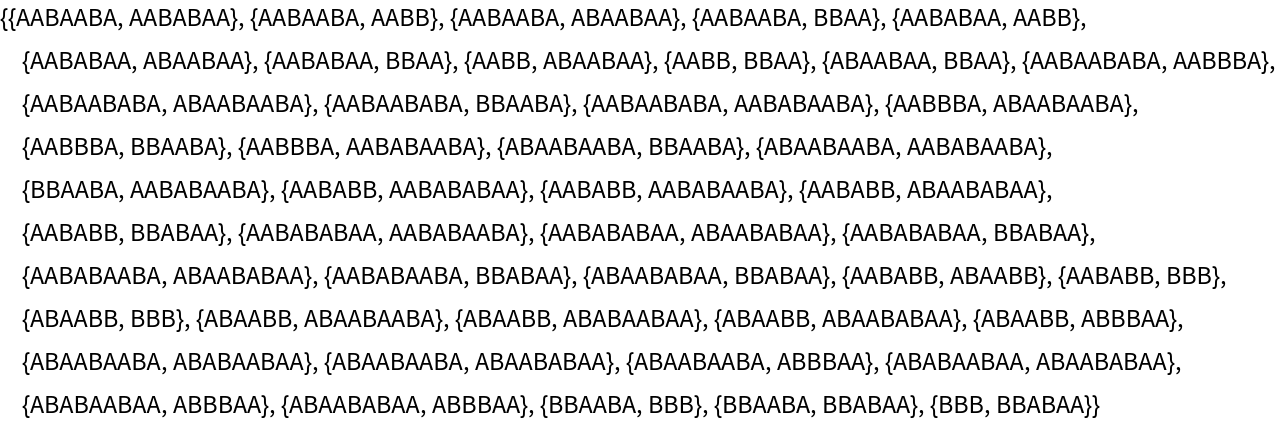
Generate the list of all branch pairs (i.e. critical pairs):
| In[29]:= |
![ResourceFunction[
"MultiwaySystem"][{"A" -> "ABA", "AA" -> "B"}, "AABAA", 2, "BranchPairsList"]](https://www.wolframcloud.com/obj/resourcesystem/images/2e0/2e01e7b9-9618-41ef-95c1-ed6532f16094/1f9d8af9918d2f88.png)
|
| Out[29]= |
|
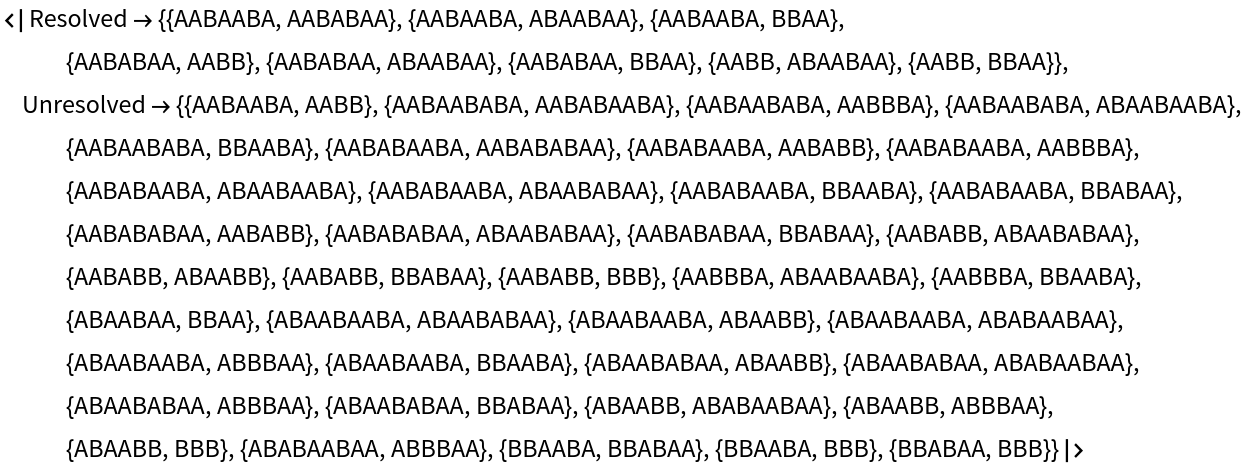
Generate the association showing which branch pairs converged and which did not:
| In[30]:= |
![ResourceFunction[
"MultiwaySystem"][{"A" -> "ABA", "AA" -> "B"}, "AABAA", 2, "BranchPairResolutionsList"]](https://www.wolframcloud.com/obj/resourcesystem/images/2e0/2e01e7b9-9618-41ef-95c1-ed6532f16094/2f9099637f146999.png)
|
| Out[30]= |
|
Prove that the system is not causal invariant:
| In[31]:= |
![ResourceFunction[
"MultiwaySystem"][{"A" -> "ABA", "AA" -> "B"}, "AABAA", 3, "CausalInvariantQ"]](https://www.wolframcloud.com/obj/resourcesystem/images/2e0/2e01e7b9-9618-41ef-95c1-ed6532f16094/3b32abdc3db57991.png)
|
| Out[31]= |

|
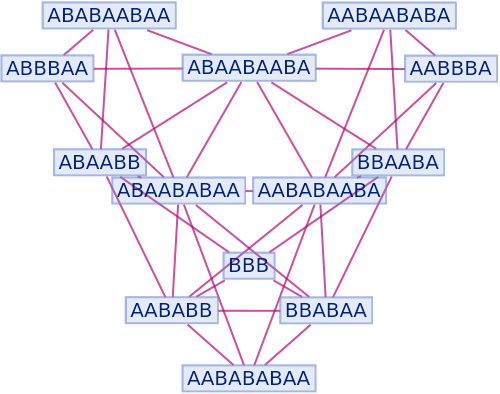
Generate a graph showing branch pair ancestry:
| In[32]:= |
![ResourceFunction[
"MultiwaySystem"][{"A" -> "ABA", "AA" -> "B"}, "AABAA", 2, "BranchialGraph"]](https://www.wolframcloud.com/obj/resourcesystem/images/2e0/2e01e7b9-9618-41ef-95c1-ed6532f16094/3f3fd462369070e7.png)
|
| Out[32]= |
|
Show the structure of the graph, without labels:
| In[33]:= |
![ResourceFunction[
"MultiwaySystem"][{"A" -> "ABA", "AA" -> "B"}, "AABAA", 2, "BranchialGraphStructure"]](https://www.wolframcloud.com/obj/resourcesystem/images/2e0/2e01e7b9-9618-41ef-95c1-ed6532f16094/5e1db1c285f1371a.png)
|
| Out[33]= |
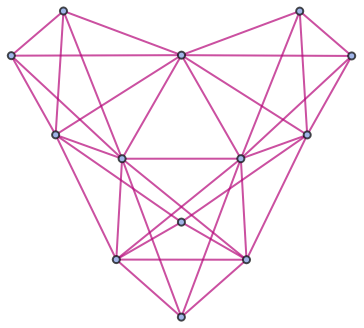
|
Generate a graph showing branch pair event ancestry:
| In[34]:= |
![ResourceFunction[
"MultiwaySystem"][{"A" -> "ABA", "AA" -> "B"}, "AABAA", 2, "EventBranchialGraphStructure"]](https://www.wolframcloud.com/obj/resourcesystem/images/2e0/2e01e7b9-9618-41ef-95c1-ed6532f16094/08d2f8150a841c17.png)
|
| Out[34]= |
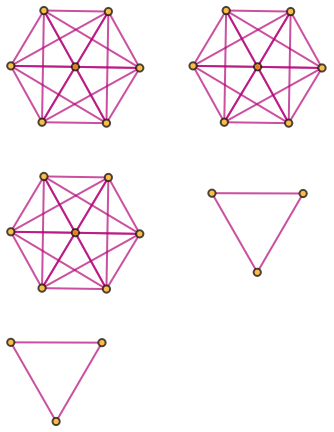
|
Prevent identical states from being merged by including step numbers and state IDs:
| In[35]:= |
![ResourceFunction[
"MultiwaySystem"][{"A" -> "AA", "B" -> "AB"}, "ABA", 3, "StatesGraph", "IncludeStepNumber" -> True, "IncludeStateID" -> True]](https://www.wolframcloud.com/obj/resourcesystem/images/2e0/2e01e7b9-9618-41ef-95c1-ed6532f16094/17c7dcff76c72004.png)
|
| Out[35]= |
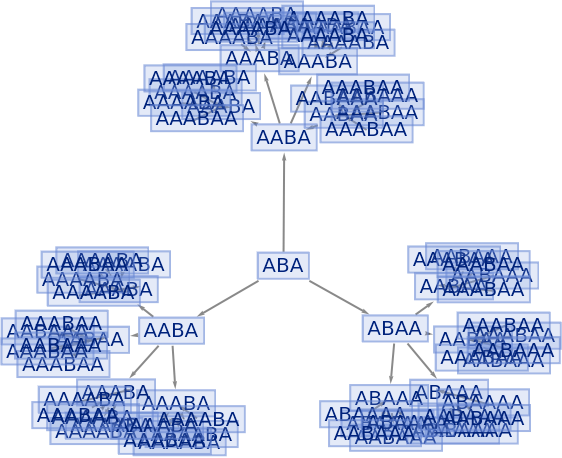
|
| In[36]:= |
![ResourceFunction[
"MultiwaySystem"][{"A" -> "AA", "B" -> "AB"}, "ABA", 3, "AllStatesList", "IncludeStepNumber" -> True, "IncludeStateID" -> True]](https://www.wolframcloud.com/obj/resourcesystem/images/2e0/2e01e7b9-9618-41ef-95c1-ed6532f16094/79a79b44299d2ae2.png)
|
| Out[36]= |
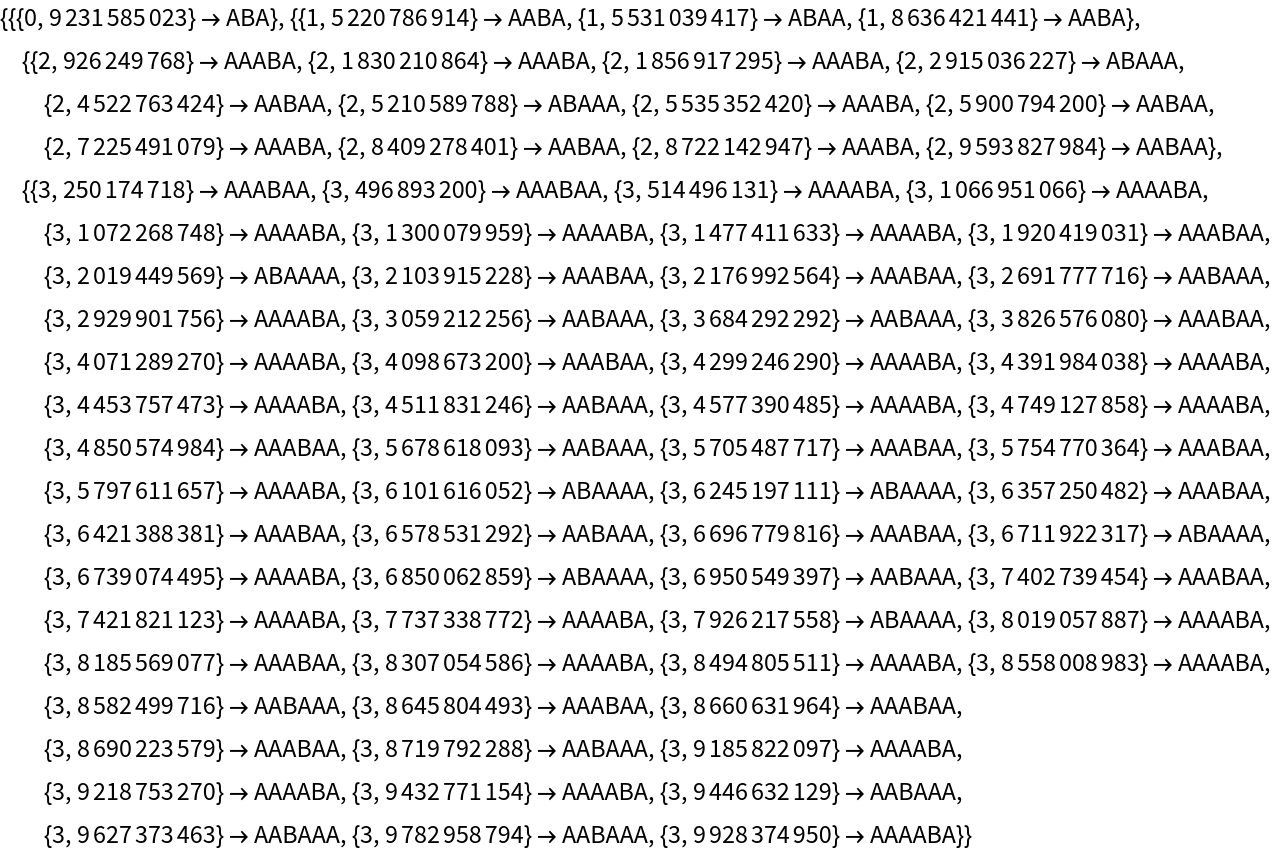
|
MultiwaySystem supports both string and list substitution systems:
| In[37]:= |
![ResourceFunction["MultiwaySystem"][{"A" -> "AA", "B" -> "AB"}, "ABA",
3]](https://www.wolframcloud.com/obj/resourcesystem/images/2e0/2e01e7b9-9618-41ef-95c1-ed6532f16094/576c465d8031d5d5.png)
|
| Out[37]= |

|
| In[38]:= |
![ResourceFunction[
"MultiwaySystem"][{{0} -> {0, 0}, {1} -> {0, 1}}, {0, 1, 0}, 3]](https://www.wolframcloud.com/obj/resourcesystem/images/2e0/2e01e7b9-9618-41ef-95c1-ed6532f16094/537d5b2f3f39a122.png)
|
| Out[38]= |

|
Lists can contain arbitrary symbolic elements:
| In[39]:= |
![(* Evaluate this cell to get the example input *) CloudGet["https://www.wolframcloud.com/obj/0f738fcf-6678-4507-9be6-ccf98ecf4a8e"]](https://www.wolframcloud.com/obj/resourcesystem/images/2e0/2e01e7b9-9618-41ef-95c1-ed6532f16094/283f30a9a52f63ba.png)
|
| Out[39]= |

|
Give an explicit substitution system rule:
| In[40]:= |
![ResourceFunction["MultiwaySystem"][
SubstitutionSystem[{{0} -> {0, 0}, {0} -> {0, 1}}], {{0}}, 3]](https://www.wolframcloud.com/obj/resourcesystem/images/2e0/2e01e7b9-9618-41ef-95c1-ed6532f16094/5fbc5b641712e9be.png)
|
| Out[40]= |

|
An alternative method of specifying that a substitution system should be used:
| In[41]:= |
![ResourceFunction["MultiwaySystem"][
"SubstitutionSystem" -> {{0} -> {0, 0}, {0} -> {0, 1}}, {{0}}, 3]](https://www.wolframcloud.com/obj/resourcesystem/images/2e0/2e01e7b9-9618-41ef-95c1-ed6532f16094/2d69c5237c015f9a.png)
|
| Out[41]= |

|
MultiwaySystem also supports multiway generalizations of cellular automata:
| In[42]:= |
![ResourceFunction[
"MultiwaySystem"][{CellularAutomaton[170], CellularAutomaton[240]}, {{0, 0, 1, 0, 0}}, 2]](https://www.wolframcloud.com/obj/resourcesystem/images/2e0/2e01e7b9-9618-41ef-95c1-ed6532f16094/459f0066a4cf1c84.png)
|
| Out[42]= |

|
Lists of cellular automaton rules can also be specified directly:
| In[43]:= |
![ResourceFunction["MultiwaySystem"][
CellularAutomaton[{170, 240}], {0, 0, 1, 0, 0}, 2]](https://www.wolframcloud.com/obj/resourcesystem/images/2e0/2e01e7b9-9618-41ef-95c1-ed6532f16094/13504448f170f28f.png)
|
| Out[43]= |

|
Generate a states graph from left- and right-shift cellular automaton rules:
| In[44]:= |
![ResourceFunction["MultiwaySystem"][
"CellularAutomaton" -> {170, 240}, {{0, 0, 1, 0, 0}}, 2, "StatesGraph", VertexSize -> 1]](https://www.wolframcloud.com/obj/resourcesystem/images/2e0/2e01e7b9-9618-41ef-95c1-ed6532f16094/6465cecf74ea997e.png)
|
| Out[44]= |
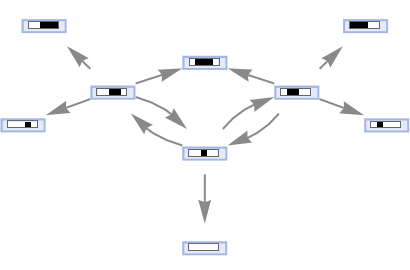
|
Generate a causal graph for the rule 30 cellular automaton:
| In[45]:= |
![ResourceFunction["MultiwaySystem"][
CellularAutomaton[30], {0, 0, 1, 0, 0}, 2, "CausalGraph", VertexSize -> 1]](https://www.wolframcloud.com/obj/resourcesystem/images/2e0/2e01e7b9-9618-41ef-95c1-ed6532f16094/20872fbb15b936f7.png)
|
| Out[45]= |
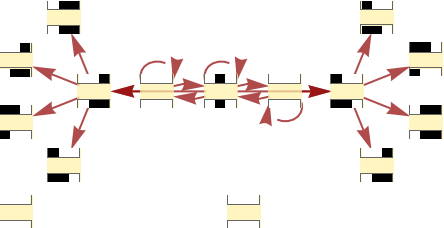
|
MultiwaySystem also supports multiway generalizations of Wolfram models:
| In[46]:= |
![ResourceFunction["MultiwaySystem"][
"WolframModel" -> {{{2, 2, 1}, {2, 2, 2}} -> {{1, 1, 3}, {1, 1, 1}, {2, 1, 2}}}, {Table[{0, 0, 0}, 3]}, 4]](https://www.wolframcloud.com/obj/resourcesystem/images/2e0/2e01e7b9-9618-41ef-95c1-ed6532f16094/6fb8dbfcbc367fbf.png)
|
| Out[46]= |
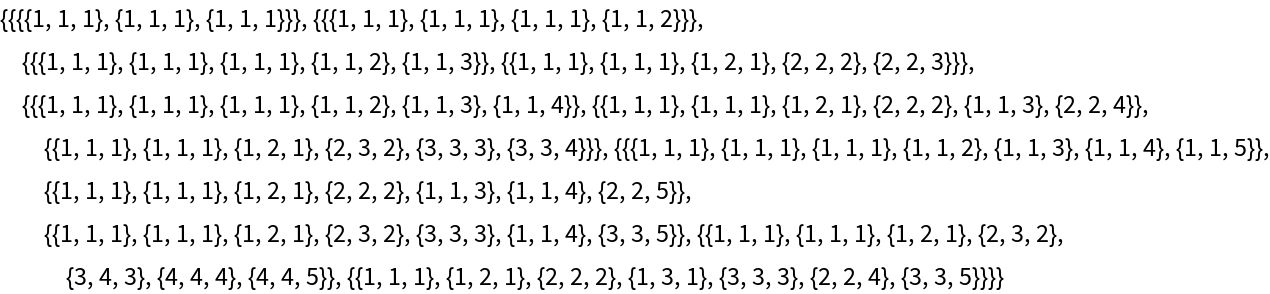
|
Generate an evolution causal graph for a Wolfram model rule:
| In[47]:= |
![ResourceFunction["MultiwaySystem"][
"WolframModel" -> {{{2, 2, 1}, {2, 2, 2}} -> {{1, 1, 3}, {1, 1, 1}, {2, 1, 2}}}, {Table[{0, 0, 0}, 3]}, 4, "EvolutionCausalGraph", VertexSize -> 1]](https://www.wolframcloud.com/obj/resourcesystem/images/2e0/2e01e7b9-9618-41ef-95c1-ed6532f16094/0015815b8b556595.png)
|
| Out[47]= |
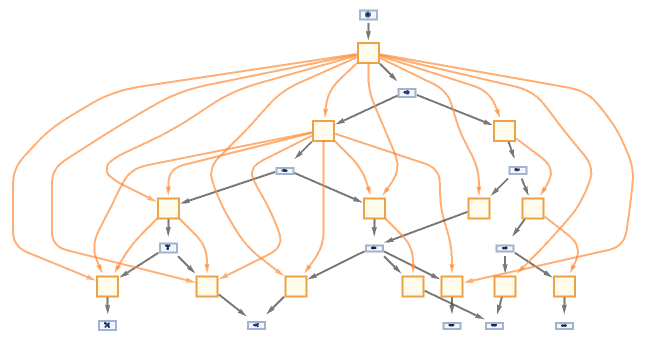
|
Construct a multiway system by explicitly specifying an association:
| In[48]:= |
![ResourceFunction[
"MultiwaySystem"][<|
"StateEvolutionFunction" -> (StringReplaceList[#, {"A" -> "AA", "B" -> "AB"}] &), "StateEquivalenceFunction" -> SameQ, "StateEventFunction" -> Identity, "EventDecompositionFunction" -> Identity, "EventApplicationFunction" -> Identity, "SystemType" -> "None", "EventSelectionFunction" -> Identity|>, {"ABA"}, 3]](https://www.wolframcloud.com/obj/resourcesystem/images/2e0/2e01e7b9-9618-41ef-95c1-ed6532f16094/1c6fda9e53b129eb.png)
|
| Out[48]= |

|
MultiwaySystem accepts both individual rules and lists of rules:
| In[49]:= |
![ResourceFunction["MultiwaySystem"][
"A" -> "AA", "AAA", 3, "StatesGraph"]](https://www.wolframcloud.com/obj/resourcesystem/images/2e0/2e01e7b9-9618-41ef-95c1-ed6532f16094/35ffd13d6228d824.png)
|
| Out[49]= |

|
| In[50]:= |
![ResourceFunction[
"MultiwaySystem"][{"A" -> "AB", "B" -> "BA"}, "AAA", 3, "StatesGraph"]](https://www.wolframcloud.com/obj/resourcesystem/images/2e0/2e01e7b9-9618-41ef-95c1-ed6532f16094/3d92190cf7b291c0.png)
|
| Out[50]= |

|
Likewise for initial conditions:
| In[51]:= |
![ResourceFunction[
"MultiwaySystem"][{"A" -> "AB", "B" -> "BA"}, {"ABA", "AAB"}, 3, "StatesGraph"]](https://www.wolframcloud.com/obj/resourcesystem/images/2e0/2e01e7b9-9618-41ef-95c1-ed6532f16094/023d7e1d09a7f115.png)
|
| Out[51]= |

|
Apply only the first possible event at each step:
| In[52]:= |
![ResourceFunction[
"MultiwaySystem"][{"A" -> "AAB", "BA" -> "A"} -> "Sequential", "A",
8]](https://www.wolframcloud.com/obj/resourcesystem/images/2e0/2e01e7b9-9618-41ef-95c1-ed6532f16094/14f4878f0092728c.png)
|
| Out[52]= |

|
Apply the first and last possible events at each step:
| In[53]:= |
![ResourceFunction[
"MultiwaySystem"][{"A" -> "AAB", "BA" -> "A"} -> ({First[#], Last[#]} &), "A", 8]](https://www.wolframcloud.com/obj/resourcesystem/images/2e0/2e01e7b9-9618-41ef-95c1-ed6532f16094/68d5bed2acc43a2e.png)
|
| Out[53]= |

|
Use a greedy-style algorithm to apply the maximal set of nonconflicting events at each step (strings only):
| In[54]:= |
![ResourceFunction[
"MultiwaySystem"][{"A" -> "AA", "BA" -> "AB"} -> "MaxScan", "ABA", 4, "StatesGraph"]](https://www.wolframcloud.com/obj/resourcesystem/images/2e0/2e01e7b9-9618-41ef-95c1-ed6532f16094/39c9b014689de8b9.png)
|
| Out[54]= |
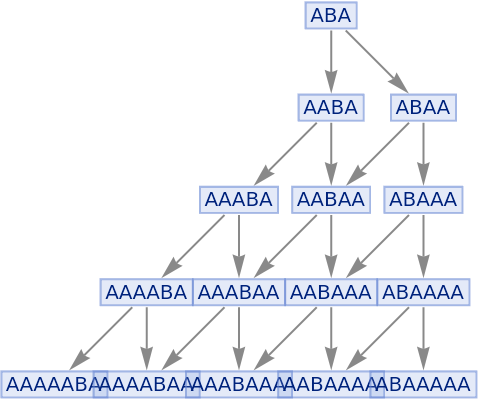
|
Compare this to the full states graph:
| In[55]:= |
![ResourceFunction[
"MultiwaySystem"][{"A" -> "AA", "BA" -> "AB"}, "ABA", 4, "StatesGraph"]](https://www.wolframcloud.com/obj/resourcesystem/images/2e0/2e01e7b9-9618-41ef-95c1-ed6532f16094/213100b3ed35eb88.png)
|
| Out[55]= |
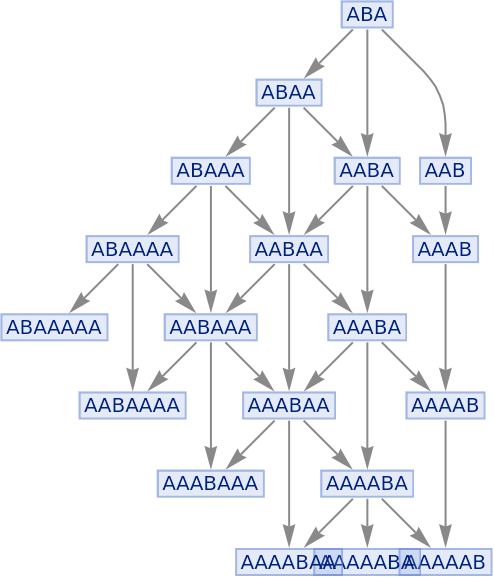
|
By default, states are labeled by their contents:
| In[56]:= |
![ResourceFunction[
"MultiwaySystem"][{"A" -> "AA", "B" -> "AB"}, {"ABA"}, 3, "StatesGraph"]](https://www.wolframcloud.com/obj/resourcesystem/images/2e0/2e01e7b9-9618-41ef-95c1-ed6532f16094/5578f5beb93920a3.png)
|
| Out[56]= |
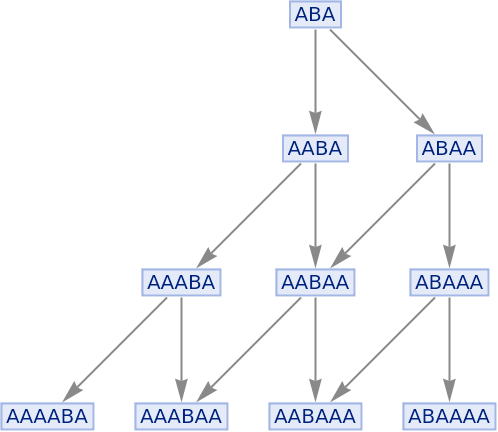
|
Use no labeling for states:
| In[57]:= |
![ResourceFunction[
"MultiwaySystem"][{"A" -> "AA", "B" -> "AB"}, {"ABA"}, 3, "StatesGraph", "StateRenderingFunction" -> None]](https://www.wolframcloud.com/obj/resourcesystem/images/2e0/2e01e7b9-9618-41ef-95c1-ed6532f16094/1b662a066d914672.png)
|
| Out[57]= |
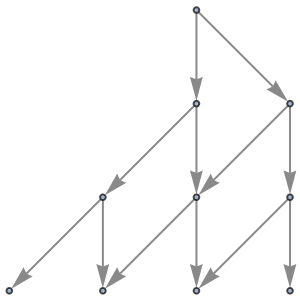
|
"StatesGraphStructure" yields the same result:
| In[58]:= |
![ResourceFunction[
"MultiwaySystem"][{"A" -> "AA", "B" -> "AB"}, {"ABA"}, 3, "StatesGraphStructure"]](https://www.wolframcloud.com/obj/resourcesystem/images/2e0/2e01e7b9-9618-41ef-95c1-ed6532f16094/36793bed14940b95.png)
|
| Out[58]= |
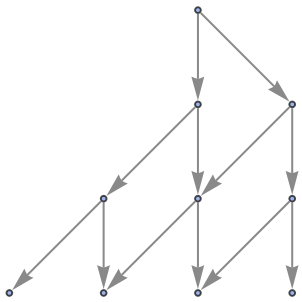
|
Use raw state names as node labels:
| In[59]:= |
![ResourceFunction[
"MultiwaySystem"][{"A" -> "AA", "B" -> "AB"}, {"ABA"}, 3, "StatesGraph", "StateRenderingFunction" -> Inherited]](https://www.wolframcloud.com/obj/resourcesystem/images/2e0/2e01e7b9-9618-41ef-95c1-ed6532f16094/15f5b72b586b4b79.png)
|
| Out[59]= |
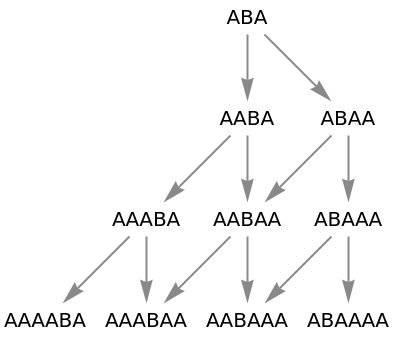
|
Use a named shape as each state label:
| In[60]:= |
![ResourceFunction[
"MultiwaySystem"][{"A" -> "AA", "B" -> "AB"}, {"ABA"}, 3, "StatesGraph", "StateRenderingFunction" -> "Square"]](https://www.wolframcloud.com/obj/resourcesystem/images/2e0/2e01e7b9-9618-41ef-95c1-ed6532f16094/74d80ec31c97ee7b.png)
|
| Out[60]= |
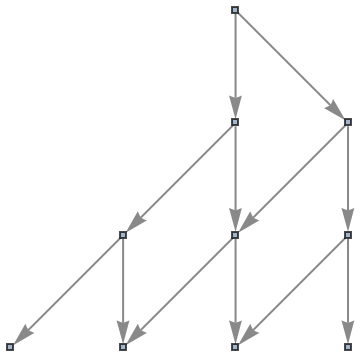
|
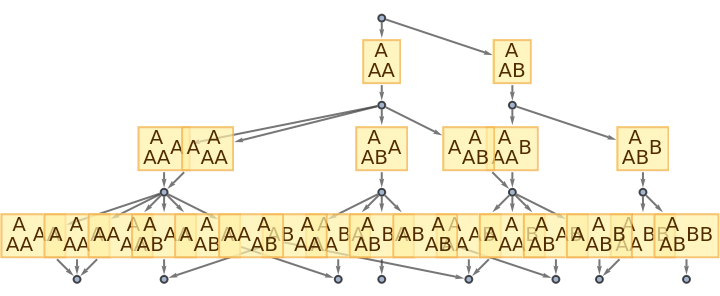
By default, both states and events are labeled by their contents:
| In[61]:= |
![ResourceFunction[
"MultiwaySystem"][{"A" -> "AA", "A" -> "AB"}, {"A"}, 3, "EvolutionEventsGraph"]](https://www.wolframcloud.com/obj/resourcesystem/images/2e0/2e01e7b9-9618-41ef-95c1-ed6532f16094/5282cb7c47f2ceb9.png)
|
| Out[61]= |
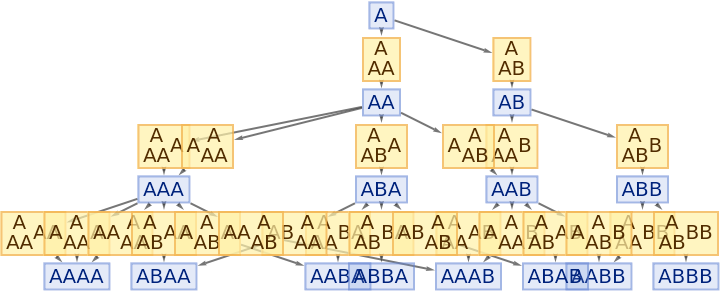
|
Use no labeling for states:
| In[62]:= |
![ResourceFunction[
"MultiwaySystem"][{"A" -> "AA", "A" -> "AB"}, {"A"}, 3, "EvolutionEventsGraph", "StateRenderingFunction" -> None]](https://www.wolframcloud.com/obj/resourcesystem/images/2e0/2e01e7b9-9618-41ef-95c1-ed6532f16094/10a05297292eb7d8.png)
|
| Out[62]= |
|
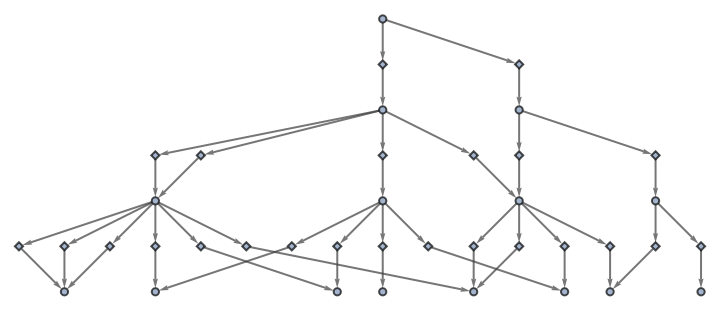
Also use no labeling for events:
| In[63]:= |
![ResourceFunction[
"MultiwaySystem"][{"A" -> "AA", "A" -> "AB"}, {"A"}, 3, "EvolutionEventsGraph", "StateRenderingFunction" -> None, "EventRenderingFunction" -> None]](https://www.wolframcloud.com/obj/resourcesystem/images/2e0/2e01e7b9-9618-41ef-95c1-ed6532f16094/27dd9fd4a4935035.png)
|
| Out[63]= |
|
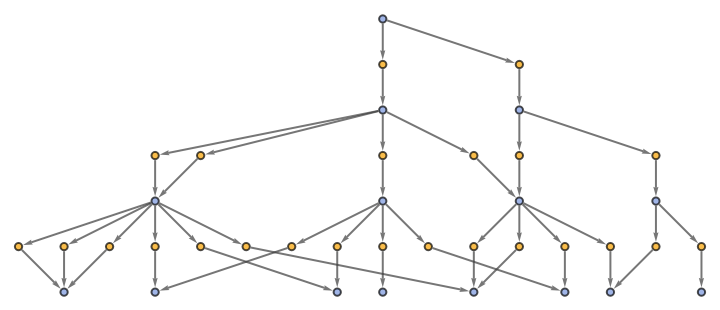
"EvolutionEventsGraphStructure" yields an equivalent result:
| In[64]:= |
![ResourceFunction[
"MultiwaySystem"][{"A" -> "AA", "A" -> "AB"}, {"A"}, 3, "EvolutionEventsGraphStructure"]](https://www.wolframcloud.com/obj/resourcesystem/images/2e0/2e01e7b9-9618-41ef-95c1-ed6532f16094/6b8949019559cb7a.png)
|
| Out[64]= |
|
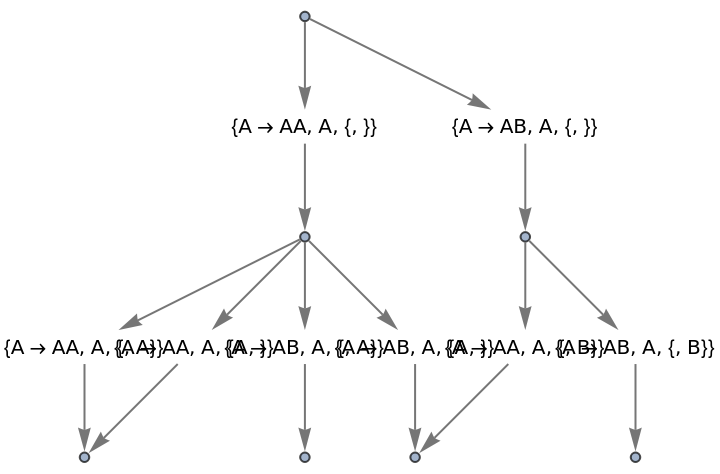
Use raw event expressions as their labels:
| In[65]:= |
![ResourceFunction[
"MultiwaySystem"][{"A" -> "AA", "A" -> "AB"}, {"A"}, 2, "EvolutionEventsGraph", "StateRenderingFunction" -> None, "EventRenderingFunction" -> Inherited]](https://www.wolframcloud.com/obj/resourcesystem/images/2e0/2e01e7b9-9618-41ef-95c1-ed6532f16094/24e321e6fad849a2.png)
|
| Out[65]= |
|
By default, "AllEventsList" does not include initialization events:
| In[66]:= |
![ResourceFunction[
"MultiwaySystem"][{"BA" -> "AB", "AB" -> "BA"}, {"ABA", "ABA", "ABB"}, 3, "AllEventsList"]](https://www.wolframcloud.com/obj/resourcesystem/images/2e0/2e01e7b9-9618-41ef-95c1-ed6532f16094/3f0fa5c40b03dc9b.png)
|
| Out[66]= |

|
The option "IncludeInitializationEvents" allows one to override this default:
| In[67]:= |
![ResourceFunction[
"MultiwaySystem"][{"BA" -> "AB", "AB" -> "BA"}, {"ABA", "ABA", "ABB"}, 3, "AllEventsList", "IncludeInitializationEvents" -> True]](https://www.wolframcloud.com/obj/resourcesystem/images/2e0/2e01e7b9-9618-41ef-95c1-ed6532f16094/297fe458e0db16e8.png)
|
| Out[67]= |

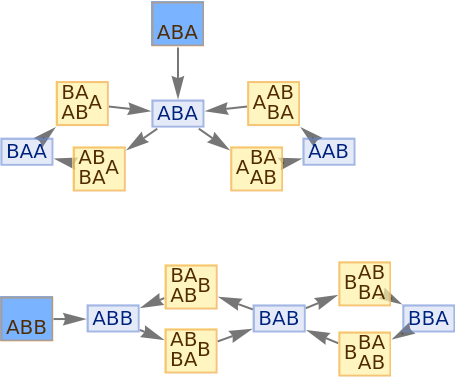
|
Initialization events have special default rendering:
| In[68]:= |
![ResourceFunction[
"MultiwaySystem"][{"BA" -> "AB", "AB" -> "BA"}, {"ABA", "ABA", "ABB"}, 3, "EvolutionEventsGraph", "IncludeInitializationEvents" -> True]](https://www.wolframcloud.com/obj/resourcesystem/images/2e0/2e01e7b9-9618-41ef-95c1-ed6532f16094/4ff8cd21dda92c98.png)
|
| Out[68]= |
|
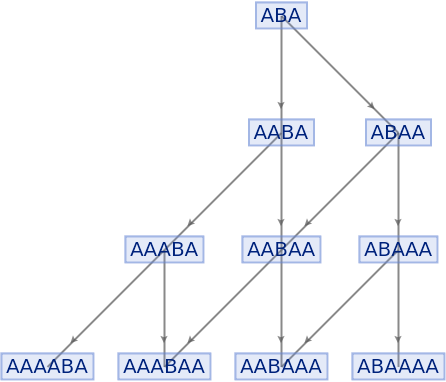
Place arrows in the middle of edges:
| In[69]:= |
![ResourceFunction[
"MultiwaySystem"][{"A" -> "AA", "B" -> "AB"}, {"ABA"}, 3, "StatesGraph", EdgeShapeFunction -> GraphElementData["ShortFilledArrow", "ArrowSize" -> 0.03]]](https://www.wolframcloud.com/obj/resourcesystem/images/2e0/2e01e7b9-9618-41ef-95c1-ed6532f16094/27cc1d168c6d5363.png)
|
| Out[69]= |
|
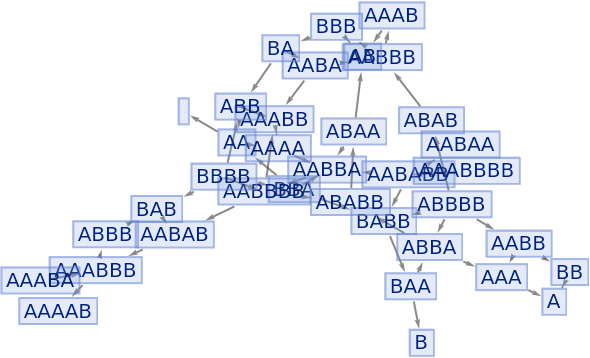
Generate an example multiway evolution from page 209 of A New Kind of Science:
| In[70]:= |
![ResourceFunction[
"MultiwaySystem"][{"AA" -> "", "BA" -> "ABB", "BB" -> "A"}, {"BBA"}, 8, "StatesGraph"]](https://www.wolframcloud.com/obj/resourcesystem/images/2e0/2e01e7b9-9618-41ef-95c1-ed6532f16094/4cc5e4f580aae6f3.png)
|
| Out[70]= |
|
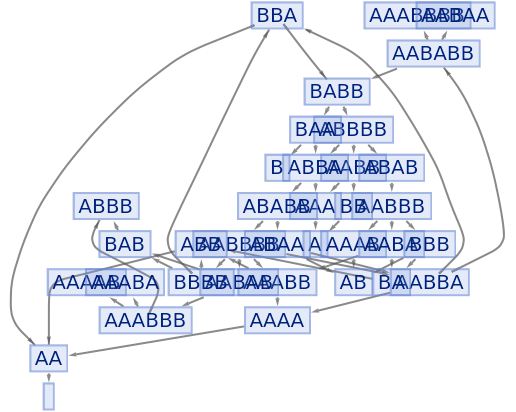
Force the initial state node to be at the top:
| In[71]:= |
![ResourceFunction[
"MultiwaySystem"][{"AA" -> "", "BA" -> "ABB", "BB" -> "A"}, {"BBA"}, 8, "StatesGraph", GraphLayout -> {"LayeredDigraphEmbedding", "RootVertex" -> "BBA"}]](https://www.wolframcloud.com/obj/resourcesystem/images/2e0/2e01e7b9-9618-41ef-95c1-ed6532f16094/3072de05215d4af7.png)
|
| Out[71]= |
|
By default, equivalent states are merged across all time steps:
| In[72]:= |
![ResourceFunction[
"MultiwaySystem"][{"AA" -> "", "BA" -> "ABB", "BB" -> "A"}, {"BBA"}, 8, "StatesGraph"]](https://www.wolframcloud.com/obj/resourcesystem/images/2e0/2e01e7b9-9618-41ef-95c1-ed6532f16094/18d25c210ba7fbe7.png)
|
| Out[72]= |
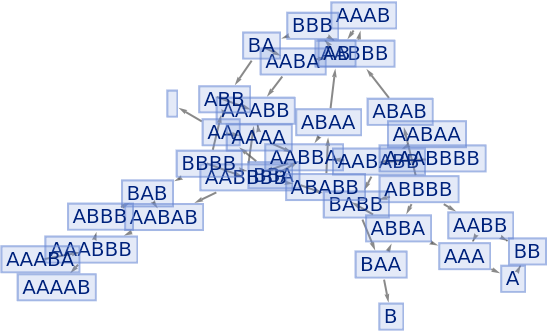
|
| In[73]:= |
![ResourceFunction[
"MultiwaySystem"][{"AA" -> "", "BA" -> "ABB", "BB" -> "A"}, {"BBA"}, 8, "AllStatesList"]](https://www.wolframcloud.com/obj/resourcesystem/images/2e0/2e01e7b9-9618-41ef-95c1-ed6532f16094/59cd113e70ece837.png)
|
| Out[73]= |

|
Merging of equivalent states across different time steps can be prevented by including step numbers:
| In[74]:= |
![ResourceFunction[
"MultiwaySystem"][{"AA" -> "", "BA" -> "ABB", "BB" -> "A"}, {"BBA"}, 8, "StatesGraph", "IncludeStepNumber" -> True]](https://www.wolframcloud.com/obj/resourcesystem/images/2e0/2e01e7b9-9618-41ef-95c1-ed6532f16094/198dd510f93c9d58.png)
|
| Out[74]= |
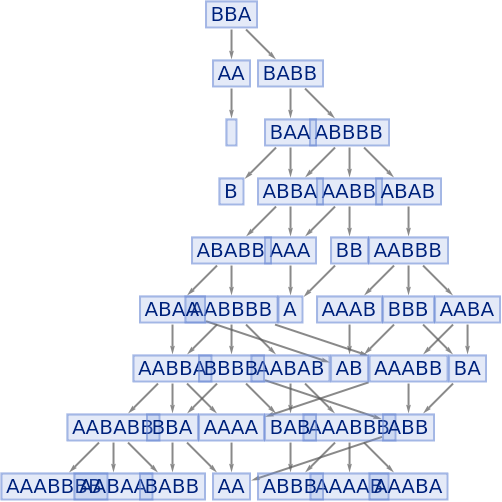
|
| In[75]:= |
![ResourceFunction[
"MultiwaySystem"][{"AA" -> "", "BA" -> "ABB", "BB" -> "A"}, {"BBA"}, 8, "AllStatesList", "IncludeStepNumber" -> True]](https://www.wolframcloud.com/obj/resourcesystem/images/2e0/2e01e7b9-9618-41ef-95c1-ed6532f16094/16aadc2988cee4f5.png)
|
| Out[75]= |

|
Merging of equivalent states at the same time step can be prevented by also including state IDs:
| In[76]:= |
![ResourceFunction[
"MultiwaySystem"][{"AA" -> "", "BA" -> "ABB", "BB" -> "A"}, {"BBA"}, 7, "StatesGraph", "IncludeStepNumber" -> True, "IncludeStateID" -> True]](https://www.wolframcloud.com/obj/resourcesystem/images/2e0/2e01e7b9-9618-41ef-95c1-ed6532f16094/73f4cb9e4e19a7aa.png)
|
| Out[76]= |
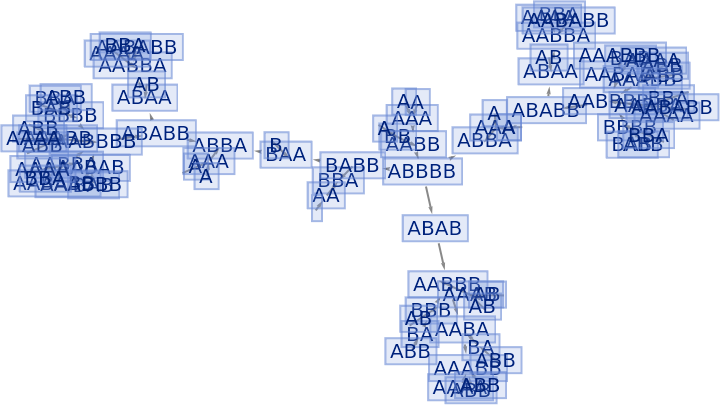
|
| In[77]:= |
![ResourceFunction[
"MultiwaySystem"][{"AA" -> "", "BA" -> "ABB", "BB" -> "A"}, {"BBA"}, 7, "AllStatesList", "IncludeStepNumber" -> True, "IncludeStateID" -> True]](https://www.wolframcloud.com/obj/resourcesystem/images/2e0/2e01e7b9-9618-41ef-95c1-ed6532f16094/5319b4b502369ca0.png)
|
| Out[77]= |

|
Step numbers and IDs also apply to events:
| In[78]:= |
![ResourceFunction[
"MultiwaySystem"][{"AA" -> "", "BA" -> "ABB", "BB" -> "A"}, {"BBA"}, 4, "EvolutionEventsGraph", "IncludeStepNumber" -> True, "IncludeStateID" -> True]](https://www.wolframcloud.com/obj/resourcesystem/images/2e0/2e01e7b9-9618-41ef-95c1-ed6532f16094/5094b449d699388c.png)
|
| Out[78]= |
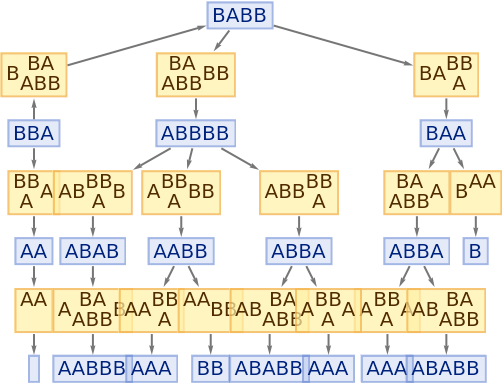
|
| In[79]:= |
![ResourceFunction[
"MultiwaySystem"][{"AA" -> "", "BA" -> "ABB", "BB" -> "A"}, {"BBA"}, 4, "AllEventsList", "IncludeStepNumber" -> True, "IncludeStateID" -> True]](https://www.wolframcloud.com/obj/resourcesystem/images/2e0/2e01e7b9-9618-41ef-95c1-ed6532f16094/75e9110e0f85c413.png)
|
| Out[79]= |

|
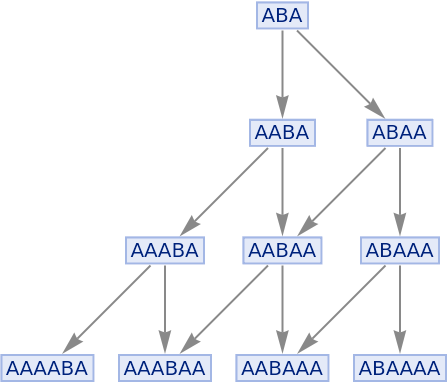
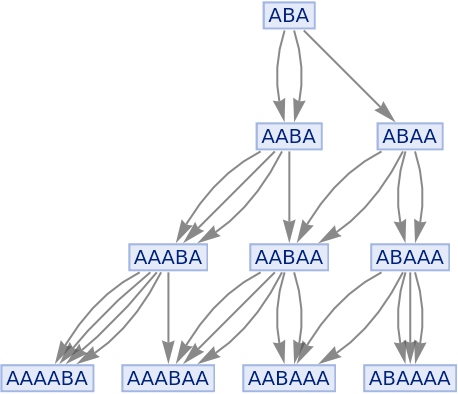
By default, multiple instances of equivalent updating events are merged in the states graph:
| In[80]:= |
![ResourceFunction[
"MultiwaySystem"][{"A" -> "AA", "B" -> "AB"}, "ABA", 3, "StatesGraph"]](https://www.wolframcloud.com/obj/resourcesystem/images/2e0/2e01e7b9-9618-41ef-95c1-ed6532f16094/581c657652636e9d.png)
|
| Out[80]= |
|
Merging of equivalent events can be prevented by including event instances:
| In[81]:= |
![ResourceFunction[
"MultiwaySystem"][{"A" -> "AA", "B" -> "AB"}, "ABA", 3, "StatesGraph", "IncludeEventInstances" -> True]](https://www.wolframcloud.com/obj/resourcesystem/images/2e0/2e01e7b9-9618-41ef-95c1-ed6532f16094/50eecb32ed139366.png)
|
| Out[81]= |
|
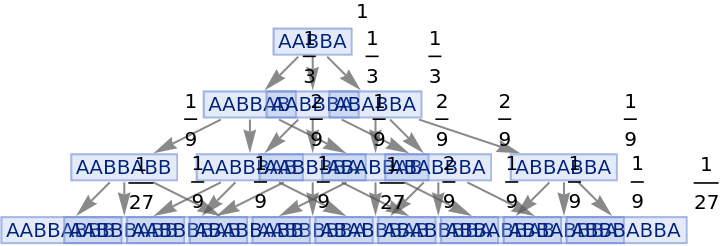
Vertices of a states graph can be weighted by their relative rate of occurrence at each time step:
| In[82]:= |
![ResourceFunction[
"MultiwaySystem"][{"A" -> "AB"}, "AABBA", 3, "StatesGraph", "IncludeStateWeights" -> True, VertexLabels -> "VertexWeight"]](https://www.wolframcloud.com/obj/resourcesystem/images/2e0/2e01e7b9-9618-41ef-95c1-ed6532f16094/08404f467a02ddd8.png)
|
| Out[82]= |
|
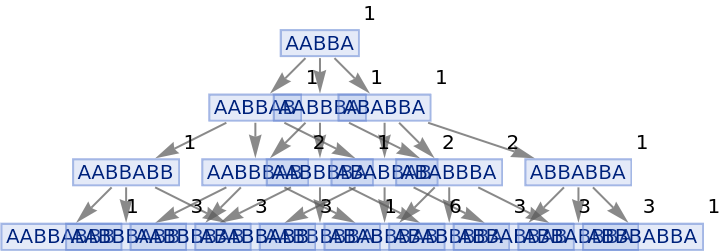
Vertices can also be weighted by the number of distinct evolution paths that lead to them:
| In[83]:= |
![ResourceFunction[
"MultiwaySystem"][{"A" -> "AB"}, "AABBA", 3, "StatesGraph", "IncludeStatePathWeights" -> True, VertexLabels -> "VertexWeight"]](https://www.wolframcloud.com/obj/resourcesystem/images/2e0/2e01e7b9-9618-41ef-95c1-ed6532f16094/14863e1b9a364eed.png)
|
| Out[83]= |
|
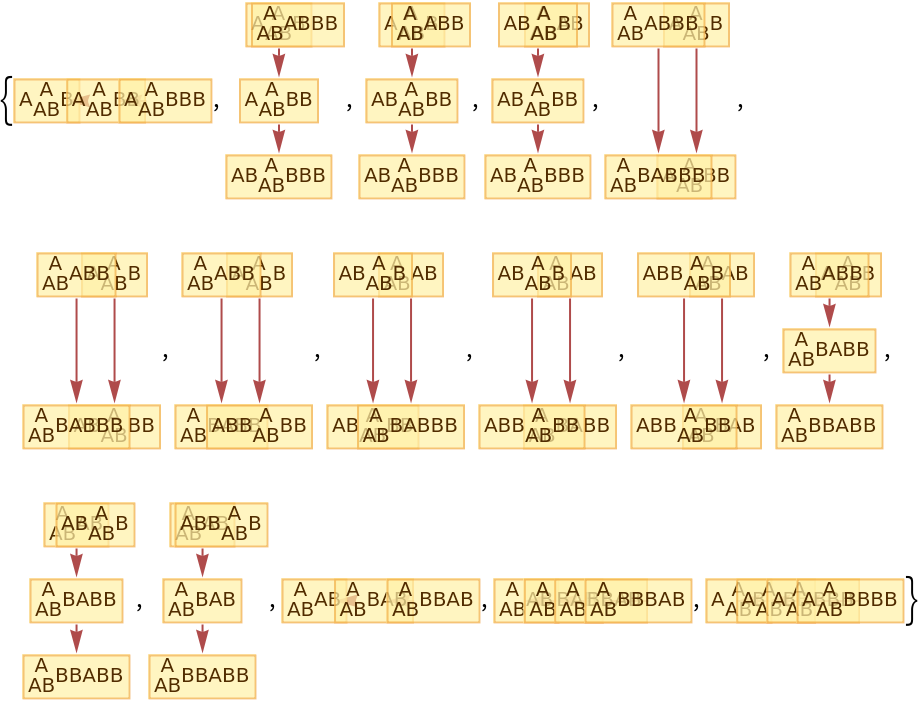
By default, "CausalGraphInstances" returns all possible causal graphs:
| In[84]:= |
![ResourceFunction[
"MultiwaySystem"][{"A" -> "AB"}, "AAB", 4, "CausalGraphInstances"]](https://www.wolframcloud.com/obj/resourcesystem/images/2e0/2e01e7b9-9618-41ef-95c1-ed6532f16094/5946e687e297e350.png)
|
| Out[84]= |
|
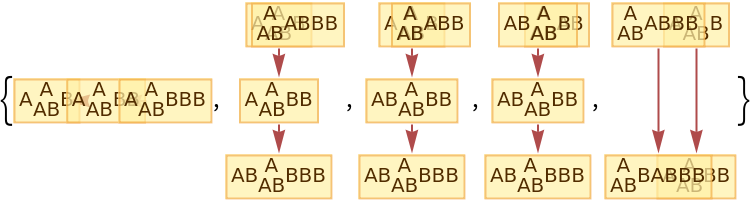
The number of causal graphs returned can be limited using MaxItems:
| In[85]:= |
![ResourceFunction[
"MultiwaySystem"][{"A" -> "AB"}, "AAB", 4, "CausalGraphInstances", "MaxItems" -> 5]](https://www.wolframcloud.com/obj/resourcesystem/images/2e0/2e01e7b9-9618-41ef-95c1-ed6532f16094/36ccba29c73a96de.png)
|
| Out[85]= |
|
By default, "BranchPairsList" returns only a list of branch pairs:
| In[86]:= |
![ResourceFunction[
"MultiwaySystem"][{"A" -> "AB", "B" -> "BA"}, "ABA", 2, "BranchPairsList"]](https://www.wolframcloud.com/obj/resourcesystem/images/2e0/2e01e7b9-9618-41ef-95c1-ed6532f16094/59c1614e5048fddc.png)
|
| Out[86]= |

|
Common predecessor states can be shown using "GivePredecessors":
| In[87]:= |
![ResourceFunction[
"MultiwaySystem"][{"A" -> "AB", "B" -> "BA"}, "ABA", 2, "BranchPairsList", "GivePredecessors" -> True]](https://www.wolframcloud.com/obj/resourcesystem/images/2e0/2e01e7b9-9618-41ef-95c1-ed6532f16094/0422f9a5d67a95b5.png)
|
| Out[87]= |

|
Similarly, "BranchPairResolutionsList" by default lists only resolved and unresolved branch pairs:
| In[88]:= |
![ResourceFunction[
"MultiwaySystem"][{"A" -> "AB", "B" -> "BA"}, "ABA", 2, "BranchPairResolutionsList"]](https://www.wolframcloud.com/obj/resourcesystem/images/2e0/2e01e7b9-9618-41ef-95c1-ed6532f16094/29042bef05dae20a.png)
|
| Out[88]= |

|
Common resolvents of resolved branch pairs can be shown using "GiveResolvents":
| In[89]:= |
![ResourceFunction[
"MultiwaySystem"][{"A" -> "AB", "B" -> "BA"}, "ABA", 2, "BranchPairResolutionsList", "GiveResolvents" -> True]](https://www.wolframcloud.com/obj/resourcesystem/images/2e0/2e01e7b9-9618-41ef-95c1-ed6532f16094/33fd31a83bf10078.png)
|
| Out[89]= |

|
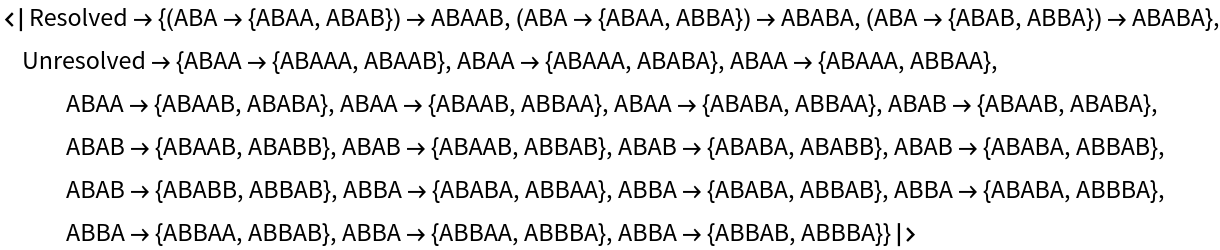
Show both common predecessors and common resolvents, where appropriate:
| In[90]:= |
![ResourceFunction[
"MultiwaySystem"][{"A" -> "AB", "B" -> "BA"}, "ABA", 2, "BranchPairResolutionsList", "GivePredecessors" -> True, "GiveResolvents" -> True]](https://www.wolframcloud.com/obj/resourcesystem/images/2e0/2e01e7b9-9618-41ef-95c1-ed6532f16094/20ac5b324beb13cc.png)
|
| Out[90]= |
|
By default, "CanonicalBranchPairsList" does not include self-pairs (i.e. trivial critical pairs):
| In[91]:= |
![ResourceFunction[
"MultiwaySystem"][{"AA" -> "AB", "BAA" -> "BA"}, "CanonicalBranchPairsList"]](https://www.wolframcloud.com/obj/resourcesystem/images/2e0/2e01e7b9-9618-41ef-95c1-ed6532f16094/4675f89506a5cae2.png)
|
| Out[91]= |

|
Self-pairs can be included using "IncludeSelfPairs":
| In[92]:= |
![ResourceFunction[
"MultiwaySystem"][{"AA" -> "AB", "BAA" -> "BA"}, "CanonicalBranchPairsList", "IncludeSelfPairs" -> True]](https://www.wolframcloud.com/obj/resourcesystem/images/2e0/2e01e7b9-9618-41ef-95c1-ed6532f16094/4b99d5dabce61c0a.png)
|
| Out[92]= |

|
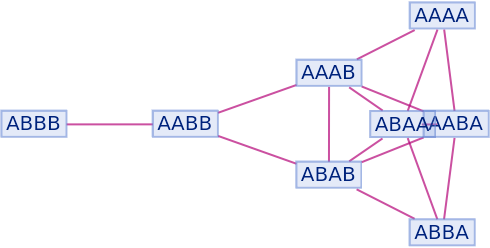
By default, non-branch pair states are not shown as part of the branchial graph:
| In[93]:= |
![ResourceFunction[
"MultiwaySystem"][{"A" -> "AA", "A" -> "AB", "A" -> "A"}, "A", 3, "BranchialGraph"]](https://www.wolframcloud.com/obj/resourcesystem/images/2e0/2e01e7b9-9618-41ef-95c1-ed6532f16094/61fb570771fe3b97.png)
|
| Out[93]= |
|
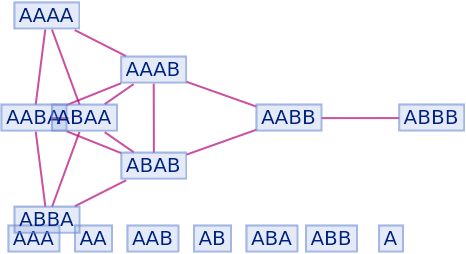
They can be shown using "IncludeFullBranchialSpace":
| In[94]:= |
![ResourceFunction[
"MultiwaySystem"][{"A" -> "AA", "A" -> "AB", "A" -> "A"}, "A", 3, "BranchialGraph", "IncludeFullBranchialSpace" -> True]](https://www.wolframcloud.com/obj/resourcesystem/images/2e0/2e01e7b9-9618-41ef-95c1-ed6532f16094/444bddc333f25210.png)
|
| Out[94]= |
|
Investigate a multiway system from A New Kind of Science:
| In[95]:= |
![ResourceFunction[
"MultiwaySystem"][{"AA" -> "", "BA" -> "ABB", "BB" -> "A"}, "BBA", 5]](https://www.wolframcloud.com/obj/resourcesystem/images/2e0/2e01e7b9-9618-41ef-95c1-ed6532f16094/22a26e8ccf944933.png)
|
| Out[95]= |

|
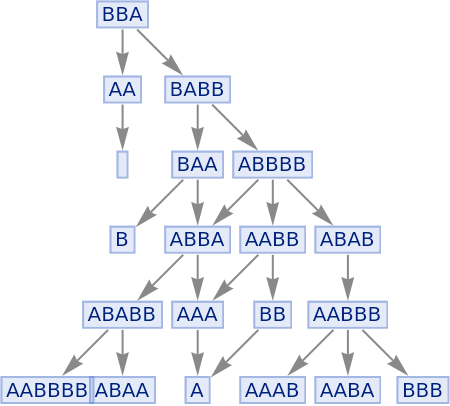
Illustrate the evolution:
| In[96]:= |
![ResourceFunction[
"MultiwaySystem"][{"AA" -> "", "BA" -> "ABB", "BB" -> "A"}, "BBA", 5, "StatesGraph"]](https://www.wolframcloud.com/obj/resourcesystem/images/2e0/2e01e7b9-9618-41ef-95c1-ed6532f16094/5ed9e78d23877859.png)
|
| Out[96]= |
|
The rule exhibits irregular growth in the total number of states at each step:
| In[97]:= |
![ResourceFunction[
"MultiwaySystem"][{"AA" -> "", "BA" -> "ABB", "BB" -> "A"}, "BBA", 100, "StatesCountsList"]](https://www.wolframcloud.com/obj/resourcesystem/images/2e0/2e01e7b9-9618-41ef-95c1-ed6532f16094/3439a92282a8329b.png)
|
| Out[97]= |

|
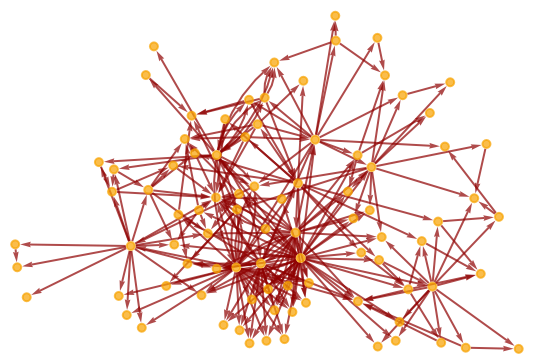
Its multiway causal graph is relatively complicated:
| In[98]:= |
![ResourceFunction[
"MultiwaySystem"][{"AA" -> "", "BA" -> "ABB", "BB" -> "A"}, "BBA", 10, "CausalGraphStructure"]](https://www.wolframcloud.com/obj/resourcesystem/images/2e0/2e01e7b9-9618-41ef-95c1-ed6532f16094/72c9c212e5cc71c8.png)
|
| Out[98]= |
|
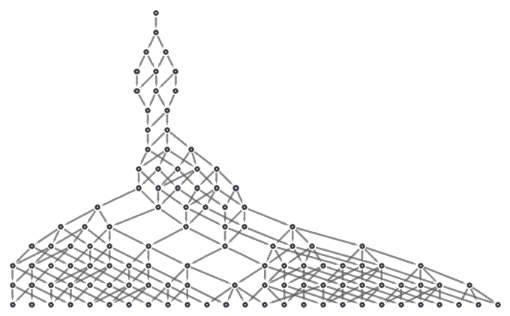
Show the state graph structure for a multiway system:
| In[99]:= |
![LayeredGraphPlot[
ResourceFunction["MultiwaySystem"][{"AAB" -> "ABBBAA"}, "AAABBB", 15,
"StatesGraphStructure"]]](https://www.wolframcloud.com/obj/resourcesystem/images/2e0/2e01e7b9-9618-41ef-95c1-ed6532f16094/0416d3ef79dfa10c.png)
|
| Out[99]= |
|
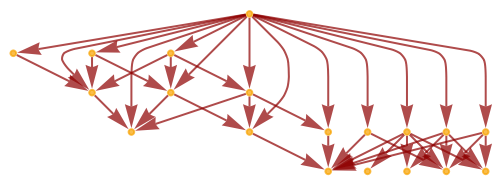
Show the causal graph structure:
| In[100]:= |
![ResourceFunction[
"MultiwaySystem"][{"AAB" -> "ABBBAA"}, "AAABBB", 6, "CausalGraphStructure"]](https://www.wolframcloud.com/obj/resourcesystem/images/2e0/2e01e7b9-9618-41ef-95c1-ed6532f16094/288a0a9dca614940.png)
|
| Out[100]= |
|
Show that this multiway evolution is both causal invariant and total causal invariant:
| In[101]:= |
![ResourceFunction[
"MultiwaySystem"][{"AAB" -> "ABBBAA"}, "AAABBB", 5, "CausalInvariantQ"]](https://www.wolframcloud.com/obj/resourcesystem/images/2e0/2e01e7b9-9618-41ef-95c1-ed6532f16094/72d51b295c8842fe.png)
|
| Out[101]= |

|
| In[102]:= |
![ResourceFunction[
"MultiwaySystem"][{"AAB" -> "ABBBAA"}, 5, "TotalCausalInvariantQ"]](https://www.wolframcloud.com/obj/resourcesystem/images/2e0/2e01e7b9-9618-41ef-95c1-ed6532f16094/22f8d8293d0ac70e.png)
|
| Out[102]= |

|
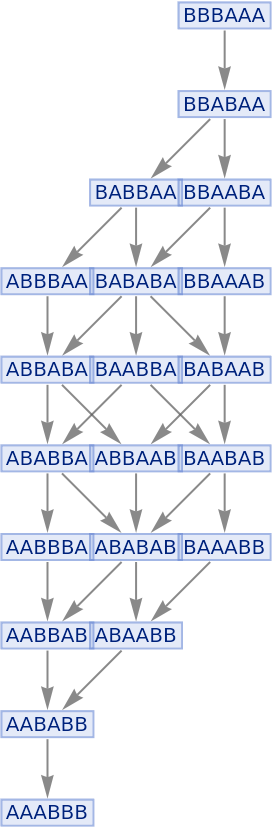
Illustrate a simple sorting rule:
| In[103]:= |
![ResourceFunction["MultiwaySystem"][
"BA" -> "AB", "BBBAAA", 10, "StatesGraph"]](https://www.wolframcloud.com/obj/resourcesystem/images/2e0/2e01e7b9-9618-41ef-95c1-ed6532f16094/1a256f09f48bd102.png)
|
| Out[103]= |
|
| In[104]:= |
![ResourceFunction["MultiwaySystem"][
"BA" -> "AB", "BBBAAA", 10, "CausalInvariantQ"]](https://www.wolframcloud.com/obj/resourcesystem/images/2e0/2e01e7b9-9618-41ef-95c1-ed6532f16094/22228cae978a8317.png)
|
| Out[104]= |

|
| In[105]:= |
![ResourceFunction["MultiwaySystem"][
"BA" -> "AB", 10, "TotalCausalInvariantQ"]](https://www.wolframcloud.com/obj/resourcesystem/images/2e0/2e01e7b9-9618-41ef-95c1-ed6532f16094/44cefa870d16d079.png)
|
| Out[105]= |

|
Generate string replacements rules corresponding to the Xor function:
| In[106]:= |
![Map[StringJoin, # -> Apply[Xor][#] & /@ Tuples[{True, False}, 2] /. {True -> "T", False -> "F"}, {2}]](https://www.wolframcloud.com/obj/resourcesystem/images/2e0/2e01e7b9-9618-41ef-95c1-ed6532f16094/2d593e966e524382.png)
|
| Out[106]= |

|
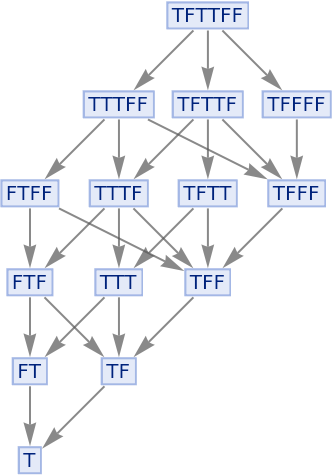
The multiway system has many paths, but due to causal invariance all lead to the same eventual result:
| In[107]:= |
![ResourceFunction[
"MultiwaySystem"][{"TT" -> "F", "TF" -> "T", "FT" -> "T", "FF" -> "F"}, "TFTTFF", 10, "StatesGraph"]](https://www.wolframcloud.com/obj/resourcesystem/images/2e0/2e01e7b9-9618-41ef-95c1-ed6532f16094/3008e3dd19fb8943.png)
|
| Out[107]= |
|
| In[108]:= |
![ResourceFunction[
"MultiwaySystem"][{"TT" -> "F", "TF" -> "T", "FT" -> "T", "FF" -> "F"}, "TFTTFF", 10, "CausalInvariantQ"]](https://www.wolframcloud.com/obj/resourcesystem/images/2e0/2e01e7b9-9618-41ef-95c1-ed6532f16094/69a0039c3917d190.png)
|
| Out[108]= |

|
| In[109]:= |
![ResourceFunction[
"MultiwaySystem"][{"TT" -> "F", "TF" -> "T", "FT" -> "T", "FF" -> "F"}, 10, "TotalCausalInvariantQ"]](https://www.wolframcloud.com/obj/resourcesystem/images/2e0/2e01e7b9-9618-41ef-95c1-ed6532f16094/63dad008b1332e61.png)
|
| Out[109]= |

|
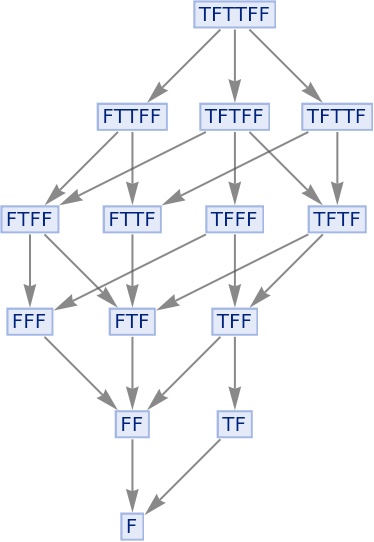
The And function is also confluent, since it too is associative:
| In[110]:= |
![ResourceFunction[
"MultiwaySystem"][{"TT" -> "T", "TF" -> "F", "FT" -> "F", "FF" -> "F"}, "TFTTFF", 10, "StatesGraph"]](https://www.wolframcloud.com/obj/resourcesystem/images/2e0/2e01e7b9-9618-41ef-95c1-ed6532f16094/36536fb58d1d1980.png)
|
| Out[110]= |
|
| In[111]:= |
![ResourceFunction[
"MultiwaySystem"][{"TT" -> "T", "TF" -> "F", "FT" -> "F", "FF" -> "F"}, "TFTTFF", 10, "CausalInvariantQ"]](https://www.wolframcloud.com/obj/resourcesystem/images/2e0/2e01e7b9-9618-41ef-95c1-ed6532f16094/43218b26606117d8.png)
|
| Out[111]= |

|
| In[112]:= |
![ResourceFunction[
"MultiwaySystem"][{"TT" -> "T", "TF" -> "F", "FT" -> "F", "FF" -> "F"}, 10, "TotalCausalInvariantQ"]](https://www.wolframcloud.com/obj/resourcesystem/images/2e0/2e01e7b9-9618-41ef-95c1-ed6532f16094/59390e6e6c09d6da.png)
|
| Out[112]= |

|
The Nand function is not associative, so can lead to different results:
| In[113]:= |
![ResourceFunction[
"MultiwaySystem"][{"TT" -> "F", "TF" -> "T", "FT" -> "T", "FF" -> "T"}, "TFTTFF", 10, "StatesGraph"]](https://www.wolframcloud.com/obj/resourcesystem/images/2e0/2e01e7b9-9618-41ef-95c1-ed6532f16094/2ad956c1fede3de4.png)
|
| Out[113]= |
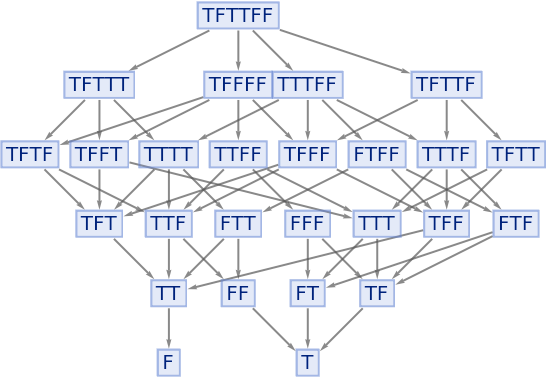
|
| In[114]:= |
![ResourceFunction[
"MultiwaySystem"][{"TT" -> "F", "TF" -> "T", "FT" -> "T", "FF" -> "T"}, "TFTTFF", 10, "CausalInvariantQ"]](https://www.wolframcloud.com/obj/resourcesystem/images/2e0/2e01e7b9-9618-41ef-95c1-ed6532f16094/7ba94e7c84a9f8f9.png)
|
| Out[114]= |

|
| In[115]:= |
![ResourceFunction[
"MultiwaySystem"][{"TT" -> "F", "TF" -> "T", "FT" -> "T", "FF" -> "T"}, 10, "TotalCausalInvariantQ"]](https://www.wolframcloud.com/obj/resourcesystem/images/2e0/2e01e7b9-9618-41ef-95c1-ed6532f16094/019461869c4bd794.png)
|
| Out[115]= |

|
"StatesCountsList" is equivalent to mapping Length over the lists of generated states:
| In[116]:= |
![Length /@ ResourceFunction[
"MultiwaySystem"][{"AA" -> "", "BA" -> "ABB", "BB" -> "A"}, "BBA", 10]](https://www.wolframcloud.com/obj/resourcesystem/images/2e0/2e01e7b9-9618-41ef-95c1-ed6532f16094/1f42d056f5ccd17a.png)
|
| Out[116]= |

|
| In[117]:= |
![ResourceFunction[
"MultiwaySystem"][{"AA" -> "", "BA" -> "ABB", "BB" -> "A"}, "BBA", 10, "StatesCountsList"]](https://www.wolframcloud.com/obj/resourcesystem/images/2e0/2e01e7b9-9618-41ef-95c1-ed6532f16094/4e51eed32693389a.png)
|
| Out[117]= |

|
Find all possible states, including multiplicities:
| In[118]:= |
![KeySort /@ Counts /@ ResourceFunction["MultiwaySystem"][{"A" -> "AA", "B" -> "AB"}, "ABA", 3, "AllStatesListUnmerged"]](https://www.wolframcloud.com/obj/resourcesystem/images/2e0/2e01e7b9-9618-41ef-95c1-ed6532f16094/473aa3ef64d86bac.png)
|
| Out[118]= |

|
This work is licensed under a Creative Commons Attribution 4.0 International License
