Wolfram Function Repository
Instant-use add-on functions for the Wolfram Language
Function Repository Resource:
Create a paclet layout from a collection of files, symbols and contexts
ResourceFunction["Pacletize"][name,content] creates a Wolfram Language paclet from the specified content and returns the directory name. | |
ResourceFunction["Pacletize"][name, content, location] stores the paclet in the specified directory. |
| File[…] | local file or directory containing code package files |
| "context`" | context with symbol definitions |
| "name" | symbol name with definitions |
Create a paclet from a function:
| In[1]:= | ![HalfSquared[x_] := (x/2)^2
dir = ResourceFunction["Pacletize"]["HalfSquare", {"HalfSquared"}]](https://www.wolframcloud.com/obj/resourcesystem/images/b6e/b6ef6257-8323-4aa4-8213-7b1645a0f694/28e7da431d41a9c7.png) |
| Out[1]= |  |
Clear the local function definition and add register the paclet:
| In[2]:= | ![Clear[HalfSquared];
PacletManager`PacletDirectoryAdd[dir];](https://www.wolframcloud.com/obj/resourcesystem/images/b6e/b6ef6257-8323-4aa4-8213-7b1645a0f694/0d579fb0a8adb8b5.png) |
The function will autoload the paclet and work:
| In[3]:= | ![HalfSquared[10]](https://www.wolframcloud.com/obj/resourcesystem/images/b6e/b6ef6257-8323-4aa4-8213-7b1645a0f694/6d02c87456e7e2bf.png) |
| Out[3]= |  |
Create a paclet layout in a specific location:
| In[4]:= | ![DoubleSpooky[x_] := Nest[ResourceFunction["Spookify"], SpeechSynthesize[x], 2]
dir = ResourceFunction["Pacletize"]["DoubleSpooky", "DoubleSpooky", "ScaryStuff/SpookyPaclet"]](https://www.wolframcloud.com/obj/resourcesystem/images/b6e/b6ef6257-8323-4aa4-8213-7b1645a0f694/7ad609df4e625524.png) |
| Out[4]= |  |
| In[5]:= | ![PacletDirectoryAdd[dir];](https://www.wolframcloud.com/obj/resourcesystem/images/b6e/b6ef6257-8323-4aa4-8213-7b1645a0f694/51e58f81db753391.png) |
I made this on the spookiest day:
| In[6]:= | ![Today -> DoubleSpooky@
DateString[Today, {"DayName", " the " , "Day", "th"}]](https://www.wolframcloud.com/obj/resourcesystem/images/b6e/b6ef6257-8323-4aa4-8213-7b1645a0f694/5e600c93d7fd0a76.png) |
| Out[6]= |  |
Paclets can be defined for a context. First define symbols in a new context:
| In[7]:= | ![AnimalConversations`BirdScream[str_String] := ResourceFunction["BirdSay"][Style[ToUpperCase[str <> "!!!"], 24]];
AnimalConversations`BirdWolfChat[l : {_String ...}] := Column@Flatten@Transpose[
{ResourceFunction["BirdSay"] /@ #1,
ResourceFunction["WolfieSay"] /@ #2}] & @@ Transpose[Partition[l, 2, 2, 1, ""]]](https://www.wolframcloud.com/obj/resourcesystem/images/b6e/b6ef6257-8323-4aa4-8213-7b1645a0f694/5f2a8b578afdf67e.png) |
Create the paclet directory:
| In[8]:= | ![dir = ResourceFunction["Pacletize"]["AnimalConversations", "AnimalConversations`"]](https://www.wolframcloud.com/obj/resourcesystem/images/b6e/b6ef6257-8323-4aa4-8213-7b1645a0f694/597a2aa022b6a262.png) |
| Out[8]= |  |
Clear the local definitions and add the paclet:
| In[9]:= | ![ClearAll["AnimalConversations`*"];
PacletManager`PacletDirectoryAdd[dir];](https://www.wolframcloud.com/obj/resourcesystem/images/b6e/b6ef6257-8323-4aa4-8213-7b1645a0f694/5c1bd14995ac9af7.png) |
Getting the context will load the paclet:
| In[10]:= |  |
The code is defined:
| In[11]:= | ![AnimalConversations`BirdScream["squawk"]](https://www.wolframcloud.com/obj/resourcesystem/images/b6e/b6ef6257-8323-4aa4-8213-7b1645a0f694/6a1c968d13bd06e4.png) |
| Out[11]= | 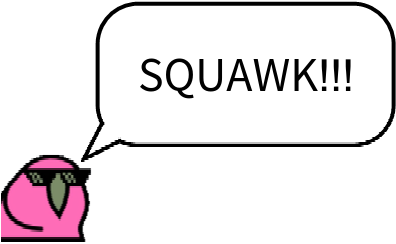 |
| In[12]:= | ![AnimalConversations`BirdWolfChat[{"Hi Wolfie", "Good day Birdnardo, howl are you?", "Cool as can be", "Huzzah!"}]](https://www.wolframcloud.com/obj/resourcesystem/images/b6e/b6ef6257-8323-4aa4-8213-7b1645a0f694/79a31979916498c8.png) |
| Out[12]= | 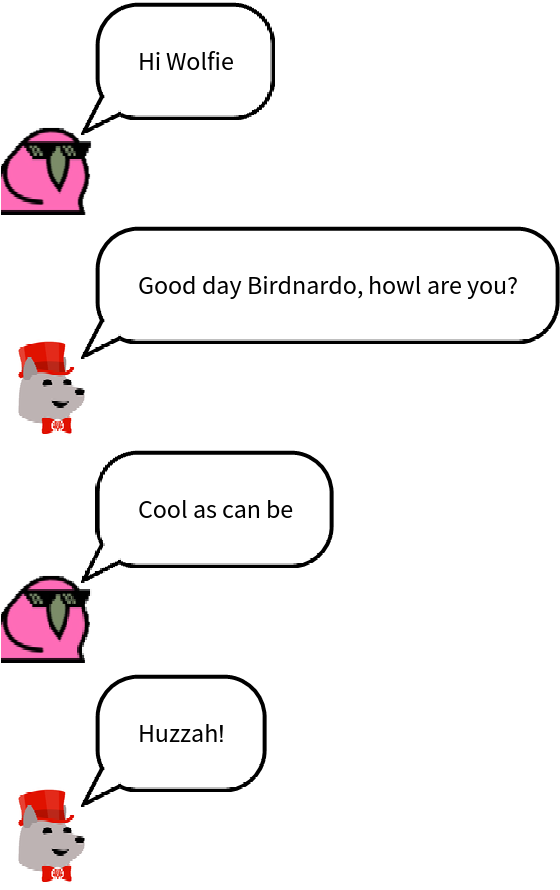 |
Store some code and data in a package file:
| In[13]:= | ![bostondata = Normal@ResourceData["Sample Data: Boston Homes"];
BostonOldHomeCount[age_] := Length[Select[bostondata, #AGE > age &]];
DumpSave["bostonstuff.wl", {BostonOldHomeCount, bostondata}];](https://www.wolframcloud.com/obj/resourcesystem/images/b6e/b6ef6257-8323-4aa4-8213-7b1645a0f694/5da54ce0bc3dd83c.png) |
Create a paclet directory including that file:
| In[14]:= | ![dir = ResourceFunction["Pacletize"][
"BostonHouses", {File["bostonstuff.wl"]}];](https://www.wolframcloud.com/obj/resourcesystem/images/b6e/b6ef6257-8323-4aa4-8213-7b1645a0f694/22d55bd213929f04.png) |
Clear the definitions and add the paclet directory:
| In[15]:= | ![Clear[bostondata, BostonOldHomeCount];
PacletManager`PacletDirectoryAdd[dir];](https://www.wolframcloud.com/obj/resourcesystem/images/b6e/b6ef6257-8323-4aa4-8213-7b1645a0f694/76740cd8053e26b8.png) |
Load the paclet context:
| In[16]:= |  |
| In[17]:= | ![BostonOldHomeCount[90]](https://www.wolframcloud.com/obj/resourcesystem/images/b6e/b6ef6257-8323-4aa4-8213-7b1645a0f694/504c5d7782924bb2.png) |
| Out[17]= |  |
Create a directory with many code files:
| In[18]:= | ![codedir = CreateDirectory[];](https://www.wolframcloud.com/obj/resourcesystem/images/b6e/b6ef6257-8323-4aa4-8213-7b1645a0f694/1fab7a4bca56f98a.png) |
| In[19]:= | ![With[{symb = Symbol[#]},
symb[] = RandomReal[];
DumpSave[FileNameJoin[{codedir, # <> ".mx"}], symb]] & /@ {"a", "b", "c", "d", "e"}](https://www.wolframcloud.com/obj/resourcesystem/images/b6e/b6ef6257-8323-4aa4-8213-7b1645a0f694/3845f25042cd4fec.png) |
| Out[19]= |  |
Create a paclet directory including those files:
| In[20]:= | ![dir = ResourceFunction["Pacletize"]["LetterFuncs", {File[codedir]}];](https://www.wolframcloud.com/obj/resourcesystem/images/b6e/b6ef6257-8323-4aa4-8213-7b1645a0f694/24e4e13fb7a04299.png) |
Clear the definitions and add the paclet directory:
| In[21]:= | ![Clear[a, b, c, d, e];
PacletManager`PacletDirectoryAdd[dir];](https://www.wolframcloud.com/obj/resourcesystem/images/b6e/b6ef6257-8323-4aa4-8213-7b1645a0f694/73949a4c82aa63da.png) |
Load the paclet context:
| In[22]:= |  |
| In[23]:= | ![{a[], b[], c[], d[], e[]}](https://www.wolframcloud.com/obj/resourcesystem/images/b6e/b6ef6257-8323-4aa4-8213-7b1645a0f694/62977519e3c9d432.png) |
| Out[23]= |  |
The created paclet directory contains several files:
| In[24]:= | ![TwiceSquared[x_] := (2 x)^2
dir = ResourceFunction["Pacletize"]["TwiceSquared", {"TwiceSquared"}, FileNameJoin[{"mypaclets", "basedir"}]];
FileNames["*", dir, Infinity]](https://www.wolframcloud.com/obj/resourcesystem/images/b6e/b6ef6257-8323-4aa4-8213-7b1645a0f694/4b6a08b7d85945e5.png) |
| Out[24]= |  |
This work is licensed under a Creative Commons Attribution 4.0 International License
