Wolfram Function Repository
Instant-use add-on functions for the Wolfram Language
Function Repository Resource:
Install a resource function persistently so that it can be used like a built-in function
ResourceFunction["PersistResourceFunction"][rf] installs the resource function f persistently. | |
ResourceFunction["PersistResourceFunction"][rf,"Uninstall"] uninstalls the resource function f. | |
ResourceFunction["PersistResourceFunction"]["List"] lists the currently installed resource functions. |
Store ResourceFunction["RainbowText"] persistently:
| In[1]:= | ![ResourceFunction["PersistResourceFunction"]["RainbowText"]](https://www.wolframcloud.com/obj/resourcesystem/images/b5b/b5b00b9a-b36f-493f-b5f1-1af97b601ba5/1da560a4e8f066eb.png) |
| Out[1]= |  |
Use it like a built-in function:
| In[2]:= | ![RainbowText["hello world"]](https://www.wolframcloud.com/obj/resourcesystem/images/b5b/b5b00b9a-b36f-493f-b5f1-1af97b601ba5/04d45311d6573e88.png) |
| Out[2]= |  |
The definition persists across kernel sessions:
| In[3]:= |  |
| In[4]:= | ![RainbowText["hello world"]](https://www.wolframcloud.com/obj/resourcesystem/images/b5b/b5b00b9a-b36f-493f-b5f1-1af97b601ba5/6061dff2adf142be.png) |
| Out[4]= |  |
Uninstall the function:
| In[5]:= | ![ResourceFunction[
"PersistResourceFunction"]["RainbowText", "Uninstall"]](https://www.wolframcloud.com/obj/resourcesystem/images/b5b/b5b00b9a-b36f-493f-b5f1-1af97b601ba5/606d2d77fcc434a3.png) |
| Out[5]= |  |
Multiple resource functions can be installed or uninstalled by supplying a list of ResourceFunction objects or function names as the first argument to PersistResourceFunction:
| In[6]:= | ![ResourceFunction[
"PersistResourceFunction"][{"RainbowText", ResourceFunction[
ResourceObject[<|{"Name" -> "BirdSay", "ShortName" -> "BirdSay", "UUID" -> "a24858c8-45c5-4020-a8c2-c23bd5d26f04", "ResourceType" -> "Function", "Version" -> "3.0.0", "Description" -> "Have a bird say an expression", "RepositoryLocation" -> URL[
"https://www.wolframcloud.com/objects/resourcesystem/api/1.0"],
"SymbolName" -> "FunctionRepository`$55711938e45341c08ca516066b27f30c`BirdSay", "FunctionLocation" -> CloudObject[
"https://www.wolframcloud.com/obj/9d5d3776-baed-4a5d-bf38-e857d53825e1"]}|>, ResourceSystemBase -> "https://www.wolframcloud.com/objects/resourcesystem/api/1.0"]]}]](https://www.wolframcloud.com/obj/resourcesystem/images/b5b/b5b00b9a-b36f-493f-b5f1-1af97b601ba5/45536d97b6a62957.png) |
| Out[6]= | 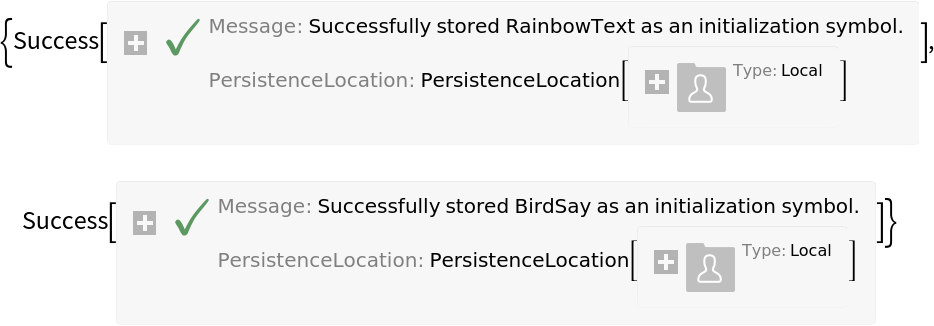 |
| In[7]:= | ![BirdSay[RainbowText["rainbow bird"]]](https://www.wolframcloud.com/obj/resourcesystem/images/b5b/b5b00b9a-b36f-493f-b5f1-1af97b601ba5/51cea5f755e4c3e3.png) |
| Out[7]= | 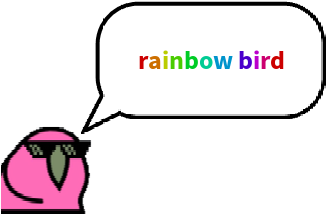 |
The currently installed resource functions can be listed with PersistResourceFunction["List"]:
| In[8]:= | ![ResourceFunction["PersistResourceFunction"]["List"]](https://www.wolframcloud.com/obj/resourcesystem/images/b5b/b5b00b9a-b36f-493f-b5f1-1af97b601ba5/60715f92d3490f1f.png) |
| Out[8]= |  |
| In[9]:= | ![ResourceFunction[
"PersistResourceFunction"][{"RainbowText", ResourceFunction[
ResourceObject[<|{"Name" -> "BirdSay", "ShortName" -> "BirdSay", "UUID" -> "a24858c8-45c5-4020-a8c2-c23bd5d26f04", "ResourceType" -> "Function", "Version" -> "3.0.0", "Description" -> "Have a bird say an expression", "RepositoryLocation" -> URL[
"https://www.wolframcloud.com/objects/resourcesystem/api/1.0"],
"SymbolName" -> "FunctionRepository`$55711938e45341c08ca516066b27f30c`BirdSay", "FunctionLocation" -> CloudObject[
"https://www.wolframcloud.com/obj/9d5d3776-baed-4a5d-bf38-e857d53825e1"]}|>, ResourceSystemBase -> "https://www.wolframcloud.com/objects/resourcesystem/api/1.0"]]}, "Uninstall"]](https://www.wolframcloud.com/obj/resourcesystem/images/b5b/b5b00b9a-b36f-493f-b5f1-1af97b601ba5/1f6fc7ddb1e22095.png) |
| Out[9]= | 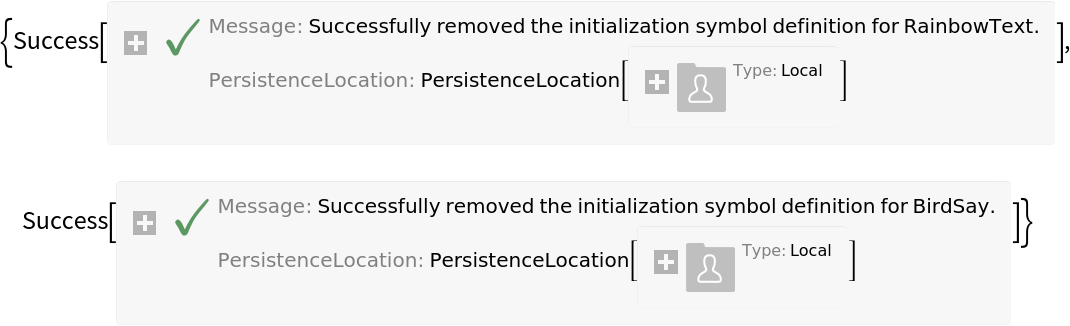 |
The "PersistenceLocation" option allows for storing resource functions in a location other than $PersistenceBase:
| In[10]:= | ![ResourceFunction["PersistResourceFunction"]["RainbowText", "PersistenceLocation" -> "Cloud"]](https://www.wolframcloud.com/obj/resourcesystem/images/b5b/b5b00b9a-b36f-493f-b5f1-1af97b601ba5/3186fb5d90f16160.png) |
| Out[10]= |  |
The underlying PersistentObject storing a resource function can be found with InitializationObjects:
| In[11]:= | ![ResourceFunction["PersistResourceFunction"]["RainbowText"]](https://www.wolframcloud.com/obj/resourcesystem/images/b5b/b5b00b9a-b36f-493f-b5f1-1af97b601ba5/3647414eb2575b82.png) |
| Out[11]= |  |
| In[12]:= | ![InitializationObjects["Global`RainbowText"]](https://www.wolframcloud.com/obj/resourcesystem/images/b5b/b5b00b9a-b36f-493f-b5f1-1af97b601ba5/72c2ecb9c7b10505.png) |
| Out[12]= |  |
Installing a ResourceFunction will overwrite any values currently assigned to the function name:
| In[13]:= | ![RainbowText[_] := "not a rainbow :(";
RainbowText["hello world"]](https://www.wolframcloud.com/obj/resourcesystem/images/b5b/b5b00b9a-b36f-493f-b5f1-1af97b601ba5/6f48f5f13ab8191e.png) |
| Out[13]= | 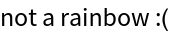 |
| In[14]:= | ![ResourceFunction["PersistResourceFunction"]["RainbowText"]](https://www.wolframcloud.com/obj/resourcesystem/images/b5b/b5b00b9a-b36f-493f-b5f1-1af97b601ba5/58302280c25203a9.png) |
| Out[14]= |  |
| In[15]:= | ![RainbowText["hello world"]](https://www.wolframcloud.com/obj/resourcesystem/images/b5b/b5b00b9a-b36f-493f-b5f1-1af97b601ba5/5521b3841d1920df.png) |
| Out[15]= |  |
Install PersistResourceFunction as a persistent resource function:
| In[16]:= | ![ResourceFunction["PersistResourceFunction"]["PersistResourceFunction"]](https://www.wolframcloud.com/obj/resourcesystem/images/b5b/b5b00b9a-b36f-493f-b5f1-1af97b601ba5/1d2283e067715f8c.png) |
| Out[16]= |  |
| In[17]:= | ![PersistResourceFunction["RainbowText"]](https://www.wolframcloud.com/obj/resourcesystem/images/b5b/b5b00b9a-b36f-493f-b5f1-1af97b601ba5/2bae6d5d347e2bc2.png) |
| Out[17]= |  |
| In[18]:= | ![RainbowText["hello world"]](https://www.wolframcloud.com/obj/resourcesystem/images/b5b/b5b00b9a-b36f-493f-b5f1-1af97b601ba5/77b8ba4607e84b64.png) |
| Out[18]= |  |
This work is licensed under a Creative Commons Attribution 4.0 International License
