Basic Examples (5)
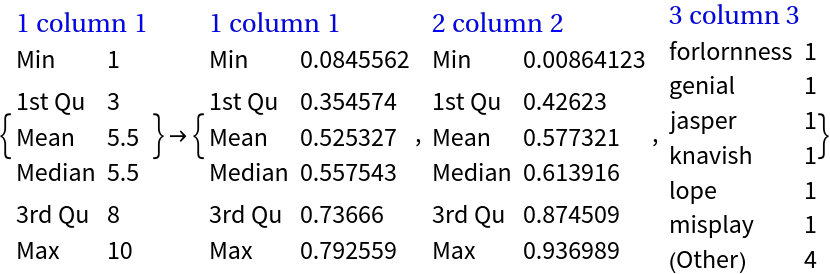
Summarize a vector of numbers:
Summarize a matrix of strings and specify the column names:
Summarize a vector of numbers with missing values:
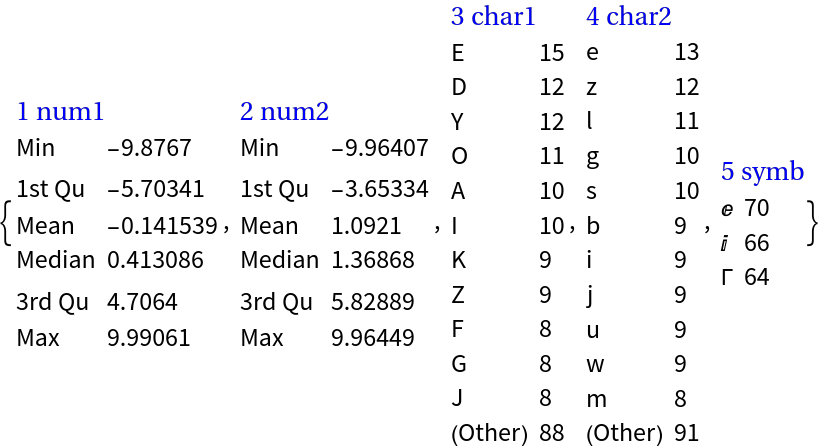
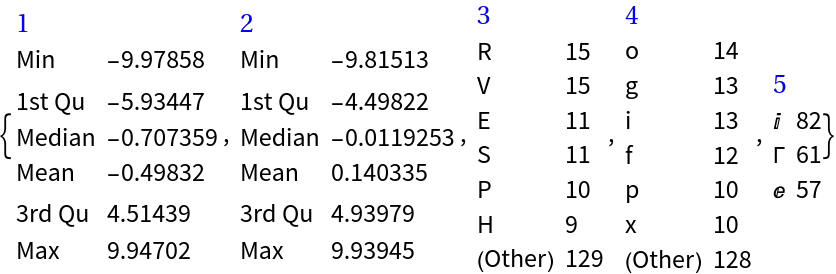
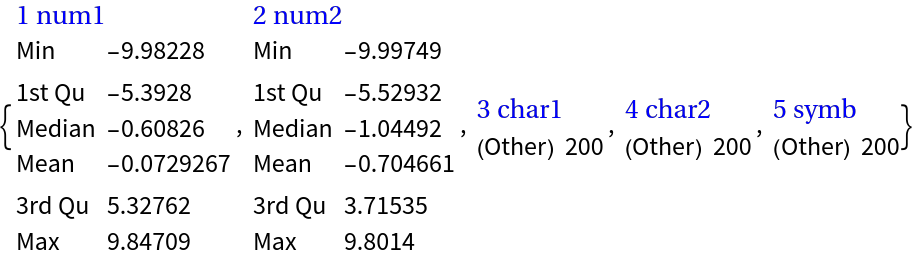
Summarize a full 2D array with numerical and categorical columns (numbers, strings, and symbols):
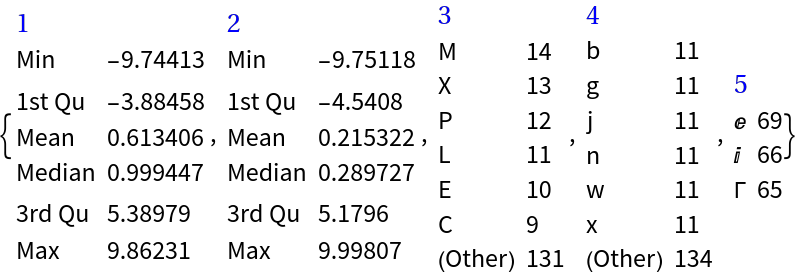
Summarize a dataset:
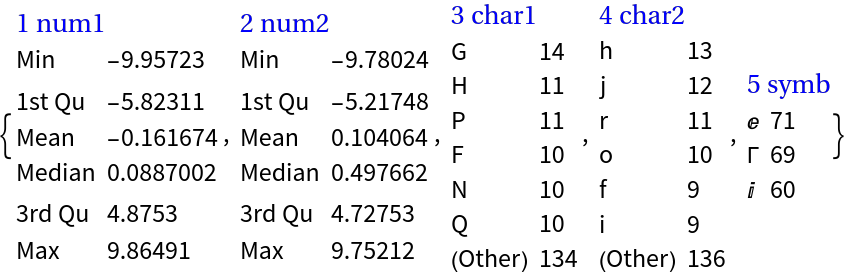
Summarize a dataset with column names:
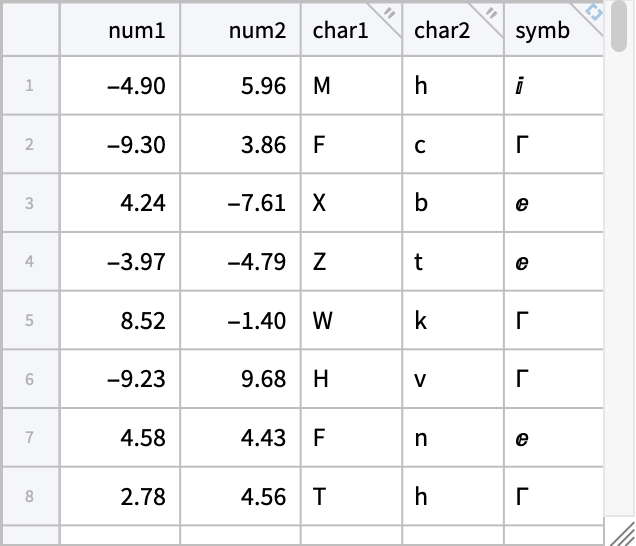
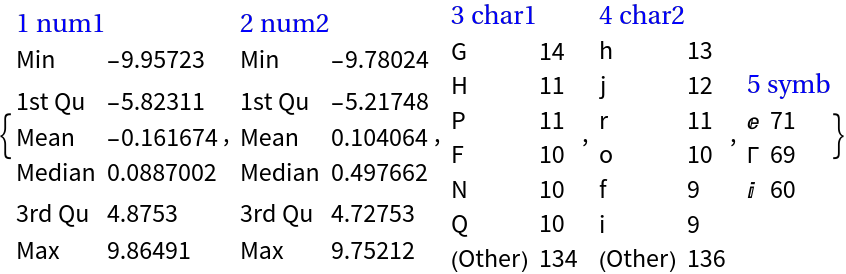
Summarize a Tabular object:
Summarize an association of vectors:
Scope (4)
Define a dataset:
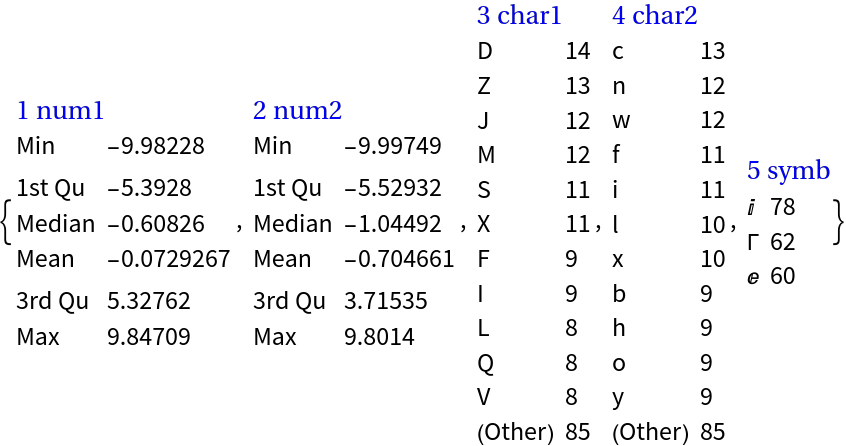
A larger number of categorical values can be seen using the option "MaxTallies":
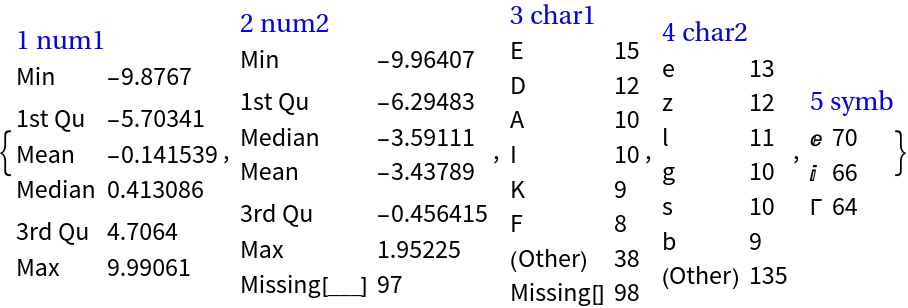
The function works with missing values and summarizes them separately of the rest of the values in a column:
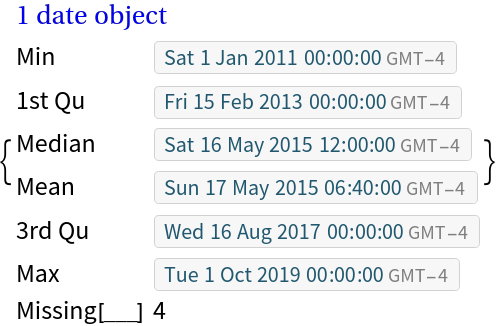
Here we make a list of date objects with missing values:
Here is the summary of the date objects list and with a specified column name:
Here we make an association of random images:
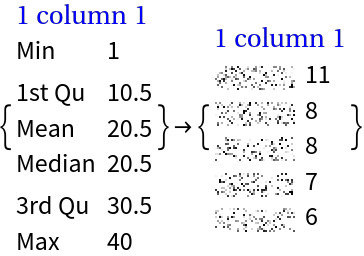
This summarizes the list of rules in the association:
We can summarize association's keys and values separately using the option setting Thread→True:
A dataset does not have to have named columns:
Options (7)
MaxTallies (1)
With the option "MaxTallies" we specify how many of summarized items we want to see for each column (variable):
NumberedColumns (2)
By default the summarized columns (variables) are automatically numbered:
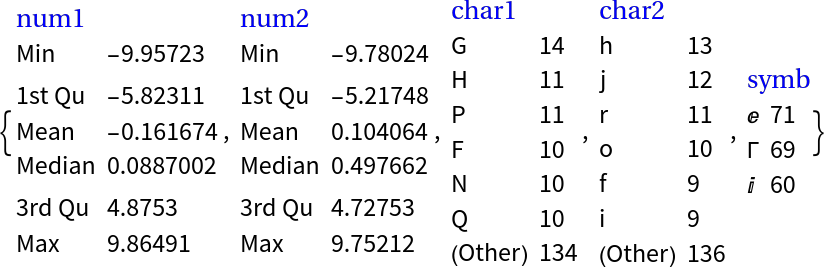
With the option "NumberedColumns" the automatic numbering can be prevented:
Thread (4)
The option Thread is used to specify should the summarization be "threaded" if data to be summarized is an association or a list of rules.
Here is an association of 3D points:
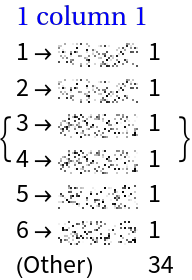
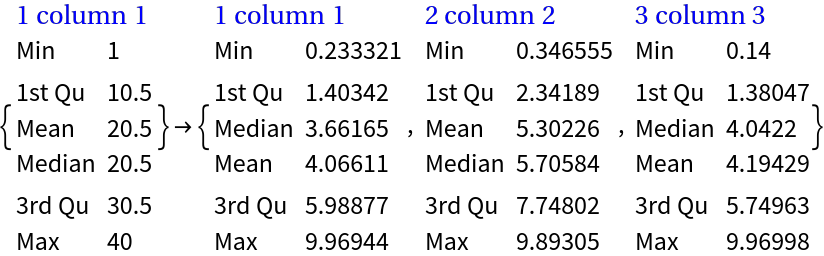
Summarizing without threading:
Summarizing with threading:
Optionally column names can be added:
Applications (3)
Summarize Classify-ready data (2)
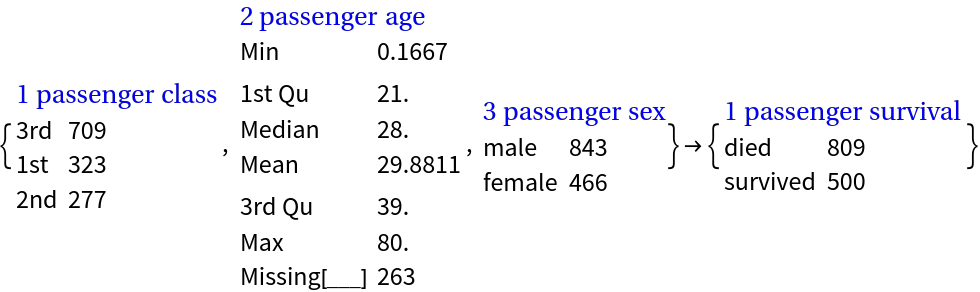
Here we summarize the Titanic data:
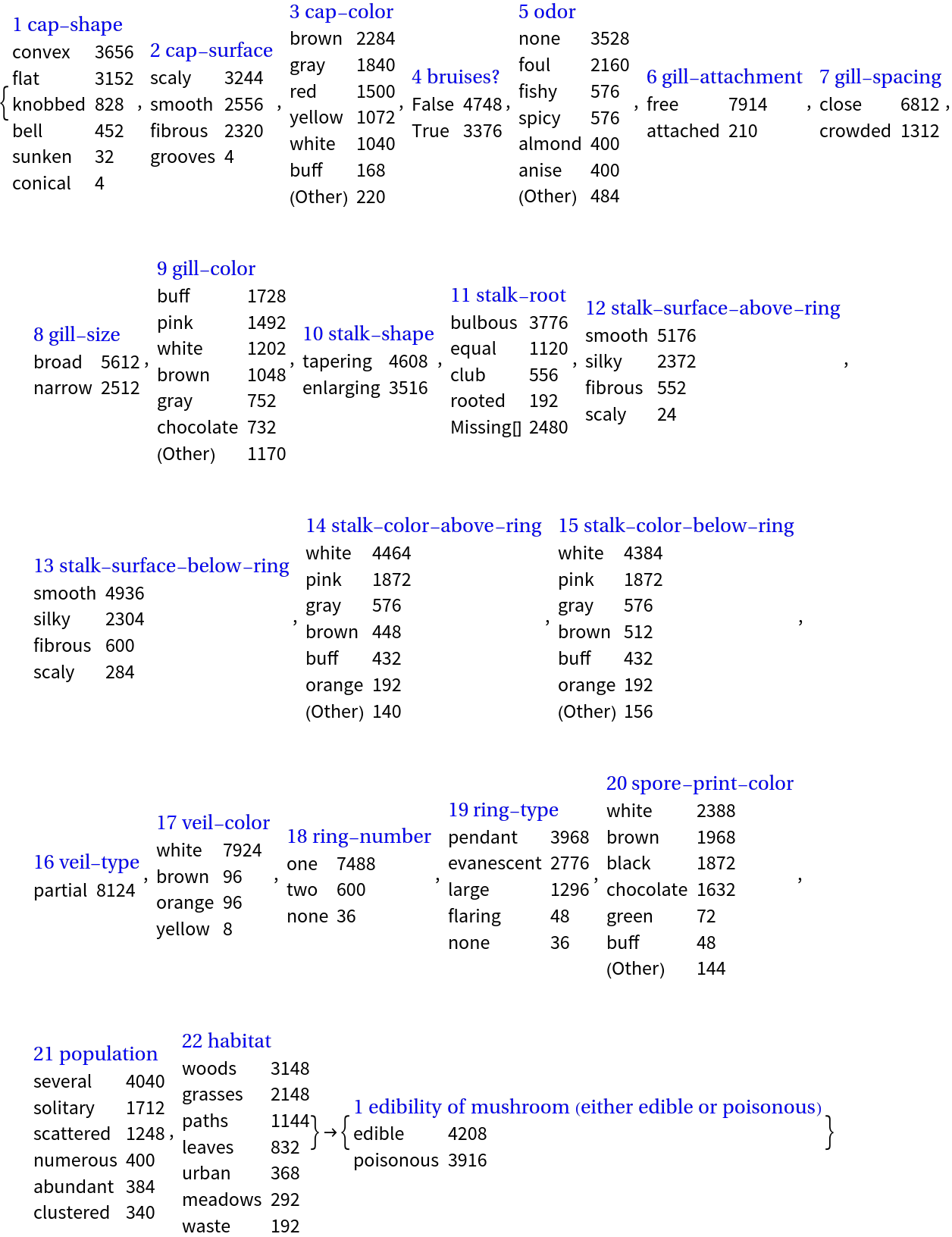
Here we summarize the Mushroom data:
Summaries browser (1)
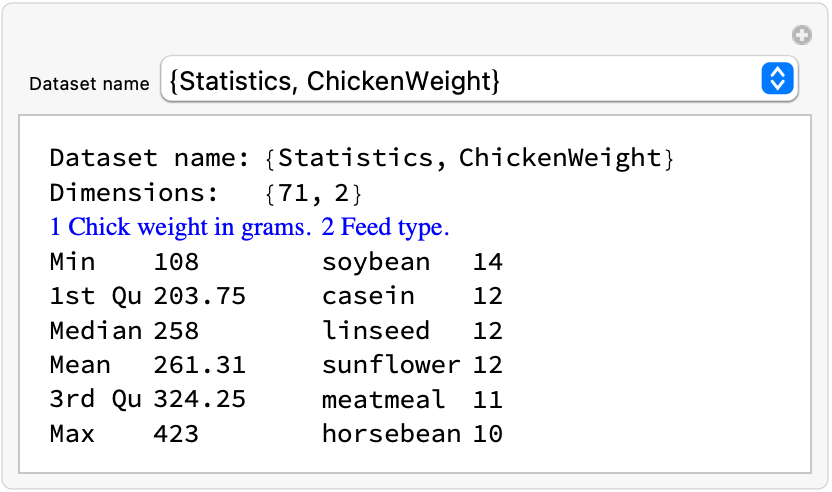
If we have a set of datasets we can easily build an interactive interface that allows browsing of dataset summaries:
Possible Issues (7)
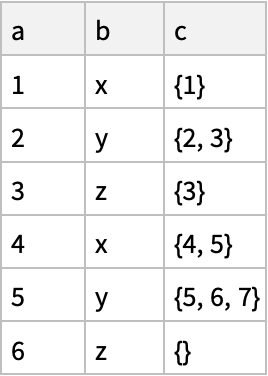
It is expected that the first argument of RecordsSummary is an object that can be converted to a full array atom objects:
This fails because dataset cannot be converted to a full 2D array:
A work-around is to use HoldForm for the columns that are not vectors:
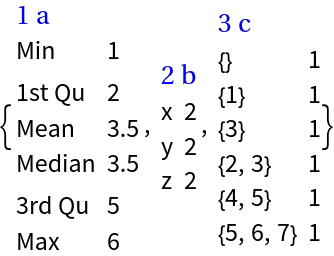
If the numerical columns have Quantity values those columns are treated as categorical:
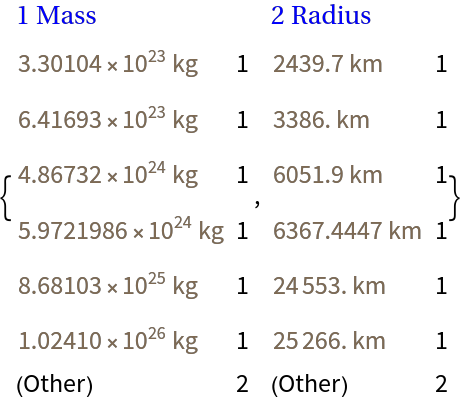
A summary of numerical values can be obtained by using QuantityMagnitude:
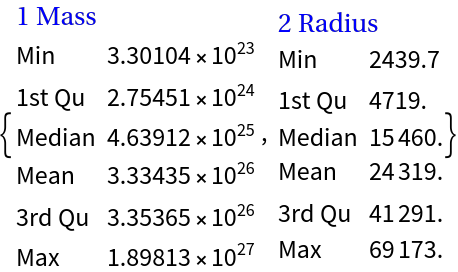
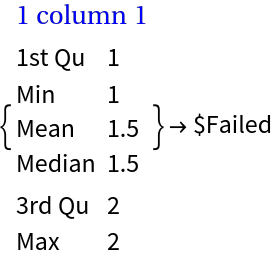
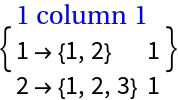
For associations the values of which are not full arrays, using the option setting Thread→True produces a failure:
This works though:
Neat Examples (1)
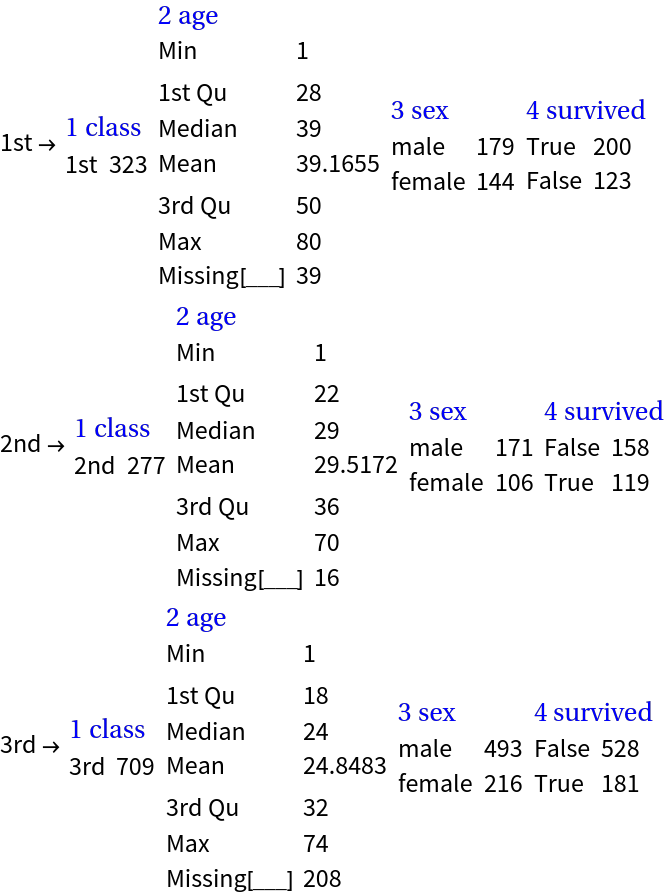
Summarize subsets of Titanic data that correspond to each passenger class:
![ResourceFunction["RecordsSummary"][RandomReal[{-10, 10}, 100]]](https://www.wolframcloud.com/obj/resourcesystem/images/fa8/fa86ac1d-fc6e-4006-970e-b67adad7743e/2be08dcd7a111e8b.png)

![sarr = Transpose[{RandomChoice[CharacterRange["A", "Z"], 20], RandomWord["CommonWords", 20]}];
ResourceFunction[
"RecordsSummary"][sarr, {"random letter", "random word"}]](https://www.wolframcloud.com/obj/resourcesystem/images/fa8/fa86ac1d-fc6e-4006-970e-b67adad7743e/5d2de25daf7b208f.png)
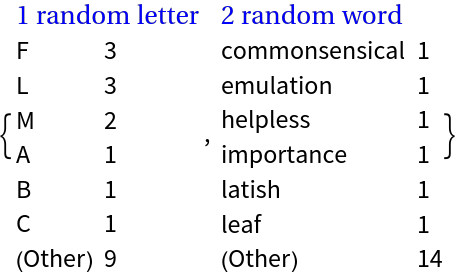
![ResourceFunction["RecordsSummary"][
RandomSample[Join[RandomReal[{-10, 10}, 100], Table[Missing[], 4]]]]](https://www.wolframcloud.com/obj/resourcesystem/images/fa8/fa86ac1d-fc6e-4006-970e-b67adad7743e/750b4f8167978f66.png)
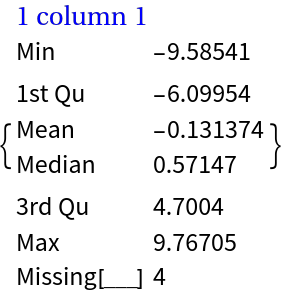
![Block[{n = 200},
arr = Flatten /@ Transpose[{RandomReal[{-10, 10}, {n, 2}], MapAt[ToLowerCase, RandomChoice[CharacterRange["A", "Z"], {n, 2}], {All, 2}], RandomChoice[{E, I, \[CapitalGamma]}, n]}]
];](https://www.wolframcloud.com/obj/resourcesystem/images/fa8/fa86ac1d-fc6e-4006-970e-b67adad7743e/0d28fda8b2b0820c.png)
![ResourceFunction["RecordsSummary"][arr]](https://www.wolframcloud.com/obj/resourcesystem/images/fa8/fa86ac1d-fc6e-4006-970e-b67adad7743e/362106abfcde3283.png)
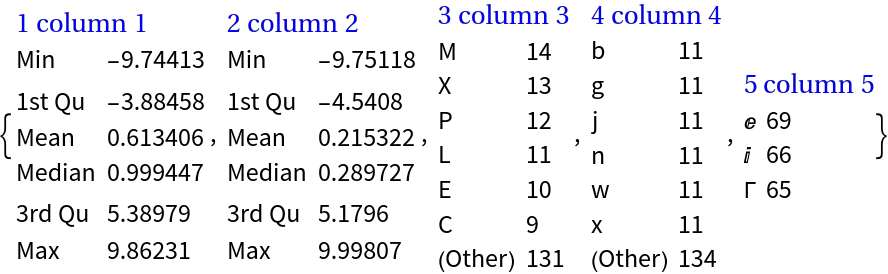
![ResourceFunction["RecordsSummary"][Dataset[arr]]](https://www.wolframcloud.com/obj/resourcesystem/images/fa8/fa86ac1d-fc6e-4006-970e-b67adad7743e/3789939242c2cb23.png)
![ds = Dataset[arr][All, AssociationThread[{"num1", "num2", "char1", "char2", "symb"}, #] &];](https://www.wolframcloud.com/obj/resourcesystem/images/fa8/fa86ac1d-fc6e-4006-970e-b67adad7743e/2f7ce89696da8450.png)
![ResourceFunction["RecordsSummary"][ds]](https://www.wolframcloud.com/obj/resourcesystem/images/fa8/fa86ac1d-fc6e-4006-970e-b67adad7743e/2aa023776ab7f2ef.png)
![tbl = Tabular[ds]](https://www.wolframcloud.com/obj/resourcesystem/images/fa8/fa86ac1d-fc6e-4006-970e-b67adad7743e/1dbda08a1deace39.png)
![ResourceFunction["RecordsSummary"][tbl]](https://www.wolframcloud.com/obj/resourcesystem/images/fa8/fa86ac1d-fc6e-4006-970e-b67adad7743e/112f63c3e0d76929.png)
![asc = AssociationThread[
Range[10] -> Table[Append[RandomReal[1, 2], RandomWord[]], 10]];](https://www.wolframcloud.com/obj/resourcesystem/images/fa8/fa86ac1d-fc6e-4006-970e-b67adad7743e/0800c2b784926cc6.png)
![ResourceFunction["RecordsSummary"][asc, Thread -> True]](https://www.wolframcloud.com/obj/resourcesystem/images/fa8/fa86ac1d-fc6e-4006-970e-b67adad7743e/23d8185e3d7e7eae.png)
![Block[{n = 200},
arr = Flatten /@ Transpose[{RandomReal[{-10, 10}, {n, 2}], MapAt[ToLowerCase, RandomChoice[CharacterRange["A", "Z"], {n, 2}], {All, 2}], RandomChoice[{E, I, \[CapitalGamma]}, n]}]
];](https://www.wolframcloud.com/obj/resourcesystem/images/fa8/fa86ac1d-fc6e-4006-970e-b67adad7743e/22b2fce4d5addf86.png)
![ds = Dataset[arr][All, AssociationThread[{"num1", "num2", "char1", "char2", "symb"}, #] &];](https://www.wolframcloud.com/obj/resourcesystem/images/fa8/fa86ac1d-fc6e-4006-970e-b67adad7743e/61e2be6cd3bb7c2e.png)
![ResourceFunction["RecordsSummary"][ds, "MaxTallies" -> 12]](https://www.wolframcloud.com/obj/resourcesystem/images/fa8/fa86ac1d-fc6e-4006-970e-b67adad7743e/24a687d8ca12604f.png)
![ResourceFunction["RecordsSummary"][
ds[All, {"num2" -> (If[# > 2, Missing[], #] &), "char1" -> (If[ToCharacterCode[#][[1]] > 76, Missing[], #] &)}]]](https://www.wolframcloud.com/obj/resourcesystem/images/fa8/fa86ac1d-fc6e-4006-970e-b67adad7743e/62cda7153f40d234.png)
![dateObjs = RandomSample[
Join[DateObject /@ DateRange[{2011, 1, 1}, {2019, 12, 31}, Quantity[3, "Months"]], Table[Missing[], {4}]]];](https://www.wolframcloud.com/obj/resourcesystem/images/fa8/fa86ac1d-fc6e-4006-970e-b67adad7743e/2e6a714d48cfb8d7.png)
![ResourceFunction["RecordsSummary"][dateObjs, "date object"]](https://www.wolframcloud.com/obj/resourcesystem/images/fa8/fa86ac1d-fc6e-4006-970e-b67adad7743e/7ae8cbe91cbb634a.png)
![asc = AssociationThread[
Range[40] -> RandomChoice[Table[RandomImage[4, {40, 12}], 5], 40]];](https://www.wolframcloud.com/obj/resourcesystem/images/fa8/fa86ac1d-fc6e-4006-970e-b67adad7743e/7f593ce916785c0d.png)
![ResourceFunction["RecordsSummary"][asc]](https://www.wolframcloud.com/obj/resourcesystem/images/fa8/fa86ac1d-fc6e-4006-970e-b67adad7743e/54afbc10ddd55def.png)
![ResourceFunction["RecordsSummary"][asc, Thread -> True]](https://www.wolframcloud.com/obj/resourcesystem/images/fa8/fa86ac1d-fc6e-4006-970e-b67adad7743e/09951fb01e35b3a0.png)
![Block[{n = 200},
arr = Flatten /@ Transpose[{RandomReal[{-10, 10}, {n, 2}], MapAt[ToLowerCase, RandomChoice[CharacterRange["A", "Z"], {n, 2}], {All, 2}], RandomChoice[{E, I, \[CapitalGamma]}, n]}]
];](https://www.wolframcloud.com/obj/resourcesystem/images/fa8/fa86ac1d-fc6e-4006-970e-b67adad7743e/2966cdd9f3d7beef.png)
![ds = Dataset[arr][All, AssociationThread[{"num1", "num2", "char1", "char2", "symb"}, #] &];](https://www.wolframcloud.com/obj/resourcesystem/images/fa8/fa86ac1d-fc6e-4006-970e-b67adad7743e/7accced277742de3.png)
![ResourceFunction["RecordsSummary"][ds[Values]]](https://www.wolframcloud.com/obj/resourcesystem/images/fa8/fa86ac1d-fc6e-4006-970e-b67adad7743e/3f62cc3eb8b9365d.png)
![Block[{n = 200},
arr = Flatten /@ Transpose[{RandomReal[{-10, 10}, {n, 2}], MapAt[ToLowerCase, RandomChoice[CharacterRange["A", "Z"], {n, 2}], {All, 2}], RandomChoice[{E, I, \[CapitalGamma]}, n]}]
];](https://www.wolframcloud.com/obj/resourcesystem/images/fa8/fa86ac1d-fc6e-4006-970e-b67adad7743e/03edd51e9cd06e2e.png)
![ds = Dataset[arr][All, AssociationThread[{"num1", "num2", "char1", "char2", "symb"}, #] &];](https://www.wolframcloud.com/obj/resourcesystem/images/fa8/fa86ac1d-fc6e-4006-970e-b67adad7743e/1f911ac171d86189.png)
![ResourceFunction["RecordsSummary"][ds, "MaxTallies" -> 12]](https://www.wolframcloud.com/obj/resourcesystem/images/fa8/fa86ac1d-fc6e-4006-970e-b67adad7743e/5be4663eea91db20.png)
![ResourceFunction["RecordsSummary"][ds, "MaxTallies" -> 1]](https://www.wolframcloud.com/obj/resourcesystem/images/fa8/fa86ac1d-fc6e-4006-970e-b67adad7743e/2d3e577c8198320a.png)
![Block[{n = 200},
arr = Flatten /@ Transpose[{RandomReal[{-10, 10}, {n, 2}], MapAt[ToLowerCase, RandomChoice[CharacterRange["A", "Z"], {n, 2}], {All, 2}], RandomChoice[{E, I, \[CapitalGamma]}, n]}]
];](https://www.wolframcloud.com/obj/resourcesystem/images/fa8/fa86ac1d-fc6e-4006-970e-b67adad7743e/67754343b6b91b51.png)
![ds = Dataset[arr][All, AssociationThread[{"num1", "num2", "char1", "char2", "symb"}, #] &];](https://www.wolframcloud.com/obj/resourcesystem/images/fa8/fa86ac1d-fc6e-4006-970e-b67adad7743e/306ec7cc174cac9b.png)
![ResourceFunction["RecordsSummary"][ds]](https://www.wolframcloud.com/obj/resourcesystem/images/fa8/fa86ac1d-fc6e-4006-970e-b67adad7743e/43c5a43154f9a4bc.png)
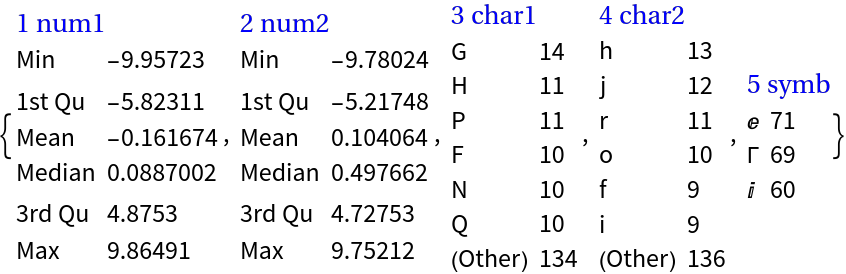
![ResourceFunction["RecordsSummary"][ds, "NumberedColumns" -> False]](https://www.wolframcloud.com/obj/resourcesystem/images/fa8/fa86ac1d-fc6e-4006-970e-b67adad7743e/4843b86d63b5cbd6.png)
![asc = AssociationThread[Range[40] -> RandomReal[10, {40, 3}]];
Short[asc]](https://www.wolframcloud.com/obj/resourcesystem/images/fa8/fa86ac1d-fc6e-4006-970e-b67adad7743e/2b04f967e906120c.png)

![ResourceFunction["RecordsSummary"][asc, Thread -> False]](https://www.wolframcloud.com/obj/resourcesystem/images/fa8/fa86ac1d-fc6e-4006-970e-b67adad7743e/54378f112064eb65.png)

![ResourceFunction["RecordsSummary"][asc, Thread -> True]](https://www.wolframcloud.com/obj/resourcesystem/images/fa8/fa86ac1d-fc6e-4006-970e-b67adad7743e/69bec50305be5ea9.png)
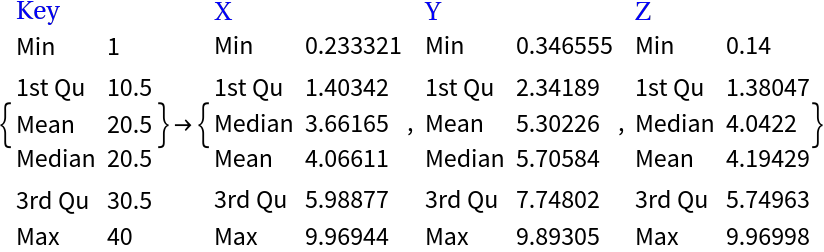
![ResourceFunction["RecordsSummary"][asc, "Key" -> {"X", "Y", "Z"}, "NumberedColumns" -> False, Thread -> True]](https://www.wolframcloud.com/obj/resourcesystem/images/fa8/fa86ac1d-fc6e-4006-970e-b67adad7743e/48d609fcb3aad4a7.png)
![ResourceFunction["RecordsSummary"][
ExampleData[{"MachineLearning", "Titanic"}, "Data"],
ExampleData[{"MachineLearning", "Titanic"}, "VariableDescriptions"],
Thread -> True]](https://www.wolframcloud.com/obj/resourcesystem/images/fa8/fa86ac1d-fc6e-4006-970e-b67adad7743e/55c733e3dd0dfd46.png)
![ResourceFunction["RecordsSummary"][
ExampleData[{"MachineLearning", "Mushroom"}, "Data"],
ExampleData[{"MachineLearning", "Mushroom"}, "VariableDescriptions"],
Thread -> True]](https://www.wolframcloud.com/obj/resourcesystem/images/fa8/fa86ac1d-fc6e-4006-970e-b67adad7743e/103cc98b612038e1.png)
![dataNames = ExampleData["Statistics"];
Manipulate[
Column[{
Grid[{{"Dataset name:", name},
{"Dimensions:", ExampleData[name, "Dimensions"]}},
Alignment -> Left
],
Multicolumn[
ResourceFunction["RecordsSummary"][ExampleData[name], ExampleData[name, "ColumnDescriptions"]], 4, Alignment -> Top]
}],
{{name, dataNames[[29]], "Dataset name"}, dataNames, ControlType -> PopupMenu}]](https://www.wolframcloud.com/obj/resourcesystem/images/fa8/fa86ac1d-fc6e-4006-970e-b67adad7743e/04b2bca50078c3df.png)
![dataset = Dataset[{
<|"a" -> 1, "b" -> "x", "c" -> {1}|>,
<|"a" -> 2, "b" -> "y", "c" -> {2, 3}|>,
<|"a" -> 3, "b" -> "z", "c" -> {3}|>,
<|"a" -> 4, "b" -> "x", "c" -> {4, 5}|>,
<|"a" -> 5, "b" -> "y", "c" -> {5, 6, 7}|>,
<|"a" -> 6, "b" -> "z", "c" -> {}|>}]](https://www.wolframcloud.com/obj/resourcesystem/images/fa8/fa86ac1d-fc6e-4006-970e-b67adad7743e/74a0f6c1df39eed8.png)
![ResourceFunction["RecordsSummary"][dataset]](https://www.wolframcloud.com/obj/resourcesystem/images/fa8/fa86ac1d-fc6e-4006-970e-b67adad7743e/76ee3549b09d8aab.png)

![ResourceFunction["RecordsSummary"][dataset[All, {"c" -> HoldForm}]]](https://www.wolframcloud.com/obj/resourcesystem/images/fa8/fa86ac1d-fc6e-4006-970e-b67adad7743e/592e8ebfd5a99f21.png)
![ResourceFunction["RecordsSummary"][
ExampleData[{"Dataset", "Planets"}][[All, {1, 2}]]]](https://www.wolframcloud.com/obj/resourcesystem/images/fa8/fa86ac1d-fc6e-4006-970e-b67adad7743e/154b8087d404596c.png)
![ResourceFunction["RecordsSummary"][
ExampleData[{"Dataset", "Planets"}][[All, {1, 2}]][
All, {"Mass" -> QuantityMagnitude, "Radius" -> QuantityMagnitude}]]](https://www.wolframcloud.com/obj/resourcesystem/images/fa8/fa86ac1d-fc6e-4006-970e-b67adad7743e/7887264d87cb4d83.png)
![ResourceFunction["RecordsSummary"][<|1 -> Range[2], 2 -> Range[3]|>, Thread -> True]](https://www.wolframcloud.com/obj/resourcesystem/images/fa8/fa86ac1d-fc6e-4006-970e-b67adad7743e/652305c287dba5c5.png)
![ResourceFunction["RecordsSummary"][<|1 -> Range[2], 2 -> Range[3]|>, Thread -> False]](https://www.wolframcloud.com/obj/resourcesystem/images/fa8/fa86ac1d-fc6e-4006-970e-b67adad7743e/2a2354b0e1e189aa.png)
![titanic = ExampleData[{"Dataset", "Titanic"}];](https://www.wolframcloud.com/obj/resourcesystem/images/fa8/fa86ac1d-fc6e-4006-970e-b67adad7743e/05e0861eb4f99711.png)
![ColumnForm@
Normal@Map[Grid[{ResourceFunction["RecordsSummary"][Dataset[#]]}] &, Normal[titanic[GroupBy["class"]]]]](https://www.wolframcloud.com/obj/resourcesystem/images/fa8/fa86ac1d-fc6e-4006-970e-b67adad7743e/60810f4f6abe83b7.png)