Wolfram Function Repository
Instant-use add-on functions for the Wolfram Language
Function Repository Resource:
Add a way to interactively input ResourceFunction symbols inline
ResourceFunction["ResourceFunctionInput"]["InstallAlias"] permanently adds an interactive input for ResourceFunction symbols as input alias | |
ResourceFunction["ResourceFunctionInput"]["InstallAlias",alias] installs the interactive input as input alias | |
ResourceFunction["ResourceFunctionInput"]["InstallMenuItem"] permanently adds the interactive input as a menu item with a hotkey. | |
ResourceFunction["ResourceFunctionInput"]["InstallMenuItem",MenuKey[…]] permanently adds the interactive input with the specified hotkey. | |
ResourceFunction["ResourceFunctionInput"]["Remove"] removes any permanently installed changes. |
 key or the
  key.
key.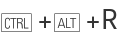 on Windows/Linux, and
 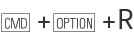 on macOS.
Install the input as an input alias:
| In[1]:= | ![ResourceFunction["ResourceFunctionInput"]["InstallAlias"]](https://www.wolframcloud.com/obj/resourcesystem/images/deb/debaa7e3-63b6-4ef0-aea4-5530ebb3d639/7c1183cc1fc0fc39.png) |
Insert a ResourceFunction input field by typing  rfi:
rfi:
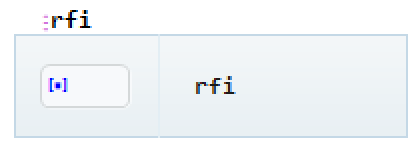

Enter the name of a ResourceFunction:
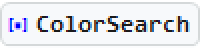
Confirm the input by pressing the  or
or  key, or by clicking the name in the completion drop-down menu:

Install the input field as a menu item instead:
| In[2]:= | ![ResourceFunction["ResourceFunctionInput"]["InstallMenuItem"]](https://www.wolframcloud.com/obj/resourcesystem/images/deb/debaa7e3-63b6-4ef0-aea4-5530ebb3d639/7d58f143dc774256.png) |
Insert an input field via Insert > ResourceFunction Input:
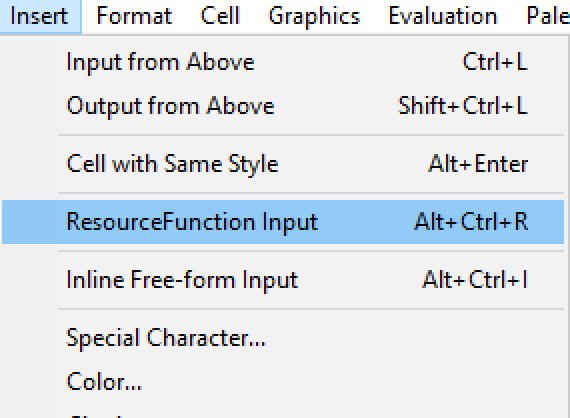

Use the keyboard shortcut  (
( on macOS) to insert the input field:

Remove the keyboard shortcut/alias (only effective after restarting Mathematica):
| In[3]:= | ![ResourceFunction["ResourceFunctionInput"]["Remove"]](https://www.wolframcloud.com/obj/resourcesystem/images/deb/debaa7e3-63b6-4ef0-aea4-5530ebb3d639/183d75980ea37b31.png) |
Create a one-off ResourceFunction input:
| In[4]:= | ![ResourceFunction["ResourceFunctionInput"][]](https://www.wolframcloud.com/obj/resourcesystem/images/deb/debaa7e3-63b6-4ef0-aea4-5530ebb3d639/1e08bc408c34c317.png) |
| Out[4]= |  |
Add the alias  rfiinput to the current front end session:
| In[5]:= | ![ResourceFunction["ResourceFunctionInput"]["AddAlias", "rfinput"]](https://www.wolframcloud.com/obj/resourcesystem/images/deb/debaa7e3-63b6-4ef0-aea4-5530ebb3d639/6192a3ff76dec977.png) |
Insert a ResourceFunction input field by typing rfinput into an input cell:

This work is licensed under a Creative Commons Attribution 4.0 International License

