Wolfram Function Repository
Instant-use add-on functions for the Wolfram Language
Function Repository Resource:
Convert a string into boxes as if it were typed into a notebook
ResourceFunction["StringToBoxes"][string] converts string into boxes as if it were typed into a notebook. |
Convert a string into boxes:
| In[1]:= | ![ResourceFunction["StringToBoxes"]["f[x_]:=x+1"]](https://www.wolframcloud.com/obj/resourcesystem/images/589/589c60f9-de84-4acf-b344-131873a4c3c4/7025b6299626f51b.png) |
| Out[1]= |  |
View the DisplayForm:
| In[2]:= | ![DisplayForm[%]](https://www.wolframcloud.com/obj/resourcesystem/images/589/589c60f9-de84-4acf-b344-131873a4c3c4/00cbea86ff704d37.png) |
| Out[2]= |  |
View as an input cell:
| In[3]:= | ![CellPrint[Cell[BoxData[%%], "Input"]]](https://www.wolframcloud.com/obj/resourcesystem/images/589/589c60f9-de84-4acf-b344-131873a4c3c4/7b48b7c8bfdbfd37.png) |
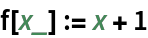
The string does not need to be valid syntax:
| In[4]:= | ![ResourceFunction["StringToBoxes"]["f[x_]:="]](https://www.wolframcloud.com/obj/resourcesystem/images/589/589c60f9-de84-4acf-b344-131873a4c3c4/2731658cb1887a70.png) |
| Out[4]= |  |
| In[5]:= | ![DisplayForm[%]](https://www.wolframcloud.com/obj/resourcesystem/images/589/589c60f9-de84-4acf-b344-131873a4c3c4/024fac808d24e609.png) |
| Out[5]= |  |
Convert a linear syntax string into boxes:
| In[6]:= | ![string = "\!\(\*SuperscriptBox[\"a\", \"b\"]\)"](https://www.wolframcloud.com/obj/resourcesystem/images/589/589c60f9-de84-4acf-b344-131873a4c3c4/40067e990224904e.png) |
| Out[6]= |  |
| In[7]:= | ![ResourceFunction["StringToBoxes"][string]](https://www.wolframcloud.com/obj/resourcesystem/images/589/589c60f9-de84-4acf-b344-131873a4c3c4/5e4f8e7cd25b7778.png) |
| Out[7]= |  |
| In[8]:= | ![string = "\!\(\*RowBox[{SuperscriptBox[\"x\",\"2\"],\"+\",SuperscriptBox[\"y\",\"3\"]}]\)"](https://www.wolframcloud.com/obj/resourcesystem/images/589/589c60f9-de84-4acf-b344-131873a4c3c4/6c5abb2b47cbcb38.png) |
| Out[8]= |  |
| In[9]:= | ![ResourceFunction["StringToBoxes"][string]](https://www.wolframcloud.com/obj/resourcesystem/images/589/589c60f9-de84-4acf-b344-131873a4c3c4/2b04a20aecc247fe.png) |
| Out[9]= |  |
The boxes are interpreted as if the string were typed into a notebook:
| In[10]:= | ![ResourceFunction["StringToBoxes"]["Graphics[Disk[pt]]"]](https://www.wolframcloud.com/obj/resourcesystem/images/589/589c60f9-de84-4acf-b344-131873a4c3c4/336737268943aa08.png) |
| Out[10]= |  |
| In[11]:= | ![RawBoxes[%]](https://www.wolframcloud.com/obj/resourcesystem/images/589/589c60f9-de84-4acf-b344-131873a4c3c4/14b82d628076dbd4.png) |
| Out[11]= |  |
Compare to using ToExpression and MakeBoxes:
| In[12]:= | ![ToExpression["Graphics[Disk[pt]]", InputForm, MakeBoxes]](https://www.wolframcloud.com/obj/resourcesystem/images/589/589c60f9-de84-4acf-b344-131873a4c3c4/40838cba43efc0f6.png) |
| Out[12]= |  |
This results in an error:
| In[13]:= | ![RawBoxes[%]](https://www.wolframcloud.com/obj/resourcesystem/images/589/589c60f9-de84-4acf-b344-131873a4c3c4/2509880662006d35.png) |
| Out[13]= |  |
StringToBoxes can handle invalid syntax:
| In[14]:= | ![boxes = ResourceFunction["StringToBoxes"]["f[what?] := ¯\\_(ツ)_/¯"]](https://www.wolframcloud.com/obj/resourcesystem/images/589/589c60f9-de84-4acf-b344-131873a4c3c4/51010f568209d369.png) |
| Out[14]= |  |
This means the resulting boxes will not be valid syntax either:
| In[15]:= | ![ToExpression[boxes, StandardForm]](https://www.wolframcloud.com/obj/resourcesystem/images/589/589c60f9-de84-4acf-b344-131873a4c3c4/31d14ef5e88401eb.png) |
| Out[15]= |  |
The boxes are valid, however, and can be displayed by the front end:
| In[16]:= | ![CellPrint[Cell[BoxData[boxes], "Input"]]](https://www.wolframcloud.com/obj/resourcesystem/images/589/589c60f9-de84-4acf-b344-131873a4c3c4/2c95073dc9eed052.png) |

By default, whitespace will be preserved in the output:
| In[17]:= | ![ResourceFunction["StringToBoxes"]["f[x_] := x+1"]](https://www.wolframcloud.com/obj/resourcesystem/images/589/589c60f9-de84-4acf-b344-131873a4c3c4/0b08657fb39a7a91.png) |
| Out[17]= |  |
| In[18]:= | ![DisplayForm[%]](https://www.wolframcloud.com/obj/resourcesystem/images/589/589c60f9-de84-4acf-b344-131873a4c3c4/66ba6932d66a64f8.png) |
| Out[18]= |  |
Ignore whitespace:
| In[19]:= | ![ResourceFunction["StringToBoxes"]["f[x_] := x+1", "PreserveWhitespace" -> False]](https://www.wolframcloud.com/obj/resourcesystem/images/589/589c60f9-de84-4acf-b344-131873a4c3c4/2776bdca696433a4.png) |
| Out[19]= |  |
| In[20]:= | ![DisplayForm[%]](https://www.wolframcloud.com/obj/resourcesystem/images/589/589c60f9-de84-4acf-b344-131873a4c3c4/63d567942740d214.png) |
| Out[20]= |  |
Wolfram Language 11.3 (March 2018) or above
This work is licensed under a Creative Commons Attribution 4.0 International License